
TP-Link AX1800 WiFi 6 Router
4.4Editor score
AX1800 dual-band throughput
Four external high-gain antennas
OFDMA and beamforming support
Our expert guide compares the 10 best routers for 700 Mbps internet, covering Wi-Fi speed, coverage, ports, features, and ideal home setups for confident
A router for 700 Mbps internet must do more than support a fast connection. It needs to distribute that speed efficiently among phones, laptops, televisions, gaming systems, and smart-home devices while maintaining stable coverage throughout your home. The right model balances wireless throughput, processor capability, port speed, coverage, and useful management features.
This guide compares ten routers and modem-router combinations suited to fast broadband access, from practical dual-band models to tri-band Wi-Fi 7 systems and a portable cellular option. We evaluated the stated specifications, wireless standards, connection capacity, port layouts, coverage claims, security tools, and setup features. The list includes devices for different budgets, household sizes, and connectivity needs.
The selections show where a value-focused Wi-Fi 6 router is sufficient, where a tri-band design provides meaningful room for growth, and when a modem-router combination simplifies installation. Advanced features can improve the experience, but the most important considerations remain whether the router can sustain your service, reach occupied rooms, and handle the number of devices that will share the connection.
4.4Editor score

4.5Editor score

4.4Editor score
This side-by-side comparison highlights the wireless generation, aggregate throughput, wired connectivity, and intended use of each router, making it easier to identify the model that matches a 700 Mbps internet plan.





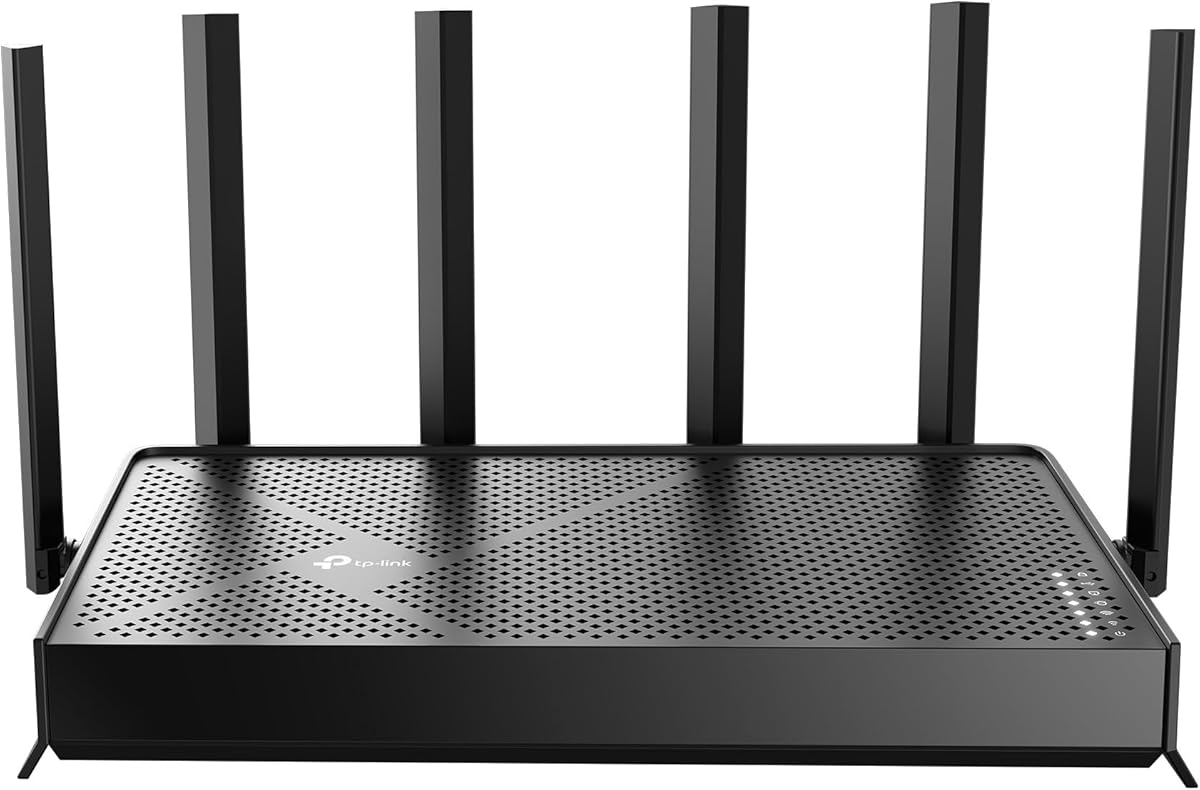

The TP-Link Archer AX21 V5 is a dual-band Wi-Fi 6 router built around a practical combination of speed, coverage, and ease of use. It holds a 4.4 rating and advertises up to 1,200 Mbps on the 5 GHz band and up to 574 Mbps on 2.4 GHz. Those figures comfortably exceed the needs of a 700 Mbps internet connection when paired with suitable client devices, while OFDMA and beamforming help it serve a busy household more efficiently.
We may earn a commission when you buy through this link, at no additional cost to you.
Its most appealing strength is balance. Four external high-gain antennas support broader signal distribution, and the stated beamforming capability focuses radio energy toward connected devices. OFDMA allows simultaneous communication with multiple clients, which is particularly useful when everyone is streaming, working, gaming, or joining video calls at once. The router also supports OpenVPN and PPTP server functions, giving connected devices access to a protected home network.
The Archer AX21 does require a separate modem, and its dual-band design cannot use the 6 GHz spectrum. As a result, it offers less room for future wireless standards than a Wi-Fi 6E or Wi-Fi 7 model. Actual wireless results will also depend on device capabilities, distance, walls, neighboring networks, and whether users are connected by Ethernet or Wi-Fi. Nevertheless, none of those limitations prevents it from serving a typical 700 Mbps home connection.
This is the strongest general recommendation for most households seeking a capable 700 Mbps router without moving to a premium multi-gig platform. It is especially appropriate for apartments and medium-sized homes with several connected devices. TP-Link also lists compatibility with major providers, including Comcast, Charter, AT&T, Verizon, Xfinity, Spectrum, RCN, Cox, CenturyLink, and Frontier. Install the current firmware through Tether after setup, place the router centrally, and use Ethernet for bandwidth-intensive stationary devices.
OFDMA is the Archer AX21's most relevant feature for a busy home because it improves simultaneous communication across several clients. The 5 GHz band is particularly well suited to modern laptops, phones, televisions, and game consoles, while 2.4 GHz remains useful for less demanding wireless accessories.
Four high-gain external antennas and beamforming make the AX21 more flexible than a basic entry-level router. The same features do not guarantee full coverage in every floor plan, so larger homes may still need a mesh system or a second access point.
We may earn a commission when you buy through this link, at no additional cost to you.
The GL.iNet GL-E5800 NA MUDI 7 is a tri-band Wi-Fi 7 travel router that combines cellular 5G, wired Ethernet, wireless repeating, and USB tethering. Its 4.4 rating and Qualcomm Dragonwing MBB Gen 3 platform make it compelling for travelers, temporary workspaces, mobile professionals, and anyone seeking a resilient connection away from a conventional cable or fiber provider.
We may earn a commission when you buy through this link, at no additional cost to you.
Cellular performance is the defining attraction. The stated 5G download capability reaches up to 4.67 Gbps, while the three Wi-Fi bands provide aggregate capacity across 2.4, 5, and 6 GHz. Built-in eSIM support and two physical nano-SIM slots offer flexibility, while the 2.8-inch color display allows users to switch SIMs, control VPN clients, share access, and monitor data without opening the mobile app.
This router is not a conventional replacement for a fixed home gateway. Its strengths come from portability, multi-WAN resilience, and the ability to work over cellular. A 5G connection can vary with signal quality, congestion, location, and carrier availability, while international use may require an appropriate regional eSIM or nano-SIM. The battery also provides approximately 13.5 hours of untethered use according to the product information, making charging logistics part of the ownership experience.
For a household with dependable cable or fiber service, a dedicated home router will generally be more appropriate. The MUDI 7 becomes an excellent recommendation for people who travel regularly, work from hotels and short-term rentals, need a backup connection, or operate from mobile locations. Its quad-path failover is particularly valuable when an active internet link is essential and Ethernet, cellular, USB, or repeating connections may become available at different times.
The combination of eSIM, dual nano-SIM, 2.5G Ethernet, and USB tethering allows the MUDI 7 to work with several kinds of connectivity. It can serve as a traditional travel router, a cellular backup, or a multi-WAN system that changes routes when one link becomes unavailable.
The built-in display is unusually useful for quick, on-the-go management. Preinstalled OpenVPN-DCO and WireGuard clients support up to 700 Mbps and 600 Mbps respectively on local-network tests, while the app and touchscreen provide both quick and advanced controls.
We may earn a commission when you buy through this link, at no additional cost to you.
The NETGEAR Nighthawk CAX30 combines a DOCSIS 3.1 cable modem with an AX2700 dual-band Wi-Fi 6 router. It carries a 4.1 rating and is aimed specifically at homes using compatible cable internet. For subscribers who want one device to handle both provider handoff and home networking, this integrated design reduces equipment and setup complexity.
We may earn a commission when you buy through this link, at no additional cost to you.
The DOCSIS 3.1 modem is the key feature for a 700 Mbps plan. Product information lists compatibility with Xfinity plans up to 800 Mbps, Spectrum up to 1 Gbps, and Cox up to 1 Gbps, subject to provider approval and activation. On the wireless side, the router offers up to 2,000 square feet of stated coverage and capacity for more than 25 connected devices, while four Gigabit Ethernet ports support hardwired connections.
There are important limitations. The CAX30 is made for cable internet only and is not compatible with Verizon, AT&T, CenturyLink, DirecTV, DISH, or bundled voice plans. It cannot serve fiber, DSL, or fixed 5G service without an external provider gateway. Its 2.4 GHz and 5 GHz bands also leave the 6 GHz spectrum unused, although that does not prevent it from delivering a strong 700 Mbps experience on compatible cable networks.
Choose the CAX30 if your provider supports it and you want to avoid maintaining separate modem and router equipment. It is particularly attractive to households that want easy mobile management, a guest network, device pausing, and convenient speed testing through the Nighthawk app. Confirm the exact provider and service tier before purchase, complete the required activation, and place the unit centrally to obtain the best possible wireless distribution.
Combining DOCSIS 3.1 modem hardware with AX2700 routing eliminates one box and several Ethernet connections. It also reduces confusion during setup, although the cable provider must approve and activate the equipment for the selected service plan.
The dual-band Wi-Fi 6 system supports a stated 25-plus connected devices, while four Gigabit Ethernet ports serve desktops, game consoles, and televisions. Hardwired clients generally enjoy steadier latency than wireless clients when a 700 Mbps plan is divided among many users.
We may earn a commission when you buy through this link, at no additional cost to you.
The GL.iNet Flint 2 is a performance-oriented Wi-Fi 6 router that reaches up to 6 Gbps across eight streams. Its 4.5 rating is the highest among the selected models, and the combination of dual 2.5G Ethernet ports, 1 GB of DDR4 memory, and VPN capabilities makes it a strong option for demanding homes that want more than basic gigabit networking.
We may earn a commission when you buy through this link, at no additional cost to you.
For a 700 Mbps connection, the Flint 2 has considerable headroom on the wireless side. Its 2.5G ports are particularly useful for a high-speed modem, NAS, workstation, or gaming system, and they can support wired backhaul in more advanced arrangements. The router also supports OpenVPN and WireGuard, with stated local-network speeds of up to 880 Mbps and 900 Mbps respectively, allowing protected access without applying VPN software to every device.
The main trade-off is that it remains a dual-band Wi-Fi 6 router. There is no 6 GHz band for compatible Wi-Fi 6E or Wi-Fi 7 clients, and its eight-stream designation should not be mistaken for eight physical antennas. Actual wireless speed is limited by client capabilities, signal conditions, and the internet plan. GL.iNet also explicitly recommends updating the firmware during initial setup to improve performance and the overall user experience.
The Flint 2 is our editorial choice for readers who want strong 700 Mbps performance plus multi-gig flexibility. It suits gamers, remote workers, smart-home enthusiasts, and households that plan to add demanding local services. It may be excessive for a modest apartment, but for a busy active home it combines excellent stated capacity with useful VPN and storage-related features.
Two 2.5G Ethernet ports give the Flint 2 an advantage over basic gigabit routers. A modern fiber or cable modem can feed the router at multi-gig rates, while a NAS or high-performance computer can benefit from faster local transfers and lower dependence on wireless contention.
AdGuard Home support, VPN client and server functions, and generous memory make this more than a basic network appliance. These tools are valuable for users who want filtering, secure remote access, or a router that can evolve with plugins and custom services.
We may earn a commission when you buy through this link, at no additional cost to you.
The NETGEAR Nighthawk RS700S is a dedicated tri-band Wi-Fi 7 router designed to deliver high wireless capacity across 2.4, 5, and 6 GHz. It has a 4.4 rating, claims up to 19 Gbps of aggregate throughput, and offers coverage for as many as 200 devices across up to 3,500 square feet. Those specifications place it well above what a 700 Mbps internet plan strictly requires.
We may earn a commission when you buy through this link, at no additional cost to you.
The premium value lies in headroom rather than necessity. Wi-Fi 7 features such as Multi-Link Operation, MU-MIMO, OFDMA, and wider channels can improve performance for compatible modern devices. A 10 Gbps WAN port also prepares the network for premium fiber, while a 10 Gbps LAN port and four 1 Gbps LAN ports provide exceptional wired options for workstations, storage systems, and game consoles.
Real-world performance will depend on connected clients, walls, interference, and the layout of the home. Older Wi-Fi 5 or Wi-Fi 6 devices will not benefit from the full Wi-Fi 7 feature set, and the router still requires an existing modem or gateway. The RS700S pairs with most cable, fiber, DSL, and satellite providers, although some gateway combinations may need bridge mode. A large or multi-story property may still benefit more from a mesh system.
The RS700S is ideal for a technology-forward household that wants premium Wi-Fi, extensive device capacity, and multi-gig wired performance. It is also a strong long-term option for users planning to upgrade their internet service or client devices. For a normal 700 Mbps connection in a small home, the AX21 or Flint 2 may deliver a more practical experience, but the RS700S is the most fully featured premium selection here.
The dedicated tri-band layout separates traffic across 2.4, 5, and 6 GHz, reducing congestion when many devices connect. It is especially valuable in a smart home with phones, computers, televisions, appliances, and wearables all competing for radio time.
The 10 Gbps WAN and LAN ports provide a clear upgrade path for high-tier broadband and local services. They are useful for fiber connections, fast NAS systems, and users who want to minimize the performance gap between internet access and internal file transfers.
We may earn a commission when you buy through this link, at no additional cost to you.
The TP-Link AX3000 dual-band Wi-Fi 6 router is a straightforward value choice for homes with a 700 Mbps internet service. It carries a 4.4 rating and advertises up to 2,402 Mbps on 5 GHz and 574 Mbps on 2.4 GHz. That gives modern wireless clients ample theoretical headroom over a 700 Mbps connection.
We may earn a commission when you buy through this link, at no additional cost to you.
The router's practical features are well matched to a busy home. OFDMA allows multiple clients to share a band more efficiently, while four high-gain external antennas and beamforming help maintain stronger signals across rooms. Target Wake Time is designed to reduce wireless communication time for compatible devices, while a larger heat sink and revised case improve cooling compared with more basic designs.
This model does not need to be treated as a premium network appliance. It has no 6 GHz band, and most households will not need the multi-gig ports or advanced customization found in higher-end choices. It still requires a separate modem for most providers. The value of the AX3000 model lies in delivering modern Wi-Fi 6 efficiency, strong 5 GHz throughput, and broad provider support without adding unnecessary complexity.
It is a good option for apartments, small homes, and users who want a capable 700 Mbps router with uncomplicated management. TP-Link HomeShield includes free network security, IoT device identification, basic parental controls, quality of service, and reporting, while Alexa support adds optional voice control. For better whole-home coverage, position it centrally and take advantage of its adjustable external antennas.
The 2,402 Mbps 5 GHz rate gives laptops, phones, smart televisions, and game consoles substantial wireless capacity. In practice, internet throughput will be limited first by the 700 Mbps service and then by the client, distance, and surrounding conditions.
OFDMA reduces contention when multiple devices transmit, while Target Wake Time can lower unnecessary device activity. The revised cooling design also helps the router maintain consistent performance during sustained household use.
We may earn a commission when you buy through this link, at no additional cost to you.
The TP-Link Archer AXE75 is a tri-band Wi-Fi 6E router that adds a dedicated 6 GHz band to the familiar 2.4 and 5 GHz spectrum. With a 4.3 rating and stated aggregate throughput of up to 5,400 Mbps, it is well positioned for a 700 Mbps home connection that includes modern wireless clients and plans to grow.
We may earn a commission when you buy through this link, at no additional cost to you.
The 6 GHz band is its most important differentiator. It provides more available bandwidth and can reduce congestion in crowded wireless environments, especially when compatible laptops, phones, tablets, and other devices connect to it. The 5 GHz band offers up to 2,402 Mbps, while 2.4 GHz reaches up to 574 Mbps for devices that prioritize range or basic connectivity.
Processing resources support the more ambitious wireless design. The AXE75 includes a 1.0 GHz dual-core processor, 512 MB of memory, and a housing intended to improve heat dissipation. It supports OpenVPN, PPTP, and L2TP server or client functions, plus TP-Link HomeShield features. EasyMesh compatibility allows additional compatible routers, extenders, or wireless powerline adapters to expand coverage.
The main limitation is compatibility. A router cannot create a 6 GHz benefit for clients that do not support Wi-Fi 6E. Most current household devices will still use 2.4 or 5 GHz, so the AXE75's additional capacity may not be fully used. Still, for a medium-sized or larger home seeking a 6 GHz upgrade path without entering the premium Wi-Fi 7 category, it is a balanced and well-equipped choice.
Separating 6 GHz traffic from the other bands gives compatible devices more room to operate. This can be helpful in dense neighborhoods where 2.4 and 5 GHz channels are crowded, although older clients cannot use the new spectrum.
EasyMesh support gives the AXE75 a practical path to larger homes. Users can extend coverage with compatible equipment rather than replacing the entire network, making dead zones easier to address incrementally.
We may earn a commission when you buy through this link, at no additional cost to you.
The TP-Link Archer BE230 is a dual-band Wi-Fi 7 router with a practical balance of modern wireless features and multi-gig wired connectivity. It has a 4.2 rating, provides up to 2,882 Mbps on 5 GHz and 688 Mbps on 2.4 GHz, and supports coverage for up to 2,000 square feet and as many as 60 devices.
We may earn a commission when you buy through this link, at no additional cost to you.
Its distinctive advantage over ordinary gigabit routers is the combination of a 2.5G WAN/LAN port, a separate 2.5G LAN port, and three 1 Gbps LAN ports. A suitable modem can therefore deliver more than one gigabit, while local devices can benefit from faster Ethernet connections. The Wi-Fi 7 implementation includes Multi-Link Operation, Multi-RUs, and 4K-QAM, although clients must support those capabilities to gain the full benefit.
Because it is a dual-band model, the BE230 does not support 6 GHz. It may therefore appeal to buyers who want Wi-Fi 7 and multi-gig ports without moving to a larger tri-band system. Four internal antennas and beamforming focus signals toward harder-to-reach areas, while EasyMesh support allows additional compatible access points to expand a larger installation.
This is a compelling match for a modern apartment or medium-sized home where some clients support Wi-Fi 7 and the provider equipment offers multi-gig service. It is less compelling for users whose devices are limited to older Wi-Fi standards, although they can still connect normally. Tether app setup, automatic firmware management, HomeShield tools, and voice-assistant compatibility make it approachable for everyday use.
The two 2.5G ports are the most consequential feature for a fast connection because a standard gigabit port can become the bottleneck. Connecting a compatible provider gateway to the 2.5G WAN/LAN port preserves more of the available bandwidth for local equipment.
The Archer BE230 delivers Wi-Fi 7 capabilities without using the 6 GHz spectrum. This creates a simpler and potentially more affordable path for homes that mainly need modern 5 GHz performance and multi-gig Ethernet rather than a full three-band network.
We may earn a commission when you buy through this link, at no additional cost to you.
The TP-Link Archer BE600 is a tri-band Wi-Fi 7 router with a 10 Gbps WAN/LAN port, one additional 2.5 Gbps WAN/LAN port, and three 2.5 Gbps LAN ports. It carries a 4.2 rating and offers stated coverage up to 2,600 square feet for as many as 120 devices, making it a high-capacity option for a 700 Mbps connection.
We may earn a commission when you buy through this link, at no additional cost to you.
Wireless throughput reaches up to 5,765 Mbps on 6 GHz, 2,882 Mbps on 5 GHz, and 1,032 Mbps on 2.4 GHz. Wi-Fi 7 features such as Multi-Link Operation, Multi-RUs, 4K-QAM, and support for 320 MHz channels are particularly relevant to compatible recent smartphones, laptops, game consoles, and other equipment. Six positioned antennas and beamforming help maintain coverage across the stated area.
The 10 Gbps port is designed for multi-gig fiber or other advanced WAN arrangements, while the 2.5G ports can serve high-performance wired devices. It is important to remember that a 700 Mbps internet plan does not require a 10 Gbps WAN connection. The premium hardware becomes more meaningful when considering local networking, future service upgrades, and high-bandwidth wireless clients.
The BE600 suits large, technology-forward homes that want Wi-Fi 7 across all three bands without moving to an even larger premium platform. It also supports VPN clients and servers, HomeShield protection, a separate IoT network, and Tether app management. For a smaller home or simpler device mix, the AX21, AX3000, or Flint 2 may be more rational, but the BE600 provides substantial room for future growth.
The 6 GHz, 5 GHz, and 2.4 GHz radios give connected clients distinct paths and substantial aggregate capacity. Separating modern traffic onto the 6 GHz band can improve responsiveness in a household with numerous compatible devices.
A 10 Gbps port and several 2.5 Gbps ports support advanced service plans, local storage, and demanding wired devices. The varied port speeds also make the router suitable for networks that combine ordinary gigabit clients with a small number of high-bandwidth systems.
We may earn a commission when you buy through this link, at no additional cost to you.
The TP-Link Archer BE550 is a tri-band Wi-Fi 7 router distinguished by its collection of five 2.5G Ethernet ports. It provides a 4.0 rating and combines wireless speeds of up to 5,760 Mbps on 6 GHz, 2,880 Mbps on 5 GHz, and 574 Mbps on 2.4 GHz. For a 700 Mbps home, its strongest appeal is the unusually broad multi-gig wired connectivity.
We may earn a commission when you buy through this link, at no additional cost to you.
One 2.5G WAN port and four 2.5G LAN ports eliminate the need to identify which devices can receive full gigabit service. PCs, consoles, network storage, and smart-home controllers can all be connected without being limited to the lower speed of a traditional gigabit port. The router also supports six strategically positioned antennas, beamforming, and Wi-Fi 7 functions including Multi-Link Operation, Multi-RUs, 4K-QAM, and 320 MHz channels.
Security and management are well represented. HomeShield provides network protection, parental controls, and real-time IoT security, while a separate IoT network can isolate compatible appliances using WPA3. VPN client and server support allows selected home devices to reach remote VPN services, and the Tether app provides straightforward setup and ongoing management. EasyMesh compatibility offers a route to wider coverage when required.
The BE550 is best for a home that wants many 2.5G wired connections and tri-band Wi-Fi without requiring a 10 Gbps port. It may be excessive for a 700 Mbps plan used by only a few devices, but it becomes compelling for users with fast local networks, numerous connected systems, or an intention to keep the router for many years. Its 4.0 rating is the lowest in this group, so feature requirements and compatibility deserve careful consideration.
Four 2.5G LAN ports make it easy to keep high-performance computers, game systems, and storage devices on fast Ethernet. The dedicated 2.5G WAN port can accept a compatible multi-gig provider gateway without falling back to a gigabit connection.
A dedicated IoT network can keep compatible appliances away from the main Wi-Fi network, adding separation and reducing exposure. VPN client and server support provides another layer of control for households that require remote access or protected routing.
We may earn a commission when you buy through this link, at no additional cost to you.
A 700 Mbps connection is fast enough to benefit from modern Wi-Fi, efficient multi-device handling, and sensible wired networking. The following factors help separate a basic compatible router from one that can provide stronger coverage, lower contention, and useful room for future upgrades.
Begin by identifying exactly how your 700 Mbps service reaches the home. Most standalone routers connect to a separate cable, fiber, DSL, or fixed wireless gateway, while a modem-router combination can incorporate the cable modem. Confirm that the selected equipment is compatible with the provider and that activation or bridge mode requirements are understood. A standalone router generally offers broader provider flexibility, but a compatible combination can simplify installation and reduce the number of devices.
Choose a standalone router for fiber, DSL, most fixed 5G services, or when a provider gateway is already installed. Choose a cable modem-router only when the exact provider and plan are explicitly supported.
A dual-band Wi-Fi 6 router is generally enough to deliver a 700 Mbps internet experience because its 5 GHz capacity is much higher than the service speed. Wi-Fi 6E and Wi-Fi 7 add the 6 GHz band, which can offer more available bandwidth and lower contention for compatible devices. Those newer standards matter most when several modern clients are active or when the home is crowded with neighboring wireless networks.
Prioritize dual-band Wi-Fi 6 for straightforward value, Wi-Fi 6E for a 6 GHz upgrade path, and Wi-Fi 7 for the newest compatible client hardware.
Advertised coverage figures are useful only as general guidance. Walls, floors, building materials, router placement, and interference can substantially change the usable signal. A centrally located dual-band router may cover a small apartment or modest house effectively, while a larger or multi-story property may require a tri-band router, mesh networking, or additional wired access points. Check the stated area and device capacity, then compare those claims with the number of rooms and connected systems.
For small homes, prioritize efficient antenna design and central placement. For large homes, evaluate tri-band capacity, beamforming, EasyMesh, or dedicated mesh nodes.
A 700 Mbps connection is rarely used by only one device. Phones, laptops, televisions, game consoles, cameras, speakers, and appliances all create background traffic and compete for airtime. OFDMA, MU-MIMO, beamforming, and tri-band designs help a router allocate radio resources more effectively. A router with ample memory and processing power is also better prepared for many clients, VPNs, and traffic management.
Choose based on simultaneous users and device count, not only maximum wireless speed. A capable dual-band model may handle a busy apartment, while a large household benefits from tri-band capacity.
Gigabit Ethernet remains sufficient for ordinary internet access, including a 700 Mbps plan, but multi-gig ports offer a clearer upgrade path. A 2.5G port is useful for a high-speed fiber connection, modern switch, NAS, or high-end computer. A 10 Gbps WAN port is primarily useful for premium fiber and should not be confused with the speed available over wireless links. The number of LAN ports also matters if several devices are to be hardwired.
Choose at least Gigabit for a basic setup, 2.5G for future-proof local networking, and 10G only when the service or internal network can benefit from it.
Modern routers should support current wireless encryption, WPA3 options, automatic security updates, and basic network protection. VPN client and server functions can improve privacy or grant remote access to a home network, but VPN processing may reduce throughput. Parental controls, guest networks, device pausing, and IoT separation are useful for families. Consider the supplied HomeShield, Nighthawk Armor, or equivalent tools carefully, including which functions remain available without an optional ongoing subscription.
Prioritize WPA3, firmware updates, guest isolation, and solid parental controls. Treat VPN throughput and optional security subscriptions as separate purchasing decisions.
A good router should be easy to configure and maintain. Tether and the Nighthawk app support guided setup and remote management, while the GL.iNet touchscreen provides fast local control. Advanced users may value Web administration, SSH access, plugin support, or detailed status information. EasyMesh support is important if a larger home may need additional coverage later, but a mesh system may be simpler than combining unrelated extenders.
Choose a familiar app if ease of management matters, or an advanced interface if customization is central. Confirm expansion standards before expecting a seamless multi-router network.
For gaming, stable latency and a reliable wired connection often matter more than headline throughput. For streaming, simultaneous 4K or 8K delivery and strong 5 GHz or 6 GHz coverage are more relevant. Remote workers benefit from VPN support, stable coverage, and multi-gig networking for large files. A gaming-labeled router can still be appropriate for non-gamers, but specialized features should match actual priorities rather than marketing terminology.
Prioritize Ethernet and low contention for gaming, clean high-band wireless for media, and VPN plus file-transfer capacity for intensive work.
Begin by connecting the router to the service gateway with Ethernet, plugging in the power adapter, and accessing the manufacturer's setup interface or mobile app. For a standalone model, use the app's guided setup rather than changing many advanced settings immediately. For a compatible cable modem-router, complete provider activation and confirm that the modem obtains a proper downstream and upstream connection before troubleshooting the wireless side.
Place the router in a central, open location away from enclosed cabinets, television stands, microwave appliances, and other sources of interference. Raise external antennas where applicable, keep the device ventilated, and avoid stacking it under anything that traps heat. Connect bandwidth-intensive computers, game consoles, and televisions by Ethernet when practical, while reserving higher-capacity wireless bands for mobile and portable devices.
Install the latest firmware as soon as setup is complete, change the default administrator credentials, and enable WPA3 or the strongest mixed encryption mode supported by all household clients. Create a separate guest network and IoT network when useful, review connected devices, and set parental schedules for children. Periodically compare wired and wireless speed tests, move the router if coverage is uneven, and add mesh or access points rather than forcing a single router to cover an excessively large home.
No. A capable dual-band Wi-Fi 6 router can comfortably support a 700 Mbps service when devices are reasonably close and the provider line is performing as expected. Wi-Fi 6E or Wi-Fi 7 becomes more attractive when many compatible clients share the network, the home is crowded with wireless interference, or you want longer-term room for new equipment.
It can, but several factors determine the result. The internet plan caps the available speed, while the modem, router, client wireless standard, distance, walls, and nearby interference also matter. A wired speed test helps identify service and modem issues separately from wireless conditions, so testing in the same room and near the router is useful before making a final judgment.
Choose a standalone router when using fiber, DSL, fixed 5G, or an existing provider gateway, and when you want broad provider compatibility. A modem-router combination is convenient for compatible cable service because it combines the modem and wireless router. Always confirm that your exact provider supports the unit and intended plan before purchasing.
It is not necessary for basic internet access, since Gigabit Ethernet is already faster than a 700 Mbps connection. It becomes useful with multi-gig fiber, a NAS, advanced switches, local file transfers, or future service upgrades. The number of multi-gig LAN ports may matter more to your household than the highest individual port speed.
The answer depends on device activity rather than a simple device count. A 700 Mbps plan can serve many light users, but simultaneous 4K streaming, gaming, downloads, and video calls divide the available bandwidth. Modern features such as OFDMA, MU-MIMO, tri-band operation, and adequate processing help the router manage contention.
A tri-band router may cover a medium or large home adequately if it is centrally located and the building has ordinary construction materials. Multi-story homes, thick walls, long corridors, and widely separated access points are more likely to need a mesh system. A wired backhaul between mesh nodes is usually the most consistent solution.
It can, because encryption and remote server routing add processing demands. Actual performance depends on the VPN protocol, server location, provider infrastructure, router processing power, and the client device. The Flint 2 and MUDI 7 offer dedicated VPN capabilities, but their stated VPN speed figures may not represent every real-world service or condition.
Start by moving the router to a central and elevated position, keeping it ventilated and away from electronic interference. Update the firmware, adjust the placement of external antennas, and connect high-bandwidth devices by Ethernet. If dead zones remain, add a compatible mesh node or access point using the same standard and a wired backhaul where possible.
The TP-Link Archer AX21 V5 is the most practical overall recommendation because it combines Wi-Fi 6 efficiency, 5 GHz capacity, beamforming, and broad provider compatibility in a straightforward design. The GL.iNet Flint 2 is the editorial choice for users who want dual 2.5G ports and advanced VPN features, while the NETGEAR Nighthawk RS700S represents the premium option with tri-band Wi-Fi 7 and extensive multi-gig capability.
The most important advice is to match the router to the home rather than simply choosing the largest specification. A small apartment may be well served by the AX3000 or AX21, a busy household may need the Flint 2, and a large home may benefit from the AXE75, BE230, or a mesh system. Cable subscribers should consider the CAX30, while travelers and users needing cellular failover should look closely at the MUDI 7.
Before making a final choice, verify the provider, modem or gateway, available Ethernet ports, home size, device capabilities, and security requirements. Current product configurations and availability can change, so check the latest listing details and manufacturer documentation. In all cases, correct placement, current firmware, and a sensible division between wired and wireless connections will have a major effect on the experience you receive from a 700 Mbps plan.