
Overhead Camera Mount with Articulating Arm
4.6Editor score
Three-section articulated arm
Five-pound load capacity
Scratch-free C-clamp base
Universal phone holder included
An overhead camera mount turns a normal desk into a practical filming station for tutorials, product demonstrations, crafts, remote lessons, and hands-free video calls. The best setup balances vertical reach, lateral movement, load stability, clamp security, and smooth positioning without taking over valuable workspace.
We compared the 10 featured mounts using their stated construction, adjustment ranges, load capacities, mounting interfaces, and desk-clamp designs. The list covers compact telescopic arms, multi-section articulated rigs, heavy-duty aluminum systems, and premium stands built for cameras, phones, webcams, lights, and microphones.
Each pick below explains the stand's most useful qualities, possible limitations, and ideal creator profile. Ratings reflect the listed customer feedback, while practical selection depends on desk dimensions, equipment weight, and shooting angle; current prices and availability can change over time.
4.6Editor score

4.4Editor score

4.4Editor score
As an Amazon Associate we earn from qualifying purchases.
The table below compares all 10 stands by their principal physical design, stated load rating, available reach, and mounting system. It is a quick way to narrow the field before considering desk fit, equipment weight, and the degree of articulation required.
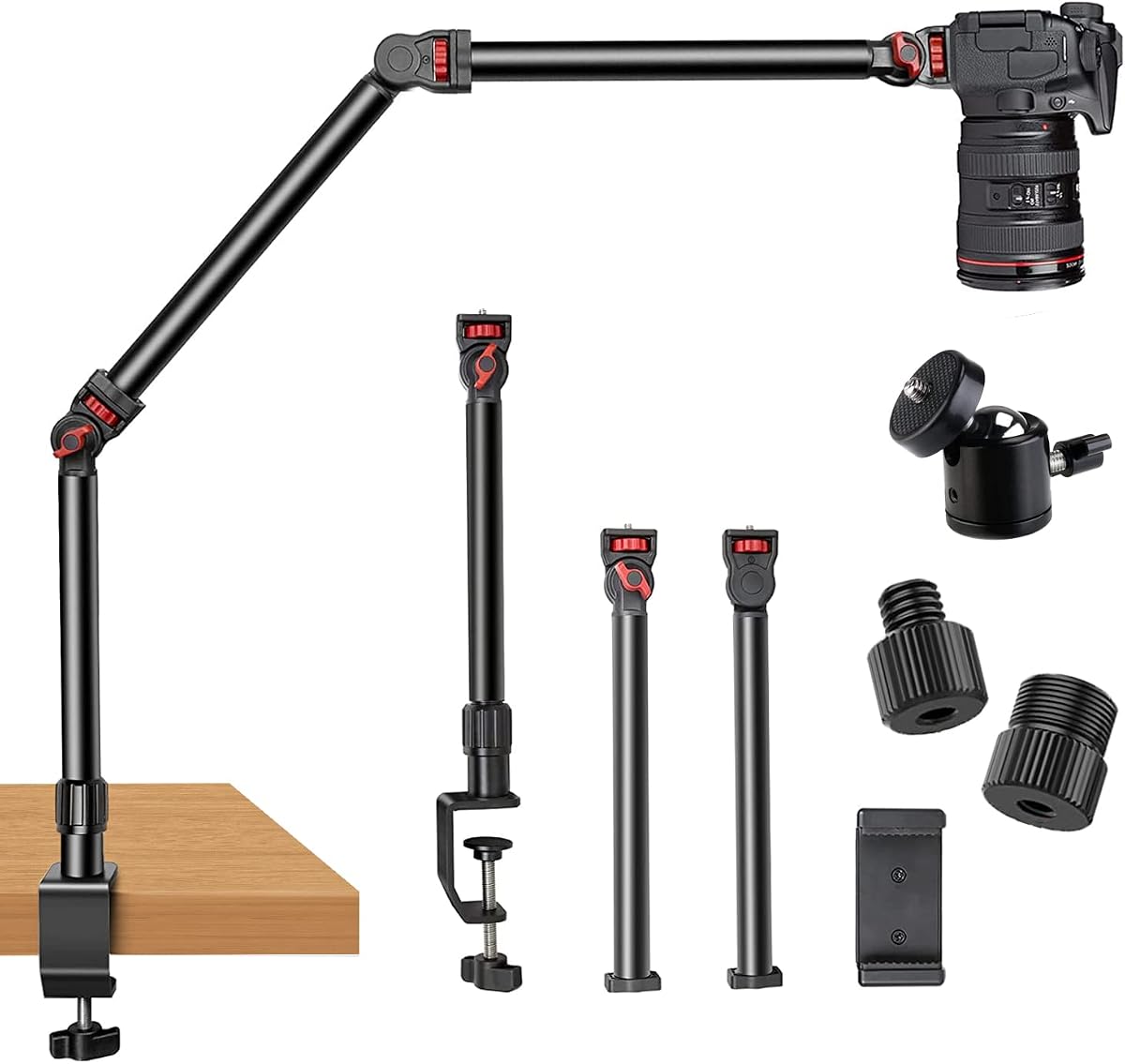


This is the most approachable overhead camera mount in the group, combining a three-section articulating arm, a 360-degree ball head, a universal phone holder, and a standard 1/4-inch screw. Its 4.6 rating also makes it one of the strongest customer-rated options here. The design is aimed at creators who need a dependable top-down perspective without assembling a large studio rig.
We may earn a commission when you buy through this link, at no additional cost to you.
Its most useful strength is the combination of vertical and angular control. The telescopic section adjusts the mounting height from 15 to 25 inches, while the articulated sections and ball head let the camera move over the center of a desk. A stated five-pound capacity makes it suitable for many phones, webcams, compact cameras, ring lights, and microphones. The rubber-padded C-clamp fits desk thicknesses from 0.5 to 2.1 inches and avoids permanent drilling.
The trade-offs are its relatively compact reach and the fact that the load rating is lower than that of several heavy-duty aluminum stands in this list. Heavy camera bodies with long lenses, large projectors, and substantial studio lighting may require a more substantial mount. As with any hinged overhead arm, insufficient clamp tension or uneven desk surfaces can introduce movement during long recordings.
This is a strong recommendation for first-time buyers, educators, livestreamers, and home cooks who want a versatile overhead setup for modest equipment. It offers the most balanced package for general use, and the included accessories make it easier to begin without sourcing a separate phone clamp or basic camera adapter.
The three-section arm changes both height and working distance, allowing the camera to sit above recipes, craft projects, documents, and small products. The 360-degree ball head then handles the final framing adjustment, so a basic smartphone or webcam can be positioned without adding separate tabletop stands.
The padded C-clamp grips a compatible desk edge without requiring permanent installation. This makes the mount practical for temporary studios, shared workspaces, and rented rooms, although the user should confirm desk thickness and inspect the grip before attaching expensive equipment.
We may earn a commission when you buy through this link, at no additional cost to you.
This detachable three-section arm offers a useful middle ground between a compact desk stand and a full production rig. It supports a 4.5-pound load in a horizontal position and up to six pounds when suspended, according to the supplied information. The 4.4 rating reflects generally positive feedback around flexibility, construction, and the range of devices the arm can carry.
We may earn a commission when you buy through this link, at no additional cost to you.
The base can rotate through 360 degrees, and each rod has a 180-degree adjustment point. That movement allows the mount to shift from directly overhead to a more oblique side angle, which is valuable for demonstrations that need both the work surface and the presenter's hands. Included 1/4-inch, 3/8-inch, and 5/8-inch screws broaden compatibility with cameras, webcams, projectors, phones, lights, and microphones.
The detachable construction is a genuine advantage for creators who travel or move between locations. However, users must account for more pieces when assembling the stand. Load capacity also changes with orientation, so the horizontal and suspended ratings should not be treated as interchangeable. The padded clamp is suitable for most desks, but its stated extension to roughly 2.4 inches should be checked against the intended surface.
Choose this option when you need an overhead angle that can move from centered to side-on, especially if a phone, camera, light, or microphone must be repositioned around the desk. It is less appropriate for a user who values the smallest possible component count or intends to support unusually heavy camera and lens combinations.
A rotating base and independently adjustable poles provide more shooting freedom than a fixed vertical stand. This lets a creator alternate between a true top-down view and a diagonal presentation angle without replacing the entire mount.
Each extension pole detaches from the next, reducing the length of the packed system. The lightweight aluminum parts are easier to carry between a home office, classroom, or event venue, though the included adapters should be kept together during transport.
We may earn a commission when you buy through this link, at no additional cost to you.
This heavy-duty desk mount is designed for creators who want more reach than a compact telescopic arm can provide. Its three detachable sections expand to a stated range of 14.5 to 41 inches, and the overall arrangement can cover a large desk or project area. The 4.4 customer rating is complemented by a stated capacity of nearly 6.6 pounds.
We may earn a commission when you buy through this link, at no additional cost to you.
A key feature is the enlarged handle C-clamp. Instead of relying on a small knob, the handle gives the user greater mechanical leverage when fitting the base to a table, counter, or desk. Each section pivots 180 degrees, providing broad horizontal and vertical positioning. Standard 1/4-inch screws allow the sections to support webcams, video lights, phone holders, DSLRs, ring lights, projectors, and small softboxes.
Its larger dimensions also require more care. A long cantilever can amplify movement at the camera end, so the clamp must be firmly seated and the equipment carefully balanced. The overall stand weight is listed at 2.2 pounds, which remains portable, but the extended arm should not be loaded aggressively or positioned beyond a stable desk edge.
This mount is a good match for tabletop cooking channels, model demonstrations, larger craft tables, and streaming setups that need broad coverage. It gives more freedom than a basic phone stand while remaining lighter and less specialized than the premium articulated systems farther down the list.
The stated 41-inch maximum provides room to place the camera over a broad desk or table. That extra reach is valuable when subjects occupy more than one area, although the user should keep the center of gravity close to the clamp.
The extended handle makes the clamp opening easier to adjust than a small knob-style mechanism. It also provides useful leverage when tightening against a thick desktop, helping the base resist movement during recording.
We may earn a commission when you buy through this link, at no additional cost to you.
The TARION TKA01-L stands apart through its three locking gear joints, steel-tube construction, and detachable ball head. It is designed to remain at a selected angle instead of drifting under a camera's weight, making it appealing for stop-motion, macro work, unboxing, and long overhead sessions. Its listed rating is 4.4, reflecting a well-received feature set.
We may earn a commission when you buy through this link, at no additional cost to you.
Each joint provides 180-degree tilt and 360-degree rotation, while the toothed locks preserve the chosen position. The stand uses 1.18-inch steel tubes and is rated to support 8.8 pounds vertically and 6.6 pounds in horizontal extension. Those figures make it suitable for heavier cameras, zoom lenses, 19-inch ring lights, and projectors. The arm extends 38 inches to cover a substantial work area without requiring a separate floor stand.
The arm ends in a 3/8-inch connection, and the included removable ball head supplies a 1/4-inch screw for cameras, webcams, and lights. Its dual-slot clamp accepts up to 2.36 inches and includes a metal anchor base for alignment and additional attachment points. These features add complexity, and the articulated steel assembly is not the lightest choice for frequent transport.
The TKA01-L is our Editor's Choice because its locking joints directly address a common weakness of articulated overhead mounts: gradual sagging. It is best for creators who value angle retention and equipment stability over a minimal component count or a very light portable stand.
The toothed joints lock firmly after adjustment, reducing the chance that a suspended camera will slowly drift. This is particularly useful during stop-motion work, overhead macro filming, and long demonstrations where repeated repositioning is unnecessary.
The steel tubes and stated vertical and horizontal load figures provide a firmer foundation than lightweight folding arms. This makes the mount better suited to a camera body with a lens, a sizable ring light, or other production equipment.
We may earn a commission when you buy through this link, at no additional cost to you.
The NEEWER UA057 is a compact magic arm built around friction rather than bulky locking sections. It extends to 22 inches, uses three sets of dual ball heads, and carries a 4.5 rating. Its understated design makes it a strong option for webcams, action cameras, phones, microphones, and light tasks where full studio equipment is not required.
We may earn a commission when you buy through this link, at no additional cost to you.
The articulated arm offers both angle and height flexibility through three ball-head adapters. Padded rings inside the heads improve grip, while anti-twist pins help prevent mounted devices from rotating unintentionally. The super clamp can attach to flat surfaces up to two inches thick and cylindrical objects up to 1.6 inches in diameter, making it more versatile than a conventional desk-only clamp.
The main limitation is the stated 500-gram load capacity. That is enough for many phones and webcams but not for a large DSLR, a projector, or a full-size ring light. The arm's vertical reach is also more limited than the extended multi-section stands in this guide. Users wanting a high overhead view may need to place the clamp on a raised surface or choose a taller design.
This mount is ideal for call recording, lightweight demonstrations, gaming captures, overhead photography, and compact streaming setups. It also has the cleanest multi-purpose clamp arrangement here, allowing the same arm to work on a desk, tripod, light stand, stabilizer rod, or another supported surface.
Friction ball heads allow a camera to be moved with one hand and then held near the selected position. This is useful for creators who frequently change angles during demonstrations or need quick corrections to framing.
Unlike a basic edge clamp, the super clamp can also grip cylindrical objects within its stated range. That expands its usefulness for temporary rigs built around poles, stands, and stabilizer rods rather than a permanent desk installation.
We may earn a commission when you buy through this link, at no additional cost to you.
The JINRAIKO mount differentiates itself with a hydraulic floating arm intended to move smoothly and remain in position. It includes an extension pole, phone holder, and accessories under a UKA quick-install system. Its 4.3 rating is the lowest in the group, but the supplied feature set positions it as a polished option for content creators who value fluid movement.
We may earn a commission when you buy through this link, at no additional cost to you.
The arm's 360-degree adjustment supports top-down work and angled views across a desk. Because the movement is described as hydraulic, it should offer a different feel from a conventional friction magic arm, with smoother repositioning and less abrupt shifting. Compatibility extends across cameras, all smartphone models, and webcams or microphones, while the included extension pole broadens the available working height.
The supplied information does not state a specific load rating, making it harder to compare this model objectively with the quantified stands in the list. A hydraulic mechanism also requires sensible handling; forcing a joint beyond its intended range or leaving the arm under pressure for long periods may not be advisable. Buyers should verify compatibility and load expectations for their particular equipment.
This mount is best for livestreaming, unboxing, crafts, 3D printing, and studio-style content where smooth repositioning is the priority. It is a sensible premium-style choice for users who prefer a polished arm over a basic adjustable pole, but a model with clearly published load specifications may be more reassuring for heavy equipment.
The hydraulic floating action is designed to make repositioning controlled and quiet. This can be valuable during live production, where abrupt arm movement could disrupt framing or cause the mounted device to wobble.
The included phone holder, extension pole, and quick-install hardware reduce the need to assemble a complete support kit from separate components. Users should still confirm that their camera or accessory has a compatible attachment point.
We may earn a commission when you buy through this link, at no additional cost to you.
The ULANZI ZJ02 is a four-section aluminum stand with a 4.6 customer rating, tying for the strongest listed score in this comparison. It combines an adjustable length of up to 98 centimeters with a shooting height of up to 65 centimeters. Those dimensions make it particularly relevant to creators seeking more top-down coverage than a short desktop arm provides.
We may earn a commission when you buy through this link, at no additional cost to you.
Toothed joints adjust through 180 degrees, and the included 1/4-inch ball head supports final angle changes. A stated load capacity of two kilograms supports a broad selection of cameras, phones, lights, and other compact production devices. The sturdy C-clamp attaches to desktops up to 48 millimeters thick, while the silicone pad helps protect the surface and improve grip.
Its four-section construction creates more adjustment points than many competing stands, but that also means more opportunities for alignment to vary. The user should check each joint and lock after positioning. The stated clamp limit should be compared with the desk before purchase, especially on a thick worktop with a raised edge or unusual underside.
The ZJ02 is a strong recommendation for flat-lay photography, product filming, crafts, drawing, and tabletop demonstrations. It suits users who want a relatively tall top-down camera position and the flexibility of an articulated arm, while remaining lighter in stated load capacity than the heaviest aluminum rigs in the guide.
The 65-centimeter maximum shooting height can help the lens look more directly down at products and work surfaces. Four adjustable sections also make it possible to trade overall height against horizontal reach for different desk layouts.
The joint locks are designed to maintain a selected angle with less drift than a plain friction hinge. This is advantageous when a camera must remain motionless during a demonstration or time-lapse sequence.
We may earn a commission when you buy through this link, at no additional cost to you.
The TARION Titanrig Lite Z is a substantial premium rig designed around stability, versatility, and high equipment loads. It has a 4.4 rating, an eight-kilogram stated capacity, a double C-clamp, and a main body weighing 3.15 kilograms. That mass makes it better suited to a permanent workstation than a mobile streaming kit.
We may earn a commission when you buy through this link, at no additional cost to you.
Its double C-clamp uses internal anti-slip rubber and accommodates desktop thicknesses from 1.5 to 7.5 centimeters. Two clamps reduce the chance that the base will rotate or shift when a heavy camera extends over the edge. The 18.9-inch articulating arm adjusts 360 degrees vertically and 180 degrees horizontally, while a 360-degree ball head provides finer camera positioning.
Compatibility is unusually broad. Dual 1/4-inch and 3/8-inch threads, an adapter, and a tablet clamp allow the rig to carry a DSLR, ring light, webcam, tablet, phone, microphone, or other supported device. A main pole can also carry fill lights, adding flexibility for controlled tabletop lighting. The heavy construction and broad adjustment range explain why this model is more substantial than lighter articulated stands.
The Titanrig Lite Z is ideal for dedicated studios, production desks, and creators using heavier camera bodies, large lights, or multiple accessories. Buyers who frequently pack equipment into a small vehicle may find lighter alternatives easier to manage, but for a fixed desk this is one of the most capable premium options in the group.
The dual C-clamp design creates a broader connection with the desktop than a single clamp. This is especially useful when a heavy camera, projector, or lighting unit extends beyond the desk edge and creates a pronounced lever arm.
The included tablet clamp and multiple threaded connections make the stand more versatile than a camera-only boom. It can support overhead lessons, screen demonstrations, tabletop production, and compact livestream configurations without requiring separate mounting hardware.
We may earn a commission when you buy through this link, at no additional cost to you.
The JUSMO LS15 Pro is a modular aluminum rig with a stated maximum load of 10 kilograms, the highest published capacity in this comparison. Its 4.4 rating reflects a strong feature set for desktop photography, recipe videos, specimen filming, stop-motion animation, crafts, painting demonstrations, streaming, and general overhead production.
We may earn a commission when you buy through this link, at no additional cost to you.
The segmented design allows the length and height to change as the project changes. Corrugated anti-slip pole surfaces, secondary anti-deflection locking screws, and laser-engraved tick marks help make assembly repeatable. The enlarged and thickened C-clamp has a width of up to 90 millimeters, which helps it attach to a wider portion of the desktop while preserving usable workspace.
The major advantage is expandability. Additional LS15 poles or a compatible super clamp can extend the system to carry more equipment, and the base can support cameras, lights, microphones, and related accessories. That flexibility comes at the cost of bulk, and extra components are not necessarily included with the standard package. Users should avoid assuming that every third-party arm will preserve the system's rated load.
The LS15 Pro fits creators building a permanent or semi-permanent production station rather than a one-camera temporary setup. Its capacity and modularity are compelling for heavier equipment, but a simpler three-section stand is often sufficient for a small workspace or one frequently changing phone.
The modular pole system is designed to accept additional components, allowing a creator to increase reach or support another accessory. This makes the LS15 Pro relevant to users whose equipment list is likely to expand over time.
Secondary locking screws help limit flex in the support structure when substantial weight is attached. Combined with the large clamp and high stated capacity, these locks support the rig's professional positioning.
We may earn a commission when you buy through this link, at no additional cost to you.
The Ailight combines a three-section vertical stand with a separate two-section horizontal arm and swiveling ball head. Its 4.5 rating places it among the better customer-rated choices here, while the 15.75-to-33.45-inch height range covers many ordinary desk setups. It is a general-purpose solution for cameras, phones, LED lights, and webcams.
We may earn a commission when you buy through this link, at no additional cost to you.
The horizontal arm extends from 11.8 to 20 inches and has a stated load capacity of one kilogram. Standard 1/4-inch screws appear on both the vertical and horizontal ball heads, making it straightforward to position equipment at the top of the desk and then move it into the working area. The C-clamp accommodates desk thicknesses from 0.2 to 1.97 inches, with inner rubber pads protecting the surface.
The arm's one-kilogram rating is the main constraint. It can accommodate a phone, webcam, compact camera, or modest light, but a large DSLR with a substantial lens may exceed that figure. The telescopic design is also shorter than the most expansive three-section stands, making desk dimensions an important part of the purchase decision.
This is a practical recommendation for online teaching, makeup demonstrations, interviews, Zoom meetings, and tabletop video recording. It offers a straightforward vertical and horizontal system without the complexity of a full modular studio rig, particularly for users whose devices remain within the stated load limit.
The vertical stand sets the camera's general height, while the two-section arm moves it over the desktop. This separation makes it easier to reach a large work area without relying on a tall, top-heavy pole arrangement.
Standard 1/4-inch screws on both ball heads support many cameras, phone clips, LED lights, and webcams. The common interface also makes it simpler to reuse compatible accessories from an existing photography or streaming setup.
We may earn a commission when you buy through this link, at no additional cost to you.
The right overhead camera mount depends on equipment weight, required camera height, available desk space, and how precisely the arm must hold its position. Comparing the following factors before buying can prevent an unstable clamp, insufficient reach, or a mount that is more complicated than the intended workflow requires.
Load capacity is one of the most important specifications because the camera, lens, phone adapter, lighting, and any other attached accessory all contribute weight. Pay attention to whether the manufacturer lists horizontal, vertical, or suspended limits, because the stated value may change with arm orientation. A compact DSLR with a light lens can work on a lower-rated arm, while a zoom-lens camera, projector, or large ring light calls for a more substantial stand.
Choose a stated capacity with comfortable headroom above your intended load. Match the mounting interface as well as the weight, since a strong arm cannot safely support a device without the correct screw size or adapter.
Overhead camera mounts come in compact, telescopic, and multi-section formats, and their usable ranges differ considerably. Measure the distance from your desk surface to the desired lens position and allow room for the device holder or ball head. A flat-lay product shoot may need a high, nearly vertical view, while demonstrations often work better with the camera slightly lower and angled.
Remember that maximum extension is not the same as comfortable working height. Choose a range that includes the position you need without forcing the arm to remain fully extended.
The clamp must fit both the desk thickness and the available edge or underside space. Check the stated thickness range, but also look for obstructions such as a modesty panel, drawer rail, cable tray, rounded edge, or uneven tabletop. A wider clamp may secure a large desk better, while a narrow clamp can leave more workspace open but offer less surface area.
Rubber or silicone padding is valuable because it protects the finish and improves friction. Confirm that the clamp can open wide enough and that the desk edge is structurally suitable for supporting an extended arm.
A fixed arm works for one repeatable top-down angle, while an articulated arm can move the camera across the workspace or change between overhead and oblique views. Gear-locking joints add control at selected angles, whereas friction ball heads permit quicker one-handed movement. Hydraulic arms emphasize smooth repositioning, which can be useful in live production.
More joints create more possibilities but also more opportunities for alignment to vary. Inspect every lock before recording and tighten each adjustment point evenly.
Most overhead mounts use a 1/4-inch screw, but some include 3/8-inch threads, adapter screws, ball heads, phone holders, or tablet clamps. Check the mounting hole on the camera or accessory and the specifications of the mount rather than assuming every threaded device is compatible. Accessories such as microphones and lights may attach to a separate pole or top-mounted thread.
For phones, a padded holder with a sufficiently wide grip is important. For cameras, the quick-release plate should fit the camera's tripod socket without interfering with battery compartments or tilting mechanisms.
An overhead mount can project several inches into the workspace even when the clamp itself is small. A long horizontal arm may block a monitor or interfere with the creator's hands, so map out the camera's path before assembly. Models with double clamps or large bases generally occupy more desk edge, while a compact friction arm can be moved or packed away more easily.
Leave enough clearance beneath the camera for the subject and any lighting. A setup that looks sufficient in a product photograph can become awkward once a person is leaning over the desk.
Aluminum is common because it offers a useful balance of strength and weight, while larger steel systems prioritize rigidity. The material alone does not determine performance: joint machining, clamp pressure, thread quality, and the design of the locking mechanisms all influence whether equipment stays still. Toothed or gear locks generally maintain a selected angle more reliably than a simple friction joint.
Inspect fasteners, threaded inserts, and contact surfaces after unpacking. A small hex key can sometimes tighten joint hardware, but the mount should not require constant adjustment during ordinary use.
If the rig will remain in one studio, a heavy modular system may be worthwhile. If it moves between classrooms, event tables, and home workspaces, detachable sections, lightweight aluminum, and a compact clamp are more practical. Check whether the listed package includes every essential piece, particularly a phone holder, adapter screw, or horizontal extension arm.
Some modular systems support additional poles or clamps sold separately. Confirm compatibility with the same product family rather than assuming any visually similar accessory will preserve the advertised load rating.
Begin by checking the desk thickness, underside clearance, and stated load limit before attaching the clamp. Position the base close enough to the desk edge to provide leverage without obstructing drawers. Tighten the clamp evenly, inspect the rubber pad for debris, and confirm that the base cannot rotate before adding any equipment.
Assemble the vertical and horizontal sections loosely, then position the camera over the intended subject. Attach the device using the correct 1/4-inch or 3/8-inch interface, balance it around the support point, and tighten every joint. Turn the arm through its intended range gently; if it dips or the clamp shifts, reduce the load or reposition the base before recording.
For care, wipe aluminum and steel surfaces with a soft, dry or lightly dampened cloth, and avoid harsh chemicals around locking hardware and rubber pads. Check screws and joints periodically, especially after transporting the stand. Loosen all locks before packing the arm, and store the sections separately to prevent bent poles or damaged threads.
An overhead camera mount suspends a phone, webcam, or camera above a desk or table. Creators use this position for flat-lay product photography, cooking demonstrations, crafts, drawing lessons, document scanning, online teaching, interviews, and livestreaming. It can provide a more consistent top-down viewpoint than stacking a device on objects below it.
Most models in this guide include or support a phone holder, while the standard threaded camera interface handles compatible accessories. The phone must fit securely without pressing its screen or blocking cooling vents, and the combined weight of the phone and holder must remain within the mount's load rating. A padded grip and anti-slip connection are preferable for long sessions.
Start with a firmly tightened clamp and ensure the desk is level, stable, and free of vibration. Balance the camera near the support point, tighten each locking joint, and avoid extending the arm farther than necessary. For heavy equipment, a larger multi-section stand or dual-clamp base can reduce movement compared with a lightweight friction arm.
Check the stated clamp thickness range and compare it with a ruler measurement of your desktop. Also inspect the space beneath the edge for rails, drawers, panels, or crossbars that could prevent a full grip. Flat desktop edges are generally easier to clamp than rounded, segmented, or heavily beveled furniture.
No. A heavier stand may resist flex and support more equipment, but it can be harder to transport and may require a more substantial desk. For a phone, webcam, microphone, or compact camera, a medium-duty arm with sufficient reach and secure locks may be more convenient. Match the mount's construction to the equipment rather than choosing solely by weight.
Several models include threaded attachment points that support video lights, ring lights, projectors, and microphones. The included hardware and the device's own mounting interface must both match, and the accessory must remain within the stand's load specification. Hanging a microphone adds leverage and can make a lightly built arm feel less stable.
Friction arms are faster to reposition and work well for lightweight equipment, but they can drift if the friction setting is inadequate. Locking gear joints are better when a selected angle must remain fixed, making them useful for macro filming, stop-motion work, and long overhead recordings. The best choice depends on whether quick movement or repeatable positioning matters more.
Release or loosen the arm joints before packing so the sections are not held under pressure. Detach the equipment and pack each pole or arm piece separately where possible. Keep screws and adapters in a small labeled bag, and avoid placing heavy items on the ball head or threaded connector during storage.
The Overhead Camera Mount with Articulating Arm is the strongest general-value option for most home creators, combining a 4.6 rating, a 15-to-25-inch range, useful accessories, and a scratch-free clamp. The TARION TKA01-L stands out for creators who need angle-locking gear joints and stronger load support, while the JUSMO LS15 Pro is the most capable premium choice for heavy, expandable studio rigs.
Prioritize the factors that affect daily use: verify desk compatibility, check the mounting interface, choose adequate load capacity, and select the amount of reach you genuinely need. A lightweight friction arm is convenient for a phone, whereas a larger camera, substantial light, or multiple accessories calls for positive locks, a stronger clamp, and less aggressive extension.
Customer ratings and product availability can change, and current prices may also vary between sellers. Before purchasing, compare the latest specifications, customer feedback, included hardware, and desk dimensions against the intended recording setup to make the most informed final choice.