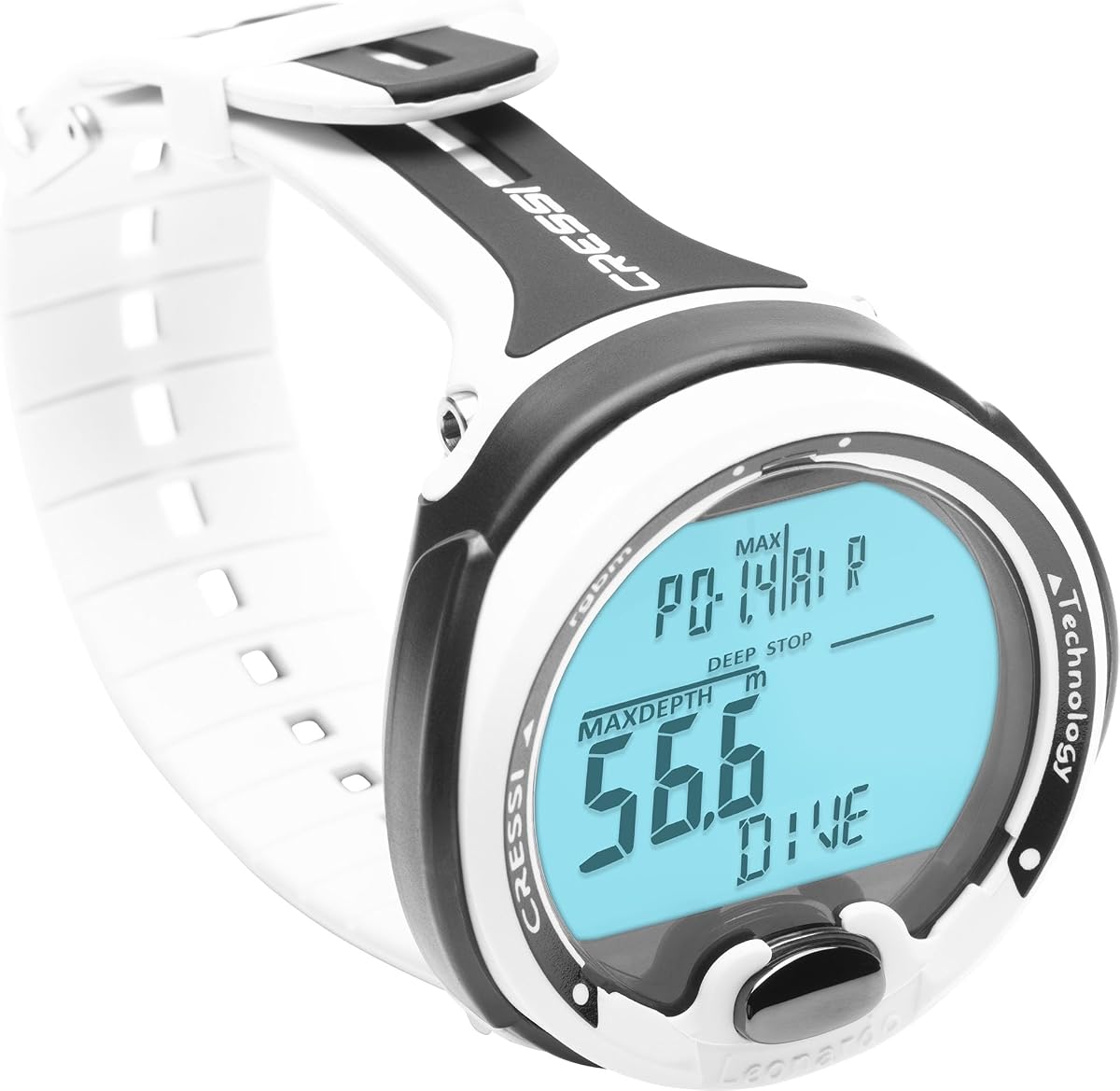
CRESSI Leonardo 2.0 G2
4.2Editor score
Single-button underwater control
Air, Nitrox, Gauge modes
Visual and audible alarms
iOS and Android connectivity
Dive computers for beginners can be confusing; this guide compares ten leading models to simplify controls, features, displays, logging, and safety for new
Dive computers for beginners should make critical information easy to read without turning every dive into a technical lesson. A good first model balances clear displays, intuitive controls, dependable alerts, accurate core metrics, and enough flexibility to grow as a diver gains experience and explores different underwater environments.
The ten products in this guide span watches and larger wrist computers, from straightforward single-button designs to feature-rich models with wireless tank support, GPS, compasses, and smartphone connectivity. We compared the supplied specifications, operating modes, navigation systems, logging options, alarms, battery details, and practical feature sets for new divers.
Each review explains what the model brings to a first dive setup, where it may fall short, and which type of learner it suits best. The selections also show that the best dive computer is not necessarily the most elaborate: clarity, reliability, and correct setup matter more than a long feature list, while market conditions and availability can change.
4.2Editor score

4.7Editor score

4.7Editor score
This side-by-side comparison highlights the major differences in display size, control style, gas support, navigation, connectivity, and battery configuration, helping new divers match a computer to their training needs and preferred wrist size.

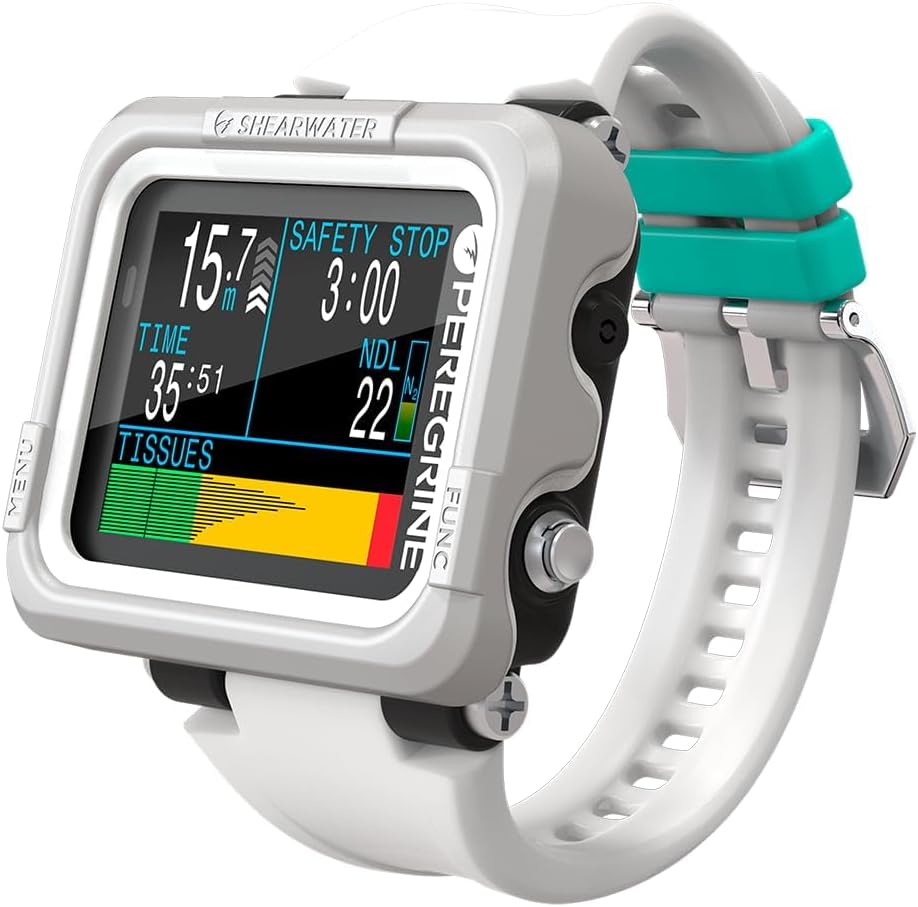


The Shearwater Research Peregrine earns a 4.7 customer rating and stands out as the most balanced starting point in this guide. Its two-button interface uses a state-aware menu structure, reducing the number of steps required to find essential information. That simplicity is particularly valuable for divers who are still learning to read a computer, manage a log, and understand what happens when a warning appears.
We may earn a commission when you buy through this link, at no additional cost to you.
Its strongest quality is the relationship between a compact format and uncluttered operation. The two 316 stainless steel buttons are durable and easy to distinguish, while the state-aware menus help keep navigation relevant to the current mode. A charge lasts up to about 30 hours at medium brightness, and the included USB wireless charging station reduces the need to hunt for a proprietary cable.
The Peregrine does not include a compass, GPS, or wireless tank-pressure support, so it is not the most capable model for every diving specialty. A new recreational diver may appreciate that restraint: the computer concentrates on core dive functions instead of presenting numerous navigation and fitness features. It also means the device should be considered alongside a conventional compass when surface navigation is needed.
It is a strong recommendation for beginners who want a straightforward computer with a refined interface and a well-regarded rating. Divers expecting advanced technical gas support, navigation electronics, or automatic tank data should look at a more specialized alternative. For most first-time recreational divers, however, the Peregrine provides a manageable introduction without feeling visually or operationally bare.
The state-aware menu structure keeps relevant choices close at hand, which helps a new diver spend less time scrolling through unfamiliar settings. Clear physical controls also make it practical to operate the computer while wearing gloves or handling other equipment.
Up to about 30 hours of operation at medium brightness is useful for a weekend of diving, while the included USB wireless charging station simplifies routine charging. Keeping the computer charged before travel remains essential for a reliable first dive experience.
We may earn a commission when you buy through this link, at no additional cost to you.
The CRESSI Leonardo 2.0 G2 is a practical option for beginners who want essential dive modes and uncomplicated controls without paying for a large collection of advanced features. Its 4.2 rating reflects a solid, accessible design, and the single-button interface is straightforward to learn once the menu logic becomes familiar.
We may earn a commission when you buy through this link, at no additional cost to you.
Support for Air, Nitrox, and Gauge modes covers the configurations most new recreational divers are likely to encounter. Visual and audible alarms provide important warnings, while USB and infrared transfer options make it possible to save and review dive information on a computer. Pairing with iOS or Android devices adds another route for tracking and analysis.
The main limitation is its narrower feature set. There is no built-in compass, GPS, or wireless tank-pressure connection in the supplied specifications, and the 4.2 rating is lower than several competitors. Divers who plan technical gas blends, navigation-heavy trips, or extensive surface tracking will need to consider a more specialized computer.
This model is best for students, vacation divers, and anyone who wants a conventional dive watch with uncomplicated operation. It can serve as an approachable introduction to computer-controlled diving without overwhelming the user. Pair it with a conventional compass and complete a careful setup session before entering the water.
A single button reduces the physical decisions made underwater. New divers can build confidence by learning the button sequence before the dive and using the Air, Nitrox, or Gauge modes appropriate to their training.
Audible and visual critical alerts make warnings harder to overlook, while USB, infrared, and mobile-device connectivity simplify moving dive records off the watch. Reviewing those profiles can help beginners recognize how depth and time affect their dive.
We may earn a commission when you buy through this link, at no additional cost to you.
The SUUNTO D5 carries a 4.0 rating and offers a blend of color display, wireless tank-pressure support, vibration alarms, a digital compass, and mobile connectivity. Those features make it a flexible choice for divers who want a capable computer without moving immediately into the most technically specialized products.
We may earn a commission when you buy through this link, at no additional cost to you.
The color display is easier for many users to interpret than a monochrome screen, while vibration alerts provide a discreet way to notice important changes. Wireless tank pressure can reduce the need to check a mechanical gauge repeatedly, and the digital compass adds useful directional information for basic underwater navigation.
Its 4.0 rating is the lowest among the listed models, and the supplied information provides less detail about battery life and gas-mode support than some competing entries. It also lacks the surface GPS and more advanced training tools found in the Garmin models. Prospective buyers should therefore focus on compatibility with their existing tank transmitter and intended dive style.
The D5 suits a diver who values alarms, tank connectivity, and a compact color screen. It may be especially helpful for a beginner taking a course in an area where wireless tank data provides reassurance, though it is not an automatic choice for every learning program.
Compatible wireless tank-pressure information allows divers to see remaining gas without repeatedly switching to a separate gauge. This can be valuable while learning gas management, although a computer should never replace required independent monitoring equipment.
Vibration alarms offer a subtle prompt for important information, and the integrated digital compass supports basic directional checks. The color display adds another layer of readability to a device intended for everyday dive use.
We may earn a commission when you buy through this link, at no additional cost to you.
The Shearwater Peregrine Adventures Edition has a 4.7 rating and builds on a beginner-friendly control approach with a vivid 2.2-inch color LCD. It supports Air, Nitrox, three-gas Nitrox, and Gauge modes, making it a flexible choice for divers who expect their gas and skill repertoire to expand.
We may earn a commission when you buy through this link, at no additional cost to you.
The larger display can show more information without requiring a tiny segment-based screen. Shearwater's Buhlmann ZHL-16C algorithm with gradient factors provides a modern decompression framework, while the absence of a lockout for planned-profile deviations avoids a common source of user frustration.
This edition may be more complex than a first-year diver needs. Adjustable gradient factors and three-gas capability introduce concepts that should be understood only with appropriate training. It also does not include the surface GPS, compass, or tank-pressure hardware found in some larger rivals.
The Peregrine Adventures Edition is an excellent choice for a beginner who prioritizes readable information, robust controls, and room to progress. It suits divers planning a course that may soon include enriched-air or multigas diving, provided those modes are introduced with qualified instruction.
The 2.2-inch display makes depth, time, gas, and status information easier to check at a glance. Color differentiation can also make changing numbers and alerts more noticeable, although brightness should remain manageable throughout the dive.
Support for three-gas Nitrox gives divers a path into more advanced gas planning. The Buhlmann algorithm and gradient-factor controls are sophisticated features, so beginners should learn them gradually and avoid changing settings without understanding the consequences.
We may earn a commission when you buy through this link, at no additional cost to you.
The Cressi Raffaello earns a 4.4 rating and offers a balanced set of features for divers who want more than a basic watch. Its built-in digital compass removes the need to carry a separate electronic compass, while mixed-gas planning and multiple operating modes offer room for more experienced use.
We may earn a commission when you buy through this link, at no additional cost to you.
Bluetooth and USB connectivity make the device practical for reviewing logs at home or on a phone or computer. Its four operating modes include apnea and gauge, allowing the same watch to support freediving and traditional scuba activities. The user-replaceable battery has an expected life of four years, reducing long-term maintenance concerns.
The RGBM-based mixed-gas planning system is not as customizable as systems offering user-adjustable gradient factors. Some beginners may find that level of planning unnecessary, and the model does not offer the surface GPS or activity-tracking ecosystem of the Garmin devices.
The Raffaello is well suited to divers who want an integrated compass, flexible modes, and straightforward log transfer. It is particularly compelling for a new diver who also plans to spend time freediving or exploring beyond basic recreational computer functions.
The built-in digital compass removes the inconvenience of wearing a second navigation device. Divers should still calibrate it as directed, maintain a conventional backup, and ensure they understand the limitations of electronic compasses underwater.
Four operating modes support scuba, apnea, and gauge-oriented use. That makes the Raffaello practical for divers who divide their time between recreational diving and freediving and want one wrist-worn device for both activities.
We may earn a commission when you buy through this link, at no additional cost to you.
The Garmin Descent X30 combines a 4.7 rating with a 2.4-inch color display, a 10 ATM dive rating, four large metal buttons, and extensive dive support. It is the most feature-rich option in this guide and a strong premium choice for a beginner who wants room for future technical, navigation, and fitness capabilities.
We may earn a commission when you buy through this link, at no additional cost to you.
Scuba profiles support single-gas, multigas, and trimix diving, while the large display allows up to three customizable fields per page. Surface GPS helps divers navigate to sites and mark entry and exit points. A three-axis compass, water-temperature sensor, NDL Aware depth metrics, and surface-interval tracking make the device a comprehensive companion above and below water.
Its size is the central compromise. A 2.4-inch screen and four physical buttons are easy to read and press, but the housing may feel substantial on a smaller wrist. The many features can also obscure the simple learning curve a new diver needs, and some advanced configurations should be left to later training stages.
The X30 is ideal for a diver who plans frequent trips, may progress toward technical diving, and values navigation and data in one device. It is less suitable for someone who wants the smallest possible watch and a minimal learning curve, but its clear display and physical controls remain strong foundations for long-term use.
The 2.4-inch color screen provides room for depth, gas, time, and customizable fields. Large metal leakproof buttons reduce the chance of an accidental press and remain easy to locate when the diver is focused on the environment.
Surface GPS can help a diver navigate toward a site and mark where a dive began and ended. Entry and exit markers are especially useful for repeat trips, although a conventional compass and local navigation knowledge remain important safety considerations.
We may earn a commission when you buy through this link, at no additional cost to you.
The Garmin Descent G2 has a 4.6 rating and combines a compact 46 mm watch-style body with a 1.2-inch AMOLED display, sapphire lens, and 10 ATM dive rating. It supports recreational, advanced, technical, freediving, and pool apnea diving, making it a versatile choice for an active beginner.
We may earn a commission when you buy through this link, at no additional cost to you.
Beyond dive functions, the G2 includes multi-GNSS support, built-in sports apps, training metrics, dive-readiness insights, heart-rate tracking, Pulse Ox, sleep monitoring, and smartwatch features. Dive logs can be stored on the device and reviewed through the Garmin Dive app, while smart notifications and contactless-payment support add everyday utility.
The watch's long feature list may make configuration feel more demanding than a dedicated dive computer. Its AMOLED display is smaller than the X30's, and the dive-mode battery specification is up to 27 hours rather than being the central strength of this category. Some health features are explicitly estimates and are not available in every country.
The G2 is a strong match for a beginner who wants one watch for diving, training, and everyday wear. Those interested only in scuba and prioritizing the largest possible dive display may find the X30 more immediately useful, while newcomers who value activity tracking will appreciate what this model adds.
Smart notifications, training features, and health metrics let the G2 function as a general-purpose watch. That makes it easier to wear consistently, which can be helpful because familiarity with the controls before a dive reduces the learning burden.
The AMOLED screen presents high-contrast information, and the sapphire lens helps protect it from scratches. The 45.5 by 45.5 millimeter case remains relatively compact for a full-featured dive watch, though it is larger than a simple dive-only watch.
We may earn a commission when you buy through this link, at no additional cost to you.
The CRESSI Giotto has a 4.2 rating and is distinguished by altitude-diving support, a 70-hour logbook, and the ability to manage up to three Nitrox mixtures. It is a logical choice for divers training in mountain lakes or exploring destinations where surface elevation changes the decompression calculation.
We may earn a commission when you buy through this link, at no additional cost to you.
The oxygen-mixture setting can be adjusted from 21% to 99%, and the listed maximum depth of 393 feet provides information across a broad range of recreational dives. A 70-hour logbook keeps a substantial amount of history on the wrist, while PC download support makes records accessible for later review.
The feature set feels less integrated with current mobile ecosystems than some newer alternatives. It does not advertise wireless tank pressure, GPS, or a color display, and its 4.2 rating is moderate rather than exceptional. The large depth range also does not mean every diver should approach those limits without the training and equipment required for them.
The Giotto is best for a beginner who knows they will dive at altitude or who values extensive Nitrox and logbook capabilities. Divers focused on travel navigation and connected planning may prefer a newer multifunction model, but the Giotto remains focused on core dive information.
Altitude support adjusts the computer's calculations for dives above sea level. A beginner planning repeated altitude dives should still account for acclimatization, ascent planning, and conservative limits rather than treating the feature as permission to descend immediately.
Adjustable oxygen mixtures and support for three mixes create a path into enriched-air diving. The 70-hour logbook preserves a meaningful history for reviewing depth, time, and gas behavior across many dives.
We may earn a commission when you buy through this link, at no additional cost to you.
The Mares Puck Lite carries a 4.4 rating and emphasizes readability, simple operation, and efficient logging. Its 800-segment chip-on-glass display presents dive information in a clear format, while a single-button control can be learned without handling a crowded interface.
We may earn a commission when you buy through this link, at no additional cost to you.
The computer uses the Bühlmann ZH-L16C algorithm with customizable gradient factors and supports Nitrox mixtures from 21% to 50%. Its logbook stores up to 100 dives with graphs and profiles, and Bluetooth connectivity allows syncing with Mares and SSI apps for additional review and firmware updates.
Its replaceable power source is expected to last through 100 dives, reducing the inconvenience of a sealed rechargeable design. On the other hand, the segment display lacks the visual richness of a color screen, and there is no integrated compass or surface GPS for navigation-focused divers.
The Puck Lite suits a beginner who wants a clear, no-frills computer, simple controls, and a modern decompression algorithm. It is especially appealing for divers who want efficient log syncing without paying attention to a large smartwatch-style display.
The 800-segment chip-on-glass screen emphasizes core numerical information rather than graphics. For a new diver, that restraint can make it easier to identify depth, remaining time, and other primary values without processing a dense screen.
Storing 100 dives with profiles and graphs creates a useful local record, while Bluetooth supports synchronization with the Mares and SSI apps. The replaceable power source is designed to last through 100 dives, offering a practical alternative to sealed battery replacement.
We may earn a commission when you buy through this link, at no additional cost to you.
The Garmin Descent G1 earns a 4.6 rating and offers a durable watch-style dive computer with an easy-to-read monochrome display. Its sapphire lens, silicone bands, and rugged design target divers who want a conventional watch appearance with serious underwater functionality.
We may earn a commission when you buy through this link, at no additional cost to you.
The G1 supports recreational, advanced, technical, freediving, and spearfishing use. It can store up to 200 dives on the wrist, includes GPS, GLONASS, and Galileo support for marking entry and exit points, and provides more than 30 built-in sports apps alongside training and wellness features.
Battery life reaches up to 25 hours in dive mode, 21 days in smartwatch mode, and 26 hours in GPS mode. The monochrome screen is less visually rich than a color AMOLED display, and the dive battery figure is lower than the G2's listed maximum, so regular charging remains important for extended trips.
The G1 is a strong option for a beginner who prefers understated hardware and rugged construction. It is less compelling for divers who want the largest possible display, but its easy-to-read screen, local storage, multi-satellite positioning, and broad activity support provide a well-rounded foundation.
The sapphire lens, silicone band, and watch-style housing suit divers who want durable equipment without carrying a large screen on the wrist. The monochrome display remains focused on essential information and can be easier to interpret at a glance.
Storage for up to 200 dives lets divers retain extensive records without immediate syncing. Uploading and reviewing those logs in the Garmin Dive app provides a more convenient way to analyze profiles and locate previously visited dive sites.
We may earn a commission when you buy through this link, at no additional cost to you.
A beginner should choose a dive computer based on readable information, appropriate gas modes, dependable alerts, comfortable controls, and reliable power. Navigation, connectivity, fitness tools, and technical capabilities matter only when they support the type of diving you expect to do.
Look for a screen that presents depth, elapsed time, remaining time, gas information, and warnings without overwhelming you. A larger color display can make multiple data fields easier to distinguish, while a well-designed segment display may offer the clearest view of essential numbers. Brightness, nighttime readability, and how information is arranged on successive pages deserve equal attention because a computer may be viewed at different angles and in changing underwater light.
Choose a display that remains readable quickly, not simply one with the largest specification. A new diver should be able to identify the most important values almost instinctively.
Button design has a major effect on real-world use. One-button models minimize physical choices but may require longer press sequences, while two-button systems can make menus faster while presenting more combinations to learn. Consider whether controls can be distinguished by touch, whether they work reliably with gloves, and whether the menu structure makes sense. A state-aware interface is particularly useful because it keeps relevant options close to the current operating mode.
Whichever layout you choose, learn every action before entering the water. A simple interface that you understand is better than a sophisticated one that remains confusing.
A recreational learner may need only Air, while Nitrox becomes relevant after appropriate training. Gauge, apnea, freediving, multigas, and trimix modes serve different environments and should match your certification and future plans rather than an aspirational feature list. Also consider whether the computer supports the standard oxygen fractions you may use and whether advanced decompression algorithms include settings you understand. More modes do not improve a basic dive if they are configured incorrectly.
Match gas support to current training first, then consider future progression. Never use an unfamiliar gas or decompression mode without instruction.
A digital compass, surface GPS, and multi-satellite support can help divers navigate toward a site, follow a direction, or mark entry and exit points. They are most relevant for divers exploring open water, visiting unfamiliar locations, or returning to the same boat or shore entry. Underwater GPS is not implied by surface positioning, and a digital compass still requires calibration and occasional verification. A conventional compass and sound navigation practices remain necessary.
Select navigation tools that match your trips. For pool and simple boat dives, core dive data may matter more than a large location-tracking suite.
Alerts should be noticeable in the conditions you actually face. Audible alarms can be useful, while vibration alerts may be easier to notice during a busy dive and less disruptive to the dive team. Wireless tank-pressure compatibility can make gas monitoring more convenient, but it depends on the correct transmitter, receiver support, setup, and independent monitoring discipline. A computer is an aid to safe operation, not a replacement for required gauges or sound procedures.
Test alarms before every trip and confirm that any wireless equipment is paired correctly. Independent gas checks should continue even when digital information is available.
Battery life should cover a full day of diving with a reasonable reserve, especially on multi-day trips. Some models use rechargeable batteries and a proprietary or USB-based charger, while others employ a user-replaceable cell. Wireless charging can simplify routine use, but divers should know how much time is required for a full charge and carry a dependable backup method when traveling. Inspect charging contacts and keep the port clean and dry according to the manufacturer's instructions.
Choose a charging process you will actually follow. A simple system used consistently is better than a nominally long-lasting battery that is not fully charged before departure.
On-device logs are valuable when a diver is away from a phone or shared computer. Look for the number of stored dives, profile details, graphing options, and the ability to download records through USB, Bluetooth, infrared, or a mobile app. Check whether the relevant app supports your phone and whether the computer has enough storage for a full trip. A reliable log can help new divers review ascent behavior, time at depth, and how different conditions affect each dive.
Favor a workflow you will use regularly. Synchronizing profiles after every dive makes long-term analysis and future planning much more useful.
A dive computer must fit comfortably enough to read without moving, yet remain within your sleeve or glove clearance. Large screens improve visibility but can catch on equipment, while compact watches are easier to wear all day. Check the stated wrist range, button placement, band flexibility, and overall dimensions. A sapphire lens and metal buttons add durability, while the housing should meet the depth rating appropriate to the intended environment.
Try wearing the watch before a dive trip. Comfort, legibility, and confidence matter more than a premium appearance or an unnecessary extra function.
Begin by reading the manual for the exact model, charging it fully, and installing fresh batteries when applicable. Set the correct date, time, units, surface elevation, and personal profile. Choose the correct gas mixture and mode, verify that the computer is not displaying a previous-dive lockout, and set audible or vibration alerts. Practice pressing every needed control on land before entering the water, and confirm that readings appear correctly on the main display.
During a dive, begin by checking the computer for the expected depth, time, gas, and remaining dive information. Keep the device in an easy-to-read position and avoid leaning on unfamiliar controls. Review the main page at regular intervals rather than waiting for an alarm. When changing depth or gas, make the change slowly, confirm the new setting, and allow the computer time to process the information before relying on its calculations.
After the dive, mark the end of the profile, review any warnings, download or sync the log, and rinse the computer with fresh water according to the manufacturer's guidance. Dry it before changing the battery or connecting a charger. Inspect the buttons, seals, band, and charging contacts, and remove salt or grit promptly. Store the device away from direct sun and extreme temperatures, and service or replace the battery when required rather than waiting for a failure.
The easiest computer is the one whose menu structure, display, and controls a diver can learn before the first dive. The CRESSI Leonardo 2.0 G2 uses a single button, while the Shearwater Peregrine uses a state-aware two-button system. Both reduce the number of interactions, but personal comfort and practice matter more than the button count. Learn the settings and alarm behavior on land and carry a backup computer when possible.
Not for every type of dive, but both can be useful for open-water trips, unfamiliar sites, and repeated shore or boat entries. Surface GPS may help divers reach a launch point or record where they entered and exited. A digital compass supports directional checks but should never replace conventional navigation skills. For pool training and simple guided dives, a clear core display and reliable alerts may provide more value.
Support is useful if your course or planned dives include enriched air and you have been trained to use it. Even if a model allows several oxygen fractions, that does not make every configuration appropriate for you. Beginners who dive on air can select a model based on readability and reliability. Set the oxygen percentage only when it matches the cylinder being used, and follow the training and procedures provided by your instructor.
It should comfortably cover a full diving day and ideally provide time for a second day without charging. The models in this guide list dive-mode figures ranging from about 25 to 30 hours under their stated conditions, but real use depends on brightness, connectivity, and features. Check the relevant specification before departure, recharge the device fully, and keep a backup source of information for multi-day travel.
Only if the specific watch has a recognized dive-computer mode, appropriate water-resistance rating, and reliable dive functions. General-purpose smartwatches and fitness trackers may not calculate decompression information or present essential data correctly underwater. Some dive-focused models also add GPS, tank data, and multi-gas support. Verify the manufacturer's dive specifications and make sure the device is configured for the intended depth and activity.
It is convenient but not essential for learning basic dive skills. Wireless tank information can reduce the need to check a mechanical gauge repeatedly, and it may suit divers who want gas data on one screen. You still need to understand the transmitter pairing, confirm readings against an independent source, and follow standard gas-management procedures. A simpler computer paired with a reliable mechanical gauge can be perfectly appropriate for many courses.
Set the date, time, units, altitude, and personal information exactly as directed by the manual, then select the appropriate dive mode and gas. Confirm the device starts from a clean state, review the display, and test both audible and vibration alerts. If the model supports a depth or profile lockout, ensure it is not preventing a dive unintentionally. Several hours before departure, check the charge or install the correct battery and test the display once more.
Stop, remain calm, and read the complete warning rather than immediately pressing buttons. Follow the training you received for ascent rate, depth, gas, or decompression warnings, and begin a controlled ascent when appropriate. Do not silence an alert merely to make it disappear. If a computer fails or behaves inconsistently, use a backup, exit safely, and have the unit inspected before relying on it again.
The Shearwater Research Peregrine is the strongest all-around choice for a beginner because its two-button interface, state-aware menus, compact layout, strong customer rating, and straightforward charging experience keep the learning process focused. The CRESSI Leonardo 2.0 G2 offers a more economical route with Air, Nitrox, and Gauge modes, while the Garmin Descent X30 is the premium selection for divers who want a large display, surface GPS, broad technical-gas support, and extensive navigation tools.
Prioritize the features you can use safely. A beginner needs readable core data, correct setup, dependable alerts, comfortable controls, and enough battery for the trip. Advanced modes and connected fitness features can be worthwhile, but they should not distract from understanding the computer and the fundamentals of diving. Choose the smallest feature set that supports your actual training and future plans, then practice it until the important information becomes familiar.
Finally, verify the current product details, compatibility, warranty information, and market availability before purchasing. Dive-computer models and companion apps can change, and the listed features should be checked against the current manual. With proper preparation, the right computer becomes a reliable part of a safe dive plan rather than another source of uncertainty.