
WALI Adjustable Monitor Stand
4.7Editor score
Three adjustable height positions
Supports up to 44 pounds
Ventilated metal platform
This Desktop Monitor Riser guide compares ten stands for height, storage, stability, capacity, and compatibility to help you choose the right fit for your desk.
A desktop monitor riser can improve viewing comfort, reclaim valuable work area, and give a computer setup a cleaner, more organized appearance. The right model balances the correct screen height, stable support, useful storage, and compatibility with your monitor, laptop, printer, or other equipment.
We compared ten monitor risers supplied for this guide, focusing on adjustment options, construction, weight capacity, desk footprint, storage, ventilation, assembly, and device compatibility. The list covers compact plastic models, metal stands, wood shelves, dual-monitor platforms, and feature-rich organizers with drawers or device holders.
Each pick highlights a different practical strength, from an affordable adjustable option to large dual-screen support and premium storage designs. Ratings reflect the supplied customer feedback, while specifications and features come from the listed product information. Prices and availability can change, so check the current listing before buying.
4.7Editor score
4.7Editor score

4.6Editor score
The comparison covers adjustment methods, support capacity, storage options, materials, and the number or type of devices each riser can accommodate, making it easier to match a stand to your desk and equipment.


The WALI Computer Monitor Stand for Desk is a versatile metal riser with a 4.7 customer rating. Its most appealing combination is a relatively large 14.6-by-9.3-inch shelf, three available height positions, ventilation, and support for loads up to 44 pounds. It suits a monitor, laptop, printer, or mixed desktop arrangement without requiring a complicated frame.
We may earn a commission when you buy through this link, at no additional cost to you.
Height can be set at 3.9, 4.7, or 5.5 inches, allowing the user to raise a screen closer to eye level. The ventilated holes help move heat away from equipment, while rubber pads on the underside help prevent slipping and surface damage. The open area below the platform can accommodate a keyboard, notebooks, papers, or other frequently used accessories.
The main limitation is that the three discrete positions are not as flexible as a continuous adjustment mechanism. The fixed platform also has a more industrial appearance than a decorative wood shelf or compact plastic organizer. Even so, those trade-offs are reasonable given the strong support capacity, broad device compatibility, and useful combination of ventilation and storage.
This is a strong choice for most home and office users who want a balanced monitor riser at a sensible cost. It is particularly effective when a laptop, standard monitor, printer, or two lighter displays share the same platform. Buyers prioritizing straightforward adjustment, stability, and useful clearance should give this model serious consideration.
The three height settings make it easy to move between lower storage use and a more comfortable elevated viewing position. This discrete adjustment is less granular than a twist knob, but it covers the most useful everyday heights without a complicated locking mechanism.
The open space below reduces visual clutter, while numerous vented holes promote airflow around laptops and other devices. Rubber pads help keep the shelf from sliding and protect the desktop from scratches and scuffs.
We may earn a commission when you buy through this link, at no additional cost to you.
The TEAMIX 20 Inch Monitor Stand Riser for Desk combines a substantial 20-inch shelf with a wood construction that can blend more naturally into a home office. It carries a 4.6 rating and is listed to support as much as 80 pounds. Its fixed 2.95-inch inner height provides a modest screen lift while opening room for stored equipment.
We may earn a commission when you buy through this link, at no additional cost to you.
The shelf can accommodate laptops smaller than 20 inches and most displays smaller than 50 inches, according to the supplied information. Users can also repurpose it for a keyboard, notebooks, and other objects when those items are not in use. The minimalist black finish suits contemporary furniture better than an exposed-metal industrial design.
Because the stand has one fixed height, it will not accommodate every seated or standing workstation as effectively as an adjustable model. Some users may also find the four-inch overall frame bulkier than a narrow riser. Nevertheless, the high listed load capacity, wide platform, and natural decorative finish compensate for the lack of adjustment.
The TEAMIX model is best for someone who has already identified a suitable viewing height and values a substantial shelf, clean styling, and lots of hidden storage. It is less appropriate for users who need to alternate quickly between sitting and standing positions or who require a very narrow desk footprint.
The black MDF construction provides a warmer, furniture-like appearance than a utilitarian metal frame. Its broad surface and simple profile can make a monitor, laptop, or printer look more like a deliberate part of the room rather than temporary office equipment.
A listed capacity of 80 pounds gives the stand ample headroom for many monitors, laptops, and printers. That strength makes it a practical choice for users who want one elevated surface to manage several pieces of equipment.
We may earn a commission when you buy through this link, at no additional cost to you.
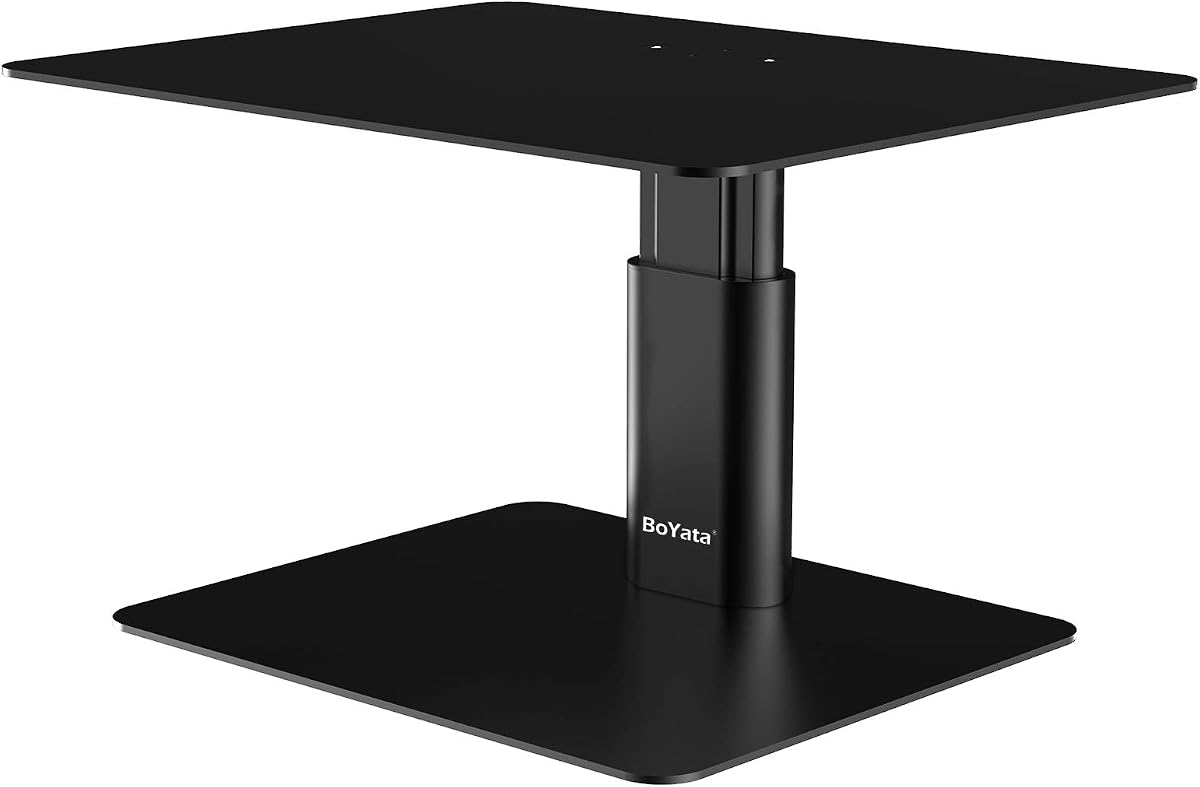
The BoYata Monitor Stand is an adjustable metal desktop riser rated 4.7 by customers. Its defining advantage is a twist knob that changes the height continuously, giving users more precise positioning than a stand with a few preset levels. The design is aimed at users who want their screen aligned with a comfortable sight line.
We may earn a commission when you buy through this link, at no additional cost to you.
Two metal base plates and a support rod form the core structure, and a listed capacity of 33.06 pounds makes the stand appropriate for many monitors, laptops, and smaller office devices. A skidproof pad at the base helps prevent movement. The open area beneath the upper plate provides room for notebooks, keyboards, and other office items.
Assembly calls for a screwdriver, although one is included. The metal construction may look less decorative than a wooden shelf, and the stated load limit is lower than that of the TEAMIX and YAOHUOO models. Those are meaningful considerations for unusually heavy equipment, but the straightforward mechanism remains an advantage for most users.
The BoYata is our Editor's Choice because it combines precise adjustment, solid construction, and useful clearance without excessive complexity. It is a particularly good fit for a single monitor or laptop in a focused workspace where screen height changes regularly and stable support matters more than integrated drawers.
The twist knob allows the support height to move through a range rather than limiting the user to preset stops. That makes it easier to find a comfortable eye line and adapt the stand as chair, desk, or user position changes.
The metal plates and support rod create a straightforward frame, while the bottom skidproof pad helps limit sliding. Fixed assembly holes and the included screwdriver make setup more approachable than a complicated multi-part structure.
We may earn a commission when you buy through this link, at no additional cost to you.
The Amazon Basics Height Adjustable Monitor Stand uses durable ABS plastic and a 3-level stackable layout. Its 4.6 rating reflects a generally favorable balance of portability, appearance, and useful height choices. The platform measures approximately 11.6 by 11 inches, with tapered sides that make the footprint more compact than a full rectangular shelf.
We may earn a commission when you buy through this link, at no additional cost to you.
Detachable legs create elevations of 2.87, 4.2, and 4.8 inches, and the non-skid feet help maintain placement on a flat surface. The design is especially attractive to users who want to rearrange their desk frequently or move the riser between rooms. It also includes a storage organizer concept that complements the space-saving design.
The listed 22-pound support limit is considerably below that of several metal and wood stands. Users should therefore avoid placing heavy printers or oversized equipment on it, even if the object physically fits. The lightweight plastic also does not offer the same visual heft as solid metal, and the tapered surface may accommodate fewer device sizes than a wide rectangular shelf.
This model is a good option for a single standard monitor, laptop, or lightweight office device in a compact workspace. It works particularly well for students, travelers, and home users who value easy reconfiguration over industrial-grade capacity. For heavier equipment or a dual-monitor arrangement, a wider metal or wood model would be more appropriate.
Detachable legs allow the riser to be rebuilt at three heights or collapsed for easier storage. The lightweight ABS body and tapered sides are particularly useful when desk space is limited or the setup needs to move between locations.
The 22-pound maximum makes the stand appropriate for standard displays, laptops, and small office equipment. Checking both the dimensions and the device weight before purchase will help prevent an awkward mismatch.
We may earn a commission when you buy through this link, at no additional cost to you.
The YAOHUOO Dual Monitor Stand Riser is built for users who need more width and strength than a conventional single-screen shelf can provide. Its customer rating is 4.6, and the product combines a 38.6-inch wooden platform with heavy-duty steel legs. The listed maximum load of 100 pounds is the highest in this comparison.
We may earn a commission when you buy through this link, at no additional cost to you.
The wide top can hold two monitors, a monitor and laptop, or another combination of supported equipment. Each leg has non-slip pads intended to protect the desk, and the open area underneath can hold a keyboard or office accessories. Its height also raises screens toward a more comfortable viewing level, supporting a more upright working position.
The main drawback is size. A 38.6-inch platform requires a broad desk and may feel oversized in a compact workspace. Installation is described as taking about ten minutes and includes instructions and tools, so it is less convenient than a no-assembly model. The fixed height also offers less positioning flexibility than continuously adjustable stands.
The YAOHUOO model is the premium choice for a command center, dual-screen workstation, shared office, or desk that must support several substantial devices. Its strength, width, and stable steel frame are compelling when desk space is available. Users with a small desk should measure carefully before committing to this large configuration.
The 38.6-inch width offers room for two displays with more freedom than smaller single-monitor stands. It can also serve as a base for a monitor paired with a laptop or other supported office equipment.
Steel legs and a listed 100-pound capacity provide substantial support. Non-slip pads on each foot help keep the stand steady and reduce the chance of scratching the desk surface.
We may earn a commission when you buy through this link, at no additional cost to you.
This Computer Monitor Stand Riser for Desk is sold as a two-pack and carries a 4.7 rating. Each unit has a 14.6-by-9.3-inch metal platform, three height settings, and a listed capacity of 44 pounds. Including two stands gives users the option of separating devices across a desk or stacking the units for additional organization.
We may earn a commission when you buy through this link, at no additional cost to you.
The legs lock into positions measuring 4.13, 4.92, or 5.7 inches, and the product description identifies a phone holder as an added convenience. Numerous heat-dissipation holes support airflow, while the coated cold-rolled steel construction is designed to resist water and rust. Rubber pads help prevent sliding and scratching.
Tool-free assembly is a meaningful convenience, with the legs simply screwed onto the platform and setup described as taking under 30 seconds. The two-pack format can become cumbersome if both units are stacked, and the phone holder is not essential for a basic monitor setup. Desk users should also account for the footprint of two separate platforms.
The set is most useful for people with multiple screens, separate laptop and monitor zones, or a desire to create a tiered arrangement. Its combination of height options, ventilation, and quick assembly makes it versatile for home offices, gaming desks, and general workspace organization.
Separate the units to elevate two devices independently, or stack them to create a tiered storage system. This flexibility makes the pack more useful than a single fixed shelf for users who anticipate changing their arrangement.
The platform includes 150 heat-dissipation holes to encourage airflow around laptops and other electronics. The coating and rubber pads add everyday protection without complicating the setup.
We may earn a commission when you buy through this link, at no additional cost to you.
The Klearlook Monitor Stand Riser combines a foldable frame, three width settings, a storage drawer, and a built-in tablet or phone holder. It has a 4.7 rating and supports up to 55 pounds. The white design gives it a distinctly light appearance that can work well in bright home offices and tidy study spaces.
We may earn a commission when you buy through this link, at no additional cost to you.
The width can be configured at 16.5, 18.5, or 20.5 inches, and the full leg span is listed as 18.09 inches when unfolded. Folding the stand creates a more compact shape and opens access to stored items. A metal plate inside the frame and rubberized non-slip legs help create a stable platform for an ultrawide monitor, printer, or laptop.
Because the design folds and changes width, users should inspect the current configuration before assuming a device will fit. The drawer and hidden device holder divide some available internal space, and the white finish may not coordinate with darker office furniture. These are modest limitations compared with the unusual flexibility of the frame.
This stand is an excellent choice for users who want an elevated platform, compact storage, and fewer visible accessories in one design. It works particularly well in home offices, study areas, and gaming setups where a full-size keyboard needs to slide underneath when the workspace is not being used.
Three available widths make it easier to match different monitor sizes, while the folding frame lets the user expose stored items or place the stand away when it is not needed. The range of configurations gives it more flexibility than a conventional fixed shelf.
The built-in drawer stores small office essentials, and the concealed device holder keeps a tablet or phone within reach. These additions reduce visual clutter without adding several separate organizers to the desk.
We may earn a commission when you buy through this link, at no additional cost to you.
The OPNICE Desk Organizers and Accessories model is designed as a complete central hub for a workstation. It carries a 4.6 rating and combines a dual-monitor stand, a drawer, and two hanging pen holders. The goal is not merely to raise screens, but to create an organized focal point for monitors, writing instruments, and small office supplies.
We may earn a commission when you buy through this link, at no additional cost to you.
Elevating the displays can place them closer to eye level, while the open area below can hold a keyboard, mouse, files, printer, or gaming accessories. The drawer gives small items a concealed home, while the two pen holders keep frequently used implements visible and accessible. A metal construction is intended to provide stable daily support, and no installation is required.
The supplied information does not list a specific maximum weight capacity, so buyers should consider the weight and dimensions of their equipment carefully. A dual-screen design may also be unnecessarily large for a single compact display, and the hanging pen holders are useful only if the stand is positioned within easy reach. The feature-rich format is less minimalist than a plain shelf.
The OPNICE stand is a strong fit for home offices, dorm rooms, gaming desks, and shared workspaces where clutter reduction matters as much as screen elevation. It is especially compelling when a user wants visible pen storage and hidden drawer storage without purchasing separate accessories.
A dual-screen shelf, drawer, and two pen holders provide several desk-management functions in a single footprint. The combination is useful for users who prefer one coordinated centerpiece over several independent accessories.
Raising the platform creates room for larger accessories such as a keyboard, mouse, files, or a printer. This vertical use of desk space can reduce crowding without sacrificing immediate access to frequently used equipment.
We may earn a commission when you buy through this link, at no additional cost to you.
The WESTREE Dual Monitor Stand Riser combines a rustic brown wood finish with a black steel frame, giving it a more decorative look than the all-metal options. It has a 4.6 customer rating and is designed primarily for two monitors, although the wide surface can also support a laptop, printer, or other listed device.
We may earn a commission when you buy through this link, at no additional cost to you.
Thick solid-steel legs provide the underlying structure, while anti-slip pads on the bottom help limit movement and protect the desk. The elevated platform creates storage space underneath for office supplies, and the wood top adds warmth to a setup dominated by black screens and dark metal furniture. Pre-drilled holes, included hardware, and supplied instructions simplify assembly.
The fixed elevation does not offer the fine positioning available from twist-knob or preset adjustable models. Its broad dual-screen format may also be excessive for a single compact monitor, and no specific numerical load limit appears in the supplied information. Buyers should still verify the available surface width and confirm that their screens have suitable bases.
The WESTREE model is a good choice for a dual-screen creative office, gaming setup, or home workspace seeking a natural wood accent. Its combination of thick steel legs and under-platform storage makes it more practical than a purely decorative shelf, while the coordinated finish helps it blend with both modern and rustic interiors.
The brown wood top softens the appearance of a practical desk organizer, while the black steel frame adds structure. This makes the stand easier to coordinate with furniture than a purely utilitarian industrial shelf.
The wide platform is primarily intended for two monitors, making it useful for multitasking, editing, gaming, or general productivity. Additional space below provides a home for accessories and reduces the number of loose items on the desktop.
We may earn a commission when you buy through this link, at no additional cost to you.
The gianotter Dual Monitor Stand Riser is an organization-focused model with a 4.5 customer rating. It combines an elevated dual-monitor shelf, a drawer, and two magnetic pen holders in a design that requires no assembly. The result is a practical central organizer for users who want screens and everyday supplies in one compact arrangement.
We may earn a commission when you buy through this link, at no additional cost to you.
The drawer provides concealed storage for small office items, and the magnetic holders keep pens within reach. Raising the screens can improve the viewing angle and help users maintain a more comfortable posture. The space beneath the platform can be used for a mouse, keyboard, files, or other supplies, while the metal construction is intended to provide dependable support.
As with the OPNICE design, the supplied information does not state a specific weight limit, which makes checking equipment requirements especially important. Magnetic holders are useful for compatible metal pens and accessories but do not retain every object equally well. The dual-monitor format also may be excessive for a small desk, and the 4.5 rating is the lowest among the ten products listed.
The gianotter is most suitable for a compact productivity setup with two screens, especially when the user values organized access to small tools. It is a straightforward option for buyers who do not want to assemble parts or purchase separate pen storage and a drawer. Confirming dimensions and weight expectations before ordering is advisable.
The drawer keeps small supplies out of sight, while the two magnetic holders place frequently used pens at the edge of the platform. This dual storage approach helps organize a desk without occupying several separate locations.
No assembly is required, so the stand can move directly from its box to the desktop. The elevated shelf and open underside then create room for screens and larger accessories in a single vertical arrangement.
We may earn a commission when you buy through this link, at no additional cost to you.
The most useful riser is one that fits the equipment, matches the available desk area, and raises the screen to a comfortable position without creating new stability or storage problems.
Match the footprint to the desk, and verify device dimensions before ordering.
Choose fixed, preset, or continuous adjustment according to how often the viewing position changes.
Check the combined equipment weight and choose a clearly rated limit with comfortable headroom.
Prioritize rigid construction, reliable locks, and non-slip feet over appearance alone.
Match drawer, shelf, and under-platform storage to the accessories you use daily.
Choose a ventilated platform for electronics that generate meaningful heat.
Choose single- or dual-device support based on your actual workflow, not just screen size.
Balance quick setup against the stability and adjustability of a more involved frame.
Begin by confirming that the desk is level and the riser's feet or pads sit fully on the surface. Assemble the stand according to its instructions, tighten any height locks, and place the riser where the monitor base, keyboard, cables, and other accessories will not interfere. Raise the screen gradually until the top or center of the display reaches a comfortable viewing level, ideally reducing the need to bend the neck or look downward.
Distribute equipment evenly across the platform and keep heavier objects closer to the center. Do not exceed the listed capacity, and do not rely on a flexible plastic platform to carry a heavy printer. Route cables behind the screen and through the open area below where possible, keeping them away from the adjustment mechanism and the non-slip pads. When using a dual stand, confirm that both monitor bases have sufficient room and remain stable.
Clean the platform with a soft, slightly damp cloth and dry it thoroughly before placing equipment on top. Avoid abrasive cleaners and excessive water, especially on wood, coated metal, or drawer components. Inspect the feet, fasteners, and height locks periodically, and tighten or realign anything that has shifted. Foldable or removable models should be collapsed or disassembled before being moved if carrying them by the platform could twist the frame.
The best height places the screen near eye level while allowing you to sit or stand with relaxed shoulders and a neutral neck. The ideal measurement depends on your eyes, monitor, desk, and chair, so start with a riser that offers multiple adjustment options. Fine-tune the position after installation rather than assuming a universal height.
Most of the listed risers can support laptops because their platforms are intended for monitors, notebooks, and related office equipment. Check the width, depth, weight, and position of the laptop's base or feet before purchase. A vented surface is especially useful for a laptop because it allows more airflow while the computer is running.
A dual-monitor riser can be suitable if the platform is wide enough for the chosen display and its base, but the broad footprint may consume much of the desk. An ultrawide monitor also needs a stable foundation and adequate clearance behind it. Check the product dimensions and stand-base footprint rather than relying on the monitor's diagonal screen size alone.
Capacity varies widely across the products in this guide, from 22 pounds for the lightweight plastic model to 100 pounds for the large steel-leg stand. Check the listed limit and compare it with the combined weight of every device and accessory on the shelf. If no capacity is stated, use extra caution and consider a model with a clearly specified limit.
They can, because raising the screen frees the area underneath for a keyboard, mouse, printer, papers, or storage boxes. The improvement is most noticeable on a compact desk where equipment was previously spread across the surface. Integrated drawers and holders can add organization, but the platform's footprint still needs to be considered.
A fixed riser is simpler and may suit one consistent workstation with a known screen height. Adjustable models are better when the user changes posture, shares a desk, or needs to fine-tune the viewing angle. Preset levels are convenient, while continuous adjustment offers the most precise positioning.
Metal generally provides strong load capacity and stability, while wood offers a warmer decorative appearance. ABS plastic is lightweight, portable, and easy to rearrange, though it is usually intended for lighter equipment. The best material depends on the weight of your devices, your preferred style, and how often you intend to move the stand.
Ventilation is especially helpful for laptops and compact computers that release heat while operating. A platform with numerous holes provides airflow and can reduce heat buildup. If your equipment has bottom-mounted vents, make sure they are not pressed against a solid surface and that the stand remains stable under load.
The WALI Adjustable Monitor Stand offers the strongest overall value for a single monitor, laptop, or printer, combining three heights, ventilation, and useful clearance. The BoYata Adjustable Metal Riser is the choice for precise continuous height control, while the YAOHUOO Dual Monitor Stand provides a large, heavy-duty platform for two screens or multiple devices.
Prioritize dimensions, load capacity, and adjustment method before style. Compact plastic stands suit lighter equipment and temporary arrangements, wood shelves fit decorative or fixed-height setups, and wide dual-monitor models require adequate desk depth. Drawers, pen holders, and device compartments are useful only when they match the accessories you actually plan to store.
Product specifications and customer ratings can change over time, and prices and availability vary by listing. Before purchasing, confirm the current dimensions, capacity, included components, and compatibility with your equipment, then check the latest listing and customer feedback for the most up-to-date information.
