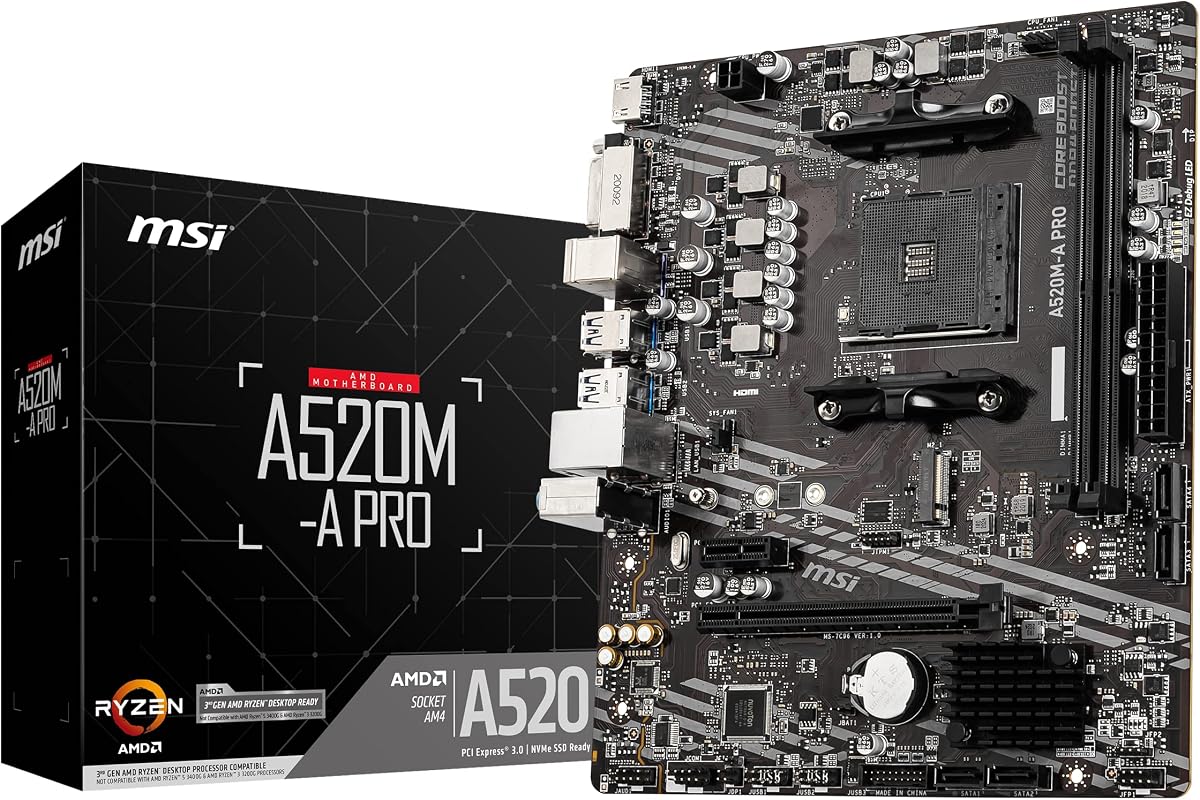
MSI A520M-A PRO
4.5Editor score
Four DDR4 memory slots
Turbo M.2 connectivity
Compact Micro-ATX format
Discover the best cheap motherboard options for AMD and Intel builds, comparing sockets, memory support, expansion, storage, networking, display outputs, and
A cheap motherboard can still provide the foundation for a capable, dependable computer, but choosing the wrong model may limit your processor, memory, storage, or expansion options. The best affordable boards balance useful connectivity, adequate power delivery, practical layouts, and compatibility with the rest of your build.
We compared these ten motherboards by examining processor sockets, memory generations, PCIe and M.2 support, networking, display outputs, power design, form factors, and user-focused features. The list includes budget AM4 and AM5 boards for AMD systems, DDR5 models for Intel, and a legacy DDR3 platform for older processors.
Each review identifies the strongest reason to consider that board, along with limitations that could affect a particular build. The top selections show the strongest balance of platform features and value, while prices and availability can change, so confirm current listings and case compatibility before purchasing.
4.5Editor score

4.4Editor score
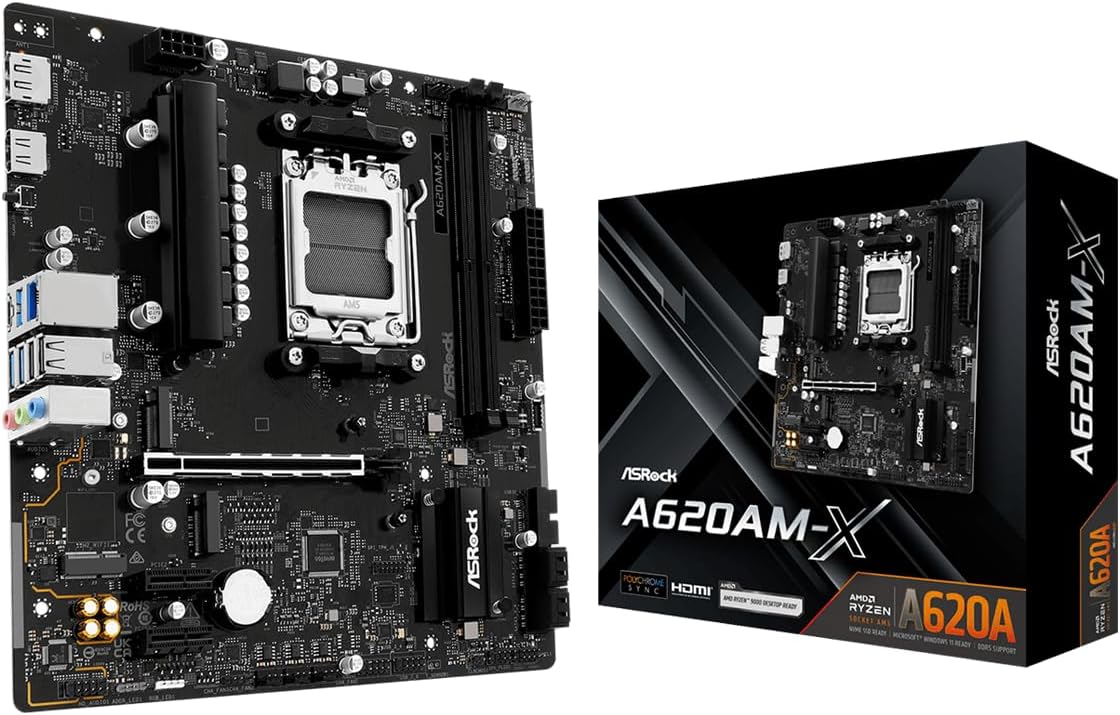
4.5Editor score
This side-by-side comparison highlights each board's processor platform, memory support, storage capabilities, and form factor so buyers can identify the most appropriate foundation for their components and case.





The GIGABYTE B550M K is an AM4 Micro-ATX board that offers one of the most useful combinations of features in this roundup. It has a 4.4 rating and supports Ryzen 5000, 4000, and 3000 series processors, giving buyers access to a wide range of AMD desktop CPUs. Its four DDR4 slots, two M.2 positions, PCIe 4.0 graphics support, and Q-Flash utility make it practical for a new compact gaming or general-purpose build.
We may earn a commission when you buy through this link, at no additional cost to you.
The board's 3+3 digital power design, premium chokes, capacitors, and chipset heatsinks provide a sensible foundation for supported processors. A primary Ultra Durable PCIe 4.0 x16 slot can accommodate a modern graphics card, while one PCIe 4.0 M.2 slot and one PCIe 3.0 M.2 slot offer room for fast NVMe storage and a second compact drive. Four USB 3.2 Gen 1 ports and Gigabit Ethernet cover common wired connectivity needs.
Its limitations reflect its budget position. The 3+3 power phase is not designed to turn an entry-level board into a heavily overclocking platform, and there is no built-in Wi-Fi or Bluetooth. Users who want abundant high-speed rear USB ports, multiple display outputs, or onboard wireless may find a more specialized board more appropriate. For most AM4 builders, however, those omissions are less significant than having two M.2 slots and four DIMM positions.
This is the strongest general recommendation for a new affordable AMD system because it avoids the severe expansion limitations of simpler boards without moving to a full-size enthusiast design. Choose it when you want a compact case, DDR4 memory, a discrete graphics card, and one or two NVMe drives. Confirm the case accepts Micro-ATX boards, verify CPU support, and check memory compatibility before completing the purchase.
Two M.2 slots let you combine a PCIe 4.0 NVMe drive with a second PCIe 3.0 M.2 device without relying exclusively on SATA storage. That flexibility is particularly helpful in a compact Micro-ATX enclosure with limited drive bays.
Four DDR4 DIMM slots offer more upgrade room than the two-slot layouts found on several competing boards. Broad Ryzen 5000, 4000, and 3000 series compatibility also makes this board useful for both new AM4 purchases and future processor upgrades.
We may earn a commission when you buy through this link, at no additional cost to you.
The LGA 1155 H61 motherboard is a specialized choice for builders reusing older Intel hardware. It carries a 5 rating and supports second- and third-generation Core i3, i5, and i7 processors, as well as listed Xeon E3 v2 and Pentium processors. Rather than competing with current platforms, this board aims to make a dependable, inexpensive foundation for an existing or inexpensive legacy collection of components.
We may earn a commission when you buy through this link, at no additional cost to you.
Its dual-channel DDR3 configuration supports up to 16GB across two slots and multiple memory speeds, including 1280, 1333, 1600, and 1866MHz. The M.2 interface can operate with either NVMe or NGFF devices, although the data lane differs by protocol. A full-length PCIe x16 slot operates under PCIe 3.0, and VGA plus HDMI-compatible outputs can drive a 1080p display through a processor with integrated graphics.
There are important constraints. Maximum memory capacity is modest, the platform lacks the bandwidth and expansion options of modern alternatives, and an external graphics card is required when the selected CPU lacks integrated graphics. The package also does not include a user manual or CR2032L battery. Prospective buyers should ensure their exact processor appears in the supported list and that the case and operating system can accommodate the platform.
This board makes the most sense for a targeted repair, a non-gaming office computer, or a hobbyist who already owns compatible LGA 1155 components. It is not a wise foundation for a new high-performance PC because the CPU and memory platform is limited. If your goal is simply to extend the life of a supported older system while adding an M.2 SSD, the combination of convertible M.2 support and integrated display options makes it unusually versatile.
The convertible M.2 interface can accept an NVMe or NGFF drive, allowing an older platform to use compact solid-state storage. The appropriate adapter and protocol support should be confirmed before installation.
This motherboard makes the most sense when you already own a supported LGA 1155 processor and DDR3 memory. It preserves usable components instead of requiring a complete platform change.
We may earn a commission when you buy through this link, at no additional cost to you.
The MSI A520M-A PRO is a focused budget board for an AM4 gaming or productivity build. Its 4.5 rating reflects a generally favorable user response, while the combination of four DDR4 slots, M.2 support, SATA connectivity, and familiar display outputs gives it more flexibility than a bare-bones entry model. It supports third-generation Ryzen desktop processors and Ryzen 4000 G-Series desktop processors.
We may earn a commission when you buy through this link, at no additional cost to you.
Memory can operate at speeds up to 4600MHz through overclocking, and the board includes MSI's Turbo M.2 interface, which uses a PCIe Gen3 x4 connection for NVMe solid-state drives. Audio Boost is included for onboard audio, while Dragon Center provides access to MSI utilities through a unified software interface. The combination of four memory slots and a full-size graphics slot is particularly useful for a compact gaming system that may later need additional memory or storage.
The main trade-off is that the A520 platform does not provide the PCIe 4.0 graphics slot found on B550 boards. That distinction matters for buyers who want the newest graphics-card interface or a specific PCIe 4.0 feature, although a compatible PCIe 3.0 graphics card can still deliver strong gaming performance. Wireless networking is also absent, so a Wi-Fi adapter or wired Ethernet connection may be necessary.
This board is a good match for a straightforward Ryzen 3000 or 4000 G-Series build where affordability and a useful feature set matter more than bleeding-edge interfaces. It is particularly suitable for Micro-ATX gaming cases and users who appreciate four RAM slots. Choose it after checking the exact processor support, BIOS requirements, and graphics card compatibility, and make sure your storage device uses the correct M.2 interface.
The four-DIMM layout gives builders room to begin with a smaller memory configuration and add modules later. That is a meaningful advantage over many two-slot budget boards in compact systems.
Turbo M.2 provides a PCIe Gen3 x4 path for an NVMe drive, enabling quick boot and application response while leaving SATA connectors available for conventional storage.
We may earn a commission when you buy through this link, at no additional cost to you.
The ASRock B550M-HDV is a Micro-ATX AM4 board with a 4.5 rating and a particularly useful set of legacy-friendly display outputs. It supports Ryzen 5000, 4000, and 3000 series processors, along with supported APUs, making it suitable for an office computer, home entertainment system, or compact Ryzen build that may use integrated graphics.
We may earn a commission when you buy through this link, at no additional cost to you.
Its three display options—HDMI, DVI-D, and D-Sub—allow it to work with a wider range of monitors and older equipment. HDMI can support 4K output at 60Hz, subject to the processor and system configuration. Storage includes one Hyper M.2 slot compatible with PCIe Gen4 x4 or SATA3 devices and four SATA3 ports. Six USB 3.2 Gen1 ports, Gigabit Ethernet, and 7.1-channel HD Audio provide solid everyday connectivity.
The board's two DDR4 DIMM slots limit memory expansion to two modules, even though advertised overclocked memory speeds can reach 4733+ when supported by the processor and modules. A six-phase power design with premium 50A chokes is suitable for supported processors, but this is not a motherboard designed around extreme overclocking. Full Spike Protection on USB, audio, and LAN ports adds a useful safeguard for a dependable daily system.
This is an excellent pick when display compatibility matters or when you want to keep an AM4 system capable of supporting a discrete graphics card later. It is less suitable for memory-heavy builds where four RAM slots would be valuable. Buyers should consult ASRock's CPU support list, verify the enclosure accepts Micro-ATX boards, and confirm that the chosen graphics and display equipment match the available outputs.
HDMI, DVI-D, and D-Sub provide exceptional flexibility for offices, workshops, and home systems. The range of outputs makes it easier to reuse existing monitors when assembling a new Ryzen-based computer.
A versatile Hyper M.2 slot and four SATA3 ports support both compact and conventional storage choices. Full Spike Protection adds practical electrical safeguards for frequently connected peripherals.
We may earn a commission when you buy through this link, at no additional cost to you.
The MSI PRO B550M-P is a feature-rich AM4 Micro-ATX board aimed at builders who want modern expansion without a full-size platform. It has a 4.3 rating, supports several Ryzen 5000, 4000 G-Series, 3000, and 3000 G-Series processor families, and includes a PCIe 4.0 x16 slot with Steel Armor for a modern discrete graphics card.
We may earn a commission when you buy through this link, at no additional cost to you.
Its four DDR4 DIMM slots support memory speeds up to 4400+ MT/s with overclocking in a one-DIMM, one-rank configuration. Storage is particularly strong for a compact board because it provides one M.2 Gen4 x4 slot and one M.2 Gen3 x4 slot. Gigabit Ethernet, a rear USB 5Gbps Type-A connection, and 7.1 HD Audio with Audio Boost cover standard wired and peripheral needs.
Thermal management combines passive chipset heatsinks with MSI Frozr AI cooling, which adjusts system fan settings according to CPU and GPU temperatures. Core Boost and the board's power design support stable processor operation, although the exact performance ceiling depends on the CPU and its supported memory configuration. The board does not include Wi-Fi or Bluetooth, and its four-slot memory layout still requires awareness of DIMM clearance under a large graphics card.
Choose the PRO B550M-P if storage headroom, four memory slots, and PCIe 4.0 graphics support matter to your build. It is especially attractive for a compact workstation or gaming PC that could benefit from two NVMe drives. It may appeal less to buyers seeking onboard wireless or the longest possible upgrade path, but for AM4 it delivers a notably capable set of features.
A Gen4 x4 M.2 slot and a Gen3 x4 M.2 slot support a high-speed primary drive and a second compact SSD. That makes rapid scratch storage, game libraries, and a separate operating system drive practical.
Frozr AI cooling adjusts fans according to processor and graphics card temperatures. This is useful in a smaller enclosure where fan curves and quiet operation deserve close attention.
We may earn a commission when you buy through this link, at no additional cost to you.
The MSI B550M PRO-VDH WiFi is the most convenient board in this group for users who want wireless networking without adding an adapter. It has a 4.5 rating, an AM4 socket, and support for third-generation Ryzen processors and future AMD Ryzen processors through a BIOS update. Its 7.1-channel audio and three display outputs also make it suitable for a compact entertainment or office system.
We may earn a commission when you buy through this link, at no additional cost to you.
The board supports dual-channel DDR4 memory up to 128GB, although only two DIMM slots are provided. It includes PCIe 4.0, Lightning Gen4 M.2 storage with an M.2 Shield Frozr, and AMD Turbo USB 3.2 Gen2. Core Boost combines optimized power layouts with digital regulation for controlled processor power delivery, while the thermal pad and thickened copper PCB are designed to improve heat transfer.
A major convenience is the Flash BIOS button, which allows the firmware to be updated without installing a processor or memory. This is useful during initial setup and can simplify future compatibility work. The tradeoff is that the board remains tied to AM4, has only two memory slots, and does not provide the dual M.2 arrangement offered by some B550 competitors. The motherboard also has a smaller selection of memory configurations to consider when planning upgrades.
This is the top choice for a budget AM4 build in a location where running an Ethernet cable is inconvenient, such as a bedroom office, living-room computer, or shared workspace. Its combination of integrated wireless connectivity, BIOS flashback, modern storage, and multiple video outputs reduces the need for extra components. Confirm that a compatible Ryzen processor and selected memory modules are supported before finalizing the system.
Integrated Wi-Fi and Bluetooth reduce cable clutter and remove the need to occupy a rear expansion slot with a wireless adapter. It is one of the most meaningful convenience features in this roundup.
The Flash BIOS button supports firmware updates before a processor or memory is installed. This can simplify setup and make later platform updates easier to manage.
We may earn a commission when you buy through this link, at no additional cost to you.
The GIGABYTE B550 Gaming X V2 is a full-size ATX option for builders who want more room, stronger power provisions, and a broad feature set. Its 4.5 rating, 10+3 digital power phase, and Ryzen 5000, 4000, and 3000 series support make it an attractive foundation for an AM4 gaming desktop that may receive several upgrades over time.
We may earn a commission when you buy through this link, at no additional cost to you.
The full ATX layout provides four DDR4 DIMM slots, one PCIe 4.0 x16 slot, one PCIe 4.0 M.2 slot, and one PCIe 3.0 M.2 slot. Rear connectivity includes three USB 3.2 Gen2 Type-A ports, one USB 3.2 Gen1 Type-A port, and a front USB 3.2 Gen1 Type-C header. Gigabit Ethernet, Bluetooth 5.3, Q-Flash Plus, an integrated I/O shield, and RGB Fusion round out the practical and cosmetic features.
Its main limitation is physical size. ATX cases are larger than the Micro-ATX models on most of this list, which matters for small desks and compact enclosures. The robust power design may be unnecessary for an entry-level processor, although it offers additional confidence with higher-power supported CPUs. RGB lighting is another matter of preference rather than a functional drawback, and buyers who dislike illuminated components should consider whether they can disable it.
This board is well suited to a full-size gaming or productivity case, particularly when the build includes a powerful discrete graphics card and several storage devices. The Q-Flash Plus feature lets users update the BIOS without installing the CPU, RAM, or GPU, reducing setup friction. Confirm case dimensions, processor support, and front-panel connector availability before buying.
The 10+3 power phase and advanced VRM heatsink provide a stronger foundation for higher-power supported processors. This makes the ATX board suitable for a gaming build that may be upgraded over time.
An ATX layout, four memory slots, and two M.2 positions make cable routing and expansion easier. It also offers a front USB-C header for compatible cases and peripherals.
We may earn a commission when you buy through this link, at no additional cost to you.
The Gigabyte A520M K V2 is a straightforward AM4 board intended for basic and value-oriented compact builds. It has a 4.4 rating, a Micro-ATX format, DDR4 memory support, and listed HDMI, D-Sub, M.2, and USB 3.2 connectivity. Those features cover the essentials for a mainstream Ryzen computer without the complexity of a high-end gaming motherboard.
We may earn a commission when you buy through this link, at no additional cost to you.
The Micro-ATX design is especially useful for compact cabinets and medium-sized cases. DDR4 compatibility allows builders to use a mature memory platform, while the M.2 interface supports compact solid-state storage and the USB 3.2 connection covers faster peripheral transfer speeds. HDMI and D-Sub provide practical display flexibility for a system using a compatible processor with integrated graphics.
The main limitation is its two-DIMM layout, which provides less flexibility than boards with four memory slots. Its published product information is also less extensive than that of several competitors, so buyers should review the final listing, manual, and CPU compatibility list carefully. It is not the natural choice for a builder seeking PCIe 4.0 graphics support, extensive high-speed rear USB, onboard wireless connectivity, or sophisticated storage expansion.
Choose this board for a straightforward office, media, or general-purpose PC where compact dimensions, AM4 processor support, and DDR4 memory are the priorities. It can also work for a modest gaming system when paired with a compatible graphics card. Verify the processor's supported status, check the case for Micro-ATX clearance, and confirm the exact M.2 protocol of your intended drive before purchase.
The Micro-ATX format fits a wide range of compact and medium-size cases while providing enough room for the essential connectors of a modern Ryzen system.
AM4, DDR4, M.2, USB 3.2, and common display outputs cover the core requirements for an affordable daily-use computer.
We may earn a commission when you buy through this link, at no additional cost to you.
The ASRock A620AM-X is the strongest premium feature pick in this roundup because it brings builders into the modern AMD AM5 ecosystem without adopting a full-size board. Its 4.5 rating, support for Ryzen 9000, 8000, and 7000 series processors, and 2.5G LAN make it especially interesting for a new high-speed desktop build.
We may earn a commission when you buy through this link, at no additional cost to you.
Its two DDR5 DIMM slots support dual-channel configurations and overclocked speeds up to 8000+, subject to processor, memory, and BIOS support. Storage is a major strength: two Hyper M.2 slots use PCIe Gen4 x4 connections, and four SATA3 ports provide room for conventional hard drives or SATA SSDs. Front and rear USB 3.2 Gen1 Type-C ports, multiple USB Type-A connections, and USB 2.0 ports cover a wide range of accessories.
The 6+1+1 phase power design with Dr.MOS technology supports the VCore power requirements of compatible processors, while BIOS Flashback permits firmware updates without installing the processor. HDMI and DisplayPort outputs work with compatible processors that include integrated graphics. The trade-offs are the two-slot memory configuration, the need for DDR5 rather than cheaper DDR4 components, and the higher platform cost associated with entering AM5.
This motherboard is an excellent choice for a new build that prioritizes current AMD platform longevity, fast networking, and dual NVMe storage. It is less appropriate when you already own compatible DDR4 memory or want four RAM slots. Check the BIOS support list, processor memory compatibility, case dimensions, and graphics requirements before buying.
Realtek 2.5G LAN provides a substantial wired networking upgrade over basic Gigabit Ethernet. It is useful for large file transfers, network storage, and connected home offices.
Support for Ryzen 9000, 8000, and 7000 processors gives this board broad platform relevance. BIOS Flashback also simplifies firmware maintenance as compatibility evolves.
We may earn a commission when you buy through this link, at no additional cost to you.
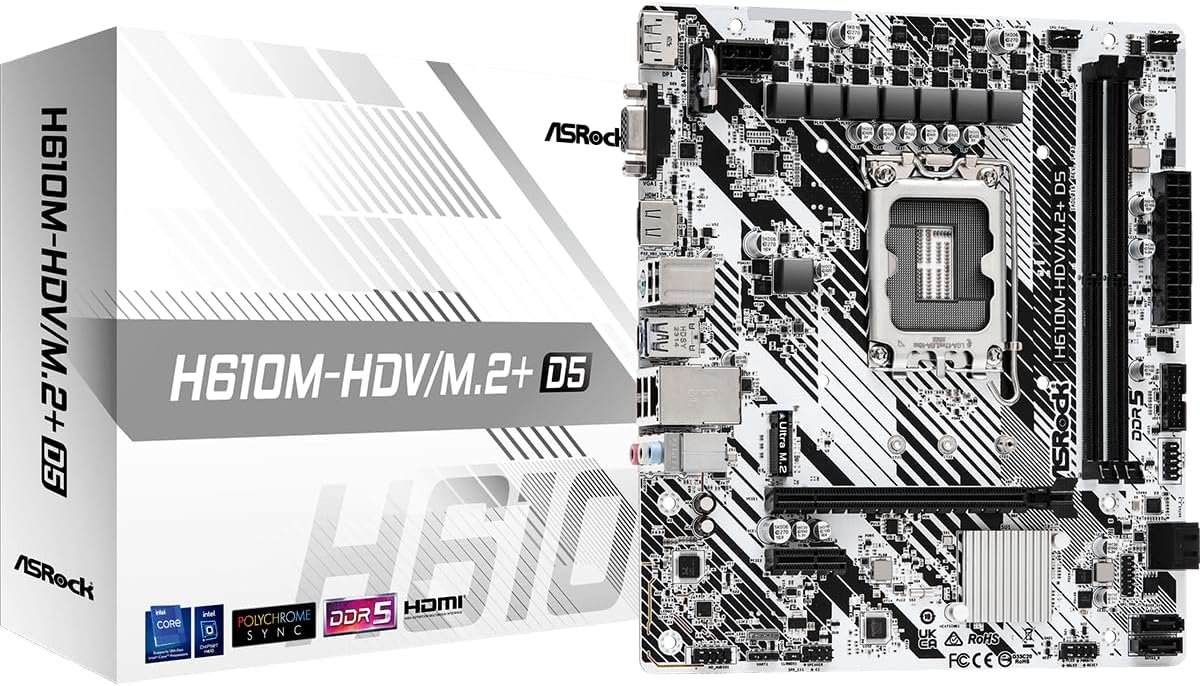
The ASRock H610M-HDV/M.2+ D5 is a compact Intel option for users who want LGA 1700 and DDR5 in a smaller board. It has a 4.4 rating and supports 12th-, 13th-, and 14th-generation Intel Core processors. Its Micro-ATX format makes it useful for smaller cases, while the six-phase power design provides a straightforward platform for mainstream processors.
We may earn a commission when you buy through this link, at no additional cost to you.
Memory support reaches DDR5 5600MHz, and the board includes a PCIe 4.0 x16 slot for a modern discrete graphics card alongside a smaller PCIe 3.0 x1 slot. HDMI, DisplayPort, and D-Sub outputs provide broad monitor compatibility when the chosen processor supports integrated graphics. The M.2+ designation refers to compact storage support, while SATA 6Gb/s connectors cover conventional drives.
As an H610-based board, it is aimed at everyday computing rather than advanced overclocking or extensive high-speed connectivity. Only two DDR5 memory slots are provided, and the platform does not match the dual M.2 and 2.5G networking features of the ASRock A620AM-X. Users should also verify LGA 1700 processor support and whether the intended case has the correct mounting pattern.
Choose this board for a compact Intel build that needs current DDR5 memory and broad display support without a full-size motherboard. It can suit a home office, school computer, or modest gaming system with a discrete graphics card. It is not the best choice for intensive processor overclocking, but for compatible mainstream CPUs it offers a concise, modern foundation.
DDR5 support and a listed speed of 5600MHz provide a current foundation for compatible 12th-, 13th-, and 14th-generation processors.
HDMI, DisplayPort, and D-Sub support several common monitor standards. This is particularly useful for offices and home systems that may reuse existing display equipment.
We may earn a commission when you buy through this link, at no additional cost to you.
The right motherboard depends less on chipset branding alone and more on processor socket, memory generation, expansion needs, case size, and connectivity. Use the following factors to narrow the field before comparing current listings and component compatibility.
The processor socket is the first non-negotiable compatibility point. AMD AM4 supports Ryzen 3000, 4000, and 5000 families on the boards in this guide, while AM5 supports Ryzen 7000, 8000, and 9000 series. Intel LGA 1700 supports 12th-, 13th-, and 14th-generation Core processors, whereas LGA 1155 serves older second- and third-generation systems. Beyond the physical socket, the chipset determines features such as PCIe generation, M.2 lane support, memory speed, networking options, and firmware behavior. Always verify the exact CPU model in the board manufacturer's compatibility list, particularly when the processor is older or the board may require an updated BIOS.
AM4 and LGA 1155 boards in this roundup use DDR4 or DDR3, while AM5 and LGA 1700 boards use DDR5. These memory generations are not interchangeable, so the processor and motherboard choice largely determines which RAM you can install. Two-DIMM boards generally mean one or two sticks, whereas four-DIMM boards provide more incremental upgrade options. Published maximum capacities and overclocked speeds are useful indicators, but actual support depends on the CPU's integrated memory controller and the motherboard BIOS. For a new system, match modules by capacity, timing, and manufacturer guidance rather than buying only for a headline speed.
M.2 support is one of the most important features for a modern build because a single NVMe drive can provide dramatically faster system responsiveness than a conventional hard drive. Some boards include one M.2 slot, while others provide two with different PCIe generations. A PCIe 4.0 x4 slot offers a more direct path for compatible high-performance NVMe drives, while a PCIe 3.0 M.2 slot remains suitable for many practical uses. Also count SATA ports for hard drives, optical devices, and SATA SSDs. Confirm the M.2 protocol, keying, lane sharing, and whether the drive will use a PCIe or SATA connection.
A discrete graphics card generally requires a full-length PCIe x16 slot, so its presence and generation should influence the motherboard choice. PCIe 4.0 provides a current high-bandwidth interface, while PCIe 3.0 remains adequate for many graphics cards. If the board relies on integrated graphics, make sure the selected processor supports it and that the motherboard offers the display output and resolution you need. Extra PCIe x1 slots can support Wi-Fi, capture cards, sound cards, and other accessories, but a compact board may sacrifice these for size. Consider the eventual graphics plan before choosing a model that seems adequate only with integrated graphics.
Micro-ATX is the dominant format in this roundup because it offers a useful balance of compact dimensions and expansion. ATX boards provide more physical room and sometimes stronger feature sets, but they require a sufficiently large case. A small-form-factor case may support only Mini-ITX boards, while a standard mid-tower can usually accept both Micro-ATX and ATX. Check the case specification for supported motherboard sizes rather than estimating from the outside. Also consider GPU length, cooler height, memory clearance, and the location of M.2 sockets and SATA connectors, since a board can technically fit while still making assembly difficult.
Power delivery matters most with higher-power processors and sustained workloads. The boards here range from three-phase designs for basic AM4 systems to a 10+3 configuration in the full-size GIGABYTE B550 Gaming X V2. A stronger design can provide steadier operation and more headroom, but it does not make every affordable board suitable for extreme overclocking. Heatsinks, chipset thermal solutions, and fan-control features also influence temperatures and noise. Match the board to the processor rather than assuming a particular phase count is required, and leave room for a quality CPU cooler and case airflow.
Basic Ethernet is enough for many home systems, but the MSI B550M PRO-VDH WiFi and ASRock A620AM-X provide more flexible connectivity. The former includes Wi-Fi and Bluetooth, while the latter offers faster 2.5G wired networking. USB counts and generations matter when connecting external storage, cameras, docking stations, or other peripherals. Display outputs should match both your monitor and whether the chosen processor includes integrated graphics. The ASRock B550M-HDV stands out with HDMI, DVI-D, and D-Sub, making it especially useful for offices and systems that need to reuse older displays.
BIOS features can make a compact or upgrade-focused build much easier to manage. Q-Flash, Q-Flash Plus, and BIOS Flashback support firmware updates with varying degrees of processor and memory involvement. The MSI board's dedicated Flash BIOS button is particularly convenient for initial setup, while GIGABYTE's Q-Flash Plus allows a similar CPU-free update approach. A clear interface can also make memory profiles, fan curves, boot order, and power settings easier to configure. When buying an older or newly listed model, confirm whether the shipping BIOS supports your chosen processor or whether an update process is required.
Before installation, compare the processor, memory, storage, graphics card, and power supply connectors with the board's manual and product listing. Confirm that the CPU is supported, install the processor and memory before powering on, and make sure the cooler and graphics card are fully seated. Read the board's power and M.2 instructions rather than relying on generic guidance, particularly when using a legacy platform or a storage device with multiple possible protocols.
Enter the BIOS after the first power-on to confirm that the processor, memory capacity, and storage devices are detected correctly. Enable the correct boot device, adjust fan curves, and save only settings you understand. If the board includes Q-Flash Plus or BIOS Flashback, use that function to update firmware when required. After installing the operating system, install the appropriate chipset, network, and graphics drivers from trusted sources.
Good airflow, stable power, and careful cable management help preserve performance and make future upgrades easier. Keep the motherboard away from static discharge, use a grounded wrist strap when handling components, and avoid forceful insertion. Check temperatures and fan behavior under sustained load, keep the case filters clean, and do not change BIOS or memory settings without a clear reason. Periodic visual inspections can reveal loose connectors, cable strain, or overheating before they become major failures.
Yes, an affordable motherboard can support a capable gaming PC when its processor support, power delivery, memory layout, and PCIe graphics slot meet your needs. The graphics card and processor usually have a greater effect on gaming performance than the motherboard itself. Choose a board with at least one full-length PCIe slot, adequate cooling, and enough storage connectivity for your drives.
Choose AM4 for compatible Ryzen 3000, 4000, and 5000 processors, while AM5 covers Ryzen 7000, 8000, and 9000 series. LGA 1700 supports 12th-, 13th-, and 14th-generation Intel Core processors, and LGA 1155 is intended for older second- and third-generation Core systems. Match the socket to the processor you own or intend to buy rather than choosing a board first without considering the rest of the build.
A Micro-ATX board is often better for a compact build because it requires less case space and can still provide four memory slots, M.2 storage, and a full-length graphics slot. A full-size ATX board may offer more expansion room, additional headers, stronger power designs, and easier cable routing. The best choice depends on your case, processor, graphics card, and desired layout.
Four slots are useful when you want to start with a smaller memory configuration and add more later, or when you want to populate all four positions with matched modules. Two slots are sufficient for many ordinary systems and reduce the need to rely on unusually fast dual-rank memory kits. Check the CPU's memory support and practical capacity limits before deciding how many modules to install.
No. AM5 and LGA 1700 boards use DDR5, while the AM4 boards in this guide use DDR4 and the LGA 1155 model uses DDR3. These memory standards use different physical slots and electrical designs, so they are not interchangeable. Check the processor and motherboard memory type before purchasing RAM or attempting to reuse components from another system.
It depends on the model. The GIGABYTE B550M K, MSI PRO B550M-P, and GIGABYTE B550 Gaming X V2 each provide two M.2 positions, while the ASRock A620AM-X also has two Hyper M.2 slots. Other boards may provide one M.2 connection alongside multiple SATA ports. Confirm the M.2 key, PCIe or SATA protocol, and any lane-sharing restrictions before adding a second drive.
No. Integrated graphics generally refers to graphics capability within the processor, which then uses the motherboard's display outputs. Several boards in this roundup include HDMI, DisplayPort, or D-Sub connectors, but the selected CPU must support integrated graphics. If the processor lacks that feature, a discrete graphics card is required.
It depends on the board and processor combination. Newer boards may support compatible processors out of the box, while older inventory may require a firmware update. The manufacturer's CPU support list and BIOS history provide the answer. Q-Flash Plus or BIOS Flashback features can simplify the update, but you should still confirm the exact CPU is supported before installation.
The GIGABYTE B550M K is the strongest general pick because it combines broad AM4 processor support, four memory slots, two M.2 positions, and PCIe 4.0 in a compact board. The MSI A520M-A PRO serves as a budget-focused gaming option with four DIMM slots and a fast M.2 connection, while the ASRock A620AM-X offers the most modern premium platform with AM5, DDR5, dual Gen4 M.2 storage, 2.5G LAN, and BIOS Flashback.
Prioritize the processor socket, memory generation, and form factor before considering secondary features. A board is only a good deal if it supports the hardware already in your system or the hardware you genuinely plan to use. Expansion slots, M.2 lane speed, display connectors, networking, and BIOS update methods should then be matched to the build's priorities rather than chosen from marketing labels alone.
Finally, check current product listings, availability, case dimensions, and manufacturer compatibility documents before purchasing. Motherboard prices and bundle contents can change over time, and the same model may appear with different included accessories. Confirm the processor, memory, graphics card, storage protocol, and case support one final time so the affordable board becomes the right foundation for the entire system.