
21-Piece Opening Pry Tool Screwdriver Set
4.2Editor score
Twenty-one varied repair components
Magnetic swiveling screwdriver heads
Storage bag included
Phone and Tablet Screen Repair Kits guide comparing clamps, pry tools, suction cups, heating pads, and adhesive options for safer DIY screen repairs at home.
Phone and Tablet Screen Repair Kits provide the specialized tools needed to open, position, and reseal cracked or damaged screens. A useful kit should provide the right balance of opening tools, fasteners, fixtures, suction cups, and adhesives while avoiding unnecessary complexity. The best choice depends heavily on device type and repair experience.
The products in this guide were compared using their supplied specifications, included components, device compatibility, and customer ratings. The list covers adjustable fastening clamps, electronics opening tools, screen-lifting suction cups, a controlled heating pad, and precision adhesive tape. It includes compact entry-level sets and more specialized repair equipment.
Each review explains what the kit is best suited for, which repair tasks its components support, and where buyers should expect limitations. The top three selections represent a budget pry-tool set, an all-around clamp and screwdriver bundle, and a premium controlled-heating option. Prices and availability can change, so check current listings before purchasing.
4.2Editor score

4.7Editor score

4.6Editor score
This side-by-side comparison organizes all ten kits by their primary repair function, included equipment, and practical device coverage, helping readers distinguish between opening tools, screen-lifting accessories, fastening fixtures, heating equipment, and adhesive supplies.


This four-piece fastening clamp kit earns a 4.7 rating and stands out as the most balanced option in the guide. It combines adjustable metal screen clips, rubber contact pads, and a screwdriver set in one package. Rather than specializing in only one repair stage, it supports device positioning, screen installation, rear-glass work, and general phone or tablet repairs.
We may earn a commission when you buy through this link, at no additional cost to you.
The clamps are designed to hold a device securely while a new display or rear glass panel is pressed into alignment. Their adjustability allows the fixture to accommodate different shapes, while the rubber pads are intended to keep the screen from being marked or dented under pressure. The included screwdriver tools make the package more practical for beginners who do not already own basic repair implements.
Its main limitation is that it does not handle adhesive separation, screen lifting, or heat application. It is a fixture rather than a complete screen-replacement system, and users will still need to disconnect components and manage adhesive before the clamp becomes useful. The broad compatibility language also should not be interpreted as a guarantee that every model will fit perfectly.
This is the strongest general recommendation for readers who want a compact repair setup centered on screen alignment. It is particularly helpful for technicians, repair shops, and careful beginners who expect to replace screens regularly and want multiple clamps for working on more than one device at a time.
The adjustable clamp structure keeps a phone or tablet stable while pressure is applied to a replacement screen. That control is valuable when adhesive has not yet set and the display might otherwise bulge, sink, or shift out of alignment.
Four clamps and included screwdrivers make this kit more useful than a lone fixture. It gives new repairers a broader foundation, although separate opening tools and adhesive accessories may still be needed for a full screen replacement.
We may earn a commission when you buy through this link, at no additional cost to you.
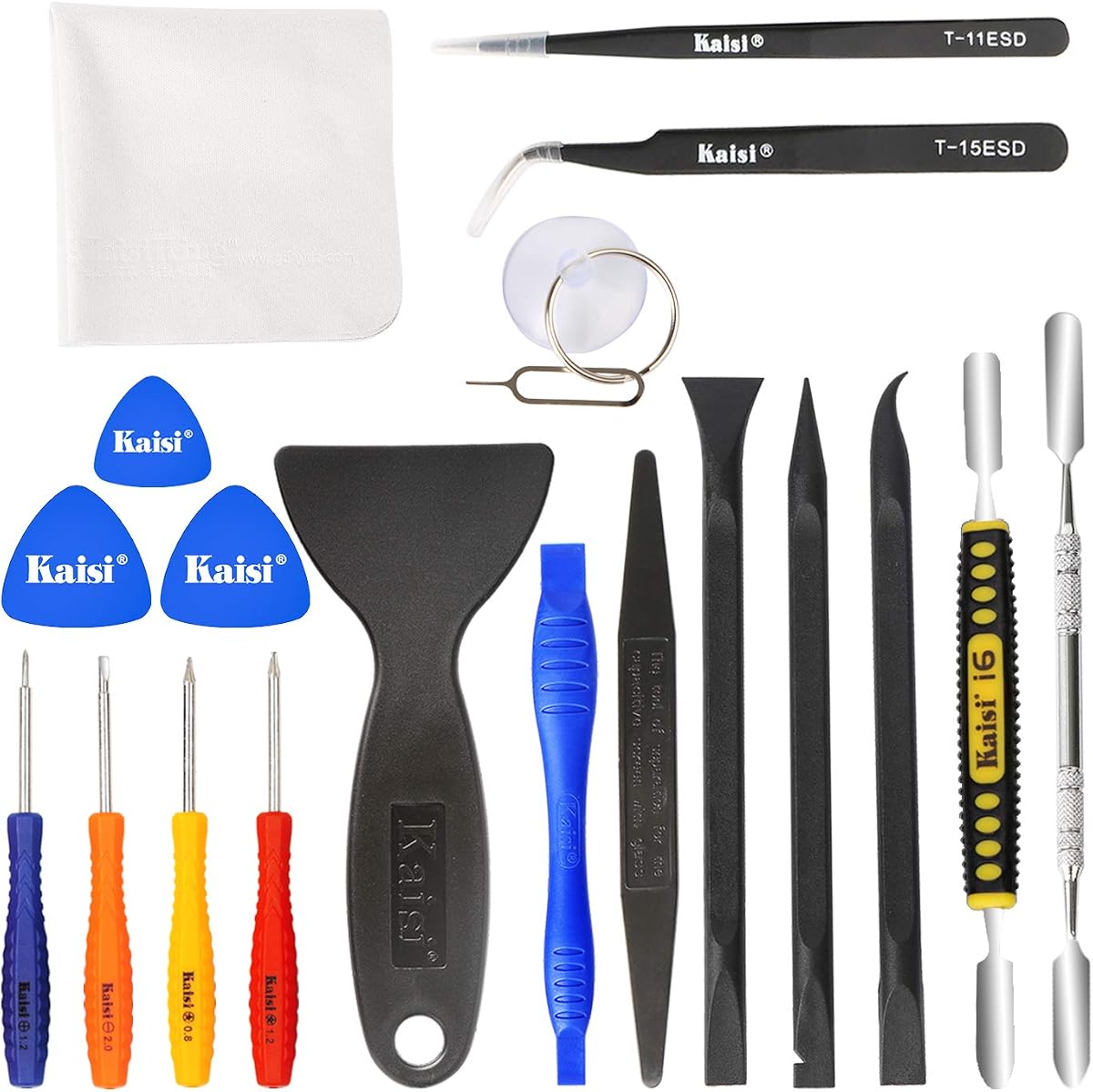
This 20-piece Kaisi toolkit carries a 4.6 rating and focuses on opening and disassembling a wide range of electronics. Its mix of plastic pry tools, steel spudgers, ESD tweezers, screwdrivers, protective film tools, and cleaning cloths gives it more general repair utility than a kit devoted to a single screen-related task.
We may earn a commission when you buy through this link, at no additional cost to you.
Seven nylon pry tools and two steel pry tools offer a useful balance between controlled plastic opening and firmer metal access. The steel construction is described as professional grade and intended to withstand repeated use. The two ESD tweezers are especially relevant when handling tiny screws, touch-screen flex cables, or other precision components.
This package does not include a suction cup for lifting a separated display or a clamp for holding a new panel in place. Buyers seeking to perform a complete screen replacement may need both. The steel spudgers also demand more restraint than plastic cards, particularly around curved edges, glued seams, and sensitive internal components.
Choose this kit if your priority is broad disassembly coverage across phones, tablets, laptops, computers, Apple Watches, iPods, MacBooks, and similar electronics. It is a strong general-purpose repair toolkit for owners who want tools beyond a basic screen-opening card.
Plastic and nylon implements are useful for separating covers without concentrating excessive stress on one point. Metal spudgers provide greater stiffness when a tighter seam must be opened, making careful control and an understanding of the device internals especially important.
ESD tweezers help position tiny parts with greater control, while the included cleaning cloths are useful for removing residue after screen work. These additions make the set more suitable for an ongoing repair bench than a simple pick-and-card package.
We may earn a commission when you buy through this link, at no additional cost to you.
This 21-piece opening and screwdriver set receives a 4.2 rating and works well as an accessible starting point for common phone, tablet, and laptop repairs. It combines multiple screwdrivers, a suction cup, ultra-thin steel pry pieces, and additional opening bars, giving buyers several ways to start disassembly without a highly specialized fixture.
We may earn a commission when you buy through this link, at no additional cost to you.
The screwdriver heads are described as magnetic and use ball-bearing swivel joints for faster work. Color-coded caps, size markings, and head labels make the different drivers easier to distinguish. Alloy-steel bits and a larger handle add durability and grip, while the included bag provides a practical place to keep the 21 components together.
Its 4.2 rating is the lowest among the ten products, so buyers should not expect the same level of customer consensus as the higher-rated options. The set also lacks the clamps, heating controls, and adhesive included in some other packages. Compatibility claims list many iPhone families, but screws, adhesives, and display structures can vary by model.
This is a sensible budget-oriented choice for a first repair, a student, or a technician who wants a varied manual toolkit in one bag. It works particularly well for people who can identify the correct driver and pry method, while those expecting a complete display-replacement workflow may need to add clamps, opening cards, and fresh adhesive.
Magnetic screwdriver heads help reduce the chance of dropping miniature screws inside a device. Swivel caps also allow the bit to turn at a more comfortable angle when working in confined areas.
The combination of a suction cup, thin steel pry pieces, and additional bars provides several opening approaches. Keeping the parts together in the included durable bag makes it easier to select the right tool for each device.
We may earn a commission when you buy through this link, at no additional cost to you.
This heating pad receives a 4.6 rating and offers a more specialized approach to screen separation. Instead of relying only on mechanical picks, it uses controlled heat to soften adhesive between a display and the device frame. Separate phone and tablet modes make it the most specialized option in this guide.
We may earn a commission when you buy through this link, at no additional cost to you.
The phone mode is listed as adjustable from 50 to 248 degrees Fahrenheit, while tablet mode ranges from 50 to 194 degrees Fahrenheit. Time and temperature controls give the user more influence over the process, and the product description states that these settings help avoid burning plastic or LCD components. Its 15-by-7.9-by-1.46-inch platform accommodates several common device sizes.
The product is not a complete repair kit because it does not include the picks, pry tools, screwdrivers, or clamps normally required to finish a screen replacement. Heat can also accelerate damage if the user applies it too long or uses an aggressive setting without understanding the device construction. The supplied information is not a substitute for a device-specific repair procedure.
This is the premium pick for repairers who routinely remove glued phone or tablet screens and want a dedicated heating station. It is especially relevant to technicians who value controlled temperature and timer settings over a simple heat source, while occasional users may find a basic opening kit less complicated.
Heating the display perimeter can soften adhesive and make initial separation gentler. Dedicated phone and tablet modes provide a more structured starting point than an improvised hot plate or hair dryer.
Four notches and 30 screw positions provide dedicated storage for small components. The updated LED display and selectable time and temperature controls make the station easier to monitor during repeated repair jobs.
We may earn a commission when you buy through this link, at no additional cost to you.
This four-piece fastening clamp set has a 4.6 rating and specializes in one essential stage of screen repair: holding a device and a newly positioned screen securely. It supports most mobile phones and tablets and is designed to help a replacement screen sit flat rather than bulge outward or sink into the frame.
We may earn a commission when you buy through this link, at no additional cost to you.
Adjustment gives each clamp some flexibility across different device dimensions. Rubber pads inside the fixture help protect the screen from direct metal contact and reduce the risk of cosmetic damage while pressure is applied. Four units also allow a repairer to stabilize multiple sides of a larger tablet or work on separate devices.
The package is intentionally narrow in scope. It does not provide a method for opening the device, disconnecting internal connectors, heating adhesive, or resealing the perimeter. As a result, it works best as part of a larger toolkit and is not intended to handle an entire screen replacement by itself.
Buy this set when screen alignment and stable positioning are the main concerns, particularly for tablet repairs or repeated installation work. It is a focused, straightforward alternative to broader clamp bundles and should be paired with appropriate opening tools, connectors handling tools, and replacement adhesive.
The clamp's adjustable frame helps resist the uneven pressure that can leave a new screen bowed or unevenly seated. Stable positioning is especially valuable while the user checks gaps and reconnects internal flex cables.
The built-in rubber pads separate the metal fixture from the display surface. This added cushioning supports more careful handling, although the device should still be inspected for marks after repair.
We may earn a commission when you buy through this link, at no additional cost to you.
This six-piece universal clamp set receives a 4.4 rating and provides the largest clamp collection among the products reviewed. It is designed for disassembling and repairing screens on mobile phones, tablets, and other electronics, with particular attention to keeping replacement LCD panels and back-cover glass flush during installation.
We may earn a commission when you buy through this link, at no additional cost to you.
The adjustable metal construction offers a secure grip while accommodating different device shapes. Non-slip rubber pads help protect screen surfaces and improve the fixture's hold. Buyers can use the clamps across iPhone, iPad, iPod, MacBook, laptop, tablet, and LCD repair applications, according to the supplied compatibility information.
A larger number of clamps does not make the set a complete repair system. It lacks opening tools, screwdrivers, heating equipment, and replacement adhesive, so it is most useful after a display has already been removed or when a dedicated positioning fixture is needed. Its 4.4 rating also sits below the other major clamp options, suggesting somewhat less consensus among users.
This set is a good choice for a busy repair bench that needs more fixtures than a four-piece package provides. Six clamps can stabilize a large tablet, support multiple repair tasks, or reduce the time spent reconfiguring a single adjustable clamp for different jobs.
Six clamps make it easier to secure more sides of a larger display or keep several devices positioned at once. That flexibility is useful for repair shops and repeat screen installers.
The adjustable grip supports both LCD screen replacement and back-cover glass work. Rubber pads help maintain control while reducing direct contact with the fragile replacement surface.
We may earn a commission when you buy through this link, at no additional cost to you.
This 11-piece Kaisiking suction cup kit has a 4.5 rating and balances screen lifting with opening tools. The set includes two suction cups, a nylon spudger, a double-sided spudger, two plastic triangles, four auxiliary plastic cards, and a microfiber cloth. It is a compact package for separating display panels from several common device types.
We may earn a commission when you buy through this link, at no additional cost to you.
The locking handle creates a controlled grip on clean, smooth surfaces. A stated lifting capacity of 1–2 kilograms matches the intended use on phones and tablets, while the included plastic implements help separate adhesive and guide the screen edge. The kit explicitly warns against using these small suction cups for televisions, appliances, architectural glass, or other heavy objects.
On heavily bonded screens, the user may need to loosen or separate the adhesive with an opening tool before attempting a lift. A cracked display can also move irregularly, reducing the reliability of a suction seal. The kit includes no heating equipment, fastening clamps, screwdrivers, or replacement adhesive, so it covers only part of the overall process.
This is a good fit for careful DIY users and mobile technicians who already own basic screwdrivers and adhesive supplies. It works particularly well when a clean, flat screen offers a suitable gripping surface and the goal is to separate a display without relying on the edge alone.
The locking mechanism lets the user build and maintain suction before pulling on the display. This offers more control than a simple cup, especially when working along a glued screen edge.
Nylon, double-sided, triangular, and card-style implements cover different gaps and adhesive conditions. The cloth provides a way to clean the screen before applying suction, which supports a more reliable seal.
We may earn a commission when you buy through this link, at no additional cost to you.
This black 11-piece Kaisiking suction kit has a 4.5 rating and is designed around controlled lifting of lightweight electronic displays. The package includes two black suction cups, a nylon spudger, a double-sided spudger, two opening picks, four plastic cards, and a microfiber cloth.
We may earn a commission when you buy through this link, at no additional cost to you.
ABS and natural rubber construction gives the cups a durable yet flexible grip on clean, smooth, flat, and nonporous surfaces. A locking handle allows the user to establish suction before lifting, while the included opening tools help separate strongly bonded adhesive. Listed applications include iPad, iMac, MacBook, tablet, laptop, iPhone, Samsung, and Huawei devices.
The product is limited to lightweight electronics, with a stated suitable range up to 1–2 kilograms. It should not be used for TVs, appliances, automotive glass, architectural glass, or other heavy objects. Cracked or damaged screens can distort the surface and reduce suction consistency, so extra care is necessary during the lift.
Choose this set when you want a dedicated screen-opening package with clearly visible black cups and a balanced selection of plastic tools. It is appropriate for technicians and experienced DIY users who can prepare the adhesive and support the display during separation.
The rubber suction surface is intended to grip clean, flat screens without relying on the bezel alone. This makes the cups useful for creating a controlled initial lift after adhesive has been separated.
The supplied spudgers, picks, and cards can help loosen adhesive around the display perimeter before suction is applied. This staged approach is safer than forcing the cup to release a completely sealed screen.
We may earn a commission when you buy through this link, at no additional cost to you.
This SenseYo kit receives a 4.3 rating and combines two heavy-duty LCD suction cups with an eight-piece mobile-phone disassembly set. The result is a compact package intended to take screens from phones, computers, tablets, and other electronics with smooth glass, metal, or plastic surfaces.
We may earn a commission when you buy through this link, at no additional cost to you.
The cups are made from industrial plastic and thick rubber, with a tabbed design intended to create a firm seal against the screen. The accompanying disassembly tools provide additional ways to separate housings and loosen edges. Together, these components offer a practical starting point for screen removal without requiring a large collection of individual implements.
The heavy-duty name refers to the construction of these small electronic-repair cups, not to suitability for heavy furniture, large televisions, or industrial glass lifting. The 4.3 rating is also lower than the two 11-piece Kaisiking suction kits, and the supplied description does not mention locking handles or a stated weight limit. Users should judge it as a screen-repair accessory rather than a general lifting device.
This kit is most appropriate for a repairer who wants a manageable number of components and a straightforward suction-assisted opening method. It works well as a compact home repair set, particularly for phones and tablets with clean, smooth displays that offer a reliable gripping area.
Industrial plastic and thick rubber are intended to resist bending while maintaining a useful seal. The durable construction makes the cups suitable for repeated electronics repair tasks.
The eight-piece opening set gives users tools for separating edges before the screen is lifted. This combination is more useful for initial repairs than buying a suction cup alone.
We may earn a commission when you buy through this link, at no additional cost to you.
This 2mm LCD repair tape receives a 4.6 rating and addresses a different but essential part of screen replacement: securing the display perimeter. Rather than including general opening tools, it supplies a long roll of narrow double-sided adhesive and a pair of ESD tweezers for precise placement.
We may earn a commission when you buy through this link, at no additional cost to you.
The tape is described as offering strong adhesion, high peel strength, waterproof sealing, solvent resistance, and resistance to aging and softening. Its narrow width suits display edges and other compact bonding lines, while the 50-meter length provides enough material for numerous repairs. The included anti-static tweezers help position the strip around small device contours.
This is a specialist accessory rather than a complete phone and tablet screen repair kit. It will not open a device, lift a display, hold it in alignment, or reinstall internal connectors. The product is also described as approximately 0.1 millimeters thick, and prolonged exposure to high temperatures may prevent it from forming a permanent bond, so application conditions matter.
Buy this tape if you already have reliable opening, lifting, and positioning tools and need a replacement adhesive for screen borders. It is especially useful for precision work across phones, tablets, laptops, cameras, watch screens, LCD panels, and other electronic components listed in the product data.
The 2-millimeter width makes the tape practical for following the narrow perimeter of an LCD assembly. Its thin profile is designed to fit electronics repairs without creating an unnecessarily bulky bond line.
Fifty meters of tape supports numerous replacement jobs and allows the user to cut custom lengths. Combined with ESD tweezers, it creates a practical setup for controlled adhesive placement around delicate components.
We may earn a commission when you buy through this link, at no additional cost to you.
Screen repair kits differ more in function than their general-purpose names may suggest. The right selection depends on whether you need to open a device, lift a display, position a replacement, soften adhesive, or reseal the screen edge.
Begin by deciding which part of the repair process needs support. Opening pry tools separate housings and cut through adhesive, suction cups provide controlled lifting, fastening clamps hold a new display in position, heating pads soften stubborn adhesive, and narrow tape reseals the display perimeter. No single accessory type covers every stage, so the most useful kit is often one that matches a recurring task rather than the longest advertised component list.
Compatibility should be evaluated at both the brand and model level. Broad references to phones, tablets, iPhones, iPads, Samsung devices, MacBooks, and laptops indicate general category support, but the construction of each screen, adhesive, frame, and screw can vary. Look for the tool type that matches the device: a plate for many modern sealed screens, a suction cup for smooth display surfaces, a clamp for alignment, and a heating platform for adhesive that needs controlled warming.
Material affects both effectiveness and the likelihood of damage. Plastic spudgers, nylon tools, and cards are suitable for separating adhesive with less risk of scratching than metal. Stainless steel pry tools and screwdrivers provide strength for tight fasteners, while rubber suction surfaces and pads offer grip on glass. A well-balanced kit combines several materials so the user is not forced to use a hard tool for every step.
Count the actual functions rather than the number of pieces. A useful set may include several spudgers, cards, screwdrivers, tweezers, suction cups, and a cloth, but duplicate pieces with little practical difference add little value. The 20-piece Kaisi set offers a broad electronics assortment, while the heating pad concentrates on one specialized function. Compare the inventory with the repairs you expect to perform and prioritize missing stages over a larger headline count.
Heating can make adhesive separation gentler, but only when the tool provides repeatable settings and the user understands the target device. A dedicated heating pad with separate phone and tablet modes, adjustable temperature, and a timer offers more control than an improvised heat source. Even then, heat should be applied gradually and monitored because prolonged high temperatures may damage screens, adhesives, plastic frames, or nearby batteries.
A repair tool should hold the device without adding unnecessary stress to the glass. Suction cups work best on clean, flat, smooth surfaces, and damaged glass can produce an unreliable seal. Clamps need adjustable contacts and rubber pads so the screen is not marked or distorted. For larger tablets, check whether the fixture can stabilize multiple sides and whether its dimensions are appropriate for the device.
A screen replacement usually involves powering down, removing the device's back or display, disconnecting internal parts, separating adhesive, transferring components, positioning the new panel, and sealing it. Each of these stages may require a different tool. Purchase a broad opening set for disassembly, a clamp set for alignment, a heating pad for stubborn adhesive, and a narrow adhesive roll only if those functions are relevant to your work.
Small screws, clips, and connectors are easy to lose during a repair, so storage deserves attention. Kits with labeled screwdrivers, color-coded caps, a carrying bag, component notches, or dedicated positions can save time and reduce confusion. A heating station with organized storage is particularly useful for professional work, while a compact bag is more convenient for a home repair kit that can be stored away when finished.
Before beginning, power the device down and consult a repair procedure appropriate for its exact model. Gather the necessary tools rather than assuming a general kit includes every required component. Clean the work area, organize small screws in a labeled container, and photograph the device before disassembly so connectors, adhesive, and cable positions can be documented.
Use the lowest-force opening method appropriate to the device. Plastic cards or spudgers are preferable for separating adhesive, while a suction cup should be placed only on a clean, flat section of the display. If heat is required, use the tool's controlled settings, keep the device stable, and avoid exposing batteries or sensitive components to prolonged high temperatures.
After opening the device, disconnect battery and display connections before moving the new screen. Test the replacement before applying permanent adhesive, and use clamps to maintain alignment during the trial. Once the display works, clean the bonding surfaces, apply suitable narrow adhesive evenly, and allow the bond to set according to the adhesive and device guidance. Clean tools after use, keep replaceable tips away from heat, and store the entire kit in a dry area.
A complete repair usually requires several categories of tools rather than one universal device. Opening tools separate the housing or display, suction cups or controlled heat release adhesive, and clamps keep a replacement screen aligned. You also need suitable screwdrivers, internal connector tools, and replacement adhesive. Some kits cover several of these functions, while specialized tools such as a heating pad may need to be purchased separately.
No. The suction cups in this guide are intended for lightweight electronics such as phones and tablets, not large screens, appliances, automotive glass, or architectural panels. A damaged or uneven display may also provide a poor seal. Clean the surface before use and use extra care when lifting a cracked screen because the glass can move before the entire display separates.
Heat can soften adhesive and make separation easier, but it must be controlled. A dedicated heating pad with adjustable temperature, phone and tablet modes, and a timer is safer and more repeatable than improvised heat. Keep the device stable, monitor the process, and follow model-specific guidance. Prolonged high heat can damage plastic, display components, adhesives, or nearby batteries.
A fastening clamp stabilizes a device while a replacement screen is being aligned and pressed into place. Adjustable metal frames and rubber pads help prevent a new panel from bulging, sinking, or shifting before the adhesive sets. Clamps generally do not open the device or release the old adhesive, so they are one part of a larger repair workflow rather than a complete solution.
Narrow LCD tape is designed for bonding display components and other precision electronic surfaces, but its suitability depends on the device and adhesive specification. The 2mm roll in this guide offers strong adhesion, a long length, and removable residue characteristics, while noting that extended high-temperature exposure may interfere with a permanent bond. Follow the screen replacement procedure and use adhesive approved for the specific device.
Look for a mixture of thin plastic cards, nylon spudgers, and stronger metal tools with clearly different profiles. Thin plastic implements reduce scratching, while metal tools help with tight seams and should be used carefully. The full Kaisi kit offers seven plastic pry tools and two steel tools, while the 21-piece set includes multiple pry pieces and a suction cup. Choose a set that matches the types of housings you regularly service.
Use clean, undamaged rubber pads and tighten the fixture only enough to maintain stable alignment. Inspect the pad and clamp contact points before placing a new display between them. Do not squeeze a brittle or cracked panel, and do not assume every device fits a universal clamp. The most important precaution is to avoid placing concentrated pressure on vulnerable glass areas or components beneath the screen.
The products in this guide are repair tools and supplies rather than replacement-screen packages. They include items such as clamps, pry tools, screwdrivers, suction cups, heating equipment, cleaning cloths, tweezers, or adhesive. Buyers still need to source a screen that matches the exact device model and separately obtain any other components required by that repair.
The 4Pcs Phone Screen Repair Tools Adjustable Screen Fastening Clamp Screen Clip Fixture Tools is the strongest all-around recommendation because it combines four adjustable clamps, rubber pads, and screwdrivers. The Kaisi Professional Electronics Opening Pry Tool Repair Kit Metal Spudger is ideal for broad disassembly work, while the 21-piece opening and screwdriver set offers a capable budget-oriented toolkit for first-time repairs and general device maintenance.
For professionals who repeatedly remove glued displays, the Heating Pad Compatible with iPad iPhone Smartphone LCD Screen Separator Machine Repair Tools Heat Plate provides the most specialized premium option. For narrower needs, prioritize the function actually required: a Kaisiking suction kit for lifting, a clamp set for alignment, or the Kaisiking 2mm tape for final bonding. Complete workflows often require several products rather than one oversized kit.
Before ordering, verify the exact device model, the required opening method, and the adhesive or fixture dimensions involved. Customer ratings provide a useful snapshot of buyer satisfaction, but they do not replace compatibility checks or safe repair procedures. Check current prices, availability, included components, and the latest product listing before making a final purchase.