
HANYCONY 1080J Braided Cord Strip
4.8Editor score
Twelve total charging ports
Wide-spaced three-sided outlets
Braided five-foot extension cord
Looking for a surge protector for dorm? Compare ten top-rated models for outlet count, USB charging, cord length, safety features, and desk-friendly designs.
A surge protector for a dorm should make limited space easier to manage while safely powering a laptop, phone, lamp, monitor, and other essentials. The most useful models combine accessible outlets, compact construction, dependable protection, and enough cord length to reach a nearby wall outlet without creating a trip hazard.
The ten products in this guide were compared using the information supplied for each listing, including AC and USB port counts, outlet spacing, surge capacity, extension length, mounting options, safety systems, and physical design. The list covers flat strips, low-profile three-sided strips, and vertical towers suited to desks, nightstands, and other compact dorm spaces.
Each review identifies the reason a product stands out while noting practical limitations. The top selections represent a balanced option, a feature-rich option, and a higher-capacity option, though the right choice depends on outlet count, cord reach, charging needs, and available space. Prices and availability can change, so confirm current details before purchasing.
4.8Editor score

4.7Editor score

4.8Editor score
The comparison highlights the most consequential differences for dorm use: total device capacity, surge protection, cord length, plug design, USB support, and whether the model is best mounted, laid flat, or positioned upright on a desk.



The SUPERDANNY Extension Cord combines eight AC outlets with two USB-A and two USB-C ports in a low-profile strip designed for tight dorm spaces. Its 4.7 rating reflects a strong balance of useful capacity, protection, and flexibility, making it a strong all-around option for students who need to power several electronics at once.
We may earn a commission when you buy through this link, at no additional cost to you.
Its standout feature is the 10-foot cord, which provides considerable freedom when the nearest wall outlet is across the room, under a desk, or behind furniture. The plug is only 0.3 inches thick and uses a 45-degree angled shape, allowing it to sit close to the wall without blocking an adjacent receptacle. Two mounting holes also let the strip be secured vertically or horizontally.
The four-sided outlet arrangement and 1.65-inch spacing make the eight AC outlets easier to use with large laptop chargers and other bulky plugs. Protection includes 1050 joules of surge suppression, 1250W overload protection, 10A over-current protection, and a fire-retardant V-0 casing. The USB section includes two 5V/2.4A USB-A ports and two 5V/3A USB-C ports.
The main limitation is that the stated USB output totals up to 15W, so the USB ports are more appropriate for phones, earbuds, watches, and similar accessories than for power-hungry USB-C laptops. The long cord can also occupy desk or floor space if it is not routed carefully. Even so, this is a versatile dorm option for anyone balancing computers, lamps, chargers, and peripherals.
Choose this model if you want a long cord, several USB charging options, a wall-friendly plug, and a strip that can be mounted rather than left loose. It is a particularly practical fit for dorm rooms where the outlet is inconveniently positioned and cable management matters.
The 10-foot cord gives the strip enough reach to move from a wall outlet to a desk, nightstand, or shelf without requiring an extension of your own. Its thin, angled plug also reduces the gap behind furniture and leaves nearby wall receptacles more accessible.
Two USB-A and two USB-C ports eliminate the need for several wall adapters when charging smaller devices. The shared 15W output means the strip is best treated as a convenient charging hub rather than a replacement for a high-power USB-C charger.
We may earn a commission when you buy through this link, at no additional cost to you.
This 6-foot power strip tower provides twelve widely spaced AC outlets and four USB charging ports in a compact upright format. Its 4.7 rating and vertical construction make it especially useful for dorm desks where a long horizontal strip could occupy valuable work surface or become hidden beneath clutter.
We may earn a commission when you buy through this link, at no additional cost to you.
The tower measures 3.15 by 3.15 by 5.79 inches and uses four rubber feet to remain stable while devices are plugged in or removed. Outlets are distributed around the four sides, allowing several cords to approach from different directions. This arrangement can reduce the sharp bends and tangled crossings that develop when every adapter has to face the same horizontal strip.
Protection is rated at 1800 joules, with overload, short-circuit, and over-current protection. A reset or off switch provides a convenient way to shut the tower down, while the automatic cutoff responds to overload conditions. The USB section includes two USB-A ports and two USB-C ports, with listed maximum outputs of 3.1A for USB-A and 3.4A for USB-C.
Its total USB output is listed as 3.4A, which means multiple connected devices may share available power. The tower also takes up more vertical room than a flat strip and may be less convenient where there is very little space beside a desk. Those caveats are minor for students with several computers, monitors, lamps, and chargers.
This is an excellent selection when desktop organization and high outlet capacity matter more than the lowest possible profile. The 12-outlet count gives room to expand, while the vertical tower keeps a large collection of cables gathered in one accessible location.
The tower's upright form makes it useful on a compact desk where a conventional 12-outlet strip would be unwieldy. Multi-sided access also means cords can run toward the wall, side, or front rather than all bending in one direction.
The 1800-joule rating provides a higher stated surge capacity than several flat-strip alternatives in this guide. It still belongs indoors and should be connected directly to a suitable wall outlet rather than chained to another extension device.
We may earn a commission when you buy through this link, at no additional cost to you.
The HANYCONY 1080J power strip offers eight AC outlets and four USB ports, including two USB-C connections, in a compact three-sided format. Its 4.8 rating is among the highest in the group, and the wide-spaced outlet arrangement makes this a practical option for a dorm desk or nightstand.
We may earn a commission when you buy through this link, at no additional cost to you.
The 2.2-inch spacing between outlets is generous enough to accommodate larger adapters without immediately blocking neighboring sockets. Two USB-A ports are rated at up to 5V/2.4A, while the USB-C ports support up to 5V/3A. Smart charging is intended to detect connected devices and deliver an appropriate output for phones, tablets, earphones, and similar accessories.
Safety features include 1080 joules of surge protection, overload protection, and an integrated circuit breaker with a lighted on/off switch. The flat plug is designed to sit close to the wall, while the right-angle configuration helps preserve access to a second wall receptacle. A five-foot braided cord adds durability and resists visible fraying.
The listing notes that other ports may briefly experience a power interruption while a device is plugged in or unplugged as part of power negotiation. That behavior may be inconvenient in a dorm where several devices charge overnight. The cord is also shorter than the ten-foot options, so the strip is best placed near the wall outlet.
For most students, this strikes an excellent balance between outlet spacing, charging flexibility, protection, and compact size. It is especially suitable for someone who needs a handful of AC connections and a few USB chargers but does not need the outlet capacity of a large tower.
The three-sided layout and 2.2-inch spacing reduce the chance that a large power brick will cover multiple outlets. This is a meaningful advantage over tightly packed strips when a laptop charger, monitor plug, and phone adapter are used together.
The five-foot braided extension is shorter than many competing models but can withstand regular movement around a desk better than a bare-looking cord. Route it along a wall or desk edge to keep the walking area clear.
We may earn a commission when you buy through this link, at no additional cost to you.
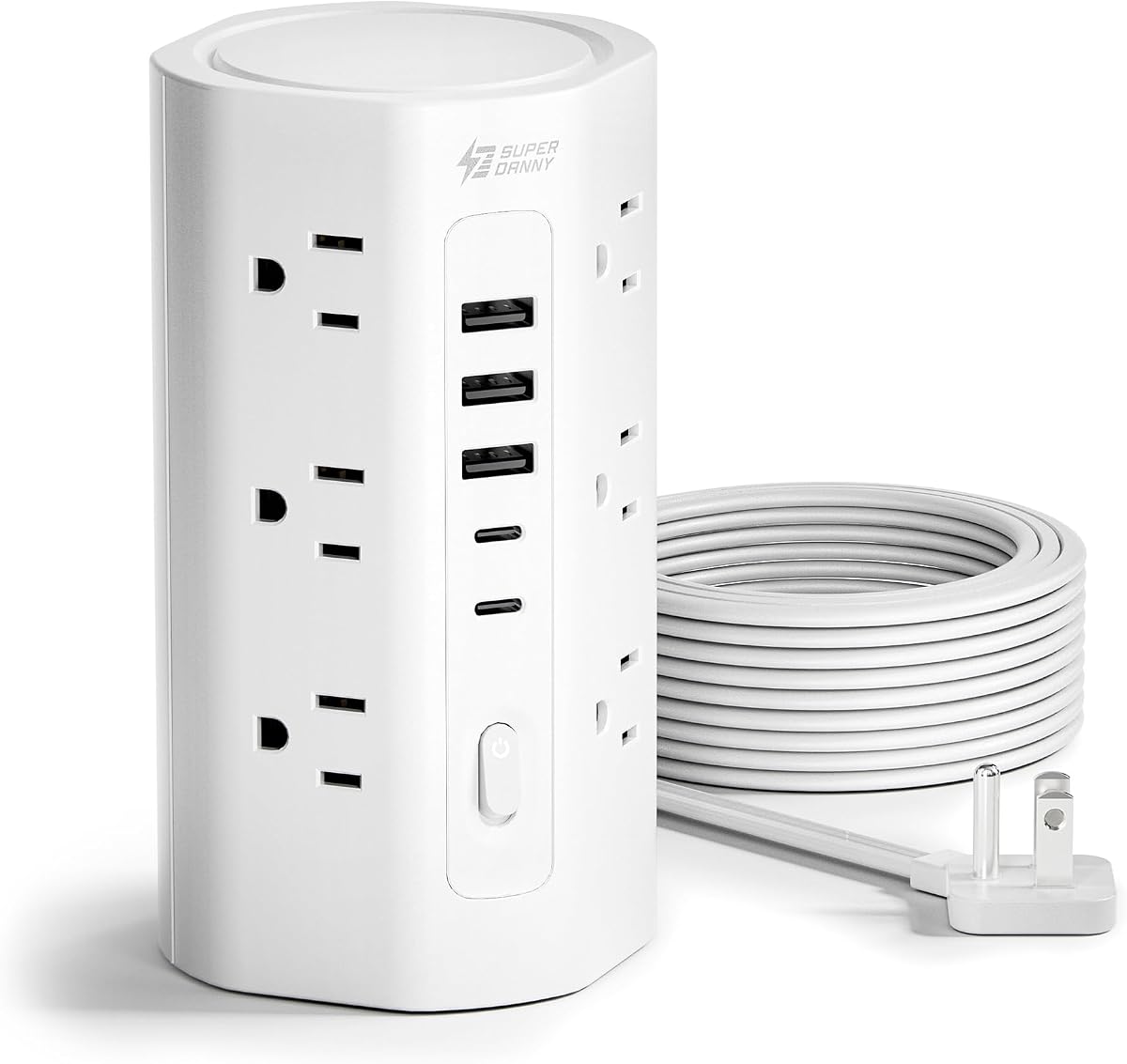
The SUPERDANNY 10FT tower combines twelve AC outlets, three USB-A ports, and two USB-C ports in one upright charging station. With a 4.7 rating and capacity for up to seventeen devices, it is aimed at students who maintain a substantial collection of electronics and want them connected in one organized location.
We may earn a commission when you buy through this link, at no additional cost to you.
Its four-sided tower design provides 1.5-inch outlet spacing for bulky adapters, while the compact 3-by-3-by-5.9-inch body uses less desk area than a long horizontal strip. Four anti-slip rubber feet help prevent the tower from sliding or tipping. This makes the format particularly useful for a dorm desk shared by a computer, monitor, lamp, speakers, and several smaller devices.
The ten-foot cord is listed as 0.12 inches thick, allowing it to run along a wall, beneath a desk, or around a tight corner. Its 0.31-inch flat plug and 45-degree right-angle design help it sit flush and avoid blocking the receptacle below. The length provides much more placement freedom than a five- or six-foot cord.
The stated protection package is extensive: 1700 joules of surge suppression, 1250W and 10A overload protection, grounded, short-circuit, over-current, over-voltage, and overheat protection, plus a V-0 fire-retardant casing rated at 1382°F. A three-year maintenance or replacement plan is also listed. USB power is shared, so charging several demanding devices at once may not provide maximum output to each.
This tower is best for a well-equipped dorm workstation where cable tidiness and device capacity matter. It may be more than necessary for a simple bedside setup, but for a student who already uses multiple adapters, consolidating them can make the space safer and more orderly.
Twelve AC outlets and five USB ports make this one of the highest-capacity options listed. The upright form gathers numerous cables around a central tower and leaves more usable desk space than a comparable horizontal power strip.
A ten-foot cord can span the distance from a distant wall outlet to a bedside table or desk. Because the cord is relatively thin, it can be secured along a wall or under a desk, though it should never cross a walking path unattended.
We may earn a commission when you buy through this link, at no additional cost to you.
The YISHU strip provides eight AC outlets and four USB charging ports in a three-sided design rated at 4.6. It is a straightforward option for dorm rooms that need a modest number of AC connections and several direct charging ports without carrying a large tower.
We may earn a commission when you buy through this link, at no additional cost to you.
Its outlets have 1.8 inches of spacing, which offers more room than a conventional tightly packed strip and helps large plugs avoid obstructing one another. The angled flat plug sits close to a wall and is designed not to clog the outlet beneath it. A six-foot cord provides a useful balance between reach and manageable length, while two rear mounting holes allow secure placement on a wall, desk, or other suitable surface.
The four USB ports consist of three USB-A connections listed at up to 5V/2.4A and one USB-C connection listed at up to 5V/3A. Together with the eight AC outlets, the strip can handle up to twelve connected devices. As with many multi-port USB power strips, charging performance can be affected when several devices draw power simultaneously.
The stated minimum surge energy-absorbing capacity is 900 joules, the lowest figure in this comparison, although the strip also includes overload, short-circuit, over-current, over-voltage, and overheating protection. It is ETL certified, and the listing includes a 12-month warranty and a stated 30-day return period. This provides added reassurance, but the lower surge figure deserves attention for valuable equipment.
This model works well for a student who wants convenient USB charging and a cord long enough to reach from a nearby wall outlet. It is less compelling than higher-capacity towers for a large electronics setup, but its compact format can be a better fit in a smaller room or on a narrow nightstand.
Three USB-A ports and one USB-C port cover most common dorm charging cables without requiring separate wall adapters. The arrangement is especially handy for students carrying phone, watch, earbud, and tablet accessories.
The 900-joule rating and layered safety functions provide baseline protection for ordinary room equipment. Buyers with expensive computers or displays should compare surge capacity and grounding details carefully before making a final choice.
We may earn a commission when you buy through this link, at no additional cost to you.
This 10-foot flat extension cord provides six AC outlets, two USB-A ports, and one USB-C port. Its 4.7 rating and generous outlet spacing make it a simple but effective option for a dorm where a longer cord is more important than a very large number of sockets.
We may earn a commission when you buy through this link, at no additional cost to you.
The 0.35-inch flat plug and 45-degree angle make it easy to position behind a nightstand, bed, or desk while leaving a nearby wall receptacle accessible. Its ten-foot cord offers enough reach to connect a distant outlet to a study area, and the two-inch spacing between AC outlets allows larger power adapters to fit with less interference.
Protection includes 1050 joules of surge suppression, 1250W overload protection, 10A over-current protection, and a fire-retardant V-0 casing rated at 1382°F. The housing and cable are described as UL-recognized. Two mounting holes offer an alternative to leaving the strip on a surface, which can be useful under a desk or beside a bed.
Its USB section includes two 5V/2.4A USB-A ports and one 5V/3A USB-C port, with total USB output listed at up to 15W. This is adequate for common small accessories but not ideal for a high-wattage USB-C laptop. Six AC outlets are also fewer than the eight- and twelve-outlet alternatives, so heavy plug users may need to prioritize another model.
Choose this strip when long reach, generous spacing, and a wall-friendly form are the main priorities. It offers a balanced feature set for a bedroom desk, study table, or nightstand without the footprint of a tower.
The ten-foot cord is particularly useful when the only convenient outlet is across the room, behind a bed, or above a desk. Its thin profile allows more flexible routing than a thick conventional extension.
With six AC outlets and three USB ports, the strip can feel less crowded than a larger model. The two-inch outlet gaps preserve access to individual plugs, making repeated connections and disconnections easier.
We may earn a commission when you buy through this link, at no additional cost to you.
This 6-foot tower combines twelve widely spaced AC outlets with two USB-A and two USB-C ports. It shares the high-capacity format of the other 12-outlet tower in this guide and carries a 4.7 rating, making it a strong option for a desk that must support numerous devices without a sprawling horizontal strip.
We may earn a commission when you buy through this link, at no additional cost to you.
The 3.15-by-3.15-by-5.79-inch body is designed to take up less space than a traditional multi-outlet strip. Four rubber feet help keep it stable, while outlets on all four sides let cords approach from different directions. This can reduce the tangle of adapters that often develops when every device must be plugged into one edge of a flat strip.
The listed USB outputs are up to 3.1A for each USB-A port and up to 3.4A for USB-C, with a total USB output of 3.4A. The listing says USB-C charging can be up to 30 percent faster than a standard 5W charger. That claim is most relevant to compatible devices and should not be interpreted as a guarantee of maximum charging speed for every product.
The 1800-joule surge rating is accompanied by overload, short-circuit, and over-current protection. A reset and off switch allows the tower to be shut down, and the listed automatic shutdown responds to overload. The 0.30-inch flat plug and 45-degree outlet orientation improve access in tight spaces and help the tower sit close to a wall.
The tradeoff is shared USB capacity and the need for enough vertical clearance beside the desk. For a dorm room with a computer setup, monitor, lamp, and several phone accessories, however, the twelve outlets and compact vertical design make this a flexible all-purpose hub.
The vertical tower preserves desk space while offering substantially more AC capacity than most conventional strips. It is a good match for students who need to connect multiple pieces of equipment but dislike a row of plugs spanning the back edge of a desk.
Two USB-C and two USB-A connections eliminate several small adapters, which can reduce visual clutter. Because the ports share a total output budget, heavy simultaneous charging may be slower than charging one device at a time.
We may earn a commission when you buy through this link, at no additional cost to you.
The TESSAN tower combines eleven AC outlets and three USB ports in a compact four-sided design. Its 4.8 rating, 1050-joule surge protection, and space-saving vertical format make it a strong premium pick for a dorm desk that needs more outlets than a conventional strip can offer.
We may earn a commission when you buy through this link, at no additional cost to you.
The tower's multi-sided construction lets plugs connect from the front, back, left, or right, reducing competition for the same face of the unit. Its 0.31-inch flat plug fits tightly against a wall, and the 45-degree right-angle construction helps leave the wall receptacle below accessible. This is useful behind a narrow desk, nightstand, or shelving unit where a conventional plug may not fit.
Two USB-A ports are listed at up to 2.4A, while the USB-C port supports up to 3A. The listing says the ports detect connected devices and deliver an appropriate charging speed for compatible phones, tablets, and earphones. With eleven AC outlets plus three USB connections, the tower can support up to fourteen devices without requiring several separate charging blocks.
Safety features include overload, short-circuit, and over-current protection, along with a reliable on/off switch that can automatically shut the unit down when protection is triggered. Four rubber feet keep the six-foot extension cord from sliding and help stabilize the tower. The stated 1050-joule capacity is lower than the 1800- and 2100-joule options in the list, although it remains comparable to several compact strips.
TESSAN is a good choice for a student who values a stable, polished desk arrangement and many AC outlets. It may not be the first option for someone whose priority is maximum USB port count or maximum listed surge capacity, but its 4.8 rating indicates a well-received overall feature balance.
The vertical tower keeps a large outlet collection in one compact location and separates cables across four sides. It is especially useful for students who want a clear work surface and can place the tower just outside the main writing area.
The thin, angled plug is valuable behind dorm furniture and against walls where a deep plug would either fail to fit or waste a second receptacle. The six-foot cord offers enough flexibility for a standard desk or bedside arrangement.
We may earn a commission when you buy through this link, at no additional cost to you.
The HANYCONY Multi-Outlet Strip uses a slim three-sided format to provide eight AC outlets and four USB charging ports. Its 4.8 rating and 1080-joule surge protection make it one of the strongest compact choices for a dorm nightstand, desk, or shelf.
We may earn a commission when you buy through this link, at no additional cost to you.
The major physical benefit is the 0.35-inch ultra-thin plug, which can sit close to a wall and slide behind furniture. A 45-degree right-angle design preserves access to the receptacle below. The eight AC outlets are separated by 2.2 inches, so large adapters are less likely to obstruct one another, while the three-sided form allows cables to approach from several directions.
The USB section includes two USB-C ports rated at up to 5V/3A and two USB-A ports rated at up to 5V/2.4A, with a total output listed as 5V/3.1A. That makes the strip convenient for common phone, tablet, earbud, and watch chargers, all connected to one wall outlet without separate charging bricks.
Protection includes 1080 joules of surge suppression, overload protection, and other listed safety functions. The fire-resistance PC shell is described as flame retardant at 1382°F, and the product carries RoHS and ETL certification. Unlike several other strips here, the supplied information does not state the cord length or mention mounting holes, so buyers should verify those physical details before ordering.
This is a good fit for students who want a low-profile unit with generous outlet spacing and built-in USB-C charging. Its appeal lies less in extra capacity and more in a clean, practical format that can fit where a larger tower or conventional strip would be inconvenient.
The thin plug and angled body are designed for locations where a standard plug leaves an awkward gap. This makes the strip useful behind a bed, nightstand, or compact desk without pushing furniture farther into the room.
Two USB-C and two USB-A connections provide useful flexibility without the height of a tower. The shared output remains appropriate for smaller accessories and everyday dorm charging rather than multiple high-power laptops.
We may earn a commission when you buy through this link, at no additional cost to you.
The 18-outlet heavy-duty strip is the maximum-capacity option in this guide, combining eighteen AC outlets, four USB ports, and 2100 joules of surge protection. Its 4.8 rating makes it a compelling choice for students with a large computer, gaming, or media setup, though many dorm rooms will not need this much capacity.
We may earn a commission when you buy through this link, at no additional cost to you.
The 2100-joule rating is the highest stated among the ten products. The strip also includes overload protection, an over-current switch intended to limit working current and reduce heat, and a fire-resistant PC shell rated at 1382°F. A protected indicator light shows when the surge-protection function is active. The main components and extension cord are described as ETL certified.
Its six-foot cord uses a right-angle flat plug for easier placement behind furniture or near a wall. Reusable fastening cable ties are included, a detail that is useful for securing the unused portion of the cord. Eighteen widely spaced AC outlets provide ample room for multiple power bricks without turning the strip into a tightly packed row of sockets.
The drawback is physical bulk. A strip with this many outlets is likely to be long or deep, and it may be better positioned along a wall, under a desk, or on a shelf than placed prominently in a tiny work area. The four USB ports also mean the unit can accommodate a large mixed collection of devices, but the total internal capacity still needs to match the connected equipment.
Choose this model when maximum outlet count and a high surge rating are priorities, such as in a dorm with a multi-monitor computer setup or many peripherals. For a simple bedside table with a phone, lamp, and laptop, the added size and outlets may offer little practical benefit.
Eighteen AC outlets and four USB ports make this the most expandable option listed. It can support a computer ecosystem with several monitors, peripherals, a printer, lighting, and numerous charging accessories without requiring multiple wall strips.
The 2100-joule protection system offers the strongest stated surge capacity in the comparison. The included reusable cable ties help keep the six-foot cord controlled, especially when the strip is mounted under a desk or positioned near a wall.
We may earn a commission when you buy through this link, at no additional cost to you.
The most useful dorm power strip balances physical fit, electrical protection, charging options, and manageable cords. Consider where the unit will live, how many adapters you use, and which devices need AC power before choosing a design.
Start by counting the number of wall-plug adapters rather than simply counting powered devices, because many phone chargers and laptop bricks occupy more than one position or create large blocks. Models with eight outlets suit typical desks, 12-outlet towers support more elaborate setups, and the 18-outlet strip is intended for unusually device-heavy rooms. Wide outlet spacing and multi-sided layouts can make a lower outlet count easier to use.
Cord length determines where the strip can be placed. A five-foot cord is convenient when a wall outlet is close, while six feet offers moderate flexibility. Ten-foot models can reach a distant outlet, a bedside table, or the far side of a room, but they require more deliberate routing. Look for a thin cable and an angled plug if the strip will sit behind furniture or beneath a desk.
Surge protection is one of the main reasons to use a listed power strip instead of a basic extension cord. The products here provide stated capacities from 900 to 2100 joules, along with combinations of overload, over-current, over-voltage, short-circuit, and overheating protection. A higher figure is desirable when powering expensive computers or displays, but certification, grounding, and sound construction also matter.
Built-in USB ports remove the need for several charging bricks and help reduce desk clutter. Models with two USB-C ports are more future-oriented, while a greater number of USB-A ports may better serve older accessories. Pay attention to the per-port and total shared output, because a nominal maximum for one port does not mean every port can deliver that amount simultaneously.
Flat three-sided strips can fit behind a bed, slide beneath a desk, or occupy less surface area than a long rectangular block. Vertical towers gather many cords into a smaller footprint and provide outlets on multiple faces, but they need height and a stable surface. Measure the available area, including room for a right-angle plug and for the power bricks you intend to use.
Mounting holes can secure a strip under a desk, beside a bed, or to a wall, helping prevent accidental pulling and reducing cable movement. They are especially useful in dorm rooms where furniture may be moved. If the unit will travel between rooms or outlets, a shorter cord and lightweight flat design may be more convenient than a large fixed tower.
A low-profile flat plug can reach a wall outlet hidden behind a nightstand or headboard. The 45-degree angle used by most products in this guide also helps leave the wall receptacle below accessible. These details are especially helpful in older dorm buildings where outlets may be positioned in awkward places or where furniture sits close to the wall.
Recognized safety certification provides additional confidence beyond marketing claims. Several products listed here are ETL certified, while the SUPERDANNY flat strip and the separate 10-foot flat option are described as using UL-recognized cable and a V-0 fire-retardant casing. Lit on/off switches and protected indicators can also help show operating status, although they do not replace sound electrical practices.
Place the surge protector on a dry, stable surface or mount it securely where it will not be pulled by a cable. Connect it directly to a suitable wall outlet, uncoil excess cord, and route the extension along a wall or beneath a desk. Never place the strip under a rug, across a doorway, or where moisture could reach it.
Distribute high-draw appliances across the available outlets and avoid overloading the strip beyond its stated limits. Unplug the strip before changing the arrangement of devices, and use only the switch or reset control as directed. If the breaker trips, disconnect some loads, inspect the setup, and reset the strip only after identifying and correcting the cause.
Inspect the cord, plug, casing, and sockets periodically. Look for cracks, discoloration, heat, scorch marks, bent pins, or damaged insulation, and stop using the unit if any of these signs appear. Keep liquids away from the strip, bundle unused cord length with ties, and avoid repeatedly yanking devices out by their cables.
A certified surge protector can be useful in a dorm room when it is installed correctly and operated within its limits. Connect it directly to a wall outlet, keep it dry, do not overload it, and avoid placing it under rugs or furniture that can block ventilation. A strip is not a substitute for building-owned surge protection or electrical inspection.
A flat strip is usually better for a narrow surface, a tight wall gap, or a setup that needs to slide behind furniture. A tower is better when you have many devices and want their cords gathered vertically around one central unit. Measure the available desk and vertical clearance before deciding.
A student with a laptop, phone, lamp, and a few accessories will often need only four to eight AC outlets. A large desk with a monitor, printer, speakers, gaming equipment, and several chargers can benefit from 12 or more. Always count the size of the adapters as well as the number of devices.
It depends on the laptop's charging requirements and the strip's stated output. The USB-C ports here list outputs ranging up to 3A or 3.4A, with several products limiting total USB output to 15W. Those values are generally intended for phones, tablets, watches, and earbuds rather than many high-power laptop chargers.
The joule figure indicates the amount of surge energy the protection system is designed to absorb. A higher rating generally offers more capacity for protecting connected electronics, but it does not make a strip immune to every electrical problem. Overload, over-current, grounding, and proper installation remain important.
Yes, if the product has suitable mounting holes and is installed according to its instructions. Many options in this guide include two mounting holes. Keep the strip and connections away from moisture, do not pinch the cord beneath a movable desk component, and make sure the cables remain reachable.
No. Connect one surge protector directly to a wall receptacle rather than plugging it into another power strip or extension cord. Chained devices can create additional heat, overload the upstream connection, and make problems harder to identify. If more reach is needed, choose a longer strip or relocate the furniture.
Replace it if the casing or plug is cracked, the cord is damaged, outlets become loose, or the unit shows unusual heat, discoloration, buzzing, or a burning smell. Also replace it after a severe power event or if its protected indicator no longer behaves as described. Stop using it immediately if any overheating or burning sign appears.
The SUPERDANNY 10-foot flat plug is the most versatile all-around choice because it combines eight AC outlets, four USB ports, a long cord, a wall-friendly plug, and mounting holes. The HANYCONY 1080J braided strip stands out as a value-focused option with wide outlet spacing and a high 4.8 rating, while the TESSAN tower is a particularly polished choice for organized desktop charging.
Prioritize the features your room actually needs. Choose a compact flat strip for tight spaces, a tower for numerous AC connections, and a longer cord only when it can be routed safely. Also check surge capacity, shared USB output, plug clearance, outlet spacing, and certification before settling on a model.
Product details, ratings, availability, and prices can change over time. Review the current listing and manufacturer information before ordering, particularly for cord length, certification, and electrical ratings, and compare the final option with your dorm layout and the devices you plan to connect.