
Windex Electronic Cleaning Wipes
4.4Editor score
Ammonia-free gentle formula
Anti-static cleaning cloths
Compact 25-wipe pack
A MacBook display collects fingerprints, skin oils, dust, and keyboard marks surprisingly fast, and ordinary household cleaners can leave streaks or harm sensitive coatings. The right laptop wipes for Mac should remove grime without excess moisture, residue, or unnecessary abrasion.
This guide compares ten electronic cleaning wipe options based on stated ingredients, screen compatibility, wipe dimensions, packaging, included accessories, odor, portability, and cleaning coverage. It covers pre-moistened and sanitizing formats for MacBook displays, external monitors, keyboards, tablets, and phones.
Each review identifies the product's strongest use case and important limitations, from individually sealed travel wipes to large resealable-canister options. Ratings and specifications reflect the supplied product information, while prices and availability change, so compare the current listing before purchasing.
4.4Editor score
4.5Editor score

4.4Editor score
As an Amazon Associate we earn from qualifying purchases.
This side-by-side comparison highlights each option's format, stated screen compatibility, packaging, and best-use strengths, making it easier to find a wipe that fits your MacBook and cleaning habits.


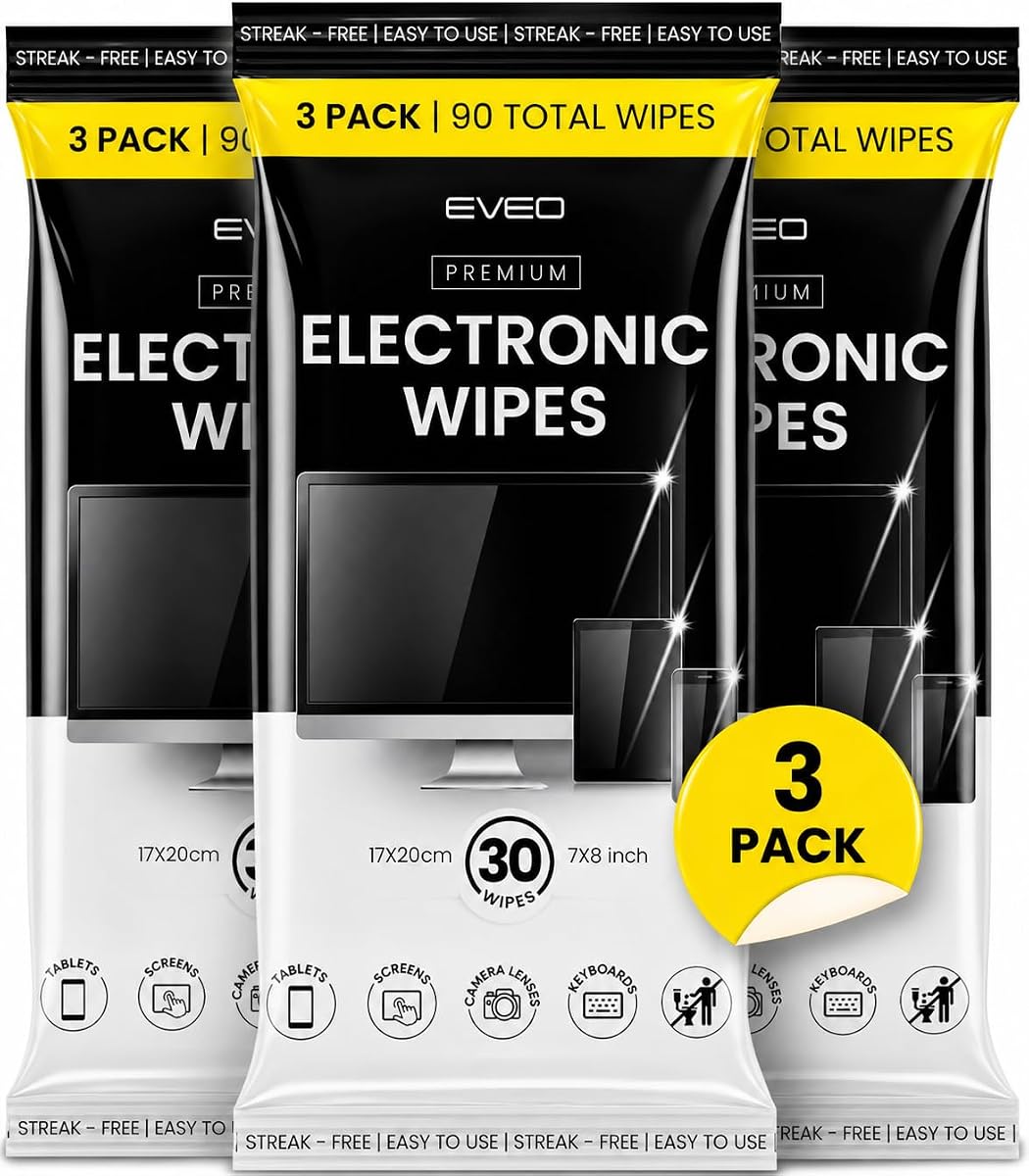
EVEO Electronic Wipes combine 90 pre-moistened wipes with a microfiber cloth, giving users a practical two-stage cleaning system for MacBook displays and other screens. The product carries a 4.5 rating, making it one of the strongest-rated options in this guide, and its stated focus on removing dirt, fingerprints, and smudges closely matches the everyday needs of laptop users.
We may earn a commission when you buy through this link, at no additional cost to you.
The strongest feature is the combination of convenience and follow-up detailing. A pre-moistened wipe handles the initial cleaning, while the included cloth can buff away any remaining marks and restore a clear finish. The wipes are presented as suitable for TVs, laptops, computer screens, phones, tablets, and monitors, making them a sensible choice for users who maintain several Apple or connected devices.
There are a few trade-offs. Ninety wipes are fewer than the quantities offered by the largest multipacks, and the product description does not provide a detailed ingredient list or explicit compatibility statement for every Mac display coating. It is therefore wise to test the wipes on an inconspicuous area and confirm any device-specific cleaning guidance before treating an entire display.
This is the most well-rounded recommendation for someone who wants dependable screen cleaning without buying a separate cloth. It suits daily MacBook touch-ups, shared workspaces, and travel kits. Choose it if the balance between effective cleaning, portability, and a finishing accessory matters more than having the largest possible wipe count.
Start with a wipe to lift fingerprints and surface grime, then use the microfiber cloth for a final pass. This layered approach is particularly useful when a display looks hazy after ordinary contact with the keyboard or trackpad.
The stated multi-device focus makes this package useful beyond a MacBook. It can also clean an iPhone, iPad, monitor, television, or another laptop without requiring separate products for every category of screen.
We may earn a commission when you buy through this link, at no additional cost to you.
Windex Electronic Cleaning Wipes offer a straightforward and economical way to clean a MacBook display. The 25-count pack earns a 4.4 rating and is formulated for electronics, with ammonia-free cleaning and anti-static cloth material highlighted as central benefits. The wipes are intended to remove dust, fingerprints, and smudges while leaving a clear finish.
We may earn a commission when you buy through this link, at no additional cost to you.
This product covers an unusually broad list of compatible surfaces, including computer and laptop screens, televisions, monitors, phones, tablets, iPads, cameras, and car screens. For a MacBook owner who wants a small supply for occasional touch-ups, that versatility can be more valuable than a large multipack. The flat pack is also designed for convenient storage without taking up much room.
The main limitation is quantity. Twenty-five wipes may disappear quickly in a busy household, office, classroom, or shared studio, particularly if the same pack is used for several screens and keyboards. It also does not include a separate microfiber cloth, so users who prefer a final buffing step should already own one.
This is the best pick for budget-conscious buyers who need a small, versatile supply of electronic wipes. It is especially suitable for occasional MacBook cleaning, keeping one in a desk drawer, or maintaining a personal laptop without committing to a high-volume package.
The ammonia-free formula and anti-static cloth material are useful distinctions for laptop owners. They indicate a product designed around electronics rather than general household glass cleaning, although testing remains sensible on delicate surfaces.
The compact flat pack is easy to store in a drawer, laptop sleeve, or cleaning caddy. Its smaller count also makes sense for users who want a straightforward routine without maintaining a large canister of wipes.
We may earn a commission when you buy through this link, at no additional cost to you.
iCloth Screen Cleaner Wipes are positioned as a premium, travel-conscious option with 24 large wipes, each sealed in its own pouch. The product has a 4.4 rating and uses hydra-spun non-woven material designed to lift dirt and oils while protecting screen surfaces from scratches.
We may earn a commission when you buy through this link, at no additional cost to you.
Individual sealing is the standout feature. It helps each wipe retain moisture until needed, prevents the remaining wipes from drying out after one use, and eliminates the loose-wipe cleanup associated with some canisters. The TSA-approved pouches are small enough for a pocket, bag, or glove compartment, which is valuable for travelers, commuters, and hybrid workers who clean their MacBook away from home.
Compatibility claims are extensive, covering OLED, AMOLED, anti-glare, 4K, and touchscreen coatings. The formula combines purified deionized water with isopropyl alcohol and is described as delivering enough moisture for cleaning without excessive residue or overspray. Although that breadth is reassuring, users should still follow the cleaning instructions for their specific Mac and avoid openings.
This is the best choice for someone who values freshness, portability, and material quality over having a large number of wipes. It also works well for travel days when a wet wipe must remain individually protected until it is needed. The trade-off is a smaller count than value-oriented multipacks.
Each wipe is sealed separately, so moisture is protected until use. This packaging is especially convenient for travel because it avoids carrying an open canister and lets users take only the packets they need.
The hydra-spun non-woven material is described as soft and highly absorbent. It lifts oils and surface contaminants while helping reduce the likelihood of scratching delicate displays during routine cleaning.
We may earn a commission when you buy through this link, at no additional cost to you.
ARCHXX Screen Wipes provide 120 individually wrapped, six-by-six-inch wipes with a 4.3 rating. The larger dimensions offer generous coverage on a MacBook display, while the substantial count suits offices, households, and users who clean several screens regularly. A microfiber cloth is included for more detailed finishing work.
We may earn a commission when you buy through this link, at no additional cost to you.
The wipes are designed to remove fingerprints and smudges while drying quickly without leaving streaks, scratches, or lint. Their listed ingredients are isopropyl alcohol, purified water, and wood pulp paper, giving shoppers clearer formula information than many alternatives. Individual wrapping preserves moisture and makes the package convenient to organize or distribute.
The alcohol ingredient warrants attention. Users should turn off the Mac, unplug external power sources, avoid excessive wiping, and keep moisture away from ports and other openings. ARCHXX also advises testing an unknown surface in an inconspicuous location and cautions against using the wipes where a screen coating is already broken.
Choose this product if you want a generous quantity, generous wipe size, and the convenience of individual packets without sacrificing an included detailing cloth. It is a strong fit for shared workspaces and frequent screen cleaning, provided users follow the stated precautions around ports and sensitive coatings.
At six by six inches, each wipe is large enough to cover meaningful portions of a MacBook display. That size can reduce the number of passes needed for fingerprints, dust, and smudges across a larger screen.
The instructions emphasize powering down devices, unplugging external sources, and preventing moisture from entering openings. Following those steps helps users gain more control over moisture while cleaning sensitive electronics.
We may earn a commission when you buy through this link, at no additional cost to you.
EVEO Screen Wipes offer 150 microfiber-soft wipes in a resealable canister, making them the high-volume choice in this comparison. The product has a 4.3 rating and is intended to remove dust, oil, and fingerprints from computers, phones, monitors, televisions, laptops, and other electronic surfaces.
We may earn a commission when you buy through this link, at no additional cost to you.
The six-by-six-inch wipes combine broad coverage with a soft texture. Their quick-drying behavior is intended to leave a clear finish without streaks, while the resealable container is designed to help preserve moisture. A high count is especially practical for offices, workshops, classrooms, or anyone who already owns several screens and keyboards.
Compared with individually sealed products, a canister is less tidy for travel because every use involves taking a loose wipe from the container. The product description also does not list a full ingredient breakdown, so Mac owners who are sensitive to particular cleaning agents may want to check the package before use. Users should always apply the wipe lightly rather than soaking the display.
This is the best option for maximizing cleaning supply and minimizing refills. Choose it when a home office, studio, or busy household will use wipes regularly and the main priority is having plenty on hand. For frequent travel, a packet-based option is more convenient.
A 150-count package is well suited to environments where screens are cleaned daily. It reduces the need for constant replenishment and can cover several MacBooks, external monitors, tablets, and shared workstations.
The microfiber-soft texture is intended to capture dust and debris without scratching or dulling a display. It offers a cloth-like feel while retaining the speed and convenience of a pre-moistened wipe.
We may earn a commission when you buy through this link, at no additional cost to you.
This EVEO Electronic Screen Wipes set contains two 40-wipe packs for a total of 80 wipes and includes a microfiber cleaning cloth. Its 4.4 rating reflects a generally favorable response, and the product is designed to remove dust, fingerprints, skin oils, food particles, spills, and watermarks from a wide range of screens.
We may earn a commission when you buy through this link, at no additional cost to you.
Compatibility is one of the strongest elements of the description. The wipes are listed for flat-screen, LCD, OLED, LED, QLED, and smart televisions as well as computer monitors, phones, tablets, smartwatches, and laptops. A quick-drying, non-streaking formula is intended to leave electronics dry and clear, while the separate cloth provides a final polishing option.
Two canisters offer some flexibility compared with one large container: one can remain at a desk while another stays in a travel bag or cleaning cupboard. On the other hand, the format requires more space than individually wrapped wipes, and no specific ingredient list or fragrance information is provided. Users should avoid saturating the display and clean with light pressure.
This product is a good middle-ground option for households or offices that want two storage points and a complete wipe-and-cloth kit. It works especially well when MacBook owners also maintain external displays, iPads, iPhones, or televisions and want one cleaning system for many device types.
Keeping one pack near a workstation and another in a travel kit makes it easier to maintain clean screens wherever the MacBook is used. It also separates supplies if one canister is used in a shared environment.
The pre-moistened wipes lift grime, while the included cloth buffs the surface. This is useful for fingerprint-prone displays and for finishing a MacBook after it has been handled extensively.
We may earn a commission when you buy through this link, at no additional cost to you.
CloroxPro Disinfecting Wipes are the sanitation-focused option in this roundup, with 75 wipes in a canister and a 4.3 rating. They are marketed to kill 99.9% of certain bacteria in 10 seconds, including listed organisms such as Staph, Strep, E. coli, and MRSA, making them relevant for shared or high-touch electronics.
We may earn a commission when you buy through this link, at no additional cost to you.
The product is described as bleach-free and non-abrasive, with suitability for LCD screens on computers, laptops, phones, and tablets, as well as keyboards. A light citrus blend scent remains after cleaning, and the manufacturer recommends following the wipe with a dry microfiber cloth for a polished finish. That two-step guidance aligns well with a careful MacBook cleaning routine.
Disinfecting is not the same as merely removing dust, and some users may prefer a fragrance-free cleaning product for frequent personal use. Mac owners should also follow the screen and coating guidance supplied by their device manufacturer. The product is best suited to sanitation priorities, shared work areas, schools, offices, or healthcare environments rather than situations requiring only a gentle dry touch-up.
This is the best pick when bacterial disinfection matters more than fragrance preference or minimal residue. It gives MacBook owners a dedicated option for shared desks, keyboards, and frequently handled surfaces, provided they use it as directed and follow up with a dry cloth when a polished finish is desired.
Sanitizing wipes make sense for a MacBook used by multiple people or handled in a busy office. They can also clean compatible keyboards, phones, and tablets that receive frequent contact.
The manufacturer specifically recommends a dry microfiber cloth after disinfecting. That final pass helps remove any remaining marks and produces the polished finish expected from a careful electronics-cleaning routine.
We may earn a commission when you buy through this link, at no additional cost to you.
Air Jungles Electronic Wipes emphasize coverage, offering 70 wipes at eight by ten inches each. The product has a 4.3 rating and is designed to clean LEDs, televisions, computer monitors, tablets, laptops, phones, car screens, and gaming devices without requiring a separate cloth.
We may earn a commission when you buy through this link, at no additional cost to you.
The oversized format is the defining feature. A wipe this large can cover more of a MacBook display or external monitor in one pass, which may appeal to users who clean large displays or prefer fewer sweeping motions. The material is described as premium, non-abrasive, and gentle on most screens, keyboards, laptops, Chromebooks, and gaming equipment.
Larger does not always mean more convenient. An eight-by-ten-inch wipe may be excessive for a phone, compact tablet, or trackpad, and 70 units remain a moderate count compared with the largest multipacks. Users should also avoid flattening the surface with a wet wipe, and no detailed ingredient list is provided in the supplied information.
Choose this product when broad, rapid screen coverage matters most. It is well suited to cleaning large external displays alongside a MacBook and for users who want the convenience of a disposable wipe without carrying a separate microfiber cloth.
The extra-large dimensions can cover a substantial portion of a MacBook or monitor in a single sweep. This is particularly helpful on larger external screens where small wipes require repeated overlapping passes.
Because the product is designed to work without a cloth, it offers a streamlined routine for desks, gaming setups, and travel kits. The resealable cap helps keep the remaining wipes moist between uses.
We may earn a commission when you buy through this link, at no additional cost to you.
Glasses Wipes Lens Cleaner delivers 400 individually wrapped, pre-moistened wipes and carries a 4.6 rating, the highest numerical rating among the products compared. Although its primary category is lens cleaning, the description explicitly includes electronics, phones, computers, laptop screens, camera lenses, keyboards, binoculars, and other optical surfaces.
We may earn a commission when you buy through this link, at no additional cost to you.
The formula is ammonia-free and fragrance-free, which makes it appealing to people sensitive to strong odors. Its five-point-nine-by-five-point-five-inch size provides decent display coverage while remaining portable enough for a car, office, school, gym, or home. Each packet is sealed individually, helping maintain moisture and making the wipes easy to distribute.
The nonwoven material is described as compostable and biodegradable, adding an environmental consideration absent from most competing products. However, this is primarily a lens-cleaning product, and its screen compatibility is less explicit than that of products designed specifically for LCD, OLED, or touchscreen coatings. Users should test it first and follow Mac display care guidance.
This is the best pick for buyers who want an enormous number of individually protected, fragrance-free wipes and already use lens cleaners around the home. It is particularly convenient for cleaning glasses, camera optics, keyboards, and screens with one multipurpose supply, although display-specific wipes may be a better choice for highly delicate screens.
Four hundred individually wrapped wipes are practical for offices, classrooms, studios, and homes where many people need cleaning supplies. The packets can be distributed without worrying about an open container drying out.
The ammonia-free, fragrance-free formula is useful for sensitive users, while the stated compostable and biodegradable nonwoven material may appeal to environmentally conscious shoppers. Packaging rules and local disposal guidance should still determine how used wipes are discarded.
We may earn a commission when you buy through this link, at no additional cost to you.
EOTW Computer Screen Wipes include 120 individually wrapped, pre-moistened wipes and one microfiber cleaning cloth. The product has a 4.4 rating and is designed to remove stains, fingerprints, and oils from computer screens, keyboards, phones, tablets, and laptops without leaving streaks or residue.
We may earn a commission when you buy through this link, at no additional cost to you.
Its largest benefit is straightforward portability. Each wipe is sealed, which helps preserve moisture and makes it easy to keep a fresh cleaning option in a pocket, handbag, desk drawer, or travel kit. The included cloth provides a second step for drying or buffing a display if it remains wet after the initial pass.
The most important limitation is an explicit warning not to use the wipes directly on a Retina Display such as a MacBook Pro display if it has no screen protector. This restriction makes careful reading essential, particularly for buyers whose MacBook lacks a protective cover. The formula also does not provide a complete ingredient list in the supplied description.
This product suits users who clean many compatible electronic surfaces and value individually protected wipes at a generous count. It can work well for MacBook models or setups with an appropriate screen protector, but owners of uncovered Retina displays should choose a product with explicit compatibility or follow their device manufacturer's cleaning guidance instead.
Individual wrapping keeps unused wipes separate from moisture and makes the package easy to organize. A user can place one packet in a laptop sleeve and keep another in a desk or travel bag.
The description explicitly says not to use the wipes directly on an unprotected Retina Display such as a MacBook Pro. Mac owners should check their display and protective setup before applying the product to avoid unnecessary risk.
We may earn a commission when you buy through this link, at no additional cost to you.
The best laptop wipes for Mac depend on display coating, moisture tolerance, cleaning frequency, scent preferences, portability, and how many screens you maintain. These factors help narrow the field before comparing package size and convenience.
Begin by checking the cleaning guidance supplied with your Mac, especially if the display has a nano-texture coating, an anti-reflective layer, or an aftermarket screen protector. Wipes explicitly marketed for electronics are generally more appropriate than ordinary glass cleaners, but individual product instructions can differ. The EOTW listing, for example, warns against direct use on an unprotected Retina Display such as a MacBook Pro display. Other products state broad support for LCD, OLED, touchscreen, anti-glare, or modern display coatings.
Prioritize products with clear screen-compatibility language and test any unfamiliar formula on a small, inconspicuous portion of the display. Avoid assuming that a product safe for a monitor is automatically safe for every laptop coating.
A screen wipe should be damp enough to lift oils and fingerprints but not so wet that liquid can seep into a MacBook's keyboard, ports, speakers, or hinge. Products that emphasize quick drying, controlled moisture, or a pre-moistened not-saturated design are worth considering. Isopropyl alcohol-based wipes can be effective, but they still require careful application and should not be allowed to pool on the display.
Look for guidance that recommends powering the device down, unplugging external power, and avoiding openings. If a product leaves the surface visibly wet, use a clean microfiber cloth or let it dry before powering on.
Ingredient information helps identify the type of cleaning performed. ARCHXX lists isopropyl alcohol, purified water, and wood pulp paper, while iCloth combines purified deionized water with isopropyl alcohol. Other products emphasize ammonia-free, bleach-free, or specialist electronics formulas without providing a complete ingredient breakdown. These differences can influence residue, odor, material compatibility, and how a wipe behaves on coatings.
Choose a clearly documented formula when you have sensitivity concerns or specific material needs. For heavily coated displays, manufacturer guidance should take priority over assumptions based on a wipe's general electronics label.
Material affects gentleness, lint pickup, and how much display area can be cleaned in one pass. Soft microfiber or hydra-spun non-woven materials are designed to capture dust without aggressive abrasion, although actual performance depends on application. Size is equally practical: six-by-six-inch and eight-by-ten-inch wipes cover more of a MacBook, while smaller wipes can be easier to control around ports and compact screens.
Match the size to your routine rather than choosing automatically by quantity. Larger wipes suit large external monitors, while smaller or more controlled applications can be preferable around a MacBook's edges and keyboard.
Packaging determines portability, moisture retention, and convenience. Individually wrapped wipes stay fresh, prevent cross-contamination between users, and fit easily into pockets or travel pouches. Resealable canisters are more compact and can be economical for high-volume use, provided the lid is closed properly after each wipe. A flat pack works well for occasional cleaning but offers less protection for unused wipes.
Choose individual packets for commuting and travel, or a canister for a desk, office, or household cleaning station. The most important factor is whether the package matches how often and where you use the product.
A 25-count pack may suit someone cleaning a laptop occasionally, while 70, 90, 120, 150, 80 across two canisters, and 400-wipe packs address different consumption patterns. More wipes are not automatically better, but they can reduce replenishment in busy offices, classrooms, homes with multiple devices, and shared workspaces. Consider how many people use each MacBook and whether the same product will also clean monitors, tablets, phones, and keyboards.
Choose a quantity matched to realistic use. For infrequent personal cleaning, a compact pack avoids excess storage; for a high-traffic environment, a larger supply offers better convenience.
Routine screen cleaning and disinfection are different objectives. Pre-moistened electronics wipes focus on fingerprints, oils, dust, and smudges, while CloroxPro emphasizes sanitizing common electronics and killing listed bacteria. Some users prefer an unscented option, others like a light citrus scent, and fragrance-free can be preferable for shared spaces or frequent personal use.
Decide whether your priority is visual cleanliness, sanitation, or an enjoyable scent. A sanitizer may be appropriate for a shared or high-touch MacBook, but it is not automatically the best choice for every display or every user.
If the MacBook travels regularly, packaging can matter as much as cleaning performance. TSA-approved, individually sealed pouches are easy to carry through travel routines and avoid leaking in a bag. A resealable canister is compact but should be kept upright and secured. Include a separate clean microfiber cloth if your chosen wipes can leave the screen damp or if you prefer a final buffing step.
For commuters, build a small cleaning kit around one packet, a soft cloth, and a storage sleeve. For desk-based users, a larger canister and a dedicated microfiber cloth are usually more convenient.
Start by shutting down the Mac and disconnecting external power sources. Take a fresh wipe, fold or crease it as needed, and test it on a small, less-visible area of the display. Wipe gently using light, overlapping strokes rather than pressing hard or scrubbing in a small circle. Avoid directing moisture toward the hinge, camera, keyboard, speakers, ports, or any opening.
For routine cleaning, remove dust and fingerprints with one pass and use a clean, dry microfiber cloth to finish the surface if needed. Let the display dry completely before closing the lid or powering on the device. Do not use a wipe on a visibly damaged screen coating, and follow the display-care instructions that came with the Mac or that appear on the screen protector's packaging.
Store the wipes as directed: keep individual pouches sealed, close resealable canisters tightly, and keep all products away from excessive heat. Discard used wipes rather than rinsing or reusing them. If a wipe leaves persistent streaks, allow the screen to dry and buff it with the included cloth; if haze or residue remains, stop using the product and consult the manufacturer's guidance.
They can be safe when the product is intended for electronics, the MacBook screen is not damaged, and the instructions are followed carefully. Shut the Mac down, use light pressure, and avoid pushing moisture toward ports or openings. Check the compatibility notes for your exact model and screen protector, and test an unfamiliar product on an inconspicuous area first.
Some lens-cleaning products are explicitly formulated for electronics as well as lenses, but not every lens wipe is appropriate for every MacBook coating. The Glasses Wipes option in this guide states that it can clean laptop screens, yet the more cautious approach is to verify ingredients and compatibility first. A screen-specific product with clear electronics guidance is generally the safer choice.
Disinfecting wipes may be useful for a shared or frequently handled MacBook, especially around keyboards and other high-touch areas. They are not automatically necessary for every user and may leave a noticeable scent. Follow the wipe's directions, do not allow liquid into openings, and use a dry microfiber cloth afterward for the recommended finish.
A clean, soft microfiber cloth is the most useful companion because it lifts remaining moisture and can buff light streaks without adding fibers. Keep a dedicated cloth for screens and avoid household cloths that may contain detergent, loose threads, or abrasive material. A separate cloth for keyboards and screens helps prevent transferring grime between surfaces.
Clean the display when fingerprints, dust, or smudges affect visibility, rather than on a rigid schedule. A quick wipe every few days is often sufficient for personal use, while shared work devices may need more frequent attention. Always power down the Mac before cleaning and stop if the screen coating is already cracked or peeling.
Cleaning wipes are intended to remove dust, oils, fingerprints, and smudges, not repair physical scratches. A soft wipe may make a dirty display appear clearer, but deep scratches or damaged coatings require different treatment and possibly professional service. Do not scrub a damaged screen because abrasion can worsen the appearance.
Individually wrapped wipes are generally more portable and help each wipe retain moisture until use. Canisters take up less space, are convenient at a desk, and can offer a higher wipe count. The best format depends on whether portability, freshness, compact storage, or bulk convenience matters most in your routine.
Let the screen dry completely, then buff it gently with a clean, dry microfiber cloth in straight, light strokes. If residue persists, avoid repeatedly applying more cleaner, which can add moisture. Check that the cloth is clean, the wipe was not overly saturated, and the product is compatible with the display coating.
The EVEO Electronic Wipes stand out as the best overall option because they combine 90 pre-moistened wipes with a microfiber cloth and a strong multi-device cleaning focus. Windex Electronic Cleaning Wipes are the best budget choice for occasional maintenance, while iCloth Screen Cleaner Wipes earn the premium designation for their individual sealing, soft material, and travel-friendly packaging.
Prioritize compatibility and moisture control above everything else. Check the specific warnings for your Mac model, especially if you have a Retina display or aftermarket screen protector, and follow the device manufacturer's cleaning instructions. After that, choose the packaging and quantity that suit your routine: sealed packets for travel, a canister for a desk, and a microfiber cloth for finishing.
Ratings, package details, and formulas can change as manufacturers update products, and current prices and availability vary by seller and time. Before purchasing, confirm the listing details, ingredient information, coating guidance, and return terms. With that final check, you can choose a laptop wipe that cleans a MacBook effectively without unnecessary risk or inconvenience.