
RCA Svideo to HDMI Converter with HD Cable
4.2Editor score
Integrated RCA and S-Video cables
Selectable 720P and 1080P output
Automatic NTSC and PAL detection
Explore the best S Video to HDMI Upscaler options, comparing 10 converters for video quality, resolution, aspect ratio, audio, compatibility, and setup.
An S Video to HDMI upscaler connects older video sources to modern televisions, projectors, and monitors. The right adapter should preserve the look of the original material while providing a stable digital signal, useful image controls, flexible aspect-ratio options, and convenient audio routing across a wide range of legacy devices.
This guide compares ten converters based on resolution support, input and output options, image controls, bundled accessories, compatibility, and practical setup considerations. It includes dedicated S-Video and RCA models, feature-rich upscalers, capture-capable devices, and two converters that perform the opposite HDMI-to-analog conversion for a broader perspective.
Each review explains the strongest reasons to consider the converter, along with limitations that may affect particular setups. Ratings and product details reflect the supplied listings, while prices and promotions can change, so readers should confirm current availability and the complete package contents before purchasing.
4.2Editor score

4.3Editor score

4.4Editor score
The table below compares all ten products by direction, supported input, output resolution, and notable features. Use it to narrow the field before considering controls, cables, and source-specific compatibility.



The ClearClick AV to HDMI Converter 3.0 is a feature-rich analog-to-digital adapter rated 4.2 by customers. It accepts RCA composite and S-Video video, converts those signals to HDMI, and provides selectable 720P or 1080P output. Its defining advantage is the included remote, which puts brightness, contrast, saturation, hue, resolution, and aspect-ratio adjustments within easy reach.
We may earn a commission when you buy through this link, at no additional cost to you.
This converter is particularly useful when the source footage or game image needs tuning after being viewed on a modern display. The 4:3 option preserves the original composition with black bars, while the 16:9 option stretches the image to fill a widescreen television. That flexibility is valuable for users who alternate between archival video, console games, and material intended for full-screen presentation.
The main trade-off is that the S-Video cable is not supplied, and the RCA cable is required for audio. It also cannot convert HDMI back to RCA or S-Video. Nevertheless, for users who value remote image correction and flexible aspect handling, those limitations are easy to understand and do not undermine the core conversion function.
This is a strong choice for VHS, VCR, camcorder, DVD, set-top box, and supported gaming-system owners who want a plug-and-play path to an HDMI television. It is particularly attractive for installations where frequent fine-tuning is expected. Confirm that your source offers the appropriate analog output and that the separate cable requirements suit your setup.
The remote makes on-screen calibration more convenient than repeated button presses on the unit. It can adjust several core picture settings as well as output resolution and aspect ratio, making it useful for sources with different color and geometry characteristics.
Keeping the native 4:3 look avoids the horizontal stretching commonly associated with old standard-definition recordings. Switching to 16:9 fills the television when a full-screen presentation matters more than preserving every original edge.
We may earn a commission when you buy through this link, at no additional cost to you.
The HTDYOO S Video to HDMI Converter is a direct, uncomplicated solution rated 4.2 by customers. It accepts RCA composite or S-Video input and sends the selected picture to an HDMI television or monitor at 480P or 720P. The unit is powered from a USB port, reducing the number of separate power adapters required for many installations.
We may earn a commission when you buy through this link, at no additional cost to you.
Its strongest convenience comes from the integrated RCA and S-Video cables. An HDMI cable is not included, so a compatible cable must still be available or purchased separately. The converter is suitable for older game systems, VHS players, VCRs, DVD players, projectors, and set-top boxes whose output is limited to analog video.
Users should note two important limitations. It cannot reverse the conversion from HDMI to RCA or S-Video, and it accepts 480i input but not 480P input. Its maximum 720P output also means it is not the right choice for buyers who specifically need a converter capable of delivering 1080P.
Despite those limits, the HTDYOO is a sensible pick for a basic legacy-console or VHS display project where straightforward one-way conversion is the only requirement. It avoids unnecessary complexity and offers clear input selection. Verify the output type and signal standard of your source before connecting it.
Integrated input cables reduce setup clutter and make the converter easier to move between televisions, projectors, and game systems. The needed source-side connections are already attached, leaving only power and the HDMI output to arrange.
A 720P ceiling is reasonable for many standard-definition sources because it provides a modern digital connection without claiming capabilities the converter does not have. Owners seeking higher output should choose a model explicitly supporting 1080P.
We may earn a commission when you buy through this link, at no additional cost to you.
This RCA Svideo to HDMI Converter is rated 4.0 and focuses on giving users more control over how legacy signals appear on an HD television. It accepts 480i NTSC or 576i PAL input, carries R/L audio, and provides 720P or 1080P at 60Hz through HDMI.
We may earn a commission when you buy through this link, at no additional cost to you.
Its standout feature is the four-option aspect-ratio system: 4:3, 16:9, 16:10, and Full. The 4:3 setting is useful for retro games, while the wider modes suit DVDs and other sources that benefit from a widescreen presentation. Output resolution can also be selected with a switch on the converter.
The supplied power adapter, RCA cable, S-Video cable, and HDMI cable reduce the chance that a new buyer will immediately need additional accessories. One limitation is that conversion begins with an analog standard-definition signal, so the device creates a digital output but cannot add detail absent from the source.
This is a good match for owners of VHS, VCR, DVD, or classic game systems who want several framing options and a complete initial connection package. It is especially compelling for multi-console users. The lower rating suggests some variability in user experience, so checking recent customer feedback can help confirm whether its controls meet your needs.
Different sources have different native proportions, and the 4:3, 16:9, 16:10, and Full settings give users practical control over that relationship. This is especially helpful when moving between retro games and widescreen video.
Including the power adapter, analog connection cables, and an HDMI cable simplifies the first installation. Buyers can compare the listed contents with their existing equipment to determine whether any additional cable is required.
We may earn a commission when you buy through this link, at no additional cost to you.
The Tendak HDMI to Composite 3RCA AV S-Video Converter performs the reverse of a conventional S-Video-to-HDMI adapter. It takes an HDMI signal and produces S-Video or RCA composite video alongside left and right analog audio. The product carries a 4.1 customer rating and is included to show a different way these conversion boxes are used.
We may earn a commission when you buy through this link, at no additional cost to you.
Its HDMI input can handle 480p, 576p, 720p, 1080i, and 1080p at the listed frame rates. A PAL or NTSC switch accommodates different source standards, while the analog outputs support 480i, 480p, 576i, and 576p. This makes the device relevant for a television, projector, or monitor that lacks modern HDMI input.
The conversion is strictly one way. It cannot receive S-Video or RCA input and cannot send HDMI output, so it should not be selected for a traditional legacy-to-modern setup. The reduced analog output resolutions also mean it is not intended to turn a modern high-definition source into a full-resolution 1080p analog picture.
This converter is best for people with an HDMI source but an older television or projector that accepts S-Video or composite video. Its broad list of compatible source types includes consoles, laptops, media players, and disc devices. Choose it only when the direction of conversion matches the equipment in your room.
A laptop, modern console, or streaming box may have HDMI output while the available television or projector uses older analog connections. This converter bridges that mismatch by making S-Video and RCA video available.
The PAL and NTSC switch helps align the converter with the source system. Correct selection helps maintain synchronization and reduces avoidable picture or audio compatibility issues.
We may earn a commission when you buy through this link, at no additional cost to you.
The RCA Svideo to HDMI Converter earns a 4.3 customer rating, the highest among the dedicated standard-definition-to-HDMI adapters in this group. It accepts RCA composite or S-Video video with R/L audio, then upscales 480i NTSC or 576i PAL input to selectable 720P or 1080P HDMI output.
We may earn a commission when you buy through this link, at no additional cost to you.
Both analog video formats can remain connected at the same time, and a switch selects which source is active. The converter also includes a 3.5mm audio output in addition to carrying audio through HDMI. That extra audio route is useful for older televisions without suitable digital audio input or for a separate powered speaker or amplifier.
The included power adapter, composite cable, and S-Video cable support a straightforward installation without software. Its simplicity is also its main limitation compared with feature-rich models: there is no listed remote for adjusting color, brightness, contrast, or geometry. The picture therefore depends more heavily on the source and the television's own menu settings.
For buyers seeking a balanced converter with a strong listed rating, broad classic-console support, flexible input selection, and a useful analog audio option, this is a strong all-around choice. It is particularly appropriate for N64, PS2, Wii, DVD, VCR, and camera owners who want modern HDMI connectivity without a complex control system.
Keeping RCA and S-Video sources connected at once lets the user change source with the built-in switch instead of unplugging cables. This is convenient for game collections or setups with both a console and a video deck.
The dedicated 3.5mm output gives users another way to connect the converted audio. It can be useful with legacy speakers, amplifiers, or a television whose HDMI input does not expose a convenient analog audio connection.
We may earn a commission when you buy through this link, at no additional cost to you.
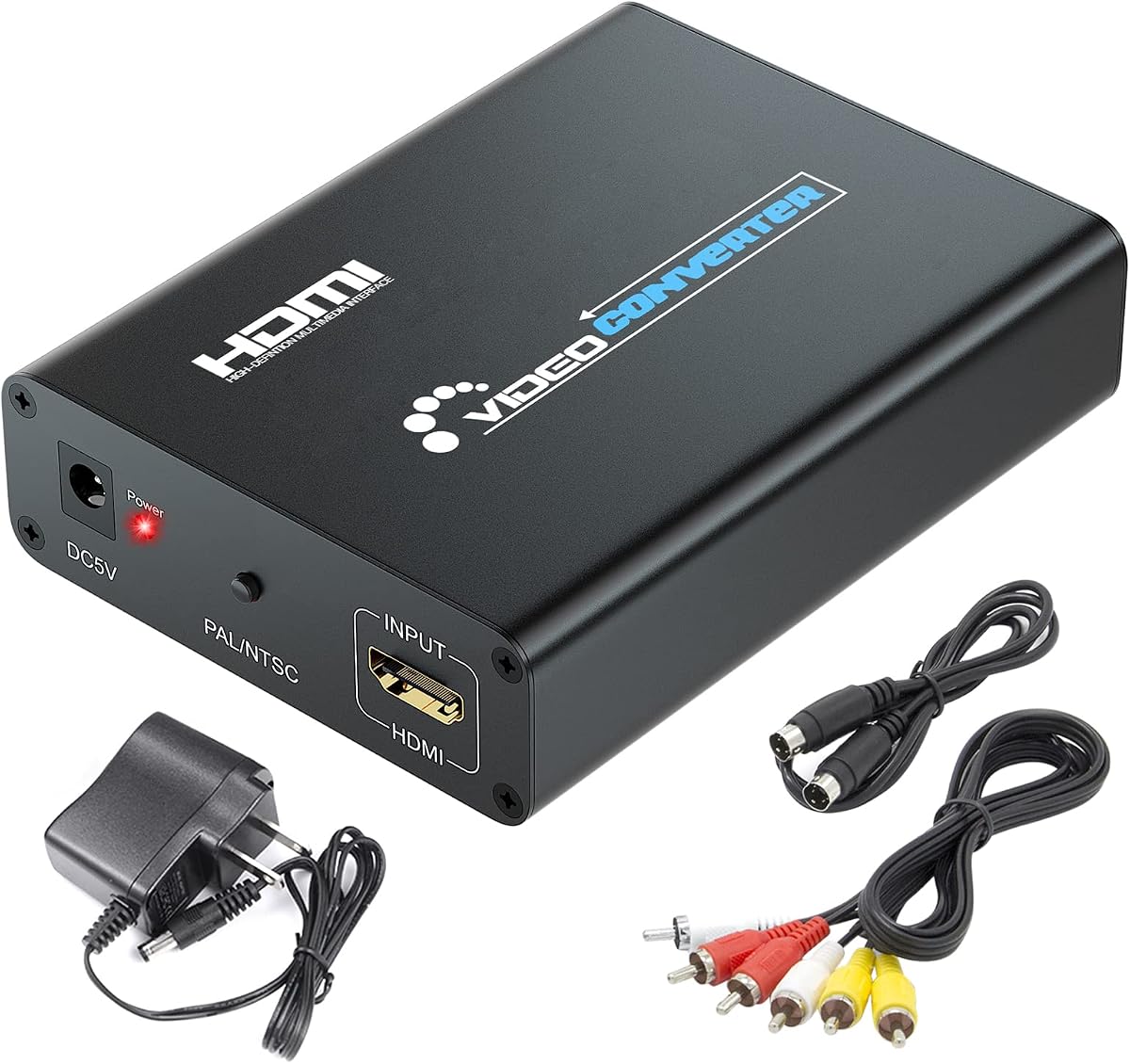
The RCA Svideo to HDMI Converter with HD Cable combines straightforward conversion with an unusually convenient bundle. It carries a 4.2 customer rating, includes an HDMI cable, and has integrated RCA and S-Video cables. That means the essential video connections are ready to use, while the included USB cable powers the unit from a suitable 5V USB port.
We may earn a commission when you buy through this link, at no additional cost to you.
Its automatic scaling function detects 480i NTSC or 576i PAL standard-definition input and upscales it to a selectable 720P or 1080P output. The listing describes advanced signal processing intended to improve color, detail, and precision. The resulting image still comes from an analog source, so it should not be confused with native high-definition video.
The converter is broadly compatible with VHS, VCR, DVD players, set-top boxes, and older systems such as NES, SNES, N64, Wii, Wii U, Xbox, and PS2. It also needs no drivers and is described as lightweight and portable. However, it lacks the more granular image controls and aspect-ratio choices found on premium models.
This is a strong selection for a first conversion setup, especially when minimizing extra cable purchases and simple automatic operation are the priority. It offers 1080P output without the complexity of a remote-controlled menu. Buyers should confirm that a suitable 5V USB power source and an HDMI input are available on the destination display.
The integrated analog leads and included HDMI cable make the package easier to assemble. This is a meaningful convenience for first-time users who may not know which legacy video cable their console or player requires.
Automatic detection of NTSC and PAL input reduces the need for manual source-standard configuration. The user can concentrate on connecting the source, powering the converter, and selecting the desired HDMI resolution.
We may earn a commission when you buy through this link, at no additional cost to you.
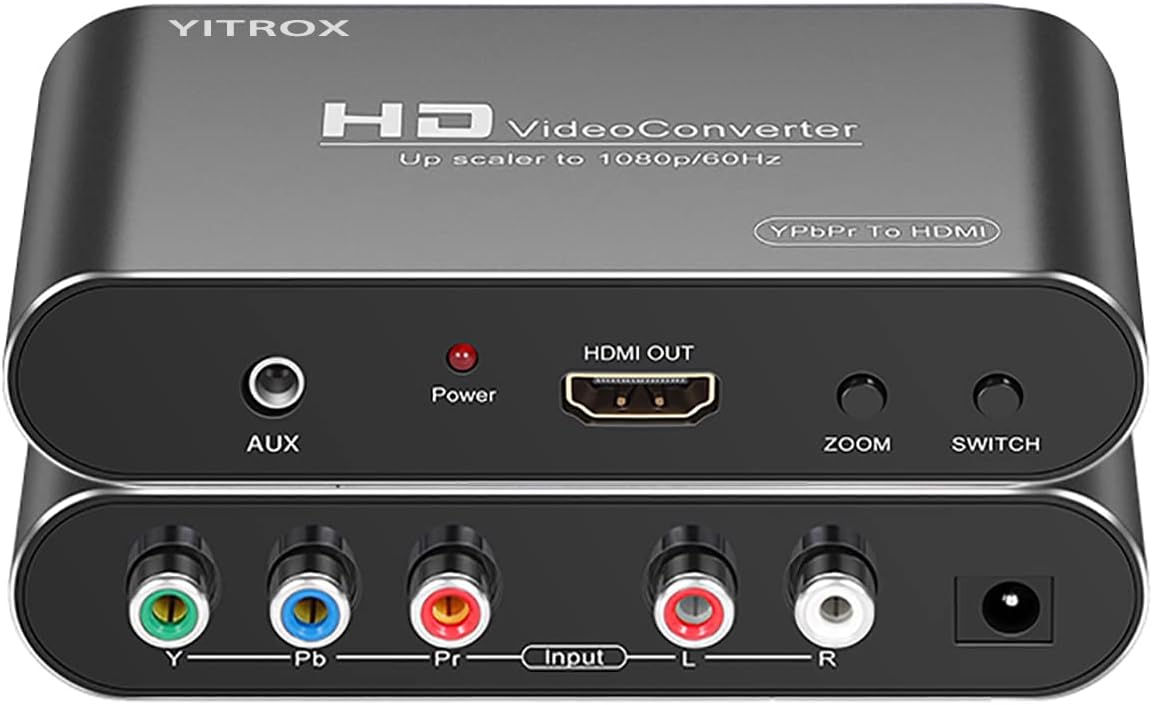
The Component to HDMI Converter Upscaler is a specialized 4.1-rated model for equipment with YPbPr component output. It converts analog component video and R/L audio into HDMI and is especially relevant to certain configurations of the Wii, PS2, PS3, Xbox 360, Blu-ray players, and DVD players.
We may earn a commission when you buy through this link, at no additional cost to you.
Its controls are unusually extensive. Five output resolutions, ranging from 800×600 through 1920×1080, can be selected, along with seven zoom configurations. The product also uses motion optimization, color optimization, contrast processing, and digital noise reduction intended to make moving game scenes appear more stable and refined.
Component video must be used rather than an S-Video cable; the listing warns that the latter can produce a black-and-white image. It also directs users to use a component cable, which is not stated to be included. Audio and video synchronization are supported, and an AUX audio port provides another audio option.
This converter is ideal for a source whose component output is the best available and whose HDMI display has become inconvenient or unavailable. It is less appropriate for a device that only provides S-Video or RCA composite. Confirm the source's output selection and obtain the correct component cable before installation.
Multiple resolution and zoom choices help reconcile analog component signals with modern displays of different sizes. These controls can be valuable for games and video where geometry or scaling needs careful adjustment.
The listed processing targets motion, color, contrast, and digital noise in classic console output. These features make the model more relevant to gaming than a basic fixed-function analog adapter.
We may earn a commission when you buy through this link, at no additional cost to you.
The SoundBeast AV to HDMI Converter & Recorder 2.0 has a 4.4 customer rating and stands apart through its integrated USB video capture function. It converts RCA composite video to 720P or 1080P HDMI for television viewing, while also allowing compatible video to be recorded to a PC or Mac without installing capture drivers.
We may earn a commission when you buy through this link, at no additional cost to you.
Capture is listed at 640×480 pixels, and capture software is included. This makes the device useful for digitizing VHS, VCR, camcorder, Hi8, gaming, or other composite sources before they are sent to a modern display. The converter can also work as a normal plug-and-play display adapter when capture is not required.
Its aspect-ratio control addresses a common issue with old media. The 4:3 option preserves the original composition by adding black bars at the sides rather than stretching the picture horizontally, while a 16:9 option can fill the full television screen. It works with PAL and NTSC sources and includes a one-year warranty with extendable support.
This is the premium pick for buyers who want more than passive viewing. The capture feature is a clear product-specific advantage, although its 640×480 recording resolution is modest and the input is RCA composite rather than S-Video. Choose it when archiving or recording is part of the project, not merely when connecting one console to one television.
The USB capture function turns the converter into a bridge between analog media and a computer. That makes it useful for creating a digital copy while retaining the option to monitor the same source through HDMI.
Keeping the 4:3 composition avoids widening faces and other subjects in archival recordings. The option to fill a widescreen display remains available when a full-screen presentation is preferred.
We may earn a commission when you buy through this link, at no additional cost to you.
The RCA Svideo to HDMI Converter with AV + S-Video Cables is a practical two-input option rated 4.2 by customers. It converts RCA composite or S-Video video with R/L audio into HDMI at selectable 720P or 1080P resolution, supporting both 480i NTSC and 576i PAL input.
We may earn a commission when you buy through this link, at no additional cost to you.
A key convenience is that composite and S-Video sources can remain connected simultaneously, with a button used to select the active input. The separate 3.5mm audio output adds another route for connecting sound to external equipment. The converter is aimed at cameras, VCRs, DVD players, and game systems such as NES, SNES, N64, and PlayStation generations one through three.
The included composite and S-Video cables make the basic connection easier, while the plug-and-play design requires no software. Compared with the ClearClick, however, this model does not list a remote or granular color and geometry controls, so users must work primarily with television picture menus.
This converter is well suited to a home entertainment setup containing more than one legacy source and a player who prioritizes straightforward switching. It also suits users who want an independent analog audio connection. It is a sensible middle ground between basic fixed converters and more adjustable premium models.
Keeping two input types connected makes it easy to move between a game console and a VHS or DVD source. The physical input switch is quick and avoids the inconvenience of changing cabling every time.
HDMI carries the converted picture and digital audio, while the 3.5mm jack provides a separate analog audio path. This gives users more freedom when connecting older speakers or a television with limited audio inputs.
We may earn a commission when you buy through this link, at no additional cost to you.
The HDMI to S-Video Converter is another reverse-direction option, with a 4.4 customer rating. It accepts HDMI from a modern media player, game console, computer, television, or projector and converts that signal to S-Video video and left/right analog audio.
We may earn a commission when you buy through this link, at no additional cost to you.
The RCA composite output provides a second connection method for older displays. Supported HDMI input resolutions include 480p, 576p, 720p, 1080i, and 1080p at the specified frame rates. The analog output is limited to 480i, 480p, 576i, or 576p, which is an important distinction when judging picture quality.
RCA and S-Video cables are included, reducing the need for extra output leads. The converter is strictly one-way and cannot take an S-Video source and return HDMI, so the keyword-compatible use case requires careful attention to signal direction before purchase.
This product is a strong choice for a newer source device that lacks S-Video or composite output but must be shown on an older television or projector. Its high listed rating and broad source compatibility are positives, but it is most valuable in reverse-facing installations rather than conventional legacy-to-modern conversions.
Many current source devices output HDMI exclusively, while older televisions and projectors may require S-Video or RCA video. This converter provides that bridge without requiring a replacement display.
Although the converter can accept high-definition HDMI, the available S-Video and composite outputs remain analog standard-definition formats. Understanding this distinction helps set realistic expectations before installation.
We may earn a commission when you buy through this link, at no additional cost to you.
Choosing an S Video to HDMI upscaler requires matching signal direction, source connections, display capabilities, and audio needs. The most important details are the converter's supported resolutions, aspect controls, included cables, and whether it can handle the specific source you own.
Most legacy gaming systems, VHS players, VCRs, and camcorders output RCA composite or S-Video and require a converter that sends analog video to HDMI. Conversely, a modern laptop, streaming device, or game console may have only HDMI output and need HDMI-to-S-Video or HDMI-to-composite conversion to reach an older television or projector. The two directions are not interchangeable unless a product explicitly states that it is bidirectional.
A 1080P-capable converter is generally the more flexible choice when the display supports 1920×1080. Some lower-cost models stop at 720P, while others accept 480P and 576P standards. The input remains analog in conventional upscalers, so a larger output resolution provides a convenient digital format for the television rather than creating missing source detail.
S-Video generally provides a cleaner analog picture than yellow RCA composite when both are available on a source device. RCA composite is more universal and often carries stereo audio on the red and white connectors. A converter with both inputs and a source switch is more flexible, particularly for a setup containing a game console, VCR, DVD player, or camcorder.
Standard-definition media commonly has a 4:3 composition. Stretching it across a 16:9 television can make people and objects look unnaturally wide, so converters with 4:3, 16:9, 16:10, or Full modes provide useful framing options. More advanced models also offer remote adjustment for brightness, contrast, saturation, hue, resolution, and aspect ratio, which can make matching different source types easier.
Most converters carry R/L audio into the HDMI output, but some add a 3.5mm audio jack for external speakers, amplifiers, or televisions with limited HDMI audio support. A separate audio route is helpful if the display does not expose the converted audio conveniently. Check the source's audio connectors as well, because a red-and-white RCA pair is needed for stereo sound.
NTSC and PAL are the common television standards associated with many older sources. A converter that handles both is more adaptable, especially if you own equipment from different regions. Automatic detection is convenient, while manual switching may be needed for troublesome combinations. Also verify whether the source outputs interlaced 480i or 576i, because some basic converters do not accept 480P.
The difference between a complete package and a bare converter can affect the number of extra items needed. Integrated RCA and S-Video leads are convenient, while an included HDMI cable and power adapter can make installation more immediate. USB-powered models may use the included USB cable, although a television's USB port may not always supply enough power. Some listings do not include the required S-Video or HDMI lead.
A converter with USB video capture can create a digital copy of analog footage while also displaying it through HDMI. This is valuable for preserving VHS, VCR, camcorder, or Hi8 material, although the listed capture resolution may be modest. For gaming, look for aspect controls and low-latency operation; for archiving, prioritize a supported capture format and included software.
Begin by identifying the source's output type and the display's input. Connect the appropriate RCA or S-Video cable to the source, connect an HDMI cable from the converter to the television or projector, and supply power through the specified adapter or USB connection. Make sure the converter's input switch matches the source you intend to use.
Select the appropriate source standard and output resolution on the converter. If the picture is stretched, use a 4:3 or aspect-ratio setting that preserves the original composition. For audio, connect the white and red RCA plugs if stereo sound is required, or use any listed 3.5mm output to reach external speakers. Allow the television a moment to recognize the HDMI signal.
Keep the converter ventilated and away from moisture, direct heat, and crowded spaces. Do not force cables into ports or connect the converter to a different signal direction than it supports. If a capture feature is used, follow the included software's storage and file-format guidance, and preserve the original media whenever possible as an additional backup.
S-Video separates luminance and chrominance into dedicated lines, while RCA composite combines the video signal into a yellow connector. S-Video can therefore produce a cleaner image when the source offers it. RCA composite is more common and is easier to find on many VCRs, DVD players, and game consoles.
It can convert the analog signal into a digital HDMI format and upscale it to 720P or 1080P for convenient display. It cannot recover detail that was never recorded or transmitted. The result may look cleaner on a modern television, but it remains an upscaled standard-definition image.
You need an HDMI cable unless it is explicitly included in the package. Some models bundle one, while others require a separate cable to reach the television or projector. The RCA and S-Video source cables may also vary, so checking the package contents before ordering is important.
Many legacy consoles and recordings use a 4:3 picture, while modern televisions usually use a 16:9 screen. Without aspect correction, the image may be stretched horizontally. A converter with a 4:3 or aspect-ratio switch can preserve the original proportions, usually by adding black bars at the sides.
Some models support simultaneous connection and let the user select the active input with a switch. Other converters accept only one input format at a time even though both types are supported. Check for wording such as simultaneous connection or input selection before planning a multi-device installation.
Usually not. The two models described in this guide with HDMI-to-S-Video or HDMI-to-RCA output are one-way devices. They convert a modern HDMI source to an analog display and cannot simultaneously send S-Video or RCA input to an HDMI television.
The source's white and red RCA audio plugs must be connected for stereo audio in addition to the video cable. Some setups also require the correct input selection or a separate 3.5mm audio connection. Confirm that the television is using the converter's HDMI input and that its audio level is not muted.
Only a model with an explicitly supported USB video capture function can record the analog source to a computer. The SoundBeast AV to HDMI Converter & Recorder 2.0 is the capture-capable option in this list, and its listed recording resolution is 640×480 pixels. Standard upscalers without capture support display video but do not save it to a computer.
The RCA Svideo to HDMI Converter is the strongest all-around choice for its 4.3 rating, selectable 720P and 1080P output, two analog inputs, and useful 3.5mm audio connection. The HTDYOO model and the converter with integrated cables serve simpler needs, while the ClearClick is ideal when remote image adjustment and aspect-ratio control are important.
The SoundBeast model is the most specialized because it adds USB capture, making it appropriate for digitizing analog footage. For retro gaming, prioritize aspect-ratio controls and the correct source cable. For a modern device feeding an old screen, select an HDMI-to-S-Video or HDMI-to-composite converter instead of a traditional upscaler.
Before ordering, verify the conversion direction, source signal standard, output resolution, audio connectors, and included accessories. Current prices, promotions, and product availability can change, so check the live listing and recent customer feedback before making a final purchasing decision.