
DAXINGXING 10-Piece Dual-Tip Stylus
4.7Editor score
Two rubber tip diameters
Ten colorful alloy-body pens
Twenty replacement rubber nibs
Our Touchscreen Stylus Pens guide compares tip designs, compatibility, precision, comfort, and extras to help you choose the right pen.
Touchscreen stylus pens provide a more precise, pen-like way to write, draw, navigate, and play on capacitive screens. The best models combine responsive tips, comfortable handling, broad device compatibility, and simple operation. Most options in this guide are passive and require neither charging nor Bluetooth pairing.
We compared all ten products by examining their tip styles, body construction, included accessories, replacement provisions, device compatibility, and intended uses. The list covers compact personal options, multipacks for classrooms and offices, and versatile models combining rubber, fiber, and transparent disc tips for different tasks.
Each review highlights the product's strongest benefits, practical limitations, and ideal buyer so you can judge fit rather than rely on a single feature. Ratings and product details reflect the supplied information, while prices and availability can change, so confirm current listings before making a purchase.
4.7Editor score
4.6Editor score

4.7Editor score
The comparison below organizes all ten stylus sets by tip design, construction, compatibility, and package contents, making it easier to identify the most practical option for writing, drawing, gaming, travel, or shared use.




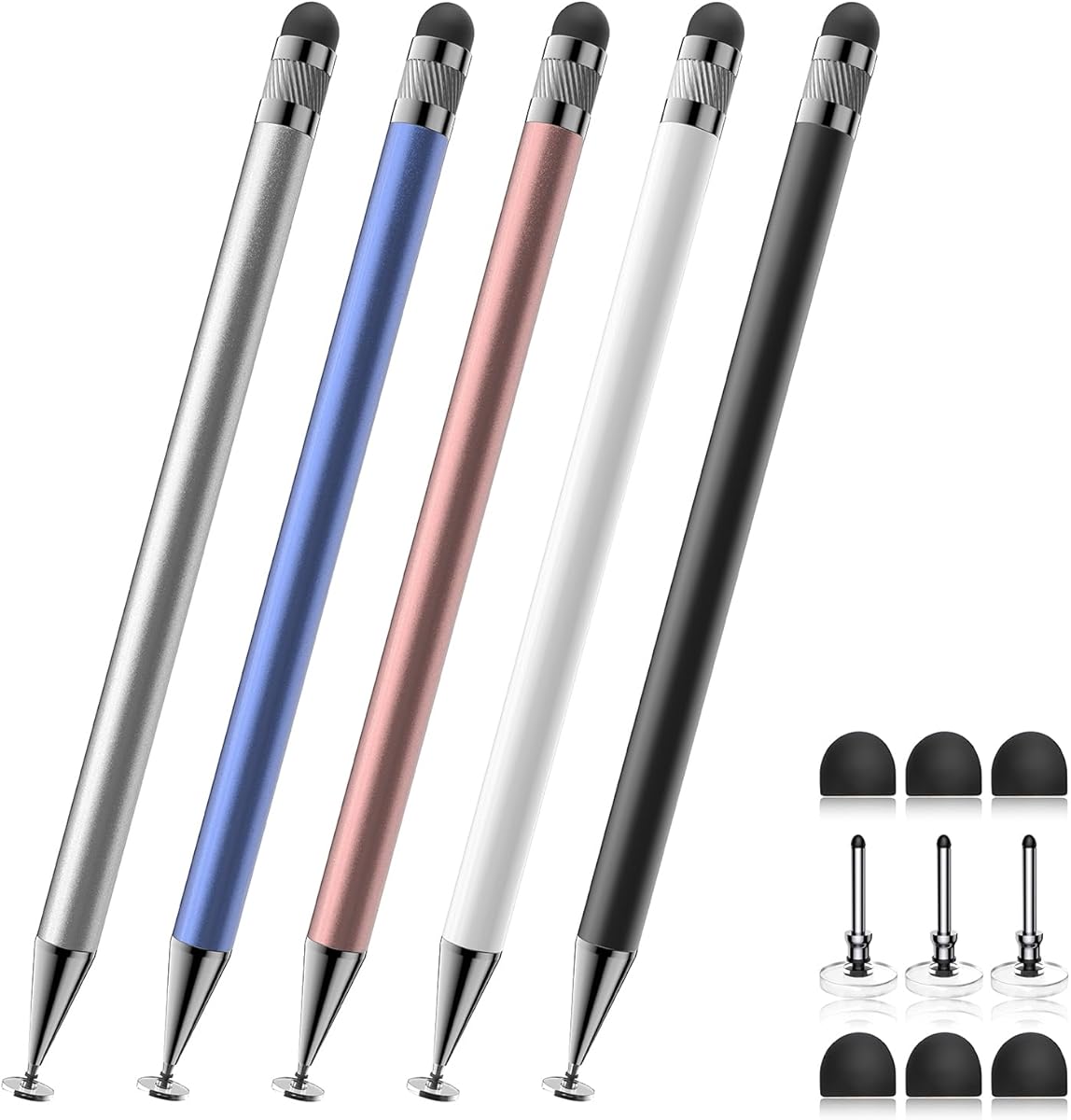
This Bopomofo set earns a 4.6 rating and stands out as the most versatile overall option because each of its five pens combines a flexible rubber tip with a transparent disc tip. That dual design lets users switch between broader everyday navigation and more controlled writing, sketching, or icon selection without buying separate pens.
We may earn a commission when you buy through this link, at no additional cost to you.
The transparent disc exposes the contact point, which is useful when accuracy matters, while the rubber tip supplies steadier contact over many screen protectors. Its capacitive design works with iPads, iPhones, Samsung Galaxy Tab devices, Android tablets, Kindles, smartphones, and other compatible touchscreens. No charging, Bluetooth connection, or app installation is required.
As a passive capacitive stylus, it cannot reproduce the pressure response, tilt behavior, or palm rejection associated with an active drawing stylus. Some writing applications may also impose their own compatibility restrictions, and the disc tip's plastic contact section is an integral component. These are important distinctions for an artist seeking professional-grade drawing behavior.
This is an excellent choice for students, teachers, office workers, families, and casual creators who want a dependable multipurpose set without setup complexity. The five colors, portable format, and included replacement nibs make it especially practical for sharing. It is our top overall pick for balancing tip versatility, compatibility, and convenience.
The rubber tip handles general touching, scrolling, annotation, and steadier interaction, while the transparent disc tip improves visibility of the exact contact point. Having both styles available makes the five-pen set useful for quick navigation as well as more deliberate writing and drawing.
Five differently colored pens make it easier to assign one to each family member, student, or colleague. The replacement rubber and disc nibs also reduce the inconvenience of wearing out a frequently used tip.
We may earn a commission when you buy through this link, at no additional cost to you.
The DAXINGXING 10-piece set carries a 4.7 rating and is a strong value-oriented choice for anyone who wants several reliable pens. Every alloy-body stylus has a 0.27-inch rubber tip on one end and a 0.21-inch fine rubber tip on the other, providing a practical balance between broad navigation and more controlled handwriting.
We may earn a commission when you buy through this link, at no additional cost to you.
The soft rubber nibs glide over capacitive screens and help limit direct contact with the display, reducing the need to touch it with bare fingers. Because the pens are passive, they work without charging or pairing and can move between iPads, iPhones, Android phones and tablets, touchscreen laptops, and e-readers.
Its main limitation is that it offers only rubber tips. Artists who require a transparent contact disc, active pressure sensitivity, tilt detection, or palm rejection may need a more specialized tool. The product is also intended for general capacitive interaction rather than recreating the full behavior of a premium active stylus.
For classrooms, offices, household device sharing, or anyone who tends to lose a small pen, the ten-piece format is highly convenient. The mixed colors aid identification, and twenty matching replacement nibs support continued use. It is our best budget-oriented pick for its generous allocation and clear organization.
The wider rubber nib is well suited to scrolling, color filling, and routine navigation, while the smaller end supports detailed handwriting and precise selection of small interface elements. Reversing the pen provides a quick change of feel without accessories.
A classroom, office, or family with several touchscreen users can assign the colorful pens to different people. Twenty replacement nibs and tool-free replacement make the package practical for regular use rather than a one-off accessory.
We may earn a commission when you buy through this link, at no additional cost to you.
The MEKO 3-in-1 set has a 4.6 rating and appeals to users who want one stylus to cover several contact styles. Each pen combines 0.18-inch and 0.27-inch silicone rubber tips with a transparent disc tip, while a protective cap helps shield the stylus during storage and transport.
We may earn a commission when you buy through this link, at no additional cost to you.
The disc tip is the most distinctive feature because its transparency lets the user see precisely where the stylus contacts the screen. It can be used at a flexible 180-degree angle, and the two differently sized rubber tips offer alternatives for browsing, note-taking, writing, drawing, and gaming. The tips are designed to resist scratching and reduce fingerprints.
This remains a passive capacitive product without pressure sensitivity or palm rejection, so it should not be confused with an advanced active drawing pencil. The package is also smaller than many multipacks, with two pens and a limited assortment of replacement pieces. Buyers needing more disc tips are directed to a separate ASIN.
The MEKO set is best for a student, creative hobbyist, or mobile worker who appreciates multiple tips but does not need a classroom-sized quantity. Its mix of contact styles, protective cap, and replaceable silicone nibs makes it a flexible personal option for everyday touchscreen work.
The transparent disc lets you see the point of contact, which can make small interface selections, handwritten notes, and detailed sketching feel more controlled. Its flexible construction also supports a broad range of writing positions.
Two complete pens provide a personal backup, while each pen carries all three tip styles. The included replacement rubber and disc tips help maintain smooth performance after the original nibs begin to wear.
We may earn a commission when you buy through this link, at no additional cost to you.
This 10-piece stylus set earns a 4.6 rating by combining a restrained black-and-white appearance with two silicone rubber tip sizes. The seven-millimeter and five-millimeter ends are designed for general browsing as well as writing, drawing, and gaming, making the pens adaptable without complicated controls.
We may earn a commission when you buy through this link, at no additional cost to you.
No charging or Bluetooth connection is needed, so they can be placed in a briefcase and used on iPhones, iPads, Nintendo Switch systems, Android devices, Samsung Galaxy products, Chromebooks, Microsoft Surface devices, and other capacitive screens. The aluminum bodies offer a lightweight, understated option for office or classroom distribution.
Unlike disc-tip alternatives, its contact surfaces are entirely rubber. That can make large-area navigation comfortable, although it may provide less visual precision when selecting small controls. It also has no pressure sensitivity, tilt response, or palm rejection, and its restrained colors make individual pens harder to distinguish in a busy shared setting.
This set is a good fit for offices, study groups, or families that want a consistent multipack in black and white. It provides the most straightforward balance of portability, tip flexibility, and broad compatibility, making it well suited to general productivity rather than specialized digital art.
The larger seven-millimeter tip supports ordinary navigation, while the five-millimeter tip offers a finer target for writing and interface selection. Soft silicone helps reduce scratches and the need to leave fingerprints directly on the display.
Because these are passive capacitive pens, they require no drivers, charging, or Bluetooth pairing. Users can move from a tablet to a phone or touchscreen laptop with little more than an unpacking and a tip selection.
We may earn a commission when you buy through this link, at no additional cost to you.
The 20 Pack Universal Stylus receives a 4.7 rating and stands out for quantity. With twenty pens, it is the most complete option for a large classroom, office, workshop, event, or household in which many people may need a dedicated stylus at the same time.
We may earn a commission when you buy through this link, at no additional cost to you.
Each pen uses a soft rubber tip designed to offer more deliberate interaction than a fingertip while helping reduce direct screen contact, scratches, and fingerprint deposits. The lightweight bodies include both a pen clip and an anti-loss hanging hole, making them easier to keep with a carrying case, notebook, or other daily gear.
The design is intentionally simple, with a single rubber contact style and no charging, pairing, or app setup. It does not offer a transparent disc, multiple tip diameters, pressure sensitivity, or palm rejection. Replacement tips are also not identified as part of the stated package, so buyers focused on long-term tip renewal may need to source them separately.
Despite those limitations, this is a practical choice when availability and easy distribution matter most. It is particularly suitable for short courses, corporate sessions, family device use, public demonstrations, and other situations where assigning one pen to each participant prevents sharing and hygiene concerns.
Twenty pens eliminate the need to pass a single accessory around during a busy session. This is useful in classrooms, meetings, workshops, and family activities where many people will be writing or navigating at once.
The integrated clip and hanging hole offer two ways to secure the lightweight pen. Both features suit travel, office use, and other situations where a small accessory could otherwise be misplaced.
We may earn a commission when you buy through this link, at no additional cost to you.
This three-pack earns a 4.5 rating and combines transparent disc tips with durable fiber tips in blue, pink, and purple. That pairing gives it a more distinctive appearance and a broader contact-style selection than simple rubber-tip sets, making it appealing for note-taking, drawing, browsing, and scrolling.
We may earn a commission when you buy through this link, at no additional cost to you.
The transparent disc gives users a clear view of the contact point, while the flexible construction is intended to support smooth lines. The other end provides a fiber surface for routine navigation and offers another way to reduce fingerprints on the display. Replacement disc and fiber tips are stored within the pen body and can be accessed by rotating the fiber end.
Its magnetic cap can attach near either end, helping protect the working tips while also reducing the chance of losing the cap. On iPad, however, the product instructions specifically advise checking that the Only Draw with Apple Pencil setting is turned off, because that restriction can otherwise interfere with third-party stylus input.
This is a good personal or small-family set for users who want colorful accessories and a disc tip without moving up to a large multipack. It is less appropriate for a class or office requiring dozens of pens, and it remains a passive capacitive device without pressure sensitivity or palm rejection.
The disc tip favors controlled writing and drawing by keeping the contact point visible, while the fiber tip suits conventional browsing and scrolling. Reversing the pen makes it easy to adapt to different tasks.
A magnetic cap attaches to either end, shielding whichever tip is not being used. Extra disc and fiber tips are stored inside the body, making the package easier to manage than a collection of loose accessories.
We may earn a commission when you buy through this link, at no additional cost to you.
The 15 Pack Stylus and Ballpoint set has a 4.5 rating and is unusual because each pen combines a capacitive silicone tip with a conventional black-ink ballpoint on the opposite end. That hybrid construction is useful for meetings, classes, and travel because users can capture notes digitally and on paper with one object.
We may earn a commission when you buy through this link, at no additional cost to you.
The touchscreen side requires no charging or Bluetooth connection and is compatible with capacitive devices such as smartphones, tablets, and touchscreen laptops. Each pen measures 5.5 inches long and 0.25 inch wide, while the slim aluminum body includes a clip that can attach to a pocket, diary, book, or carrying case.
The trade-off is that only one end performs touchscreen input. Users must switch from the rubber stylus to the ballpoint for physical writing, and there is no disc tip, multiple rubber diameters, or pressure-sensitive active input. The stated package also does not mention replacement nibs.
This multipack is best for people who want an all-in-one writing tool or for organizers distributing practical gifts for school, office, or holiday use. It offers more functionality than a single-purpose stylus, though artists seeking a transparent disc tip should choose a dedicated multi-tip model.
The black-ink ballpoint end makes these pens useful when a paper notepad is more convenient than a device. The capacitive end remains available for touchscreen writing, browsing, and everyday navigation.
The slim profile, lightweight aluminum construction, and pocket clip make each pen easy to carry. Fifteen units also work well for gifts, school events, office stocking, or shared digital workspaces.
We may earn a commission when you buy through this link, at no additional cost to you.
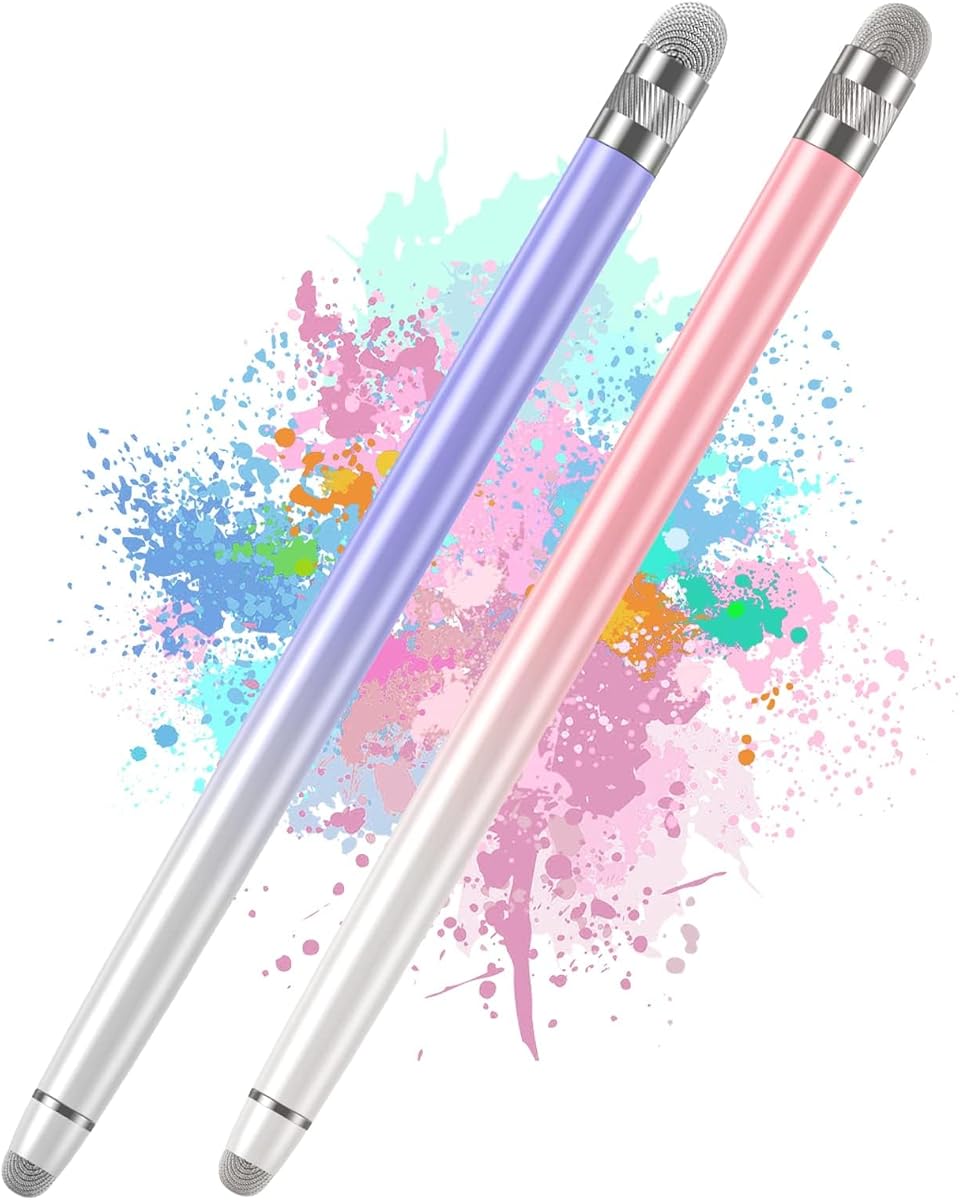
This Bopomofo two-piece set earns a 4.5 rating and focuses on a soft fiber-tip design with two different nib sizes. The fiber material is intended to provide responsive writing and drawing while protecting capacitive displays from the direct abrasion associated with a hard contact point.
We may earn a commission when you buy through this link, at no additional cost to you.
The pens are ready to use without downloading apps, charging batteries, or connecting through Bluetooth. Their lightweight alloy bodies and gradient colors give the set a more refined appearance, while the different fiber sizes provide choices for writing, sketching, browsing, gaming, and general navigation.
The supplied information notes that a new fiber tip can initially feel somewhat stiff. Users may need to apply slight pressure, particularly when a screen protector is installed, until the tip softens and develops sufficient contact area. The set also lacks a transparent disc tip, rubber alternatives, and advanced active-stylus functions.
This pair is well suited to students, teachers, and everyday users who prefer a soft fiber contact over a rubber nib. It is a restrained personal set rather than a bulk solution, but its simple operation and mixed contact sizes make it a solid choice for carrying in a pocket or sharing between two people.
Fiber tips are designed to feel gentle against capacitive screens and are useful for writing, drawing, and ordinary navigation. Users with screen protectors may notice that the new tip needs a short break-in period before it becomes fully responsive.
Two pens are enough for a personal backup or a two-person arrangement without taking up much room. The gradient finish and light alloy construction also make the set appropriate as a practical gift.
We may earn a commission when you buy through this link, at no additional cost to you.
The seven-piece 2-in-1 stylus set receives a 4.6 rating and offers a middle ground between a personal pair and a large office multipack. Its seven multicolor pens provide enough units for family members, classmates, or several devices, while the dual-end format adds versatility to each pen.
We may earn a commission when you buy through this link, at no additional cost to you.
The lightweight alloy bodies require no charging and no Bluetooth pairing, allowing the pens to work quickly on Apple, Samsung, Moto, Lenovo, Xiaomi, Nintendo Switch, and other compatible capacitive devices. They can be used with writing and drawing applications for notes, sketches, reading, and games.
Compared with specialized multi-tip models, the package provides less detail about individual tip materials and sizes. It also does not state that replacement tips are included, and the passive design does not supply active pressure response, tilt detection, or palm rejection.
This set is a sensible choice for a household or small group that values colorful identification and several ready-to-use pens. It provides enough quantity for sharing, broad platform support, and simple operation, making it a balanced option for everyday productivity and casual creative work.
The multicolor assortment makes it straightforward to assign a different pen to each person or device. Seven units cover common family and classroom arrangements without reaching the scale of a large institutional pack.
Removing the pen from its package is enough to begin using it on a compatible capacitive screen. There is no charging cycle, wireless pairing, or software installation to manage.
We may earn a commission when you buy through this link, at no additional cost to you.
The OASO stylus has a 4.3 rating and is a compact option for users who primarily prefer a transparent disc tip. It works without a battery or connection, allowing it to function like a finger on compatible capacitive screens for note-taking, drawing, scrolling, and reading.
We may earn a commission when you buy through this link, at no additional cost to you.
Its travel-oriented accessories set it apart. A magnetic cap stores over the disc tip to protect the working surface, a replacement disc tip is stored in the opposite end, and the package includes a leather pen case for carrying. The design is particularly convenient for someone who wants one carefully stored pen rather than a loose multipack.
The main limitation is its single-purpose format. There is only one pen, only one tip style, and no stated rubber or fiber alternative. It is also a passive stylus with no pressure sensitivity, tilt response, or palm rejection, so it should be viewed as a convenient touch accessory rather than a professional active drawing instrument.
OASO is best for travelers, students carrying a pen between classes, and anyone who prefers the visibility and control of a disc contact. The magnetic cap, spare tip, and carrying case create a more thoughtful travel package, although buyers seeking multiple colors or tip options should choose a larger multipack.
The magnetic cap covers the disc tip when the stylus is not in use, while the included leather case adds another layer of organization. A spare disc tip inside the body helps keep the pen ready for continued use.
The stylus operates on capacitive screens as long as a finger can work on the device. That principle gives it compatibility across many tablets, phones, e-readers, laptops, and other touchscreen categories without complex setup.
We may earn a commission when you buy through this link, at no additional cost to you.
The right touchscreen stylus depends on the devices you use, the precision you need, the number of people involved, and whether you prefer a dedicated drawing tool or a simple passive pointer. These factors narrow the field quickly and prevent an unnecessary mismatch.
In short, choose passive for convenience and choose active when advanced pressure behavior is essential.
Match the tip to the task: rubber for broad use, fiber for gentle smooth contact, and disc for visible precision.
Use a fine tip for small controls and a wider tip for comfortable everyday navigation.
Check both the screen type and application settings before expecting every feature to work.
Choose a small set for personal use and a larger multipack when several people need dedicated styluses.
For frequent use, prioritize a set with clearly stated replacement nibs and simple tool-free changes.
Favor a slim, balanced body and a secure storage method for long or mobile sessions.
Choose a soft, screen-conscious tip and assign separate pens when hygiene or shared handling matters.
Begin by confirming that your device uses a capacitive touchscreen and that the stylus is compatible with the application you intend to use. Remove the protective packaging and, if present, unscrew the cap or rotate the end to expose the selected tip. Passive models need no charging, pairing, or app installation, although an iPad may require the Only Draw with Apple Pencil setting to be disabled.
Use light, controlled pressure and move the pen in the same direction as a conventional pen. Choose a broad rubber or fiber tip for scrolling and color filling, or a fine rubber or transparent disc tip for small selections, handwriting, and detailed drawing. Let the tip rest fully on the screen rather than pressing hard, and avoid striking the display with the plastic cap or body.
Store the stylus with its working tip covered or safely retracted. Clean the body and tip with a soft, dry or lightly dampened cloth, avoiding harsh liquids and excessive moisture. If a tip begins to feel sluggish, inspect it for debris and confirm that the screen protector is not creating a gap. Replace compatible tips when they become visibly worn, and never open an electronic active stylus unless its instructions specifically permit it.
The touchscreen stylus pens in this guide are passive capacitive models, so they do not need charging, batteries, Bluetooth pairing, or special drivers. They begin working when the tip makes contact with a compatible capacitive screen. This differs from active styluses, which require power and may connect to a tablet for pressure, tilt, or palm-rejection features.
Most of the listed styluses are advertised as compatible with iPads and other capacitive devices. However, an application can impose its own restrictions, and the three-pack specifically instructs users to turn off the Only Draw with Apple Pencil setting in iPad settings. Passive models also do not reproduce the full pressure and tilt response of an Apple Pencil.
A transparent disc tip generally provides the clearest view of the contact point, making it useful for detailed writing, small interface selections, and drawing. A smaller rubber tip can also offer finer control, while a wider rubber tip is usually more suitable for scrolling and color filling. The ideal choice depends on comfort and the size of the task rather than one universally precise tip.
The Bopomofo 5-piece set is specifically described as working over most screen protectors, and many other passive pens should function across standard protective films. Some cases or unusually thick protectors can increase the distance between the tip and screen, reducing sensitivity. The Bopomofo fiber-tip model notes that slight initial pressure may be needed while the new tip beds in, especially with a protector installed.
They are appropriate for casual sketching, annotations, diagrams, and light creative work, but they are not equivalent to pressure-sensitive active styluses. A passive pen can provide a pen-like touch and improved precision over a finger, yet it cannot offer advanced pressure curves, tilt behavior, or palm rejection. Professional illustrators should evaluate a dedicated active stylus instead.
The quantity depends on how many people share devices and whether dedicated pens are required. A 7- or 10-piece set may suit a small class, while the 15-pack and 20-pack cover larger groups and reduce the need to pass one pen around. The 20-pack is especially useful for workshops, public sessions, and offices that prefer keeping one stylus assigned to each participant.
First, confirm that the device screen is capacitive and that the correct tip is securely attached. Clean both the tip and screen, check for debris, and test the pen on another compatible device. On an iPad, verify that Only Draw with Apple Pencil is disabled when using a third-party stylus. If the tip feels stiff or worn, allow a fiber tip to soften or install a compatible replacement.
Using a stylus instead of a bare finger can reduce direct finger contact and therefore the number of fingerprints placed on the display. The soft rubber and fiber tips are intended to glide more gently, while transparent disc tips limit the visible contact area. No stylus is completely immune to marks, so wiping the screen and handling the pen by its body remains helpful.
The Bopomofo five-piece set is the strongest all-around choice because it combines rubber and transparent disc tips, broad compatibility, five colors, and replacement nibs. DAXINGXING's ten-piece dual-tip set stands out for fine-versus-wide rubber tips and abundant replacements, while the 20 Pack Universal Stylus is the most practical for large groups.
For individual creative work, consider the MEKO 3-in-1 or the three-pack with disc and fiber tips. Students and mobile users may prefer the lighter two-piece Bopomofo fiber set or the travel-ready OASO stylus, while the 15-pack is distinctive for combining touchscreen input with a conventional ballpoint. Prioritize the tip style, package quantity, and storage features that match your routine.
Ratings, product configurations, and availability can change over time, and current prices also vary by seller and occasion. Confirm the latest listing and device requirements before buying, particularly if you rely on a specific application, screen protector, or low-pressure writing technique.