LENSGO TCQI 10P
5.0Editor score
Ten-inch anti-glare panel
Magnetic phone attachment
App and remote controls
A teleprompter for Zoom calls can turn a prepared script into a natural, camera-facing presentation without forcing you to alternate between looking at your screen and watching yourself. The best models combine readable prompts, smooth controls, steady camera positioning, and enough portability to work at a home office or on location.
We compared all ten products by examining their teleprompter glass, screen size, supported devices, app and remote-control features, mounting options, portability, and suitability for live or prerecorded Zoom content. The list covers phone-based systems, tablet and camera-compatible kits, and a desktop teleprompter with a built-in display.
Each review identifies the product's strongest use case and important limitations, while the comparison table offers a quick side-by-side view. Ratings reflect the supplied customer feedback and may change over time. Product prices also fluctuate, so check current listings and compatibility before making a final purchase.
5.0Editor score

4.4Editor score

4.2Editor score
As an Amazon Associate we earn from qualifying purchases.
The table below compares all ten options across screen format, device compatibility, control method, and portability, helping Zoom presenters identify the setup that best matches their recording space and camera.



The LENSGO TC12P is a large, portable teleprompter built around a 14.5-inch HD beam-splitter panel. It holds a 4.2 rating and stands out for offering more prompting space than most phone-based models. That extra room can reduce frequent scrolling, support larger type, and make longer Zoom presentations easier to follow without moving the camera.
We may earn a commission when you buy through this link, at no additional cost to you.
Its four universal adapter rings and adjustable holder accommodate compatible iPhones, Android phones, and tablets up to 7.3 inches when measured in landscape orientation. The coated glass is designed to maintain a clear reflection and reduce stray light, while foam padding helps control glare. A front panel can be raised to suit different angles, and the quick assembly design supports frequent setup changes.
The main compromise is size. A 14.5-inch glass panel is less convenient than a compact foldable prompter for small desks, crowded meeting rooms, or minimalist mobile kits. The product also depends on the user's own phone or tablet and its dimensions. Even so, the readable panel, Bluetooth remote, TCQI app, and vertical-to-horizontal adjustment make it a capable choice for presenters who prioritize screen area over maximum compactness.
Choose the TC12P if you regularly deliver long scripts, create Zoom-based training content, or need a dedicated prompting surface that can also serve YouTube, TikTok, and vlogging production. It is especially attractive for someone who wants one portable teleprompter to handle both live calls and recorded content. For users with limited storage or desk space, a ten-inch model may be more practical.
The 14.5-inch panel gives the script more visual breathing room than common ten-inch designs. Larger text and fewer scroll breaks can make lengthy announcements, training sessions, and scripted sales presentations easier to deliver at a steady pace.
Quick assembly, adjustable orientation, and a dedicated tripod-friendly design make the TC12P useful beyond a permanent desktop. It remains less pocketable than the folding TC7 models, but it is better suited to users who regularly move between recording spaces.
We may earn a commission when you buy through this link, at no additional cost to you.
The Elgato Prompter is the strongest all-around choice for a desk-based Zoom presentation because it combines a teleprompter, built-in display, and camera mount in one desktop system. Its 4.4 rating is the second highest among the listed products. Unlike glass-based phone kits, it lets you drag a script, chat window, or other application directly onto the included screen.
We may earn a commission when you buy through this link, at no additional cost to you.
Its largest practical advantage is the simplified computer workflow. There is no need to import a manuscript into a third-party mobile app or position a phone behind beam-splitter glass. The Prompter attaches to a camera, connects to a PC or Mac, and displays the selected window like a monitor. The Camera Hub app allows adjustments to text and chat appearance, while support for broad camera systems includes even wide-angle lenses.
This setup is less mobile than the LENSGO and Desview options. Mac users need DisplayLink software, while Android operation requires DisplayLink Presenter, adding a step to an otherwise straightforward setup. It also ties the buyer to a desktop-based workflow rather than a standalone phone or tablet. Even with those qualifications, the integrated display and natural eye-contact benefit make it especially compelling for regular Zoom hosting, streaming, and content creation.
Buy the Elgato Prompter when your calls originate from a computer, your scripts are already digital, and you want a professional, repeatable setup without managing a separate prompting device. It is the best fit for a home studio, business presentation room, or production desk where permanence is an advantage. Mobile creators should instead examine one of the compact phone teleprompters.
Dragging any window or app onto the built-in display means a presenter can keep notes, slides, chat, and the script in a familiar computer environment. This reduces the learning curve for users who do not want to maintain a separate teleprompter app.
The camera sits behind the display and sees the presenter through the prompt surface. That arrangement helps you focus on the lens rather than a separate monitor, which is especially useful for Zoom presentations, interviews, livestreams, and recorded explainer videos.
We may earn a commission when you buy through this link, at no additional cost to you.
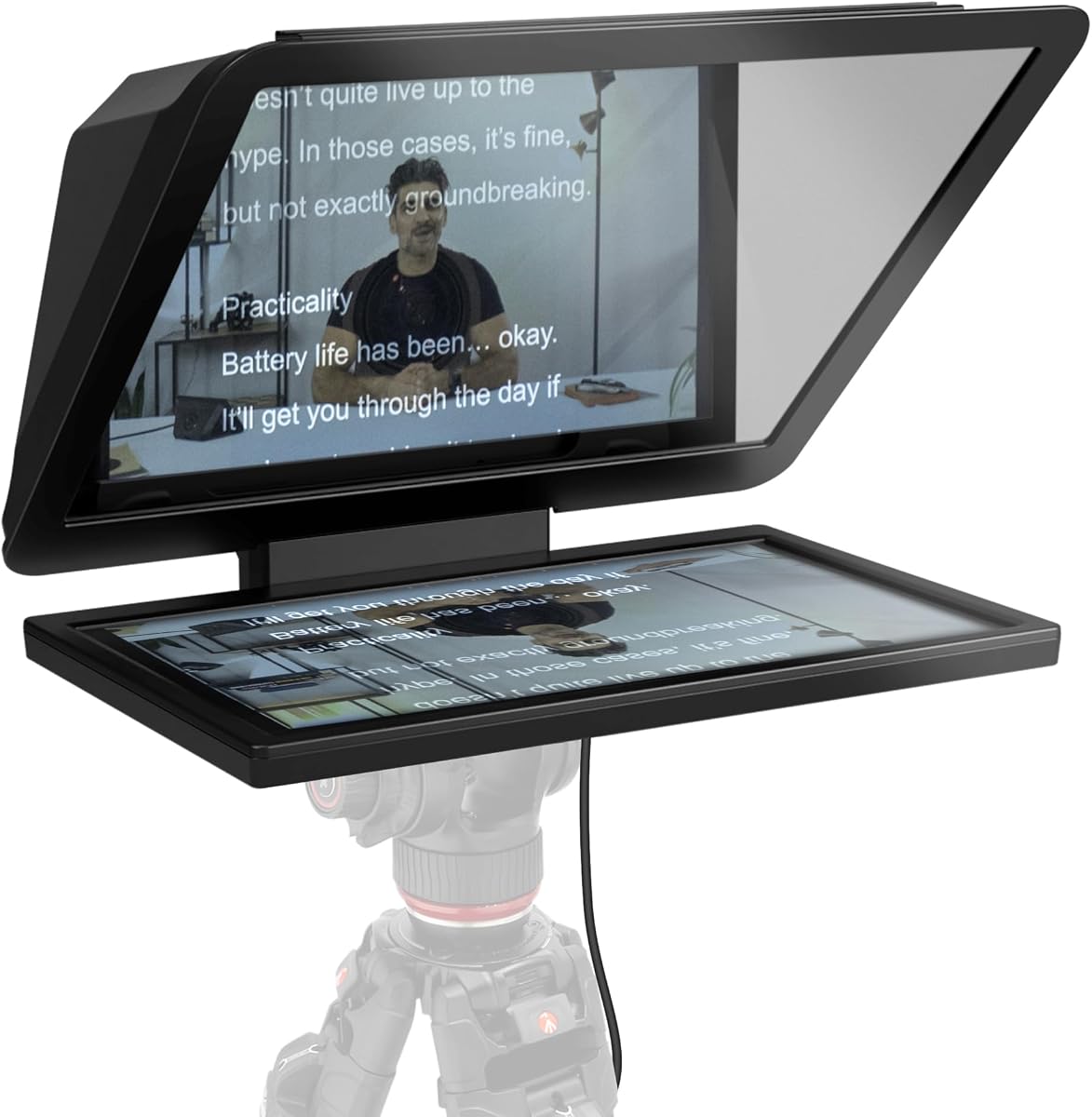
The LENSGO TCQI 10P Tripod is a balanced mobile teleprompter that combines a ten-inch HD panel, magnetic phone base, mini tripod, adapter rings, and Bluetooth remote. It carries a 4.2 rating and offers one of the more complete bundles for people who want to begin making guided Zoom videos without assembling every component separately.
We may earn a commission when you buy through this link, at no additional cost to you.
The prompt surface uses beam-splitting glass with a stated 70/30 transmission ratio and a special coating intended to preserve image quality while keeping the reflection clear. The holder supports horizontal and vertical placement, while the magnetic base makes repeated device changes fast. Compatible phones can attach directly, and Android users can use the included magnetic ring when their device does not support magnetic mounting itself.
Its central limitation is device size. The supplied description says the glass fits phones under 3.82 inches wide, which excludes many modern large-screen smartphones. Tablet support is therefore less accommodating than the product name might imply. The unit also weighs about 0.8 pounds, making it portable, but its mini tripod is intended for stability rather than highly mobile walk-and-talk shooting.
This TCQI 10P version is a good choice for a home Zoom studio, mobile teaching kit, or beginner creator who values a complete package and a reasonably large prompt panel. It offers more control than a simple DIY setup and remains easier to relocate than a full desktop system. Check your phone width before buying, and favor the handheld TCQI model if you prioritize the included support.
The teleprompter, magnetic base, adapter rings, tripod, remote, and mounting hardware are included. That makes the kit easier to evaluate as a complete mobile presentation system rather than as a single accessory with several likely additions.
The high-clarity glass and 70/30 beam-splitting construction aim to balance camera visibility with a readable reflected script. Adjustable background and font colors through the TCQI app further improve contrast in different rooms.
We may earn a commission when you buy through this link, at no additional cost to you.
The LENSGO TCQI 10P Handheld is a compelling value-focused teleprompter for Zoom calls, with a 5.0 rating—the highest listed score in this comparison. Its ten-inch anti-glare panel provides a generous area for scripts, while the included handheld tripod helps keep a phone steady during a presentation.
We may earn a commission when you buy through this link, at no additional cost to you.
The kit uses a magnetic base for rapid phone placement and includes a lens hood to reduce ambient light. Its 75/25 beam-splitter glass is described as coated to deliver sharp axial reflection while preserving image quality. Script controls are available through an app and Bluetooth remote, allowing the presenter to adjust text size, text color, playback, and scrolling speed without touching the phone.
The main concern is compatibility. Users must confirm that the camera lens will not be obstructed after selecting the correct shading ring, and Android phones without magnetic attachment require the included magnetic ring. The instructions also refer to the app as TXQI, while other LENSGO products use TCQI, so buyers should follow the manual rather than assuming the name is interchangeable. These are manageable setup details rather than fundamental flaws.
Choose this model if you want a capable, portable prompting system without moving to a full desktop rig. It is particularly useful for presenters who alternate between Zoom calls and recorded social content. The combination of a large panel, remote control, magnetic attachment, and anti-glare accessories makes it an excellent general-purpose choice for the category.
The anti-glare panel and included lens hood help maintain script visibility by limiting stray light. This is especially valuable during daytime Zoom calls or when recording near windows, where reflections can otherwise wash out the prompt.
The magnetic base streamens device placement after initial alignment. Phones without native magnetic support can use the included ring, making this system practical for mixed Android and iPhone environments.
We may earn a commission when you buy through this link, at no additional cost to you.
The LENSGO TC7 combines a folding 9.7-inch teleprompter with broad phone, tablet, and camera compatibility. Its 4.0 rating reflects an established product that remains useful for online teaching, interviews, live streaming, presentations, and recorded videos. The ability to fold in one second makes it one of the more travel-friendly options in the group.
We may earn a commission when you buy through this link, at no additional cost to you.
The frame can hold flexible tablets below 9.7 inches and smartphones, with eight camera lens adapter rings supporting compatible DSLRs. The glass can be fixed at a 45-degree angle to improve reading, while multiple cold-shoe mounting points allow accessories such as a microphone, tripod, or video light. The TCQI app supports direct text entry, TXT document import, and image-based prompts, with remote control for playback speed and pausing.
Its app workflow is less streamlined than the drag-and-drop approach offered by desktop-focused systems. The product description also notes that some users may need to update the app, and image-based scripts are difficult to resize. Wide-angle camera support extends to 17mm, but the glass and adapter configuration still require careful alignment to avoid vignetting or lens obstruction.
The TC7 is a strong choice for presenters who need to travel between locations or switch between phone, tablet, and camera production. Its rapid-folding design is a tangible advantage for mobile teaching and field interviews. If you want the simplest possible desktop workflow, choose a built-in-display model; if portability and device flexibility matter more, the TC7 remains a versatile selection.
The hinged frame collapses quickly, reducing the amount of time needed to pack and unpack. That makes the TC7 easier to move between a home office, classroom, client site, or temporary recording station.
Supporting phones, tablets, and compatible cameras sets this model apart from simpler phone-only kits. The included rings and adjustable orientation also make it a useful bridge between mobile and dedicated-camera workflows.
We may earn a commission when you buy through this link, at no additional cost to you.
The Desview T5 Multi-Device is a broad compatibility kit for people who may use a smartphone, tablet, or DSLR with the same teleprompter. Its 4.0 rating and extensive list of 49, 52, 55, 58, 62, 67, 72, 77, and 82 millimeter adapter rings make it useful for creators working across different camera systems.
We may earn a commission when you buy through this link, at no additional cost to you.
The included app can import TXT and DOCX files, change font and background colors, mirror or rotate the display, and set a countdown timer. A Bluetooth remote manages play, pause, speed, and page turns. For framing checks, the self-check function allows a second phone to show the shooting status in real time. The coated glass, foam cushions, light-seal foam, and height-adjustable front panel support clearer prompts in varied conditions.
Its complexity is the trade-off. A universal kit contains more rings and adjustment possibilities than a basic phone-only prompter, so initial setup takes more thought. Users must center the camera and select the correct adapter to keep the lens unobstructed. The self-check function also suggests a multi-device workflow that may be unnecessary for a user who only records with one phone.
Buy the Desview T5 when camera flexibility matters and you want a single prompting platform for live streaming, vlogging, and recorded presentations. Its combination of file import, remote controls, and broad mounting options is particularly attractive to creators who already work with interchangeable camera equipment. A simple phone-only buyer can find a more compact alternative within this list.
Supporting TXT and DOCX imports makes it easier to reuse finalized presentation copy. Formatting controls for background, font color, mirroring, rotation, and countdowns help adapt one script to different Zoom sessions and recording formats.
The real-time self-check function can show the shooting status on another phone. Although it adds another device to the workflow, it can reduce framing mistakes and help creators keep the camera and teleprompter aligned.
We may earn a commission when you buy through this link, at no additional cost to you.
The Desview T5 Camera Kit offers a flexible combination of coated glass, phone and tablet support, DSLR compatibility, app controls, and a Bluetooth remote. Its 4.1 rating places it slightly above the similarly priced multi-device Desview option, suggesting a generally favorable reception among buyers.
We may earn a commission when you buy through this link, at no additional cost to you.
The official app supports TXT and DOCX script imports, adjustable typography, background colors, mirror and rotate modes, and a countdown timer. Remote control provides play, pause, playback-speed, and page-turn functions without touching the device. The frame can rotate between horizontal and vertical mobile shooting, while a one-key adjustment helps align the camera position.
As with the other Desview T5 configuration, the broad feature set can be more than a simple presenter needs. The self-check function is most useful when a second phone is available, and camera-based users must install the correct adapter and avoid blocking the lens. The adjustable front panel helps compensate for different angles, but the first setup still benefits from patience and a clear view of the framing.
This kit is best for a creator who wants to move between mobile calls, tablet-based teaching, and camera-led recording without changing teleprompters. It offers more practical adjustments than minimalist kits and remains less dependent on a desktop than the Elgato built-in-display systems. For someone who only needs a simple phone prompt, a ten-inch LENSGO model offers a more focused bundle.
The Bluetooth remote keeps essential script actions away from the phone or tablet. Starting, pausing, changing speed, and turning pages are easier when a presenter cannot touch the device without disrupting the camera view.
The movable phone or tablet holder and height-adjustable panel make it easier to match a laptop-level webcam, a phone camera, or a separately mounted camera. These adjustments improve the chance of natural eye contact across different Zoom recording setups.
We may earn a commission when you buy through this link, at no additional cost to you.
The LENSGO TC7S is built around portability, offering a 9.7-inch foldable prompt panel that collapses in one second. Its 4.0 rating and support for online teaching, vlogging, live streaming, interviews, and presentations make it a practical option for mobile Zoom presenters who need to pack light.
We may earn a commission when you buy through this link, at no additional cost to you.
The coated beam-splitter glass is designed to provide a clear reflection without materially affecting the camera image. The TCQI app supports direct text entry, TXT file uploads, and image-based scripts, while the Bluetooth remote handles play, pause, and scrolling speed. Users can change background and font colors, and the holder supports both vertical and horizontal placement as well as left- and right-side shooting.
The largest limitation is narrower compatibility than some competing kits. The prompt panel supports phones and iPads or mini tablets below eight inches, but it does not include the camera adapter rings found with the LENSGO TC7. Image-based scripts are also difficult to resize, as the product description itself notes. Those limitations make it best for phone-led work rather than mixed camera systems.
The TC7S suits consultants, teachers, sales professionals, and content creators who travel or need to set up quickly in different rooms. Its compact fold and light structure reduce storage and setup demands. Choose it when portability and phone-based simplicity matter more than dedicated-camera support or a large desktop display.
The one-second folding mechanism is a meaningful advantage for people who set up immediately before a call. It reduces the time and effort required to transition between a packed mobile bag and a ready-to-record teleprompter.
The TCQI app gives mobile users several ways to add content, including direct entry and TXT imports. Remote playback and scrolling controls help keep the presentation hands-free once the script has been prepared.
We may earn a commission when you buy through this link, at no additional cost to you.
The Elgato Prompter XL is a full-size desktop teleprompter with a removable 15.6-inch Full HD display. Its 3.8 rating is the lowest among the products in this guide, but the product offers a distinct advantage for presenters who want a large prompt surface and can sit far enough away to read comfortably.
We may earn a commission when you buy through this link, at no additional cost to you.
The removable display may be used as a spare monitor for video conferencing and multitasking, adding value beyond its teleprompter function. It fits setups ranging from DSLRs to mirrorless and studio cameras. Extended reading distance can reduce eye strain and make long scripts easier to follow, particularly for formal presentations or technical training.
The stated voice synchronization feature is conditional rather than universal. It requires an NVIDIA RTX GPU, an Apple M1 or better processor, or a comparable supported system. Buyers should therefore verify hardware requirements before treating hands-free script advancement as a guaranteed feature. The full-size design also demands more desk space than a compact desktop teleprompter.
Choose the Prompter XL for a dedicated studio, production office, or large presentation desk where screen size and seating distance are priorities. It is especially relevant for long scripts that would require frequent scrolling on a smaller display. Users wanting the simplest desktop experience with fewer hardware requirements may prefer the standard Elgato Prompter.
The large Full HD panel provides ample room for readable text and fewer scroll interruptions. It is a practical choice for formal presentations where the operator can maintain a comfortable viewing distance.
Because the display detaches, it can serve as a secondary screen for calls or multitasking. That versatility can make the product more useful for users who manage scripts, chat, and recording status at the same time.
We may earn a commission when you buy through this link, at no additional cost to you.
The Elgato Prompter 9-Inch uses a built-in nine-inch display to present scripts and messages while allowing the user to maintain camera-facing eye contact. It supports Zoom meetings, Twitch chat, webcams, DSLRs, and wide-angle lenses. Its 2.0 rating is the lowest listed score, so prospective buyers should investigate current customer feedback carefully.
We may earn a commission when you buy through this link, at no additional cost to you.
The core workflow resembles a conventional monitor. Any window or application can be dragged into the Prompter display, allowing notes, chat, and scripts to share one screen. That simplicity is valuable for users who do not want to import scripts into a separate mobile app or position their own phone behind a glass panel.
The low rating may reflect installation, compatibility, software, or fulfillment experiences rather than the core concept, but the supplied information does not confirm a specific cause. The listing also ends with an Amazon.co.jp reference, making regional availability or packaging something to verify. As with any desktop teleprompter, camera alignment and room lighting remain important to the final result.
This model makes sense for a compact studio that wants a dedicated nine-inch prompting display and supports a wide range of cameras. It is less attractive when customer-rating confidence matters most or when buyers want the broader support experience associated with the standard Elgato Prompter. Verify current software requirements, regional availability, and device support before ordering.
The integrated display can show both a script and a chat window, making it useful for interactive livestreams and webinar-style Zoom sessions. The ability to drag in any application reduces the need for dedicated prompting software.
Compatibility with webcams, DSLRs, and wide-angle lenses gives the system broader camera flexibility than a phone-only kit. Proper spacing and alignment remain essential for a natural result.
We may earn a commission when you buy through this link, at no additional cost to you.
The right Zoom teleprompter depends on your device, camera, room, and presentation style. Consider screen size, portability, controls, and mounting requirements before choosing a model.
A built-in-screen teleprompter connects to a desktop and behaves like a dedicated second monitor. It removes the need to position a phone or tablet behind glass and allows any application window to be dragged into the display. This is generally the simplest workflow for regular computer-based Zoom hosting. A phone-based teleprompter is more portable and often less expensive, but it relies on a compatible mobile app, a separate device, and a correctly sized holder.
Choose a built-in display for a permanent desk, frequent streaming, or professional production. Choose a phone or tablet prompter for travel, flexible rooms, and creators who already manage scripts on mobile devices.
A larger panel can show more text, support larger type, and reduce the frequency of scrolling. That benefit is especially noticeable during long presentations or when the presenter sits far from the camera. Smaller folding models are easier to carry but may require more frequent page turns. Coated beam-splitter glass, anti-glare construction, lens hoods, and light-seal foam can improve readability in bright rooms.
Prioritize readable text over physical size. Choose a larger panel for long scripts and a compact one when portability, storage, and quick setup matter more.
Confirm both the camera and prompting-device dimensions before buying. Phone systems may have strict width limits, while tablet systems should be checked against the stated maximum screen size. Camera-based prompter kits need the correct lens adapter ring, and glass thickness must be sufficient to keep the lens clear of the reflective surface. Wide-angle lenses can require more distance between the camera and glass.
Check the compatibility list carefully and avoid buying based only on a general device category. Verify the exact phone, tablet, camera, and lens combination before ordering.
A useful teleprompter should make scripts easy to import and control. App-based systems may accept pasted text, TXT files, DOCX documents, or images, while desktop models may mirror any application window. Playback speed, pause, page turn, mirroring, background color, and font size are useful controls. A Bluetooth remote reduces the need to touch the phone during a live call and helps prevent visible interruptions.
Favor controls that match your preparation method. If you write in documents, file import is valuable; if you already use a browser or notes application, screen mirroring may be easier.
Portable teleprompters differ greatly in how quickly they can be deployed. A one-second folding model is convenient for calls in different rooms, while a magnetic phone holder speeds up device changes in a fixed studio. Mini tripods provide basic support, but a heavier desk stand may be more stable for long sessions. Consider both the packed size and the time required to align the camera correctly.
Choose a fast-folding design for frequent travel and a rigid desktop system for stationary use. Quick setup matters only if the prompt remains properly aligned afterward.
The teleprompter must position the camera behind the glass while keeping the lens unobstructed and the presenter in the correct frame. Cold-shoe mounts, included screws, magnetic bases, and adjustable panels support different setups. Some systems also include a self-check function that uses another phone to display the framing. On a desktop model, verify that the camera can be attached securely and positioned at a comfortable height.
Look for straightforward height, angle, and lens adjustments. A flexible frame is helpful, but clear instructions and a stable mount are equally important for repeatable calls.
Beam-splitter glass must transmit enough of the camera image while reflecting a readable script. Coatings, anti-glare panels, lens hoods, and foam light seals can reduce reflections caused by room lighting or sunlight. Even with quality glass, a dark or highly reflective screen can make prompts difficult to read. You may need to change display brightness, background color, or room lighting to establish sufficient contrast.
Look for anti-glare features and test the setup in the room where calls take place. Good glass helps, but it cannot fully compensate for severe glare.
Some desktop teleprompters require additional display software on particular operating systems. Mobile products depend on an app that must be installed on the prompting phone or tablet, and remote functions may depend on Bluetooth connectivity. Stream Deck support can add convenient controls for compatible users. Review the latest setup instructions and confirm that your computer, mobile device, and camera combination is supported.
Favor a product whose software requirements match your existing devices. A feature-rich prompter is less valuable if its control software creates unnecessary setup friction.
Begin by choosing a stable shooting position and confirming that your phone, tablet, or camera fits the holder. Install the appropriate lens adapter or magnetic ring, connect the prompting device, and open the script app. Import the final text, choose a readable font size and background, then adjust the prompt speed to match your speaking pace. A Bluetooth remote can control playback without touching the camera device.
Position the camera directly behind the glass and raise or lower the front panel until the script appears centered and bright. Check the framing with the camera preview or the teleprompter's self-check function when available. Test a short recording under the same lighting used for live calls. If the text is washed out, reduce reflections, increase screen brightness, or change the app background before the session begins.
After use, disconnect the phone or tablet carefully and remove the camera or holder without forcing the mount. Clean the glass with a soft, lint-free cloth and a suitable glass-cleaning method, avoiding harsh liquids and abrasive pads. Keep the folding hinges and adapters free from dust, store the unit in a protective location, and inspect the mount periodically for looseness or vibration.
It is not essential for every call, but it is valuable whenever you need to read a prepared script, deliver technical details, or maintain camera-facing eye contact. It can reduce verbal filler and make a presentation feel more polished. For informal conversations or short unprepared updates, a conventional second screen may be sufficient.
A tablet can display the script, but the screen usually sits below or beside the camera unless a dedicated teleprompter frame is used. A beam-splitter prompter reflects the text into the camera's line of sight so you can look toward the lens while reading. Simply placing a tablet below the camera usually causes noticeable eye movement.
A nine- or ten-inch panel is a practical middle ground for phone-based systems because it provides readable text without becoming excessively bulky. Larger displays are easier to read from farther away and reduce scrolling. The best size ultimately depends on your device dimensions, available desk space, and typical viewing distance.
Most of the listed phone teleprompters support both iOS and Android through a companion app, but you should confirm your specific model and width before buying. Some magnetic mounts require a magnetic ring for Android devices that lack native magnetic attachment. The app should be installed and tested before an important live call.
It depends on the design. A dedicated desktop teleprompter is often easier to align with a webcam because both components share one adjustable frame. Phone-based or camera-based kits may require a separate stand and careful positioning. A phone teleprompter can still work with a laptop, but you may need a webcam-to-phone mounting solution.
Use a darker app background, increase the contrast between the text and background, and adjust the screen brightness before changing room lighting. Anti-glare coatings, lens hoods, and light-seal foam can help. Avoid placing a bright light directly behind or beside the camera, since strong reflections are usually more visible in glass-based prompts.
Yes, if your setup provides separate displays or supports mirrored windows. Desktop teleprompters with built-in screens can show a script while leaving Zoom on another monitor. Phone-based systems typically use the prompting phone for the script and may run Zoom on a computer or tablet, but you will need to test audio, cable connections, and multitasking behavior beforehand.
Test the script app, remote connection, camera framing, lighting, audio, and Zoom preview before the meeting. Confirm that the lens is unobstructed and that you can read the prompt at your normal seated position. Keep a local copy of the script in case the remote, app, or power connection fails during the call.
The Elgato Prompter is the most complete choice for a computer-based studio, offering a built-in display, drag-and-drop workflow, broad camera compatibility, and natural eye contact. The LENSGO TCQI 10P Handheld is the strongest value option for mobile presenters, while the large LENSGO TC12P is the most distinctive premium portable choice with its generous 14.5-inch prompting area.
Prioritize the features that match your actual environment. Frequent desktop presenters should favor an integrated screen and simple computer workflow. Travelers and mobile creators should look for folding frames, magnetic phone holders, and app-based remote controls. If you use a DSLR or different camera bodies, verify lens adapters, glass spacing, and framing adjustments before purchasing.
Finally, check current product listings, customer ratings, availability, and software requirements before placing an order. Features, bundled accessories, and application compatibility can change, and regional versions may differ. Testing the complete setup with a short rehearsal will ensure the teleprompter improves your delivery rather than introducing a new source of distraction.
