
HUANUO Single Monitor Arm
4.6Editor score
39-inch adjustable center pole
22-pound maximum load
C-clamp and grommet bases
180-degree tilt and swivel
38-inch ultrawide support
A tall monitor arm can transform a crowded workstation by raising a display to a more comfortable viewing height while freeing valuable desk space. The right model should combine adequate pole height, smooth articulation, dependable weight support, and a mounting method that suits your desk, while remaining compatible with your screen.
We compared these ten monitor arms using the specifications supplied for each product, including maximum screen size, supported weight, VESA patterns, vertical reach, horizontal extension, desk-mount options, and articulation. The list covers standard displays, extra-tall setups, long-reach designs, and heavy-duty mounts for large curved or ultrawide monitors.
Each review explains where a product stands out, identifies practical trade-offs, and identifies the type of workstation it best serves. Ratings and availability can change over time, and current prices and retailer listings should be checked before making a final purchase decision.
4.6Editor score

4.5Editor score
4.7Editor score
As an Amazon Associate we earn from qualifying purchases.
The comparison below highlights the major differences in height, reach, display support, mounting flexibility, and motion range. Use it to identify the arm that matches your monitor dimensions, desk construction, and preferred working position.


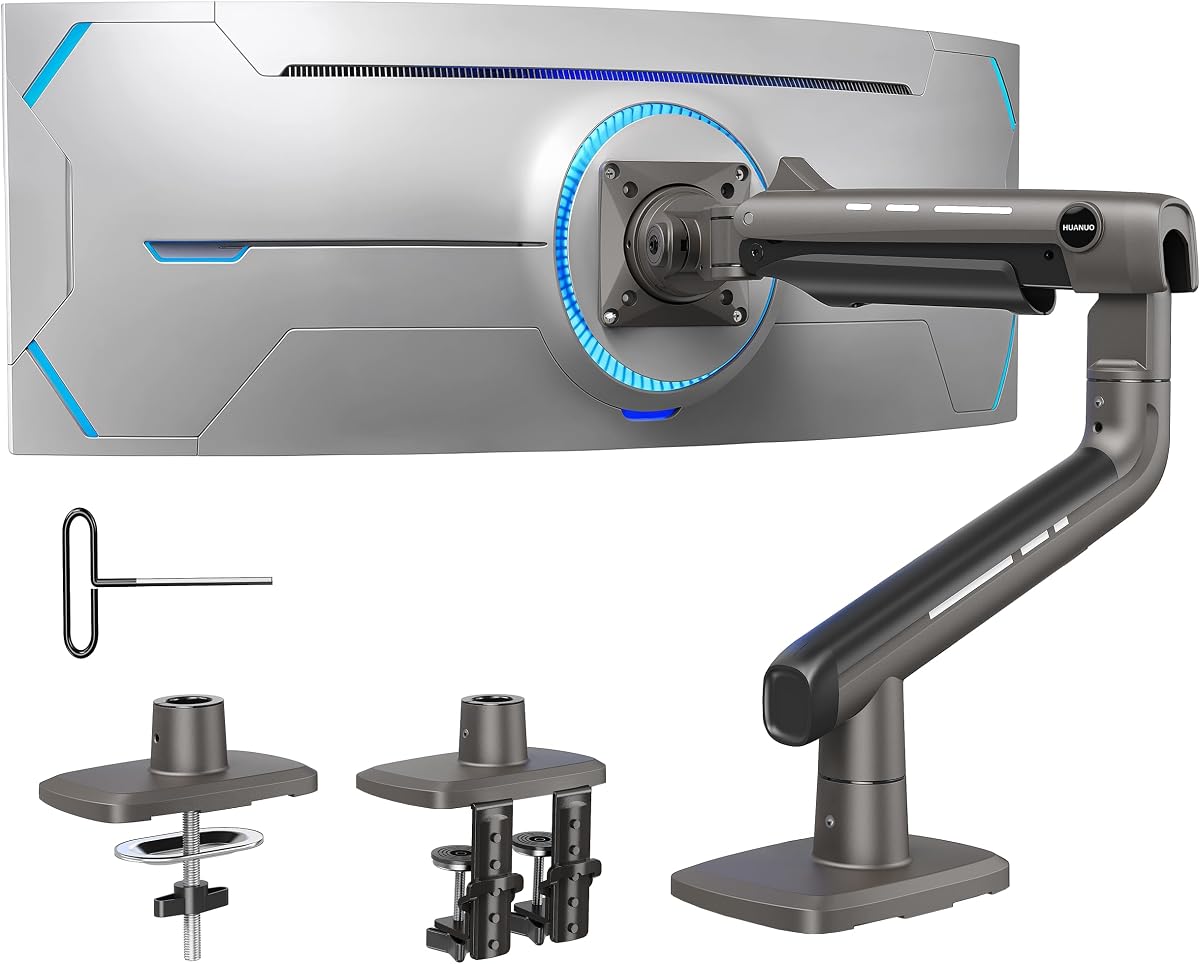
The HUANUO Single Monitor Arm combines an unusually tall 39-inch center pole with broad compatibility and a 4.6 rating, making it a strong all-around choice for workstations that need more vertical clearance. It supports standard displays from 13 to 32 inches, ultrawide screens up to 38 inches, and loads up to 22 pounds, which covers many common office and gaming configurations.
We may earn a commission when you buy through this link, at no additional cost to you.
Its most useful feature is the combination of height and articulation. The arm offers 180-degree tilt, 180-degree swivel, and 360-degree rotation, so a screen can be aligned for a seated workstation, raised for a standing desk, turned toward another person, or changed between portrait and landscape orientations. The supplied specification also notes an integrated cable-management system, helping prevent the display and power cords from spreading across the desktop.
Installation flexibility is another strength. Buyers receive both a C-clamp for desks up to 3.93 inches thick and a grommet base for desks up to 2.75 inches thick. The product data states that the necessary tools and hardware are included and that installation can be completed in about 10 minutes following the manual. As a trade-off, the 22-pound limit means it is not the right choice for the heaviest large-format ultrawide panels, and desk thickness should be measured before ordering.
This arm is best for people who want a genuinely tall mounting point, a standard-sized monitor, or a manageable ultrawide without moving to a heavy-duty premium design. It is especially appealing in dual-purpose offices because the same mount can adapt when the desk changes between sitting and standing. For most buyers seeking the Tall Monitor Arm category, it provides the strongest combination of reach, movement, mounting options, and overall value.
The 39-inch center pole creates more useful headroom than a conventional monitor stand, allowing the display to rise above desk accessories and sit closer to eye level. This is particularly helpful for taller users, standing setups, and desks with keyboards, laptops, or other equipment beneath the screen.
Including both C-clamp and grommet bases allows the arm to suit different desk layouts without changing the monitor hardware. Integrated cable management adds another practical benefit, helping keep signal and power cords routed along the support rather than tangled behind the display.
We may earn a commission when you buy through this link, at no additional cost to you.
The VIVO Extra Tall Single Monitor Desk Mount is built around a 39-inch pole that makes it especially well suited to desks used in both sitting and standing positions. Its 4.5 rating reflects a balanced feature set, with support for 13- to 32-inch screens, ultrawides up to 38 inches, and monitor weights up to 22 pounds.
We may earn a commission when you buy through this link, at no additional cost to you.
The adjustment range is comprehensive. The arm can tilt from plus 90 to minus 90 degrees, swivel through 360 degrees, rotate 360 degrees, and move vertically along the center pole. Portrait and landscape orientation are both available, which makes the mount useful for coding, document review, video editing, and general office work. Cable-management clips along the arm and pole help keep AV and power cords contained.
The supplied C-clamp accommodates a surface up to 4 inches thick, giving it a useful installation range for many solid wooden desks. An optional grommet mount provides an alternative for users whose workstation is already routed for a desk opening. The main limitation is the 22-pound capacity, which is ample for most conventional monitors but may fall short for a very large, heavy ultrawide display. The detachable VESA plate and included manual also make the setup process more approachable.
Choose this VIVO model when your priority is seamless movement between seated and standing work, a high screen position, and a wide range of viewing angles. It is a particularly sensible recommendation for shared or hybrid offices because the monitor can be repositioned quickly for different users, tasks, and sightlines. It ranks just behind the HUANUO model in overall value but offers an equally strong extra-tall foundation.
Height adjustment along the long pole allows the display to move from a lower seated position to a higher standing position. Combined with broad swivel and tilt ranges, this makes it easy to align the screen with different users and changing desk elevations.
Full rotation and portrait support extend the arm beyond simple up-and-down positioning. This is valuable for side-by-side workflows, long documents, vertical code, and content that is easier to inspect in a portrait layout.
We may earn a commission when you buy through this link, at no additional cost to you.
The WALI Tall Monitor Arm Mount provides a practical 31.5-inch pole, support for flat-panel displays up to 34 inches, and a 22-pound load capacity. It is aimed at users who want to reclaim horizontal desk area while retaining straightforward screen positioning. No numerical customer rating was supplied for this listing, so its practical specifications offer the clearest basis for comparison.
We may earn a commission when you buy through this link, at no additional cost to you.
The arm extends and retracts, tilts plus or minus 90 degrees, swivels, and rotates 360 degrees between landscape and portrait modes. A two-stage locking system includes both a C-clamp and a 3.5-inch-diameter grommet base, each applied to desks up to 3 inches thick. Built-in cable management guides cords along the arm, while the raised display frees room for a keyboard, notebook, docking station, or other everyday equipment.
The clear trade-off is pole height. Its 31.5-inch support is shorter than the 39-inch poles offered by the two leading products, so it may be less accommodating for very tall users or particularly elevated standing setups. It also supports a slightly larger maximum screen size than the first two picks, reaching 34 inches, but the stated 22-pound limit remains modest for large ultrawide monitors. The package includes the mount, hardware kit, and user manual.
This WALI model is a strong fit for conventional office desks where space conservation, screen rotation, and flexible installation matter more than maximum height. It is also useful for a display between 32 and 34 inches that remains within the weight limit. For a taller sit-stand arrangement, verify the available clearance above the desk before choosing; otherwise, its straightforward hardware and broad articulation make it a versatile everyday option.
An extending and retracting arm changes the screen's distance from the user without requiring a new stand. This can make a shared workstation easier to adapt for different viewing distances and desk depths.
Lifting the display makes space for a keyboard, notebook, docking station, or other daily tools. Cable management along the arm further reduces visual clutter, producing a more organized workstation.
We may earn a commission when you buy through this link, at no additional cost to you.
The ULTRARM Extra-Tall Heavy-Duty Monitor Arm distinguishes itself with a modular design, a 33.4-inch maximum height range, and a 22-inch arm length. It carries a 4.6 rating and is designed not only for a single screen but also for users who may later add a second, third, or fourth display to the same pole.
We may earn a commission when you buy through this link, at no additional cost to you.
A gas spring enables fluid height changes, while the mechanical spring structure is intended to provide a consistent tilt feel without drift. The extended arm and tall adjustment range push the display up and away from the desktop, leaving room for keyboards, laptops, and accessories. The mount supports flat and curved screens from 17 to 40 inches, including 1000R, 21:9, and 32:9 formats.
Each arm is listed as supporting 2.2 to 26.4 pounds, which is suitable for many large gaming and productivity monitors. The modular architecture is a meaningful advantage for a workstation that may evolve, since the base pole can accommodate additional arms without replacing the entire mount. That flexibility also requires more careful planning, because a multi-screen arrangement must account for weight distribution, available desk space, and the practical limits of installing several arms.
This ULTRARM is ideal for buyers who prioritize maximum height, long reach, and future expansion, especially when using a large ultrawide or planning a multi-monitor command center. It may appeal to creative professionals and gamers who want screens well above the desk. Those wanting the very tallest pole should compare its 33.4-inch range with the 39-inch alternatives, while heavy multi-screen users should verify the total configuration carefully.
The modular pole is designed to grow from one display into a larger multi-screen setup. This makes it useful for users who value future flexibility and want one base system to support changing productivity or gaming configurations.
Gas-spring assistance is designed to make vertical movement fluid and consistent. That can be particularly useful with larger displays, where lifting or lowering a monitor by hand may otherwise feel awkward.
We may earn a commission when you buy through this link, at no additional cost to you.
The WALI Extra Long Single Monitor Arm is designed for users who need to bring a display farther forward across a deep desk. Its 26.77-inch extension is among the longest reaches in this guide, while the 29.13-inch maximum height and 26.4-pound load capacity make it suitable for many 17- to 38-inch flat or curved displays.
We may earn a commission when you buy through this link, at no additional cost to you.
The articulation includes plus or minus 180-degree swivel, plus 70 and minus 45-degree tilt, and 360-degree rotation. These ranges make it possible to reposition the screen for shared viewing, change its orientation, or align it precisely with the user's line of sight. A wider VESA head and tighter-fitting VESA panel are included to improve stability, while the core is listed as having been tested through more than 20,000 cycles.
Cable management runs along the arms, and both C-clamp and grommet bases are offered. According to the product information, each mounting method supports desks from 0.39 to 2.76 inches thick, and installation is recommended only on wooden desks without a crossbeam obstructing the underside. This desk-material limitation is important: it narrows the range of surfaces on which the mount can be safely installed.
The WALI Extra Long is a strong recommendation for a spacious workstation where monitor distance and lateral reach matter more than having the tallest possible pole. It works well for entertainment desks, deep creative workspaces, and displays that need to be moved aside when another person uses the desk. Buyers should confirm desk construction and underside clearance before purchase, while those needing maximum height should examine the taller 39-inch models.
The extended arm moves the display well forward and sideways, which is useful when the monitor is too close for comfortable viewing or needs to make room for other tasks. It also helps with shared-desk workflows requiring frequent repositioning.
A wider VESA head, a closer-fitting mounting plate, and a 26.4-pound capacity support larger displays while the arm is being moved. The stated 20,000-plus cycle testing also suggests attention to repeated daily adjustment.
We may earn a commission when you buy through this link, at no additional cost to you.
The MOUNT PRO Single Long Monitor Arm combines a 27.76-inch extension with a height of up to 28.5 inches above the desktop. It supports most flat or curved LCD and LED screens from 13 to 32 inches, has a 4.5 rating, and is explicitly positioned as a useful option for taller users who want more adjustment than a standard monitor stand provides.
We may earn a commission when you buy through this link, at no additional cost to you.
The arm offers plus or minus 90-degree swivel, plus 85 and minus 45-degree tilt, and 360-degree rotation for landscape or portrait viewing. Its extended column is listed as providing 30 percent more height and a broader viewing range than other VESA mounts, while the long reach helps reclaim substantial desktop space. Integrated cable management allows power and display wiring to be routed neatly along the support.
Compatibility requires care. The listed load range is 4.4 to 19.8 pounds, and the mounting pattern must be 75 by 75 millimeters or 100 by 100 millimeters. Importantly, the product information says the mount is not compatible with 1000R, 1500R, or 1800R curved screens, which could rule it out for some modern ultrawide displays. The arm is listed as having been tested for 20,000 motion cycles, supporting its suitability for regular adjustment.
Installation can use a clamp for desks from 0.39 to 3.15 inches thick or a grommet base for desks from 0.39 to 1.97 inches thick. The labeled parts and clear instructions are useful for first-time installers. This model is best for a standard flat monitor, a tall user seeking eye-level positioning, or a deep desk where a long reach is the priority. Buyers with strongly curved screens should choose another option.
The taller column and 28.5-inch maximum height create more positioning range than a compact arm. That extra range can bring a screen closer to eye level for taller users and reduce the need to hunch toward a display positioned too low.
A 27.76-inch extension combined with generous swivel, tilt, and rotation creates several ways to position the monitor. The screen can be moved closer, pushed aside, angled for glare control, or rotated when a different orientation is needed.
We may earn a commission when you buy through this link, at no additional cost to you.
The ErGear Heavy Duty Monitor Arm is built for substantial screens, offering a 37.4-pound capacity and compatibility with monitors from 13 to 49 inches. Its 4.4 rating and focus on large ultrawide or curved displays distinguish it from lighter single-screen arms designed mainly for conventional office monitors.
We may earn a commission when you buy through this link, at no additional cost to you.
Stability receives particular attention in the product data. A dual C-clamp spreads the load across the desktop, while a thickened steel arm is intended to limit shaking during typing, fast mouse movement, and screen repositioning. The arm extends up to 21.2 inches and raises the display up to 22.2 inches, while motion controls include plus 30 and minus 40-degree tilt, plus or minus 90-degree swivel, and 360-degree rotation.
Both a C-clamp and grommet mount are included. The clamp supports desks from 0.39 to 3.15 inches thick, and the grommet option supports 0.39 to 2 inches. VESA compatibility covers 75-by-75 and 100-by-100-millimeter patterns, allowing the arm to fit many modern flat, curved, and super-wide screens. The trade-off is that the dual-clamp arrangement may occupy more space beneath the desk than a simpler single-clamp base.
This ErGear is most appropriate for a large, heavy ultrawide display that needs firm support and frequent adjustment. Its capacity provides a useful margin for heavy 40- to 49-inch panels, while the 22.2-inch height remains sufficient for many desk setups. Users who need an extremely high pole, however, may prefer the 39-inch models. Before ordering, verify both the display weight and the physical room available under the desk.
A 37.4-pound capacity is high enough for many large-format monitors, giving the arm a stronger margin than standard 22-pound designs. The thickened arm and dual-clamp base add further stability for displays that are difficult to manage with a lightweight stand.
The combination of height adjustment, extension, swivel, tilt, and rotation allows a large screen to be positioned according to the user's comfort and the available desk space. It also frees the area beneath the display for a keyboard, laptop, notebooks, or daily accessories.
We may earn a commission when you buy through this link, at no additional cost to you.
The Extra Long Arm Monitor Mount offers a 27.76-inch extension, 28.5-inch maximum height, and support for screens from 13 to 32 inches. Its 4.2 rating and straightforward specification set make it a practical option for users who want a long reach and a higher display position without moving into a heavy-duty mount.
We may earn a commission when you buy through this link, at no additional cost to you.
The arm is said to save more than 80 percent of the desktop space occupied by a monitor and its factory base, although the practical result depends on desk size and equipment placement. Its taller pole provides 30 percent more height and a wider viewing area than other mounts in the product range. The display can be positioned closer to eye level, which can make the setup more comfortable for taller users.
Adjustment includes plus or minus 90-degree swivel, plus 85 and minus 45-degree tilt, and 360-degree rotation. It supports screens weighing 4.4 to 19.8 pounds with 75-by-75 or 100-by-100-millimeter VESA patterns. The product information mentions compatibility with many 13- to 32-inch flat or curved LCD and LED screens from major brands, but buyers should still check the exact monitor specification before installation. Both clamp and grommet methods are available for desks from 0.39 to 2.76 inches thick.
The main limitation is its lower 19.8-pound maximum load, which is below the capacity offered by several other products in this guide. The arm is also listed as having passed 20,000 motion-cycle testing, which supports confidence in repeated adjustment. This model makes sense for standard and ultrawide screens that remain within its weight range, particularly on a deep desk where substantial forward reach is valuable. Heavy premium monitors call for a higher-capacity arm.
A long arm moves the display away from the desktop, creating room for peripherals and reducing visual clutter. This is especially useful on a smaller work surface where a monitor base, laptop, and writing area would otherwise compete for the same space.
The 28.5-inch height and 27.76-inch extension give users broad control over screen distance and elevation. Swivel, tilt, and rotation make it easier to share a view, change orientation, or reduce reflections throughout the day.
We may earn a commission when you buy through this link, at no additional cost to you.
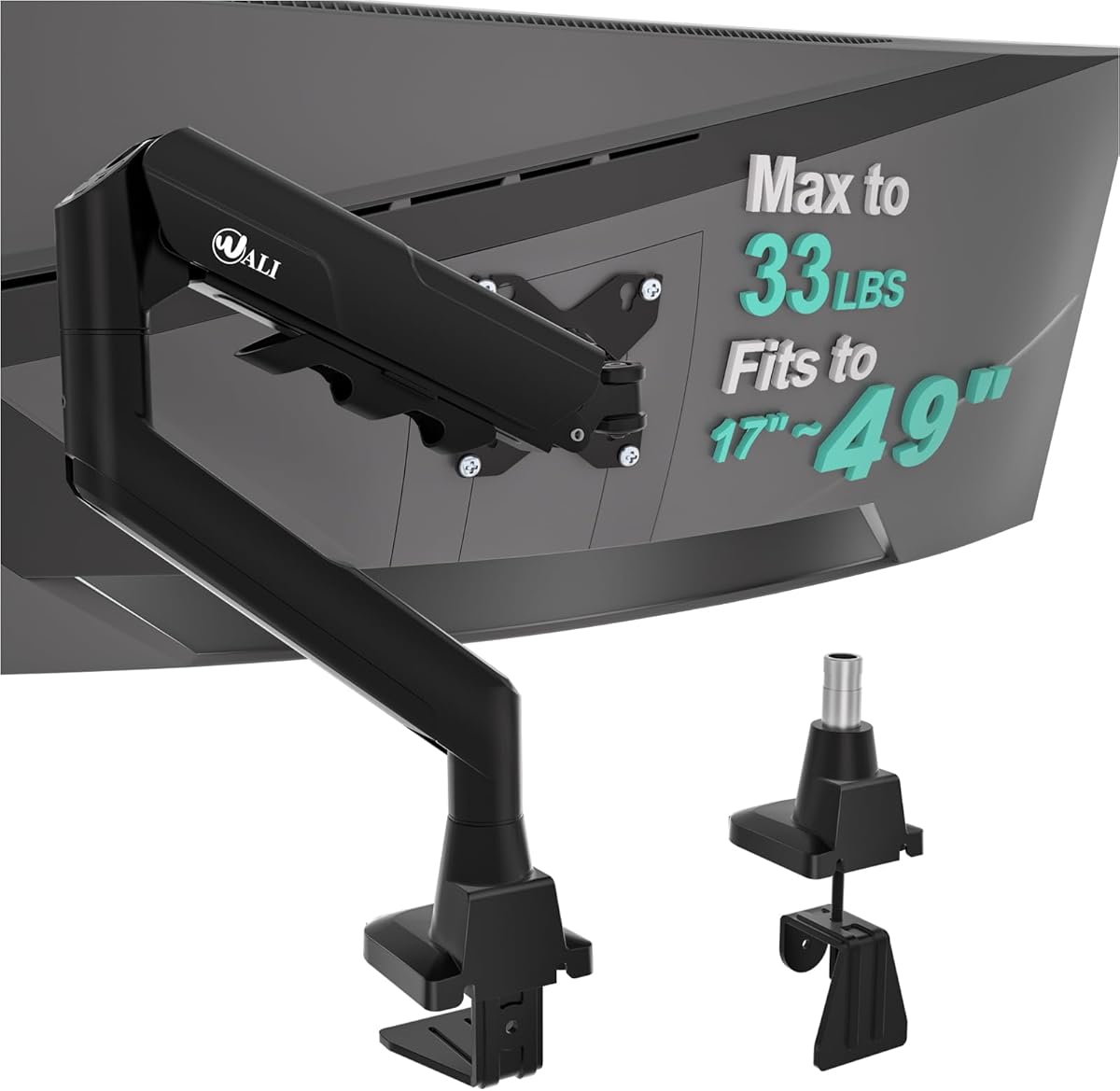
The WALI Ultrawide Single Monitor Arm supports flat and 1800R curved LCD or LED displays from 17 to 49 inches, with a maximum load of 33 pounds. It is tailored to very large screens, and its 4.3 rating reflects a design that combines broad size compatibility with a more restrained vertical and horizontal reach than the longest arms in the guide.
We may earn a commission when you buy through this link, at no additional cost to you.
The arm extends 21.14 inches and raises the display up to 20.59 inches above the desktop. Its movement range includes plus or minus 90-degree swivel, plus or minus 75-degree tilt, and 360-degree rotation. A wider VESA head and tighter-fitting VESA panel are designed to improve stability, while the durable core is listed as having passed more than 20,000 cycles. Built-in cable management keeps cords guided along the arm.
Installation uses either a C-clamp or grommet base, each suited to desks from 0.39 to 1.96 inches thick. The supplied information specifically recommends wooden desks and advises avoiding a crossbeam beneath the desktop, so buyers should inspect the installation area before ordering. The relatively limited desk-thickness range may also be a concern for thick butcher-block or other oversized work surfaces. Its 33-pound capacity is strong, but it remains below the 37.4- and 44-pound alternatives.
This WALI is best for someone with a very large flat or 1800R curved display that needs a single-arm support with a 33-pound limit. It suits users who need stable positioning more than extreme reach or an exceptionally tall pole. Confirm the monitor's VESA pattern, weight, curvature, and desk construction first. If the display is exceptionally heavy, the ErGear or HUANUO TitanLift offers a larger capacity margin.
The 33-pound limit and reinforced VESA connection provide a substantial support margin for large monitors. This makes the arm more appropriate for a premium ultrawide than standard arms rated for conventional office displays.
Balanced tilt, broad swivel, and complete rotation make it possible to fine-tune the viewing angle without repeatedly detaching the display. The extension also allows the screen to be brought closer or moved aside as workspace requirements change.
We may earn a commission when you buy through this link, at no additional cost to you.
The HUANUO TitanLift Heavy Duty Monitor Arm is the premium heavy-duty option in this guide, with the highest listed customer rating at 4.7 and a maximum load of 44 pounds. Its aluminum construction, reinforced VESA head, and support for monitors from 17 to 49 inches position it for demanding large-screen and ultrawide setups.
We may earn a commission when you buy through this link, at no additional cost to you.
The arm offers plus 50 to minus 50-degree tilt, 180-degree swivel, and horizontal and vertical 360-degree rotation for screens up to 35 inches. It extends up to 22.5 inches and provides 19.6 inches of height adjustment, measured from the desk surface to the center of the VESA mount. A quick-install VESA head streamlines assembly, and integrated cable management helps maintain a clean installation.
Durability is a major selling point. The product data states that the construction passed 50,000 motion-cycle tests and a three-times load test. The VESA head is described as 20 percent thicker, while the base is 30 percent wider, both intended to improve stability. Tension can be tuned with an included Allen key using one-hand operation. The dual C-clamp is supportive for a heavy panel, although its size may require more clearance beneath the desk than a conventional clamp.
Desk compatibility requires strict attention. The recommended material is wood, with a thickness between 0.8 and 3.5 inches, and the underside must have no crossbeam or panel interfering with the clamp. Plastic and glass desks are not recommended. This is the strongest choice for a heavy 40- to 49-inch monitor or a premium ultrawide that exceeds the limits of ordinary arms. Buyers with lighter screens and thinner desks can obtain adequate performance from a less specialized model.
The 44-pound capacity, aluminum alloy structure, reinforced head, and wide base are engineered to support displays too heavy for many standard arms. The stated load and motion testing provide reassurance for a high-value large monitor used in demanding work or gaming.
A straightforward tension control and clear motion ranges make it easier to balance the arm and retain a chosen position. Vertical and horizontal rotation, broad tilt, swivel, and extension cover most common viewing and desk configurations.
We may earn a commission when you buy through this link, at no additional cost to you.
The most useful monitor arm is one that fits the display, desk, and working style together. Screen dimensions, weight, VESA pattern, pole height, reach, articulation, and mounting conditions should be checked before making a selection.
Start with the manufacturer's weight rating rather than screen size alone. A large monitor can remain light, while a smaller panel may include substantial internal hardware. The products here range from 19.8 pounds to 44 pounds, and several of the more compact models list a 22-pound ceiling. Choose a limit comfortably above the display's actual weight rather than matching the two values exactly.
Screen-size support varies considerably. Standard extra-tall arms generally cover common 13- to 32-inch displays, some extend to 38 inches, and heavy-duty options reach 49 inches. Curvature needs separate attention: the MOUNT PRO explicitly excludes 1000R, 1500R, and 1800R curved screens, while the WALI Ultrawide model is specified for 1800R curved displays and the ULTRARM supports 1000R formats.
Most arms in this guide use the common 75-by-75-millimeter or 100-by-100-millimeter VESA pattern. That covers a broad range of flat panels and ultrawides, but no arm can connect to a monitor that lacks matching mounting holes. Check the rear of the display or its manual, and verify whether an adapter is available before assuming compatibility.
Height determines how high the screen can sit above the desktop, which affects eye-level comfort and desk clearance. The leading extra-tall models use 39-inch center poles, while other options reach approximately 31.5, 33.4, 30, or 28.5 inches. Taller users and standing desks benefit from more range, especially when the arm also needs to clear a laptop, monitor, or other raised equipment.
Long arms allow the display to move forward, sideways, or out of the way, making them valuable on deep desks and shared workstations. The WALI Extra Long and MOUNT PRO provide roughly 27.8 inches of extension, the ULTRARM provides 22 inches, and other products are shorter. Reach should be balanced against desk depth and the stability of the chosen base.
C-clamp installation generally avoids drilling a hole, while a grommet base can be visually cleaner when a desk opening already exists. Check the allowed desk thickness carefully because limits vary from 1.96 inches to 4 inches, or differ between the clamp and grommet options. Also inspect the underside for crossbeams, drawers, frames, or panels that can prevent proper clamp placement.
Tilt, swivel, extension, and rotation determine how easily the screen can match your preferred viewing position. Rotation between landscape and portrait is useful for coding and long documents, while broad swivel angles make side-by-side work and screen sharing easier. Gas-spring assistance may also be worthwhile for a heavy display if frequent height changes are expected.
Desk material is not merely an installation detail; it affects what the manufacturer considers safe. The HUANUO TitanLift and WALI Extra Long recommend wooden desks specifically, while the latter also advises against a crossbeam beneath the surface. The WALI Ultrawide has a narrower mounting thickness range. Confirm the complete installation conditions instead of checking only screen dimensions and weight.
Before installation, unbox the arm, identify every included component, and read the manual. Measure the desk thickness, locate the rear VESA holes, and inspect the underside for obstructions. Confirm that the monitor's weight and dimensions fall within the arm's stated limits, and decide between the supplied C-clamp and grommet base according to your desk design.
Attach the appropriate VESA plate securely to the back of the display, then install the pole and desktop base. Keep the arm supported while tightening fasteners, and follow the specified torque so the joints are secure without being forced. After connecting the display and routing cables, adjust the arm gradually to determine the correct tension for its weight and reach.
For daily use, move the display by the frame rather than pushing on the screen panel. Avoid extending the arm beyond the desk's structural limits or hanging objects from it. Periodically check the clamp, bolts, and VESA connection for looseness, keep the moving joints free from dust, and route cables so they do not pull against the joints. If the desk or arm is moved, recheck alignment and tension.
A tall monitor arm uses a long vertical pole to provide more clearance above the desktop than a compact fixed stand. An extra-tall arm generally offers even greater pole length, allowing a display to move between lower seated positions and higher standing positions. The useful comparison is the maximum height above the desk, not simply the product label.
Yes, provided the screen's size, weight, curvature, and VESA pattern are supported. Several options handle ultrawides up to 38 inches, while heavy-duty models reach 49 inches. Curved screens require special attention because some mounts explicitly exclude 1000R, 1500R, or 1800R panels.
Look for four mounting holes in a 75-by-75-millimeter or 100-by-100-millimeter square on the monitor's rear. The product specifications should also cover the screen's weight and dimensions. If the holes are missing or spaced differently, the display may require a compatible adapter or may not be suitable for that arm.
A C-clamp is often easier for a desk without a pre-cut opening and can accommodate many desk thicknesses. A grommet mount can look neater and may be preferable when the desk already has a suitable hole. The available space beneath the desk, the desk thickness, and the manufacturer's stated limits should determine the choice.
A taller pole allows the screen to remain at a comfortable eye level when the desk rises and can provide more clearance above a keyboard or laptop. This is particularly useful for taller users. Measure the available distance from the desktop to nearby shelving or other equipment before choosing the maximum height.
Stability depends on weight capacity, mounting pattern, joint quality, and the stability of the desk base rather than screen size alone. Heavy displays benefit from arms with higher load ratings, reinforced VESA heads, and dual-clamp bases. The monitor's actual weight should remain comfortably below the arm's maximum rating.
Most models in this guide provide 360-degree rotation and can hold a compatible display in portrait mode. This is useful for vertical documents, code, and some creative workflows. Buyers should still confirm that the arm and VESA plate support the intended orientation and that the display is not positioned beyond a safe balance point.
No. Desk thickness, material, underside clearance, and frame placement can determine whether a mount can be installed safely. Some manufacturers recommend wooden desks only, and several specify maximum thicknesses for the clamp or grommet base. Always compare the full installation requirements with your desk before purchasing.
The HUANUO Single Monitor Arm is the strongest general-value choice, offering a 39-inch pole, useful articulation, broad screen compatibility, and two mounting systems. The VIVO Extra Tall Monitor Mount is equally compelling for users who frequently alternate between sitting and standing, while the HUANUO TitanLift stands apart for premium heavy-duty construction and a 44-pound capacity.
Prioritize the specifications that cannot be changed after installation: monitor weight, VESA pattern, screen curvature, desk thickness, and underside clearance. Then choose height, extension, and articulation according to your workspace. A standard monitor on a compact desk may need very little beyond a dependable mount, whereas a 40- to 49-inch ultrawide benefits from greater load capacity, reinforced hardware, and a stable dual-clamp base.
Ratings, product availability, and retailer listings can change over time, so check the current product page and installation requirements before ordering. Comparing the live listing with the compatibility details in this guide will help ensure that the selected tall monitor arm fits the display, desk, and working style as intended.