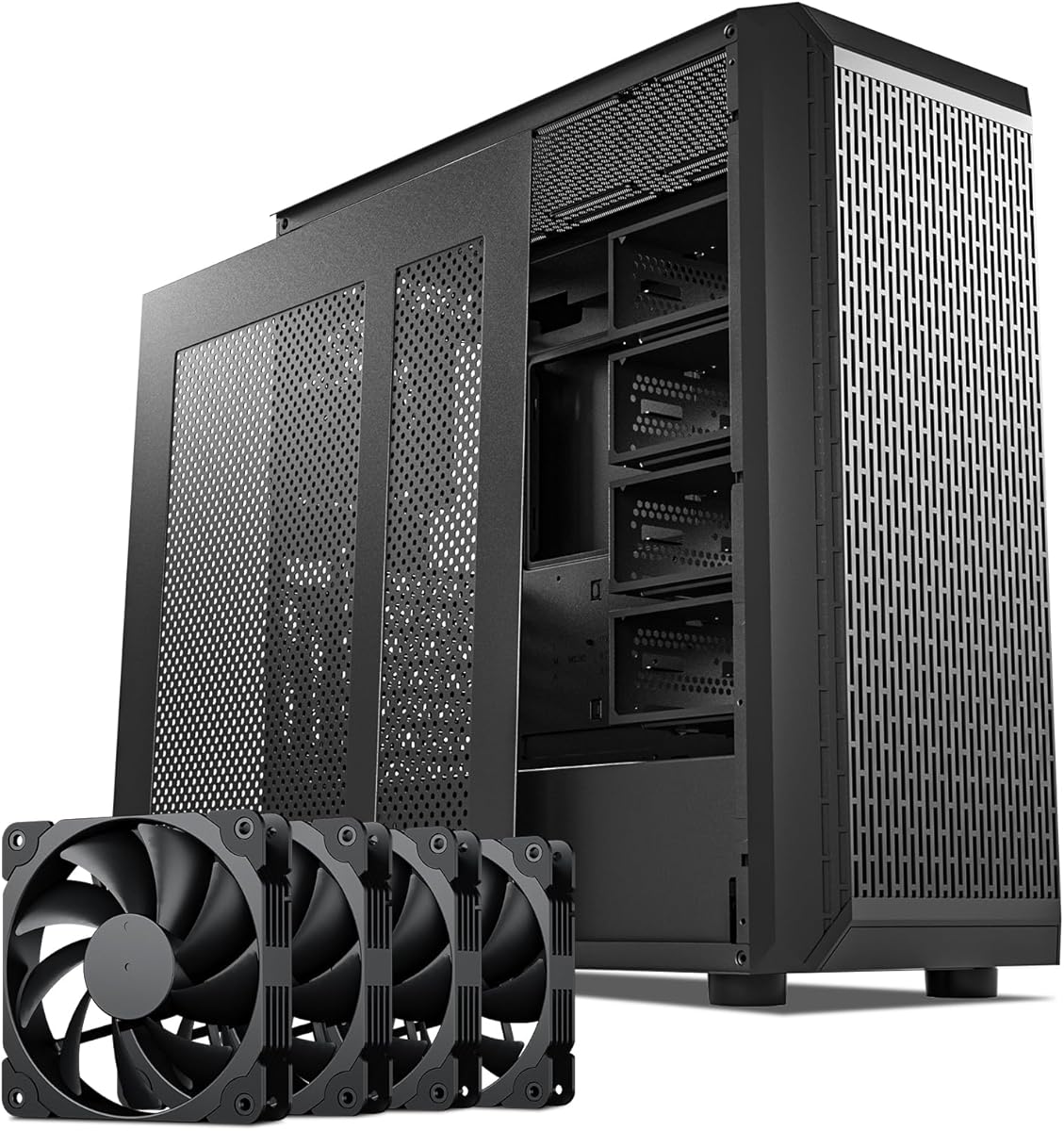
DARKROCK Classico Storage Master
4.4Editor score
Thirteen hard drive support
Four preinstalled 120mm fans
Vertical GPU mounting support
A server case for multiple drives is more than a metal box with extra storage slots. It must balance drive density, airflow, motherboard compatibility, cable routing, and the practical demands of operating a NAS, media server, backup system, or home lab around the clock.
We compared ten cases based on supported drive configurations, cooling provisions, expansion options, form factors, front connectivity, security features, and overall suitability for home or professional server builds. The list covers both desktop-style NAS enclosures and rackmount chassis for installations with more demanding storage requirements.
Each pick highlights a distinct reason to consider it, from flexible storage support to quiet cooling and professional rack integration. Product availability and pricing change over time, so confirm current specifications and component compatibility before making a final purchasing decision.
4.4Editor score
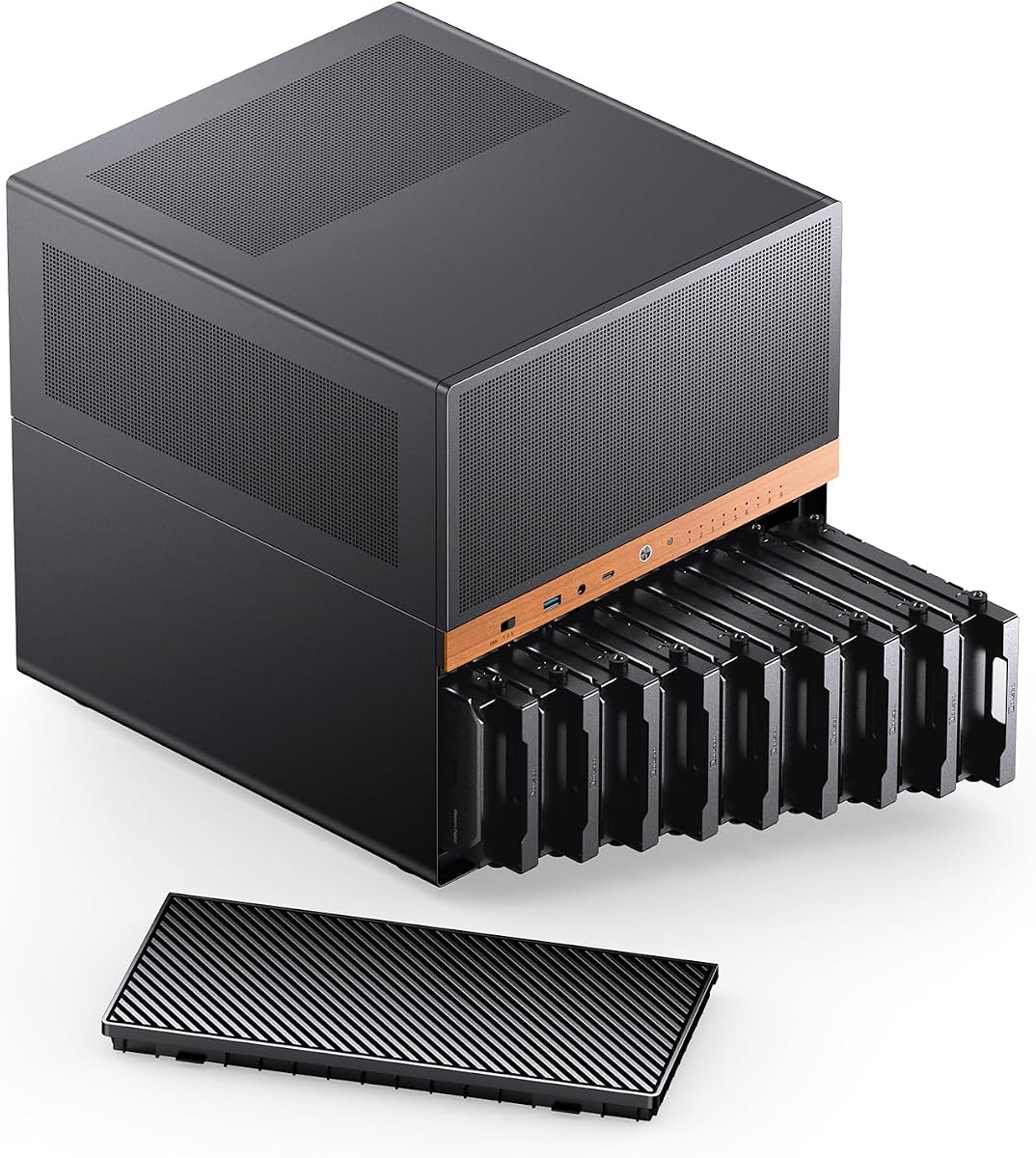
4.6Editor score

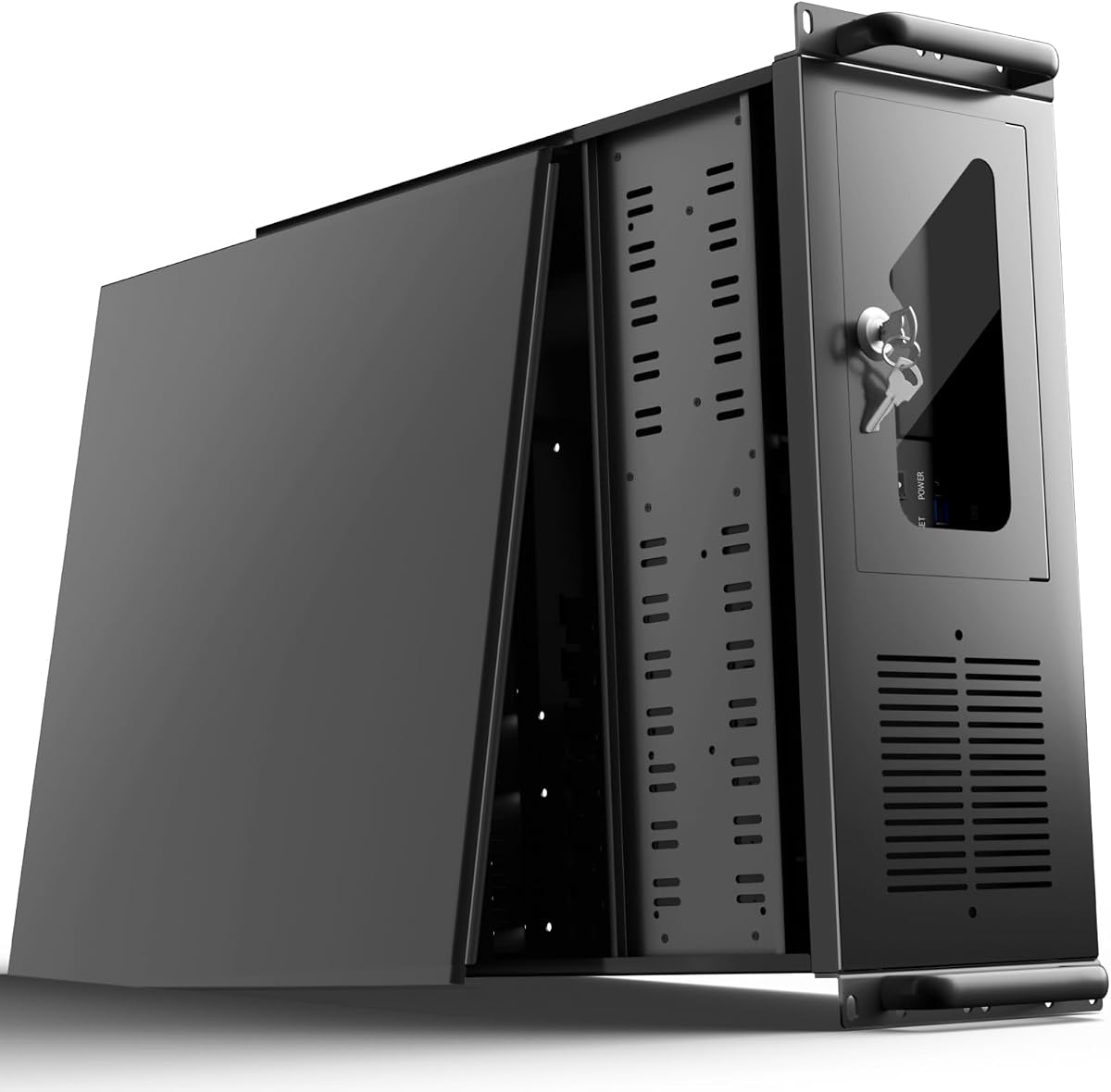
4.2Editor score
As an Amazon Associate we earn from qualifying purchases.
The comparison chart summarizes drive capacity, chassis format, cooling configuration, and expansion support to make it easier to identify the right enclosure for a NAS, media server, or rack-based storage system.



The DARKROCK Classico Storage Master combines unusually broad hard-drive support with a familiar ATX mid-tower layout, giving it a strong balance for home NAS and storage-workstation builders. Its 4.4 rating reflects a generally favorable user reception, while the included 120mm fans and mesh panels point to a case designed around the heat generated by multiple hard drives.
We may earn a commission when you buy through this link, at no additional cost to you.
Its headline advantage is support for thirteen hard drives, which creates more room for a large storage pool than many similarly styled cases. Four included 120mm fans provide a useful foundation for moving air through the drive area and across the rest of the system. Mesh sections on the front and side improve the path for intake and exhaust, and the top mounting area can accept a 360mm radiator for builds that need additional thermal capacity.
The vertical graphics-card mount is useful for systems where a long GPU might otherwise interfere with airflow or drive access, although it also adds another compatibility point to check. As a mid-tower, it will not fit into a server rack, and the supplied description does not provide a complete breakdown of every drive interface or bay type. Builders should therefore verify their preferred controller, backplane, and cable requirements before purchasing.
This is an appealing choice for a high-capacity desktop NAS, media repository, or backup server that will live outside a rack. It offers the most versatile combination of drive capacity, cooling, and familiar ATX construction in the list, making it a particularly sensible starting point for builders who want abundant storage without moving directly to a specialized rack chassis.
Supporting thirteen hard drives gives the Classico Storage Master room to separate media, backups, and active projects. That capacity is especially useful when a build begins with fewer drives but may expand as data retention needs increase.
The combination of mesh panels and four 120mm fans creates a strong starting point for airflow. A supported 360mm radiator also gives builders an option when the motherboard and processor produce substantial heat alongside the storage load.
We may earn a commission when you buy through this link, at no additional cost to you.
The Rosewill Helium NAS Max is a polished mid-tower NAS enclosure for builders who want many 3.5-inch drives without adopting the appearance of a rackmount server. It carries a 4.0 rating and emphasizes a spacious interior, a full mesh front panel, and four large 140mm PWM fans for a high-volume airflow strategy.
We may earn a commission when you buy through this link, at no additional cost to you.
Support for up to eleven 3.5-inch hard drives makes this one of the strongest desktop-style options in the list. The case also supports ATX motherboards and BTF-compatible layouts, while the USB 3.2 Type-C front port provides convenient access to modern external devices. Its all-black finish and restrained exterior make it more visually appropriate for a home office, living area, or professional workspace.
Its main limitation is that it is designed as a mid-tower rather than a rackmount unit. Builders who need a backplane, hot-swap carriers, or a specific data-center mounting standard may find a rack chassis more suitable. The supplied information also lists broad compatibility but does not describe detailed bay connectors, so the exact hard-drive and controller arrangement should be confirmed directly from the manufacturer or seller.
The Helium NAS Max is best for home NAS enthusiasts, media-library builders, and small offices that want dense 3.5-inch storage in an attractive tower. The four 140mm fans and mesh panel make it a compelling option when quiet, consistent airflow around multiple spinning drives is a leading priority.
Eleven supported 3.5-inch hard drives provide substantial capacity for a home or small-business archive. The dense arrangement also makes careful cooling and sensible cable management essential, both of which this enclosure addresses through its mesh panel and large fans.
The black finish, clean front panel, and USB Type-C connection make the case more suitable for an office or living space than a barebones rack enclosure. It retains the storage density of a server while avoiding a visibly industrial design.
We may earn a commission when you buy through this link, at no additional cost to you.
The JONSBO N6 stands out as the most complete general-purpose server case in this guide, earning the highest rating at 4.6. Its nine hot-swap drive bays, removable cage, flexible power-supply arrangement, and numerous cooling positions make it a natural centerpiece for a compact NAS or dedicated personal server.
We may earn a commission when you buy through this link, at no additional cost to you.
The enclosure supports ITX and Micro-ATX motherboards, along with ATX or SFX power supplies installed in multiple positions. Drive capacity reaches nine hot-swappable HDD or SSD positions, while the removable top cover and cage simplify construction access. Cooling flexibility is another strength: the case provides many mounting points, includes two fans, and supports a 240mm AIO cooler.
Backplane power deserves careful attention. The listed guidance says ordinary SATA or SAS mechanical drives generally have startup currents of roughly 1A to 2.5A and that three power connections are sufficient, while enterprise drives may warrant all four. A single ATX 4-pin or SATA cable must not be used to feed multiple rear-panel connectors simultaneously. These details make the N6 powerful but less forgiving for first-time server builders.
Choose the JONSBO N6 when you want hot-swappable storage, serviceable internal layout, and flexible power and cooling in a relatively compact server enclosure. It is our top overall recommendation because it combines the highest rating with the most purpose-built approach to NAS and personal-server construction.
Nine hot-swap positions make it easier to replace or expand storage without rebuilding the entire system. The removable drive cage and top cover also improve access during initial assembly and routine maintenance.
Multiple ATX and SFX power-supply positions let builders adapt the chassis to different power and cable arrangements. Numerous fan locations and 240mm AIO support provide options for tuning airflow around nine drives and the installed computing hardware.
We may earn a commission when you buy through this link, at no additional cost to you.
The UTLGAMENG 4U Server Case offers a spacious rack platform with twelve dedicated hard-drive bays and seven PCI slots. Its 4.0 rating reflects a straightforward server-chassis proposition: expandable storage, conventional component compatibility, and practical management features for home labs, offices, or data-center environments.
We may earn a commission when you buy through this link, at no additional cost to you.
Drive density is the principal attraction. Twelve dedicated bays allow a builder to assemble a larger storage array than most of the desktop cases in this guide, while seven PCI slots allow network cards, controllers, and other expansion hardware. The chassis supports ATX, Micro-ATX, and Mini-ITX motherboards, standard ATX power supplies, and graphics cards up to 230mm—or 330mm after removing the hard-drive bay.
Front-panel USB 3.0 ports simplify local transfer and maintenance tasks, while LED indicators provide at-a-glance system status. A key-lock mechanism and dedicated side-panel air filter add practical protection. The listing does not specify the exact 3.5-inch and 2.5-inch bay mix or whether trays support hot-swapping, so buyers needing precise drive support should verify those details.
This case is most appropriate for a 4U rack where storage expansion and PCI availability matter more than compact size. It may serve a growing home lab, an office backup appliance, or a private media server, provided the installer confirms drive format, connector arrangement, and cable routing before assembly.
Twelve dedicated drive positions offer room for a larger array, making this chassis useful for archives, video storage, and backup systems. The expansion potential makes it a practical foundation for a rack installation expected to grow over time.
Front USB connections, status lights, a keyed front panel, and a dust filter simplify routine operation. These details are especially valuable in shared server rooms where quick maintenance and physical security are important.
We may earn a commission when you buy through this link, at no additional cost to you.
The Rosewill RSV-R4000U is a conventional 4U server chassis that combines eight internal 3.5-inch HDD bays with three 5.25-inch device positions. Its 4.1 rating and professional rackmount layout make it a balanced option for organizations that need more drive capacity than a compact NAS but do not require the highest possible density.
We may earn a commission when you buy through this link, at no additional cost to you.
Seven PCI expansion slots support network adapters, controllers, and other add-in hardware, while ATX and CEB motherboard compatibility broadens the available platform choices. Four preinstalled fans provide airflow from the front and rear, and front LEDs report power, HDD, and LAN status. Two front USB 3.0 ports support local administration and peripheral connections.
The included mounting hardware and standard 4U format are useful for installation in a server rack, data center, or dedicated home-lab cabinet. A front panel lock improves physical security. However, the supplied listing does not state that the drive trays are hot-swappable, so builders who need quick disk replacement should not assume that feature.
This Rosewill model is a sensible middle ground for office servers, small-business storage, and home labs where eight hard drives, several removable-device bays, and seven expansion slots meet the required capacity without moving to a denser chassis. Its cooling and monitoring features support the demands of a continuously operating server installation.
Eight 3.5-inch drive bays provide a substantial storage foundation, while the three 5.25-inch positions can accommodate additional components. This mix makes the chassis adaptable to servers that combine mass storage with specialized devices.
Front and rear PWM fans are positioned to move air through the drive area and exhaust heat from the chassis. Status indicators and a front lock support organized operation in offices, labs, and professional rack environments.
We may earn a commission when you buy through this link, at no additional cost to you.
The Rosewill RSV-L4500U is the highest-density conventional rack chassis in the selection, with fifteen internal 3.5-inch HDD bays. Its 4.2 rating and extensive cooling configuration make it a strong premium choice for dedicated storage servers, high-capacity archives, and professional environments where drive density is the main objective.
We may earn a commission when you buy through this link, at no additional cost to you.
Fifteen hot-drive positions create the opportunity for a very large storage array, while seven PCI expansion slots leave room for network, controller, and accelerator hardware. E-ATX compatibility allows a more capable motherboard platform than smaller boards. The chassis includes six 120mm fans—three at the front and three in the middle—and two 80mm rear fans to support airflow through the dense storage section.
Its density also creates a meaningful planning requirement. Power requirements rise with every drive, cable routing becomes more involved, and the additional fans need appropriate control. Buyers should not assume that every bay uses the same connector, nor should they assume hot-swap support without confirming the exact backplane and tray arrangement. The physical size and weight of a fully populated system also deserve consideration during installation.
For a serious storage build, the RSV-L4500U is the most ambitious option here. It is best suited to an installer who has a 4U rack position, a clear drive-expansion plan, and enough power and cooling infrastructure to support a densely populated system.
Fifteen drive bays create an impressive foundation for large archives and storage arrays. E-ATX support and seven expansion slots also allow the chassis to serve as more than a simple external drive holder.
Eight included fans are divided between the front, center, and rear of the chassis, creating a comprehensive cooling layout. This is a major advantage when multiple hard drives operate continuously in a confined rack space.
We may earn a commission when you buy through this link, at no additional cost to you.
The DARKROCK Classico Max Storage Master is a large desktop enclosure for builders who want a broad mix of hard-drive and solid-state storage alongside E-ATX hardware. Its 4.4 rating and specification for ten 3.5-inch HDDs plus three 2.5-inch SSDs make it a versatile alternative to the Classico Storage Master reviewed earlier.
We may earn a commission when you buy through this link, at no additional cost to you.
Motherboard support spans E-ATX, ATX, Micro-ATX, and ITX, although installing an E-ATX board requires removing the hard-drive cage. That requirement should be considered carefully because it can affect the final storage layout. A vertical GPU mounting option uses three vertical slots and directs the graphics card through parallel airflow paths created by the front and rear fans.
Mesh panels support heat dissipation, and a top position for a 360mm radiator gives builders flexibility for processor cooling. The enclosure remains less appropriate for a locked server room because it is a mid-tower rather than a rackmount chassis. The stated ten HDD and three SSD positions are useful, but exact connector and backplane details should still be verified for a particular controller configuration.
Choose this case for a powerful desktop server, workstation, or hybrid storage system where E-ATX flexibility and a mix of drive types matter. It works especially well for builders who value a case that can host both a substantial hard-drive array and faster 2.5-inch storage.
Ten 3.5-inch HDD positions and three 2.5-inch SSD positions support a tiered storage design. Capacity can come from hard drives while SSDs handle frequently accessed data, applications, or caching workloads.
Support for four motherboard sizes allows the case to adapt to different processor and expansion requirements. The 360mm radiator position and mesh panels provide a strong foundation for a workstation-class thermal configuration.
We may earn a commission when you buy through this link, at no additional cost to you.
The Rosewill RSV-R4100U provides seven internal 3.5-inch drive bays in a standard 4U rackmount format. With a 4.0 rating, seven PCI expansion slots, and three preinstalled fans, it suits installers who need more than a compact desktop case but fewer drives than the densest rack chassis in the guide.
We may earn a commission when you buy through this link, at no additional cost to you.
ATX and CEB motherboard support gives the builder a choice of server platforms. Two 5.25-inch device positions can accommodate additional equipment, while front USB 3.0 ports and LEDs for power and HDD activity aid administration. The front panel lock and key provide physical security for shared offices, home labs, and data-center cabinets.
The most important compatibility detail concerns the hard-drive mounting pattern. The supplied information says the bays support drives with three screw holes on each side, providing a three-point connection, but they do not support drives with only two holes on each side. Builders should inspect their intended drives before ordering. The listing also does not mention hot-swap functionality.
This chassis is a practical choice for a compact 4U server, private backup system, or moderate-capacity NAS where seven drives are sufficient. It balances storage, expansion, physical security, and cooling without reaching the size or complexity of a fifteen-bay model.
The three-screw-hole requirement is an important distinction that can affect drive compatibility. Confirming the mounting pattern before purchasing prevents a mismatch between the chosen hard drives and the case's cage.
Seven PCI slots offer more expansion opportunities than many compact home-server cases. Combined with two 5.25-inch device bays, the chassis can support a broader mix of storage, networking, and support hardware.
We may earn a commission when you buy through this link, at no additional cost to you.
The Rosewill RSV-Z3100U is a compact 3U rackmount server case intended for installations where rack depth is more constrained than storage density. Its 4.0 rating, ATX motherboard compatibility, and four internal 3.5-inch drive positions make it suitable for a small business server, network-appliance project, or home-lab system.
We may earn a commission when you buy through this link, at no additional cost to you.
The 3U format can make better use of limited rack space, while four PCI slots still allow room for network controllers and other expansion devices. Two included 80mm PWM fans provide front-to-rear airflow, and the front panel includes power, HDD, and LAN indicators along with two USB 3.0 ports. These features support straightforward monitoring and local maintenance.
The listing contains an inconsistency between its title and the supplied product description: the title refers to six 3.5-inch bays, while the detailed description states four internal 3.5-inch bays. That discrepancy should be resolved with the seller or manufacturer before purchase. The smaller fans also offer less total airflow area than the 120mm fans used by several larger cases, so careful placement and drive selection are important.
The RSV-Z3100U makes sense for users who need a standard rack footprint but do not need a large archive. It is a better fit for a compact network or backup server than for a media collection with substantial expansion plans.
The 3U chassis is useful when every available rack position matters. It provides room for a standard platform and several expansion cards while leaving more vertical capacity available in a crowded cabinet.
Because the supplied title and description identify different bay counts, the exact capacity needs verification. Buyers should request a current diagram or manufacturer specification before designing their storage array.
We may earn a commission when you buy through this link, at no additional cost to you.
The SilverStone RM41-H08 specializes in a smaller but highly serviceable server-storage layout. Its 4.3 rating, five hot-swappable 3.5-inch drive bays, and seven expansion slots make it a strong option for a professional application where quick, secure drive replacement is more important than maximum capacity.
We may earn a commission when you buy through this link, at no additional cost to you.
The bays accept SATA or SAS drives according to the listed 12 Gbit/s support, and the tray-free, screw-less design helps reduce maintenance time. Each tray includes an anti-theft lock intended to protect confidential data. Three 5.25-inch device bays add further flexibility, while SSI-CEB motherboard support targets professional server platforms.
The enclosure is a 4U rackmount unit, so it is intended for equipment racks rather than a desktop media library. The supplied description gives less detail about included fans and cooling positions than several competing chassis, so airflow should be investigated alongside the drive and controller configuration. Power requirements for five drives and any expansion cards also deserve attention.
This SilverStone case is best for a compact professional storage system, secure hot-swap array, or office server where serviceability is the priority. It is less appropriate for builders seeking the largest possible drive count, but its security-oriented tray locks and efficient maintenance design make it distinctive.
Hot-swap support lets operators replace or expand storage more efficiently than with permanently mounted drives. Anti-theft tray locks add a physical protection layer that is valuable for confidential business data.
Seven PCI expansion slots make the five-bay enclosure useful for network adapters, storage controllers, and other professional additions. SSI-CEB support provides a foundation for server-class motherboards when the application requires them.
We may earn a commission when you buy through this link, at no additional cost to you.
The right server case depends on the number and type of drives, the location of the system, the cooling and power available, and the maintenance workflow. Match the enclosure to those requirements rather than focusing only on the largest advertised bay count.
Start with the number of drives you need now and the amount of expansion you expect to use. A compact system with four or five bays may be appropriate for a small backup server, while eight to fifteen positions offer greater freedom for archives, media pools, and RAID configurations. Be aware that advertised drive counts can refer to different formats or mounting positions, so verify the full bay breakdown before buying.
A server case may support 3.5-inch hard drives, 2.5-inch solid-state drives, or both. Larger hard drives usually offer the highest capacity per bay, while 2.5-inch drives can provide fast scratch, cache, or application storage. Cases with mixed support are ideal for tiered systems, but a large number of mechanical drives demands stronger airflow and careful consideration of vibration, noise, and heat.
Multiple hard drives generate heat, particularly when several spin or perform simultaneous transfers. Look for mesh intake panels, strategically positioned fans, filters, and radiator support. The number and size of included fans matter, but their location is equally important because a dense cage can create isolated pockets of heat. For rack chassis, confirm that the server rack itself supplies adequate front-to-back airflow.
Check whether the case supports the exact motherboard form factor and maximum board dimensions needed by the build. ATX, Micro-ATX, Mini-ITX, E-ATX, CEB, and SSI-CEB are not interchangeable in every chassis. Larger boards can also interfere with drive cages, graphics cards, cable routing, or power-supply placement, so review the full dimensional specification rather than relying on the form-factor label.
A mid-tower NAS is easier to place in an office or home and can look more like a normal computer, but it is not a standard rack unit. A 3U or 4U chassis is designed for a server cabinet, data center, or equipment closet and may provide stronger institutional features such as locks, status indicators, and front connectivity. Choose the format based on where the machine will live and how it will be maintained.
PCI slots, graphics-card clearance, front USB ports, and drive controllers determine how easily the system can evolve. Some server cases use proprietary backplanes or proprietary drive trays, which can simplify installation but limit drive interchangeability. Hot-swap support is valuable for continuous operation, yet it also imposes specific controller, power, and connector requirements that should be checked in advance.
Drive startup can place a greater electrical load on a power supply than steady-state operation, and the number of drives affects both the power supply rating and the distribution of power cables. Some backplanes require multiple connectors, while others can power all bays from a smaller set. A chassis with a standard ATX power supply may offer easier sourcing, whereas a compact SFX design may require a more specialized component.
A server may operate for long periods before anyone opens it, so convenient access matters. Removable cages, tool-free trays, clear status indicators, front USB ports, and accessible dust filters can greatly simplify maintenance. For a shared rack or business deployment, a keyed front panel, locking drive trays, and tamper-resistant construction add useful physical security without changing the underlying storage design.
Before installing drives, identify the intended bay for each disk and record its position. Install the operating system and boot device first where practical, then add data drives in a consistent sequence. Follow the drive and backplane manuals, secure every tray or screw, and route power and data cables so they do not obstruct fan blades, block intake openings, or make future service unnecessarily difficult.
After the system is assembled, verify airflow direction, check that every drive appears in the controller, and listen for unusual clicking, vibration, or repeated startup sounds. A sudden increase in noise or temperature can indicate a loose tray, obstructed fan, failing cable, or drive with a mechanical issue. Use the case's front indicators and monitoring software to confirm that drive activity and temperatures are being reported correctly.
Routine care should include cleaning accessible dust filters according to the manufacturer's instructions, checking that all screws remain secure, and ensuring that cables have not been pinched during service. Keep a record of drive models, firmware, bay assignments, and backup status. In a hot-swap system, follow the documented shutdown or removal procedure for each tray and never interrupt a transfer that the controller has not confirmed is complete.
A NAS case is generally designed around accessible storage, quiet operation, and simple home or office use, while a rackmount server case targets equipment cabinets and professional deployment. A NAS case may emphasize a clean exterior, front USB Type-C, and straightforward drive access. A server chassis may emphasize PCI expansion, locks, status indicators, formal rack dimensions, and high drive density.
The JONSBO N6 is the strongest general-purpose option here because it combines nine hot-swap bays, flexible power-supply placement, and several cooling configurations. The DARKROCK Classico Storage Master may be preferable for a desktop-style build with thirteen supported hard drives and four included fans. The right choice ultimately depends on bay format, controller, noise expectations, and future expansion plans.
The cases in this guide range from four or five usable drive positions to as many as fifteen, although one product listing contains a discrepancy between its title and description. A greater bay count does not automatically mean greater suitability. Confirm whether the advertised positions accept 3.5-inch HDDs, 2.5-inch SSDs, or both, and verify the exact connector and backplane arrangement.
Hot-swap capability is useful when fast drive replacement and minimal downtime are priorities. It can simplify maintenance in a business server, home lab, or array with redundant storage. However, hot-swap operation usually requires a compatible backplane, controller, power configuration, and operating-system support, so it should be treated as a complete system requirement rather than an isolated case feature.
It can if airflow and cooling are poorly planned, because closely packed hard drives restrict the path for cool intake air and create warm pockets. Look for a chassis with intake fans aimed toward the drive cage and adequate exhaust at the rear. Monitor drive temperatures under realistic workloads and avoid using an unfiltered intake in a dusty environment.
Two or more 80mm fans can be sufficient in a compact chassis if they are positioned to move a focused stream of air through the drive area and out of the case. The Rosewill RSV-Z3100U is one such example, although it has limited space and a modest drive count. Larger cases and denser drive arrays generally benefit from 120mm or 140mm fans because they move more air with lower noise.
ATX supplies are generally easier to find and can provide more flexible mounting and cable options in larger cases. SFX supplies are useful in compact enclosures where physical space is constrained. The JONSBO N6 supports both formats in multiple positions, but the correct choice still depends on the selected motherboard, drive backplane, power demands, and the case's cable-management provisions.
Confirm the bay size, mounting pattern, connector type, backplane requirements, and available power. The Rosewill RSV-R4100U specifically requires drives with three screw holes on each side and does not support the two-hole pattern. Also verify that the operating system, storage controller, and any RAID or NAS software support the chosen drive configuration.
The JONSBO N6 takes the overall recommendation because its nine hot-swap bays, serviceable internal design, flexible power options, and extensive cooling positions cover the needs of most serious compact server builders. The DARKROCK Classico Storage Master is a strong alternative for a high-capacity ATX mid-tower, while the Rosewill RSV-L4500U delivers the greatest conventional rack density with fifteen 3.5-inch drive positions.
Prioritize the details that determine whether the finished server will work: usable bay count, drive mounting pattern, backplane and controller compatibility, motherboard dimensions, power delivery, and physical form factor. Do not choose solely by the largest advertised drive number or by the number of fans. A smaller case with compatible hardware and serviceable connections may be far more useful than a denser model that forces difficult compromises.
Finally, check current product specifications, availability, and pricing before ordering, since manufacturer designs and marketplace listings can change. Confirm all relevant dimensions and connectors, and make sure the complete system—including drives, power supply, cooling, and expansion cards—fits the intended rack or desktop location.


