
ECOLOVI Adjustable Wood Monitor Stand Riser
4.6Editor score
Four adjustable height settings
Spacious under-platform storage
Sturdy 44-pound support
Discover the best PC Monitor Riser Stand options for home offices, gaming desks, and dual-screen setups, compared for height, storage, stability, and versatilit
A PC monitor riser stand can transform a crowded desktop by lifting your display, revealing storage space, and creating a more comfortable viewing position. The right model should suit your monitor size, desk dimensions, equipment weight, and preferred working style while remaining stable and visually appropriate.
We compared ten monitor risers based on the supplied product specifications, focusing on height adjustment, support capacity, storage, ventilation, construction, footprint, assembly, and dual-monitor functionality. The list includes single-screen metal and wood designs, foldable stands, and expandable models for more complex workstations.
Each review explains the product's strongest benefits and practical limitations so readers can identify the right fit for a home office, study area, gaming setup, reception desk, or dual-screen workspace. Product listings and prices can change, so confirm current details and compatibility before making a purchase.
4.6Editor score

4.7Editor score

4.6Editor score
The comparison chart highlights the core differences among all ten stands, including their screen capacity, height options, maximum load, and principal organizational features. It provides a quick way to narrow the field before reading the detailed reviews.



The ECOLOVI Adjustable Wood Computer Monitor Stand Riser combines a warm wooden surface with four height settings, making it a practical option for improving screen position and reclaiming desk space. Its 4.6 rating reflects a generally favorable balance of adjustment, storage, appearance, and useful equipment compatibility.
We may earn a commission when you buy through this link, at no additional cost to you.
Its strongest feature is the range of viewing heights, listed at 4.00, 4.80, 5.50, and 6.10 inches. That gives users more flexibility than a fixed riser and can make a substantial difference when screen height, seating position, and monitor size do not align naturally. The 12.50 by 7.00-inch area underneath can hold keyboards, notebooks, office accessories, or other frequently used items.
The stated support capacity of 44 pounds is suitable for many monitors, laptops, printers, and gaming consoles, although unusually large or heavy equipment should be checked against the seller's dimensions and load guidance. The wooden top gives the stand a more decorative finish than a basic metal shelf, while non-slip rubber pads help prevent movement and protect the desktop. Its main limitation is that it is designed around one centered device rather than two separate screens.
This is a strong recommendation for a home office, study desk, or single-screen gaming setup that needs both height adjustment and concealed storage. It may be less suitable for expansive dual-monitor systems, but for a compact and visually coordinated workstation, it offers one of the most versatile height ranges in this guide.
Four settings make it easier to accommodate different chair heights and viewing preferences. Users can raise the display when seated low or lower it when working with a taller chair, while the 6.10-inch setting offers a pronounced lift for higher sight lines.
The broad under-platform area turns otherwise unused vertical space into a practical shelf. It can reduce visible clutter while keeping a keyboard, notebooks, charging accessories, or small office equipment close at hand.
We may earn a commission when you buy through this link, at no additional cost to you.
This two-pack of adjustable monitor risers is among the most versatile choices in the guide because it supports two screens, two workstations, or a monitor paired with a laptop. Its 4.7 rating and combination of a broad platform, three height settings, and steel construction make it a well-rounded option for offices, study spaces, and shared desks.
We may earn a commission when you buy through this link, at no additional cost to you.
Each stand measures 14.6 by 9.3 inches and offers height levels of 4.13, 4.92, and 5.70 inches. The wide platform provides more surface area than many compact risers, while 150 heat-dissipation holes can help improve airflow around a desktop computer or laptop. The cold-rolled steel frame has a waterproof, anti-rust coating and a listed load capacity of 44 pounds.
One notable feature is the possibility of stacking two stands to create additional storage, although buyers should consider the stability of the resulting configuration and the amount of desk space required. The stands can also serve as general-purpose shelves for plants or kitchen storage, but their primary strength is the flexibility of having two separate units. Assembly reportedly takes less than 30 seconds and does not require tools.
This package is especially appealing to households with two desks, remote workers using both a computer and laptop, students who move between study and gaming areas, or offices that want matching equipment at separate workstations. It is a strong all-around pick when the value of receiving two adjustable risers outweighs the need for swivel screens or a single continuous platform.
The two-pack format is more useful than it may first appear. One stand can support a primary monitor while the other holds a laptop, or the units can be placed at separate work areas for a consistent ergonomic and organizational setup.
The perforated platform gives warm air more ways to escape, while coated steel provides the stated support for common desktop equipment. Rubber pads add stability and reduce the chance of scratching the desk.
We may earn a commission when you buy through this link, at no additional cost to you.
The WESTREE Dual Monitor Stand Riser brings together a rustic brown wood top and thick steel legs for a dual-screen setup that needs both organization and a decorative finish. Its 4.6 rating indicates a well-regarded product, particularly for users who want one elevated platform instead of separate stands.
We may earn a commission when you buy through this link, at no additional cost to you.
The defining feature is its ability to hold two monitors, which makes it useful for multitasking, paired application windows, trading setups, creative work, or a monitor-and-laptop arrangement. Beneath the upper surface, additional space can organize office supplies, while the same platform can serve printers, laptops, televisions, or other compatible equipment. Thick solid steel legs support the structure, and anti-slip pads can be installed for stability and surface protection.
A limitation is that the product data does not describe adjustable height, swivel movement, or telescoping width. That makes it less flexible than dedicated dual-screen risers with expandable or rotating shelves, especially for users with ultrawide displays or unusual screen angles. The assembly is designed to be straightforward because the board and frame feature pre-drilled holes, with parts, tools, and instructions included.
This stand is best for buyers who prioritize a coordinated, rustic appearance and a shared elevated platform over advanced articulation. It offers a compelling blend of dual-display support, storage, and furniture-style construction for a home office, creative studio, or professional workstation.
Placing two screens on one riser creates a more unified workstation than separate stands. The shared wood surface also gives the setup a furniture-like appearance that can integrate more naturally into a finished office.
The space below the screens helps keep frequently used accessories organized. Although marketed for two monitors, the platform can also accommodate compatible laptops, printers, televisions, and other desktop equipment.
We may earn a commission when you buy through this link, at no additional cost to you.
The TEAMIX 20 Inch Monitor Stand Riser is a straightforward wooden shelf for users who value a broad surface, solid support, and a clean appearance. It carries a 4.6 rating and is designed to accommodate laptops smaller than 20 inches and most screens smaller than 50 inches.
We may earn a commission when you buy through this link, at no additional cost to you.
Its standout specification is the stated 80-pound capacity, which is higher than the load rating of most adjustable models in this guide. The 20 by 9.5 by 4-inch MDF construction can support a substantial display or other equipment while adding a storage area for a keyboard, notebook, or accessories. The internal height is listed as 2.95 inches, so buyers should check whether their stored items will fit comfortably.
Unlike many competitors, this stand has a fixed height rather than multiple adjustment levels. That makes it less adaptable to different users and seating arrangements, but it can be a worthwhile choice when a particular screen height is known to work for the desk. Its minimal black finish is designed to blend with many home and office interiors.
Best suited to a dedicated workstation with a larger monitor, heavier equipment, or a need for a simple shelf, this model avoids unnecessary mechanical complexity. It is less compelling for users who want to fine-tune viewing height, but the high capacity and large surface make it a practical fixed-height option.
The listed 80-pound capacity provides comfortable margin for many larger monitors and substantial desktop hardware. Buyers should still consider balance and placement, especially with a single narrow base.
Raising the display creates usable space below for items that would otherwise occupy the main work surface. The 2.95-inch internal clearance makes it most suitable for flatter accessories and compact keyboards.
We may earn a commission when you buy through this link, at no additional cost to you.
The HUANUO Monitor Stand is a compact metal riser designed around three height settings, a ventilated platform, and enough support for common office and entertainment equipment. Its 4.7 rating is among the highest in the guide, making it a strong contender for users seeking a balanced, practical stand.
We may earn a commission when you buy through this link, at no additional cost to you.
The three listed heights are 3.94, 4.72, and 5.51 inches, giving users a useful range without making the frame excessively complicated. Powder-coated steel provides the structure, while the vented surface is intended to improve heat dissipation for laptops and other electronics. Its stated maximum load of 44 pounds is suitable for monitors, laptops up to 15.6 inches, printers, and gaming consoles.
The 12.40 by 7.09-inch area below the platform adds valuable organization space, and two stands can be stacked according to the product description. Rubber feet help prevent slipping and scratching. On the other hand, the platform and storage area are relatively compact, so a full-size keyboard or large file organizer may not fit with room to spare. The lower adjustment level also offers less height change than four-setting models.
This riser is a good recommendation for students, office workers, and gamers who want a durable ventilated shelf in a modest footprint. It is especially relevant when a laptop will spend substantial time on the stand, since the ventilation is a more meaningful feature than it would be for a display that generates little heat.
The perforated platform allows more airflow around a laptop or compact computer than a solid wooden top. It cannot control temperature independently, but it can help remove the restriction created by enclosing equipment on a desktop.
Three button-controlled settings make it straightforward to choose a comfortable screen position. The compatibility guidance also allows the same stand to serve printers, gaming consoles, and monitors, improving its value across changing setups.
We may earn a commission when you buy through this link, at no additional cost to you.
The AMERIERGO Dual Monitor Stand Riser is built for users who need two displays and a platform that can expand to accommodate different screen sizes. It has a 4.5 rating and distinguishes itself through a substantial length adjustment, flexible positioning, and three storage spaces below the monitors.
We may earn a commission when you buy through this link, at no additional cost to you.
The platform extends from 29.13 to 40.9 inches, allowing it to accommodate configurations that would overwhelm a fixed-size dual stand. Each side can be angled to help form a more comfortable viewing arrangement, while the raised position of 3.9 inches supports a better seated posture. The listed maximum load of 55 pounds offers ample capacity for typical dual-monitor equipment.
Beneath the shelf are three distinct storage areas for keyboards, files, notebooks, calculators, and office supplies. A slot-style design also provides dedicated positions for tablets, phones, pens, clips, and cables. The main trade-off is its broad footprint: a large adjustable structure needs sufficient desk depth and width, and moving the sections may require more effort than with a lightweight plastic or compact wood stand.
This model is a strong option for serious work-from-home users, programmers, editors, financial traders, and other professionals who rely on multiple screens. It is less appropriate for a very small desk, but on a suitably large surface, the range of movement and dedicated organization can produce a notably more adaptable workstation.
The broad adjustment range makes it easier to match the stand to different monitor sizes and desk arrangements. It can also accommodate unusual combinations, such as a primary display paired with a smaller secondary screen.
Adjustable screen angles allow each user to bring the displays closer to a direct sight line. The lower compartments and small-device slots reduce clutter around the main work area without requiring separate organizers.
We may earn a commission when you buy through this link, at no additional cost to you.
The BONTEC Dual Monitor Stand Riser offers expandable length, swiveling side shelves, and an unusually complete organization system. Its 4.6 rating makes it a polished choice for a modern dual-screen office or gaming desk where both display positioning and clutter control matter.
We may earn a commission when you buy through this link, at no additional cost to you.
The design expands from 31.5 to 42.5 inches and supports straight, angled, or corner layouts. Those flexible side shelves can bring two screens into a more natural viewing position or adapt to desks with different monitor arrangements. Three open compartments below the shelf accommodate keyboards, mice, files, notebooks, docking stations, office accessories, and gaming devices.
A built-in phone holder slot and cable management opening help keep frequently used items accessible while reducing loose wires. The sturdy wooden structure and non-slip pads are intended to provide stable support and protect the desk. The trade-offs are that the viewing height is not described as adjustable, and assembly with the included screws is required, though the process is described as taking about two minutes.
This stand is an excellent match for users who want more control than a fixed dual riser offers but do not need an elaborate height-adjusting mechanism. It is particularly suitable for home offices and gaming setups where a clean white appearance, flexible screen angles, and integrated storage create a coordinated focal point.
Movable side sections make it possible to arrange two monitors in a straight, angled, or corner configuration. This flexibility can reduce repeated neck twisting and create a more cohesive dual-screen experience.
The large lower compartments accommodate everyday equipment rather than a few decorative accessories. A dedicated phone slot and cable opening make the stand function as a central organizer for the full workstation.
We may earn a commission when you buy through this link, at no additional cost to you.
The Klearlook Foldable Monitor Stand is a versatile single-screen riser for desks where adjustable width, compact storage, and an integrated drawer matter. Its 4.7 rating reflects a strong feature set that extends well beyond simple screen elevation.
We may earn a commission when you buy through this link, at no additional cost to you.
The platform offers three width settings of 16.5, 18.5, and 20.5 inches, allowing it to fit different workstations and display sizes. When folded, the stand can free up valuable desk area, and its full leg span is listed as 18.09 inches. A storage drawer provides a concealed place for small office items, while a built-in tablet or phone holder keeps compatible mobile devices accessible.
For stability, the stand uses rubberized non-slip legs and an internal metal plate, helping it support up to 55 pounds without the wobble associated with some lightweight risers. It can also accommodate an ultrawide monitor, a printer, or a laptop and requires no assembly. Its limitation is that the product is not a dual-monitor platform, and the integrated drawer means some of the lower space is reserved for small items rather than large equipment.
Best for students, hybrid workers, and anyone who alternates between a compact setup and a full workstation, this stand provides an unusually adaptable combination of folding capability, width adjustment, storage, and a polished white appearance.
The folding structure makes it easier to reclaim desk space when the monitor is not needed. Three width settings also let the platform adapt to different screens and available workspace without changing the entire desk layout.
The integrated drawer keeps pens, cables, and other compact accessories out of sight. It adds organization to a riser that could otherwise offer only open shelving below the display.
We may earn a commission when you buy through this link, at no additional cost to you.
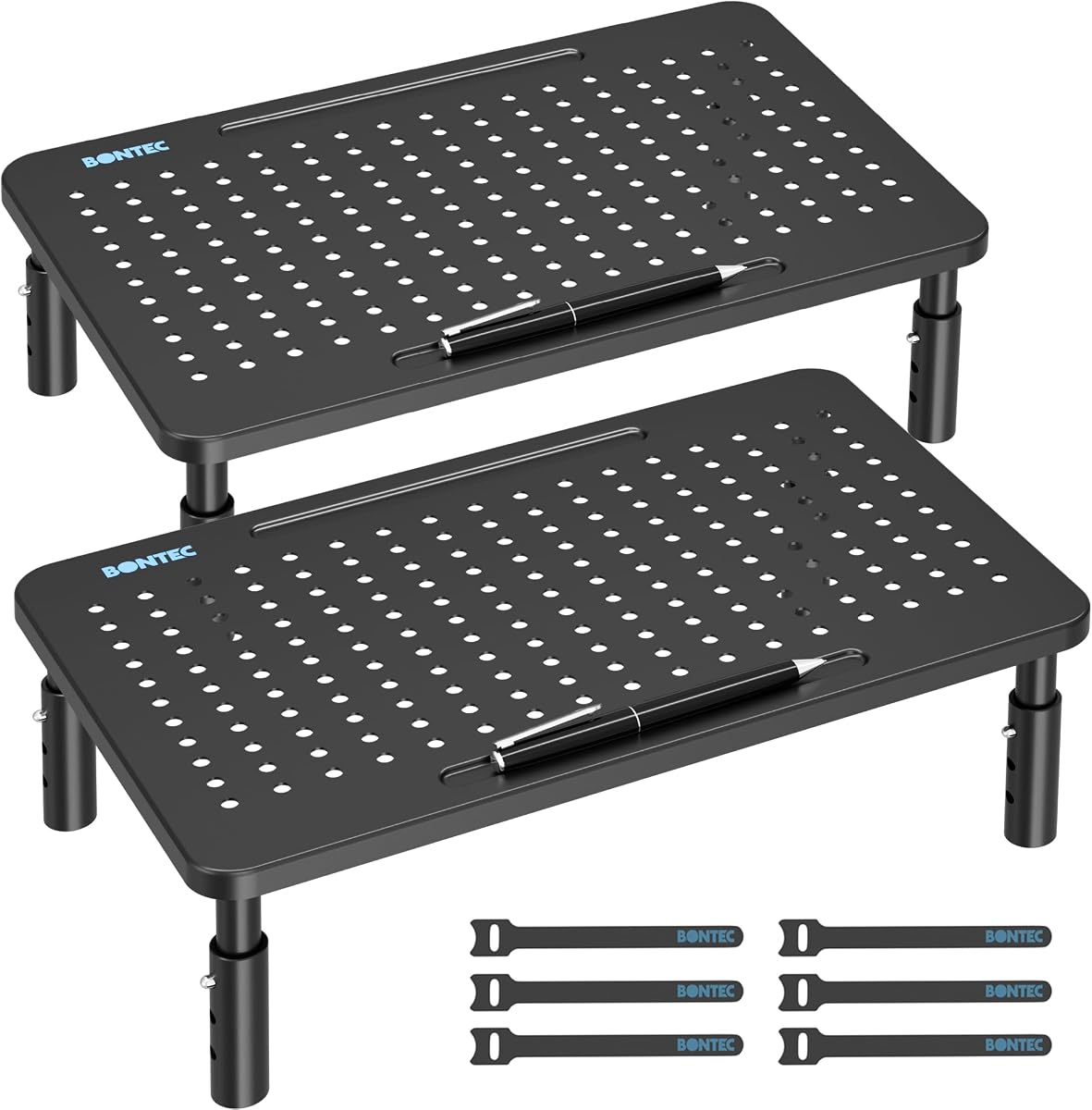
The BONTEC 2 Pack Adjustable Monitor Stand Riser is designed for two screens, two desks, or a monitor-and-laptop arrangement. With a 4.7 rating, it combines three height settings with drawers, cable management, and a durable steel frame, making it especially practical for users who want consistent equipment in more than one location.
We may earn a commission when you buy through this link, at no additional cost to you.
Each stand offers heights of 3.9, 4.7, and 5.5 inches, allowing the screen to be placed closer to a comfortable eye line. The 14.5 by 9.1-inch platform has a practical under-stand area for a keyboard, phone, notebooks, and daily office items. A built-in pen holder and cable management system further reduce the need for separate accessories on the desktop.
Each unit is made from powder-coated steel and supports up to 44 pounds. Non-slip rubber feet help keep the stand stable and guard the desk surface. Assembly is described as simple: the legs are screwed into place, and height is changed with a button, without extra tools. The main limitation is that the platform itself does not expand or swivel, so users should verify the width of both displays and the available desk depth.
This two-pack is a good recommendation for shared homes, separate work areas, school computer labs, reception counters, and hybrid workers who alternate between a laptop and a desktop display. It provides the convenience of two complete units without requiring two different storage solutions.
The pair can support separate displays on one desk, create matching stations in two rooms, or combine one monitor with one laptop. That versatility makes the package useful for changing spaces as well as fixed dual-screen arrangements.
Integrated pen storage and cable management keep small essentials attached to the stand rather than scattered around the desktop. These details improve daily organization even when the riser is used with a single screen.
We may earn a commission when you buy through this link, at no additional cost to you.
The YAOHUOO Dual Monitor Stand Riser is a large, heavy-duty platform for expansive workstations that need room for two screens or substantial desktop equipment. Its 4.6 rating reflects a product that prioritizes width and load capacity over compactness or mechanical adjustment.
We may earn a commission when you buy through this link, at no additional cost to you.
The upper platform measures 38.6 inches long by 10.2 inches wide and stands 5 inches high. Its heavy-duty steel legs support a stated maximum load of 100 pounds, the highest capacity listed among these picks. That strength makes it suitable for dual monitors, laptop and printer combinations, televisions, or other compatible equipment, provided the desk is large enough and the load is distributed safely.
Elevation can create a more comfortable viewing line, and the area beneath the platform can store a keyboard or accessories. Each leg has non-slip pads to protect the desktop. However, the product description does not mention telescoping width, swivel shelves, or height adjustment. The fixed form therefore suits buyers who know their screens will fit and who prioritize a sturdy, uninterrupted surface.
Assembly is described as taking about ten minutes, with instructions and tools included. This is a strong option for large desks, command centers, editing suites, trading environments, and other setups that need a broad central riser. It is less suitable for compact desks or users who expect to reposition screens frequently.
The nearly 39-inch top offers enough width for two conventional displays with more freedom than compact dual stands. It is particularly useful when a user wants one continuous shelf rather than separate risers.
The steel legs and stated 100-pound capacity are intended for robust workstation use. Non-slip pads add protection, although buyers should still confirm that the stand's dimensions match the available desk area.
We may earn a commission when you buy through this link, at no additional cost to you.
The most useful monitor riser balances screen height, equipment weight, desk footprint, storage, and construction. Comparing those factors against your actual workspace is more reliable than choosing solely on appearance or the number of included accessories.
Begin with the dimensions and number of displays you intend to support. A single-screen riser may accommodate a conventional monitor, laptop, or compact television, while dual-screen products need sufficient width for both screens and their stands. Fixed-width models are straightforward but offer less flexibility, whereas expandable and swivel platforms can accommodate different arrangements. Always check both the stated maximum dimensions and the available depth of your desk, since a wide stand that protrudes over the edge can be unstable and can reduce usable mouse space.
Height adjustment is one of the most useful features for creating a comfortable viewing position. Models with three or four settings can accommodate different chairs, desks, and users more effectively than a fixed-height shelf. The best height depends on the monitor and seated eye level, but more options usually provide a better starting point. Consider whether you share a desk, use different chairs throughout the day, or alternate between close viewing and a more distant screen position. If your ideal height is already known, a fixed stand can still be perfectly appropriate.
The listed weight capacity should comfortably exceed the combined weight of the display, stand base, and any equipment placed on the platform. Heavy monitors, large televisions, printers, and desktop computer cases can require considerably more support than a small laptop. Stability also depends on the frame, base footprint, non-slip feet, and how the load is distributed. A high capacity does not compensate for a base that overhangs a narrow desk or a heavy object placed near the edge, so careful placement remains important.
The space below the screen is one of the main reasons to use a riser. Measure the keyboard, notebook, docking station, or files you plan to store and compare them with the listed under-platform dimensions. Open shelving is versatile and easy to access, while a drawer keeps small items concealed but reduces some usable vertical space. Dual stands may include dedicated compartments, device slots, pen holders, or cable openings, which can simplify a workstation without requiring several separate organizers.
If the riser will hold an active laptop, gaming console, or compact computer, ventilation can influence performance and comfort. Perforated metal platforms and platforms with dedicated heat-dissipation holes allow more airflow than solid wood or fully enclosed shelves. Ventilation does not replace good room ventilation or proper device care, but it prevents the stand from unnecessarily restricting cooling airflow. For a passive monitor, the visual difference matters less, so buyers can focus more heavily on height and storage.
Dual-monitor users should consider whether the platforms can move independently. Swivel shelves help angle screens inward, expandable width accommodates different display sizes, and a continuous top may suit ultrawide combinations. Adjustable length is particularly useful when a user changes monitors or works with a main display and a smaller secondary screen. A simple fixed dual riser can be adequate for symmetrical monitors, but it offers less freedom if the screens have different bases or require close positioning.
Steel tends to offer a modern industrial look and strong load capacity, while wood and MDF can create a warmer, furniture-like appearance that blends with home decor. Consider the color of your desk, the room, and other accessories before choosing a finish. Also check the base dimensions and whether raised feet could interfere with a keyboard, desk drawer, or wall. A riser that looks attractive but crowds the work area may be less practical than a simpler model with a smaller footprint.
Some risers arrive ready to use, while others require legs or shelves to be attached with screws and bolts. Tool-free or quick-assembly designs are convenient for frequent moves, whereas a more involved setup may provide stiffer construction. Special features such as drawers, concealed device holders, cable openings, and stacking options can improve organization but may also add weight or narrow the space beneath the display. Choose convenience features only when they solve a problem in your particular workspace.
Start by checking the stand's dimensions, load rating, and assembly instructions. Assemble all legs, shelves, or braces on a flat surface before placing it on the desk, and confirm that the base sits fully within the desk edges. Position the monitor near the center of the platform, connect its power and display cables, and route cables through any dedicated openings. Avoid placing more weight on one side than the construction appears designed to support.
Adjust the height, width, or swivel angle gradually while seated at your normal working position. The upper edge of an active display should fall within a comfortable sight line, allowing you to look forward rather than repeatedly tilting your head. If the device sits on the riser, leave adequate ventilation around its vents and avoid covering them with papers or decorative objects. For dual setups, angle each screen toward the primary user and check that neither display rocks when touched.
For routine care, remove the equipment and wipe the platform with a soft, slightly damp cloth, then dry it thoroughly before reinstalling anything. Avoid abrasive cleaners and excessive moisture, especially on wood, MDF, powder-coated steel, or electronics. Check screws and adjustable mechanisms periodically, replace stretched rubber feet if they lose grip, and never exceed the listed capacity. If the stand is moved, remove the monitor first and recheck stability at the new location.
The ideal height allows the top of the active screen to sit near seated eye level, so you can look forward with a relaxed neck. Because monitor sizes and chair heights vary, an adjustable stand is often more useful than a fixed one. A riser is best viewed as a positioning aid rather than a substitute for an ergonomically appropriate chair and desk.
Yes, if the model is specifically designed for dual screens and the combined weight remains within its capacity. Users should also check platform width, depth, and the size of each monitor base. Expandable and swivel stands offer more layout flexibility than a fixed-width model designed for two matching displays.
They can help by raising a low monitor closer to eye level, which may reduce the need to bend forward or tilt the head repeatedly. They cannot address every cause of discomfort, and an unsuitable height may make a setup worse. Users should combine a properly positioned riser with a supportive chair, correct desk height, regular movement, and breaks from screen time.
Ventilation matters most when the raised device is a laptop, compact computer, or game console that generates heat. A perforated or vented platform can reduce airflow restriction around the device. If the riser supports only a monitor, prioritize height, stability, and storage instead of paying extra for ventilation that offers little practical benefit.
Choose a capacity comfortably above the combined weight of the monitor, its base, and any other equipment placed on the platform. Many everyday monitor risers support around 44 pounds, while heavier-duty wood and steel models may support substantially more. The stated rating should be treated as a maximum, and the equipment should still be positioned centrally and securely.
Common items include a keyboard, notebooks, documents, a docking station, cables, and small office accessories. Fit depends on the listed internal height and shelf dimensions, so check those measurements before buying. Items with ports or ventilation openings also need enough clearance to remain accessible and functional.
Foldable stands are particularly useful in compact or shared spaces because the platform can be put away when it is not needed. Fixed models may feel more permanent and may offer a broader uninterrupted surface. The better choice depends on how often you need the extra desk area and whether storage convenience matters more than a larger stable top.
Matching can improve the visual coherence of a workspace, but performance should come first. Steel stands often suit modern or industrial interiors, while wood and MDF designs can blend with warmer home-office furniture. Confirm the stand's footprint, finish, cable arrangement, and storage needs before deciding that appearance alone should determine the purchase.
The ECOLOVI stand is a well-rounded option for a single-screen setup that values four height settings, warm wood styling, and useful storage. The two-pack adjustable metal riser offers the greatest flexibility for two separate screens or two work areas, while the WESTREE model provides a more decorative shared platform for matching dual displays.
Prioritize the features that affect daily use: verify the platform dimensions, ensure the capacity has comfortable margin, and confirm that the viewing height suits your chair and screen. Ventilation is important for active electronics, storage is useful when desk space is tight, and swivel or expandable shelves matter most when screens need frequent repositioning.
Product details, availability, and prices can change, so check the current listing before ordering. Review the final dimensions, assembly requirements, included components, and compatibility information to ensure that your chosen PC monitor riser stand fits the workspace as planned.
