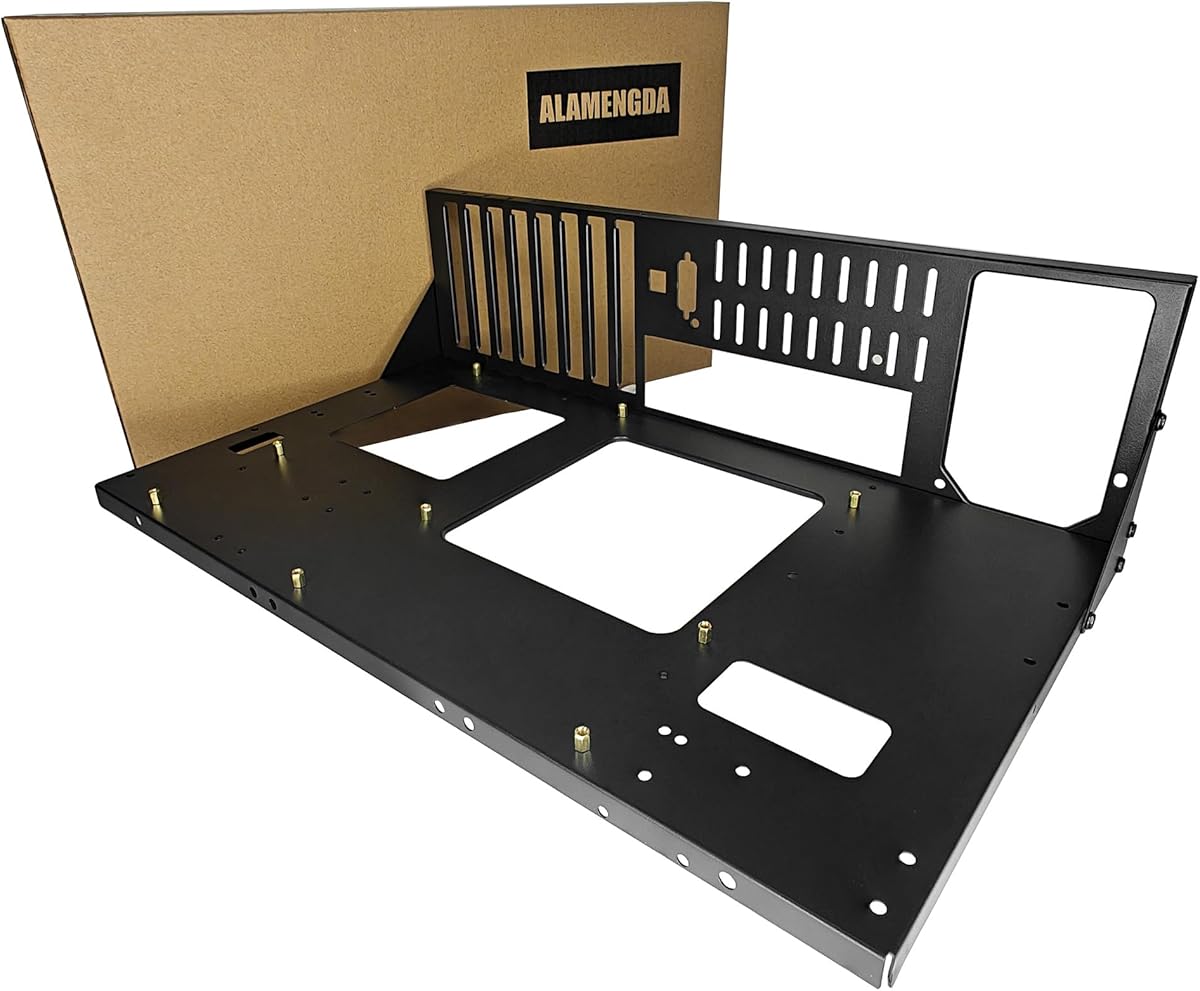
AL01 Open Frame Computer Case
4.4Editor score
Supports three motherboard sizes
Open-air multi-GPU flexibility
Rear cable routing holes
This Open Air PC Test Bench guide compares ten options for motherboard support, cooling, construction, portability, and DIY assembly.
An open air PC test bench provides a practical platform for diagnosing components, building a custom system, experimenting with overclocking, or displaying a powerful PC without a conventional enclosure. The best model balances structural support, airflow, hardware clearance, straightforward assembly, and access to every connection.
The products in this guide were compared using the supplied specifications, including supported motherboard sizes, graphics card and cooler clearance, power supply options, cooling provisions, materials, dimensions, and included components. The list covers compact steel frames, spacious aluminum structures, portable models, and stackable rack-oriented benches.
Each review explains where the bench excels, what compatibility details matter, and which builders may encounter limitations. Ratings and specifications reflect the available product information, while practical features such as cable routing and tool-free access can determine which option suits a particular workstation. Prices and availability change frequently.
4.4Editor score

4.7Editor score

4.4Editor score
This side-by-side comparison highlights the major differences in frame material, motherboard support, graphics card clearance, cooling capacity, and practical features, helping you narrow the field before assembling your system.
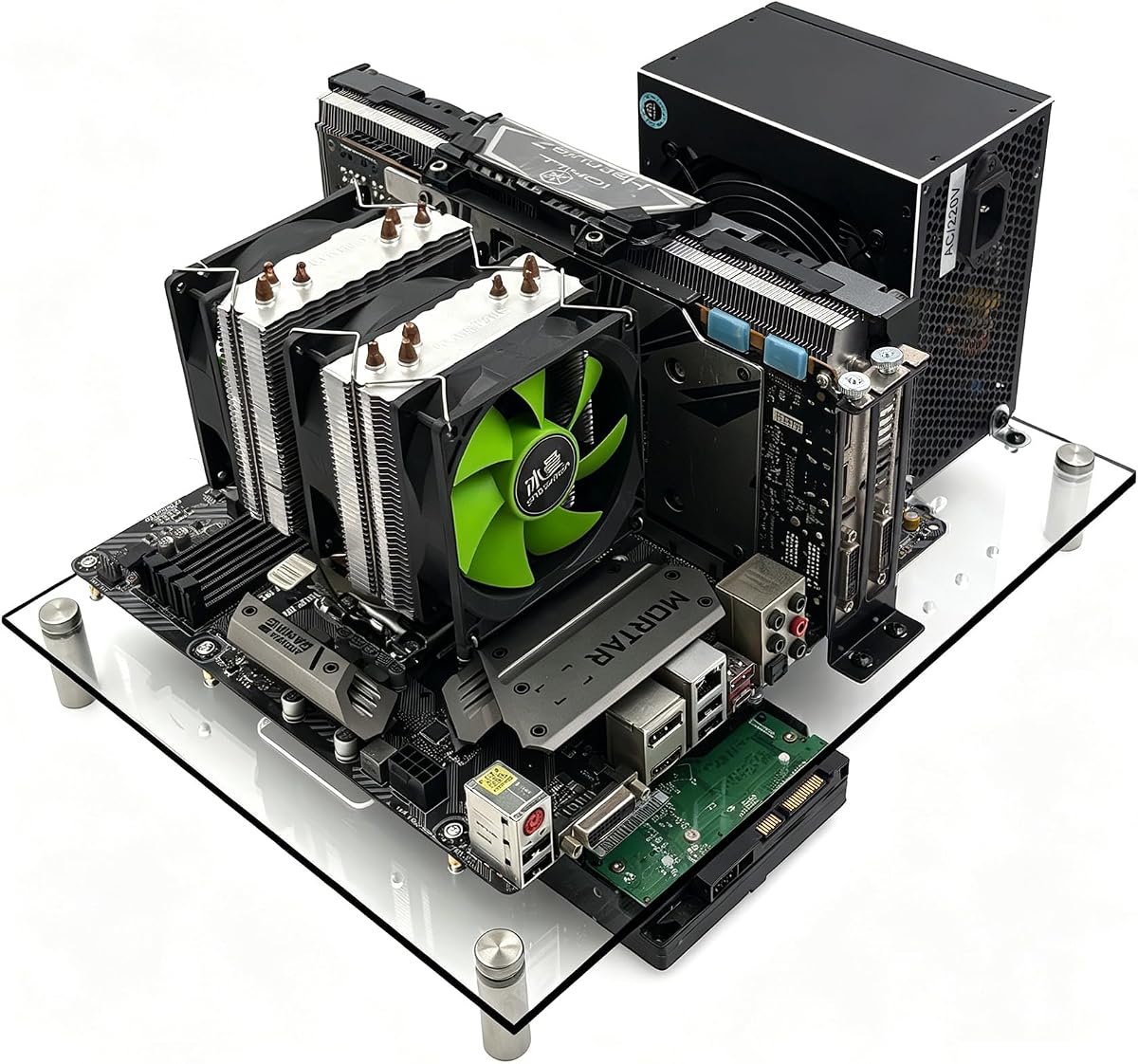


The AL01 Open Frame Computer Case combines a reinforced steel structure with broad hardware compatibility, earning a 4.4 rating and making it one of the most versatile options in this guide. Its open-air layout exposes the motherboard, graphics card, power supply, and cabling while allowing air to move freely around high-heat components.
We may earn a commission when you buy through this link, at no additional cost to you.
Its defining advantage is flexibility. The frame supports ATX, Micro ATX, and ITX motherboards within the stated dimensional range, while the extended width is designed to accommodate server cabinet installation. Graphics card length and width are not restricted according to the supplied description, which is valuable for multi-GPU testing, unusually long cards, and experimental layouts. Standard ATX power supplies are supported, and reserved routing holes help keep rear cables organized.
The 0.8mm SPCC steel plate is reinforced with folded edges and triangular braces, giving the open skeleton more rigidity than a collection of simple rails might suggest. A scratch-resistant black sand-grain finish is also appropriate for a permanent display build. The trade-off is that this is a larger, more involved structure than a compact bench-testing stand, and builders should verify the fit of their exact motherboard and power supply before assembly.
This is an excellent choice for builders creating a permanent open-air gaming system, working with multiple graphics cards, or needing a test platform that can move between standard ATX, MATX, and ITX builds. It is also sensible for those who value steel rigidity and cable management without moving to a large aluminum chassis. For most general-purpose builders, the AL01 offers the strongest balance of capability, accessibility, and structural confidence.
The unrestricted graphics card installation area makes this bench especially useful when testing unusually long cards or planning a multi-GPU arrangement. Buyers should still confirm that the chosen cards, risers, power cables, and cooling hardware can physically coexist without interfering with one another.
Folded edges, triangular reinforcing plates, and a protective sand-grain finish support long-term use. The open layout also makes it easier to reach connectors, swap drives, inspect wiring, or alter the configuration during repeated testing.
We may earn a commission when you buy through this link, at no additional cost to you.
This Open Air Frame Computer Case is a premium-style aluminum test bench with a 4.4 rating and a notably substantial 8mm material thickness. It is designed primarily around standard ATX motherboards while also describing compatibility with ITX and MATX hardware, giving builders a large, rigid platform for a polished open-air system.
We may earn a commission when you buy through this link, at no additional cost to you.
The magnesium aluminum alloy construction is the standout feature. Its frosted texture reduces glossiness and light reflection while remaining comparatively easy to maintain. The frame is designed to hold four hard drives or solid-state drives, accommodate a standard ATX power supply, and support integrated water-cooling hardware in 120, 140, 240, 280, and 360mm sizes. Metal support rods and anti-slip pads add stability to the bottom bracket.
This is not shipped as a completely finished product. The seller must install it according to the instructions, so buyers should consider that assembly service when comparing the bench with ready-to-assemble frames. The product size is listed as 14.37 by 11.1 by 5.12 inches, and meticulous alignment will be important during setup. Its deeper structure also takes more room than a minimal test stand.
The bench is best suited to builders who want a visually substantial, aluminum open-frame platform with generous cooling and storage options. It works particularly well for custom water-cooled systems, showpiece builds, and technicians who repeatedly dismantle and reassemble components. Those who want immediate assembly and a smaller footprint may prefer one of the simpler steel designs instead.
The 8mm aluminum construction distinguishes this model from lightweight open frames. It should provide a more architectural appearance while offering a rigid base for full-size components, although the actual finish and final presentation depend on correct assembly.
Support for several radiator sizes makes the bench relevant to builders assembling a dedicated water-cooled test system. Buyers should verify mounting positions, pump and reservoir placement, tubing paths, and the total dimensions of their cooling hardware.
We may earn a commission when you buy through this link, at no additional cost to you.
The Transparent Acrylic PC Test Bench stands apart visually because its clear panels turn the build itself into a display. No customer rating was supplied for this model, so its listed strengths and specifications deserve particularly careful consideration before purchase. It targets builders who want their components visible without sacrificing open-air airflow.
We may earn a commission when you buy through this link, at no additional cost to you.
The frame supports ATX, Micro ATX, and Mini-ITX motherboards, along with both ATX and SFX power supplies. That flexibility is useful when the bench must accommodate different project formats. Clear panels expose the hardware from multiple angles, while hidden cable routing and an underside storage area are intended to preserve a minimalist appearance. The open structure also makes installation, upgrades, and maintenance more direct.
Transparent acrylic is attractive but demands more careful handling than a fully enclosed steel case. It can show fingerprints or surface marks, and builders should avoid placing pressure on unsupported panel sections. Because no rating is available, there is no customer feedback history to provide an additional confidence signal. Its compatibility claims are broad, but checking the actual socket clearance and panel mounting arrangement remains essential.
This bench is a good match for RGB enthusiasts, component collectors, and anyone building an open-air system intended to be seen. It is also convenient for quick upgrades because the exposed frame gives direct access to ports and components. For buyers who prioritize presentation, accessible assembly, and a wide choice of motherboard and power supply formats, the acrylic model offers a distinctive option.
Clear acrylic panels provide visibility without the dust management trade-offs of fabric or mesh filters. The result is particularly effective when internal lighting and carefully coordinated component colors are part of the build.
An exposed frame simplifies reaching headers, connectors, and installed components. Hidden routing and underside storage help control visual clutter, although final neatness will depend on the builder's cable arrangement and available space.
We may earn a commission when you buy through this link, at no additional cost to you.
The AL03 Open Air Test Stand is built for technicians and builders who need to change the orientation of a working computer. It has a 4.0 rating and supports either stand-up or lying-down installation, making it useful on a bench, a service mat, or a temporary workspace where a conventional tower would be inconvenient.
We may earn a commission when you buy through this link, at no additional cost to you.
The one-millimeter steel construction provides a rigid base, while a stainless-steel handle makes the assembled system easier to carry. The bench accommodates graphics cards up to 256mm long and supports a 360mm radiator. Its ATX power supply can be mounted at the front or rear, offering flexibility as the layout changes. An integrated industrial control start cable is included for bench testing, debugging, overclocking, repair, and modification work.
Its most important limitation concerns motherboard alignment. The supplied information warns that some screw holes may not align with pure ATX boards, and it is best suited to M-ATX or ITX motherboards. This means the name should not be interpreted as guaranteeing flawless support for every ATX layout. The 256mm graphics card allowance is also more restrictive than several open frames that place no length restriction.
The AL03 makes the most sense for repair technicians, system integrators, and experimenters who routinely move and reorient a test system. Those working with compact motherboards can benefit from its flexibility and carrying handle. If you require guaranteed full-size ATX alignment or use a graphics card longer than the stated allowance, choose a model with more explicit compatibility.
The ability to operate the stand upright or lie it flat supports different workflows. Horizontal placement may improve access to underside connections, while vertical positioning can make a running test system easier to observe.
A carry handle, flexible power supply placement, and an integrated start cable reflect a practical focus on troubleshooting. These details are useful when a system must move between temporary test positions rather than remain permanently installed.
We may earn a commission when you buy through this link, at no additional cost to you.
The Multi-Form-Factor Open Air PC Case has a 4.1 rating and emphasizes quick installation, broad motherboard support, and a layout that can serve either a temporary test platform or a permanent display build. It supports ATX, MATX, and ITX motherboards, including boards commonly found in X79 and X99 enthusiast systems.
We may earn a commission when you buy through this link, at no additional cost to you.
Its open-frame arrangement makes internal components easy to see and reach, which benefits installation, maintenance, and repeated modifications. The tool-free design is especially useful for builders who do not want to reach for tools every time a component must be moved. Dedicated brackets are provided for the motherboard, power supply, and storage devices, allowing the bench to organize more than just the main board.
The supplied information does not give exact dimensions, graphics card limits, CPU cooler height, or power supply length. That makes this model less straightforward to compare with highly specified alternatives. Prospective buyers should request or verify those measurements before committing, especially when using a large graphics card or an unusually tall CPU cooler. The tool-free mechanism should also be checked for repeatable load stability.
This bench is well suited to frequent tinkering, X79 or X99 projects, and anyone who values rapid access over a closed traditional chassis. It can remain on a desk as an open-air display when it is not being used for diagnostics. Buyers who need precise clearance limits or a fully documented rack-style structure may prefer a model with more comprehensive specifications.
Tool-free access can shorten repeated installation and maintenance cycles. The open arrangement makes it easier to connect cables, swap devices, and diagnose components without working around a conventional case wall.
The same open frame can support active testing and a visually exposed finished build. That versatility makes it attractive for builders who want one platform to handle development, troubleshooting, and display.
We may earn a commission when you buy through this link, at no additional cost to you.
The Open Air Aluminum MATX Bench is a 4.4-rated alternative for builders whose systems center on standard MATX motherboards. It uses the same substantial 8mm magnesium aluminum alloy theme as the larger ATX version, but its listed dimensions of 11.1 by 11.1 by 5.12 inches create a more compact footprint.
We may earn a commission when you buy through this link, at no additional cost to you.
The product supports standard MATX motherboards, four hard drives or solid-state drives, and a standard ATX power supply. Integrated water-cooling installation is offered for 120, 140, 240, 280, and 360mm radiators. Metal support rods and anti-slip pads are incorporated into the bottom bracket, while the treated metal surface is intended to reduce corrosion and extend service life.
Although the listing text refers generally to ITX, MATX, and ATX compatibility, the selected configuration and stated dimensions specifically emphasize standard MATX. Full-size ATX builders should confirm all three dimensions and mounting positions rather than assuming that the larger model will fit. As with the related aluminum bench, this unit is not a completely finished product at shipment and requires seller installation according to the instructions.
This is a strong choice for a compact, aluminum MATX test system, particularly when the build includes custom water cooling. It offers meaningful storage capacity and a refined material choice without moving to the full ATX dimensions. It is less suitable for buyers expecting immediate assembly, extensive published clearance figures, or guaranteed accommodation of every full-size ATX component.
The 11.1-inch square footprint makes this model more manageable on a crowded workbench than a full-size frame. The 8mm aluminum still provides a substantial base for a MATX system and any attached cooling or storage hardware.
Support for multiple radiator sizes offers meaningful flexibility for custom cooling. The compact dimensions still require careful planning, particularly when radiators, tubing, reservoirs, and drives share the same open structure.
We may earn a commission when you buy through this link, at no additional cost to you.
The TGDGAMER E-ATX Open Chassis has a 4.4 rating and focuses on wide-body compatibility. It supports E-ATX, ATX, M-ATX, and ITX motherboards, giving it one of the broadest motherboard ranges in this guide. The wide frame also places no stated limit on graphics card length or CPU cooler height.
We may earn a commission when you buy through this link, at no additional cost to you.
Those generous clearances are practical advantages for power users. A long graphics card can hang beyond a conventional compact case without forcing the builder to choose a smaller GPU, and CPU coolers can be as tall as the hardware and open layout allow. The chassis supports two solid-state drives and two hard drives, providing enough storage mounting points for a serious workstation or test platform.
The listing is concise and does not provide exact external dimensions, power supply length limits, radiator support, or detailed mounting coordinates. The lack of a stated CPU cooler height limit does not mean every cooler will be practical in every configuration; large coolers can interfere with memory, the graphics card, or nearby panels. Buyers should inspect the physical layout and compare it with their hardware before ordering.
The TGDGAMER is well suited to builders with unusually tall coolers, long graphics cards, or E-ATX motherboards. It is also useful for anyone planning a high-performance open-air workstation that needs more storage mounting than a minimalist bench. If water-cooling support is essential, a model with explicit radiator compatibility may be the safer choice.
Removing stated graphics card length and CPU cooler height restrictions gives power builders room to use substantial hardware. The open design also makes it easier to inspect whether a large cooler creates an issue with adjacent components.
Two SSD and two HDD positions allow the bench to function as more than a bare diagnostic platform. The mixed storage support is useful for testing operating systems, data configurations, and multi-device workflows.
We may earn a commission when you buy through this link, at no additional cost to you.
The Stackable Open Frame Chassis earns the highest listed customer rating in this comparison at 4.7. It combines precise component limits with the unusual ability to stack up to ten units horizontally, making it especially compelling for technicians, labs, integrators, and enthusiasts who expect to maintain multiple test systems.
We may earn a commission when you buy through this link, at no additional cost to you.
The rigid structure uses 1.5mm SPCC panels with a 0.8mm base plate and a sandblasted finish. It measures 435 by 340 by 195mm and supports horizontal or vertical placement. Motherboards up to 330 by 330mm are accepted across EATX, ATX, Micro ATX, and ITX formats. Cooling options include up to eight 120mm air-cooling fans or a water-cooling arrangement consisting of one 360mm and two 240mm radiators plus one 120mm radiator.
The specification depth is one of its strongest features. GPU clearance reaches 310mm with internal fans or 335mm with an external fan, CPU cooler height reaches 165mm, storage includes two HDD and three SSD positions, and the standard ATX power supply can measure up to 300mm. A power button, motherboard spacer wrench, and screws are included. The large footprint and stacking requirement mean careful measurement remains important in rack or workstation environments.
This bench is the strongest all-purpose choice for a builder who wants precise limits, extensive storage, flexible cooling, and the possibility of scaling upward. It works particularly well for X79 and X99 systems and for professional test environments. For a single compact desktop project, it may be more than necessary, but for multi-unit operation its stackability creates clear value.
Stacking up to ten units creates a practical path from a single workbench to a larger test environment. Each system still needs appropriate power, network, display, and cooling arrangements, so the stack should be planned as a complete workstation.
Published limits for GPUs, coolers, radiators, storage, and power supplies reduce guesswork during planning. This transparency is particularly helpful for builders combining unusual or high-performance components.
We may earn a commission when you buy through this link, at no additional cost to you.
The DIY Aluminum Open Chassis holds a 4.6 rating and presents a broad, highly customizable platform for builders. Its listing describes support for all motherboard models and formats ranging from ITX and MATX to ATX and EATX, although the selected configuration is identified as 2.M-ATX, so the exact mounting arrangement still requires review.
We may earn a commission when you buy through this link, at no additional cost to you.
Its strongest specifications include an unlimited graphics card length allowance and compatibility with ATX, SFX, and 1U power supplies. Support for both air and water cooling provides flexibility for different system goals. The open aluminum chassis and intended DIY installation process give experienced builders considerable control over component positioning and the final presentation.
Because the product is designed for DIY installation and the supplied information does not list external dimensions, radiator sizes, CPU cooler height, or storage locations, buyers must take extra care during planning. An unlimited specification often means that the open frame imposes no formal card-length limit, but large cards can still interfere with radiators, power cables, or neighboring hardware. The frame should therefore be evaluated by layout rather than by headline compatibility alone.
This is a compelling option for experienced builders who want to customize a large open-air system, particularly one using a long GPU, specialized power supply, or water-cooled processor. It is less suitable for a first-time builder who wants a fully finished, tightly documented product. For confident customizers, the combination of aluminum construction and broad power supply support offers considerable freedom.
The DIY format lets builders decide where cooling, storage, and power components sit around the motherboard. This is useful for unusual systems, but it also means the builder assumes responsibility for planning airflow, support, and cable paths.
Compatibility with ATX, SFX, and 1U supplies can simplify reuse across different test projects. The smaller formats may be particularly useful when space or weight is a concern, while standard ATX supplies remain available for conventional builds.
We may earn a commission when you buy through this link, at no additional cost to you.
The Portable Zinc Steel Chassis is a straightforward open-frame option with a 4.1 rating. It supports ITX, MATX, and ATX motherboards and uses zinc-coated steel with baked black paint, combining a practical industrial appearance with a construction method designed for durability.
We may earn a commission when you buy through this link, at no additional cost to you.
Its upgraded portable chassis bracket is the central feature, suggesting that the frame can be configured for a mobile or temporary testing role rather than functioning only as a stationary display structure. The black finish should coordinate easily with a wide range of components, and the open design supports airflow while leaving ports and expansion hardware accessible.
The available specifications are limited. The listing does not provide exact dimensions, GPU clearance, CPU cooler height, power supply restrictions, radiator support, or storage mounting details. It also does not state whether tool-free installation or a full set of mounting accessories is included. Buyers who require precise fitment information should compare the physical frame with their hardware before ordering.
This bench is best for builders seeking a simple steel structure that can move with a test system and accommodate common motherboard sizes. Its understated black finish is suitable for both workshop and display environments. For complex water-cooled builds, large storage arrays, or specialist rack work, a model with more detailed specifications and cooling guidance will usually be easier to plan.
Zinc-coated steel provides a practical structural base for a portable test rig. The baked black finish helps the frame blend into a workshop or match the visual style of a finished computer.
The portable chassis bracket distinguishes this frame from fixed display stands. It may be useful when a build needs to move between locations, though buyers should still verify the assembled weight and handling stability.
We may earn a commission when you buy through this link, at no additional cost to you.
The right test bench depends on the hardware you need to hold, the way you work, and whether the system will remain on display. Motherboard format, clearance, cooling, power supply support, material, and portability deserve careful review before purchase.
Begin with the exact motherboard size and mounting pattern. Most benches support ATX, Micro ATX, and Mini-ITX, but a general label does not guarantee that every screw position aligns. The AL03 explicitly notes that some screw holes may misalign on pure ATX boards, while the MATX-focused aluminum model is centered on standard MATX dimensions. Review the board dimensions, I/O position, stand-off locations, and any included spacers.
Choose a bench that explicitly matches your current and future hardware. Broad language can still be helpful, but precise form-factor support gives a more reliable installation path.
Long modern graphics cards can extend well beyond the motherboard footprint, so graphics card clearance is essential. Some frames advertise no length restriction, the TGDGAMER lists no GPU limit, and the Stackable Open Frame states 310mm with internal fans or 335mm with external fan mounting. The AL03 gives a more conservative 256mm maximum. Measure the complete card, including any power connector or bracket overhang.
Also check whether an overhanging card can block access to drive bays, radiators, or front-mounted power supplies. Clearance is about the whole layout, not only the card itself.
CPU coolers can be nearly as tall as the graphics card is long. Large tower coolers need adequate space above the socket, while custom liquid coolers require room for a radiator, pump, reservoir, tubing, and mounting hardware. Some open benches make an explicit height claim, while others leave it unspecified or describe a general absence of restrictions. Check the cooler dimensions against the frame and adjacent components.
Remember that a wide tower heatsink can conflict with tall memory modules even when its stated height fits. An open design improves inspection, but it does not automatically guarantee that every cooler configuration will be practical.
Confirm that the bench supports the form factor and length of your power supply. Standard ATX supplies are the most common choice, but the AL03 permits front or rear mounting, and the DIY Aluminum Open Chassis supports ATX, SFX, and 1U units. The Stackable Open Frame states a 300mm ATX limit, which provides useful planning information. Placement can also affect cable reach and the positions of the motherboard's power connectors.
Select a layout that allows service access without sharp bends or heavy tension on the cables. A bench that positions the power supply conveniently can make repeated testing considerably easier.
An open frame naturally promotes airflow, but the mounting points determine how effectively fans and radiators can be used. The Stackable Open Frame lists support for up to eight 120mm fans or a multi-radiator water-cooling arrangement. Both aluminum models support several radiator sizes, while the DIY Aluminum model supports water and air cooling. Builders using liquid cooling should verify radiators, tubing, reservoir location, and pump clearance.
Open-air construction is valuable during overclocking, gaming, and demanding workloads because it removes the restriction of a conventional case wall. It does not replace correct fan direction, a sensible cooling layout, or careful monitoring of operating temperatures.
Steel tends to offer a practical, industrial look, while aluminum can provide a more refined display aesthetic and substantial structural mass. The AL01 uses 0.8mm SPCC steel with folded edges and triangular reinforcement, the AL03 uses 1mm steel, and the Stackable model uses 1.5mm SPCC panels with a 0.8mm base plate. Aluminum options use 8mm alloy in the listed designs. Consider component weight, transport, and the stability of the feet or bracket.
Choose the construction that matches your environment. A heavy aluminum chassis may stay planted on a permanent desk, while a lighter steel frame may be easier to carry between troubleshooting sessions.
A test bench used for real systems often needs more storage than a bare diagnostic frame can provide. The aluminum models support four drives, the TGDGAMER lists two SSD and two HDD positions, and the Stackable Open Frame lists two HDD and three SSD bays. These are useful for testing operating systems, storage configurations, and complete workstations. Cable routing holes, underside storage, and hidden routing can help maintain a clean display build.
Match drive capacity to your needs, but also consider connector reach. A bench with plenty of mounting holes can still look messy if every power and data cable must cross the open frame.
Some benches are designed to remain in one place, while others include handles, alternate positions, or portable brackets. The AL03 has a stainless-steel handle and supports stand-up or lying-down use, while the Portable Zinc Steel Chassis uses a chassis bracket intended for mobility. Assembly demands also differ: the aluminum products require seller-led installation, while other designs emphasize straightforward or tool-free assembly.
Ask whether you want a disposable temporary platform or a polished permanent build. More elaborate frames often offer better organization and finishes, but they can take more time to assemble and occupy more workspace.
Before installing components, compare the motherboard mounting holes, rear-panel opening, and stand-off positions with the bench instructions. Assemble the frame on a stable, clean surface, install any required spacers, and confirm that every screw reaches the intended metal without forcing the board. Connect the motherboard, storage, graphics card, and cooling hardware before arranging the final cable paths.
Use the open frame as a diagnostic platform by installing one system at a time where possible, recording each change, and testing power delivery before adding intensive software loads. Keep the bench away from dusty areas, direct sunlight, and sources of moisture. When moving a completed system, disconnect power, support all heavy components, and use a carrying handle or lift the frame from its base rather than pulling on attached cables.
Periodically inspect screws, rubber feet, cable ties, drive mounts, and connector positions. Dust can be removed with a soft brush or compressed air directed carefully around components. Clean acrylic panels with a suitable nonabrasive material, and avoid harsh chemicals on coated steel or aluminum surfaces. If the bench is used in a server environment, include surge protection, adequate power distribution, and clear airflow around every open system.
An open air bench is usually better for temporary testing, troubleshooting, and frequent upgrades because components remain visible and accessible. A conventional case is generally better for a permanently installed system that needs dust protection, a tidy enclosed appearance, or tightly managed airflow. The best bench makes assembly and diagnostics easier without introducing incompatible dimensions.
Choose a bench that explicitly supports the board you own. ATX, MATX, and ITX are common options, but some listings use broad compatibility language without confirming every mounting hole. Check the board dimensions, rear-panel alignment, and included spacers before assembly. A product that warns of possible ATX misalignment is better suited to MATX or ITX.
It can if the frame provides enough physical clearance, although not every bench is designed for a long card. The TGDGAMER and DIY Aluminum model advertise no GPU length limit, while the Stackable Open Frame lists 310mm with internal fans or 335mm with external fan mounting. Measure the card and its power connector before ordering.
Several models do, but support should be checked by radiator size and mounting layout. The aluminum models and DIY Aluminum Open Chassis describe support for water cooling, and the Stackable model lists a specific radiator combination. You must still confirm space for the pump, reservoir, tubing, fans, and radiator, since a chassis can be technically compatible while remaining difficult to assemble.
Their open construction can improve airflow and make temperature monitoring easier, which is useful for overclocking. Safety still depends on correct assembly, stable power, suitable cooling, and careful component installation. Use appropriate surge protection and monitor temperatures and system behavior, especially during prolonged stress tests.
Yes, several models are designed for both testing and permanent open-air display use. The AL01, Multi-Form-Factor model, and Stackable chassis all suit permanent builds, while the aluminum options offer a more decorative finish. Consider cable presentation, dust exposure, and the stability of the frame before making it your everyday system enclosure.
An ATX bench is designed around the larger standard ATX motherboard footprint, while a MATX bench is more compact and centered on Micro ATX dimensions. A bench advertised for both may accommodate either format, but its physical dimensions and mounting points still matter. The MATX-focused aluminum model is more compact and should be evaluated carefully for full-size ATX builds.
Shut down and disconnect the system, remove or secure heavy components where practical, and protect the exposed parts from impact. Use a frame with a handle for easier movement, and never lift the system by a graphics card, cooler, power supply, or dangling cable. Support the base with both hands and keep the bench away from moisture and excessive heat during transport.
The AL01 Open Frame Computer Case stands out as the strongest all-round option for builders who need broad motherboard support, flexible graphics card placement, and a reinforced steel structure. The Stackable Open Frame Chassis is the most technically documented and scalable choice, especially for multi-system environments, while the Open Air Aluminum ATX Bench offers a premium aluminum structure with extensive cooling and storage support.
Prioritize exact motherboard fit first, then confirm graphics card, CPU cooler, power supply, and radiator clearances. Consider whether the bench will be carried between jobs or remain on display, and decide whether quick access or polished presentation matters more. Also review assembly requirements carefully, particularly for aluminum models that require seller installation.
Finally, check current prices, availability, and seller details before ordering, since all three can change. Compare the latest listing information with the product specifications discussed here, and confirm that the selected frame includes the mounting hardware and accessories needed for your particular build.