ASUS Pro WS B850M-ACE SE
4.3Editor score
10Gb and 2.5Gb networking
Compact AMD AM5 platform
Onboard AST2600 BMC
Two PCIe 5.0 M.2 slots
Server-grade remote management
Motherboards with 10GB Ethernet compared for speed, CPU support, expansion, M.2 storage, cooling, networking, and workstation features.
A 10Gb Ethernet connection can be a meaningful upgrade for a modern desktop, especially when a computer handles large file transfers, media libraries, virtual machines, network storage, or demanding creative workloads. The best board must pair fast networking with a compatible processor socket, adequate expansion, dependable power delivery, and storage options that match your system.
This guide compares ten motherboards using the supplied specifications, with particular attention to wired networking speed, processor support, PCIe and M.2 capabilities, power-stage design, cooling, connectivity, and specialized management features. It covers ATX, microATX, workstation, and business-oriented models, including several boards that do not actually include the requested 10Gb connection.
Each review explains where the board stands out, what limitations should be considered, and which type of builder it suits best. The leading choices include the ASUS Pro WS W890E-SAGE SE for specialized workstation networking, the ASUS Pro WS B850M-ACE SE for compact business systems, and the ASUS ProArt X870E-CREATOR WiFi for a broad desktop feature set. Availability and pricing can change.
4.3Editor score
4.3Editor score

5.0Editor score
The comparison highlights processor compatibility, wired network speed, storage expansion, and form factor, making it easy to separate genuinely 10Gb-equipped models from the related ASUS boards in the list that provide 2.5Gb or 5Gb Ethernet instead.


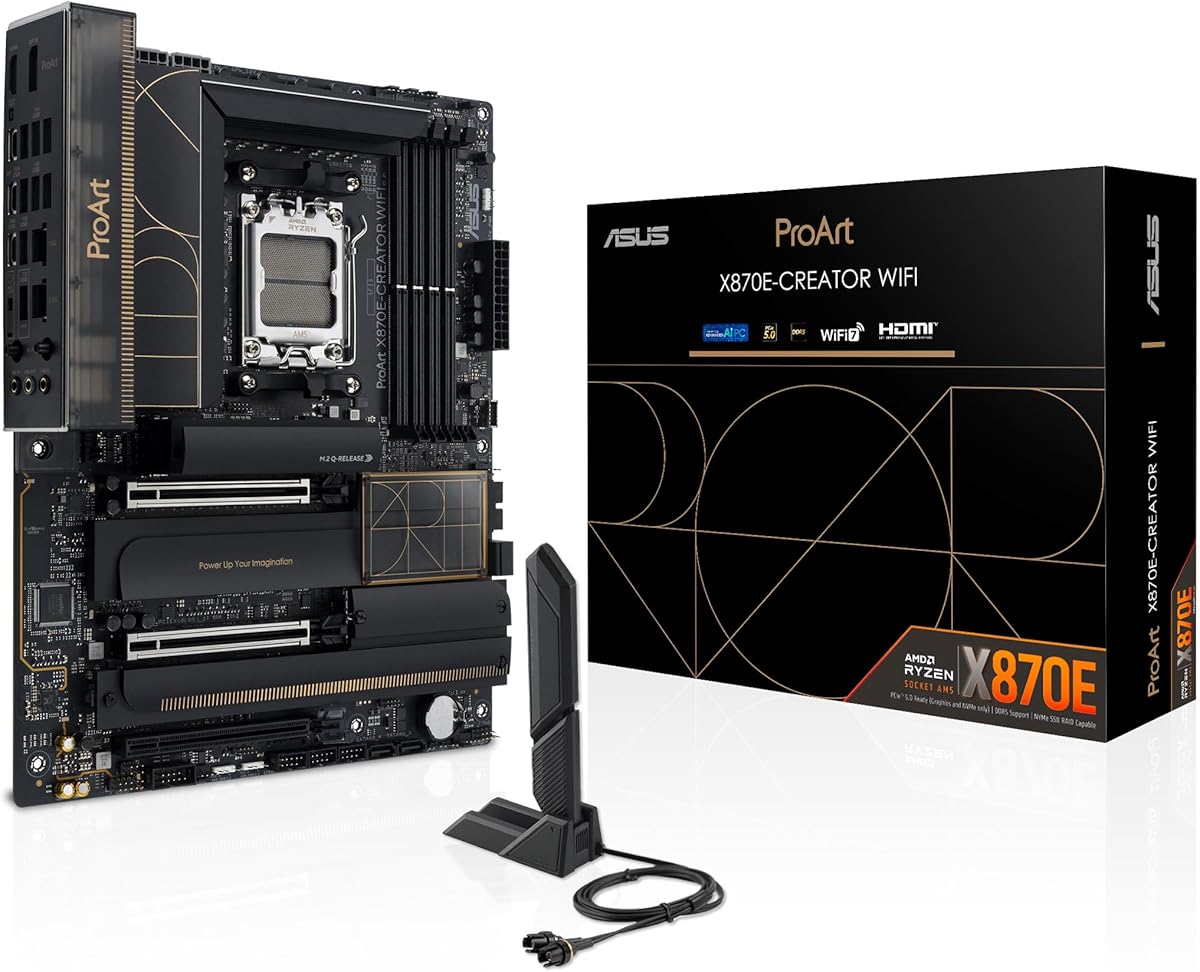
The ASUS ProArt X870E-CREATOR WiFi is a strong all-around recommendation for a creator, advanced enthusiast, or professional who wants 10Gb Ethernet without sacrificing modern expansion. Its supplied rating is 4.3, and the board combines an AMD AM5 socket, a full-size ATX layout, WiFi 7, 10Gb and 2.5Gb Ethernet, dual USB4, and four M.2 slots.
We may earn a commission when you buy through this link, at no additional cost to you.
Its most important strength is balanced connectivity rather than one isolated headline feature. The 16+2+2 teamed power stages, ProCool II CPU connectors, alloy chokes, and durable capacitors provide a substantial foundation for Ryzen 9000, 8000, and 7000 processors. Storage support includes two PCIe 5.0 M.2 and two PCIe 4.0 M.2 positions, while the primary PCIe 5.0 x16 slot is designed for current high-performance graphics.
The main compromise is physical and financial scale. A full ATX board requires a correspondingly large case, and the platform is aimed at systems where fast networking, modern USB, abundant storage, and creator-oriented utilities justify the investment. Buyers should also confirm that their enclosure has suitable airflow and that their chosen processor supports the features they actually need.
It is a compelling match for a high-end desktop that may transfer very large media files, connect to fast NAS equipment, or use local network storage. The combination of 10Gb Ethernet, WiFi 7, USB4, plentiful M.2 slots, and strong power delivery makes it the most versatile recommendation in this guide for a conventional AMD desktop.
The 10Gb port offers a practical upgrade for large transfers and fast network storage, while the separate 2.5Gb port provides a useful option for compatibility with existing infrastructure. WiFi 7 adds flexibility when a wired connection is inconvenient.
Four M.2 slots, dual USB4 connectivity, and a PCIe 5.0 x16 graphics slot give the board room for fast SSDs and modern peripherals. The four-slot M.2 arrangement is especially useful for content libraries that exceed the capacity of a single drive.
We may earn a commission when you buy through this link, at no additional cost to you.
The ASUS ROG Crosshair X870E Dark Hero is an enthusiast-focused AM5 board with a supplied rating of 4.8, the highest rated product in this roundup. It pairs 10Gb and 5Gb Ethernet with WiFi 7, two USB4 Type-C ports, extensive overclocking controls, and a generous five-M.2 storage layout.
We may earn a commission when you buy through this link, at no additional cost to you.
Its 20+2+2 power design uses high-current stages, ProCool II connectors, MicroFine alloy chokes, and premium metallic capacitors. A 3D VC heatsink cools one PCIe 5.0 M.2 slot, while large VRM and I/O-cover heatsinks use an L-shaped heatpipe and high-conductivity thermal pads. Two PCIe 5.0 and three PCIe 4.0 M.2 slots give it unusual storage flexibility.
This is not a minimalist board. The ATX layout, extensive power delivery, advanced fan control, RGB integration, AIO Q-Connector, and numerous quick-release and diagnostic features make it best suited to an enthusiast willing to configure and maintain the system. Some of those facilities may be unnecessary for a general-purpose desktop.
Choose it for a heavily equipped Ryzen 9000, 8000, or 7000 system that needs 10Gb networking, several NVMe drives, modern USB, and sophisticated tuning. For users who value the highest supplied rating alongside comprehensive connectivity, it is one of the most complete boards here.
Separate 10Gb and 5Gb controllers allow a system to use fast networking where the endpoint supports it while retaining another high-speed wired option. This is valuable in studios where large media files move between editing systems and shared storage.
Dynamic OC Switcher, Core Flex, PBO Enhancement, Asynchronous Clock, AI Overclocking, and AI Cooling II target advanced tuning. The dedicated M.2 cooling and extensive VRM heatsinks support sustained performance under demanding processor and storage loads.
We may earn a commission when you buy through this link, at no additional cost to you.
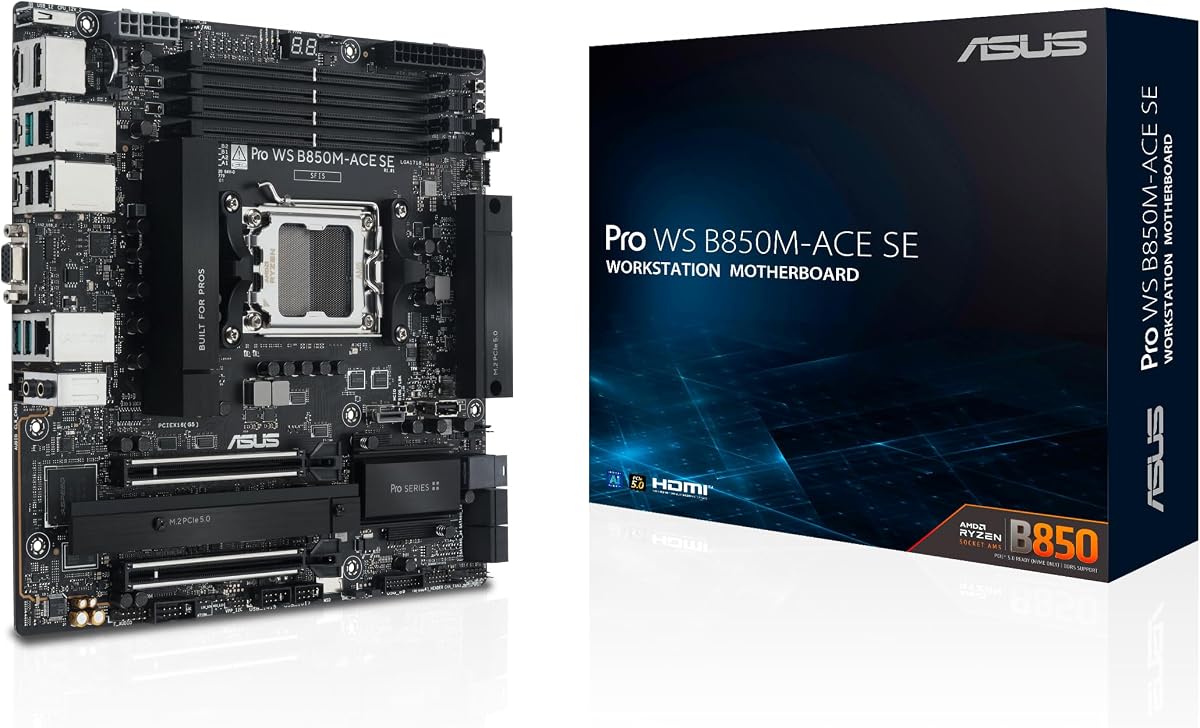
The ASUS Pro WS B850M-ACE SE delivers a rare combination of compact size, 10Gb Ethernet, and built-in remote management. Its 4.3 supplied rating is supported by a feature set aimed at business PCs, including onboard AST2600 BMC hardware and ASUS Control Center Express for real-time monitoring and management.
We may earn a commission when you buy through this link, at no additional cost to you.
The board supports AMD Ryzen 9000, 8000, and 7000 desktop processors as well as AMD EPYC 4005 Series processors. Its connectivity includes 10Gb and 2.5Gb LAN, two PCIe 5.0/4.0 x16 slots with one operating at x4, two PCIe 5.0 x4 M.2 slots, front USB 20Gbps Type-C, and MCIO NVMe support.
Its microATX dimensions reduce the space required for the motherboard, although the board still provides less storage expansion than the larger recommendations. The management-oriented software may also feel more complex than necessary for a conventional home build. These are legitimate limitations, but they do not undermine its strength as a compact managed system.
It is best for a small business workstation, compact server-like desktop, or system that must be monitored remotely. The combination of 10Gb networking, BMC support, broad compatibility, and claimed 24/7 validation makes it the practical choice in this list when physical footprint and administration matter as much as peak gaming features.
The onboard AST2600 BMC provides a hardware foundation for out-of-band monitoring and control. ASUS Control Center Express adds a software interface for real-time system management, reducing the need for physical access during routine administration.
A microATX layout can simplify enclosure selection in an office or rack-adjacent workstation. Two PCIe 5.0 M.2 slots, dual high-speed Ethernet, MCIO storage support, and USB4 provide a strong foundation despite the board's smaller footprint.
We may earn a commission when you buy through this link, at no additional cost to you.
The ASUS Pro WS W890-SAGE is a CEB workstation motherboard built around the Intel W890 chipset and LGA 4710-2 socket. No customer rating is supplied, but the specification sheet reveals a high-capacity platform designed for Intel Xeon 600 workstation processors, extensive PCIe expansion, and professional workloads.
We may earn a commission when you buy through this link, at no additional cost to you.
Seven PCIe 5.0 x16 slots provide exceptional graphics, accelerator, capture, and storage expansion. The board also includes four M.2 positions, two SlimSAS connectors, Realtek 10Gb LAN, Intel 2.5Gb LAN, USB4, and USB 20Gbps Type-C. Its 12+(2+2)+1+2 power stages and numerous CPU and PCIe power connectors support complex, power-hungry configurations.
The trade-offs are the demands of the CEB form factor and the need for compatible workstation hardware. ECC RDIMM memory in a two-DIMM-per-channel arrangement, NitroPath DRAM technology, and support for dual power supplies indicate that this is not intended for a casual compact build. Additional IPMI expansion hardware is needed for the full remote-management path.
This motherboard makes sense for professional visualization, AI development, large simulation projects, or specialized data-processing systems that need multiple accelerator cards. Its high slot count and dual high-speed networking distinguish it from creator boards designed primarily for storage and peripherals.
Seven PCIe 5.0 x16 positions can accommodate several high-bandwidth devices, subject to processor and chassis limitations. This makes the platform relevant to workstations where an accelerator-heavy configuration is more important than a small footprint.
ECC RDIMM support, extensive cooling, a broad qualified vendor list, and claimed 24/7 testing favor long-running professional use. The board's robust power design is built to sustain complex CPU, GPU, and storage configurations.
We may earn a commission when you buy through this link, at no additional cost to you.
The ASUS ProArt Z890-CREATOR WIFI is a strong Intel alternative for creators who want 10Gb Ethernet alongside extensive USB and storage connectivity. Its supplied rating is 4.4. The LGA1851 board supports Intel Core Ultra Series 2 9, 7, and 5 desktop processors and combines 10Gb and 2.5Gb Ethernet with WiFi 7.
We may earn a commission when you buy through this link, at no additional cost to you.
Its standout feature set includes dual Thunderbolt 5 ports, one Thunderbolt 4 port, a USB 20Gbps front-panel header, and five M.2 slots. Two M.2 positions use PCIe 5.0 while four use PCIe 4.0, and the primary PCIe 5.0 x16 slot supports next-generation GPUs. A 16+2+1+2 power design, ProCool II connectors, alloy chokes, and durable capacitors support processor demands.
Creator-specific software adds value for users who understand it. ProArt Creator Hub provides one-stop system control and includes color-management features that work with Pantone utilities. ASUS Control Center Express adds USB port management, software blacklisting, and Registry controls. Builders who only need networking and storage may find these tools excessive.
The board suits an Intel Core Ultra creative workstation using Thunderbolt peripherals, high-resolution displays, fast external storage, or shared network resources. It is especially attractive when the project brief requires 10Gb Ethernet but also benefits from premium display and peripheral connections.
Two Thunderbolt 5 Type-C ports and a Thunderbolt 4 port complement the board's high-speed wired networking. This combination is well suited to creators who regularly move media between computers, displays, docks, and external storage.
ProArt Creator Hub consolidates system and color-management settings, while the security controls in Control Center Express can restrict unwanted device behavior. These utilities add value to managed production environments.
We may earn a commission when you buy through this link, at no additional cost to you.
The ASUS ROG Strix X870E-E Gaming WiFi is an excellent AM5 gaming board, but it is important to note that its supplied specification lists Realtek 5Gb Ethernet rather than 10Gb. It therefore does not satisfy the core networking requirement of this roundup. Its supplied rating is 4.4 and its strengths lie in gaming-oriented power delivery, tuning, and connectivity.
We may earn a commission when you buy through this link, at no additional cost to you.
The 18+2+2 stages are rated at 110A per stage, with dual ProCool II connectors, alloy chokes, and durable capacitors. Three PCIe 5.0 M.2 slots and two PCIe 4.0 M.2 positions provide excellent storage expansion. Dual USB4 Type-C ports, a front USB 20Gbps Type-C connector, nine additional 10Gbps USB ports, and WiFi 7 create a broad peripheral ecosystem.
ROG tuning features include Dynamic OC Switcher, Core Flex, Asynchronous Clock, PBO Enhancement, AI Overclocking, AI Cooling II, AI Networking, and AEMP. DIY conveniences include PCIe Slot Q-Release Slim, M.2 Q-Latch, Q-Release, Q-Slide, BIOS FlashBack, a pre-mounted I/O shield, and diagnostic controls.
It is still worth considering for a high-end gaming system, particularly when five NVMe drives and extensive USB connectivity matter. However, it should not be selected under the assumption that it has 10Gb Ethernet. Users who need the specified 10Gb link should choose one of the ProArt, Pro WS, or Crosshair models that actually lists it.
The board's strong power stages, cooling, PCIe 5.0 expansion, and USB4 support target modern gaming hardware. It is a flexible foundation for a high-end AMD build with fast graphics and multiple storage devices.
The stated networking specification is 5Gb Ethernet, not 10Gb. This board can still provide fast everyday networking, but it does not meet a strict requirement for a 10Gb port or a 10Gb-capable network adapter.
We may earn a commission when you buy through this link, at no additional cost to you.
The ASUS TUF Gaming B850M-PLUS WIFI7 is a compact AMD AM5 board with a 4.2 supplied rating. Although it appears in this guide for context, its stated networking specification is Realtek 2.5Gb Ethernet, so it does not provide the requested 10Gb connection.
We may earn a commission when you buy through this link, at no additional cost to you.
Its appeal lies in a balanced microATX gaming platform. A 14+2+1 power configuration uses 80A DrMOS stages, an eight-layer PCB, 8+8-pin ProCool connectors, alloy chokes, and durable capacitors. Storage includes one PCIe 5.0 M.2 slot and two PCIe 4.0 M.2 slots, while the primary PCIe 5.0 x16 slot supports a modern graphics card.
Connectivity is modern but not 10Gb: WiFi 7, 2.5Gb Ethernet, a rear USB 20Gbps Type-C port, and a front USB 10Gbps Type-C connector are supplied. DisplayPort and HDMI outputs broaden its usefulness for systems that use integrated graphics or do not require a dedicated graphics card.
The board suits a smaller gaming or general-purpose build where three NVMe drives, WiFi 7, and a modern Type-C peripheral are desired. It should be skipped if 10Gb Ethernet is non-negotiable, because neither the board specification nor the title claims that capability.
The board combines an eight-layer PCB, 80A DrMOS stages, and a PCIe 5.0 x16 graphics slot in a microATX package. It provides a practical upgrade path without requiring a full-size chassis.
WiFi 7 and USB 20Gbps make the board current for wireless peripherals and external storage. Its 2.5Gb wired port is fast for general use but falls short of the 10Gb requirement that drives this comparison.
We may earn a commission when you buy through this link, at no additional cost to you.
The ASUS B650E MAX Gaming WiFi W is a visually distinctive white ATX motherboard for AMD gaming builds. Its supplied rating is 4.4. The board supports Ryzen 9000, 8000, and 7000 processors and offers PCIe 5.0 graphics support, but its listed wired network speed is only 2.5Gb.
We may earn a commission when you buy through this link, at no additional cost to you.
The B650E platform includes a PCIe 5.0 x16 slot, a PCIe 5.0 M.2 slot, and a total of three M.2 positions. An 8+2+1 power design, six-layer PCB, alloy chokes, and durable capacitors form its processor foundation. VRM, M.2, and PCH heatsinks, hybrid fan headers, and Fan Xpert 2+ cover the main thermal and airflow needs.
Its aesthetic features include a white PCB and three addressable RGB Gen 2 headers compatible with Aura Sync. For practical connectivity, it provides WiFi 6E, rear USB 10Gbps Type-A and Type-C ports, front USB 5Gbps Type-C support, DisplayPort, HDMI, BIOS FlashBack, and a pre-mounted I/O shield.
It is a good fit for a coordinated white gaming system with RGB lighting and fast storage. It is not an appropriate answer to a strict search for 10Gb Ethernet because the supplied specification identifies Realtek 2.5Gb LAN. A separate 10Gb adapter could provide that link, but it would not be an integrated 10Gb port.
The white PCB and addressable RGB headers make this board easier to coordinate with matching cases, cooling hardware, and accessories. BIOS FlashBack and the pre-mounted I/O shield simplify initial setup.
The PCIe 5.0 x16 slot and dedicated PCIe 5.0 M.2 position support current high-speed graphics and storage. Its 2.5Gb Ethernet remains the main mismatch with the roundup's 10Gb focus.
We may earn a commission when you buy through this link, at no additional cost to you.
The ASUS TUF Gaming B650EM-E WiFi has a supplied rating of 4.5 and a compact mATX design. It supports AMD Ryzen 9000, 8000, and 7000 desktop processors, but the stated Ethernet specification is 2.5Gb. It therefore belongs in the comparison as a related 2.5Gb model rather than a genuine 10Gb Ethernet choice.
We may earn a commission when you buy through this link, at no additional cost to you.
The board uses an 8+2+1 configuration of 80A DrMOS stages, an eight-layer PCB, 8+4-pin ProCool connectors, alloy chokes, and durable capacitors. It offers one PCIe 5.0 M.2 slot, two PCIe 4.0 M.2 slots, and a PCIe 5.0 x16 expansion slot. DisplayPort and HDMI make it suitable for systems using integrated graphics.
Its practical extras include WiFi 6, rear USB-C with 10Gbps bandwidth, front USB-C 5Gbps support, an enlarged VRM heatsink, M.2 and PCH heatsinks, hybrid fan headers, Fan Xpert 2+, PCIe Slot Q-Release, M.2 Q-Latch, Q-LED, and BIOS FlashBack. ASUS TUF PROTECTION, DriverHub, and DTS Audio Processing add software support.
It fits a smaller gaming build that needs three fast storage positions, modern USB, wireless networking, and integrated display outputs. However, a buyer whose principal reason for choosing this guide is 10Gb networking should select a board with an explicitly listed 10Gb controller instead.
Three M.2 slots preserve useful NVMe expansion despite the microATX format. Two positions use PCIe 4.0, while one supports PCIe 5.0 for the fastest system drive.
The 80A DrMOS power stages, eight-layer PCB, robust cooling, and broad processor support make it a sensible mainstream foundation. WiFi 6, dual display outputs, and BIOS FlashBack improve everyday usability.
We may earn a commission when you buy through this link, at no additional cost to you.
The ASUS Pro WS W890E-SAGE SE is the strongest premium answer for a professional system that needs more than one native 10Gb network connection. Its supplied rating is 5.0. Built for Intel Xeon 600 workstation processors on the LGA 4710-2 socket, it offers dual Intel E610-XAT2 10Gb LAN and extensive PCIe expansion.
We may earn a commission when you buy through this link, at no additional cost to you.
Seven PCIe 5.0 x16 slots support demanding combinations of GPUs, accelerators, capture hardware, and storage controllers. The board includes four M.2 connectors, MCIO, two SlimSAS connectors, USB4, and USB 20Gbps Type-C. A 16+(2+2)+1+2 power design, multiple 8-pin and CPU or PCIe connectors, and dual-PSU support suit intensive workstation configurations.
Its management architecture is particularly distinctive. A dedicated LAN connection to the AST2600 BMC controller separates remote administration traffic from the two 10Gb work-network ports. ASUS Control Center Express provides real-time monitoring and management, while NitroPath DRAM technology supports ECC RDIMM memory in a one-DIMM-per-channel arrangement.
The EEB footprint, Xeon processor requirement, and specialized memory make this unsuitable for a conventional home desktop. It is ideal for enterprise visualization, simulation, AI infrastructure, or data-center-adjacent systems where redundant 10Gb networking and isolated remote management justify a specialized platform.
Two independent Intel 10Gb controllers can serve separate workloads, high-speed storage, or aggregation needs. This is substantially more specialized than the single 10Gb port offered by several creator and business boards in the guide.
The dedicated BMC LAN link keeps administrative traffic separate from the dual 10Gb ports. That separation is valuable in managed environments where operational traffic and support traffic need separation.
Seven PCIe 5.0 x16 slots, ECC RDIMM support, multiple storage standards, and dual power-supply readiness create a foundation for sustained professional workloads. Its cooling and power design are scaled for dense workstation configurations.
We may earn a commission when you buy through this link, at no additional cost to you.
The right choice depends on more than whether a marketing title mentions 10Gb Ethernet. Processor platform, form factor, storage, management, cooling, and the speed of the rest of the system can be equally decisive, so buyers should verify the exact controller and port configuration before purchasing.
A motherboard title may list a faster secondary Ethernet controller while omitting the main port from view, and several models in this guide turn out to provide only 2.5Gb or 5Gb networking. Check the rear I/O specifications and confirm that a native 10Gb RJ45 port exists. On dual-10Gb boards, also determine whether both ports use the same controller and whether any bandwidth is shared.
The networking controller cannot compensate for an unsuitable processor. AMD AM5 models support the listed Ryzen 9000, 8000, and 7000 families, while LGA1851 boards target Intel Core Ultra Series 2. The W890 platforms use the specialized LGA 4710-2 socket with Xeon 600 workstation processors. Confirm socket, chipset, memory type, and processor support before selecting a board.
A 10Gb link is most useful when the computer communicates with a 10Gb-capable switch, NAS, server, or workstation. The destination must also support that speed, and suitable cabling and routing may be required. Storage boards with several M.2 slots, MCIO, or SlimSAS can further reduce network bottlenecks by keeping large datasets on local high-speed drives.
ATX boards offer broad expansion and easier airflow planning, while microATX can suit smaller cases and CEB or EEB workstation platforms target dense professional systems. Compare PCIe slot counts and lane sharing, M.2 quantity, memory capacity, and chassis clearance. A visually impressive board is less useful if its slots, heatsinks, or connectors conflict with planned components.
High-current power stages, layered PCBs, dedicated VRM heatsinks, and robust CPU power connectors matter most with high-core-count processors or multiple accelerators. M.2 heatsinks and good airflow are equally important when several fast SSDs operate continuously. Compare the stated power design and cooling layout with the expected workload rather than relying on phase count alone.
Onboard BMC support can provide out-of-band monitoring and control when the operating system is unavailable or the computer is remote. ASUS Control Center Express is included with the relevant workstation and business boards. Some models support IPMI through an expansion card, while others integrate the BMC more directly, so distinguish between the two when planning a managed deployment.
Fast Ethernet is only one part of a complete workstation. Check for USB4, Thunderbolt 5 or 4, USB-C, display outputs, audio, and front-panel headers. Two USB4 ports support high-bandwidth external devices, while multiple display outputs are useful for systems using integrated graphics. Choose based on actual peripherals rather than adding ports that will remain unused.
Fast networking may require updated operating-system drivers, firmware, management utilities, and compatible endpoint software. Creator boards offer color and security tools, ROG boards emphasize overclocking, and Pro WS products add management interfaces. Check whether the required software is useful for your workflow and whether the board's validation, warranty, and support terms fit the intended operating environment.
Before installation, compare the board's form factor with the case mounting pattern and check clearance around large VRM heatsinks, M.2 covers, and the I/O area. Install the processor and memory according to the manual, use the specified CPU power connectors, and confirm that the CPU cooler supports the socket and chosen memory configuration.
After the first boot, update the motherboard firmware and networking controller drivers using a trusted connection. Enter the BIOS or UEFI to confirm the 10Gb controller is enabled, review negotiated link speeds, and install the appropriate management or creator software if the board includes it. Update related chipset, storage, and wireless drivers to keep the platform consistent.
For sustained 10Gb use, keep the network interface enabled, allow the correct network profile to be selected, and use a compatible switch and network storage device. Maintain clear airflow around heatsinks and populated M.2 slots, monitor temperatures during long workloads, and use surge protection for high-value workstation systems.
No. Six of the listed products explicitly include a 10Gb port, while the ASUS ROG Strix X870E-E, TUF Gaming B850M-PLUS WIFI7, B650E MAX Gaming WiFi W, and TUF Gaming B650EM-E list 2.5Gb or 5Gb Ethernet. The comparison preserves these distinctions so buyers can avoid assuming every entry meets the networking requirement.
The main benefit is higher throughput for large file transfers, fast network storage, and communication between capable workstations. Actual performance depends on the switch, endpoint, storage device, cable, and operating system. A faster motherboard port alone cannot guarantee faster transfers.
The required cabling depends on the distance and environment. Cat5e can support 10GBASE-T over shorter runs, while Cat6 or better provides more headroom for longer installations and interference-prone environments. Check the network equipment manufacturer's recommendations before deploying cabling.
It can be, particularly in workstation or server environments that need separate storage, user, and management traffic. The ASUS Pro WS W890E-SAGE SE includes two 10Gb ports and a dedicated BMC link. Simpler desktop users may gain little from the second port unless their network design requires traffic separation.
Yes, a PCIe 10Gb network adapter can provide 10Gb connectivity if the board has an available PCIe slot and the operating system supports the chosen driver. This is an effective alternative for a strong AM5 gaming board with only 2.5Gb or 5Gb networking, although it consumes expansion space and adds another component to manage.
The ASUS Pro WS B850M-ACE SE is the strongest compact recommendation because it combines 10Gb and 2.5Gb LAN with an onboard AST2600 BMC and Control Center Express. Its microATX size can simplify enclosure planning, while the management features are more useful than gaming-oriented extras for a managed office system.
The ASUS Pro WS W890-SAGE and Pro WS W890E-SAGE SE each list seven PCIe 5.0 x16 slots. Their support for Xeon 600 processors, ECC RDIMM memory, and specialized power and management arrangements makes them better suited to complex workstation configurations than conventional consumer boards.
Not directly. WiFi and wired Ethernet are separate connections, and their available throughput depends on different hardware, access points, interference, and network services. A 10Gb wired adapter can improve local wired transfers, but it will not increase the speed of a WiFi link.
The ASUS Pro WS W890E-SAGE SE stands out for dual native 10Gb ports, seven PCIe 5.0 x16 slots, isolated BMC management, and extensive workstation power support. The ASUS Pro WS B850M-ACE SE is more practical for a compact managed system, while the ASUS ProArt X870E-CREATOR WiFi offers the most balanced feature set for a conventional AMD desktop.
Prioritize the CPU platform, form factor, required storage, and actual 10Gb controller before considering cosmetic or enthusiast features. Workstation users may need ECC RDIMM memory, multiple accelerators, or dedicated management, whereas a compact AMD creator can get the required networking from the B850M-ACE SE with far less complexity. Always verify that the product page lists the exact Ethernet speed and port arrangement you need.
Product availability and pricing change over time, so compare current listings and confirm the current specification before ordering. Also verify the complete platform, including processor support, memory type, case size, graphics requirements, and the capabilities of the connected network endpoint.