
Transparent Mechanical Keyboard
3.2Editor score
Ultra-transparent acrylic construction
Quiet linear switch setup
Tri-mode wireless connectivity
Compare clear mechanical keyboards in our Keyboard with Acrylic Chassis guide, covering tri-mode connectivity, RGB lighting, hot swapping, layout, acoustics
A keyboard with an acrylic chassis does more than brighten a desk: it exposes the layered construction, switches, and lighting that usually remain hidden inside an opaque case. The best models balance that visual drama with responsive switches, stable mounting, useful connectivity, and controls that genuinely improve everyday typing or gaming.
We compared ten clear, translucent, frosted, and crystal-inspired mechanical keyboards using the supplied specifications and customer ratings. The list covers compact 60%, 75%, 80-key, 96%, and full-size 98% designs, with attention to batteries, RGB lighting, rotary knobs, displays, acoustic construction, programmability, and competitive gaming features.
Each review identifies the product’s strongest use and any meaningful compromises, helping you separate dramatic appearance from everyday performance. Ratings reflect the information available for each listing, while feature availability, firmware behavior, compatibility, and pricing can change, so confirm the current product details before buying.
3.2Editor score

4.6Editor score
5.0Editor score
The comparison below highlights the major differences in layout, chassis treatment, connectivity, gaming technology, and customization. It is designed to make it easier to identify the right clear or translucent keyboard for your desk, workflow, and preferred switching style.


The KiiBoom Phantom81 V4 is a semi-translucent 75% mechanical keyboard that combines a frosted acrylic appearance with a substantial feature list. Its customer rating is 3.7, but the supplied specifications show a keyboard designed for users who want wireless freedom, visible internals, extensive lighting controls, and the ability to change switches. The stainless-steel weight base also distinguishes it from models built entirely around a lightweight plastic frame.
We may earn a commission when you buy through this link, at no additional cost to you.
Connectivity is a major strength. The keyboard supports 2.4GHz wireless, Bluetooth 5.0, and USB-C wired operation, with Bluetooth pairing for three devices and a listed 1000Hz wireless polling rate. Its 8000mAh battery is claimed to provide about 84 hours with RGB on or approximately 180 hours with RGB disabled. South-facing per-key LEDs illuminate the frosted body and semi-transparent keycaps, while the KiiBOOM driver supports remapping, macros, brightness, animation speed, and lighting profiles.
The 81-key arrangement retains a function row and arrow keys without including a number pad, making it a practical compromise between full-size functionality and desk space. A rotary knob at the upper right, a gasket-mounted structure, NKRO support, and a hot-swappable PCB add further value. The compromises are chiefly the middling customer rating and the substantial 8000mAh battery, which may make the keyboard less convenient to carry than a slimmer wireless model.
This is a strong option for a desk that emphasizes RGB, visible hardware, wireless convenience, and future switch customization. It is especially attractive if you regularly alternate among gaming, writing, and productivity layouts and want one keyboard to cover all three. Confirm your operating system and preferred software before purchasing, because advanced configuration depends on the KiiBOOM driver.
The frosted acrylic and semi-transparent keycaps let RGB light spread through the keyboard rather than stopping at a solid case. Combined with three connection modes and a long claimed runtime, the design suits both a permanently displayed desk setup and a mobile workstation.
A hot-swappable PCB lets you change compatible mechanical switches without soldering, while NKRO and driver-based remapping make the board useful for games and complex shortcuts. The gasket structure is intended to provide a steadier, less rigid typing experience.
We may earn a commission when you buy through this link, at no additional cost to you.
The Transparent Mechanical Keyboard is the most direct interpretation of a clear acrylic build in this guide, with a crystal-style case, RGB illumination, and an 80-key format. Its 3.2 customer rating is the lowest among the listed models, so the visual appeal and feature set should be weighed carefully against limited customer feedback. The board nevertheless offers several traits that budget-focused buyers often seek: hot swapping, linear switches, and three connection modes.
We may earn a commission when you buy through this link, at no additional cost to you.
The acrylic construction exposes the internal mechanics while supporting 16.8 million RGB colors and 15 lighting modes, including wave, ripple, and reactive effects. The included linear switches are described as quiet, making them practical for offices, streaming, and shared spaces. Anti-ghosting is included, and the rotary knob can handle lighting brightness, lighting modes, audio volume, and mute functions, with a long press switching between two modes.
Bluetooth 5.0, 2.4GHz wireless, and USB-C wired operation provide flexible connectivity. The listed compatibility extends across PCs, Android, iOS, PS4, and Xbox, while five-device switching helps owners move among computers, tablets, and phones. The 4000mAh battery supports extended use, and the hot-swap design allows compatible switches to be changed without soldering. Its main limitation is the compact 80-key layout, which does not include a number pad or full navigation row.
Choose this model if the crystal-clear appearance, quiet linear feel, and rotary control are your priorities and you can work within a compact layout. It is a budget-minded option for experimenting with clear mechanical builds, but buyers who place greater importance on customer feedback or require arrow keys and a number pad should examine one of the more established compact or 98% alternatives.
The defining advantage is visual transparency. The acrylic shell exposes the switches and internal structure, while the RGB system can create layered light effects that are less visible on an opaque keyboard.
Three connection modes and five-device switching make this a practical option for mixed workspaces. Its compact layout reduces desk clutter, although users should verify that it contains every navigation key their daily workload requires.
We may earn a commission when you buy through this link, at no additional cost to you.
The GravaStar Mercury K1 Lite takes a different approach to the transparent keyboard category. Its flowing open-frame construction uses a PC chassis and translucent keycaps to create an airy aurora gradient rather than a completely exposed acrylic box. The resulting product is especially suited to users who prioritize desk aesthetics, soft acoustics, and colorful lighting. Its 4.7 customer rating is among the strongest in the list.
We may earn a commission when you buy through this link, at no additional cost to you.
The Crystal Aurora colorway combines lavender purple, mint green, and clear accents. The open frame improves airflow and allows RGB light to spill across the desk, while the translucent keycaps diffuse illumination. Custom GravaStar and BSUN linear switches have a listed 40gf actuation force, 2mm pre-travel, and 3.6mm total travel. A five-layer gasket system, including PORON foam, is designed to reduce resonance and produce a deep, balanced thock.
The keyboard supports 2.4GHz wireless at a 1000Hz polling rate, Bluetooth 5.0 with three-device pairing, and USB-C wired operation. A 4000mAh battery is included, and it can be charged while continuing to type or play. Hot-swappable sockets allow users to alter the feel and sound later, while the 75% format balances portability with a useful function row and navigation area.
The Mercury K1 Lite is best for creative professionals, streamers, and gamers who want a visually expressive keyboard with a soft linear feel. It is not as fully transparent as an exposed acrylic model, and its one-kilohertz wireless polling may not satisfy competitive players seeking the very highest polling rates. For general gaming and mixed creative work, however, the combination of acoustics, lighting, and customization is compelling.
The skeletal design exposes more of the RGB illumination than a conventional enclosed case. It creates a decorative centerpiece that is especially effective in dim rooms, streaming setups, and minimalist workspaces.
Five layers of gasket-mounted dampening, including PORON foam, are intended to control resonance. The included light linear switches provide a smooth alternative to heavier or noisier switch styles.
We may earn a commission when you buy through this link, at no additional cost to you.
The YUNZII X98 Jelly is a 96% wireless keyboard built around a milky white, glossy enclosure and clear jelly keycaps. It carries a 4.7 customer rating and emphasizes vivid, even RGB illumination alongside extensive programmability. The result is a practical productivity board with a number pad rather than a pure gaming compact, making it a strong fit for creators and office users who want visual customization without giving up familiar keys.
We may earn a commission when you buy through this link, at no additional cost to you.
Its ABS and PC keycaps use side-printed legends that glow with the lighting. South-facing LEDs support 16.8 million colors, while the transparent keycap design allows a more continuous illuminated effect than conventional opaque caps. A gasket mount and five layers of dampening materials are intended to create a soft, elastic feel and a deeper thock. Pre-lubed switches and support for both 3-pin and 5-pin switches provide a smooth starting point and convenient customization.
QMK/VIA firmware makes the keyboard appealing to experienced enthusiasts. Users can remap keys, create macros, adjust RGB, and change the rotary knob function across profiles. Connectivity includes USB-C wired mode, 2.4GHz wireless, and Bluetooth, with pairing for up to five devices. The 98-key format is described as a full-size option and includes a number pad, offering substantially more workspace utility than a 60% or 75% keyboard.
This X98 is ideal for someone who wants a bright, layered clear-keycap appearance alongside serious productivity features. The glossy bezel may attract fingerprints, and its larger footprint uses more desk space than a compact board. Even so, the strong rating, five-device support, QMK/VIA customization, and full layout make it one of the most complete choices in the guide.
The clear jelly keycaps are the visual centerpiece, allowing light to travel through the caps and emphasizing their side-printed legends. The milky white chassis keeps the overall appearance bright rather than stark or industrial.
A number pad, QMK/VIA support, programmable knob, and multiple device profiles make this more than a decorative gaming keyboard. It is a better match for work-heavy desks that still want RGB and hot swapping.
We may earn a commission when you buy through this link, at no additional cost to you.
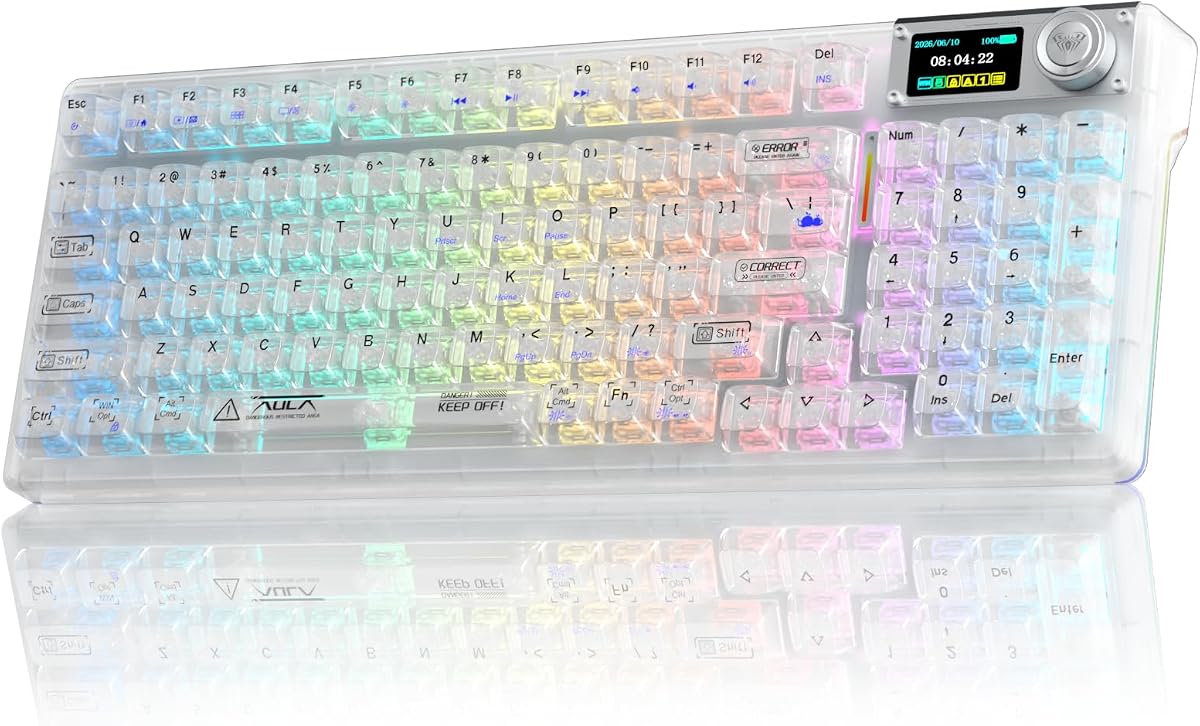
The Aula F98Pro V3 stands apart with a smart TFT screen that displays information such as battery level, time, connection status, and system status. Paired with a multifunction knob and a clear 98% layout, it combines a display-oriented feature set with the visual transparency sought in this category. Its customer rating is 3.5, so buyers should consider both the useful information panel and the limits of its software.
We may earn a commission when you buy through this link, at no additional cost to you.
The knob can control volume, RGB, language, and system functions. The screen can display additional images or GIFs, although the instructions say to use the driver and a wired PC connection for those settings and to synchronize the date and time. Connectivity covers USB-C, 2.4GHz wireless, and Bluetooth 5.0, with Bluetooth saving up to three devices. A 10000mAh battery is included, one of the largest capacities among the listed models.
The full-key hot-swappable PCB accepts 3-pin and 5-pin switches, and the included Ice Crystal Switches are described as fast-actuating, creamy sounding, and highly transmissive. High-transmission keycaps work with 16 million RGB colors to create layered light. A gasket mount, extended integrated silicone pad, PCB single-key slotting, and five layers of noise-dampening filling aim to produce a soft, elastic feel while reducing cavity noise.
The F98Pro V3 is a good candidate for users who value a status display, large battery, number pad, and transparent lighting in one board. Its driver is compatible with Windows only when connected by cable, which could be a meaningful limitation for Mac-only users. The manual also advises using the original cable and avoiding fast charging, making it best suited to buyers who are comfortable with a more structured software and charging setup.
The TFT display can show battery, time, connection state, and system information, reducing the need to open software for routine checks. Custom images and GIFs add further visual options when the board is connected by cable to a PC.
The 10000mAh battery and light-transmitting switches form a strong combination for long wireless sessions. The 98-key format preserves a number pad, while RGB settings can be adjusted from the knob or dedicated Windows driver.
We may earn a commission when you buy through this link, at no additional cost to you.
The YUNZII X98 Crystal is a well-rounded clear mechanical keyboard for users who want transparent materials, wireless flexibility, and serious customization in a productivity-sized layout. Its 4.6 customer rating reflects a favorable reception, while the supplied features suggest broad compatibility across gaming, writing, and everyday office tasks. The 98% arrangement retains a number pad and a compact footprint relative to a conventional full-size board.
We may earn a commission when you buy through this link, at no additional cost to you.
Its high-transparency PC casing and double-layer clear keycaps create a layered RGB appearance, while south-facing LEDs and 16.8 million colors add lighting flexibility. The included pre-lubed Snow switches are described as silky-smooth and creamy, with hot-swappable sockets accepting both 3-pin and 5-pin switches. A five-layer dampening system uses Poron, IXPE, silicone, and sound-enhancement pads to soften the sound and make the typing feel more elastic.
QMK/VIA support is a major advantage for keyboard enthusiasts. It enables key remapping, layout changes, macros, RGB adjustment, and customizable knob behavior across multiple profiles. The knob defaults to volume control, and the keyboard supports wired USB-C, 2.4GHz wireless, and Bluetooth, with the ability to pair up to five devices. That makes it a convenient central keyboard for a workstation containing several computers or mobile devices.
The X98 Crystal is our Editor’s Choice because it balances aesthetics, acoustics, firmware openness, connectivity, and layout better than most of the clear keyboards reviewed. The main trade-off is size: buyers with limited desk space may prefer a 75% or 60% model. Even so, the combination of high customer feedback, five-layer dampening, and extensive programmability makes this an excellent all-around recommendation.
Clear keycaps and casing are paired with five distinct dampening layers, including Poron, IXPE, and silicone. This combination targets the hollow sound and harshness that can otherwise appear in visually open keyboard designs.
QMK/VIA support extends well beyond basic RGB controls. Multiple profiles, remapping, macros, and knob assignments make it easy to create separate configurations for work and gaming without repeatedly changing physical switches.
We may earn a commission when you buy through this link, at no additional cost to you.
The GravaStar Mercury V60 HE is built for competitive shooters, and its specifications make that intent clear. It combines a Crystal Rose transparent chassis with a true 8000Hz polling rate, a 256kHz scan rate, and a stated latency of 0.125ms. Its 4.6 customer rating is strong, but the most compelling reasons to choose it are speed-oriented Hall Effect features rather than wireless convenience or office-focused layout options.
We may earn a commission when you buy through this link, at no additional cost to you.
Rapid Trigger dynamically resets a key as soon as it is released, supporting quick directional changes, repeated taps, and counter-strafing. The GravaStar UFO magnetic switches offer adjustable actuation from 0.005mm to 3.5mm, allowing users to tune when a press registers. That precision is useful for games such as Valorant, CS2, Fortnite, and Apex Legends, where brief movement inputs can determine a reaction.
The 60% layout keeps the keyboard compact and leaves more room for mouse movement. Its transparent Crystal Rose chassis uses soft pink styling with RGB lighting, while multi-layer acoustic foam contributes to the claimed thock sound. Hot-swappable Hall Effect switches support later changes to feel and behavior, and dynamic RGB provides several effects. Wired operation is compatible with both Windows and Mac.
This is a strong recommendation for a competitive FPS setup that values polling, rapid reset, and adjustable actuation. Its important limitation is that it is wired-only, so it cannot serve as a flexible wireless keyboard for a multi-device workspace. The 60% format also omits dedicated function and navigation keys unless they are accessed through other layers. For a gaming-first desk, those trade-offs are usually acceptable.
The 8000Hz polling rate and 256kHz scan rate are designed to minimize the gap between physical input and on-screen response. Rapid Trigger then allows each magnetic switch to reset immediately after release.
A 60% layout creates valuable desk and mouse space, while adjustable actuation lets users select extremely light or firmer register points. The transparent Crystal Rose finish keeps the gaming hardware visually distinctive.
We may earn a commission when you buy through this link, at no additional cost to you.
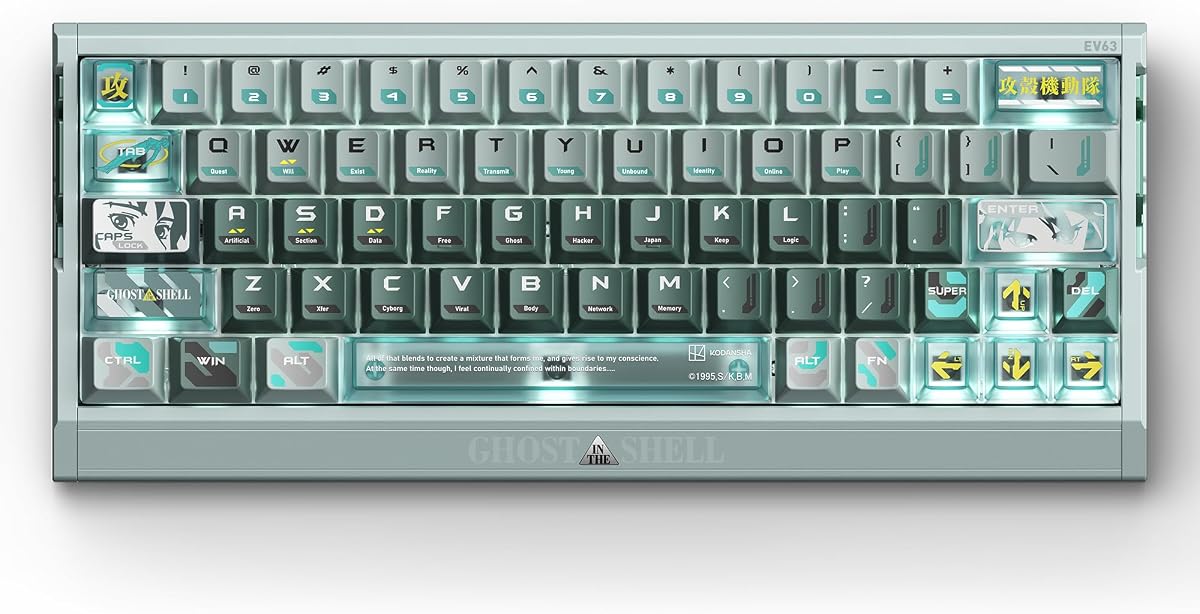
The IQUNIX EV63 Ghost in the Shell is a premium 60% gaming keyboard built around magnetic Hall Effect technology, an officially licensed theme, and a CNC aluminum case. Its 5.0 customer rating is the highest listed here. The product is aimed at players who want precise actuation and a distinctive desk centerpiece rather than a conventional transparent plastic keyboard with basic digital switches.
We may earn a commission when you buy through this link, at no additional cost to you.
The keyboard supports 0.01mm Rapid Trigger, 0.125ms latency, and 8KHz polling for fast key registration and release. HyperCore V3 firmware uses Smart Hall calibration and a 400% Hall voltage range to create cleaner and more stable sensing. Smart Switch Adaptation automatically detects compatible magnetic switch types, including after supported switch changes, which helps maintain consistent actuation behavior.
The included Linear Nova magnetic switches have a listed operating force of 35±5gf, an end force of 48±5gf, and total travel of 3.4±0.05mm. Factory lubrication and contactless magnetic sensing support a smooth, controlled feel. The driver allows users to tune actuation and reset behavior for movement styles ranging from quick stops and counter-strafing to repeated inputs and rapid peeks.
A CNC aluminum case gives the EV63 a planted, weighty feel and a cold-touch finish. The Ghost in the Shell keyset includes lexicon sublegends, Motoko-inspired character artwork, translucent accents, and RGB atmosphere, making it appealing to collectors as well as competitive gamers. The main compromises are the compact 60% layout and the premium-oriented nature of its feature set. For FPS performance and collectible design, it is the strongest overall fit.
Smart Hall calibration, a broad voltage range, and automatic switch adaptation are intended to keep magnetic sensing stable. Fine control over actuation and reset creates a different experience from fixed digital mechanical switches.
The tactical Ghost in the Shell theme includes character artwork, lexicon sublegends, translucent accents, and RGB lighting. CNC aluminum adds a stable, substantial platform that visually and physically separates it from entry-level clear boards.
We may earn a commission when you buy through this link, at no additional cost to you.
The KiiBoom Phantom81 Lite is a frosted 75% wireless keyboard designed for keyboard enthusiasts who want a refined translucent appearance, open firmware, and carefully dampened construction. It has a 4.6 customer rating and an 81-key arrangement that preserves a function row and arrow keys while eliminating the number pad. It is a restrained alternative to the Phantom81 V4, with a smaller battery and a different material treatment.
We may earn a commission when you buy through this link, at no additional cost to you.
The case uses durable ABS molding with a frosted finish intended to resist scratches and discoloration. South-facing RGB LEDs provide 16.8 million colors and customizable lighting effects that can respond to music or games. Pre-lubed linear switches are described as producing a soft, smooth sound, while the hot-swappable PCB allows compatible switches to be changed without soldering.
QMK/VIA compatibility provides key remapping, macros, and lighting customization, making the board useful for programming, gaming shortcuts, and productivity profiles. The gasket structure combines latex sandwich foam, IXPE switch pads, PE transparent film, PCB foam, and bottom silicone. These layers, together with pre-lubed stabilizers, are intended to reduce ping and rattling while creating a creamy acoustic profile.
Connectivity includes 2.4GHz wireless, USB-C, and Bluetooth 5.0, with switching among up to five devices. Compatibility extends across Windows, Mac, and Linux. The Phantom81 Lite is best for a clean, compact setup that values firmware freedom and refined sound without requiring a knob or a very large battery. Its frosted shell reduces visual clutter compared with a completely clear chassis.
The frosted ABS surface softens the appearance of the internal components while still catching RGB illumination. It offers a cleaner look for work-focused desks and should be less visually busy than an exposed acrylic frame.
QMK/VIA support makes extensive remapping and macro control available. Five-device switching and compatibility with Windows, Mac, and Linux make the board flexible across mixed personal and office environments.
We may earn a commission when you buy through this link, at no additional cost to you.
The Aula F98Pro V3 Clear combines a transparent 98% case, a TFT status display, a multifunction knob, and a large battery. Its 4.7 customer rating is among the best in the group, and the supplied information shows a keyboard capable of serving as both a gaming board and a productivity centerpiece. It is particularly attractive for users who want a number pad and at-a-glance system information without sacrificing the transparent design theme.
We may earn a commission when you buy through this link, at no additional cost to you.
The TFT screen can display battery level, time, connection status, and system information. It can also show custom images or GIFs after the appropriate driver setup, and the knob can adjust volume, RGB, language, and system functions. To set the image or synchronize the clock and date, the instructions call for a wired PC connection and the dedicated driver.
USB-C, 2.4GHz, and Bluetooth 5.0 provide three operating modes, and Bluetooth can save three devices. The 10000mAh battery offers one of the strongest endurance specifications in this roundup. Full-key hot swapping supports both 3-pin and 5-pin switches, while the included Ice Crystal Switches are described as fast-actuating, creamy sounding, and effective at transmitting light. Sixteen million RGB colors can be adjusted through the knob or software.
A gasket mount, extended silicone pad, single-key PCB slotting, and five layers of filling work together to reduce cavity noise and create a softer, more elastic feel. The trade-off is the driver’s restriction to Windows over a wired connection. The charging instructions also call for the original cable and advise against fast charging. Subject to those limitations, it is a feature-rich recommendation for a clear productivity and gaming setup.
The display provides immediate information about charge, time, connection, and system state, while the knob offers hands-on control of common functions. This reduces reliance on software for routine adjustments.
The 98% layout includes a number pad without the extreme width of some full-size designs. A 10000mAh battery, three connection modes, and hot-swappable switches make it suitable for long work sessions and mixed gaming use.
We may earn a commission when you buy through this link, at no additional cost to you.
A clear or translucent keyboard should be judged by more than its visible lighting. Layout, connection method, switch design, acoustic construction, software support, and intended use determine whether the board feels impressive in daily use.
A 60% keyboard removes the function row, arrow keys, and number pad, creating the most desk space and the best conditions for low-sensitivity mouse movement. A 75% board usually retains arrow keys and a function row while omitting the number pad. The 80-key model in this guide is similarly compact but should be checked for exact navigation coverage. A 96% or 98% layout preserves a number pad in a relatively narrow enclosure, making it a stronger choice for spreadsheets, accounting, data entry, and shortcuts. Consider your desk dimensions, monitor arrangement, and whether missing keys would disrupt your workflow before choosing the size.
Wired operation offers a direct connection and can suit competitive setups that prioritize consistency. Wireless designs reduce cable clutter and are useful with laptops, tablets, or phones, while tri-mode boards add both 2.4GHz and Bluetooth alongside USB-C. Bluetooth can support several saved devices, although the number varies by model. Check the stated wireless polling rate if gaming latency is important, and note whether the keyboard can continue operating while connected for charging.
Fixed mechanical switches have a predefined press point, while magnetic Hall Effect switches allow the actuation point and reset behavior to be adjusted. Light linear switches are often comfortable for gaming and long typing, and pre-lubed options can produce smoother movement and more controlled sound. Tactile switches add a noticeable bump, while clicky models are generally more audible. For fast shooters, examine actuation range, Rapid Trigger support, and polling rather than relying on switch color or name alone.
A fully clear acrylic chassis exposes the most internal detail and creates a dramatic, technical appearance. High-transparency polycarbonate and clear keycaps often produce a cleaner, more uniform visual while allowing RGB to shine through. A frosted shell softens the view of the components, which can look more restrained on a work desk. Open-frame designs prioritize visible lighting and airflow rather than a fully enclosed case. Consider glare, fingerprints, scratch visibility, and how much visual transparency you want in a permanent desk display.
Gasket mounting can make a keyboard feel more flexible by isolating the plate and PCB from the case. Multiple foam, IXPE, silicone, and other dampening layers can reduce hollow cavity noise, ping, and rattling. Linear switches often suit a creamy or thocky profile, but the exact result depends on the case, stabilizers, keycaps, and mounting system. If sound matters, look for explicit dampening details and pre-lubed stabilizers rather than assuming every clear keyboard sounds the same.
RGB quality depends on LED placement, switch transparency, keycap design, and the diffuser inside the chassis. South-facing LEDs can produce an even shine-through appearance, while side-printed clear legends create a layered effect. A rotary knob is useful for volume, scrolling, brightness, or application-specific commands, but compatibility and default functions vary. A TFT display may show battery, time, connection, and system information. Check whether custom images, clock synchronization, and lighting control require a particular operating system or wired connection.
QMK/VIA-based keyboards offer extensive remapping, macros, layer control, and profile management, often with less dependence on a vendor-specific visual interface. Other products use a dedicated Windows driver for lighting, key assignments, and display settings. Wireless mode may work across multiple operating systems even when advanced configuration does not. Review the listed compatibility carefully if you use Mac, Linux, consoles, or mobile devices, and check whether Bluetooth pairing, media keys, and layout switching work as expected.
Larger batteries can support extended wireless use, but they add bulk and may make a keyboard less convenient to carry. The Phantom81 V4 and Aula F98Pro V3 include especially high stated capacities, while several other models use 4000mAh batteries. Published runtime figures may depend on whether RGB is active, connection mode, and usage intensity. For a stationary desk, capacity can be a priority; for frequent travel, the entire keyboard’s weight and dimensions should influence the decision.
Begin by identifying the correct connection mode. Use USB-C for setup when the manufacturer requires a wired connection for the driver, and use Bluetooth for everyday switching among saved devices. For gaming, select 2.4GHz or wired operation according to the model’s stated capabilities. If the keyboard includes a rotary knob or TFT screen, explore its default functions before installing software so you understand which controls are immediately available.
Treat the clear shell and transparent keycaps with care because visible surfaces can show fingerprints, dust, and scratches. Clean them with a soft, lint-free cloth lightly dampened with water, and avoid spraying cleaner directly onto the keyboard. Allow liquid to remain away from switches, sockets, ports, and the screen. Compressed air can remove dust from between keys, but it should be used carefully around open frames and exposed components. Do not immerse the keyboard or place it in direct contact with water.
For a hot-swappable model, power down and disconnect the keyboard before changing switches. Confirm that the replacement switch has a compatible three-pin or five-pin base and that any LED or magnetic features are supported by the PCB. Clean the keycap area before reassembly, reconnect the device, and test the new switch. When a manufacturer specifies the original charging cable or advises against fast charging, follow those instructions to protect the battery and avoid unexpected charging behavior.
Not automatically. A clear chassis can improve the visual impact of RGB lighting, but gaming performance depends more on switch response, polling rate, latency, and stability. Models such as the GravaStar Mercury V60 HE and IQUNIX EV63 use magnetic switches and very high polling rates, while other clear boards emphasize wireless flexibility, acoustics, or programmable controls. Choose based on the features your games require rather than the case material alone.
Acrylic is a cast plastic material that can be polished to a highly transparent finish, exposing more of the internal construction. High-transparency polycarbonate can also provide clear or translucent keycaps and cases, often with a slightly different visual and physical character. Frosted ABS and PC finishes reduce the visibility of internal parts. All four materials are represented among the close, transparent, frosted, and crystal-inspired designs in this guide.
A gasket mount uses flexible material between the plate and case to reduce rigid contact and soften the overall feel. It often produces a more flexible, cushioned response and can reduce unwanted resonance when combined with suitable dampening materials. The effect varies by keyboard and switch, so the presence of a gasket alone does not guarantee one exact sound. The KiiBoom, YUNZII, Aula, and GravaStar models in this roundup pair mounting systems with additional acoustic materials.
Usually, yes, as long as the replacement switches are compatible with the board’s socket and pin configuration. The KiiBoom models, Aula F98Pro V3, YUNZII X98 models, and GravaStar Mercury K1 Lite support hot swapping. Magnetic boards may accept only compatible magnetic switches. Power down and disconnect the keyboard before changing switches, and verify that the PCB supports any special LED or magnetic functionality.
They require more frequent care because fingerprints, dust, and scratches are easier to see on transparent surfaces. Use a soft microfiber cloth, avoid spraying liquid directly onto the keyboard, and keep moisture away from the switches and electronic controls. Compressed air and careful keycap removal can help with trapped debris. A clean, microfiber-covered mat or a raised position can also reduce the amount of dust that settles on a display-oriented clear build.
It depends on how you use the keyboard. Bluetooth is convenient when switching among a desktop, laptop, tablet, or phone, while 2.4GHz or wired modes are often more appropriate during gaming. Some models support several Bluetooth devices, but the number varies. Competition-focused models such as the GravaStar Mercury V60 HE and IQUNIX EV63 prioritize wired performance, while the Phantom81, X98, and Aula options offer broader wireless flexibility.
It depends on the model. QMK/VIA-compatible boards can offer extensive remapping and profile support, while other products rely on a dedicated driver for lighting, displays, knob functions, or macros. The Aula F98Pro V3’s advanced driver is specified for Windows over a wired connection. Before buying, check whether your preferred operating system, connection method, and desired settings are supported.
Choose a 60% model for the most desk space and mouse movement, a 75% model for a balance of compactness and navigation keys, or a 98% model when a number pad and productivity layout matter. The 80-key model is also compact but requires closer inspection of its navigation coverage. Consider how often you use function keys, arrow keys, and a number pad before making the final choice.
The YUNZII X98 Crystal is the strongest all-around option because it combines a high customer rating, transparent construction, five-layer dampening, QMK/VIA support, a rotary knob, and five-device connectivity. The Transparent Mechanical Keyboard is the budget-focused choice for anyone who prioritizes a fully exposed acrylic design, quiet linear switches, and flexible wireless use. For premium gaming, the IQUNIX EV63 Ghost in the Shell stands out with magnetic switches, Rapid Trigger, 8KHz polling, and a CNC aluminum body.
Your priorities should determine the rest of the shortlist. Choose the Aula F98Pro V3 Clear for a TFT display, large battery, number pad, and multifunction knob. The GravaStar Mercury K1 Lite suits buyers who prefer an open frame and soft linear acoustics, while the GravaStar Mercury V60 HE targets competitive shooters. The frosted KiiBoom Phantom81 Lite and Phantom81 V4 are more appropriate when you want a restrained translucent look, wireless freedom, and extensive switch customization.
Before ordering, verify layout, operating-system support, connection modes, switch compatibility, and any driver requirements. Product specifications, customer feedback, software behavior, and pricing can change over time, so check the current listing and compare the final configuration before purchasing.