
SteelSeries Apex 3
4.6Editor score
Whisper-quiet gaming switches
Ten-zone RGB illumination
Magnetic palm-support wrist rest
Our expert guide compares the best keyboard for Fortnite, covering switches, latency, layout, lighting, macro controls, comfort, and compatibility.
A keyboard for Fortnite should make movement, building, inventory navigation, and repeated combat actions feel immediate and dependable. The most important qualities include a responsive connection, low-latency switches, accurate key registration, a comfortable layout, and controls that suit both competitive matches and long creative sessions.
We compared ten keyboards using the specifications supplied for each model, focusing on switch behavior, polling rate, actuation options, macro support, RGB lighting, wired or wireless connectivity, layout size, wrist support, and device compatibility. The list covers full-size, tenkeyless, 75%, 68-key, 67-key, 66-key, and 65% designs at different feature levels.
Each recommendation highlights where a model is especially well suited, while also noting compromises such as membrane construction, a smaller key set, software requirements, or a more specialized feature set. Product listings and availability can change, so readers should verify the current specifications and compatibility details before purchasing.
4.6Editor score
4.5Editor score

4.6Editor score
The comparison covers switch type, connection, layout, customization, and the Fortnite-focused strengths of every keyboard, from a full-size all-in-one set to compact Hall Effect models built for rapid inputs.






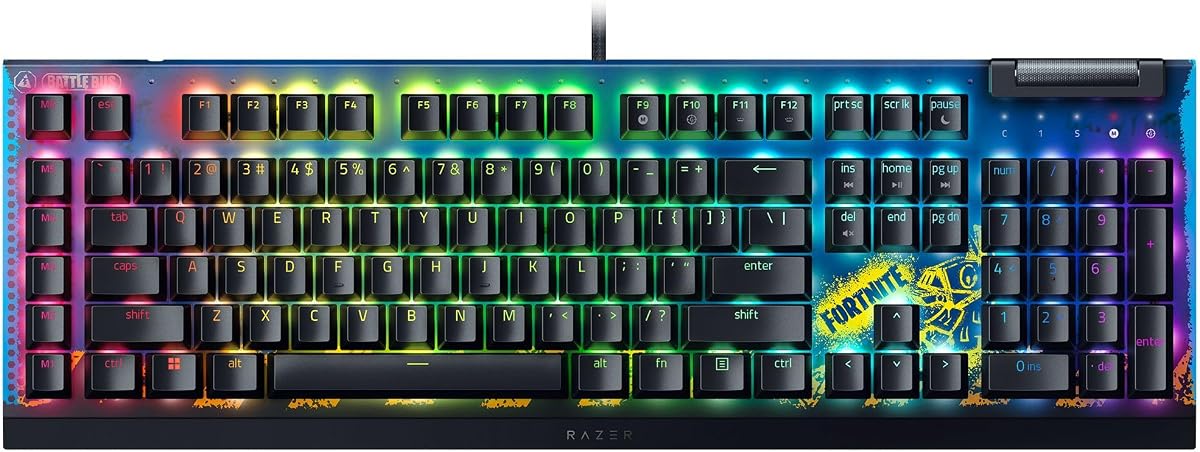
The Razer BlackWidow V4 X Mechanical Gaming Keyboard, Fortnite Edition combines a gaming-focused mechanical design with an explicitly Fortnite-themed appearance. Its 4.5 rating reflects a generally favorable reception, while the supplied feature set makes it the most thematically direct recommendation in this guide. It is built for players who want fast inputs, visible controls, and a familiar full-size arrangement.
We may earn a commission when you buy through this link, at no additional cost to you.
The yellow mechanical linear switches provide a short actuation point, require 45 grams of force, and use a 1.2 millimeter actuation-and-reset distance. That configuration favors rapid movement, combat, building, and inventory inputs because presses register with little travel. Built-in sound dampeners are intended to soften the noise, and the switch design supports brighter, more even per-key RGB illumination.
Six dedicated macro keys are the standout practical feature. They can be assigned to common Fortnite sequences, including building actions or other commands that become repetitive during matches. A multifunction roller and secondary media keys provide quick access to playback, volume, and lighting controls. Double-shot ABS keycaps are designed to resist worn lettering and provide thicker keycap walls for frequent gaming use.
The main compromise is desk footprint. A full-size layout includes a number pad and places more keys between the main typing area and the mouse, which may be less desirable for a player who favors compact equipment. Software support may also be needed to customize macros and lighting. Even so, the fast switches, useful macro bank, Fortnite edition, and vivid lighting make this a strong all-around choice for dedicated players.
The 1.2 millimeter actuation distance and light 45-gram force suit players who frequently tap movement, build, and combat keys. Linear behavior also provides a consistent action without the tactile bump associated with clicky switches.
Six easily accessible macro keys can be programmed around a player's preferred routines. They are particularly useful for consolidating multi-step building or communication commands without crowding the primary movement area.
We may earn a commission when you buy through this link, at no additional cost to you.
The SteelSeries Apex 3 Gaming Keyboard – Black is a practical full-size option for Fortnite players who value quiet operation, comfort, and broad device support. Its 4.6 rating is among the strongest in the group, and the model balances gaming features with features commonly found in everyday keyboards. It is a particularly attractive choice for shared rooms or late-night sessions.
We may earn a commission when you buy through this link, at no additional cost to you.
Whisper-quiet gaming switches are rated for 20 million low-friction keypresses, making them suitable for repeated construction, movement, and combat inputs without producing the loudest mechanical feedback. Ten-zone RGB illumination supplies color and reactive effects, while dedicated multimedia controls allow volume and settings changes without leaving the game. The IP32 water resistance offers some protection against accidental spills.
A premium magnetic wrist rest provides full palm support and is one of the keyboard's most noticeable practical advantages. Fortnite sessions can be long, and a keyboard that encourages a more relaxed hand position may be easier to use than a bare compact board. The full-size layout also preserves familiar key placement, including separate navigation and number-pad areas.
The SteelSeries Apex 3 does not list dedicated macro keys, and its lighting is divided into ten zones rather than controlled per key. Players who need extensive programmable shortcuts may prefer one of the models with onboard macro controls. Otherwise, the quiet switches, wrist rest, water resistance, RGB lighting, and support for Windows, Mac, Xbox, and PlayStation systems make this a versatile recommendation for Fortnite.
The combination of low-noise gaming switches and a magnetic palm rest supports extended play without the constant mechanical noise some players find distracting. It is especially useful in shared spaces.
Compatibility with Windows, Mac, Xbox Series S, Xbox Series X, PS4, and PS5 broadens the model's appeal. That makes it useful beyond a single Fortnite PC setup.
We may earn a commission when you buy through this link, at no additional cost to you.
The Redragon S101-3 PRO Gaming Keyboard and Mouse is a complete wired package aimed at first-time gamers, students, and players seeking a broad feature set without assembling several peripherals. Its 4.5 rating indicates a favorable overall reception. For Fortnite, the strongest attraction is the combination of programmable keyboard controls and an included high-precision gaming mouse.
We may earn a commission when you buy through this link, at no additional cost to you.
The full-size keyboard has six RGB backlight modes, five dedicated macro keys, anti-ghosting behavior, and software support for customizing colors, brightness, patterns, and commands. Settings for lighting and mouse DPI can be stored directly in the hardware, so they can persist after a restart. The included mouse offers sensitivity from 800 to 7200 DPI and a dedicated on-the-fly adjustment button.
Soft-touch membrane keys are described as quiet and comfortable for shared spaces, late-night gaming, or office use. An ergonomic wrist rest supports longer sessions, while the software-driven macro system provides a way to automate longer sequences that would otherwise require several separate inputs. The complete package is also easier for a new Fortnite player to set up than sourcing a keyboard and mouse independently.
The central compromise is switch construction. Membrane keys can feel different from linear mechanical or Hall Effect alternatives, and they do not offer the same physical switch behavior. Software also needs to be downloaded before every lighting and sensitivity option can be managed. Even with those limitations, the included mouse, five macro keys, anti-ghosting behavior, persistent settings, and quiet operation create a compelling starter package.
The included gaming mouse removes the need for another purchase when building a basic Fortnite setup. Its adjustable DPI range supports both broad aiming movements and finer cursor control.
Lighting and mouse sensitivity can remain configured after a restart. That convenience reduces the need to reopen software each time the player begins a session.
We may earn a commission when you buy through this link, at no additional cost to you.
The GEODMAER 65% Gaming Keyboard is a compact, wired option designed to save desk space while retaining separate arrow keys. Its 4.3 rating places it slightly below the higher-rated models in the group, but the size and portability make it relevant for Fortnite players with limited desk area. The layout is described as suitable for both gaming and office use.
We may earn a commission when you buy through this link, at no additional cost to you.
The 68-key design omits a number pad, creating more room for mouse movement. It connects through a detachable USB-C cable, which can make storage and transport more convenient than a permanently attached lead. Twenty-six keys support no-conflict operation, and the Windows keys can be locked to prevent accidental presses during intense play.
The keyboard uses quiet membrane switches designed to imitate the feel of mechanical keys. Two-color injection-molded keycaps have transparent characters that remain visible under the LED backlight. Lighting can be switched off or set to a constant mode, and a breathing mode can be adjusted for brightness and frequency using dedicated key combinations. Eleven media buttons provide additional controls within the compact footprint.
A stated lifespan of more than 10 million keystrokes supports the expectation of regular gaming use, and UV treatment is intended to reduce fading. The trade-offs are the less mechanical feel of membrane keys and the absence of polling-rate or advanced actuation specifications. It is most appropriate for a player who prioritizes a small, portable, quiet keyboard rather than competitive switch-level tuning.
Removing the number pad brings the mouse closer to the keyboard and frees desk area. This is useful for players who prefer a clean setup or have limited room.
The detachable USB-C cable and compact dimensions make the keyboard easy to store and carry. Backlighting remains adjustable for different rooms and lighting conditions.
We may earn a commission when you buy through this link, at no additional cost to you.
The Aula WIN60 HE is a 60% mechanical gaming keyboard built around Hall Effect magnetic switches, an 8000 Hz polling rate, and Rapid Trigger behavior. Its 4.5 rating reflects strong interest in a performance-oriented design. While the supplied description emphasizes FPS titles such as Valorant and CS2, the adjustable inputs also have clear value for Fortnite movement and rapid combat sequences.
We may earn a commission when you buy through this link, at no additional cost to you.
The keyboard can achieve a rapid trigger step distance of 0.02 millimeters, allowing a key to reset as soon as it rises enough to register. That behavior can support repeated actions without requiring a full physical reset. Magnetic sensing also permits actuation adjustments without physical contact, and the stated 8000 Hz polling rate is intended to reduce command delay.
The compact 60% layout maximizes available mouse space, while lower-positioned lighting illuminates the PBT keycaps. RGB lighting includes 16.8 million colors, and the web-based driver allows key remapping, macro creation, and lighting customization without a conventional desktop installation. Because the driver is accessed through a browser, it can be managed from a connected device with internet access.
The smaller layout omits dedicated macro keys, a number pad, and some larger-key convenience. Players who depend on those elements may prefer a 75% or tenkeyless design. The compact format can also demand more adjustment for players accustomed to a full-size board. Even so, the WIN60 HE is a compelling choice for Fortnite players who want modern magnetic-switch control, rapid triggering, and minimal desk usage.
The 0.02-millimeter rapid trigger step is designed for repeated actions that benefit from immediate reset behavior. It is especially relevant to players who tap movement or combat controls rapidly.
A browser-based driver handles remapping, macros, and RGB effects. Players can review settings from a connected device and make changes without installing a bulky desktop application.
We may earn a commission when you buy through this link, at no additional cost to you.
The AULA F75 Pro is a versatile 75% wireless mechanical keyboard that combines multi-device connectivity, hot-swappable switches, a multifunction knob, and programmable controls. Its 4.6 rating is tied for the highest among the listed products. It is a strong Fortnite choice for players who want a compact layout without giving up arrow keys, flexibility, or a strong feature set.
We may earn a commission when you buy through this link, at no additional cost to you.
Bluetooth 5.0, 2.4 GHz wireless, and USB wired modes allow the keyboard to work across PCs, laptops, tablets, mobile phones, PlayStation, and Xbox devices. It can remember up to five connections and switch between them through shortcuts or a side button. A rechargeable 4000 mAh battery supports wireless use, while the wired mode provides a straightforward alternative when a stable connection or uninterrupted power is preferred.
Pre-lubed LEOBOG Reaper switches and pre-lubed stabilizers are supplied, and the hot-swappable base accepts three-pin or five-pin switches. This gives newer keyboard enthusiasts an easy way to change switch types without soldering. The structure includes an integrated silicone pad, single-key PCB slotting, and five internal filling layers intended to reduce cavity noise and improve stability.
The 81-key layout retains arrow keys while reducing desk footprint. A multifunction knob switches between gaming and office modes, adjusts lighting, and can control media functions. Macros are programmable through the F75 driver, while N-key rollover and Windows-key lock support demanding play. The main drawback is that advanced configuration requires software, and a wireless setup requires a little more configuration than a basic wired keyboard.
Three connection modes and support for five paired devices make it easy to move between a Fortnite PC, laptop, tablet, or console. Shortcut-based switching reduces the need to reconnect manually.
Hot-swappable sockets accept both three-pin and five-pin switches. Players can experiment with different switch characteristics while retaining a practical path to a personalized setup.
We may earn a commission when you buy through this link, at no additional cost to you.
The AULA WIN68 HE is a compact wired keyboard centered on adjustable Hall Effect magnetic switches. Its 4.5 rating indicates a favorable reception, and its ability to tune press and reset behavior distinguishes it from conventional membrane and mechanical models. It is particularly relevant for players who want more control over how their Fortnite inputs trigger.
We may earn a commission when you buy through this link, at no additional cost to you.
Each key can be configured at 0.1-millimeter increments within an actuation range of 0.02 to 3.44 millimeters. The keyboard also supports an 8000 Hz polling rate and a stated latency of 0.3 milliseconds. Its web driver can adjust rapid trigger, SOCD, DKS, MT, and TGL functions, along with key mapping, macro editing, and RGB lighting. Individual press and reset sensitivity can be tuned for different habits and game types.
The 68-key layout omits a number pad and dedicated top-row functions but retains separate arrow keys. A detachable USB cable supports a stable connection and easier transport. South-facing LEDs provide a clearer view of the lettering, and 14 preset lighting effects can be adjusted through the driver or function-key combinations. Full-key anti-ghosting is also listed for the compact gaming design.
The supplied web driver is Windows-only, which is an important limitation for Mac users. The 60% format also requires adjustment for players accustomed to a function row, and a specialized magnetic keyboard may be more than someone needs for casual play. Still, the adjustable actuation points, rapid functions, high polling rate, and compact arrow-key layout make this a strong competitive option for Fortnite on Windows.
Individual press and reset settings let players create a different feel for movement, building, and combat keys. Fine-grained control can be useful for anyone accustomed to magnetic-switch keyboards.
The driver exposes rapid trigger, anti-acceleration, dynamic key strokes, macros, mapping, and lighting in one interface. The Windows limitation should be checked before buying for a mixed-device setup.
We may earn a commission when you buy through this link, at no additional cost to you.
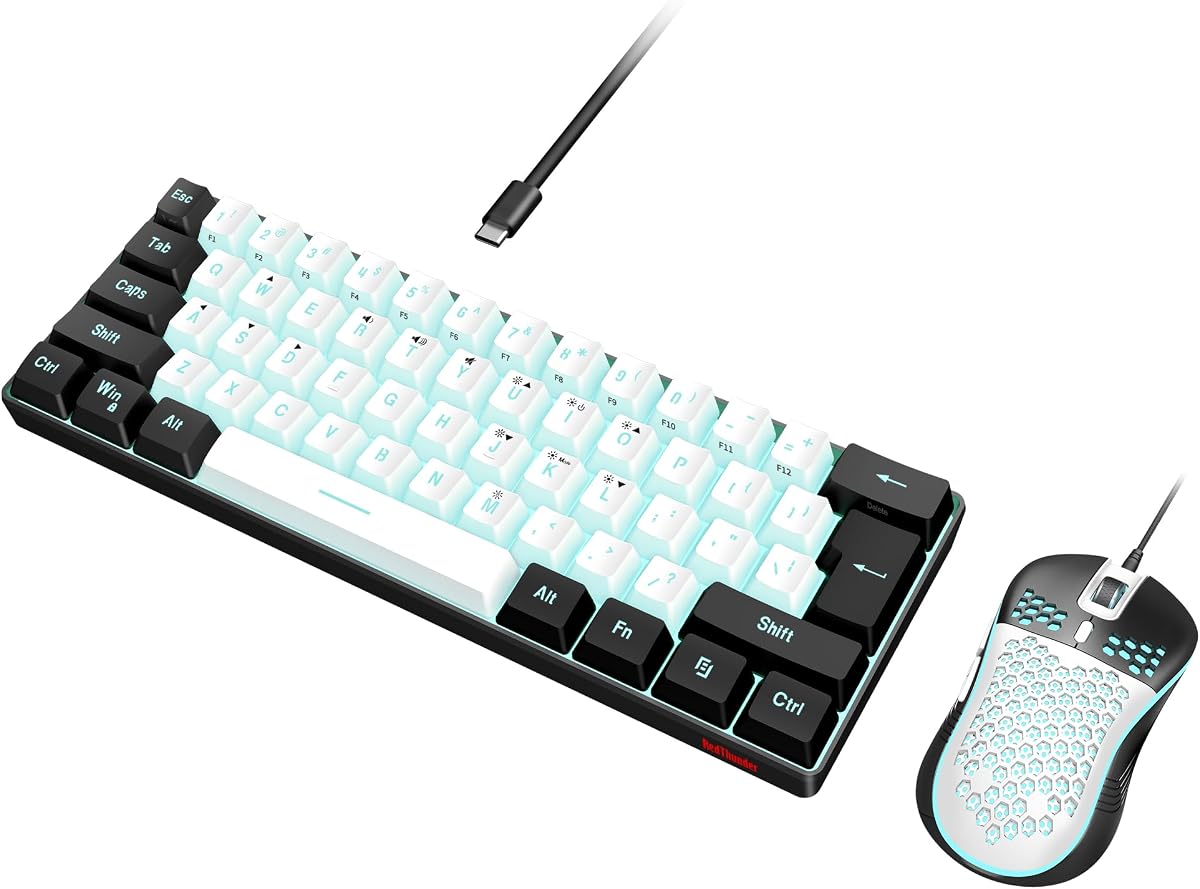
The RedThunder 60% Gaming Keyboard and Mouse Combo pairs an ultra-compact 61-key keyboard with a lightweight honeycomb-shell optical mouse. Its 4.3 rating is among the lower scores in the list, but the two-piece package and space-saving design serve a clear purpose: creating a small Fortnite setup centered on mouse movement and minimal desk clutter.
We may earn a commission when you buy through this link, at no additional cost to you.
Removing the number pad brings the mouse closer to the keyboard and leaves more space for broad aiming motions. RGB backlighting offers permanent and breathing modes, with adjustable brightness and breathing speed. The keyboard has no listed dedicated macro keys, so players who rely on shortcuts may need to use software or another keyboard. Its very compact key count also means fewer dedicated controls than larger gaming boards.
The included mouse weighs approximately 65 grams, plus or minus five grams, and uses a symmetrical honeycomb shell that supports multiple grip styles. Its optical sensor provides up to 7200 DPI, a 12,000 frames-per-second scan rate, and a 1000 Hz polling rate. Listed tracking specifications include support for 40G acceleration and 400 IPS movement, making it suitable for fast in-game camera adjustments.
Protection features include a water-resistant keyboard, anti-interference magnetic rings, gold-plate interfaces, and braided USB cables. The package supports PC, PS5, and Xbox-oriented use according to the supplied title. The main limitations are the 4.3 rating, limited keyboard layout, and absence of listed macro controls. Despite that, it is a practical option for players who want a coordinated compact keyboard-and-mouse setup.
Matching the 61-key keyboard and lightweight honeycomb mouse keeps the footprint small. The arrangement gives Fortnite players more room for mouse movement and a tidier desk.
Braided cables, gold-plate interfaces, and magnetic interference protection support dependable wired operation. The keyboard's water resistance also helps with accidental everyday spills.
We may earn a commission when you buy through this link, at no additional cost to you.
The Logitech G PRO Mechanical TKL is a tenkeyless gaming keyboard designed with esports athletes in mind. Its 4.6 rating is tied for the highest in the group, and the tournament-oriented feature set gives it a credible premium position. For Fortnite, the strongest advantages are its compact footprint, crisp switches, and easy portability between home, school, and competition environments.
We may earn a commission when you buy through this link, at no additional cost to you.
Durable GX Blue Click switches provide an audible and tactile press intended to make every registered action feel secure. The tenkeyless format removes the number pad, increasing the available mouse area without the extreme reduction seen on 60% layouts. It preserves a familiar gaming shape while remaining easier to pack for tournaments or travel than a full-size keyboard.
LIGHTSYNC can highlight individual keys and store static lighting patterns directly on onboard memory. This is useful on tournament systems that prevent G HUB installation. Detachable three-pronged Micro USB cables support secure connections and safe transport, while three angle settings and rubber feet provide stable positioning during intense sessions.
F-key programming, lighting customization, and keyboard macros require Logitech G HUB. Macros are generally not allowed in tournaments, so players should review competition rules before assigning them. Clicky feedback may also be louder than quieter switch alternatives. Even with these caveats, the 4.6 rating, durable construction, onboard lighting, portable cable, and mouse-friendly layout make this an excellent premium Fortnite keyboard.
The detachable cable and compact tenkeyless form make the keyboard straightforward to transport. Onboard lighting patterns help preserve a familiar setup when software installation is restricted.
GX Blue Click switches deliver a pronounced audible and tactile action. Some Fortnite players prefer that certainty, although others may choose quieter or smoother alternatives.
We may earn a commission when you buy through this link, at no additional cost to you.
The ATTACK SHARK X68 HE RT is a 60% wired mechanical gaming keyboard that combines Hall Effect magnetic switches, Rapid Trigger behavior, 8000 Hz polling, and unusually deep key customization. Its 4.6 rating places it among the strongest options. It is a fitting choice for Fortnite players who enjoy experimenting with input behavior and want a small board with distinct arrow keys.
We may earn a commission when you buy through this link, at no additional cost to you.
The keyboard allows four functions to be bound according to four different pressing depths. Actuation can be adjusted from 0.1 to 3.4 millimeters, and the stated Rapid Trigger accuracy is 0.01 millimeters. Its polling rate reaches 8000 Hz, while the listed theoretical latency is 0.125 milliseconds. These specifications position the model for rapid, precise competitive play.
A web driver supports key remapping, macros, hotkeys, lighting effects, and custom actuation points without a conventional software installation. The top-mounted structure uses an anodized aluminum alloy positioning plate and two layers of PORON to create a stable, quieter feel. Pre-lubed satellite stabilizers are also intended to reduce wobble on larger keys.
The 66-key layout includes separate arrow keys, a curved wrist rest, and a non-slip mat. Full-key anti-ghosting and a Windows-key lock function support accurate play. A button switches between Windows and Mac layouts, although the design is wired and therefore aimed primarily at desktop setups. It finishes as a technically ambitious Fortnite option whose main attraction is the depth of its programmable magnetic-switch controls.
Different press depths can trigger different actions on one key. The feature supports advanced customization, though players should experiment carefully to avoid unexpected inputs.
A top-mounted aluminum plate and double-layer PORON add stability and help control cavity noise. Pre-lubed stabilizers improve the movement of wider keys such as Shift and Enter.
We may earn a commission when you buy through this link, at no additional cost to you.
Choosing a keyboard for Fortnite is easier when the important input, layout, comfort, and customization features are separated from optional extras. The best choice depends on how you play, what equipment you already own, and whether responsiveness or a quieter, more versatile setup matters more.
Switch technology shapes the feel and timing of every movement, build, and combat command. Membrane models can be quiet and affordable, while mechanical linear switches provide a fast, consistent action with less resistance. Hall Effect magnetic switches add adjustable actuation and Rapid Trigger options, allowing a key to register and reset at user-selected depths. These advanced settings can benefit players who enjoy fine control or regularly use compact competitive layouts.
The right switch is the one that feels natural and remains comfortable through long sessions. Fortnite is not restricted to first-person shooting, and many players alternate between keyboard commands, building, mouse aiming, and communication shortcuts. Some will prefer the decisive feedback of clicky switches, while others will favor quiet operation in a shared room.
Polling rate indicates how often the keyboard reports its state to the computer. Models listed with 8000 Hz polling are designed for very frequent communication, while a 1000 Hz mouse or keyboard represents a lower but widely used baseline. The supplied data also lists specific latency figures for several magnetic-switch models. These numbers should be viewed as design targets rather than a guarantee of an identical real-world advantage.
Latency matters most when it is paired with a stable connection and a keyboard that registers each press accurately. A very high polling rate cannot compensate for a loose cable, software conflict, or an uncomfortable layout. Players should consider the complete system rather than focusing on one headline specification.
Fortnite benefits from a compact layout because a smaller keyboard leaves more room for broad mouse movements. A 60% board omits the function row and number pad, a 65% design adds a compact navigation area, and a 75% layout balances space savings with more dedicated keys. A tenkeyless keyboard preserves a familiar shape while removing only the number pad. Full-size models remain useful when complete numeric input or familiar spacing matters.
Do not judge a compact layout solely by its dimensions. Check whether arrow keys, essential modifiers, macro keys, and navigation controls remain accessible. Players who use Fortnite building techniques extensively may also appreciate a separate number pad for creative map editing or communication tools.
Macros can shorten repeated or multi-step actions, which may be useful for building sequences, inventory routines, or communication shortcuts. Dedicated macro keys make these commands easier to access than software-only combinations. A board with programmable keys can also be adapted as a player's habits change, although macros must be configured carefully and may be restricted in competitive events.
Check how programming is performed. Some models use a full desktop application, others use a browser-based driver, and some preserve settings in onboard memory. Windows compatibility should also be verified if the same keyboard is shared with a Mac, console, tablet, or laptop.
A wired keyboard provides a direct and consistent connection for desktop play. Detachable cables add portability without sacrificing a wired setup. Wireless models offer greater flexibility and can connect to several devices, making them convenient for switching between Fortnite on a PC, console, laptop, tablet, or phone. Bluetooth, 2.4 GHz wireless, and wired modes each present different connection habits and battery considerations.
Players should confirm that a wireless model has a suitable battery, charging method, and range for their normal gaming location. For a stationary PC setup, a wired model may be simpler. For travel or multi-device use, tri-mode connectivity and quick device switching are useful. Console support also depends on what the manufacturer lists rather than general keyboard compatibility.
RGB lighting is more than decoration for many gaming setups. Per-key effects can help a player identify controls, while zone-based lighting is simpler to configure. Backlighting also makes a keyboard easier to use in a dim room. A model with 16.8 million colors provides a broad range of effects, but the practical difference often comes down to whether lighting can be adjusted per key, by zone, or through onboard controls.
Software requirements deserve attention. A browser-based driver can make customization convenient, while a full application may offer more options. Players using tournament systems should look for onboard lighting storage so their preferred pattern remains available without installing software.
Fortnite sessions can last for hours, so comfort depends on wrist support, keycap shape, switch feel, and the stability of the keyboard on the desk. A magnetic or fixed wrist rest can reduce strain, while rubber feet can prevent movement during fast inputs. The listed mechanical structures, including aluminum plates, silicone pads, PORON layers, and pre-lubed stabilizers, are intended to improve feel and reduce unwanted noise.
A larger keyboard is not automatically more comfortable, and a compact board is not automatically better. The best fit leaves the wrists supported, the mouse unobstructed, and frequently used keys within comfortable reach. Try to maintain a relaxed hand position and avoid placing the wrists sharply on a hard desk edge.
A keyboard used for gaming is also used for messaging, browsing, creative work, and school or office tasks. Mechanical and membrane models differ in construction, while rated keystroke lifespans provide one indication of expected longevity. Keycap materials also matter: double-shot ABS is designed to resist worn legends, and PBT is valued for a firmer texture and resistance to fading.
Look for practical protections such as water resistance, detachable cables, and reinforced switch or stabilizer systems. No keyboard is spill-proof, so keeping drinks away from the board remains sensible. Choose a construction that suits the environment rather than relying on a single durability claim.
Begin by connecting the keyboard in the manner described in its product information, then update the required software and assign lighting, macros, and any switch settings. Test every movement, build, inventory, and communication command in Fortnite before entering a match. If using a magnetic-switch model, begin with conservative actuation settings and increase the sensitivity gradually rather than applying extreme values immediately.
Keep the keyboard on a stable, clean surface and use a soft wrist rest that supports the palms without creating excessive pressure. Allow enough room for the mouse, especially with a compact layout. Avoid resting drinks near the keyboard, clean dust from around the switches with compressed air, and disconnect the cable before cleaning removable parts.
For long sessions, take short breaks to relax the hands and wrists. Periodically check the driver for updates, review macro assignments, and back up any essential onboard profiles. Do not change switches or structural parts unless the model is designed for hot-swapping and the manufacturer provides clear instructions.
No. A capable membrane keyboard can provide the inputs needed for Fortnite, and the Redragon S101-3 PRO is one example with macro controls and an included mouse. Mechanical and magnetic models may offer more precise switch behavior, programmability, or actuation settings, but the right choice still depends on comfort, layout, and personal preference.
A 60% keyboard can be excellent for Fortnite because its small footprint leaves more space for mouse movement. It usually omits the function row, number pad, and dedicated macro keys, so players should confirm that their essential controls remain accessible. Models with separate arrow keys and remapping software offer greater flexibility.
Hall Effect switches are not automatically better for every player. They provide adjustable actuation, Rapid Trigger behavior, and extensive per-key customization that some competitive players appreciate. Others may prefer simpler linear switches, quieter membrane keys, or the pronounced tactile feedback of a clicky mechanical model.
Macros are not appropriate for competitive Fortnite because they can automate actions that should be performed manually. The Logitech G PRO Mechanical TKL explicitly notes that keyboard macros are generally not allowed in tournaments. Players should always review current event rules and avoid using any prohibited configuration in ranked or competitive play.
RGB lighting is not required for gameplay, but it can improve visibility and make key groups easier to identify in a dim room. Per-key effects offer the most detailed control, while zone-based lighting is simpler to configure. Players who travel to tournament systems may also value onboard lighting profiles that work without installing configuration software.
A wired keyboard is usually the simplest option for a stationary gaming setup because it avoids battery management and wireless interference concerns. A wireless or tri-mode model is more convenient when switching among multiple devices or playing away from the main desk. Whichever connection is chosen, the cable and receiver should be positioned to avoid interference.
No single key size suits everyone. Linear mechanical switches are smooth and fast, tactile switches add feedback without the sharper noise of clicky models, and membrane keys are generally quiet and easy to maintain. Players who value precise control may prefer adjustable Hall Effect switches, while casual players may find a quiet standard model more comfortable.
A gaming mouse is not required, but aiming in Fortnite depends heavily on mouse movement, and the right mouse can make that movement more precise and comfortable. The Redragon S101-3 PRO and RedThunder 60% Combo include mice, while keyboard-only buyers should choose a mouse based on grip style, sensor performance, weight, and comfort.
The Razer BlackWidow V4 X stands out as the most directly Fortnite-focused recommendation, combining fast linear switches, six macro keys, vivid per-key lighting, and a full-size layout. The SteelSeries Apex 3 is a more affordable and versatile alternative for players who prioritize quiet switches, wrist comfort, and broad device compatibility, while the Logitech G PRO Mechanical TKL delivers a premium esports-style setup.
Players with very specific input preferences may find an even better fit among the specialized models. The Aula WIN60 HE and AULA WIN68 HE suit users interested in magnetic switches and rapid trigger behavior, the ATTACK SHARK X68 HE goes deeper into programmable press levels, and the AULA F75 Pro serves players who need wireless connectivity, hot-swapping, and a 75% layout.
Before buying, verify the current listing, system requirements, included accessories, dimensions, and device compatibility. Fortnite may seem simple in terms of controls, but the best keyboard is the one that registers commands predictably, feels comfortable, leaves room for mouse movement, and fits the way you play.
