
Redragon K686 HE
4.4Editor score
8,000Hz hyper-polling wired performance
Rapid Trigger with dynamic activation
Single knob controls lighting and media
Compare the best Hall Effect Keyboards for Gaming by polling rate, rapid trigger, layout, connectivity, acoustics, build quality, and customization features.
Hall Effect Keyboards for Gaming use magnetic switches to detect key travel without physical contact, allowing players to adjust actuation, trigger rapid resets, and reduce unwanted inputs during movement. These features can make a noticeable difference in competitive shooters, rhythm games, and other fast-paced titles.
The keyboards in this guide were compared using their published specifications, including polling rate, scan rate, actuation range, rapid-trigger functions, layout, connectivity, switch construction, acoustic design, and customization software. The list covers wired, wireless, compact, tenkeyless, and multi-device options for different gaming setups.
Each review highlights the strongest reason to consider a model, along with practical trade-offs that may affect your choice. Rankings reflect the supplied feature information and customer ratings rather than personal testing. Product availability, configuration, and prices can change, so confirm the current listing before purchasing.
4.4Editor score

4.7Editor score

4.6Editor score
This side-by-side comparison organizes all ten keyboards by their most important gaming characteristics, including input speed, magnetic-control features, physical layout, connectivity, and customization approach. It is designed to make the differences clear before you narrow the field to the model that best fits your games and desk.




The EPOMAKER G84 HE combines an 80% layout, 8K polling, and tri-mode wireless connectivity in a well-rounded competitive keyboard. Its 4.7 rating places it among the strongest models in this guide. The magnetic switches support exceptionally fine adjustment, while features such as Snap Key and Dynamic Keystroke go beyond basic rapid-trigger functionality.
We may earn a commission when you buy through this link, at no additional cost to you.
Its headline specifications center on an 8,000Hz polling rate, 256K scan rate, and claimed latency as low as 0.125ms. Actuation and release travel can be adjusted from 0.1 to 3.3mm, with sensitivity described as fine as 0.01mm. That range allows players to choose a light initial press for fast movement or a deeper setting for controlled typing, which makes the G84 useful in both gaming and productivity roles.
The EPOMAKER software expands the already extensive hardware specification with remapping, macros, lighting controls, SOCD, DKS, MT, RT, and per-key sensitivity. A gasket-mounted structure and five internal damping materials create a softer, quieter sound than a bare tray-mounted board. The trade-offs are an 80% design without a number pad and the expectation that some of the most flexible features require configuration through the Windows or Mac driver.
This is our leading recommendation for a player who does not want to choose between low-latency magnetic controls and wireless freedom. It also works well for someone who alternates among PC, Mac, tablet, and phone gaming. The 8000mAh battery, receiver storage, adjustable kickstand, PBT keycaps, and shine-through RGB make it particularly complete for a modern multi-device desk.
Rapidly adjustable actuation and release points let you tune the keyboard around your own key travel rather than accepting a fixed switch behavior. EPOMAKER's software also supports SOCD and DKS, giving competitive players useful tools for directional inputs and multi-action key commands.
Wired, 2.4GHz wireless, and Bluetooth modes let the G84 move between competitive play and everyday productivity. The 8000mAh battery and hidden receiver storage improve convenience, while the adjustable two-stage kickstand adds comfort.
We may earn a commission when you buy through this link, at no additional cost to you.
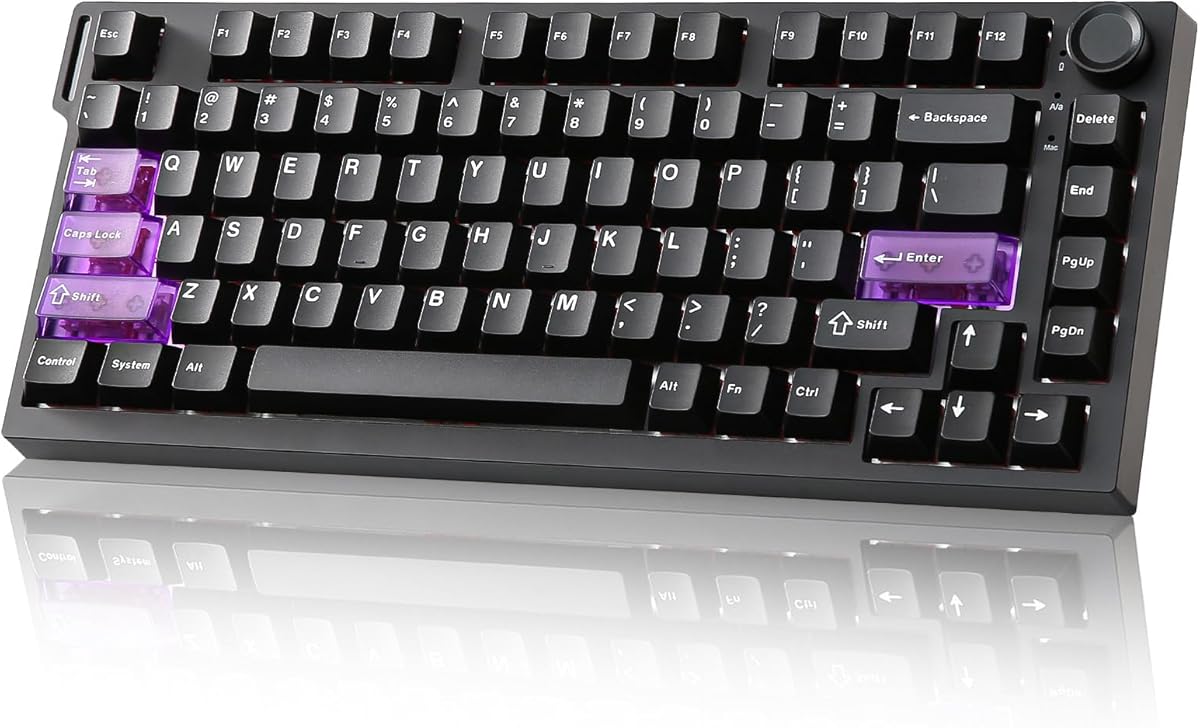
The Redragon K686 HE is a focused wired gaming keyboard with an 8,000Hz polling rate, magnetic switches, Rapid Trigger, and PRCS. Its 4.4 rating reflects a practical specification sheet without the wireless convenience or polished acoustic construction of some premium alternatives. It is a compelling choice when fast magnetic input matters more than maximum desk versatility.
We may earn a commission when you buy through this link, at no additional cost to you.
The UltraMag POM switches detect presses without physical contact and support actuation settings from 0.1 to 3.4mm. Dynamic key activation is designed to prevent redundant inputs during quick changes of direction, while the software stores multiple profiles so you can move between games or play styles. The floating switch-plate and dampening layers soften the sound and reduce the harshness associated with rigid keyboard construction.
One of the K686's most approachable details is its single knob, which controls both backlight brightness and media playback. That makes it possible to handle common controls without memorizing combinations. The main compromises are its wired-only design and the need for the desktop or web driver when you want to calibrate the magnetic switches or select specific actuation profiles.
Choose the K686 if you want essential Hall Effect gaming functions in a straightforward package. It is particularly suitable for a stationary gaming desk where a reliable wired connection is preferred, or for a first move into rapid-trigger keyboards. Its low-latency specification and adjustable sensitivity make it more compelling for competitive play than a basic membrane or standard mechanical keyboard.
A wired 8,000Hz polling path keeps the K686 focused on competitive input. The absence of a battery also removes charging routines and wireless interference concerns, making it straightforward to plug in and play.
Saved actuation profiles are useful when one title rewards rapid resets while another benefits from a deeper, more deliberate press. The desktop or web-based driver handles calibration and profile selection.
We may earn a commission when you buy through this link, at no additional cost to you.
The Logitech G PRO X TKL RAPID is built around tournament-focused magnetic analog switches, Rapid Trigger, and a 35g actuation force. Its 4.6 rating and professional esports positioning make it the premium option in this roundup. The tenkeyless layout preserves familiar gaming proportions while removing the number pad for more mouse space.
We may earn a commission when you buy through this link, at no additional cost to you.
Rapid Trigger allows a key to reactivate without a complete release, which can produce cleaner movement inputs when correcting direction. Customizable actuation points and sensitivity can be set in Logitech G HUB, while KEYCONTROL supports specific commands and multi-action combinations across layers. RGB lighting synchronizes with music or on-screen action through LIGHTSYNC, adding visual integration without changing the core input experience.
The strongest practical feature is its combination of dedicated hardware access and software depth. Function-key modes allow players to adjust actuation points and Rapid Trigger settings on the fly, reducing the need to leave a match for configuration. The trade-off is that advanced features still require G HUB, and the keyboard remains wired rather than offering wireless connectivity.
This model is a strong recommendation for competitive FPS players and esports-focused setups that value a refined software ecosystem, fast light-touch activation, and an established gaming brand. It also suits buyers who want a tenkeyless board without giving up a broad set of programmable key actions. For users who need portability or multi-device switching, a wireless alternative may be more appropriate.
The ability to reactivate a key before a full release is especially relevant to movement corrections in competitive shooters. Adjustable actuation points let players balance that speed with deliberate key commands.
G HUB provides per-key sensitivity, multi-action layers, lighting, and profile controls. Function-key modes add quick access to frequently changed settings, while the TKL format keeps desk space focused on the mouse area.
We may earn a commission when you buy through this link, at no additional cost to you.
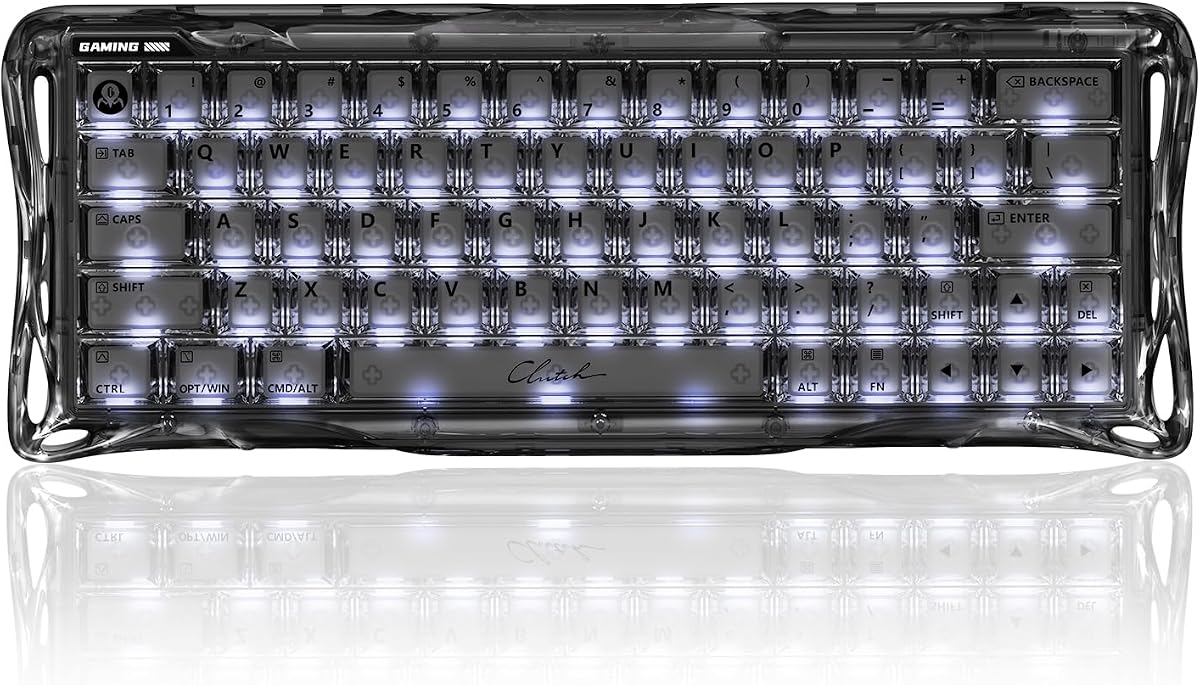
The GravaStar Mercury V60 HE stands out for its advertised 0.005mm actuation precision, adjustable range of 0.005 to 3.5mm, and futuristic transparent design. Its 4.6 rating matches several more conventional premium boards. The model is built for players who value extremely fine magnetic control and a compact footprint over a number pad or larger tenkeyless frame.
We may earn a commission when you buy through this link, at no additional cost to you.
Rapid Trigger resets keys as soon as they are released, supporting faster counter-strafing and directional changes. An 8,000Hz polling rate and the very low actuation floor form the core of its competitive specification. Its hot-swappable Hall Effect switch system adds flexibility by allowing compatible magnetic switches to be exchanged, while multi-layer foam improves the acoustic result.
The Onyx Crystal chassis is the defining visual feature, combining a transparent shell with RGB lighting. It is likely to appeal to players who want their keyboard to stand out, although the design may be less understated than a conventional black gaming board. As a wired Windows and Mac keyboard, it does not offer the convenience of switching among several devices or using a low-latency wireless link.
Choose the Mercury V60 HE for its unusually precise actuation settings, distinctive appearance, and hot-swappable magnetic platform. It is well suited to competitive shooters and creative desktop setups where a 60% board is preferred. Players who need arrow-key access, broader layout options, or multi-device connectivity should look at the 75% and tenkeyless alternatives in this guide.
A 0.005mm lower actuation figure allows exceptionally shallow input settings. This is useful for players who want highly responsive movement keys while retaining a deeper travel range for other actions.
The full-transparent chassis and integrated lighting create a distinctive sci-fi appearance. Multi-layer acoustic foam adds a more controlled sound, while hot-swappable switches support future customization.
We may earn a commission when you buy through this link, at no additional cost to you.
The ASUS ROG Falchion Ace HFX combines a compact 65% tenkeyless layout, magnetic switches, Rapid Trigger, Speed Tap, and 8,000Hz polling. Its 4.6 rating makes it a strong all-round recommendation. It particularly appeals to players who need a small footprint, a broad 4.0mm actuation range, and convenient switching between two wired PCs.
We may earn a commission when you buy through this link, at no additional cost to you.
The pre-lubed ROG HFX switches provide a 0.1 to 4.0mm adjustable range, covering very light competitive settings through deeper, more conventional travel. Rapid Trigger supports rapid repeats and quick directional changes, while Speed Tap is intended to make counter-strafing require less effort. A high-speed USB controller refreshes input at 8K and reduces the advertised delay to 0.125ms.
Two USB-C ports sit on opposite sides of the rear edge, so a cable can be routed toward either side of the desk and two PCs can be connected quickly. The touch panel and multifunction button handle media, volume, and lighting. Five layers of dampening and a silicone gasket mount soften sound, while the included protective cover protects the board and doubles as a tray mount.
This keyboard is a good match for a compact gaming station, mobile desk, or dual-PC setup. It offers a wide range of travel settings and polished acoustic construction, although it does not provide wireless connectivity. Those seeking broader connectivity should consider a tri-mode model, while buyers who favor a full-size layout may need to look elsewhere.
The dual USB-C placement makes cable management cleaner and allows quick movement between two wired systems. It is a simple but valuable feature for competitive players who alternate between gaming and streaming PCs.
The 65% tenkeyless format removes the number pad and unnecessary outer keys to free mouse space. Dedicated lighting, media, touch-panel, cover, and gasket-mounted construction make it feel more complete than a bare competitive board.
We may earn a commission when you buy through this link, at no additional cost to you.
The EPOMAKER HE80 is an 82-key, 75% wired keyboard focused on detailed magnetic control. Its 4.4 rating reflects a capable specification set, including 8,000Hz polling, a 32K scan rate, and 128K single-key scanning. It is a particularly interesting choice for players who want fine-grained actuation adjustment and extensive software-defined actions.
We may earn a commission when you buy through this link, at no additional cost to you.
Trigger and release travel can be adjusted in 0.02mm steps, supporting very precise control over movement and action keys. The board's claimed latency is 0.125ms, and its scan rate can be adjusted from 125Hz to 8KHz. SOCD prioritizes the latest opposing directional input, while DKS can assign as many as four functions to one key according to how deeply it is pressed.
The online EPOMAKER driver handles key functions, macros, lighting, sensitivity, SOCD, DKS, MT, and RT, with real-time visual feedback. That software depth is the HE80's main attraction, alongside its 75% layout, double-shot PBT keycaps, and programmable RGB lighting. The trade-off is dependence on a compatible browser and web-based utility rather than a conventional local application.
Choose the HE80 when fine magnetic tuning is a priority and you prefer browser-based configuration. Its arrow and function keys make it suitable for gaming and daily work, and the relatively compact layout leaves more room for mouse movement than a full-size board. Wireless users should choose a tri-mode alternative instead.
The 0.02mm adjustment increments and selectable scan rates provide unusually granular control. DKS and SOCD add advanced behaviors that can be assigned around the demands of different games.
Eighty-two keys preserve essential arrow and function keys while reducing desk consumption. PBT keycaps, south-facing RGB, and a web driver make the board equally suitable for productivity and gaming.
We may earn a commission when you buy through this link, at no additional cost to you.
The Razer Huntsman V3 HE is a compact wired keyboard built for competitive FPS play. Its 3.8 rating is the lowest among the ten products, but the supplied specifications still cover the essentials: Hall Effect switches, Rapid Trigger, Snap Tap, Dynamic Keystroke, 8,000Hz HyperPolling, and an adjustable 0.1 to 4.0mm range.
We may earn a commission when you buy through this link, at no additional cost to you.
Snap Tap prioritizes the most recent input between two selected directional keys, while Dynamic Keystroke can trigger up to four actions on one key. The detachable USB-C cable, 5052 aluminum top case, anti-ghosting, and hybrid onboard storage for up to six profiles make the board practical for recurring tournaments or changing game setups.
Razer's customization is handled through Synapse Web, which adjusts magnetic settings, actuation points, and Rapid Trigger performance in a compatible browser. This keeps setup focused and avoids a separate download for the core functions, although some users may prefer a full desktop application. The 65% layout maximizes mouse room but is more compact than the tenkeyless and 75% alternatives in the guide.
Choose the Huntsman V3 HE if you prioritize a minimal competitive layout, fast polling, and multi-action magnetic controls. It is relevant to players of Valorant, Counter-Strike 2, Apex Legends, Fortnite, and similar titles. Its lower supplied rating warrants checking recent customer feedback, but the feature set remains well aligned with high-speed FPS use.
Rapid Trigger and Snap Tap address two common competitive needs: resetting movement quickly and resolving opposite inputs cleanly. Together, they can reduce the coordination required for rapid directional corrections.
The detachable USB-C cable, compact 65% footprint, and six onboard profiles support quick setup changes. An aluminum top case provides a durable frame for travel and tournament use.
We may earn a commission when you buy through this link, at no additional cost to you.
The YUNZII RT75 PRO stands out as a wireless Hall Effect keyboard with 8K polling in both wired and 2.4GHz modes. Its 4.6 rating and broad connectivity support make it appealing for gamers who regularly alternate between a gaming PC, laptop, and mobile device. The 75% layout provides 81 keys while preserving dedicated arrow and function keys.
We may earn a commission when you buy through this link, at no additional cost to you.
In wired mode, input polling reaches 8,000Hz with a stated 0.1ms response; the 2.4GHz mode uses 1ms wireless polling. Bluetooth is also available for broader device use. A 128K scan rate, Rapid Trigger, N-key rollover, and hot-swappable sockets add competitive and customization potential, while the 8000mAh battery supports extended wireless sessions.
The web driver supports TGL, SOCD, DKS, MT, key reassignment, macros, and RGB effects. Five layers of padding produce a quieter, fuller sound, and south-facing LEDs provide a 500Hz lighting refresh in wired mode. The important caveat is that hot-swapping is intended for compatible magnetic switches, so buyers should verify socket and switch compatibility before changing components.
Choose the RT75 PRO for a high-speed wireless gaming experience with multi-device flexibility. It is well suited to shared desks and users who want one keyboard for desktop and mobile use. Its 75% format, durable PBT keycaps, and long battery life also make it a practical hybrid for work, while the wired mode remains the safest choice for maximum competitive polling.
The 2.4GHz mode retains 8K polling, making it more than a basic wireless keyboard. Bluetooth and device switching broaden its role, while the 8000mAh battery reduces the need for frequent charging.
The web driver covers advanced movement functions, macros, remapping, and lighting. Five internal padding layers create a fuller sound, and compatible magnetic switches can be swapped to alter the feel.
We may earn a commission when you buy through this link, at no additional cost to you.
The Corsair K70 PRO TKL combines the familiar shape of a traditional gaming tenkeyless keyboard with per-key magnetic controls. Its 4.6 rating and support for both Rapid Trigger and simultaneous SOCD make it an attractive option for competitive shooters. It preserves a familiar arrangement while reducing unnecessary desk space around the mouse.
We may earn a commission when you buy through this link, at no additional cost to you.
Pre-lubed MGX Hyperdrive magnetic switches are used for primary keys, with MLX switches on function and other non-primary positions. Their double-rail construction is designed to reduce wobble, and the stated durability is 150 million keystrokes. Actuation can be set from 0.4 to 3.6mm in 0.1mm steps, while dual actuation allows two actions to be assigned to one keypress.
The most useful feature is the combination of Rapid Trigger and simultaneous SOCD in a recognizable gaming design. It offers directional-control options without requiring a radically new layout. The trade-off is that not every key on the board uses the named magnetic switch type, and the wired design does not offer the flexible device switching found on wireless alternatives.
Choose the K70 PRO TKL if you want Hall Effect control in a familiar full-size gaming ecosystem without a number pad. It is especially useful for players who rely on dual-action commands and want per-key travel adjustment. Those seeking absolute compactness should consider 60% or 65% models, while mobile users may prefer a wireless option.
Actuation points can be changed for individual keys in 0.1mm steps. This makes it possible to keep movement keys light while using firmer settings for actions, abilities, or communication commands.
Rapid Trigger, SOCD, and dual actuation bring advanced magnetic behaviors to a conventional gaming TKL layout. The result may be easier for existing gaming-keyboard users to adapt to than an extremely compact board.
We may earn a commission when you buy through this link, at no additional cost to you.
The RK ROYAL KLUDGE M75 has the highest supplied customer rating in the guide at 4.8. It pairs that result with 8,000Hz polling, claimed 0.125ms latency, Rapid Trigger, and adjustable 0.1 to 3.3mm actuation. The 75% format and metal volume knob give it a practical balance of gaming performance, desk utility, and everyday controls.
We may earn a commission when you buy through this link, at no additional cost to you.
Its universal hot-swap PCB is a major differentiator, allowing compatible Hall Effect, custom, or mechanical switches to be changed as preferences evolve. A top-mounted structure and aluminum plate create a firm, consistent feel, while sound-dampening foam produces a muted acoustic signature. Four-sided RGB illumination, dye-sublimated PBT legends, and underglow create a vivid appearance.
The online web driver supports remapping, macros, and lighting, and the physical knob provides immediate mute and volume scrolling. Unlike some competing models, the M75 does not offer wireless connectivity, so it is best suited to a fixed gaming desk. Users who expect a broad range of magnetic gaming functions, such as multi-action Dynamic Keystroke, may find more dedicated options elsewhere.
Choose the M75 if you want high polling speed, a practical 75% layout, and the freedom to experiment with switches. It is a particularly strong fit for a first Hall Effect gaming build because the hot-swap platform reduces the cost of future change. The high supplied rating and restrained feature set make it an attractive all-rounder, provided a wired connection suits your setup.
The universal PCB supports compatible magnetic, custom, and mechanical switches. That flexibility lets buyers tune the feel without replacing the entire keyboard after deciding on a preferred switch.
The 75% layout retains arrow keys while freeing desk space, and the aluminum plate and damping foam provide a stable, controlled feel. A dedicated metal knob handles mute and volume without additional key combinations.
We may earn a commission when you buy through this link, at no additional cost to you.
Choosing a Hall Effect gaming keyboard means balancing magnetic-control features, physical layout, connectivity, acoustics, and software. The most important starting point is how and where you play, followed by the level of customization and portability you require.
Prioritize 8K polling for competitive play, but also examine the scan-rate and single-key scanning figures. Consider whether the keyboard sustains its headline polling rate in the connection mode you intend to use.
Choose a keyboard with a low actuation floor and a sufficiently wide adjustment range. Confirm that per-key control is supported if different keys need different sensitivity.
Prioritize dedicated arrows for games that need them, and consider a number pad only if you use spreadsheet or accounting software regularly. Mouse space is critical for competitive shooters.
Check the polling rate in every mode before buying. Use wired mode when maximum responsiveness is essential, and verify that wireless switching supports your operating systems.
Prioritize a driver with clear profile management and per-key controls. Advanced users should also check for macros, Dynamic Keystroke, multi-action bindings, and real-time settings previews.
Prefer a documented hot-swap system when customization is important. Check the manufacturer's compatibility list rather than assuming every mechanical or magnetic switch will fit.
Look for several internal dampening materials and a rigid frame. Keep in mind that switches, keycaps, and software settings also influence the final acoustic result.
Choose advanced controls that match your preferred games. Keep simple layouts if you want predictable behavior, and test each new feature before entering competitive matches.
Begin by installing the manufacturer's recommended driver and updating the keyboard firmware if prompted. Create a baseline profile before changing rapid-trigger behavior, actuation, or key assignments. Test the keyboard in a game where you can observe movement without immediately entering a ranked match, and make small adjustments rather than changing every key at once.
Set a comfortable actuation level for movement keys, then use a slightly deeper setting for actions that should not fire accidentally. Enable SOCD or Snap Tap only if you understand how the selected game handles opposite directions. For Dynamic Keystroke and dual-action functions, use a training area or a test application to confirm that press depth, hold duration, and release behavior produce the intended commands.
Keep the keyboard and its receiver away from standing liquids, excessive dust, and direct heat. For hot-swappable models, power the board down before changing switches and confirm that replacements are compatible with the PCB. Clean keycaps and the case with a soft, lightly dampened cloth, avoid spraying cleaner directly onto the switches, and periodically check that cables, connectors, and wireless receivers remain secure.
A Hall Effect gaming keyboard uses magnetic switches that detect key travel without the mechanical contact used by traditional switch designs. This allows software to control actuation points, release behavior, and rapid resets. These controls can reduce accidental movement inputs and support more immediate directional corrections in competitive games.
An 8,000Hz polling rate means the keyboard checks for input more frequently than a standard 1,000Hz model, which can lower input latency. Actual performance also depends on the game, system latency, frame rate, and the entire input chain. Magnetic features such as Rapid Trigger can sometimes create a more noticeable practical difference than polling alone.
Rapid Trigger is most valuable in games where quick movement corrections and repeated directional inputs are common. It can also help in action games, MOBAs, and other titles that reward rapid control, although its usefulness depends on the game engine and personal play style. For ordinary typing, the same feature may be unnecessary.
A wired keyboard provides the simplest and most consistent low-latency connection, making it a safe choice for competitive play. A wireless model is better when you value a clean desk, portability, or switching among several devices. Check the polling rate for each wireless mode, since performance can differ between the 2.4GHz receiver and Bluetooth.
Both features resolve conflicting directional inputs, but they are implemented differently and may be exposed under different names. SOCD generally prioritizes the most recent opposing input, while Snap Tap and similar functions are designed to support quick directional transitions without the character stopping. Compatibility and behavior should be tested in the software and in your chosen game.
That depends on the keyboard's PCB and socket design. Some universal hot-swap boards explicitly support compatible mechanical and magnetic switches, while others are designed only for Hall Effect components. Never assume that physical fit is sufficient, because the switch specification and electrical layout must also match the board.
No. A very light setting can improve immediate movement response, but it may also increase accidental inputs and make ordinary typing feel overly sensitive. The best approach is to use shallow settings for movement-heavy keys and deeper settings for actions, abilities, or communication shortcuts. Per-key adjustment makes this balance much easier to achieve.
Look for per-key actuation and release control, rapid-trigger settings, profile storage, remapping, lighting controls, and clear on-screen feedback. Competitive users may also want SOCD, Snap Tap, Dynamic Keystroke, macro recording, and dual-action commands. Check whether the driver is browser-based or requires a desktop application and whether it supports your operating system.
The EPOMAKER G84 HE is the most complete recommendation because it combines 8K polling, very fine magnetic adjustment, tri-mode wireless connectivity, a large battery, and broad software support. The Redragon K686 HE is the budget-focused alternative for players who want 8K wired performance and Rapid Trigger without wireless extras. The Logitech G PRO X TKL RAPID stands out as the premium esports-oriented choice with 35g magnetic switches, Rapid Trigger, and polished G HUB controls.
Prioritize the features that directly affect your play style. Competitive shooters benefit from rapid resets, low actuation, directional logic, and a compact layout. A wireless keyboard is worth considering if you switch devices or want a cleaner desk, while a hot-swappable board offers more freedom to refine the feel. Acoustic construction, keycaps, onboard controls, and software quality determine how comfortably the board fits your broader routine.
Ratings and specifications provide a useful starting point, but the final choice should reflect your games, operating system, desk size, and tolerance for software setup. Verify the current configuration and feature support on the retailer listing before buying, especially for hot-swap compatibility, wireless polling modes, and included accessories. Prices and availability can change, so compare the current offering at the time of purchase.