
NexiGo N60
4.3Editor score
Full HD 1080p recording
Built-in noise-reducing microphone
Physical lens privacy cover
Driver-free USB operation
An external webcam can transform a Mac-based workspace by improving video-call clarity, microphone pickup, autofocus behavior, and framing. The right model matters because built-in MacBook cameras often prioritize portability over image quality. A dedicated camera gives creators, remote workers, educators, and streamers more control over how they appear on camera.
We compared these ten webcams using the supplied specifications and feature details, focusing on resolution, sensors, autofocus, field of view, microphones, lighting tools, privacy mechanisms, mounting options, and Mac compatibility. The guide includes premium 4K models, Full HD alternatives, and a budget-friendly option for straightforward calls, online classes, meetings, and recordings.
Each review explains the product's strongest attributes, practical trade-offs, and ideal user so you can match a camera to your setup rather than comparing specifications in isolation. Product availability and prices change over time, so confirm the current listing, Mac version, included accessories, and platform requirements before purchasing.
4.3Editor score

4.6Editor score

4.6Editor score
As an Amazon Associate we earn from qualifying purchases.
The comparison below highlights each webcam's resolution, core imaging or audio feature, privacy design, and Mac-oriented compatibility, making it easier to identify the model that best fits your calls and creative workflow.




The Acer 4K Webcam earns the Editor's Choice position because it combines several features that matter in demanding Mac workflows: genuine 4K resolution, a relatively large Sony 1/2-inch CMOS sensor, phase-detection autofocus, dual noise-reduction microphones, and a physical privacy cover. Its 4.6 rating also places it among the strongest-reviewed cameras in this guide. It is particularly attractive to users who want more visual detail than a standard Full HD webcam can provide.
We may earn a commission when you buy through this link, at no additional cost to you.
The large sensor is designed to gather more light and capture brighter, more detailed images, including in dim conditions. That makes the camera useful for evening meetings, streaming sessions, and recordings made without a large studio light. PDAF focuses faster and more consistently than conventional contrast-based autofocus, reducing the chance that your face softens when you move toward the lens. The dual high-sensitivity microphones can pick up speech from as far as 2.5 meters and are designed to reduce wind, keyboard noise, and other ambient interference.
Its machined aluminum unibody is unusually compact at 57 grams and is designed to dissipate heat efficiently during extended use. The magnetic cover uses 12 built-in magnets to block the lens, providing a reassuring physical indication of privacy. Plug-and-play operation removes the need for drivers, apps, Wi-Fi, or Bluetooth, although the supplied USB-A-to-USB-C adapter is important if your Mac lacks a USB-A port. The major trade-off is that maximum 4K output may require compatible conferencing or recording software, so the actual resolution and frame rate can depend on the application you choose.
Choose this Acer model if you want 4K detail, dependable autofocus, clear voice pickup, and a camera you can move easily between a laptop and an external display. It is a particularly strong fit for creators, remote professionals, and users who regularly appear on camera. For someone who only needs simple 1080p calls, a less advanced model may be sufficient, but this camera offers the most balanced feature set in the roundup.
The Sony 1/2-inch CMOS sensor is the camera's most important imaging asset, supporting clearer, brighter 4K output and better light gathering than many conventional webcam sensors. Creators who crop their video or need extra detail during calls will benefit from that additional visual information.
PDAF helps maintain focus as you move, while the dual digital microphones reduce distracting environmental sounds. Together, these features make the webcam more practical for active speakers, online teaching, and livestreaming rather than only static desk conversations.
We may earn a commission when you buy through this link, at no additional cost to you.
The Logitech C922x stands out as the premium choice for Mac creators who want mature Full HD video, flexible frame-rate options, and a useful selection of streaming features. It carries a 4.6 rating and supports Full HD 1080p at 30fps or 720p at 60fps. The latter setting can benefit fast game capture and motion-heavy content, while 1080p remains the stronger choice for detailed face-to-face communication.
We may earn a commission when you buy through this link, at no additional cost to you.
HD lighting adjustment automatically fine-tunes brightness and sharpness when room lighting is imperfect, reducing the need to manually correct a dark or uneven image. Autofocus keeps your face clear as you shift position, and the dual microphones produce natural stereo audio for calls and recorded video. The included three-month XSplit VCam license is a meaningful advantage for streamers because it can remove, replace, or blur a background without requiring a green screen.
The most significant drawback is the absence of a privacy shutter. None of the listed Logitech C922x features provide a physical way to cover the lens, so privacy-conscious users may want to manage access through software, operating-system controls, or an external lens cover. It also tops out at 1080p rather than 4K, making the Acer models and EMEET C960 more attractive if ultra-high-resolution capture is essential. On the other hand, its autofocus, lighting correction, dual microphones, and 60fps option create a well-rounded package for a Mac-based production setup.
Buy the C922x when you regularly record at higher frame rates, stream meetings or gameplay, or want a camera with a strong balance of image quality, audio, and creative software. It is also a logical choice for users who value 1080p clarity over 4K resolution. For private conversations in a shared room, however, a model with a built-in shutter may be a better fit.
The choice of 1080p at 30fps or 720p at 60fps gives creators a useful tradeoff between fine facial detail and smoother motion. The higher-frame-rate mode is especially relevant to gameplay and fast activities.
The included XSplit VCam license adds virtual background controls without requiring a physical green screen. That makes the C922x more versatile for presenters who want a cleaner visual presentation during recorded or streamed sessions.
We may earn a commission when you buy through this link, at no additional cost to you.
The NexiGo N60 is the budget selection because it delivers the essentials of a dependable external Mac webcam without loading the setup with advanced controls. It records up to 1920 by 1080 at 30fps through a two-megapixel CMOS sensor and a 3.6mm glass lens. Its 4.3 rating reflects a favorable overall balance for everyday meetings, video calls, online classes, and basic recording.
We may earn a commission when you buy through this link, at no additional cost to you.
Setup is straightforward: the webcam works through USB 2.0 or 3.0 without additional drivers and is listed as compatible with Mac OS X 10.7 and later as well as several Windows, Android, Linux, Chrome OS, and Ubuntu versions. The built-in noise-canceling microphone reduces ambient interference for common applications such as Zoom, FaceTime, OBS, Twitch, YouTube, and online school. A physical privacy cover blocks the lens when the camera is not in use, offering a straightforward advantage over models without a shutter.
The fixed-focus lens is optimized for distances from 19.6 inches to 13 feet, which covers most desk and indoor uses but is less flexible when a subject moves extremely close to the camera. The supplied information also notes that firmware updates may be needed if audio delay is experienced, so potential buyers should keep that recommendation in mind. Despite these limitations, the N60 covers the basics with 1080p clarity, a useful glass lens, broad compatibility, and a privacy cover at a value-oriented level.
This is a strong selection for students, remote employees, and occasional streamers who need a noticeable upgrade over a built-in MacBook camera but do not require 4K resolution or advanced autofocus. It also suits anyone who prioritizes a physical privacy cover and quick setup. Choose a more advanced model if frequent movement, high-resolution recording, or a wide microphone range is central to your work.
Driver-free USB operation and the listed Mac OS X 10.7-and-later support make the N60 approachable for nontechnical users. It can be connected to a compatible Mac, selected in the system settings, and used in a familiar conferencing application.
The sliding privacy cover provides a physical barrier over the lens, while the noise-canceling microphone helps keep voices clearer in shared or imperfectly treated rooms. Both features add everyday value without requiring advanced software.
We may earn a commission when you buy through this link, at no additional cost to you.
The Anker PowerConf C200 combines 2K resolution with practical tools for calls, online meetings, and regular content creation. Its 4.4 rating reflects a well-liked feature set, while the 2K sensor provides more detail than a conventional 1080p camera. It is a particularly interesting option for Mac users who want a higher-resolution image without moving to one of the more specialized 4K models.
We may earn a commission when you buy through this link, at no additional cost to you.
The dual microphones use AI noise cancellation to improve voice clarity in noisy environments, an advantage for shared homes and busy offices. Low-light correction is also designed to produce a crisper image in dim rooms, reducing the need for a separate light. Users can select from 65-degree, 78-degree, or 95-degree viewing angles through software, allowing the framing to change according to whether the priority is a close personal view or a wider group shot.
The integrated sliding cover physically blocks the lens between calls, which is a meaningful privacy feature. The main limitation is that the C200 is limited to 2K, so it does not match the detail potential of the Acer 4K cameras or the EMEET C960. Angle selection also depends on software rather than an automatic mechanism, and the broader field of view may introduce more background into the frame. The listed compatibility with Windows 7 or later and macOS 10.11 or later is broad for a modern webcam.
Choose the C200 if you regularly participate in meetings from a home office, want flexible framing options, and need meaningful noise reduction. It also works well for presenters who occasionally need a wider composition. If your work involves extensive 4K recording, advanced phase-detection autofocus, or a need for very fine subject detail, move up to a 4K alternative. For general professional communication, however, the C200 offers a capable and focused package.
Three available angles let you adapt the camera to a close head-and-shoulders view, a conventional meeting frame, or a wider shot. This is more versatile than relying on a single fixed field of view for every session.
The AI-assisted noise cancellation and dual microphones target a common weakness of built-in laptop cameras. They are designed to clarify speech in rooms where household or office background noise could distract participants.
We may earn a commission when you buy through this link, at no additional cost to you.
The EMEET C960 4K is a well-rounded choice for users who want access to genuine 4K capture without giving up phase-detection autofocus or flexible mounting. Its 4.5 rating reflects strong user reception, and the stated 73-degree field of view is balanced for calls, teaching, and presentations. The adjustable base also permits 360-degree horizontal movement and 15-degree vertical adjustment.
We may earn a commission when you buy through this link, at no additional cost to you.
Unlike webcams that merely upscale a lower-resolution image, the listed specifications identify a true 4K CMOS sensor. That distinction matters when recording, cropping, or displaying footage on a high-resolution monitor. However, the camera defaults to 1080p, and users must switch to 4K through the built-in camera software or compatible applications such as PotPlayer or OBS. Automatic light correction helps the image remain usable in bright or dim conditions, while PDAF maintains focus as the subject moves.
The two omnidirectional microphones are intended to capture natural, clear speech for conferences and remote teaching. A privacy cover is included, although the product uses a physical USB-A interface and states that no driver, Wi-Fi, Bluetooth, or cloud storage is involved. A potential drawback is that the USB-A connection may require an adapter on a Mac with only USB-C ports. Also, 4K capture will not occur in every meeting application, so users should verify support before expecting the sensor's maximum resolution.
The C960 makes sense for remote instructors, content creators, and Mac professionals who regularly record. Its combination of true 4K, autofocus, automatic exposure, and a tripod-compatible 1/4-inch thread gives it more flexibility than a basic 1080p conference camera. Choose it when you need both high-resolution capture and precise positioning, but keep the default-resolution behavior and connection requirements in mind.
The camera can deliver genuine 4K rather than relying on upscaling, which is valuable for detailed recordings and high-resolution displays. Users must actively select the higher mode in the included software or a compatible capture application.
The 360-degree horizontal adjustment, 15-degree vertical tilt, and 1/4-inch tripod thread make the camera adaptable beyond a standard laptop clip. These options are useful for external monitors, elevated shelves, and compact tripods.
We may earn a commission when you buy through this link, at no additional cost to you.
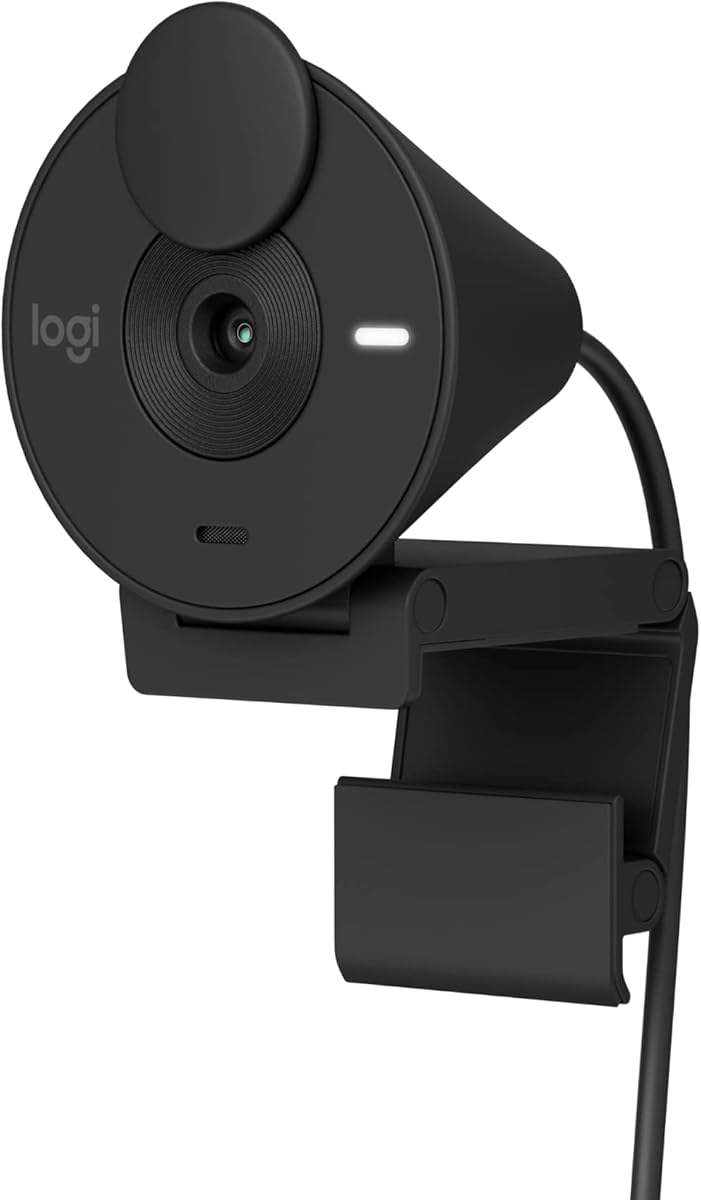
The Logitech Brio 100 is an approachable Full HD webcam for Mac users who want cleaner video, a physical privacy mechanism, and simple setup. Its 4.4 rating places it among the better-rated options here, and the design emphasizes ease of use rather than advanced controls. It works with Microsoft Teams, Zoom, Google Meet, and other common video-calling platforms.
We may earn a commission when you buy through this link, at no additional cost to you.
Full HD 1080p resolution is still a useful standard for meetings, classes, and everyday streaming. The rightLight feature boosts brightness by up to 50% compared with previous-generation Logitech webcams, helping reduce shadows when a user sits in a room with lighting above or behind the screen. The integrated microphone supports clear call audio, while the built-in sliding cover makes it easy to block the lens when privacy matters.
This model does not offer 2K or 4K capture, nor does the supplied data list a 60fps mode. It is therefore less suited to users who need heavy cropping, fine detail, or high-frame-rate recording. Its brighter, color-coordinated design is a minor lifestyle advantage, and the product is made with a minimum of 34% post-consumer plastic. It is also listed as compatible with Nintendo Switch 2's GameChat mode, though Mac users will mainly rely on standard USB connectivity and familiar conferencing software.
The Brio 100 is a good fit for a home office, study area, or shared computer where simple Full HD quality and a reliable privacy cover matter more than advanced imaging. It is also an attractive option for people who want a webcam that visually fits into a tidy workspace. If you regularly produce detailed videos or need 4K, consider a higher-resolution model; otherwise, this webcam covers the essentials cleanly.
RightLight can increase brightness substantially when the scene is dim, helping you appear clearer without immediately reaching for additional lighting. It is a simple automatic improvement for everyday indoor calls.
The integrated sliding cover blocks the lens directly on the camera body. That avoids relying entirely on software indicators when you need to reassure yourself or colleagues that the camera is not recording.
We may earn a commission when you buy through this link, at no additional cost to you.
The Logitech Brio 301 balances useful meeting features with a compact Full HD format. Its 4.4 rating reflects a solid overall reception, and the camera is certified for Zoom, Microsoft Teams, and Google Meet. That makes it a sensible option for Mac professionals who participate frequently in scheduled virtual meetings and want a device designed for straightforward integration.
We may earn a commission when you buy through this link, at no additional cost to you.
RightLight 2 automatically compensates for poor lighting so you remain visible in dim or uneven conditions. A mono noise-reduction microphone suppresses background sound, making speech easier for remote participants to hear. The physical privacy shutter rotates over the lens, providing an immediate visual cue that you have disabled the camera. You can also use the free Logi Tune app to adjust color and image quality for your preferred look.
The main limitation is that the listed audio system uses a single mono microphone rather than the dual microphones found in the C920e, C920S, and C922x. Its maximum resolution is also Full HD 1080p, so it lacks the finer detail of the Acer and EMEET 4K options. The camera is made with at least 48% post-consumer recycled plastic, and its listed Nintendo Switch 2 GameChat compatibility broadens its use beyond desktop meetings. The rotating shutter is convenient, but it occupies part of the camera's front and should be handled gently.
Choose the Brio 301 for office calls, online education, and regular streaming sessions where automatic lighting, software customization, and a mechanical privacy shutter are the key priorities. It is a particularly good option if you want a recognizable meeting-focused design without moving to the more expensive C920 line. For broadcast-quality recording, dual-microphone audio, or 4K detail, compare it with the alternatives in this guide.
RightLight 2 adjusts the picture for imperfect room lighting, while the mono noise-reduction microphone works on background sound. Together, they reduce the need for manual correction in common indoor environments.
Logi Tune gives you access to color and image-quality adjustments in a dedicated application. This makes it possible to fine-tune the camera for your monitor, room, and preferred on-screen appearance.
We may earn a commission when you buy through this link, at no additional cost to you.
The Logitech C920e is designed with workplace communication in mind. Its 4.6 rating is among the highest in this guide, reflecting a camera whose emphasis on dependable mounting, balanced framing, clear audio, and platform certification continues to appeal to professional users. It is certified for Zoom, is TAA compliant, and works with Microsoft Teams and other popular calling applications.
We may earn a commission when you buy through this link, at no additional cost to you.
The fixed 78-degree field of view is designed to frame one person well while still leaving enough room for projects and other shared items. Two integrated omnidirectional microphones capture natural audio from up to one meter away, making the camera more effective than a basic laptop microphone for everyday office use. HD autofocus maintains focus, and automatic light correction helps your image remain visible in changing room conditions.
An attachable privacy screen flips up and down over the lens. Although it is not a rotating shutter, it provides a clear physical barrier and lets you expose the lens quickly for the next meeting. The sturdy adjustable clip fits laptops and external monitors, while the 1/4-inch thread adds tripod compatibility. The camera is listed as fully compatible with Windows 11, and Sync device management can be used for supported Logitech collaboration devices. Its 1080p ceiling means it is not intended for users seeking 4K or high-frame-rate output.
This webcam is a strong choice for office professionals, remote teams, and organizations that value certification, stable mounting, and conventional Full HD quality. It is also suitable for presenters who need to share a document or screen within the same frame. If you want a more detailed 4K image, the Acer and EMEET options are stronger choices; if your main concern is a simple, proven meeting camera, the C920e remains highly competitive.
The 78-degree field of view is wide enough to include a colleague, whiteboard, or small product without making your face excessively small. It sits between the personal framing of a narrow camera and the very broad view of a room camera.
A sturdy adjustable clip and 1/4-inch thread support several installation methods, while the flip-up privacy screen covers the lens. These physical controls are useful in a professional or shared workspace.
We may earn a commission when you buy through this link, at no additional cost to you.
The Logitech C920S remains a compelling Full HD choice for Mac users who value a straightforward camera, strong user ratings, and familiar meeting performance. It captures 1080p video at 30fps, uses a glass lens, and provides HD autofocus and light correction. Its 4.6 rating is among the strongest figures in the roundup and supports its reputation as a dependable conference webcam.
We may earn a commission when you buy through this link, at no additional cost to you.
The glass lens and Full HD output are designed to produce crisp, vibrantly colored video for calls and recordings. Dual microphones provide natural stereo sound, while autofocus keeps the subject clear as their position changes. Automatic light correction helps the camera handle less-than-ideal room lighting without requiring constant manual adjustment in the conferencing application.
A snug-fitting privacy shutter is one of the C920S's clearest advantages. It is integrated, immediately visible, and helps prevent accidental capture when the webcam is not in use. The trade-off is that this older feature set does not include the newest video options: there is no listed 4K mode, 60fps capture, adjustable field of view, or integrated background-processing tool. The included description also explicitly notes that it does not include an XSplit VCam license. If maximum resolution or advanced creator tools are priorities, newer alternatives may serve better.
The C920S is ideal for standard business meetings, online classes, family video calls, and Full HD recordings where a physical shutter and dual microphones matter. It also offers a straightforward way to upgrade from a built-in MacBook camera. Choose it when you prefer a proven, balanced configuration over 4K resolution or extensive framing controls, and verify the included mounting hardware and current Mac compatibility before ordering.
The camera's glass lens and Full HD capture are suited to sharp, colorful images in standard indoor settings. They provide a noticeable quality step for users accustomed to a MacBook's built-in camera.
Dual microphones produce more spacious, natural voice capture, while the integrated privacy shutter provides immediate control over camera visibility. Both features make the camera practical for routine professional calls.
We may earn a commission when you buy through this link, at no additional cost to you.
The compact Acer 4K Webcam combines high-resolution capture with a highly portable aluminum design. At 57 grams, it is small enough to move between a laptop, shared office, café, or coworking space. Its 4.4 rating indicates a generally favorable reception, and the combination of a Sony 1/2-inch CMOS sensor, 4K resolution, and phase-detection autofocus gives it genuinely useful imaging capabilities.
We may earn a commission when you buy through this link, at no additional cost to you.
The larger sensor is intended to capture brighter, more detailed images, particularly when ambient light is limited. PDAF provides faster and more stable focusing than standard autofocus, which is valuable when you move naturally during a meeting or recording. Dual high-sensitivity digital microphones can capture speech from up to 2.5 meters and filter wind, keyboard clicks, and other distractions, making the camera less dependent on a separate desktop microphone.
Its all-metal unibody and CNC-machined construction support fast heat dissipation for extended operation, while the magnetic privacy cover uses 12 magnets to remain securely over the lens. The main practical caveat is the USB-A connection. Newer MacBook models may require an appropriate adapter, and the camera does not offer the same plug-and-play USB-C presentation as the other Acer 4K model in the guide. Its 4K output will also be constrained by the resolution and frame rate supported by the chosen meeting or recording application.
Choose this Acer model if portability, 4K detail, strong autofocus, and far-field microphone pickup matter together. It is well suited to mobile professionals, live commerce, gaming, streaming, and meetings conducted in changing locations. Users who need maximum connection convenience on a USB-C-only Mac may prefer the sibling Acer model with an included USB-A-to-USB-C adapter, but this camera remains a strong portable choice with a rare combination of imaging and audio features.
The 57-gram housing makes the camera easy to carry between workspaces while retaining a 4K sensor and phase-detection autofocus. That combination is unusual among highly portable webcams.
The dual high-sensitivity microphones are specified to capture voices from as far as 2.5 meters. This gives the camera more flexibility for larger desks, presentations, and livestreaming arrangements where the user sits farther from the screen.
We may earn a commission when you buy through this link, at no additional cost to you.
The best external webcam for a Mac depends on how you use it, where the camera will sit, and how much control you need over image quality, framing, audio, and privacy. Consider the following factors before comparing models.
Choose 1080p for standard communication and clearer budget planning, or prioritize 4K for detailed content creation. Do not assume that every 4K webcam can sustain its highest resolution in every application.
Choose PDAF for active presenters, teachers, and streamers. Choose fixed focus for a stationary desk arrangement where simplicity and predictable framing matter more.
Prioritize noise reduction for calls and dual microphones for recordings. If you need broadcast-quality sound, treat the webcam microphone as a convenience rather than a complete studio solution.
Match the field of view to your normal framing. Select a wider option for collaboration and demonstrations, and a tighter option for one-person calls or presentations.
Look for a larger sensor and automatic light correction if your room is inconsistent. For professional video, pair even front-facing lighting with any camera.
Prioritize a reliable physical lens cover and the correct connector for your Mac. Confirm that any required adapter is included before purchase.
Check the clip, tripod thread, macOS requirements, and your main calling application. A physically secure mount is especially important for a permanent home-office setup.
Start by positioning the webcam at eye level and as close to the center of your display as possible. This naturally places your gaze near the camera and reduces the upward angle that can make faces look less natural. Connect the supplied cable, open macOS System Settings, and choose the webcam under the camera or video-input section of your conferencing application. If the app continues using the built-in camera, close and reopen it after selecting the external device.
Test the image in a short recording rather than judging it only through a live preview. Check focus, exposure, color, background clutter, and microphone volume. Move slightly across the frame to determine whether the autofocus follows you and whether the microphones pick up speech clearly. If the image is dark, add a diffused light in front of you instead of increasing digital brightness, which can reveal more noise and reduce natural color.
For privacy, close the physical cover or shutter whenever the camera is not actively in use. Keep the lens clean with a soft, dry cloth and avoid household cleaners or moisture near the sensor and microphone openings. Route the cable so it does not interfere with the mouse, keyboard, or display adjustment, and use the included mount or a suitable tripod to prevent accidental knocks.
An external webcam generally provides better image quality, stronger autofocus, and more reliable microphone pickup than a built-in MacBook camera. It also offers greater placement control and often includes a physical privacy cover. The built-in camera remains more convenient for mobility, so neither option is automatically better for every user.
The listed compatibility for each model includes Mac support, but minimum operating-system requirements vary. Some list macOS 10.11, while others require macOS 10.14 or later. Confirm your Mac version, connector type, and the calling or recording application you use before making a final decision.
Full HD 1080p is sufficient for most video calls, particularly when the platform, network connection, or display cannot benefit from higher resolution. A 4K model becomes more valuable for detailed recordings, high-resolution monitors, and post-production cropping. Also check whether your software can actually select 4K, because some 4K-capable webcams default to 1080p.
Phase-detection autofocus uses contrasting phase information to determine focus direction and distance more quickly than many conventional contrast-based systems. It is especially helpful when a subject moves or when the camera needs to hold focus in changing lighting. Fixed-focus webcams are simpler, but they require a suitable distance and can become soft if the subject is too close.
A built-in microphone is convenient for calls and quick recordings because it removes the need for another device. For improved speech clarity, look for noise reduction, multiple microphones, and a useful pickup range. Professional voice-over or broadcast work may still justify a dedicated external USB microphone for finer control.
A physical shutter provides a visible and reliable way to block the lens, which is useful in shared rooms and private offices. It can prevent accidental capture and reduce the need to rely on software controls alone. Software indicators and operating-system permissions remain useful, but a mechanical cover adds another layer of reassurance.
A webcam with a larger sensor and automatic light correction can capture a brighter, clearer image than many built-in cameras, but no camera fully replaces good lighting. A diffused source placed in front of you will usually improve color and detail more than raising digital brightness. Position the light so it illuminates your face rather than creating harsh shadows.
Yes, provided the webcam is compatible with macOS and your chosen streaming or recording software. The EMEET C960 explicitly mentions PotPlayer and OBS for changing 4K settings, while the Logitech C922x includes XSplit VCam capabilities for background replacement. Check the selected application's webcam and microphone permissions before recording.
The Acer 4K Webcam is the strongest all-around choice, combining a Sony sensor, 4K capture, phase-detection autofocus, dual noise-reduction microphones, and a magnetic privacy cover in a remarkably small body. The Logitech C922x is the premium alternative for creators who prioritize Full HD quality, 60fps options, automatic light correction, and streaming software, while the NexiGo N60 delivers the most approachable package for everyday calls and classes.
Your decision should reflect the way you actually communicate. Choose 4K and fast autofocus for detailed recording or active movement, dual microphones and noise reduction for clearer speech, and a wide or adjustable field of view for group demonstrations. Prioritize a physical privacy cover when you share space, a tripod thread for a permanent setup, and the correct connector for your Mac.
Before purchasing, verify the current product listing, minimum macOS version, included cable or adapter, mounting hardware, and compatibility with your primary meeting or recording application. Prices, promotions, and availability can change, so confirming the current details ensures that the camera you select integrates smoothly with your Mac workflow.