
MNN 15.6-inch FHD
4.3Editor score
Full HD IPS display
Dual full-feature USB-C
Protective cover and stand
An external monitor can turn a MacBook Neo into a more flexible workstation, travel companion, or entertainment setup. The right portable display should offer a sharp image, dependable USB-C or HDMI connectivity, a practical stand, and enough screen space for documents, meetings, and creative work without becoming burdensome to carry.
This guide compares ten external monitors for MacBook Neo across resolution, panel technology, dimensions, refresh rate, color coverage, brightness, ports, speakers, stands, and VESA compatibility. It includes compact Full HD travel displays, 16-inch 16:10 models, and a large 4K option for users who prioritize screen area and sharp detail over portability.
Each review identifies the monitor most likely to suit a particular workflow while acknowledging practical compromises. ASUS leads with a refined everyday portable design, VisionOwl and cocopar target higher-resolution productivity and gaming, and Upperizon offers the largest display in the group. Product listings, features, ratings, and availability can change, so check the latest information before buying.
4.3Editor score

4.5Editor score

4.8Editor score
As an Amazon Associate we earn from qualifying purchases.
The comparison below highlights each display's core hardware and practical features, helping MacBook Neo users distinguish a basic travel screen from a high-resolution, high-refresh-rate productivity or gaming monitor.





The ASUS ZenScreen MB16ACV is a well-rounded portable monitor for MacBook Neo users who want a conventional 15.6-inch workspace without a bulky device. It combines a Full HD IPS panel with an anti-glare surface, a slim profile, and a familiar kickstand design. Its 4.5 rating reflects a broadly favorable balance of portability, ease of use, and display quality.
We may earn a commission when you buy through this link, at no additional cost to you.
The strongest feature is its hybrid-signal USB Type-C connection, which can carry both power and video to compatible laptops. That means a MacBook Neo user may be able to connect the display with one cable and reduce desk clutter. USB Type-A compatibility broadens the appeal further, making the monitor useful with a wider collection of computers and accessories.
The kickstand supports both portrait and landscape positioning, useful for reading long documents, monitoring messages, or arranging a narrow secondary screen beside a MacBook. ASUS Eye Care technology includes TÜV Rheinland-certified flicker-free and low blue light features, which can make extended work sessions more comfortable. The three-year warranty also provides useful reassurance.
Its main limitation is the Full HD resolution. At 1920 by 1080, text and controls remain perfectly suitable for normal productivity, but the 2.5K and 4K choices in this guide offer noticeably finer detail. It also lacks stated built-in speakers. Overall, it is the most balanced recommendation for users who value mature design, simple connectivity, and portability over maximum resolution.
The hybrid-signal Type-C connection can transmit display output and power from compatible devices. For a MacBook Neo setup centered on browsing, messaging, documents, and video calls, fewer cables make the desk cleaner and the monitor easier to deploy.
The anti-glare IPS panel and eye-care features suit office, classroom, and travel environments. Rotating the kickstand into portrait mode adds another way to organize reading-heavy tasks without adding another full-size display.
We may earn a commission when you buy through this link, at no additional cost to you.
The MNN 15.6-inch FHD display is a compelling portable companion for MacBook Neo users who want more screen area at an approachable cost. It provides a 1920 by 1080 IPS panel, 60Hz refresh rate, 178-degree viewing angle, and HDR support. Its 4.3 rating indicates that the core package delivers well for everyday productivity and travel.
We may earn a commission when you buy through this link, at no additional cost to you.
Two full-function Type-C ports provide flexibility, while one USB-C cable can handle both display signal and power when the connected device supports Thunderbolt 3 or USB 3.1 Type-C with DP Alt Mode. That requirement deserves attention, but it covers modern many MacBook configurations. The monitor can also work across several device categories, including phones, game consoles, and other laptops.
Its smart cover is more than packaging. The scratch-resistant PU leather cover protects the display during transport and doubles as a stand, reducing the number of accessories a traveler needs to carry. Copy, extended, second-screen, and portrait modes further improve its flexibility for presentations, editing windows, and mobile workflows.
This is not the strongest choice for fast competitive gaming because its 60Hz refresh rate is modest. Users who need exceptionally smooth motion should look to the VisionOwl, cocopar, or kksmart models. For general productivity, reading, and console viewing, however, the MNN offers a useful balance of screen size, portability, protection, and value.
A compatible Type-C connection can carry video and power, while the second Type-C port expands cable options. Multiple display modes make it easy to move between mirroring a presentation, extending the desktop, or rotating the panel for a narrow reading view.
The included smart cover shields the screen and doubles as a desktop stand. That integrated design is particularly helpful for commuters who want a monitor that can be packed away without a separate folio or fragile external support.
We may earn a commission when you buy through this link, at no additional cost to you.
The InnoView 15.6-inch FHD portable monitor combines a familiar 1080p IPS format with useful extras that are often missing from basic travel displays. It includes a built-in speaker, multiple full-function Type-C ports, an HDMI connection, and a protective cover that doubles as an adjustable stand. The 4.3 rating reflects a practical package for work, study, and travel.
We may earn a commission when you buy through this link, at no additional cost to you.
A single USB-C cable can handle the display and power the computer when the source supports Thunderbolt 3 or 4, or USB 3.1 Type-C with DP Alt Mode. The HDMI option gives users a fallback when Type-C video output is unavailable, although the power cable is not included in that configuration. Reverse charging support is another useful feature for maintaining a MacBook Neo during extended sessions.
The IPS panel supports a 178-degree viewing angle, HDR, low blue light, and flicker-free operation. Its smart protective cover uses grooves to adjust the viewing angle and can position the screen in landscape or portrait orientation. For demonstrations, remote work, study, or console play, the built-in speaker means audio does not require a separate device.
The resolution is only Full HD, so it does not offer the pixel density of the higher-resolution alternatives. Some users may also need to verify their MacBook Neo's Type-C capabilities before relying on a one-cable setup. Even so, the combination of a built-in speaker, flexible connections, and travel-oriented cover makes this a particularly complete budget travel monitor.
The integrated speaker adds immediate value for video calls, tutorials, and casual media. It does not turn the display into a full entertainment speaker, but it provides a convenient way to hear system audio without adding another device to a travel kit.
Full-function Type-C ports, HDMI, and power pass-through cover several common setups. Users who lack DP Alt Mode can still use HDMI, while compatible laptops can reduce clutter with a single-cable connection.
We may earn a commission when you buy through this link, at no additional cost to you.
The VisionOwl 16-inch 2.5K monitor is a high-performance portable option for MacBook Neo users who want sharper detail and smoother motion than a basic 1080p travel screen. Its 2560 by 1600 resolution, 144Hz refresh rate, and 16:10 aspect ratio make it particularly well matched to the proportions of many MacBook displays. It carries a 4.8 rating.
We may earn a commission when you buy through this link, at no additional cost to you.
The IPS panel uses 8-bit color with 2FRC, covers 110% of sRGB, and reaches 470 nits. Those specifications support smooth gradients, vivid color, and clear visibility in bright surroundings. The 16:10 format can mirror or extend a MacBook display with fewer black bars than a conventional 16:9 panel, while the 144Hz rate benefits fast games and fluid motion.
Connectivity is thoughtfully arranged with full-size HDMI and dual USB-C ports. A single Type-C cable can provide power and video when the source supports Thunderbolt 3 or 4 or DP Alt Mode. The metal enclosure, built-in kickstand, VESA holes, speakers, sleeve, power adapter, and included cables create a more complete kit than many competitors.
The trade-off is size and weight. A 16-inch metal display is still portable, but it is less discreet than a 15.6-inch model and reaches 1.48 pounds. Buyers also need to confirm source compatibility for one-cable operation. For users willing to carry a slightly larger screen, this is one of the strongest all-around choices for productivity, creative work, and gaming.
The 16:10 panel is close to the shape of many MacBook screens, which helps with mirroring and extended workspaces. At 2560 by 1600, it also provides more room for application menus, timelines, spreadsheets, and side-by-side documents than Full HD.
A 144Hz refresh rate, 470-nit brightness, and broad sRGB coverage make the display useful beyond basic office tasks. The image remains vivid for media, while the high refresh rate offers a more fluid experience for supported games and animated interfaces.
We may earn a commission when you buy through this link, at no additional cost to you.
The InnoView 15.6-inch 1080P monitor emphasizes portability and flexible positioning. It weighs 1.5 pounds, measures 0.25 inches at its thinnest, and has a built-in stand that adjusts through 90 degrees. These traits make it a practical second screen for MacBook Neo users who regularly move between desks, client meetings, and shared workspaces.
We may earn a commission when you buy through this link, at no additional cost to you.
The A-grade IPS panel delivers Full HD resolution, a 1200:1 contrast ratio, HDR support, low blue light, and flicker-free viewing. Two full-function Type-C ports and standard HDMI provide broad connection options. The OSD is controlled through four buttons, making it straightforward to change settings without navigating a complex menu.
The included sleeve helps protect the panel during transport. A more useful detail is the integrated stand, which permits a greater range of viewing angles than many basic folio designs. That flexibility can help avoid glare, align the display beside a MacBook, or raise the viewing position for shared presentations.
As with the other InnoView models, connecting the MacBook Neo over USB-C for both video and power requires Thunderbolt 3 or 4 or USB 3.1 Type-C DP Alt Mode support. The manufacturer also recommends an external power source if the screen flickers or restarts, suggesting that power output can vary by source. Full HD and 60Hz are adequate for office use but not ideal for fine photo work or high-end gaming.
The 90-degree adjustment range supports different desk heights and viewing positions. Unlike a fixed folding cover, the stand can be oriented to improve visibility while still keeping the display relatively slim and easy to transport.
The 1200:1 contrast ratio, Full HD IPS panel, and eye-care features provide a dependable basis for documents, meetings, and web work. It is a sensible choice when a compact 15.6-inch footprint matters more than high resolution or a high refresh rate.
We may earn a commission when you buy through this link, at no additional cost to you.
The cocopar 16-inch 2.5K portable monitor combines a high-resolution 16:10 display with a fast 144Hz refresh rate over USB-C. It also supports 120Hz through HDMI, a 470-nit IPS panel, 110% sRGB coverage, and a 1200:1 contrast ratio. With a 4.8 rating, it is a strong all-around option for MacBook Neo productivity, content viewing, and gaming.
We may earn a commission when you buy through this link, at no additional cost to you.
Its 2560 by 1600 resolution offers enough space for detailed application interfaces while retaining a usable 16:10 shape. The bright panel and broad color coverage suit media consumption, light creative work, and content viewing in ordinary indoor environments. Dual 1.5-watt speakers add audio for games, streams, and calls without requiring separate speakers.
The full metal chassis feels more substantial than plastic portable displays, while the kickstand adjusts from 0 to 90 degrees. Dual VESA holes expand the options for monitor arms, and a protective fabric sleeve supports travel. Two full-function USB-C ports and one HDMI connection cover modern laptops, consoles, and desktops.
The monitor weighs 1.5 pounds and is only 0.2 inches at its slimmest point, but its 16-inch panel is larger than most true travel screens. Actual refresh performance also depends on the source and connection. MacBook Neo users should confirm the capabilities of the particular USB-C port, and some Mac mini or Mac Studio setups may need a rear port according to the product guidance.
The 2.5K canvas gives office applications more usable area than a Full HD screen without moving to a large desktop display. The 16:10 ratio also feels natural for many MacBook workflows, reducing wasted space compared with a 16:9 panel.
Metal construction, a wide-angle kickstand, and VESA compatibility make the cocopar feel closer to a compact desktop monitor than a disposable travel panel. The included sleeve helps preserve that portability.
We may earn a commission when you buy through this link, at no additional cost to you.
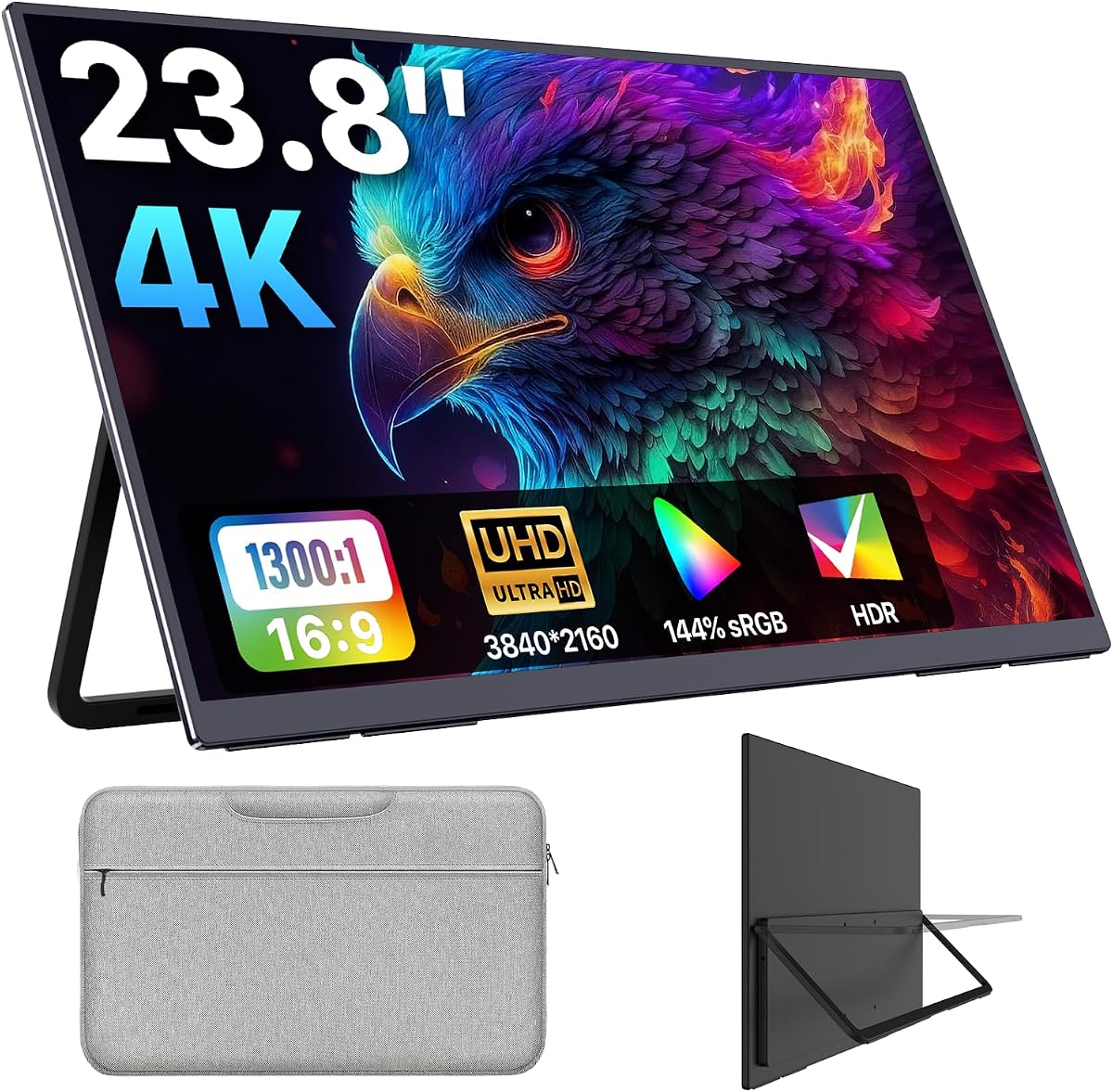
The Upperizon 23.8-inch 4K monitor is the screen-area specialist in this guide. Its 3840 by 2160 LCD offers the largest desktop of the ten options and is aimed at users who want a compact replacement for a traditional monitor. The 4.8 rating reflects strong perceived performance, while the 23.8-inch size clearly places it at the portable end of a much larger category.
We may earn a commission when you buy through this link, at no additional cost to you.
The panel provides 144% sRGB coverage, 8-bit color with FRC, up to 1.07 billion colors, 300 nits of brightness, and a 1300:1 contrast ratio. Those specifications deliver detailed text and a broad color range for coding, spreadsheets, reports, design review, presentations, and media. The anti-glare coating and flicker-free technology support longer viewing sessions.
Unlike the smaller travel panels, this display has a three-sided frameless design that gives it a conventional monitor appearance. Built-in speakers handle presentation audio, while a kickstand supports angles up to 100 degrees. Standard 100x100mm VESA compatibility allows it to be mounted on an arm or wall, making the large footprint more manageable in a permanent desk setup.
At 5.46 pounds, it is not a lightweight bag accessory. It works best for a home office, studio, dorm room, or client site where users can leave it set up. It also requires the original power adapter for reliable operation. Those limitations are reasonable if the priority is a huge, sharp, color-rich workspace rather than maximum travel convenience.
A 23.8-inch 4K display can host several windows at once while retaining enough pixel density for fine text. That makes it useful for analysts, programmers, editors, and anyone who regularly moves information between a MacBook Neo and a separate desktop monitor.
The wide kickstand range and 100x100mm VESA support provide more placement options than a simple portable panel. A monitor arm can further improve desk organization, though the unit is best treated as semi-portable.
We may earn a commission when you buy through this link, at no additional cost to you.
The KEFEYA 14-inch FHD screen extender is built for users who want a compact second display rather than a full desktop-sized panel. It pairs a 1920 by 1080 IPS display with a 60Hz refresh rate, 300-nit brightness, and a 14-inch 16:9 format. Its 4.5 rating suggests a strong result for the productivity-focused use it targets.
We may earn a commission when you buy through this link, at no additional cost to you.
The panel rotates through 180 degrees, allowing it to sit in front of or beside the MacBook Neo and switch among extended, mirrored, landscape, and portrait arrangements. This flexibility is valuable when a user moves between a laptop-sized workspace and a conventional desktop setup. The ability to show more than one application at once also makes the device useful for calls, monitoring, and entertainment.
It supports Windows, Mac, M1, M2, M3, Chrome, Linux, Android, Type-C phones, and several gaming platforms. Type-C, USB-C-to-USB-A, and HDMI cables are included, and no additional driver download is required. When using HDMI, however, the extra USB-A-to-USB-C cable must also be connected to provide power.
The 72% NTSC color gamut is narrower than the sRGB figures highlighted by several premium models, so it is not the strongest option for color-critical work. Its smaller screen also limits how much information can be shown. For routine office tasks, code review, travel, and shared presentations, though, the compact design is a practical advantage.
The 14-inch format is easier to fit beside a MacBook Neo than a 16-inch panel, yet the 180-degree rotation allows several viewing arrangements. It can serve as a private side screen, a shared presentation display, or a rotated reading panel.
Support for Mac, M-series processors, Windows, Linux, Chrome, Android, and multiple console platforms gives the extender flexibility beyond a single laptop ecosystem. The included cable set reduces setup friction, with the HDMI power requirement being the main caveat.
We may earn a commission when you buy through this link, at no additional cost to you.
The kksmart 18.5-inch monitor offers an unusual middle ground: considerably more screen area than a 15.6-inch travel panel, but less bulk than the Upperizon 23.8-inch model. It uses a Full HD IPS display with a 100Hz refresh rate, 128% sRGB coverage, 16.7 million colors, and 8-bit color depth. Its 4.8 rating is among the strongest in the group.
We may earn a commission when you buy through this link, at no additional cost to you.
The 18.5-inch workspace is useful for spreadsheets, presentations, communication windows, and side-by-side reference material. A 100Hz refresh rate provides noticeably smoother motion than the 60Hz displays in the guide, making the monitor more suitable for games and animated content. Its four-sided frameless appearance also looks cleaner than many budget portable panels.
At 2.24 pounds, the monitor is relatively light for its size. Its minimum thickness is 0.25 inches, and an integrated kickstand provides convenient angle adjustment. A 75x75mm VESA mount allows it to be attached to a compatible stand, while a built-in speaker provides convenient audio.
The primary compromise is that Full HD spread across 18.5 inches produces a lower pixel density than 2.5K alternatives. It is still sharp enough for general productivity, but designers and users who need very small text will gain more from the VisionOwl or cocopar. Single-cable video and power also require Thunderbolt 3, 4, or 5, or DP Alt Mode support.
The 18.5-inch panel offers a meaningful increase over 15.6-inch travel screens while remaining lighter than the largest 4K option. It fits the user who needs room for several windows but does not want a conventional desktop monitor.
A 100Hz rate, 128% sRGB coverage, and a four-sided frameless design give the monitor a more modern feel. The built-in speaker and VESA mount extend its usefulness beyond temporary travel use.
We may earn a commission when you buy through this link, at no additional cost to you.
The Acer PM161Q Bbmiuux is a straightforward 15.6-inch portable monitor built around a familiar Full HD IPS specification. It supports 1920 by 1080 resolution at 60Hz, has a stated 4ms gray-to-gray response time, and offers ergonomic tilt from 45 to 60 degrees. Its 4.3 rating reflects a dependable general-purpose portable display.
We may earn a commission when you buy through this link, at no additional cost to you.
The slim design suits meetings, classrooms, presentations, and work away from a fixed desk. VESA mounting compliance gives it more placement flexibility than a monitor with a basic fold-flat cover. Its 16:9 size also pairs naturally with the common MacBook display format for mirroring and extension.
Unlike several heavily featured travel monitors in this guide, the Acer listing concentrates on fundamental display qualities: IPS color, Full HD resolution, response time, tilt, and portability. That can be an advantage for buyers who prefer a simple screen without a built-in speaker, elaborate smart cover, or high-refresh gaming specification.
The available product information does not state detailed port arrangements, brightness, color-gamut coverage, stand construction, or speaker support. Buyers should therefore confirm the current package and connectivity details for the specific listing. Among the selections here, it is a solid choice for users who value a slim, established 15.6-inch format over maximum resolution or specialized features.
The 15.6-inch Full HD panel is a common size for a second laptop display, offering a large workspace without the proportions of a mini desktop monitor. It can be used for class notes, presentations, or an extended macOS desktop.
VESA compliance and a 45-to-60-degree tilt range provide practical placement options. These details make the monitor easier to integrate into a classroom, meeting room, or semi-fixed workstation.
We may earn a commission when you buy through this link, at no additional cost to you.
The most useful external monitor for a MacBook Neo is the one that matches the user's screen size, workflow, source capabilities, and tolerance for extra weight. Resolution, refresh rate, connectivity, and stand design should be considered together rather than in isolation.
Full HD at 1920 by 1080 remains useful for a 15.6-inch portable display because text and application controls are readable without producing an excessively large image. A 16-inch 2.5K model such as the VisionOwl or cocopar provides more usable workspace and finer detail, which can help when arranging multiple panels, timelines, or spreadsheets. The 23.8-inch Upperizon goes further with 4K resolution, but its large screen and lower pixel density relative to its dimensions should be considered.
A 60Hz panel is sufficient for documents, browser tabs, office applications, and general video. It is less compelling for fast-paced games, where the 100Hz kksmart and 144Hz VisionOwl and cocopar options offer smoother motion. The Acer's stated 4ms gray-to-gray response time may appeal to users who value fast pixel transitions, though a low refresh rate limits the benefit in fast games.
The cleanest setup uses one USB-C cable for both image output and power, but the source device must support Thunderbolt 3, 4, or 5, or USB-C DisplayPort Alt Mode. HDMI remains a useful alternative, yet some portable monitors also require a separate power connection in that mode. Check the MacBook Neo port, the monitor's full-function versus data-only labels, and the included power adapter before purchasing.
A 15.6-inch display is easy to pair with a MacBook Neo and remains the most conventional travel size. Sixteen-inch models provide more room but are heavier, while 18.5-inch and 23.8-inch options are better viewed as semi-portable monitors. Stand design is equally important: integrated kickstands allow quick angle changes, folding covers protect the panel, and VESA mounting holes support more permanent arrangements.
IPS panels are a sensible baseline for readable documents and consistent image quality, but the stated color coverage varies considerably. The VisionOwl and cocopar list 110% sRGB, the kksmart 128% sRGB, and the Upperizon 144% sRGB. The KEFEYA's 72% NTSC specification is narrower. Brightness ranges from 300 nits on some models to 470 nits on the VisionOwl and cocopar, while anti-glare and low blue light features can improve comfort.
Built-in speakers can make a portable display feel more self-sufficient, especially during presentations, calls, and gaming. The InnoView 15.6-inch FHD, VisionOwl, cocopar, Upperizon, and kksmart include stated audio. Other useful extras include HDR, protective sleeves, smart covers, adjustable stands, and VESA holes. These features should support the intended workflow rather than distract from display quality and connectivity.
HDR support appears across several portable monitors, but the feature should be considered alongside native resolution, refresh rate, brightness, and color coverage. The 144Hz VisionOwl and cocopar are better suited to responsive gaming, while the Upperizon provides more room for design and editing layouts. None of the supplied specifications identifies an OLED panel, so buyers seeking deep blacks should not assume a conventional HDR label provides that characteristic.
Begin by identifying the right connection mode. For a clean one-cable setup, connect a full-function USB-C port on the monitor to a MacBook Neo port that supports Thunderbolt or DP Alt Mode. If using HDMI, check whether the monitor also needs external power and whether a power adapter is included. Allow the operating system to detect the new display, then choose Copy, Extended, or another suitable arrangement from display settings.
Adjust the kickstand or folding cover to obtain a comfortable viewing angle and keep the panel away from direct glare. Use the on-screen controls to set brightness, contrast, HDR, and the desired display mode. For color-sensitive work, keep the viewing environment neutral and avoid judging color from a heavily tinted screen. If the display flickers or restarts, connect the recommended external power source and reseat the cable.
For transport, power down the monitor before removing cables, wrap the panel rather than pressing against it, and place it in the included sleeve or protective cover. Do not leave the screen in a tightly compressed bag. Clean the surface with a soft microfiber cloth and avoid placing liquids directly on the panel. When a VESA mount is used, tighten the fasteners appropriately and ensure the stand or arm is stable.
Yes, a compatible portable monitor can extend, mirror, or replace the MacBook Neo display. Most modern macOS versions recognize external displays automatically, although the available picture quality and refresh rate depend on the source port and connection. USB-C offers the simplest setup when the monitor supports video and the MacBook supports DisplayPort Alt Mode or Thunderbolt.
The usual solution is a USB-C cable connected to a full-function Type-C port on the portable monitor. The MacBook Neo's USB-C port must support Thunderbolt 3, 4, or 5, or DisplayPort Alt Mode, depending on the monitor's requirements. Verify those specifications before buying because a charge-only or data-only cable will not carry the display signal.
It can be worthwhile when the screen will hold multiple windows, detailed documents, code, or editing timelines. The VisionOwl and cocopar combine 2560 by 1600 resolution with a 16:10 ratio, providing more usable space than a Full HD panel. For simple browsing, messaging, and occasional document work, a less expensive 15.6-inch Full HD display may be sufficient.
Not for ordinary office tasks, browsing, or video calls, where 60Hz is generally adequate. A 100Hz or 144Hz panel makes a noticeable difference in fast games, high-motion video, and fluid scrolling. The VisionOwl and cocopar also pair their high refresh rates with 2.5K resolution, giving them an additional advantage for detailed desktop work.
Yes, several models include a full-size HDMI input, including the VisionOwl, cocopar, Upperizon, kksmart, KEFEYA, and InnoView models. Some require a separate power adapter when operated through HDMI. The KEFEYA specifically calls for its additional USB-A-to-USB-C power cable when HDMI is used.
A 15.6-inch model is generally easier to carry and pairs closely with a typical MacBook footprint. A 16-inch model offers more workspace and often uses a more productivity-friendly 16:10 ratio. The VisionOwl and cocopar provide 2560 by 1600 resolution, making them attractive when the additional screen area will be used consistently.
They are helpful for travel because they remove the need to carry a separate speaker for system audio. The InnoView, VisionOwl, cocopar, Upperizon, and kksmart include stated built-in speakers. Sound quality may not satisfy every listener, so users who regularly watch video or play games should consider their own headphones or speakers.
Use the supplied sleeve or smart cover and avoid placing the panel face down under heavy objects. A padded compartment in a backpack is preferable to a loose position beside cables or accessories. Clean the screen with a soft microfiber cloth, and do not leave the monitor powered on while transporting it in a tightly packed bag.
The ASUS ZenScreen MB16ACV is the most balanced overall recommendation because it combines a slim 15.6-inch Full HD IPS design, simple USB-C connectivity, eye-care features, and a versatile kickstand. The MNN 15.6-inch FHD is the strongest budget-oriented choice, while the VisionOwl 16-inch 2.5K stands out for its sharper resolution, 16:10 format, high refresh rate, metal body, and VESA support.
Users with different priorities should focus on the details that affect daily work. Favor a lightweight 15.6-inch screen and protective cover for frequent travel, a 16-inch 2.5K model for detailed multitasking and gaming, or the Upperizon 23.8-inch 4K display for a large fixed workspace. In every case, confirm USB-C video support, power requirements, and the included cables before purchase.
Ratings, product configurations, and availability can change, so review the current listing and specifications before making a final decision. Compare the monitor's portability, resolution, refresh rate, and MacBook connection requirements against your actual routine rather than choosing only by screen size or headline feature.