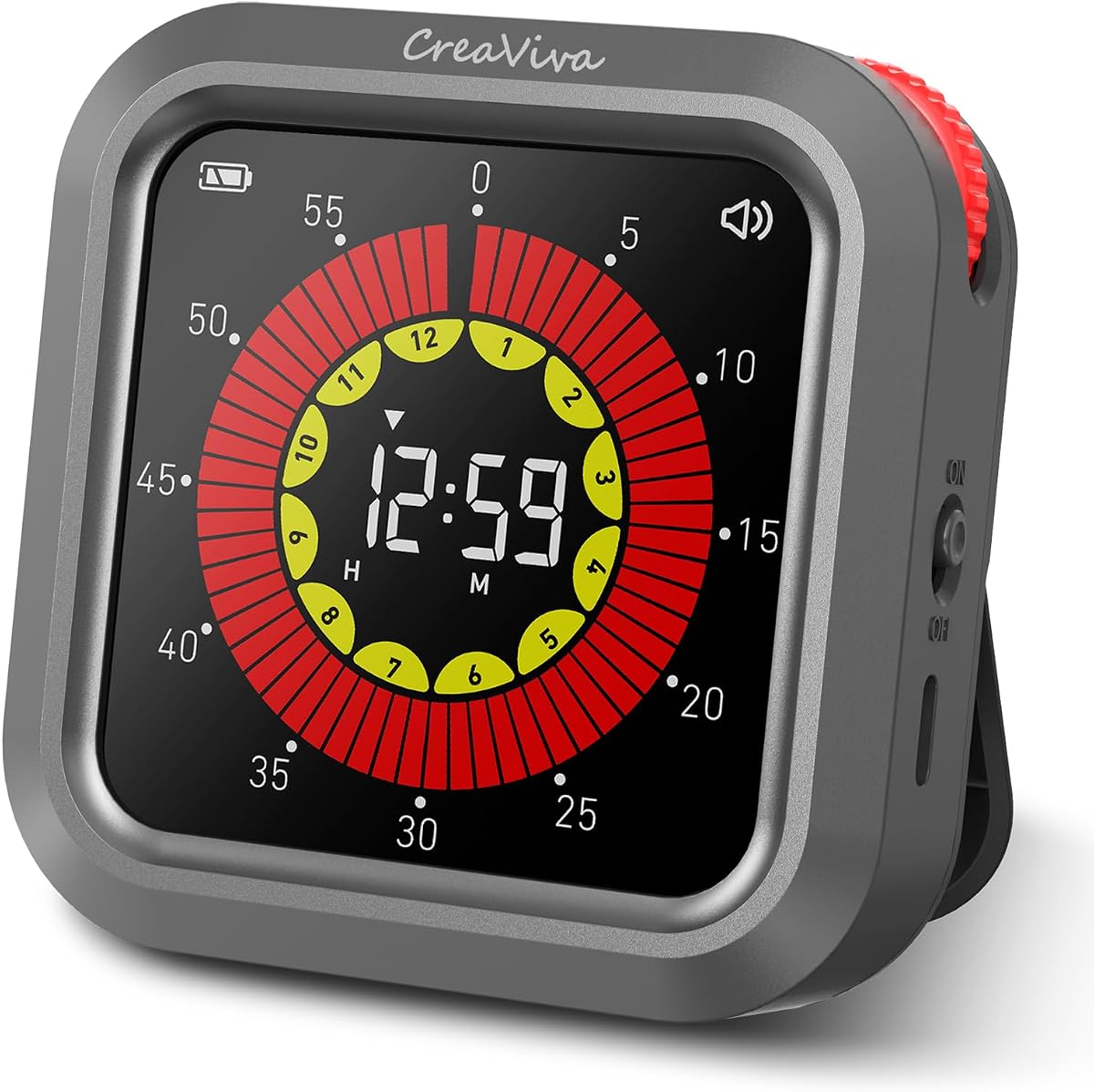
CreaViva Rechargeable Visual Timer
4.3Editor score
Color-coded progress display
Up to 12:59 timing
Three alert modes
Magnetic and stand mounting
A digital visual timer makes elapsed time easier to understand by combining numerical displays with changing colors, progress bars, discs, or dots. The best models help children anticipate transitions, support adults managing focused tasks, and provide clear alerts in homes, classrooms, kitchens, and therapy settings.
This guide compares ten visual timers according to display visibility, control layout, countdown and count-up functions, alert options, mounting options, power source, and suitability for children and sensory-sensitive users. It covers compact models for individual routines as well as large rechargeable timers designed to be seen across busy shared spaces.
Each review explains the product's strongest features, practical limitations, and ideal environment so you can choose confidently. Ratings and specifications reflect the supplied product information, while prices and availability can change, making it wise to check the current listing before purchasing.
4.3Editor score

4.6Editor score

4.2Editor score
As an Amazon Associate we earn from qualifying purchases.
The comparison covers display scale, visual guidance, timing range, alert flexibility, mounting methods, and power options, helping you identify the right timer for children, classrooms, kitchens, or focused work.

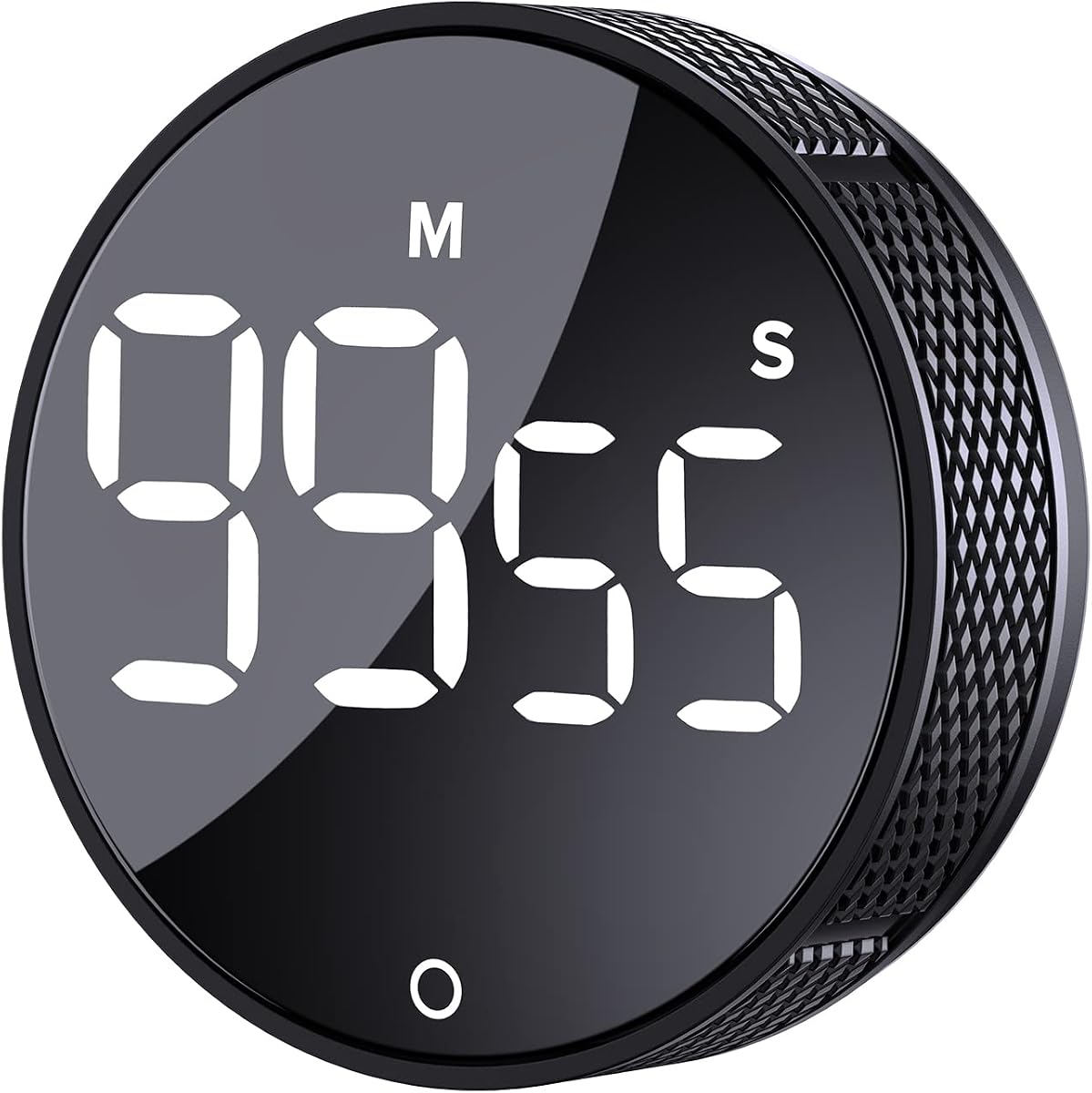


The PERSUPER Visual Timer for Kids combines a digital countdown with a white progress bar that disappears as time runs down. Its 4.2 rating reflects a practical balance of easy operation, useful alert controls, and flexible mounting. The disappearing bar offers a more concrete visual cue than numbers alone without adding a complicated interface.
We may earn a commission when you buy through this link, at no additional cost to you.
Two knobs make adjustment intuitive: one side increases time and the other decreases it, while pressing a knob starts the timer. It can count down and then count upward from zero to show time exceeded. Pressing and holding clears the setting, and a separate power button switches between hours-and-minutes and minutes-and-seconds formats for different activities.
The timer's three volume levels cover silent operation, a moderate alert, and a louder setting for busy kitchens or classrooms. Two brightness levels help with changing ambient light, while a power-saving mode turns the screen off during a running countdown and flashes when time ends. One limitation is that the visual design is deliberately simple, so users who want additional timer modes, multiple presets, or a larger room-facing display may prefer another model.
This is a strong choice for families establishing screen-time limits, children working through morning routines, and anyone who values a simple visual countdown with both countdown and count-up functions. The built-in 800mAh rechargeable battery, Type-C charging, magnets, and stand also make it easy to keep in regular use without managing disposable batteries.
The shrinking white bar gives children a clear signal that time is passing, making a ten-minute activity feel more tangible than a changing number. It is especially useful for transitions, independent play, and short focus sessions where a child may not yet read the clock reliably.
After the countdown reaches zero, the unit can continue counting upward. That makes it useful for monitoring elapsed work or exercise time instead of only enforcing a deadline.
We may earn a commission when you buy through this link, at no additional cost to you.
The AVINIA Digital Kitchen Timer is a straightforward large-display timer built for cooking, classroom activities, fitness, meetings, and everyday scheduling. Its 4.2 rating reflects dependable core functions, a user-friendly rotary control, and good visibility. The timer supports both countdown and count-up within a 0-to-99-minute range.
We may earn a commission when you buy through this link, at no additional cost to you.
Adjustment happens by twisting the outer ring, followed by a single button press to start or stop. This layout reduces the need to press multiple small controls, which is helpful for children, older adults, and busy cooks. Large LED digits make the timer easier to check from a distance, while three brightness modes allow continuous brightness, dim mode, or an off display.
Alert volume also spans three levels, ranging from silence to as much as 90dB. The magnetic back can attach to refrigerators, ovens, blackboards, and other iron surfaces, allowing one-hand operation without a stand. The main constraint is the 99-minute maximum, which is ample for kitchen and classroom intervals but unsuitable for long meetings, extended study blocks, or all-day countdowns.
Choose the AVINIA for straightforward cooking, school activities, short workouts, and routines that fit within an hour and a half. It is a good fit for buyers who value readable digits and uncomplicated adjustment more than rechargeable power or an extended hour-plus-minute range.
The oversized LED readout remains useful in a kitchen, gym, or classroom where the timer may sit farther from the user. Brightness adjustment helps it remain visible under different lighting conditions.
Mounting the timer on a refrigerator or metal board keeps the display in view and prevents it from being moved while the outer ring is adjusted. This makes the physical setup as practical as the controls.
We may earn a commission when you buy through this link, at no additional cost to you.
The VOCOO Large 7.8-Inch Digital Timer stands out for its exceptionally large display and 4.6 rating, the highest among the products featured here. Numbers measuring 2.3 inches tall can be read across a busy kitchen or classroom, while three brightness levels support both sunlit and dim environments.
We may earn a commission when you buy through this link, at no additional cost to you.
The timer can count down from 99:59:59 or operate as a count-up stopwatch, making it suitable for exams, lengthy meetings, workouts, screen-time boundaries, and household projects. Four alert options include a completely silent screen flash and three distinct audible alarms with adjustable volume. That range lets a family or teacher match the ending signal to the environment without changing devices.
Its rechargeable battery provides more than seven days of continuous use at low brightness and over seven hours at high brightness. A low-power warning helps prevent unexpected shutdowns, and USB-C charging is straightforward. Silicone-covered magnets, a built-in stand, and a hanging hole offer flexible placement on fridges, lockers, whiteboards, desks, pantry hooks, and classroom hooks.
The VOCOO is the most adaptable option for shared spaces and long-duration activities. Its size may be unnecessary for close-up desk work or travel, and USB-C charging requires access to a cable and appropriate charger. Even with those considerations, its readability, long timing capacity, and excellent alert selection make it an especially strong all-purpose recommendation.
The 7.8-inch screen and 2.3-inch numerals are valuable for a classroom, shared kitchen, or exercise area. It reduces the need for children to repeatedly ask adults how much time remains.
Silent mode avoids interrupting libraries, tests, and quiet routines, while the three audible choices provide enough variety for busier environments. Users can choose a sound pattern that is noticeable without becoming excessive.
We may earn a commission when you buy through this link, at no additional cost to you.
The CreaViva Visual Digital Timer is a rechargeable, color-display timer designed for children, classrooms, kitchens, and productivity sessions. Its 4.3 rating reflects a versatile feature set, especially the progress bar, extended timing range, and selectable alerts. The screen uses yellow for hours and red for minutes, offering an intuitive visual distinction.
We may earn a commission when you buy through this link, at no additional cost to you.
A single-button wheel handles setup: turning clockwise increases time, turning counterclockwise decreases it, pressing starts or pauses, and a long press resets. The timer supports countdowns and count-ups up to 12 hours and 59 minutes, making it useful for long cooking projects, deep work, exercise sessions, and all-day task boundaries.
Loud, low, and mute alert modes cover noisy kitchens, quiet offices, and libraries. Bright and eco display modes improve visibility while conserving power, and the display dims after 30 seconds of inactivity. Smart memory stores the last countdown setting, while the completely tick-free operating system supports sustained concentration. The product information does not provide a precise battery-runtime claim, so users may still want to charge it before a long period away from a power source.
This is a compelling premium-style choice for households that want more than a basic countdown and for adults who use visual time blocks for focused work. The color bar and long capacity are especially valuable for users who benefit from seeing time change. The main learning curve is simply understanding which color corresponds to the current time unit.
Separating hours from minutes through color gives users a quick visual cue beyond the digits. For children, ADHD support, and autism-oriented routines, that layered cue can make a deadline easier to anticipate.
A 12:59 range supports long study blocks, multi-hour projects, and extended cooking without forcing the user to restart the timer. The memory function also reduces setup time during recurring routines.
We may earn a commission when you buy through this link, at no additional cost to you.
The Red Disc Visual Timer combines large digital numbers with a red disc that disappears during a countdown and grows during count-up. Its 4.2 rating reflects a balanced design that offers both precise time information and an immediately visible measure of progress. The 2.09-inch backlit display should be easy to read in dim conditions.
We may earn a commission when you buy through this link, at no additional cost to you.
The outer ring adjusts in five-second intervals. A quick turn changes minutes, while a slower turn changes seconds, and one press starts, stops, or resets the timer. The ending can be announced by a 70dB-or-higher alarm or shown through a flashing LED backlight when a completely quiet reminder is preferable.
Two brightness modes offer constant or eco-style illumination, and the screen turns off after 30 seconds of inactivity. A low-battery icon appears below 10 percent, while three AAA batteries are included. Magnets and anti-slip pads keep the timer stable on a fridge, oven, or whiteboard as the dial is adjusted.
This is a good match for an hour-long study block, cooking task, classroom interval, or sensory-sensitive user who benefits from a shrinking or growing shape. Its main limitation is the 60-minute maximum; it cannot manage long meetings or extended project timing. The included batteries also mean the product does not offer the convenience of USB-C recharging.
The numerical display communicates exact time while the red disc communicates general progress. That combination helps people who can read numbers but benefit from an additional, less abstract cue.
Magnetic attachment and anti-slip pads reduce movement while the outer ring is turned. The result is a timer that can remain visible and stable in a kitchen or classroom.
We may earn a commission when you buy through this link, at no additional cost to you.
The TimeBuddy Digital Visual Timer for Kids uses colorful countdown dots and a smiley face to make the passage of time easier for children. Its 4.2 rating reflects a child-friendly design aimed at everyday transitions, including tooth brushing, potty training, screen time, homework, homeschool, and bedtime routines.
We may earn a commission when you buy through this link, at no additional cost to you.
Children twist the timer to set a duration and press it to start. The stated age guidance is three and older, and the last setting is remembered for consistency. Timing extends from five seconds to 99 minutes, while clock, alarm, and count-up modes broaden its use beyond a single countdown format.
The rechargeable battery can last up to two weeks per charge according to the supplied information, removing the need to keep spare batteries available. Silent, medium, and loud volume levels accommodate different rooms, and adjustable brightness helps the screen remain visible without being unnecessarily harsh. The operating mode produces no ticking, which can be beneficial during focused activities.
Choose TimeBuddy when a young child needs a simple, repeatable way to see a routine approaching its end. It is less suited to adults who need timers longer than 99 minutes or precision below five seconds, and the dot-based display may not be ideal for users who primarily want exact elapsed time. For family routines, however, its simplicity and rechargeable design are compelling.
The smiling face and disappearing dots turn a deadline into a concrete activity boundary. That can support smoother transitions and help a child connect the gradual visual change with the end of a routine.
A stated battery life of up to two weeks per charge means the timer can stay ready for repeated tooth-brushing, homework, and screen-time sessions. Families do not need to maintain a routine of buying replacement batteries.
We may earn a commission when you buy through this link, at no additional cost to you.
The Smiley Face Visual Timer for Kids combines a cheerful character with visual progress bars and an easy-to-read backlit display. Its 4.6 rating makes it one of the strongest-rated options in the guide, reflecting a child-friendly approach to focus, routines, and time awareness.
We may earn a commission when you buy through this link, at no additional cost to you.
The intuitive knob supports countdown, count-up, and pause functions, while a maximum duration of 99 minutes covers playtime, study sessions, and household activities. High, low, and mute volume settings let adults adapt the alert to a quiet room or a more active environment. The display remains readable in dim rooms or when viewed from across a play area.
The product is specifically framed for children with ADHD or autism, although its visual progress interface can be useful for anyone who benefits from a concrete representation of elapsed time. The absence of ticking avoids adding a repetitive background sound, and the smiley face makes the device feel more like an activity companion than a conventional kitchen timer.
The main uncertainty is the lack of detailed mounting information in the supplied specifications, so buyers who need a magnet, stand, or wall attachment should verify those features. It is otherwise well suited to children learning to manage play, study, and transition periods with an approachable visual prompt.
A child-friendly face and progress bars can make time management feel less punitive than a conventional countdown. The playful presentation gives children a visible object to check instead of repeatedly asking an adult.
The backlit display supports use in dim bedrooms, playrooms, and evening study routines. Three volume levels also allow the visual and audible cues to adapt to the setting.
We may earn a commission when you buy through this link, at no additional cost to you.
The TIME TIMER Home MOD is a 60-minute visual timer designed for children and adults who benefit from an immediately understandable display. Its 4.5 rating reflects a calm, uncomplicated format suited to desks, homeschool spaces, offices, meetings, and individual work blocks.
We may earn a commission when you buy through this link, at no additional cost to you.
Unlike a typical digital timer, the remaining time is communicated through a shrinking colored countdown area. That visual can be understood intuitively across ages and abilities, including children with autism, ADHD, or other learning disabilities. It supports organization and concentration without the visual noise of a dense numerical interface.
An optional audible alert can be disabled in sound-sensitive environments, making the timer suitable for reading, studying, projects, and testing. Four removable silicone covers can be used to color-code separate timers for activities such as homework, exercise, kitchen tasks, or work. Those covers are not included with the listed home edition.
This model is best for users who value calm, analog-style visualization and a desktop-centered routine. Its main limitations are a 60-minute maximum and the need for one AA battery, which is not included. It is less versatile than models offering USB-C charging, hour-plus-minute timing, and several alert styles.
The shrinking visual area removes the need to interpret changing numerals. That low-complexity approach can reduce visual demand and make transitions easier to understand.
Separate silicone covers can visually distinguish homework, exercise, kitchen, study, and work intervals. The feature is especially helpful in busy homes or learning spaces, although the covers must be obtained separately.
We may earn a commission when you buy through this link, at no additional cost to you.
The Time Timer Twist presents the full duration as a visual disk that empties as the countdown progresses. Its 4.5 rating reflects a well-understood format, easy rotary setup, and an effective continuous alert at the end of a session. The display makes remaining time understandable without requiring close numerical reading.
We may earn a commission when you buy through this link, at no additional cost to you.
Users turn the outer ring to select between one and 90 minutes and press the play button to begin. The magnetic back attaches to refrigerators, file cabinets, whiteboards, gym boards, or other metal surfaces, while the kickstand supports countertop or desktop placement. Its compact 3.5-by-1-inch profile keeps it portable between rooms.
Unlike some visual timers that provide only a short signal, the Twist continues alerting at the end until the play or pause button is pressed or the beeping continues for one minute. The countdown can also be paused and resumed without losing its place, which is useful when an activity is briefly interrupted.
This is a compelling option for reading, classroom activities, cooking, and exercise intervals up to 90 minutes. It is less appropriate for meetings or focus sessions longer than an hour and a half, and the required AAA battery is not included. For routine visual time management, however, the disk display and dependable alert are major strengths.
The entire disk represents the selected duration, so a glance communicates how much time remains. This is useful for children and adults who find changing digital numerals less intuitive.
Interrupting a reading session, recipe, or workout does not require resetting the timer. Pressing play or pause resumes the countdown from the same point, keeping the visual representation accurate.
We may earn a commission when you buy through this link, at no additional cost to you.
The Doliwish Dinosaur Visual Timer turns time management into a child-friendly object through a blue dinosaur shape and colorful progress bars. Its 4.4 rating suggests a well-received combination of playful design, an easy-to-read LED display, and quiet operation for home or classroom routines.
We may earn a commission when you buy through this link, at no additional cost to you.
The timer supports durations of up to 100 minutes, giving it slightly more range than many 60- and 90-minute visual models. Its LED display can be read from a distance or in low light, while the colorful bars show how much time remains without making the child dependent on numerical reading.
Silent timing is the defining operational feature. It avoids adding a ticking sound to reading, play, classroom work, or winding-down routines, making it potentially useful in sensory-sensitive environments. The stated suitability for children over three, smooth edges, and sturdy construction reinforce its positioning as a toddler and young-child timer.
The product information provides fewer details about controls, power, and mounting than many competing listings, so buyers should verify whether the current package includes batteries and whether a stand or wall mount is available. Even so, its playful form may make it easier to introduce than a standard kitchen timer, particularly for children who respond positively to character-based tools.
The dinosaur housing makes the timer feel like a friendly companion rather than an adult control device. That presentation can encourage children to initiate routines with less resistance.
Colorful bars and a backlit LED display provide both visual and numerical information. Silent timing keeps the focus on the activity rather than on an ongoing background sound.
We may earn a commission when you buy through this link, at no additional cost to you.
The right digital visual timer depends on the user, activity, environment, and degree of visual support required. Consider timing range, readability, controls, alerts, power, and mounting before choosing a model.
Visual timers communicate time through different forms: a disappearing bar, shrinking colored area, expanding red disc, countdown dots, or progress bars. A shrinking display is intuitive when the user needs to know how much time remains, while a growing or count-up display can clarify elapsed time. Children who do not yet read clocks may benefit more from a recognizable visual change than from digits alone, while older students may appreciate exact numerical information alongside the graphic.
Most household and classroom intervals fit within 60 to 100 minutes, but longer projects require a timer with hour-plus-minute capacity. The VOCOO reaches 99:59:59, while the CreaViva supports up to 12 hours and 59 minutes. The PERSUPER has a 10-hour range, and the AVINIA, Red Disc, TIME TIMER Home, TimeBuddy, and Smiley Face models top out at 99 minutes or less. Consider both the longest planned session and the shortest interval you need to time.
A timer placed on a crowded classroom wall needs a large screen, while a close-up desk timer can work with a smaller display. The VOCOO offers a 7.8-inch screen with 2.3-inch numerals, making it a strong shared-space option. The PERSUPER, CreaViva, and Red Disc models use smaller displays paired with progress graphics. Brightness controls are also important because a screen that is readable in daylight may be overly bright at night.
Silent visual alerts are valuable in libraries, tests, therapy sessions, and homes with sound-sensitive children. Audible alerts are often necessary in kitchens, gyms, and busy classrooms where the timer is farther away. Several products add distinct alarm patterns, adjustable volume, or a choice between sound and flashing. The VOCOO and Red Disc models provide a dedicated silent option, while the CreaViva and PERSUPER include mute levels. Confirm that the alert is noticeable in the intended space without becoming disruptive.
Simple controls reduce setup errors and make a timer more accessible to children and older adults. Rotary rings appear on the AVINIA, Red Disc, TimeBuddy, and Time Timer Twist, while the PERSUPER uses side knobs and a separate mode button. Separate buttons, as found on the VOCOO, can reduce accidental presses. Look for a straightforward way to start, pause, stop, reset, and switch between countdown and count-up functions, and confirm that the main action is easy to identify.
Rechargeable timers are convenient for daily use because they do not require disposable batteries. The VOCOO, CreaViva, PERSUPER, and TimeBuddy use USB-C charging according to the supplied information, while the AVINIA and Red Disc models use AAA batteries. TIME TIMER Home requires one AA battery, and Time Timer Twist requires one AAA battery; those batteries are not included in the relevant listings. Compare charging convenience against runtime and think about how often the timer will be stored or transported.
Magnetic backs, stands, anti-slip pads, and hanging holes support different placement needs. A magnetic timer can remain visible on a refrigerator, whiteboard, locker, oven, or file cabinet, while a kickstand works better on a desk or counter. Anti-slip feet help prevent movement during dial adjustment. The PERSUPER, AVINIA, CreaViva, Red Disc, VOCOO, and Time Timer Twist include magnetic or stand-oriented mounting, while mounting details for the remaining products are limited in the supplied data.
Recurring routines benefit from a timer that remembers its last setting. The CreaViva, TimeBuddy, and Red Disc include smart memory, reducing repetitive setup for activities such as morning routines, boiling eggs, meditation, and workouts. Count-up is useful for measuring elapsed work or exercise, while clock and alarm modes can make one device more useful across the day. Extra modes are helpful only if they remain simple, so prioritize the functions your household will actually use.
Begin by placing the timer where the user can see the entire visual display, preferably at eye level or directly on the activity surface. Use the appropriate mounting method, set the desired duration, and confirm the number and visible progress indicator before starting. For children, explain that the color, bar, dot, or disk will gradually change and that the end signal means the activity is complete.
Choose an alert that suits the room before beginning. Silent or flashing modes are useful during quiet work, while a louder or patterned sound can be selected in a noisy kitchen or classroom. If the timer supports pause and count-up, use those functions for interruptions and elapsed-time tracking rather than repeatedly resetting and restarting the countdown.
Care for the timer according to its power and mounting design. Recharge USB-C models regularly, and replace batteries in battery-powered units before low-battery warnings appear. Clean the surface gently with a soft, slightly damp cloth, avoiding excessive moisture around buttons, charging ports, and seams. Keep magnetic surfaces free of debris and use anti-slip areas as intended to maintain stable placement.
A digital timer primarily communicates time through numbers, while a visual timer adds a changing bar, disk, dot, or colored area. That visual element helps people who find conventional clock faces or rapidly changing digits difficult to interpret. Many products in this guide combine both approaches for exact and at-a-glance information.
A visual timer can make an upcoming transition visible instead of relying only on verbal reminders. Progress bars, shrinking disks, and countdown dots provide a concrete indication that time is running out. Individual responses vary, so the timer should be introduced gradually and paired with clear explanations of how the display and end signal work.
Yes, and several models are explicitly designed for kitchens. Look for a large display, loud alert, stable stand or magnetic mount, and a range long enough for the recipe. The AVINIA is particularly straightforward for 99-minute kitchen intervals, while the VOCOO and CreaViva support much longer cooking sessions.
A silent visual alert is useful in bedrooms, libraries, exams, therapy rooms, and other places where sound would be disruptive. An audible alert is usually more effective in noisy kitchens, gyms, and classrooms. Several products support both, allowing one timer to adapt to different rooms and activities.
Choose a duration that matches the actual routine and is long enough for the child to complete it without rushing. Short transitions such as tooth brushing may need only a few minutes, while homework or play sessions can last 15 to 60 minutes. Adjust the setting gradually as the child's independence and time awareness develop.
It depends on the model. The PERSUPER, VOCOO, CreaViva, and TimeBuddy are rechargeable, while the AVINIA, Red Disc, TIME TIMER Home, and Time Timer Twist use disposable batteries. Battery requirements and whether batteries are included vary, so check the current product listing before ordering.
A shared classroom benefits from a large display, bright and dim modes, a strong magnetic mount, and both silent and audible alerts. The VOCOO is especially well suited because its 7.8-inch screen can be read from farther away, while its silent flash is valuable during exams or quiet independent work.
Most digital models in this guide support both directions. Countdown is useful for deadlines, while count-up measures elapsed study, exercise, cooking, or work time. The PERSUPER, AVINIA, VOCOO, CreaViva, Red Disc, and Smiley Face models explicitly provide both functions.
The VOCOO Large 7.8-Inch Timer is the most versatile choice for shared environments because of its exceptional readability, long timing range, silent mode, audible alerts, and flexible mounting. The CreaViva Rechargeable Visual Timer offers particularly clear color guidance and extended timing, while the TimeBuddy Kids Visual Timer provides a simple, rechargeable, child-focused design for household transitions.
Prioritize the needs of the person using the timer. Young children may respond best to dots, a smiley face, or a playful dinosaur shape, while adults may value a large numerical screen and count-up mode. Sensory-sensitive settings call for silent flash alerts, shared classrooms benefit from stronger visibility, and long projects require hour-plus-minute capacity.
Before purchasing, verify the latest listing for specifications, included accessories, power requirements, and current availability. Product features, ratings, and prices can change, and the most suitable Digital Visual Timer ultimately depends on the routine, setting, and visual needs of its user.