
TECKNET Compact Wireless Mouse
4.6Editor score
Compact pink design
Quiet clicks and scrolling
49-foot wireless range
Three adjustable DPI levels
A cute laptop mouse can add personality to a workspace while still handling browsing, documents, creative applications, and everyday navigation. The most useful models balance appealing colors or character-inspired shapes with a comfortable grip, dependable wireless performance, accurate tracking, and features that suit different working environments.
This guide compares ten pink, animal-themed, colorful, and novelty wireless mice based on their stated connectivity, size, controls, compatibility, power design, and everyday convenience. The list covers receiver-based models, Bluetooth options, rechargeable travel mice, compact choices for smaller hands, and expressive designs intended to make a desk setup feel more personal.
Each review highlights the product's strongest benefits, practical limitations, and ideal buyer, helping you narrow the field without overlooking basic usability. Product details and availability can change over time, so confirm the current listing, included accessories, and compatibility information before making a final purchase.
4.6Editor score

4.4Editor score

4.7Editor score
As an Amazon Associate we earn from qualifying purchases.
The comparison below highlights the main differences among these ten cute laptop mice, including connection style, portability, power approach, click behavior, and stated device support.




The wegear USB Wireless Mouse combines a conventional pink appearance with an unusually broad feature set for this category. Its 4.4 rating reflects a generally favorable customer reception, while five DPI settings, six buttons, and a stated range of up to 33 feet distinguish it from simpler novelty models. It is particularly compelling for users who want a cute accessory that can also handle detailed productivity work.
We may earn a commission when you buy through this link, at no additional cost to you.
The adjustable sensor offers 800, 1200, 1600, 2400, and 4000 DPI options, allowing the cursor to move more quickly across large displays or more precisely for design and document tasks. Forward and backward side buttons can streamline navigation through documents and web pages, although those two controls are not recognized on Mac. A contoured shape is intended to reduce strain during long sessions, and the click mechanism has been tested for 5,000,000 clicks according to the supplied product information.
Power is supplied by a single AA battery, with the manufacturer stating a battery life of up to 24 months under suitable usage conditions. The mouse sleeps after eight minutes of inactivity and includes a red low-battery indicator. This long maintenance interval is convenient, but users should not interpret it as a guarantee for every device or usage pattern. The included receiver stores under the mouse, making the overall setup tidy and portable.
This is a strong choice for Windows users and Mac users who do not rely on side buttons. It supports a broad range of Windows versions, macOS 10.x, and most standard laptops and desktops, although an iPad may require a USB-C adapter. Buyers seeking simple styling may find its pink shell fairly understated, yet the combination of precision controls, comfort features, and wireless convenience makes it a capable choice for everyday laptop use.
Five DPI levels let you adapt the pointer speed to different tasks without replacing the mouse. The side navigation buttons add value for document-heavy workflows, although Mac users should account for their lack of recognition on that operating system.
The stated 24-month battery life and automatic sleep mode reduce the need for frequent battery changes. A low-battery light and receiver storage add practical convenience without changing the mouse's clean, cordless footprint.
We may earn a commission when you buy through this link, at no additional cost to you.
The Akko Cat Theme Wireless Gaming Mouse is the most overtly characterful option in this guide. Its 4.4 rating, adorable cat-shaped pink body, and practical tri-mode connectivity make it an editor's choice for anyone who wants a laptop accessory that clearly expresses personality. It works with Mac and Windows and can connect through 2.4GHz, Bluetooth 3.0, or Bluetooth 5.0.
We may earn a commission when you buy through this link, at no additional cost to you.
Using the receiver is straightforward: install the battery, insert the stored 2.4GHz receiver into a USB port, and turn on the mouse. Bluetooth removes the need for a receiver and allows a cleaner connection with compatible devices. That flexibility is useful for a desk that alternates between a traditional laptop and a slimmer machine with fewer convenient USB ports.
The body is shaped to sit under the palm, and an anti-slip underside is intended to improve stability during movement. An agile scroll wheel supports everyday navigation. These attributes make it more than a decorative object, although buyers focused on traditional mouse ergonomics may find the cat silhouette unconventional. The supplied details also do not specify adjustable DPI levels, so buyers should not assume the sensitivity options offered by several conventional models.
The Akko is best for students, creative professionals, cat lovers, and anyone wanting a playful focal point on a desk. Its Mac/Win compatibility, palm-oriented design, and three connection methods provide a solid functional foundation. If your priority is unmistakably cute laptop mouse styling without giving up modern wireless flexibility, this model stands out from the list.
The cat-shaped silhouette provides a more playful focal point than a conventional pink shell. It suits creative workspaces and gift-oriented setups where visual character matters as much as basic navigation.
Supporting 2.4GHz, Bluetooth 3.0, and Bluetooth 5.0 gives the mouse more connection options than most entries. Bluetooth mode is particularly helpful for devices with limited USB receiver access.
We may earn a commission when you buy through this link, at no additional cost to you.
The Donut Pink Wireless Mouse earns the highest rating among the ten products featured, with a 4.7 score based on the supplied customer rating data. Its rechargeable battery, compact proportions, quiet clicks, and dual-device connectivity make it our premium pick for users who want an easy-to-travel mouse with less ongoing battery maintenance.
We may earn a commission when you buy through this link, at no additional cost to you.
The mouse supports both Bluetooth and 2.4GHz wireless connections and can move between two devices using one button. Its stated range reaches 30 feet, while compatibility extends across Windows, macOS, iOS, iPadOS, and Android without requiring drivers. That broad operating-system support is particularly valuable for anyone moving between a laptop, tablet, and phone throughout the day.
Its lightweight body is designed to fit into a bag or pocket, and the 1200 DPI sensor provides smooth tracking for general productivity. Silent clicks make it suitable for libraries, shared offices, classrooms, and late-night work. The built-in battery lasts for up to 20 days according to the supplied information, and the mouse can be used while charging, reducing the impact of an unexpected low-battery interruption.
This is the strongest general choice for frequent travelers and anyone who prefers a rechargeable design. The lack of stated adjustable DPI or additional side buttons means it may not satisfy specialized editing or high-speed gaming needs, but those omissions are reasonable for a compact travel mouse. Its cute pink styling, quiet operation, and cross-platform flexibility make it especially well suited to everyday laptop users.
The internal rechargeable battery avoids the recurring cost and inconvenience of disposable cells. Up to 20 days of stated battery life and use while charging make the design well suited to intensive travel schedules.
A compact shell, silent clicks, and a 1200 DPI sensor make the mouse practical in shared environments. Bluetooth and 2.4GHz modes also allow it to move between a laptop and another compatible device.
We may earn a commission when you buy through this link, at no additional cost to you.
The TECKNET Compact Ambidextrous Wireless Mouse combines a 4.6 rating with a small footprint designed for users with smaller hands. At only 3.94 by 2.28 by 1.52 inches, it is one of the most compact conventional-style choices here, while the pink finish ensures that portability does not come at the expense of the cute appearance sought by this guide.
We may earn a commission when you buy through this link, at no additional cost to you.
Soft-click buttons and a quiet scroll wheel help limit distractions in offices, study areas, and shared homes. The optical sensor offers three DPI settings at 800, 1200, and 1600, which is enough to handle browsing, office applications, and general creative work. Its 2.4GHz connection is listed as reliable at distances up to 49 feet, giving it a generous stated range for a compact travel mouse.
A single AA battery can support up to 15 months according to the supplied description, and three sleep stages respond to short pauses, breaks, and longer inactivity. The nano receiver stores inside the mouse for portability. Compatibility covers numerous Windows versions, Mac OS X, Chrome OS, Linux, and Android, but the receiver requires a full-size USB-A port, which can be a limitation with modern port-focused laptops.
This is an attractive choice for children, students, travelers, and adults with small to medium hands. It offers quieter operation and a more compact profile than many standard office mice without losing adjustable sensitivity. The missing battery and USB-A requirement are easy to account for, and the balance of portability, comfort, and everyday controls makes it a compelling budget selection.
The 3.94-inch length is particularly useful for smaller desks and compact laptop bags. Its shape is intended to suit small to medium hands while preserving full-size mouse functionality.
Soft clicks and a quiet wheel make the mouse considerate in shared spaces. Three DPI levels offer more control than a fixed-sensor design without adding unnecessary buttons.
We may earn a commission when you buy through this link, at no additional cost to you.
The Unipows Wireless Mouse stands apart with a unique pink-to-purple gradient rather than a single-color shell. Its 4.6 rating reflects a strong customer reception, and the slim ergonomic design combines a cute appearance with simple, portable wireless operation. It is a good option when visual style should stand out without relying on an animal or novelty silhouette.
We may earn a commission when you buy through this link, at no additional cost to you.
The included nano receiver stores in the back of the mouse and connects through 2.4GHz technology. The stated range is up to 15 meters, or 49 feet, with plug-and-play setup and no additional driver required. Soft clicks make it suitable for quieter work areas, and the smooth shell is intended to offer a comfortable grip for regular laptop use.
Power comes from one AA battery, which is not included, while automatic sleep mode activates after eight minutes of inactivity. The mouse is rated for 5,000,000 comfortable clicks and uses a high-DPI movement resolution intended to track on nearly any surface. However, the supplied information does not list specific adjustable DPI settings, so the precision options are less clearly defined than those of the wegear or TECKNET models.
Compatibility includes Windows XP through Windows 7 and Mac OS X 10.4, but the receiver-based design is not compatible with MacBook Pro or other laptops lacking USB ports. Buyers who need broader modern device support should look for Bluetooth. For a conventional laptop with USB-A and a preference for slim, colorful styling, this model delivers a balanced and attractive experience.
The gradient finish offers more visual personality than a standard pink mouse while maintaining a conventional silhouette. Its slim shape should appeal to users who want a cute accessory that also fits neatly into a laptop bag.
A stored nano receiver and plug-and-play 2.4GHz connection minimize setup time. The stated 49-foot range is useful for flexible desk positioning, although a USB-A port is required.
We may earn a commission when you buy through this link, at no additional cost to you.
The HuGuWdy Pink Wireless Car Mouse is the boldest novelty design in the guide. Shaped like a compact sports car and enhanced with LED lighting, it delivers the playful desk-accessory experience many people seek from a cute laptop mouse. Its 4.4 rating indicates that the concept resonates, even though the model is intended more for visual fun than specialized performance.
We may earn a commission when you buy through this link, at no additional cost to you.
It connects through a 2.4GHz USB receiver with a stated obstacle-free range of 10 meters. A storage compartment keeps the receiver with the mouse, which is helpful when moving between home, office, and other locations. The illuminated details make it visually engaging, although buyers who work in dark spaces may appreciate that added character rather than consider it purely decorative.
The mouse uses two AAA batteries, which are not included, and has a bottom on/off switch for preventing unnecessary power use. It does not have its own charging function. The body is designed as a compact sports car with a playful appearance, but users should expect the novelty shape to feel different from a conventional palm-rest mouse and potentially require a different grip.
Compatibility is listed for Windows XP, Vista, 7, ME, and 2000, as well as Mac OS, with the product positioned for PCs, laptops, and tablets that can accept its receiver. It is best as a lighthearted gift or desk statement for a user who prioritizes the car aesthetic. Those wanting softer clicks, adjustable DPI, or a more traditional ergonomic form should choose another option.
The sports-car shape and LED lighting create a stronger visual centerpiece than a conventional pink mouse. It is especially suited to playful office arrangements and novelty gift settings.
A dedicated receiver compartment keeps the wireless setup together when traveling. A bottom switch lets the user shut the mouse down completely, while two AAA batteries keep the design simple and cable-free.
We may earn a commission when you buy through this link, at no additional cost to you.
The JUHOO Wireless Mouse is a straightforward choice for users who want less noise without giving up a traditional shape. It holds a 4.5 rating and emphasizes portable wireless operation, quiet left and right buttons, and plug-and-play setup. Its approachable design suits students, remote workers, and anyone who wants a cute everyday accessory without an exaggerated novelty shape.
We may earn a commission when you buy through this link, at no additional cost to you.
Advanced 2.4GHz transmission provides a stated working distance of up to 10 meters. The nano receiver hides in the battery compartment, reducing the chance of leaving it behind and keeping the mouse easy to pack. No additional software is required, so setup involves connecting the receiver to a compatible USB port and using the mouse as directed.
The special soundless design for the main buttons helps users remain focused without disrupting nearby people. The buttons and housing are rated for 5 million keystrokes according to the supplied information. Automatic sleep occurs after eight minutes of inactivity, and clicking any button wakes the mouse, helping conserve power during short pauses.
Compatibility is described broadly across PCs, laptops, notebooks, computers, MacBooks, desktops, and tablets, although connection still depends on the included receiver and suitable ports. Buyers who require adjustable DPI or detailed battery specifications may want a model with those points documented more clearly. Even so, its quiet buttons, portable receiver, and uncomplicated setup make it a strong general-purpose choice.
The reduced sound from the primary buttons is useful in offices, libraries, and shared homes. It helps preserve focus without requiring a fundamentally different pointing experience.
The stored nano receiver and software-free connection keep the initial process uncomplicated. Automatic sleep provides an additional layer of power management during regular work breaks.
We may earn a commission when you buy through this link, at no additional cost to you.
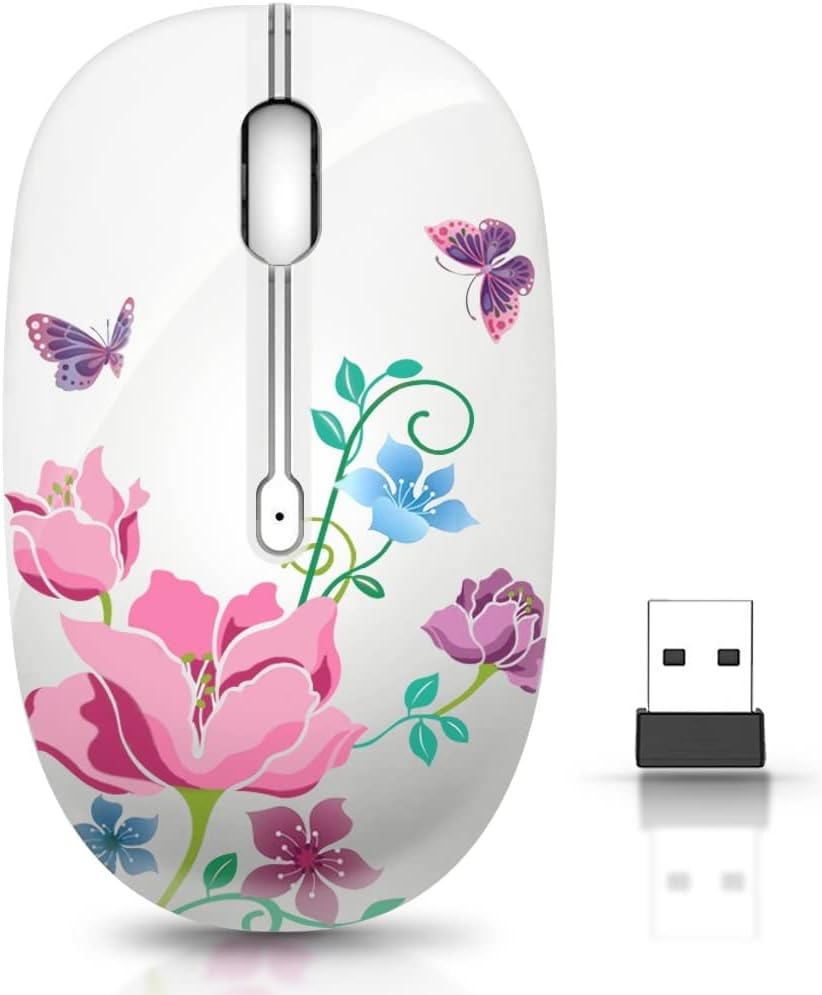
The TENMOS M101 Silent-Flower Mouse adds floral charm to a category otherwise dominated by solid pink shells and animal shapes. Its 4.4 rating reflects a positive reception, and the colorful flower-inspired design gives it a cheerful personality that works well for study spaces, creative desks, and personalized office setups.
We may earn a commission when you buy through this link, at no additional cost to you.
The mouse uses advanced 2.4GHz wireless transmission with a stated range of up to 10 meters. Installation requires no extra software: the receiver is stored in the battery compartment and must be removed and placed into the laptop's USB slot. This makes the setup approachable, although users of USB-C-only systems may need an appropriate adapter.
A soundless design for the right and left buttons reduces distractions, which is useful for shared study areas or late-night work. The buttons have undergone a stated 5 million-keystroke test. For tracking, a high-performance optical sensor provides general-purpose precision, while the supplied information does not mention adjustable DPI levels or additional side buttons.
A single AA battery powers the mouse, though it is not included. After ten minutes without activity, the mouse enters sleep mode and wakes with a button click. This model is a good fit for buyers who want a more decorative floral design, soft primary clicks, and straightforward wireless use. It may be less suitable for users who require adjustable sensitivity or a rechargeable battery.
The flower motif distinguishes the mouse from standard pink office models. It offers a playful yet versatile appearance for students and creative professionals.
The sound-reduced left and right buttons support concentration in shared environments. Its optical sensor and simple button layout are best suited to everyday navigation, documents, and browsing.
We may earn a commission when you buy through this link, at no additional cost to you.
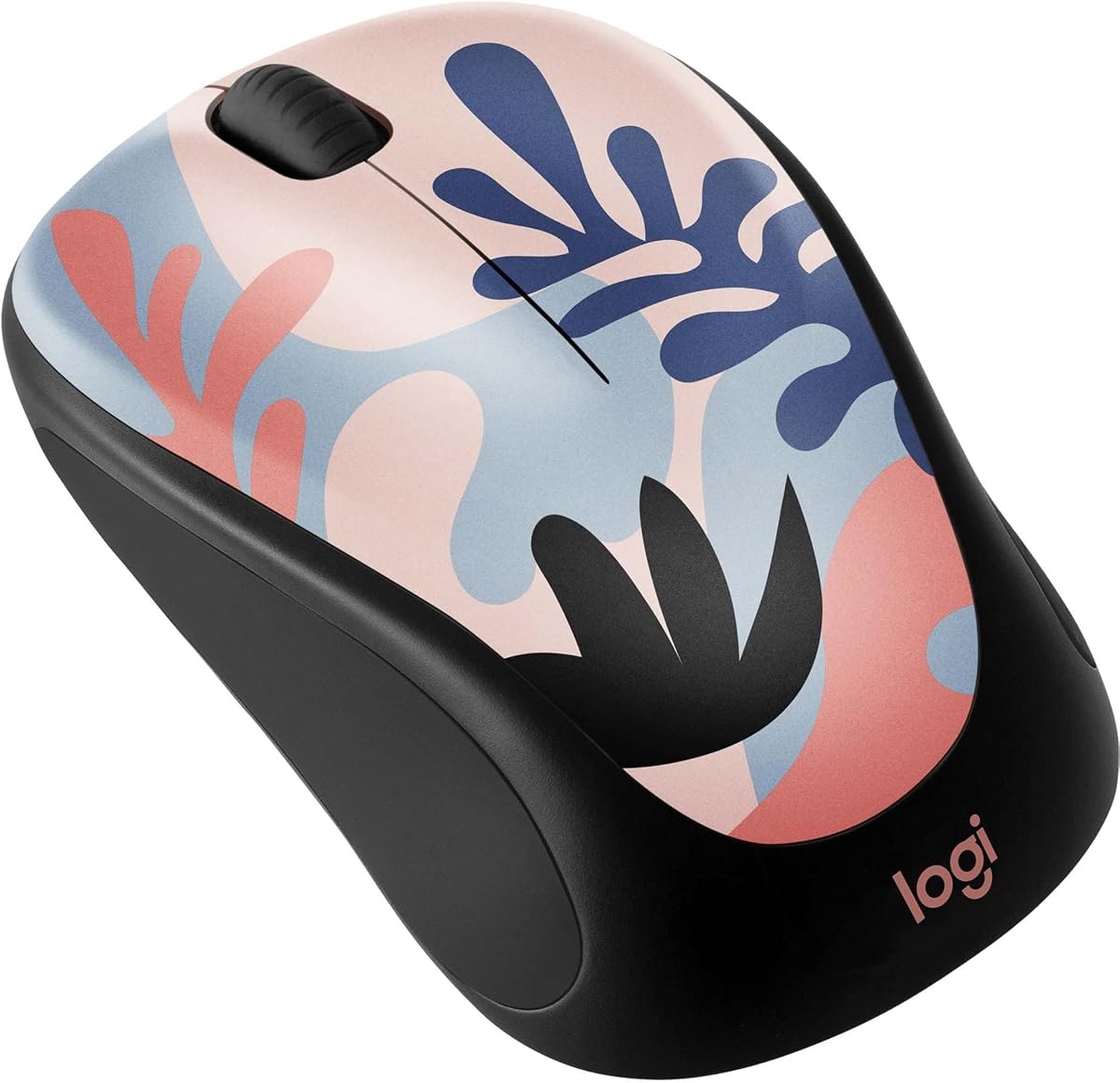
The Logitech Design Collection Limited Edition Wireless Mouse brings colorful personality from an established peripheral brand. Its 4.6 rating makes it one of the strongest-rated products in the guide, while the portable shape, soft rubber side grips, and 10-meter wireless range make it practical for both desk work and travel.
We may earn a commission when you buy through this link, at no additional cost to you.
Each limited-edition color is intended to add a vibrant accent to a personal setup. A built-in USB storage compartment keeps the receiver with the mouse, while the rubber side grips add comfort during longer sessions. The 2.4GHz wireless connection provides an effective operating range of 10 meters, allowing the mouse to be used at a comfortable distance from the laptop.
Power-saving technology is stated to provide 12 months of battery life from a single pre-installed AA battery, one of the more straightforward maintenance arrangements in the guide. The Unifying receiver can manage up to six compatible devices, including keyboards and additional mice, helping users create a coordinated wireless desk with fewer receivers.
Compatibility extends across Windows, macOS, Chrome OS, and Linux, provided a USB port is available. Some color variants also contain post-consumer recycled plastic, with the listed percentages varying by design. Limited-edition availability can be a concern for shoppers who want a specific color, but this is an excellent choice for a buyer who values brand familiarity, colorful design, and uncomplicated wireless operation.
Vibrant limited-edition designs make the mouse an easy desk accent without sacrificing portability. Soft rubber side grips add a tactile comfort benefit for extended daily use.
The Unifying receiver can combine up to six compatible devices, reducing USB receiver clutter. A 12-month stated battery life and built-in receiver storage further support a low-maintenance desk.
We may earn a commission when you buy through this link, at no additional cost to you.
The FMOUSE Cute Cartoon Silent Wireless Mouse delivers one of the most giftable designs in the guide. Its soft blush-pink body features an orange tabby cat and the office-themed message "This Meeting Could've Been An Email," while its 4.6 rating reflects a favorable reception. It is designed for small-to-medium hands and weighs just 2.1 ounces.
We may earn a commission when you buy through this link, at no additional cost to you.
Dual-mode connectivity covers both USB 2.4GHz and Bluetooth. The nano receiver stores in the battery compartment for laptops and desktops, while Bluetooth works with MacBooks, iPads, Samsung tablets, and other compatible devices without requiring a receiver. A bottom toggle switches the mode, and the mouse automatically reconnects when powered on. The stated stable range reaches 33 feet.
The primary click design is advertised as up to 90 percent quieter than standard mice, making it useful for meetings, open offices, coworking spaces, and late-night work. A 1600 DPI optical sensor tracks smoothly on most surfaces without requiring a mousepad. The listed size of 4.13 by 2.44 by 1.49 inches should also be considered when comparing hand fit with larger conventional mice.
Compatibility covers Windows 7 through 11, macOS, iPadOS, Android 5.0 and later, ChromeOS, and Linux. It uses one AA battery, which is not included, and sleeps after ten minutes of inactivity. A physical on/off switch prevents drainage during storage. This is a particularly attractive gift for cat lovers, remote workers, and coworkers, with the primary trade-off being the absence of stated DPI adjustment.
The illustrated tabby and office message give the mouse more personality than a simple color treatment. Its soft pink finish and compact proportions make it well suited to personalized desks and gift occasions.
The advertised 90-percent quieter click design is useful in shared work environments. Bluetooth and 2.4GHz modes provide broad device support, while automatic reconnection helps preserve a smooth workflow.
We may earn a commission when you buy through this link, at no additional cost to you.
The right cute laptop mouse should balance appearance with the controls, connectivity, dimensions, and power behavior that fit your work. Use the following factors to compare the models beyond their looks and identify the features most likely to matter in your routine.
A 2.4GHz receiver offers a straightforward connection through a USB port and is widely used for laptops and desktop systems. It suits buyers who want a simple dedicated receiver, although a full-size USB-A socket may be absent on newer models. Bluetooth removes the need for a receiver and is more convenient for slim laptops, tablets, and phones, but the exact operating-system and device requirements should be checked before buying. Some products in this guide offer both options, giving users the flexibility to choose between a stored receiver and direct Bluetooth pairing.
A compact mouse can be especially comfortable for children, smaller hands, and travel, while a larger palm-oriented body may suit users who prefer support across the hand. The TECKNET is explicitly designed for small to medium hands and measures 3.94 inches long. The FMOUSE also targets small-to-medium hands, and the Akko offers a palm-focused shape despite its cat silhouette. Conventional designs such as the wegear and Logitech may be more immediately familiar. Since no two hands are the same, the listed dimensions are best treated as a guide rather than a guarantee of fit.
Quiet clicks can be valuable in offices, libraries, shared homes, online meetings, and late-night sessions. The TECKNET and JUHOO both highlight softer primary clicks, while the Donut and FMOUSE make silence a central selling point. Quiet operation does not necessarily mean every component is silent, so the scroll wheel and remaining buttons may still produce sound. Users should also distinguish a quiet design from an unusually short click, since a shorter travel can feel different even when the sound level is lower.
A fixed optical sensor is sufficient for standard browsing, office work, and school tasks, but adjustable DPI provides more precise control across different screens and tasks. The wegear offers five levels, while the TECKNET offers three. The Donut uses a stated 1200 DPI sensor, and the FMOUSE specifies 1600 DPI tracking without listing adjustment options. Users doing photo editing, detailed navigation, or high-resolution work may prefer adjustable settings, whereas most general productivity tasks can be handled comfortably with a fixed well-regarded sensor.
Rechargeable and replaceable-battery designs have different maintenance profiles. The Donut has a built-in rechargeable battery, supports use while charging, and is stated to last up to 20 days. Most other models use replaceable AA or AAA cells, with some batteries included and others requiring separate purchase. Stated battery life figures are best treated as maximum or estimated values because usage frequency, sleep settings, and device behavior can affect actual performance. A manual on/off switch and automatic sleep can help preserve power, particularly for a mouse stored in a bag.
Cute styling comes in several forms. The Akko uses a complete cat-shaped silhouette, the FMOUSE uses cat artwork on a conventional body, and the HuGuWdy imitates a sports car with LED lighting. The TENMOS offers a floral motif, the Logitech emphasizes colorful limited-edition finishes, and the Unipows uses a pink-to-purple gradient. A conventional pink model such as the wegear or TECKNET may blend more easily into a professional environment, while a character-focused design can serve as a conversation piece or gift. Consider whether the shape will distract you or interfere with a close grip as well as whether you like its appearance.
Most models provide the standard left button, right button, and scroll wheel, but some add features for more demanding workflows. The wegear includes six buttons with forward and backward navigation controls, although those side buttons are not recognized on Mac. The Donut provides one-button switching between two devices, and the Logitech Unifying receiver can manage up to six compatible peripherals. Extra buttons can improve productivity, but they may also complicate the shape or be irrelevant if your software does not support them.
A laptop mouse should be easy to carry if you travel between locations. The Donut, TECKNET, JUHOO, Unipows, and HuGuWdy all emphasize compact or portable construction, and several models store the receiver inside the body. Internal storage prevents a tiny USB receiver from being left behind and reduces the number of loose accessories in a bag. Pay attention to the dimensions and weight if your laptop workspace is small, and confirm whether a USB-C adapter or Bluetooth mode is necessary for your device.
Begin by checking the power requirements listed for your selected model. Install the specified AA or AAA batteries, or fully charge a rechargeable model if it uses an internal battery. For a 2.4GHz mouse, locate the nano receiver, remove it from its storage compartment, and insert it into a compatible USB port. Move the mouse to its intended operating mode using the switch underneath or on the side, then move it across the surface to confirm that the cursor responds.
For a Bluetooth mouse, enable pairing on the mouse using its pairing control and select it from the Bluetooth settings of your laptop, tablet, or phone. If a model supports both Bluetooth and 2.4GHz, compare the listed operating-system support and choose the connection that avoids an adapter. Keep the receiver stored inside the mouse whenever it is not in use, and avoid placing loose adapters in a pocket or bag where they could be lost or damaged.
To maintain performance, clean the mouse gently with a soft dry cloth and remove dust from the underside or scroll wheel without pushing debris into the mechanism. Replace batteries according to the stated service interval or when a low-battery warning appears. Switch the mouse off during long periods of storage, and do not leave it on surfaces that are excessively hot, wet, dusty, or slippery. A small mousepad can improve tracking if your preferred desk surface is uneven, while avoiding unnecessary liquid cleaning helps protect the electronic components.
The most important feature depends on how you work, but comfort and reliable connection usually come first. A mouse should feel comfortable in your hand, track smoothly, and connect without interruption. Cute styling is the main appeal, but a device that is unpleasant to use for long periods will not serve your everyday needs well.
Yes, many of the models in this guide are suitable for ordinary office work, browsing, study, and communication. Quiet-click options are especially useful in shared offices and meetings, while conventional shapes may blend more easily into conservative workplaces. You can also choose a discreet pink or colorful model when you want personality without an exaggerated character shape.
Bluetooth is usually better for modern slim devices because it does not occupy a USB port and can connect to phones and tablets. A 2.4GHz receiver is straightforward and works well with a laptop that has a full-size USB-A port. Dual-mode models offer both approaches and are convenient when you move between different devices.
No. Silent or quiet-click designs generally reduce the sound of the main left and right buttons, while the scroll wheel and any additional buttons may still make noise. The TECKNET, JUHOO, Donut, TENMOS, and FMOUSE all emphasize quieter clicking, but the overall sound level can vary with the surface and typing habits.
Compact models with dimensions around four inches or less are often more comfortable for small hands. The TECKNET is explicitly designed for small to medium hands, while the FMOUSE also targets that fit. Shape matters as much as length, so hand comfort should be considered when the mouse is available to try.
No. The Logitech includes a pre-installed AA battery, while several other models require users to supply their own AA or AAA cells. The Donut is rechargeable and does not use replaceable cells. Always check the package details before ordering so you have the correct batteries ready for first use.
Many models support macOS or iPadOS, but compatibility depends on the connection method. Bluetooth models are generally the easiest fit for a port-limited MacBook or tablet, while receiver-based mice need a suitable USB port and sometimes an adapter. The Logitech supports several desktop operating systems, and the Donut and FMOUSE list particularly broad cross-platform compatibility.
It is helpful but not essential for every task. Adjustable DPI lets you change cursor speed for different screen sizes and precision requirements. The wegear and TECKNET provide multiple settings, while other models use a fixed stated sensor. General productivity tasks can be handled with either approach, but detailed creative work may benefit from adjustment.
The best choice ultimately depends on whether visual novelty, quiet operation, portability, or productivity controls matter most to you. The Akko Cat Theme Mouse stands out for its expressive silhouette and tri-mode connectivity, while the Donut Pink Wireless Mouse offers the strongest rating, rechargeable power, and broad cross-platform travel appeal. For a compact and economical traditional design, the TECKNET remains an excellent pink pick with adjustable sensitivity and quiet clicks.
Before ordering, confirm the mouse will fit your hand, the connection method works with your devices, and the power requirements match your habits. Buyers who travel frequently should prioritize a compact body, Bluetooth support, and either rechargeable power or stored receiver storage. For fixed desks, adjustable DPI and navigation buttons may be more useful, while shared workspaces benefit most from quiet primary clicks.
Product listings, included accessories, and availability can change, so check the current details before purchasing. Comparing the current connection options, dimensions, battery requirements, and compatibility with your own devices will help ensure that the cute laptop mouse you choose remains useful and enjoyable well beyond its appearance.