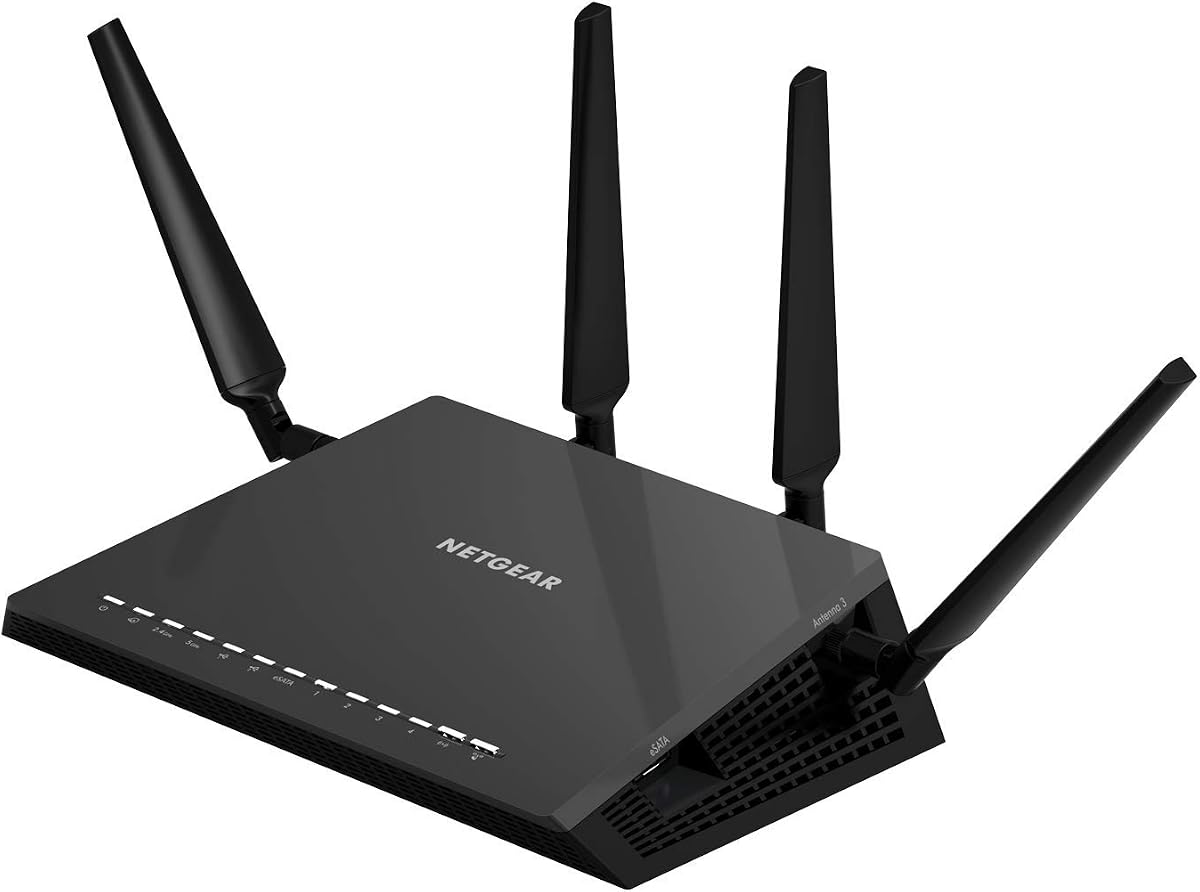
NETGEAR Nighthawk X4S R7800
4.4Editor score
Up to 45 connected devices
Four gigabit Ethernet ports
Dual 4×4 radio design
USB and eSATA connectivity
Advanced Nighthawk features
This AC2600 WiFi Router guide compares 10 models for speed, range, features, coverage, device capacity, and everyday value.
An AC2600 WiFi Router can provide a dependable upgrade for homes that need faster dual-band networking than an older basic router offers. The best choice depends on more than the advertised speed class: antenna design, processor capability, wired ports, wireless features, and management software all influence the experience.
We compared ten routers using the specifications and feature descriptions provided for each product. The list includes traditional AC2600 models as well as newer WiFi 6, WiFi 6E, and WiFi 7 alternatives that offer useful upgrades for shoppers searching by performance rather than an obsolete generation label.
Each pick highlights a different reason to consider it, from a straightforward value option to a premium gaming system and modern tri-band networking. Ratings and specifications reflect the supplied product information, while current prices can change at any time and should be checked before purchasing.
4.4Editor score
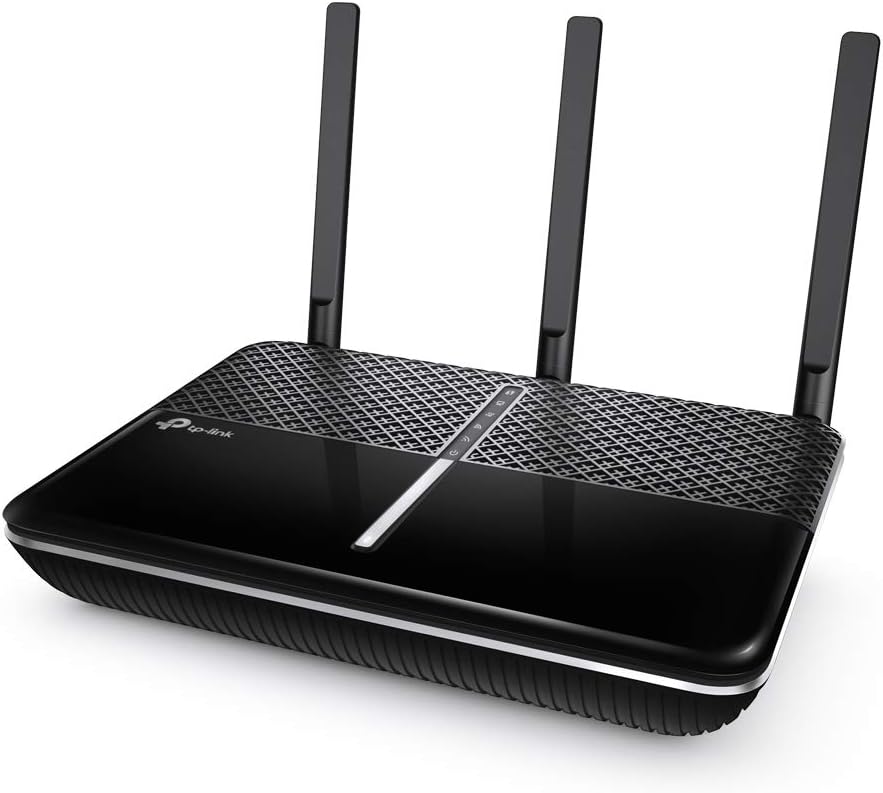
4.5Editor score

4.2Editor score
The comparison below places all ten routers side by side, emphasizing wireless generation, stated coverage, device capacity, processing, and connectivity. It also highlights several newer models that may be more future-facing than a literal AC2600 router.


The TP-Link Archer A10 is the most balanced traditional AC2600 router in this group, earning a 4.5 rating from the supplied product information. It combines dual-band wireless performance, MU-MIMO, Smart Connect, beamforming, and a practical collection of wired and remote-access features. That combination makes it a practical upgrade for a busy home that still values familiar, straightforward router functions.
We may earn a commission when you buy through this link, at no additional cost to you.
Its stated maximum wireless rate is 1,733 Mbps on the 5 GHz band and 800 Mbps on the 2.4 GHz band. MU-MIMO helps the router serve multiple devices more efficiently, while Airtime Fairness is intended to prevent demanding clients from monopolizing network resources. Smart Connect can place compatible devices on the appropriate band, reducing the need to manually separate long-range and high-speed connections.
Range is supported by three external antennas and one internal antenna, with beamforming directing wireless signals toward connected clients. The router also offers open and PPTP VPN server support for users who want to reach their home network remotely. Setup and management are handled through an intuitive phone interface and the Tether app, reducing the learning curve for less experienced users.
The principal limitation is that the Archer A10 uses older WiFi 5 technology, so it cannot offer the 6 GHz band, OFDMA, or the throughput potential of the newer WiFi 6E and WiFi 7 alternatives here. Even so, it represents a capable, feature-rich AC2600 option, especially for shoppers who prioritize stable features and uncomplicated management rather than purchasing the newest wireless generation.
MU-MIMO, Smart Connect, and Airtime Fairness work together to improve efficiency when phones, televisions, computers, and smart-home products are active at different times. The design is particularly helpful in homes where numerous devices compete for the same limited wireless airtime.
Phone-based configuration makes the Archer A10 approachable, while the built-in VPN server adds a useful way to reach the home network from elsewhere. Amazon Alexa support can also simplify switching the guest network on or off.
We may earn a commission when you buy through this link, at no additional cost to you.
The NETGEAR Nighthawk X4S R7800 is the premium traditional AC2600 option, carrying a 4.4 rating and a feature set aimed at well-equipped homes. Its headline strengths are a 4×4 radio layout, support for as many as 45 devices, up to 2,500 square feet of stated coverage, and an unusually generous collection of external ports.
We may earn a commission when you buy through this link, at no additional cost to you.
Wireless performance uses simultaneous dual-band operation with 4×4 transmit and receive capability on both 2.4 GHz and 5 GHz. The stated band rates are 800 Mbps and 1,733 Mbps. A 1.7 GHz dual-core processor, four amplified antennas, beamforming, MU-MIMO, and Dynamic QoS provide a strong foundation for streaming, online gaming, browsing, and connected-home equipment.
Its four gigabit Ethernet ports make it well suited to households with several wired devices. Two USB 3.0 ports and one eSATA port add storage-sharing, printer-sharing, and personal-cloud possibilities. Those extras distinguish it from basic routers that provide only the minimum wired connectivity, though they will be most valuable to buyers who actually use external storage or printers.
This is a sensible premium recommendation for a large home or a busy network, but it is not the right choice for every shopper. The older wireless generation offers less future-facing capability than the AXE75, RS90, or R6700AX in this list, and its premium feature set may be unnecessary for a small apartment. Those limitations are acceptable when robust AC2600 performance and flexible high-end connectivity justify the investment.
The stated capacity for 45 devices and coverage of up to 2,500 square feet makes the R7800 well matched to larger homes. MU-MIMO, beamforming, Dynamic QoS, and a dual-core processor help it handle simultaneous traffic more effectively than a basic single-band or low-feature router.
The USB 3.0 and eSATA connections expand the router beyond ordinary internet distribution. They can support shared storage, printers, and remotely accessible personal cloud storage, making the model attractive to users who want a multifunction network hub.
We may earn a commission when you buy through this link, at no additional cost to you.
The D-Link DIR-2640 is a 4.1-rated AC2600 router that emphasizes manageable performance and household controls. It supports dual-band AC2600 wireless speeds, MU-MIMO, Smart Connect, and a dual-core processor. These features give it a solid foundation for typical streaming, gaming, video calling, and browsing needs.
We may earn a commission when you buy through this link, at no additional cost to you.
The standout feature is its enhanced parental-control system. Users can create a profile for each person, associate devices with those profiles, and control when and how each profile accesses the internet. The system can also govern shared devices such as game consoles and smart televisions, which is more useful than a single basic on-and-off schedule.
Smart Connect can intelligently assign compatible clients to the appropriate wireless band, while MU-MIMO allows the router to communicate with multiple devices more efficiently. Four wired connections provide reliable Gigabit performance for a smart TV, Android box, game console, or computer. Setup and changes are handled through the free D-Link WiFi app for Android and iOS.
Its 4.1 rating is not as strong as that of the highest-rated products, and it does not offer the R7800's USB storage features or the R7450's more explicitly gaming-focused QoS. Nevertheless, the DIR-2640 is a persuasive choice for families that value granular parental controls in an easy-to-manage AC2600 package.
Per-person and per-device profiles allow household administrators to set different usage schedules and access rules. The ability to apply those controls to shared entertainment devices makes the feature more useful than a simple global pause function.
Smart Connect reduces the need to manually decide which band a compatible device should use. The mobile app handles initial configuration and routine changes, helping users manage the router without navigating a complex desktop interface.
We may earn a commission when you buy through this link, at no additional cost to you.
The NETGEAR Nighthawk R7450 combines a 4.3 rating with a straightforward 2.6 Gbps AC2600 specification. It is particularly appealing to gamers and mixed-use households because its Advanced QoS is designed to prioritize latency-sensitive traffic while other devices stream, browse, or download.
We may earn a commission when you buy through this link, at no additional cost to you.
Dual-band rates of 800 Mbps on 2.4 GHz and 1,733 Mbps on 5 GHz provide ample headroom for modern internet connections. MU-MIMO supports simultaneous data delivery to several compatible clients, while the dual-core processor is intended to improve wireless, wired, and WAN-to-LAN performance. Three amplifiers and external antennas strengthen its range-focused design.
Unlike the larger R7800, the R7450 does not list USB or eSATA connectivity, so it is better viewed as a focused wireless router rather than a home server or storage-sharing appliance. Its streamlined feature set may appeal to users who want gaming prioritization without paying for accessories and functions they will never use.
The main compromise is technological age. It remains limited to WiFi 5, whereas the newer models in this guide offer WiFi 6, 6E, or 7. Even so, the R7450 remains a capable AC2600 choice for gamers who value explicit QoS tools, strong theoretical throughput, and a lower-complexity Nighthawk design.
Advanced QoS can identify and favor gaming traffic when the network becomes congested. This makes the R7450 especially interesting for competitive users who want a dedicated way to reduce competing lag and buffering.
MU-MIMO and a dual-core processor support smooth operation across several active devices. The amplified antenna arrangement also helps preserve usable coverage in areas where a compact, minimally equipped router might struggle.
We may earn a commission when you buy through this link, at no additional cost to you.
The ASUS Blue Cave is an AC2600 dual-band gigabit router built around Intel wireless technology and a 4×4 802.11ac design. It has a 3.9 rating, placing it behind several higher-rated options, but its security suite, parental tools, and mesh compatibility make it distinct from ordinary value routers.
We may earn a commission when you buy through this link, at no additional cost to you.
AiProtection, powered by Trend Micro, is designed to block external security threats affecting devices connected to the home network. The stated inclusion of lifetime internet security adds meaningful value for buyers who want network-level protection without treating security as an optional add-on. Alexa and Echo integration provide another way to control compatible router functions.
Advanced parental controls allow administrators to view, manage, and schedule family internet and app use from a mobile device. AiMesh compatibility creates a path toward broader home coverage through compatible ASUS mesh equipment. MU-MIMO can improve simultaneous client performance, although compatible client devices are required to gain the full benefit.
The Blue Cave is best for households that place a premium on integrated security, easy scheduling, and future mesh expansion. Its lower rating and WiFi 5 platform make it less compelling for shoppers seeking the newest wireless standard, but security-focused features can make it more valuable than a higher raw score suggests.
The included AiProtection suite is intended to guard connected devices against external threats. For users who want built-in protection rather than relying only on the security features of individual devices, this is one of the router's most important differentiators.
AiMesh support gives owners an option to address dead zones with compatible ASUS equipment. It is a useful consideration for homes that may outgrow a single router as family members, connected devices, and coverage demands increase.
We may earn a commission when you buy through this link, at no additional cost to you.
The TP-Link Archer AXE75 moves beyond the literal AC2600 class with true tri-band WiFi 6E and a combined stated rate of up to 5,400 Mbps. It is included because searching for an AC2600 router can lead to dated hardware, while this model offers a much stronger platform for a new installation.
We may earn a commission when you buy through this link, at no additional cost to you.
The three bands provide 2,402 Mbps on 6 GHz, 2,402 Mbps on 5 GHz, and 574 Mbps on 2.4 GHz. The 6 GHz band adds capacity and low latency, while true tri-band operation and OFDMA help the router serve many active devices simultaneously. Compatible WiFi 6E clients are needed to take full advantage of the additional spectrum.
A one-gigahertz dual-core processor and 512 MB of memory support the router's demanding feature set. EasyMesh compatibility allows additional compatible routers, extenders, or wireless powerline adapters to create a more seamless whole-home network. The Archer AXE75 also provides both VPN server and VPN client functions using OpenVPN, PPTP, and L2TP.
This is the most future-facing pick in the guide, though it may be excessive for a small home with older devices. It also lacks some of the explicit coverage and device-count claims found on dedicated AC2600 models. For a buyer creating a current-generation network, however, its tri-band design and expansion options offer a clear long-term advantage.
The 6 GHz band provides room for compatible high-speed clients without competing on the crowded 2.4 GHz or 5 GHz bands. That separation can improve responsiveness when many modern devices are active across the home.
OFDMA and true tri-band operation increase the number of clients the router can serve efficiently. EasyMesh compatibility then provides a practical route to expand coverage without replacing the entire ecosystem with unrelated equipment.
We may earn a commission when you buy through this link, at no additional cost to you.
The NETGEAR Nighthawk RS90 is a dual-band WiFi 7 router with a stated combined speed of up to 3.6 Gbps. Its 4.3 rating and broad feature set make it one of the strongest modern alternatives to an AC2600 unit, particularly for households that want newer client devices and faster wired internet options.
We may earn a commission when you buy through this link, at no additional cost to you.
The 2.4 GHz and 5 GHz radios use WiFi 7 capabilities such as MU-MIMO and OFDMA to support simultaneous traffic from many clients. Coverage is stated at up to 2,000 square feet for as many as 50 devices, although walls, floors, interference, and other environmental factors can reduce real-world reach. Larger or multi-story homes may need an Orbi mesh system.
Its standout wired feature is a 2.5-gigabit WAN port, which can unlock multi-gig internet plans when the connected modem or gateway supports the required service. Four gigabit LAN ports provide connections for computers, game consoles, smart televisions, and storage drives. The Nighthawk app supports guided setup, speed tests, device pausing, guest networks, and remote management.
WiFi 7 benefits depend on compatible client hardware, so many existing phones, laptops, and televisions will continue operating over earlier standards. NETGEAR Armor is offered through a free trial that becomes a separate subscription. Even with those caveats, the RS90 is a compelling choice for buyers who want a current-generation router with stronger throughput and a multi-gig WAN connection.
A 2.5-gigabit WAN port supports internet plans that exceed the capacity of a conventional gigabit connection. This makes the RS90 especially relevant to customers whose service provider can deliver a faster tier and whose gateway supports multi-gig output.
MU-MIMO and OFDMA allow multiple devices to send and receive data simultaneously, while the stated capacity of 50 devices suits heavily connected homes. Real performance still depends on the internet plan, client hardware, building layout, and local interference.
We may earn a commission when you buy through this link, at no additional cost to you.
The NETGEAR Nighthawk R6700AX is the best budget-oriented choice in this guide, combining a 4.2 rating with the efficiencies of WiFi 6. It is a sensible alternative for apartment and small-home users who want a modern router without moving to a tri-band WiFi 6E or WiFi 7 platform.
We may earn a commission when you buy through this link, at no additional cost to you.
The dual-band router delivers up to 1.8 Gbps across 2.4 GHz and 5 GHz. Its stated coverage extends to 1,500 square feet and as many as 20 devices, making it appropriate for a family with multiple phones, laptops, televisions, and smart-home products. Existing WiFi 5 and earlier clients remain compatible, allowing a gradual upgrade rather than an all-at-once replacement.
Security features are enabled out of the box, including WPA3 encryption, automatic firmware updates, and a guest network. Those basics do not require a subscription, which is important for long-term ownership. NETGEAR Armor is available through a 30-day free trial, though continued use requires a separate subscription.
Four gigabit LAN ports and a separate gigabit WAN port provide practical wired connectivity. The R6700AX cannot match the RS90's multi-gig port or stated 50-device capacity, and its maximum speed depends on compatible client hardware. For a cost-conscious buyer with a modest home, though, it provides a more current and efficient foundation than a traditional AC2600 router.
WiFi 6 provides improved efficiency for busy networks while remaining backward compatible with older clients. That makes the R6700AX a practical middle ground between a basic current router and a premium multi-band system.
WPA3, automatic updates, and a dedicated guest network are included as standard functions. The optional Armor trial can be evaluated separately, but shoppers are not required to subscribe to use the router's fundamental security tools.
We may earn a commission when you buy through this link, at no additional cost to you.
The NETGEAR Nighthawk Pro XR500 is the specialist gaming choice in this roundup, with a 4.3 rating and features designed to reduce congestion-related latency. Its AC2600 dual-band platform reaches a stated 2.6 Gbps, while a 1.7 GHz dual-core processor supports efficient network handling.
We may earn a commission when you buy through this link, at no additional cost to you.
Advanced Quality of Service can place gaming traffic in a preferred route, helping reduce lag spikes, jumps, and jitter when other devices create congestion. Geo-filtering offers another gaming-oriented tool by helping users connect with closer servers and players. These features make the XR500 more focused than general-purpose routers in the list.
Four gigabit Ethernet ports give gaming consoles, computers, streaming devices, and other networked hardware reliable wired connections. A wired path is especially attractive for users who want to minimize avoidable wireless contention, although the router cannot control latency outside its own network or the distance to the game server.
This particular listing is renewed, so physical and cosmetic condition may differ from a new unit. The WiFi 5 platform also predates the newer alternatives here. Despite those caveats, the XR500 is a compelling pick for competitive gamers who specifically value QoS prioritization, geo-filtering, and a strong wired port selection.
Advanced QoS is designed to bypass congestion and reduce jitter for designated gaming activity. In a household where streaming, downloads, and other traffic compete for bandwidth, this focused prioritization can be more meaningful than a generic speed increase.
Geo-filtering helps direct the user toward game servers and players that are geographically closer. Combined with four gigabit ports, it creates a router platform designed around the priorities of latency-conscious gaming.
We may earn a commission when you buy through this link, at no additional cost to you.
The TP-LINK Archer C2600 is the most traditional entry-level AC2600 router in this list, with a 3.8 rating. Although it trails the newer models in the guide, it still combines 4-stream dual-band wireless performance, MU-MIMO, a dual-core processor, and four gigabit Ethernet ports in a broadly useful design.
We may earn a commission when you buy through this link, at no additional cost to you.
Its high-performance 4-stream AC2600 Wi-Fi is intended to support 4K video and online gaming, while MU-MIMO improves service to several simultaneous users. A 1.4 GHz dual-core processor helps maintain performance during heavy traffic, giving the router more processing capability than many basic models that rely on simpler hardware.
Four dual-band antennas with high-powered amplifiers and beamforming help direct coverage and focus signals toward individual clients. The four Gigabit Ethernet ports are another substantial strength, offering plenty of opportunities for a wired desktop, television, console, or other network device. Parental controls allow time limits and child-safety management.
The rating is the lowest among these ten products, and the model is limited to older WiFi 5 technology without a 6 GHz band or modern mesh-style expansion. A two-year warranty and TP-LINK Live technical support add reassurance. It remains a reasonable basic upgrade when the goal is dependable AC2600 performance, wired connectivity, and long-standing MU-MIMO support without advanced gaming or security suites.
The 4-stream wireless design and MU-MIMO support can improve throughput when several compatible clients are active. A dedicated 1.4 GHz dual-core processor also gives the router useful capacity for demanding traffic.
Four dual-band antennas, high-powered amplifiers, and beamforming work together to extend and focus the wireless signal. Four Gigabit Ethernet ports provide a dependable alternative for devices that benefit from a wired connection.
We may earn a commission when you buy through this link, at no additional cost to you.
The right router depends on your home layout, internet service, client devices, and tolerance for setup complexity. Speed labels are useful for comparison, but radio design, processing, coverage, security, and expansion options usually have a greater effect on daily satisfaction.
An AC2600 label refers to a combined dual-band maximum of approximately 2,600 Mbps, usually combining an 800 Mbps 2.4 GHz band with a 1,733 Mbps 5 GHz band. Those figures are laboratory-style limits, not guaranteed internet speeds, and the router cannot exceed the service delivered by the internet provider. A WiFi 6 router may offer better efficiency and capacity even when its headline rate is lower than that of a tri-band model, while WiFi 6E and WiFi 7 can provide additional spectrum and client capacity when compatible hardware is present. Existing phones, laptops, televisions, and smart-home products vary in their supported standard, so check the specifications of the devices that matter most before paying for newer capabilities.
Coverage claims provide a useful starting point, but walls, floors, appliance interference, router placement, and antenna design can materially affect actual range. The R7800 is listed for up to 2,500 square feet, the RS90 for up to 2,000 square feet, and the R6700AX for up to 1,500 square feet. These numbers should be treated as maximum conditions rather than guarantees. Larger or multi-story homes may receive more consistent results from a mesh system, especially if the router must serve rooms separated by thick walls. A compact router positioned centrally usually performs better than a powerful unit tucked into a cabinet, while extension nodes can help eliminate genuine dead zones.
The number of supported devices matters because every active client consumes wireless airtime and router processing capacity. The R7800 states support for as many as 45 devices, the RS90 for 50, and the R6700AX for 20, although raw device counts do not reveal how well each router handles high-bandwidth activity. Homes with video calls, cloud gaming, 4K streams, large downloads, and numerous smart-home products benefit from MU-MIMO, OFDMA, Smart Connect, and a capable processor. Choose capacity according to the number of active clients rather than counting only powered-off or low-bandwidth devices.
A faster or more capable processor can improve performance when many clients transmit data at once, especially on a busy 5 GHz band. The R7800 and XR500 use 1.7 GHz dual-core processors, the C2600 has a 1.4 GHz dual-core chip, the DIR-2640 includes a dual-core processor, and the AXE75 combines a one-gigahertz dual-core CPU with 512 MB of memory. MU-MIMO, beamforming, Airtime Fairness, and Smart Connect are equally important because they help the radio share capacity more fairly. Look for the complete feature set rather than judging by processor clock speed alone.
A modern router should still provide reliable gigabit Ethernet because wired devices remain the simplest way to avoid wireless contention. The R7800, R7450, DIR-2640, XR500, and C2600 each list four gigabit LAN ports. The RS90 goes further with a 2.5-gigabit WAN port, making it the better match for a multi-gig internet plan when the modem or gateway also supports that speed. The R7800 adds two USB 3.0 ports and an eSATA port for storage sharing, printers, and personal cloud use. Count the ports you need and ensure the device placement leaves room for the cables.
A secure router should provide WPA3 or WPA2 encryption, automatic firmware updates, a guest network, and a straightforward way to change the administrator password. The R6700AX includes WPA3, automatic updates, and a guest network, while the Blue Cave offers AiProtection and included lifetime internet security. The Archer A10 and AXE75 include VPN server functions, and the AXE75 also acts as a VPN client for OpenVPN, PPTP, and L2TP connections. Households with children should compare per-device scheduling, shared-device restrictions, and app controls. Optional paid security services should be evaluated separately from standard protections that work without a subscription.
Gaming routers distinguish themselves through quality-of-service controls, server-location filtering, and robust wired connections rather than just larger advertised speeds. The XR500 offers advanced QoS and geo-filtering, while the R7450 provides Advanced QoS intended to support lag-free gaming and smooth streaming. The Archer A10 and R7800 include Airtime Fairness or Dynamic QoS to improve the distribution of network resources. For a noncompetitive household, basic MU-MIMO and Smart Connect may be sufficient. For latency-sensitive play, compare priority controls, wired port availability, and the distance between the player and the game server.
A router that is powerful but difficult to configure is less useful in practice. The Archer A10, DIR-2640, R6700AX, and RS90 all emphasize smartphone-based setup and management, while the Blue Cave offers a simple mobile app workflow. EasyMesh compatibility on the AXE75 and AiMesh support on the Blue Cave provide potential expansion paths, and the R7800's USB ports allow the router to serve as a more capable network hub. Consider whether you need a separate mesh system, range extenders, powerline adapters, or shared storage, and verify that any expansion equipment works with the chosen platform.
Begin by placing the router in an open, central location rather than beside a television, microwave, metal cabinet, or enclosed shelf. Connect it to the modem or gateway with Ethernet, attach the appropriate power adapter, and use the manufacturer's app or browser-based setup process. Change the administrator credentials, select the correct internet connection method, and update the firmware before adding all household devices. If the provider uses bridge mode, activate that setting as directed by the internet service provider.
Create separate networks for trusted devices, guests, and any equipment that does not need regular access to local computers. Choose strong WiFi security, enable automatic updates, and set parental schedules where appropriate. For the best performance, let Smart Connect or band steering assign compatible clients, but keep a client on the 2.4 GHz band when it needs long range or when it is far from the router. Use Ethernet for stationary gaming consoles, desktop computers, and smart televisions whenever practical.
Keep the firmware current, periodically review connected devices, and remove old users or devices that no longer need access. Avoid leaving the router exposed to direct sunlight or an enclosed space, and periodically check that cables remain secure. When performance declines, compare wired speed tests, client capabilities, channel congestion, and placement before blaming the router. Larger homes may need a mesh node or range extender, while old client hardware may require the 2.4 GHz band for reliable performance.
An AC2600 router can handle typical streaming, browsing, video calling, and online gaming when connected to a sufficiently fast internet service. Its 5 GHz band is best for nearby high-bandwidth devices, while the 2.4 GHz band provides longer range. Actual latency and speed also depend on the internet plan, client devices, building layout, and network congestion.
A newer WiFi 6 model is generally more future-facing because it can handle traffic more efficiently and supports newer client hardware. A traditional AC2600 router can still be a good fit when its listed features meet your needs and the budget is the main concern. Compare processor capacity, coverage, wired ports, security, and current pricing rather than relying only on the speed label.
The AC2600 number combines the theoretical maximum rates of the 2.4 GHz and 5 GHz bands. It does not mean the router will deliver 2,600 Mbps of internet in every room, nor can it exceed the speed provided by your internet plan. Walls, interference, distance, device limitations, and the number of active clients all influence real performance.
A single router may be sufficient for a compact home, but floors, thick walls, and long distances can create dead zones. Mesh-compatible routers or dedicated mesh nodes can extend coverage more consistently than a single unit placed in a poor location. Measure the problem first and place the main router centrally before deciding that additional hardware is necessary.
MU-MIMO allows a compatible router to communicate with several clients more efficiently, which can help when phones, computers, televisions, and smart-home devices are active simultaneously. It does not guarantee identical speed for every client, and compatible client hardware is required. A capable processor, sensible band allocation, and good placement remain important too.
Yes, if the router has an available gigabit Ethernet LAN port. The R7800, DIR-2640, R7450, Blue Cave, AXE75, RS90, R6700AX, XR500, and C2600 provide wired options, although the exact port count and availability can vary. A wired connection generally avoids some WiFi contention and may provide more consistent latency than wireless use.
Look for WPA3 or WPA2 encryption, automatic firmware updates, a separate guest network, and secure administrator login controls. Some routers add network-level threat protection, detailed parental controls, or VPN functions, while others make advanced security available through a paid subscription. The essential protections should work without requiring an ongoing fee.
Dual-band AC2600 routers are generally designed to work with earlier WiFi generations as well as current clients. Older devices will connect at their own supported speeds, and some clients may function only on the 2.4 GHz band. Before replacing your current router, verify that any essential wireless adapter, printer, smart-home hub, or other device is compatible with the network settings you plan to use.
The TP-Link Archer A10 stands out as the best overall option in this group because it combines a strong rating with MU-MIMO, Smart Connect, beamforming, VPN server support, and straightforward phone-based management. The NETGEAR Nighthawk X4S R7800 is the premium traditional choice for large homes, many connected clients, and extensive wired and USB connectivity, while the R6700AX delivers a more current and budget-conscious WiFi 6 platform.
Other shoppers may find a better fit in a specialized model. The DIR-2640 prioritizes detailed parental controls, the R7450 emphasizes gaming QoS, the Blue Cave focuses on integrated security and mesh expansion, the AXE75 provides a modern tri-band upgrade, the RS90 delivers WiFi 7 and multi-gig connectivity, the XR500 targets competitive gamers, and the Archer C2600 remains a straightforward entry-level option.
Before purchasing, confirm the router's radio standard, stated coverage, port count, security tools, and expansion options against your actual home and devices. Current prices can change, as can promotions and availability, so check the latest listing information before making a final purchase decision.