AULA WIN68 HE
4.5Editor score
Adjustable Hall effect switches
Rapid trigger and SOCD controls
8,000Hz polling rate
68-key compact layout
Windows web-based driver
Best keyboard for Valorant guide comparing 10 gaming keyboards for rapid triggers, polling rates, switch feel, compact layouts, connectivity, and build quality.
A keyboard for Valorant must translate movement, aiming commands, and rapid inputs with minimal delay. Beyond raw speed, useful options include adjustable actuation, rapid trigger, anti-ghosting, compact layouts, durable keycaps, and controls that let you tune each key without interrupting a match.
This guide compares ten gaming keyboards using the specifications and features supplied for each model. It examines switch technology, actuation ranges, polling rates, layouts, connectivity, programmability, sound-dampening structures, and compatibility, then identifies the strongest choices for different play styles and desk setups.
The recommendations cover wired magnetic boards, optical and conventional mechanical switches, low-profile designs, wireless models, and both compact and near-full-size layouts. Rankings reflect the supplied product information rather than hands-on testing, and current prices and availability may change over time.
4.5Editor score
4.4Editor score

4.6Editor score
The comparison below places the ten keyboards by switch type, input speed, layout, connectivity, and customization. It highlights the trade-offs between magnetic rapid-trigger models, optical switches, conventional hot-swappable mechanics, and tri-mode boards.

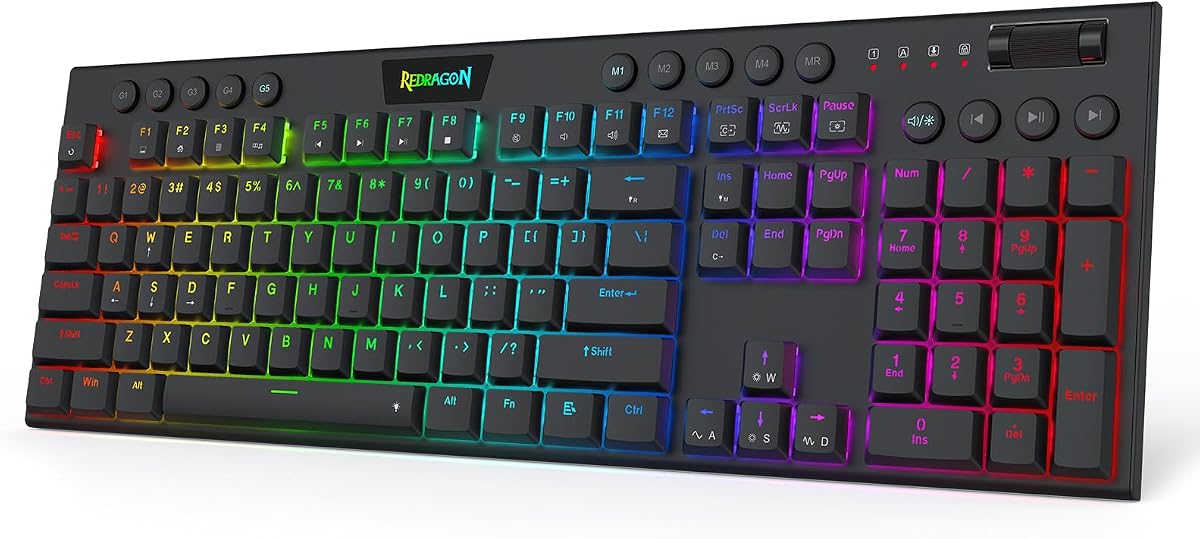



The Redragon K673 HE is a full-size wired gaming keyboard built around contact-free Hall effect magnetic switches. Its supplied rating is 4.1, and its standout qualities are adjustable actuation, rapid trigger, dynamic key activation, and an advertised 8,000Hz polling rate. The single control knob also combines backlight adjustment with media functions, reducing the need to memorize separate shortcuts.
We may earn a commission when you buy through this link, at no additional cost to you.
For Valorant, the K673 HE's main appeal is control over the point at which a key registers. Actuation can be configured from 0.1mm to 3.4mm, while rapid trigger and PRCS are intended to reduce redundant movement inputs during fast direction changes. A wired connection keeps the data path simple, and the magnetic switches detect travel without the physical contact used by conventional mechanical switches.
Construction is designed to balance feedback and noise. The independent switch plate is intended to reduce wobble, while added dampening layers soften the sound and feel of each press. This is useful when using voice chat or playing late, although the board's full-size footprint takes up more room than the small alternatives in this guide. Desktop or web-based software is also necessary for calibration and profile management.
The K673 HE is a strong all-around recommendation for a Valorant player who values rapid-trigger control and wants a conventional full-size layout with a numpad. It is especially suitable for players who want one keyboard for both gaming and productivity. The main reservation is the lower supplied rating, so buyers should check recent customer feedback and confirm software compatibility before committing.
Rapid trigger and per-key actuation let players release movement keys at a chosen travel point. That control can make short directional taps and quick counter-strafing more consistent in Valorant without requiring a different keyboard for competitive play.
The wired design avoids a wireless radio in the critical input path and supports the listed 8,000Hz polling rate. A single knob handles common lighting and media adjustments, although deeper settings still require the supplied tuning software.
We may earn a commission when you buy through this link, at no additional cost to you.
The Redragon K686 HE combines a 4.4 supplied rating with the competitive features increasingly common in magnetic gaming keyboards. It uses contact-free UltraMag POM magnetic switches, an advertised 8,000Hz wired polling rate, rapid trigger, and PRCS. Players can save several actuation profiles between 0.1mm and 3.4mm, making it easier to move between different play styles or applications.
We may earn a commission when you buy through this link, at no additional cost to you.
Its strongest Valorant feature is dynamic key activation. By controlling where movement keys reset, the keyboard can reduce unwanted repeated input when a direction is briefly released and pressed again. That makes the K686 HE relevant to players who value rapid counter-strafing, quick directional changes, and a stable stop-and-shoot rhythm.
The physical design aims to improve both consistency and acoustics. An independent switch plate is paired with dampening layers to reduce harsh, rigid feedback, while the floating structure is intended to limit key wobble. The control knob handles backlight brightness and media playback, so frequently used controls remain accessible. Detailed tuning, however, depends on the desktop or web-based driver.
This is a persuasive competitive choice for players who want serious magnetic-switch performance without moving to a wireless flagship. The wired layout and software dependency may not suit every setup, but the listed features cover the central needs of fast FPS play. It is also a more compelling all-round option than the K673 HE on the basis of the supplied ratings.
Saved actuation profiles give players a practical way to separate settings for Valorant, other FPS games, and general typing. The 0.1mm to 3.4mm range provides a wide foundation for experimenting with early or deliberate activations.
Independent switch-plate construction is joined by dampening layers to soften the board's sound. The result should be especially relevant to players who use push-to-talk and want less mechanical noise during rapid movement inputs.
We may earn a commission when you buy through this link, at no additional cost to you.
The Redragon K618 HE stands out with a supplied rating of 5.0 and a low-profile magnetic-switch design aimed specifically at rapid FPS action. Its short-travel switches, adjustable actuation from 0.1mm to 2.8mm, rapid-trigger behavior, and advertised 8,000Hz polling make it a natural fit for players who want quick movement inputs and a compact desk footprint.
We may earn a commission when you buy through this link, at no additional cost to you.
Unlike boards that require software before every convenience is available, the K618 HE includes a dedicated 4-by-5 macro zone and media controls. Those keys can record combinations or handle volume and track functions immediately. The single scroll control adjusts backlight brightness and media volume, while desktop or web-based software remains available for deeper switch calibration and saved profiles.
The low-profile format shortens key travel and is described as making typing feel lighter on the wrists. That can benefit players who move their mouse frequently, although some users may find the reduced travel less satisfying for long typing sessions. The shorter design also means there is no separate numpad, which is acceptable for Valorant but worth considering for spreadsheet-heavy work.
The K618 HE is best for competitive players who prioritize fast actuation, a clean low-profile footprint, and convenient onboard macros. Its 5.0 supplied rating is the highest among the listed models, though ratings should be considered alongside individual preferences. For someone wanting a similar speed-focused design without a full-size footprint, this is among the clearest choices.
Short-travel magnetic switches register without physical contact and offer a 0.1mm lower actuation boundary. Players can tune the response for quick movement changes while retaining a wired connection for the stated high polling rate.
The 4-by-5 onboard macro zone removes the need to install software for basic recorded commands. That convenience is useful for repeatable actions that a player wants available without leaving the game or opening a configuration window.
We may earn a commission when you buy through this link, at no additional cost to you.
The Corsair Clipper PRO MINI 60 is a compact Hall effect keyboard with a 4.4 supplied rating and a clear focus on competitive FPS control. Rapid Trigger provides an instant 0.1mm reset, while Multi-Action, Smart Tap, and Tap Lock broaden the available control schemes. These functions give Valorant players several ways to tune movement and shooting commands.
We may earn a commission when you buy through this link, at no additional cost to you.
FlashTap SOCD is designed to produce cleaner directional inputs and sharper counter-strafing. CORSAIR AXON hyper-processing supplies the listed 8,000Hz polling rate, while the linear magnetic switches can be adjusted from 0.2mm to 3.8mm. The switches are described as drift-resistant and rated for 100 million keystrokes, supporting consistent use over long sessions.
Its 60% US QWERTY layout removes the navigation cluster and function row, leaving more desk space for low-sensitivity aiming. Dual-layer sound dampening helps reduce distracting keystroke noise, and PBT double-shot keycaps are intended to resist wear. An IP57 rating adds water and dust resistance, although the product guidance notes that a submerged keyboard needs 72 hours to dry fully.
This keyboard is well suited to a mouse-first competitive setup where space and input control matter more than dedicated media keys or a number pad. Its trade-offs are the missing function row and a white exterior that may show visible marks over time. For players already using Corsair's software ecosystem, the advanced features should be especially accessible.
The compact 60% footprint can free up valuable desk area for a broad mousepad. That is a meaningful advantage in Valorant, where consistent repositioning and broad flicks benefit from unobstructed movement space.
Rapid Trigger, FlashTap SOCD, Multi-Action, Smart Tap, and Tap Lock give players more than one way to shape movement input. Trying these modes can produce a setup that feels better suited to an individual's tapping and counter-strafing habits.
We may earn a commission when you buy through this link, at no additional cost to you.
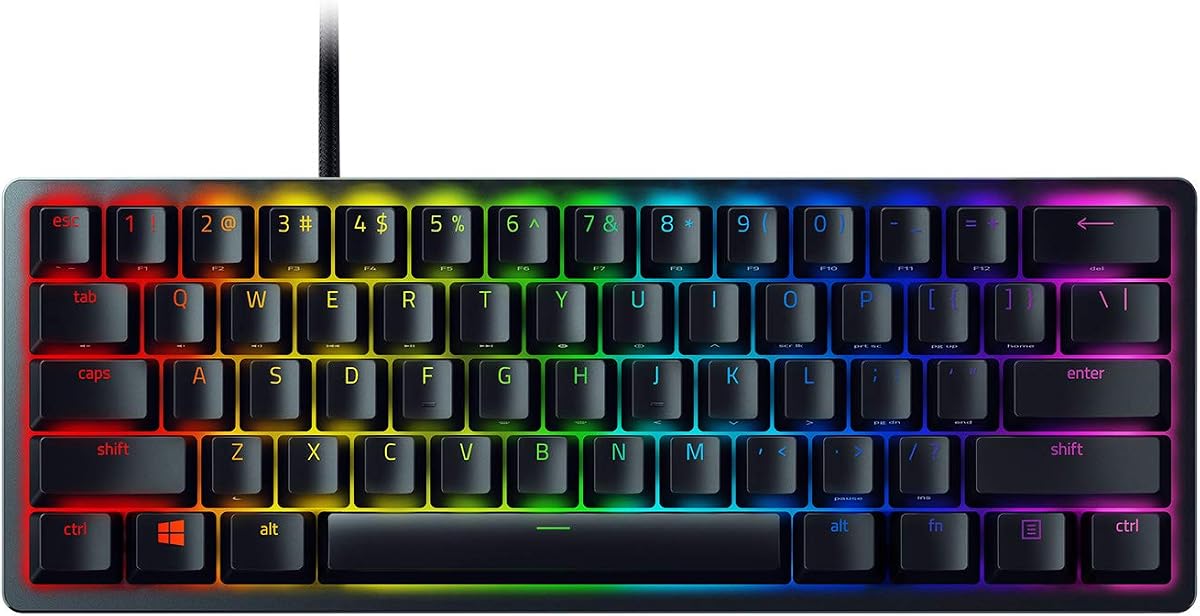
The Razer Huntsman Mini 60% has a supplied rating of 4.6 and uses Razer Linear Optical switches rather than conventional mechanical contacts. The switches actuate at 1.0mm, offering a shorter listed travel than many linear mechanical switches. That immediate response, combined with the small footprint, makes it a polished option for fast Valorant input.
We may earn a commission when you buy through this link, at no additional cost to you.
Razer Snap Tap is the notable movement feature. When enabled through Razer Synapse 4, the keyboard prioritizes the latest input between a pair of assigned keys, allowing movement releases to interrupt opposite direction presses. This is intended to support more responsive directional behavior. Hypershift also makes every key and key combination remappable, providing a deep set of options for custom commands.
The board also benefits from a matte aluminum top frame, which improves structural rigidity, and textured double-shot PBT keycaps designed to resist long-term grime. Individual Chroma RGB lighting is compatible with popular games and a wide range of third-party devices. The compact 60% format leaves additional mouse space but does not include a separate function row.
This is a strong recommendation for a Valorant player who values a refined physical design, established software features, and a reliable optical switch platform more than adjustable magnetic actuation. It also works for players who want one keyboard to handle both competitive games and a polished desktop setup. Wired-only operation may be less appealing to someone seeking tri-mode flexibility.
The listed 1.0mm actuation distance shortens the movement required before a key registers. Optical detection removes physical switch contact, which can be attractive to players who want a fast, clean-feeling command line.
Hypershift supports extensive remapping and macro creation, while Chroma extends lighting control beyond the keyboard. Razer Synapse 4 provides the central interface for these features and for enabling or disabling Snap Tap.
We may earn a commission when you buy through this link, at no additional cost to you.
The AULA WIN60 HE has a 4.5 supplied rating and combines a compact 60% layout with adjustable Hall effect magnetic switches. It supports an advertised 8,000Hz polling rate and a listed rapid-trigger step of just 0.02mm. These characteristics make it a technically aggressive option for players who want extremely granular control over movement and shooting inputs.
We may earn a commission when you buy through this link, at no additional cost to you.
The supplied information describes the switches as detecting movement without physical contact, which helps avoid the wear associated with conventional mechanical switches. The keyboard is specifically promoted for Valorant and CS2, with rapid-trigger behavior intended to improve fast peeking and quick-stop shooting. Its compact design saves desk space, while lower-positioned RGB lighting illuminates the PBT keycaps.
One of its most practical advantages is the web-based driver. It can be accessed from an internet-connected device and handles remapping, advanced macros, and RGB customization without a heavy desktop application. This simplifies setup compared with a heavy local software suite, though the browser interface still needs a reliable internet connection and a compatible device for configuration.
The WIN60 HE is a compelling option for a dedicated Valorant setup where mouse room and rapid-trigger precision come first. Its small layout will be less convenient for users who rely on a function row or number pad. Overall, the combination of fine adjustment, hot-swappable construction, and web-based customization makes it one of the more distinctive picks in the list.
The stated 0.02mm rapid-trigger step provides exceptionally fine control over movement reset behavior. It is useful for players who want to compare precise alternatives and build a configuration around their own tapping speed.
The web driver supports remapping, macros, and lighting without requiring a bulky local download. That convenience can make it easier to revisit a saved Valorant profile or correct a setting between matches.
We may earn a commission when you buy through this link, at no additional cost to you.
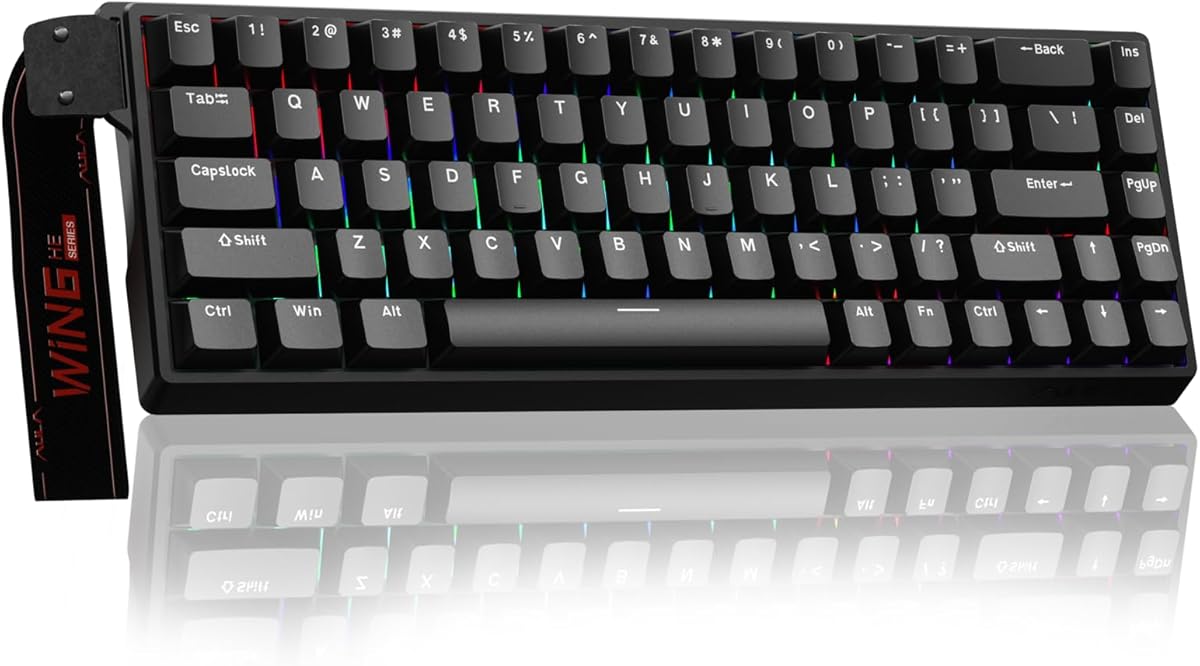
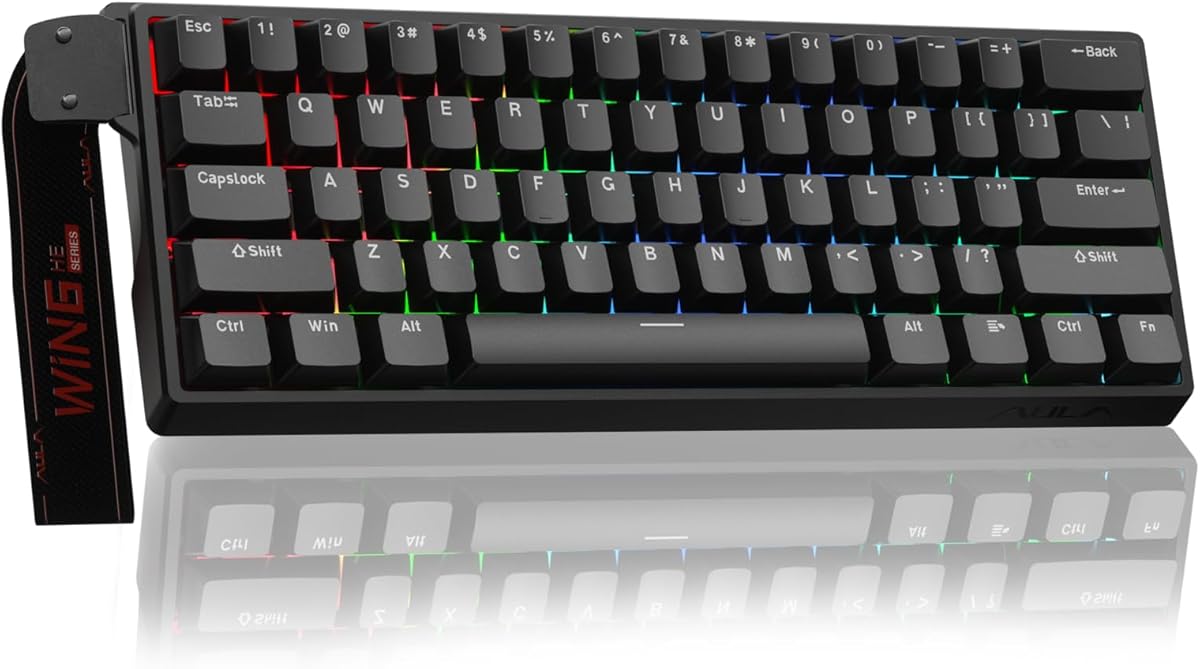
The AULA WIN68 HE is a 68-key wired Hall effect keyboard with a 4.5 supplied rating. It supports an advertised 8,000Hz polling rate, 0.3ms latency, adjustable actuation from 0.02mm to 3.44mm, and per-key increments of 0.1mm. The breadth of those controls makes it a strong value-oriented choice for a player who wants to fine-tune Valorant input behavior.
We may earn a commission when you buy through this link, at no additional cost to you.
The web driver exposes rapid trigger, SOCD, DKS, MT, and TGL functions, as well as remapping, macro editing, and RGB settings. Press and reset sensitivity can be adjusted for individual keys and different game types. It is a broad configuration set for a compact board, although the supplied information specifically notes that the web driver is Windows-only and does not support Mac.
The 60% format saves up to 40% of desktop space while retaining arrow keys and basic function access through combinations. A detachable USB-C cable supports a stable wired connection, and the keyboard can also serve as a portable option for laptop use. RGB lighting includes 16.8 million colors, 14 preset effects, south-facing LEDs, and adjustable brightness.
The WIN68 HE is a particularly balanced recommendation for budget-conscious Valorant players. It retains arrow keys that some smaller boards omit, while providing more competitive controls than a standard mechanical model. The main limitations are the lack of wireless connectivity and Windows-only configuration software, both of which should be checked against your preferred computer setup.
Each key can be tuned in small increments across a broad actuation range. That flexibility allows movement and action keys to be treated differently, giving the player more control over how the board responds during a match.
Keeping arrow keys makes the 68-key arrangement more useful for gaming and everyday navigation. A detachable Type-C cable adds portability, while the small footprint leaves additional room for a large mousepad.
We may earn a commission when you buy through this link, at no additional cost to you.
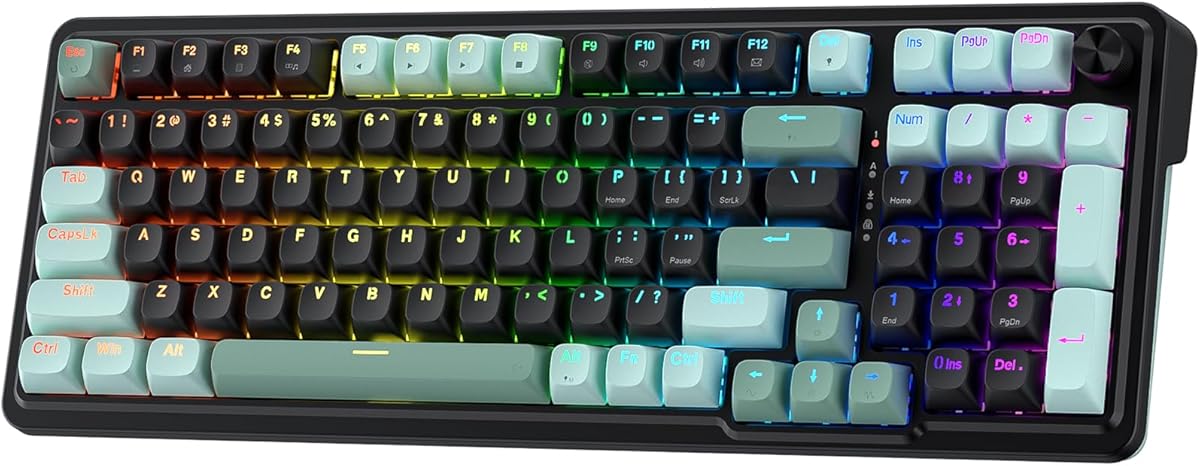
The AULA F75 Pro has a supplied rating of 4.6 and takes a broader approach than the rapid-trigger specialist keyboards in this guide. It combines a conventional hot-swappable mechanical platform with tri-mode connectivity, an 81-key 75% layout, RGB lighting, programmable macros, and a multifunction knob. That makes it useful for a player who wants Valorant performance alongside mobile, console, and office use.
We may earn a commission when you buy through this link, at no additional cost to you.
Bluetooth 5.0, 2.4GHz wireless, and USB wired connections are all supported, with up to five paired devices. The rechargeable 4,000mAh battery is designed for extended use. In 2.4GHz mode, it offers a convenient alternative to a permanently wired board, though the product does not claim the rapid-trigger or adjustable-actuation behavior of the magnetic alternatives.
The F75 Pro uses pre-lubed LEOBOG Reaper switches and hot-swappable sockets compatible with three-pin or five-pin switches. Pre-lubed stabilizers, an extended silicone pad, PCB single key slotting, and five layers of internal filling are intended to improve stability, resilience, and sound. The result is positioned more around smooth mechanical feel and refined acoustics than instantaneous magnetic reset.
The multi-function knob switches between gaming and office modes, controlling lighting in one and media in the other. Keys support macro programming through the F75 driver, N-key rollover, and a Windows-key lock that can prevent accidental menu interruptions. This is the most versatile non-magnetic recommendation, especially for a player who values wireless switching and a fuller layout over rapid-trigger features.
Switching among Bluetooth, 2.4GHz, and wired modes makes the F75 Pro useful beyond a single gaming station. It can move between a desktop, laptop, tablet, phone, or supported console setup without changing the physical keyboard.
Three-pin and five-pin hot-swap support makes it possible to alter the switch experience without soldering. Pre-lubed Reaper switches, internal filling, and pre-lubed stabilizers offer a refined starting point for both play and typing.
We may earn a commission when you buy through this link, at no additional cost to you.
The ATTACK SHARK X68 HE has a supplied rating of 4.6 and is a 66-key wired magnetic keyboard designed for fast FPS and rhythm-game input. Its advertised 8,000Hz polling, 0.01mm rapid-trigger accuracy, and theoretical 0.125ms latency place it among the most input-focused products here. The adjustable Hall effect switches are also explicitly referenced for Valorant.
We may earn a commission when you buy through this link, at no additional cost to you.
A distinctive feature is the ability to bind four functions to one key according to four different pressing depths. Actuation can be set from 0.1mm to 3.4mm, while the web driver supports remapping, macros, hotkeys, lighting, and separate activation and deactivation points. This gives players unusually granular control over how light and deep presses behave.
The top-mounted chassis uses an anodized aluminum alloy plate and double-layer PORON for stability and a quieter feel. Pre-lubed stabilizers are fitted for larger keys, while a curved wrist rest and non-slip mat are designed to improve comfort and placement. Double-shot Cherry-profile PBT keycaps, 16.8 million RGB colors, and south-facing LEDs complete the gaming-focused design.
The X68 HE is a strong option for someone who wants a compact board, a physical wrist rest, and detailed magnetic control. A detachable Type-C cable makes the connection stable, and a one-button Windows/Mac switch broadens compatibility. The driver is accessed through a web link, so buyers should confirm that its configuration workflow suits their setup.
Binding four functions to different press depths is unusually flexible. A player can experiment with light and heavy presses for separate movement, communication, or utility commands without assigning every function to a separate physical key.
The curved wrist rest helps keep the hands in a more natural position, while the anti-slip mat supports stability. This is particularly relevant for a mouse-focused game where the hands frequently alternate between keyboard and mouse.
We may earn a commission when you buy through this link, at no additional cost to you.
The ASUS ROG Strix Scope II 96 has a supplied rating of 4.6 and is the most premium, expansive design in the guide. Its 96% layout retains a dedicated number pad and full-size functionality while sitting only about one centimeter wider than a standard 80% keyboard. It is therefore suited to players who want Valorant performance and a practical productivity layout in one product.
We may earn a commission when you buy through this link, at no additional cost to you.
Connectivity covers Bluetooth for up to three devices, low-latency 2.4GHz wireless through ROG SpeedNova, and USB wired operation. PC and Mac compatibility broaden its appeal, while the stated battery life reaches up to 1,500 hours in 2.4GHz mode. The keyboard does not offer adjustable magnetic actuation, so competitive movement control relies on the quality of its mechanical switches rather than rapid-trigger software.
ROG NX Snow linear switches are pre-lubed for smooth movement and improved acoustics, and the hot-swappable design allows compatible switch alternatives to be installed. Integrated foam and switch-dampening pads reduce pinging and echoes, while PBT keycaps and per-key RGB provide a durable, customizable finish. A multifunction wheel handles media and lighting adjustments, and all keys support macro programming.
The Scope II 96 is best for a player who wants premium construction, wireless versatility, and a numpad without sacrificing a compact footprint. Its larger size takes more mouse space than a 60% board, and the lack of magnetic rapid-trigger control makes it less specialized for competitive FPS tuning. The included detachable wrist rest, three tilt positions, switch puller, receiver, extender, and other accessories make it a complete desktop package.
The 96% arrangement keeps the number pad and navigation functionality while remaining smaller than a conventional full-size keyboard. It is a practical middle ground for gaming sessions followed by work that requires frequent number entry.
Bluetooth, 2.4GHz, and wired connectivity make the keyboard easy to move between devices. ROG SpeedNova supports the low-latency wireless path, while the long stated battery life is useful for a multi-computer desk.
We may earn a commission when you buy through this link, at no additional cost to you.
The best keyboard for Valorant balances immediate input registration, consistent movement behavior, durable keycaps, and a layout that suits both the mouse and the player's habits. The most important choice is whether magnetic rapid-trigger control matters more than wireless convenience or a full-size productivity layout.
In a magnetic keyboard, actuation determines how far a key must travel before the game recognizes it. Rapid trigger then controls how quickly the key resets after release, allowing a brief opposite-direction tap to interrupt a held movement command. This can be valuable for counter-strafing because the new direction is registered without waiting for a complete physical reset. Look for clearly stated actuation ranges, per-key adjustment, and dedicated rapid-trigger controls. Models such as the Redragon K686 HE, AULA WIN60 HE, and ATTACK SHARK X68 HE provide these magnetic controls, but their exact settings and software workflows should be checked before purchase.
Polling rate describes how often the keyboard reports its state to the computer. A higher rate can shorten the interval between a physical change and the next report, although real-world responsiveness also depends on the computer, game, connection, and software. All the magnetic models in this guide advertise up to 8,000Hz, and the Corsair Clipper PRO MINI 60 uses CORSAIR AXON hyper-processing for the same stated rate. The Razer model emphasizes optical actuation and a 1.0mm activation point instead. A high polling number is useful, but it should be considered alongside stable wired operation, predictable firmware, and settings that do not compromise the rest of the system.
Magnetic Hall effect switches detect travel without physical contact and unlock adjustable actuation. Optical switches also use light-based detection and provide quick, consistent activation, while conventional mechanical switches rely on contact and may offer a more familiar feel. The supplied Redragon, Corsair, AULA magnetic, and ATTACK SHARK products target competitive response; the Razer board uses linear optical switches, the AULA F75 Pro uses pre-lubed Reaper mechanics, and the ROG Scope II 96 uses pre-lubed ROG NX Snow linear switches. Choose based on whether your priority is programmable travel, a refined traditional feel, or a changeable enthusiast build.
A compact 60% keyboard creates more space for a large mousepad, which can assist with broad flicks and frequent repositioning in Valorant. The AULA WIN60 HE, Corsair Clipper PRO MINI 60, Razer Huntsman Mini 60%, and ATTACK SHARK X68 HE use this approach, though they differ in arrow-key and function-key access. A 75% board adds more dedicated keys, while the 96% ASUS model keeps a number pad. Full-size boards are more comfortable for productivity, but their footprint can constrain mouse movement. Choose the smallest layout that still contains the navigation keys you use regularly.
Wired operation is simple, consistent, and removes wireless pairing from the setup process. Most of the rapid-trigger boards in this guide are wired, including the Redragon models, the AULA magnetic keyboards, the Corsair Clipper PRO MINI 60, and the ATTACK SHARK X68 HE. The AULA F75 Pro and ASUS ROG Strix Scope II 96 support Bluetooth and 2.4GHz wireless in addition to USB, making them more flexible across a multi-device desk. Wireless is convenient, but a wired connection is often preferable when minimizing variable conditions is the priority. Check whether the operating system and configuration software are supported before choosing a wireless board.
Competitive settings often require software, even when a board includes onboard controls. The Redragon models use desktop or web-based drivers for calibration and profiles; the AULA magnetic boards provide web drivers for functions such as rapid trigger, SOCD, macros, and lighting. The Razer integrates Snap Tap and Hypershift with Razer Synapse 4, while the AULA F75 Pro provides macro and lighting controls through its driver. Make sure the required software supports your operating system, especially because the AULA WIN68 HE driver is listed as Windows-only. Also consider whether profiles can be saved, since reconfiguration between matches is inconvenient.
A keyboard that feels consistent over long sessions benefits from a stable plate, carefully fitted stabilizers, durable keycaps, and controlled internal resonance. The Redragon K673 HE and K686 HE use independent switch-plate structures and dampening layers. The AULA F75 Pro uses multiple internal filling layers, the ATTACK SHARK X68 HE uses a top-mounted plate with PORON, and the ASUS Scope II 96 integrates sound-dampening foam and switch pads. PBT keycaps appear throughout many of the recommendations and are intended to resist wear and grime. For voice-chat players, sound character may matter almost as much as raw activation speed.
A Valorant keyboard does not have to remain on the gaming desk. The Razer board supports extensive macro remapping, the AULA F75 Pro can pair with up to five devices, and the ASUS Scope II 96 supports Bluetooth, 2.4GHz, and wired modes. The AULA F75 Pro also separates gaming and office knob modes, while the Redragon K618 HE offers onboard macro keys. If you type, edit, or use a number pad every day, consider those conveniences. If Valorant is the primary use, keep the decision focused on the controls that directly affect movement and shooting.
Begin by connecting the keyboard in its wired mode if possible, then install the correct driver or open the supplied web-based configuration page. Confirm that the operating system and game profile are recognized before entering a match. Set a moderate actuation point, enable the desired movement features one at a time, and save that setup as a separate Valorant profile rather than changing several variables simultaneously.
Test the configuration in the game's practice range. Practice short counter-strafe taps, quick direction reversals, repeated jump inputs, and the movement style you normally use. If an input feels late, inconsistent, or too sensitive, change one setting and repeat the same drill. Keep a separate general-use profile so that a highly competitive gaming configuration does not make everyday typing uncomfortable.
For maintenance, unplug the keyboard before changing magnetic, optical, or hot-swappable components and follow the manufacturer's compatibility instructions. Keep the board away from spills and excessive dust, and clean the keycaps and case with a soft, dry or lightly damp cloth. Avoid pushing liquid into the switches, and allow the keyboard to dry fully if it becomes wet. Update the driver occasionally, but keep a record of the settings that work best for your Valorant profile.
A mechanical or magnetic keyboard is generally better suited to competitive Valorant play because it offers more consistent key registration, programmability, and useful movement controls. Membrane boards can still work for casual play, but they usually provide less control over actuation and remapping. The right choice is ultimately determined by your budget, preferred feel, and need for rapid-trigger features.
No, a 60% keyboard is not required, but its smaller footprint can leave more room for a large mousepad and broad aiming movements. It also omits arrow keys and a dedicated function row, so check whether you regularly use those controls. The 68-key, 75%, and 96% alternatives provide different balances between desk space, navigation, and productivity.
Rapid trigger changes how quickly a movement key resets after it is released. This allows a new direction to register sooner when a player briefly taps an opposing movement key, which can make counter-strafing feel more responsive. It is especially relevant on Hall effect keyboards with adjustable actuation, such as the Redragon, AULA magnetic, Corsair Clipper, and ATTACK SHARK models.
An 8,000Hz polling rate is a strong specification, but it does not guarantee a particular improvement by itself. Computer performance, game behavior, connection stability, switch settings, and software all influence the experience. The rapid-trigger models still offer useful controls even when a player is not chasing the highest listed polling rate.
A wired keyboard provides a simple connection and avoids pairing, radio interference, and battery management. Wireless is more convenient if you switch between devices or want a cleaner desk, and the AULA F75 Pro and ASUS ROG Scope II 96 support multiple connection methods. For the most direct competitive setup, wired operation is generally the conservative choice.
Hall effect switches detect key travel magnetically rather than through physical contact between switch components. That design avoids one common source of mechanical-switch wear, and the supplied product information specifically highlights reduced wear on the AULA WIN60 HE. Like every keyboard, however, the switches still require reasonable care and protection from debris, moisture, and impact.
Yes, and most of the listed boards include features suitable for productivity, including remapping, macros, media controls, and adjustable lighting. The AULA F75 Pro and ASUS Scope II 96 are especially versatile because of their multi-device connectivity and fuller layouts. It is wise to save separate gaming and office profiles so a rapid-trigger setup does not affect normal typing.
Start with a moderate setting and reduce it gradually if you want earlier movement registration. A very low point can increase accidental or rapid repeated inputs, while a high point may feel unresponsive during fast counter-strafing. The exact comfort level depends on your touch and the features enabled, so use the practice range to compare settings under real movement conditions.
The Redragon K686 HE stands out as the best overall recommendation because it combines adjustable Hall effect switches, rapid trigger, PRCS, an advertised 8,000Hz polling rate, and useful dampening in a coherent competitive package. The Redragon K618 HE is the low-profile alternative, while the AULA WIN68 HE represents a strong value-focused choice with detailed per-key controls.
Players who want the most control should prioritize actuation range, rapid-trigger precision, and dependable software profiles. Those who prefer a conventional feel should consider the Razer optical board, the customizable AULA F75 Pro, or the premium ASUS ROG Scope II 96. Layout matters just as much: choose a 60% board for maximum mouse room, a 75% board for balance, or a 96% board when a number pad is important.
Before purchasing, verify the operating-system requirements, confirm that the relevant movement controls meet your play style, and read current customer feedback. Product prices, promotions, and availability can change, so check the current listing for the latest information. The right Valorant keyboard is ultimately the one that feels consistent under your own movement habits.