
HUANUO FlowLift Pro Monitor Arm
4.5Editor score
Tool-free VESA plate installation
Mechanical spring support system
Visible tension calibration window
A PC desk arm for gaming can transform a crowded workstation into a more focused, immersive setup by lifting your display, improving sightlines, and opening room for your keyboard, mouse, and accessories. The best models combine stable support, smooth movement, dependable desk attachment, and enough articulation to suit different games, multitasking layouts, and preferred viewing positions.
This guide compares ten monitor-related products for gaming desks, including single, dual, and triple display arms along with two arm-support accessories. We evaluated the supplied specifications for monitor compatibility, load capacity, mounting methods, adjustment ranges, installation requirements, cable handling, and intended use, with particular attention to the features that matter during long gaming sessions.
Each selection highlights a different path for building a better gaming station, whether that means supporting a single ultrawide display, arranging two screens, managing three panels, or improving arm and elbow comfort. Ratings reflect the supplied customer feedback, while product availability, configurations, and prices can change, so readers should verify current details before purchasing.
4.5Editor score

4.6Editor score

4.5Editor score
As an Amazon Associate we earn from qualifying purchases.
The comparison below covers monitor capacity, display-size support, adjustment mechanisms, mounting options, and desk fit. It includes true monitor arms as well as two ergonomic arm supports that can complement a gaming setup.


The HUANUO FlowLift Dual Monitor Stand earns the Editor's Choice position because it combines two independently adjustable display arms with a particularly robust dual C-clamp base. Its supplied rating is 4.6, and the design is aimed squarely at gamers who want two screens without giving up valuable desktop space. Each arm accommodates displays from 13 to 32 inches and weights from 4.4 to 19.8 pounds.
We may earn a commission when you buy through this link, at no additional cost to you.
The standout feature is the combination of installation choices and movement. A dual C-clamp can secure both arms, while a grommet option is also available. Once installed, the displays can tilt from +85 to -50 degrees, swivel through 90 degrees in either direction, rotate a full 360 degrees, and rise as high as 15.75 inches above the desktop. That flexibility makes it easier to move a secondary display away during a game or bring both screens into a comfortable arrangement for streaming and system monitoring.
There are practical limitations to consider. The manufacturer recommends a wooden desktop between 0.59 and 3.54 inches thick, and the underside must be clear of crossbeams or panels. Each display must use a supported VESA pattern and fall within the size and weight limits. The two-arm assembly is also more involved than attaching one screen, so buyers should confirm that their desk can accommodate the base before ordering.
This is an excellent recommendation for gamers with two compatible monitors, a roomy wooden desk, and a preference for frequent screen repositioning. The sturdier dual-clamp approach is particularly appealing where display wobble would be distracting. For a single ultrawide display, however, a dedicated single-monitor arm may provide a cleaner installation and simpler adjustment process.
The enlarged platform and dual C-clamp structure give the stand a reassuringly stable base for a two-display gaming arrangement. This is important when a side screen contains chat, a game launcher, performance tools, or a second game view that must remain stable during rapid input.
Wide tilt, swivel, rotation, and vertical travel let each screen follow different needs. A player can align two displays as a wide virtual desktop, rotate one to portrait for system information, or move a secondary panel closer when it becomes relevant without rearranging the entire desk.
We may earn a commission when you buy through this link, at no additional cost to you.
The HUANUO FlowLift Pro Monitor Arm is the Best Budget pick in this guide because it delivers the core qualities of a gaming monitor arm without focusing on a multi-screen configuration. It carries a 4.5 rating and supports one monitor from 13 to 32 inches, with a maximum load of 15.4 pounds. Its MechaSpring system is designed to maintain consistent support without relying on the pressure behavior associated with gas springs.
We may earn a commission when you buy through this link, at no additional cost to you.
Installation is one of its most appealing aspects. The tool-free VESA plate snaps into the mounting head, reducing the need to align screws while supporting the weight of a display. The simplified hardware and visible PrecisionView tension window make setup easier to approach confidently. Once mounted, the arm offers tilt, swivel, and rotation, while the spring mechanism is intended to move smoothly and remain at the selected position.
The main compromise is its 15.4-pound load ceiling, which is lower than the 19.8-pound figures advertised by several competing arms. It also shares the common wood-desk recommendation and requires the tabletop to fall within the specified thickness range. A player using a heavier monitor, an unusually thick desktop, or a desk with an obstructed underside should check these constraints before selecting it.
This arm is well suited to a single gaming monitor, particularly for someone who values quick installation and straightforward tension calibration. It also makes sense for a hybrid workstation where the display moves between gaming, coding, and video calls. The restrained single-screen design keeps the setup clean and may be the most practical choice for many desktop configurations.
The tool-free VESA plate and visible tension indicator make this model approachable for first-time monitor-arm users. You can connect the display without holding it while aligning several screws, then use the indicator window to converge on the appropriate spring tension.
The MechaSpring construction is intended to resist droop and retain its position during repeated adjustments. That makes it a practical option for players who routinely pull a display closer, angle a panel toward another seat, or switch between landscape and portrait layouts.
We may earn a commission when you buy through this link, at no additional cost to you.
The HUANUO FlowLift Single Monitor Mount shares the top rating in this comparison at 4.6 and offers a balanced option for gamers with one display. It accommodates 13- to 32-inch monitors, supports weights from 4.4 to 19.8 pounds, and accepts both 75x75mm and 100x100mm VESA patterns. Its one-arm format is simpler than a dual or triple setup while retaining the movement needed for an adaptable gaming position.
We may earn a commission when you buy through this link, at no additional cost to you.
The adjustment range is substantial. The screen can tilt between -50 and +85 degrees, swivel 90 degrees in either direction, rotate through 360 degrees, and lift as much as 39.6 centimeters above the desktop. One-handed controls make it convenient to shift a monitor toward the player when playing, move it aside for desk work, or rotate the display into portrait orientation for streaming tools and chat windows.
The manufacturer emphasizes automotive-grade components and 20,000 motion tests, and the supplied information states that the arm can be used continuously for more than five years without issue. That longevity claim is more persuasive when paired with the broad weight limit and straightforward tension adjustment. However, buyers still need a compatible wooden desk without interfering beams, and a desk thickness between 0.59 and 3.54 inches.
This monitor mount is a strong recommendation for a single-screen gaming station, especially when the goal is to combine frequent repositioning with a relatively uncomplicated installation. It also suits hybrid workers who want a display that can move between gaming and general productivity. If two screens are central to the setup, the dual stand may deliver better value in terms of usable configuration.
Tilt, swivel, full rotation, and generous vertical travel cover most common gaming adjustments. The result is a display that can move from a straight racing-game position to a side-facing entertainment layout without requiring a separate stand or additional hardware.
The one-piece arm design reduces the number of installation steps, while the included hardware supports either C-clamp or grommet attachment. Once the base is fixed, attaching the VESA plate and setting the spring tension completes the core setup.
We may earn a commission when you buy through this link, at no additional cost to you.
The ErGear Single Monitor Arm is a versatile choice for gamers who want one display with extensive movement. Its 4.4 rating reflects solid feedback, while its stated compatibility spans 13- to 34-inch flat or curved monitors up to 19.8 pounds. The 100x100mm and 75x75mm VESA support covers the mounting patterns most commonly found on mainstream gaming displays.
We may earn a commission when you buy through this link, at no additional cost to you.
Its reach of up to 18.1 inches and height adjustment of up to 17.5 inches provide considerable freedom to position a screen. The range includes +80 to -50-degree tilt, 90-degree swivel in either direction, and 360-degree rotation. This is particularly useful when the same monitor must serve competitive gaming, cinematic entertainment, and tasks that benefit from a vertical layout.
ErGear emphasizes a wider VESA head, a close-fitting VESA panel, and a durable core tested through more than 20,000 cycles. Its tool-free VESA plate also simplifies the most awkward part of installation. Cable clips open without tools, allowing wires to be removed or repositioned more easily than with permanently closed guides. These details contribute to a cleaner daily workflow.
The desk constraints deserve careful attention. C-clamp installation supports desktops from 0.39 to 2.56 inches thick, while the grommet option supports 0.39 to 2.95 inches. This is a compelling option for a compatible single-monitor gaming desk, though users with thicker desktops should verify the installation method before purchasing.
Support through 34 inches gives the model useful reach beyond the common 32-inch ceiling. Combined with a 19.8-pound capacity, it gives gamers a broad compatibility window without requiring a dual-arm configuration.
The tool-free-opening clips make routing and rearranging cables easier during setup. Keeping display leads organized reduces visual clutter and can prevent wires from occupying the same working area as the keyboard and mouse.
We may earn a commission when you buy through this link, at no additional cost to you.
The NB SmooVex Monitor Arm is a clean, single-screen option for gaming desks where visual simplicity matters. It has a 4.5 rating and supports flat or curved monitors up to 32 inches using standard 75x75mm or 100x100mm VESA patterns. Its slimmer construction is designed to preserve desk space and reduce the chance that an extended arm will interfere with nearby objects.
We may earn a commission when you buy through this link, at no additional cost to you.
The mechanical spring system is the defining feature. According to the supplied details, it is intended to provide smoother movement and more stable support than a conventional gas-spring arrangement while avoiding gas leakage and reducing long-term sagging concerns. The arm allows 90-degree rotation in either direction, tilt from -25 to 90 degrees, swivel movement, and 230mm of height travel.
Installation is presented as a straightforward three-step process, with both C-clamp and grommet options included. That gives the buyer some flexibility in how the arm attaches to the desk. Its primary drawback is that the supplied product information does not state a maximum monitor weight, so compatibility with a particularly heavy display cannot be confirmed from the available specifications.
This model is a sensible recommendation for gamers seeking a modern-looking, space-conscious single-display setup. The mechanical spring should appeal to anyone concerned about long-term arm behavior, while the included mounting options simplify compatibility planning. Confirm your display's weight and VESA layout before ordering, as those checks remain essential even with a straightforward installation.
The reduced-profile arm helps preserve usable space around the display and reduces potential interference with other desk equipment. That makes it useful in compact gaming areas where every part of the keyboard and mouse zone matters.
The spring design is presented as a durable alternative to gas-based mechanisms. It is intended to hold a chosen position while remaining easy to reposition, which is valuable when switching between focused play and everyday desktop tasks.
We may earn a commission when you buy through this link, at no additional cost to you.
The WALI Adjustable Single Monitor Arm is the most capable listed option for a heavier flat gaming monitor, supporting up to 26.4 pounds. It has a 4.3 rating and accommodates most flat or curved displays from 13 to 34 inches with standard 75x75mm and 100x100mm VESA mounting patterns. Curved screens have a lower stated capacity of 19.8 pounds.
We may earn a commission when you buy through this link, at no additional cost to you.
Its movement is among the most generous in the comparison. The screen can extend 19.3 inches from the desk, rise up to 17.3 inches above the desktop, swivel 180 degrees in either direction, tilt from +70 to -45 degrees, and rotate through a full 360 degrees. This range makes the arm useful for large displays, unconventional desk layouts, and shared gaming spaces where the viewing position may change.
The structural emphasis is clear: a wider VESA head, a tighter-fitting VESA panel, and a durable core tested through more than 20,000 cycles. The arm also includes built-in cable management. C-clamp and grommet installations both support desktops from 0.39 to 2.76 inches thick, and a wooden desktop without a blocking crossbeam is recommended.
The main limitation is that the higher capacity applies to flat screens, while curved displays are limited to 19.8 pounds. Its rating is also the lowest among the listed products, though that does not negate the useful strength and articulation. This is a compelling pick for owners of a large, heavy flat monitor who value reach and sturdy support over multi-screen functionality.
A 26.4-pound capacity gives the WALI arm a useful margin over many single-screen competitors. That additional headroom can be reassuring with a large flat gaming monitor, particularly when the screen is positioned at the end of its extension.
Long extension, high vertical travel, wide swivel, and full rotation allow the display to move through nearly every useful position. These ranges suit players who alternate between a centered competitive view and a more relaxed, off-axis entertainment setup.
We may earn a commission when you buy through this link, at no additional cost to you.
The HUANUO Triple Monitor Mount is built for gamers who want a genuinely multi-screen command center rather than a dual-display compromise. It has a 4.5 rating, supports three monitors from 13 to 27 inches, and uses aerospace-grade aluminum arms. Each arm is rated to hold up to 19.8 pounds, with compatibility for 75x75mm and 100x100mm VESA patterns.
We may earn a commission when you buy through this link, at no additional cost to you.
All three displays benefit from broad articulation. The system offers 360-degree rotation, 90-degree swivel in either direction, tilt up to 45 degrees in either direction, and 12.2 inches of height adjustment. A player could keep a game in the center, position a secondary game or performance display to one side, and use the remaining screen for chat, voice communication, or system monitoring.
The supplied details state that each arm has been tested through 20,000 lift cycles, indicating an emphasis on stability and repeated adjustment. Built-in cable clips help route the many leads created by a three-screen setup, while elevated monitors can free space for the keyboard, mouse, and accessories. Desk thickness compatibility spans 0.39 to 3.15 inches, although the overall width requirement is naturally significant.
This mount is ideal for simulators, strategy games, streaming workflows, and competitive setups that use multiple live views. The 27-inch maximum means it is less appropriate for a large ultrawide or oversized display, and a desk with limited width or irregular edges may complicate placement. For gamers who truly need three panels, though, it provides the most specialized configuration in the guide.
Each arm can be positioned independently, which is essential when different panels serve different roles. The center display can remain dedicated to the game while side screens handle secondary tasks without requiring all three to share one viewing angle.
Elevating three displays creates a more open surface below for peripherals and removes several monitor bases from the desktop. Cable clips help maintain that cleaner appearance by guiding the additional wiring generated by a three-screen arrangement.
We may earn a commission when you buy through this link, at no additional cost to you.
The MEKASS L-Shaped Desk Elbow Pad is not a display mount, but it is a useful companion product for a gaming workstation. It has a 4.4 rating and includes two memory foam pads shaped to wrap around desk edges. The cushions support the arms and elbows during extended keyboard, mouse, controller, or hotkey sessions when the desk edge would otherwise create concentrated pressure.
We may earn a commission when you buy through this link, at no additional cost to you.
Each pad measures 11.8 by 4.3 by 0.78 inches, and the two-piece arrangement allows users to adjust the spacing to suit different chair positions or desk layouts. The smooth Lycra covering and slow-rebound memory foam provide a softer surface than bare wood, while the textured face is intended to remain comfortable during prolonged contact and help limit heat buildup.
A rubberized base keeps the cushions from shifting during rapid typing or intense gaming. The surface is also described as stain-resistant and easy to wipe with a damp cloth, which is useful in a gaming environment where crumbs, drink splashes, and frequent hand contact are common. The pair can support either side of the body or be positioned to match a particular desk edge.
This is best recommended for gamers who spend long sessions at a flat-edged desk and feel pressure on the forearms or elbows. It will not lift a monitor, free desk space, or improve screen positioning, so it should complement rather than replace a monitor arm. Its main limitation is that it is shaped for conventional edges and does not provide the same support as a full adjustable arm rest.
The L-shaped design adds cushioning precisely where the forearms meet a hard desk edge. That can make long keyboard and mouse sessions more comfortable without taking up the open working area beneath a keyboard tray.
Independent positioning lets users adjust the gap between supports to match posture and desk dimensions. The non-slip rubber base helps each piece remain stable during rapid inputs, while the wipe-clean cover simplifies upkeep.
We may earn a commission when you buy through this link, at no additional cost to you.
The VIVO Dual Monitor Stand is the Best Premium pick, offering a refined mechanical-arm approach for two-screen gaming setups. It carries a 4.5 rating and supports two flat or curved monitors from 17 to 32 inches, with each screen weighing between 4.4 and 19.8 pounds. Both 75x75mm and 100x100mm VESA mounting patterns are supported.
We may earn a commission when you buy through this link, at no additional cost to you.
Mechanical spring adjustment provides counterbalanced movement without the gas-spring behavior highlighted by other brands. The brackets offer tilt from +90 to -90 degrees, 180-degree swivel, and 360-degree rotation. These broad ranges make it possible to arrange the screens as a centered display, angled pair, portrait sidebar, or a combination of horizontal and vertical orientations.
Open-top VESA plates allow each monitor to slide into place, simplifying installation after the base is attached. All hardware and step-by-step instructions are included. The heavy-duty C-clamp fits desktops up to 3.1 inches thick, while the optional grommet base supports tops up to 1.9 inches. Once both screens are elevated, the setup can reclaim a meaningful amount of usable desktop area.
The important caveat is that the back of the arms may extend past the edge of the desk when positioned. Users should check the distance between the monitor and wall, along with the desk's rear clearance, before installation. This model is a strong recommendation for gamers who value smooth, highly articulated dual-screen positioning and prefer the open-top mounting workflow.
The mechanical spring system is designed for smooth positioning across the arms' movement ranges. It allows a player to reach each display without disturbing the other, which is useful when switching between a game and a side panel.
Open-top VESA plates simplify the step where a display is connected to its arm. The user can position the plate over the mounting holes and slide the monitor into a secured fit, reducing the need to align screws while supporting the screen.
We may earn a commission when you buy through this link, at no additional cost to you.
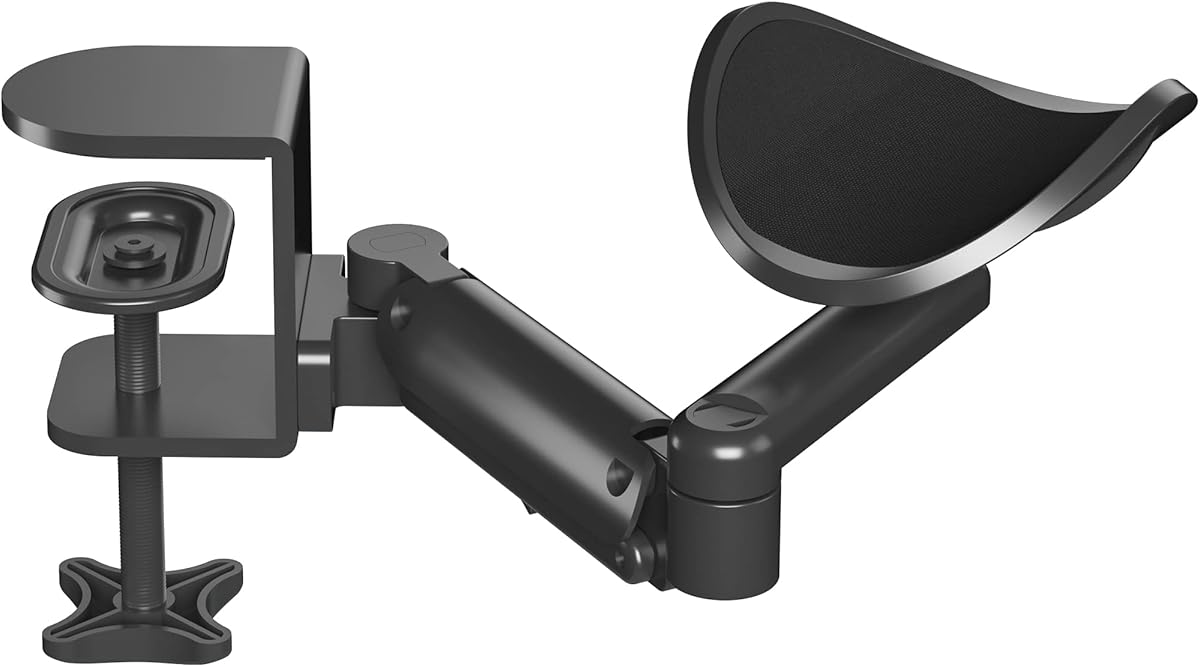
The BONTEC Adjustable Arm Rest is another ergonomic accessory rather than a monitor arm, but it fills an important gaming-comfort role. It has a 4.4 rating and provides a moving cradle for the arm and elbow. The support is designed for left- or right-handed users and adapts to different sitting positions, reducing the need to hold the forearm in place over a bare desk.
We may earn a commission when you buy through this link, at no additional cost to you.
Its flexibility comes from 360-degree rotation and extension of up to 13 inches. The height can be adjusted from 2.4 to 5.3 inches above the desktop, allowing it to work with seated and standing arrangements. Compared with fixed elbow pads, this broader range lets the user reposition support as the chair, task, or working height changes during the day.
The aluminum construction is designed to be lightweight and strong, while the ABS tray is intended to resist cracking, bending, and wear. A stated load capacity of 26.5 pounds provides ample support for typical arm and elbow use. Installation is described as quick, and the product can fit most desks, but raised strips and sloped edges are not compatible.
The BONTEC arm rest is best suited to gamers who alternate between sitting and standing, use an angled or unusually shaped chair position, or want more movement than a stationary cushion provides. It should not be confused with a monitor mount or used as a wrist rest. For flat-edged desks with frequent posture changes, it is a versatile addition to a gaming setup.
The rotating, extendable cradle can follow the arm instead of forcing a fixed posture. That flexibility is useful when the chair is reclined, the keyboard sits farther forward, or the user alternates between seated and standing play.
The aluminum structure and wear-resistant ABS tray are intended for repeated daily use. A high load capacity gives the support a stable base while keeping the arm elevated above the hard desktop edge.
We may earn a commission when you buy through this link, at no additional cost to you.
The right gaming monitor arm depends on your display count, monitor weight, VESA pattern, desk construction, and preferred range of movement. Review these factors before choosing a model so the installation is secure and the adjustment experience suits your games.
Begin by counting the monitors you intend to support. A single-monitor arm is usually the simplest and least visually intrusive option, while a dual stand can turn two panels into a broad virtual desktop or separate a game from chat and system information. A triple mount is best reserved for simulators, strategy titles, streaming workflows, and setups that genuinely benefit from three independent views. More screens require more desk width, more cables, and greater attention to balance.
Choose the smallest configuration that meets your needs. A single arm is easier to install and leaves more room for mouse movement, while a dual or triple mount provides greater flexibility at the cost of a larger footprint.
Every arm has stated screen-size and load limits. The listed single-screen products generally support monitors from 13 to 32 inches, with some extending to 34 inches, while the triple system is intended for displays up to 27 inches. Weight matters just as much: most models support up to 19.8 pounds, the WALI offers 26.4 pounds for flat screens, and the HUANUO FlowLift Pro has a lower 15.4-pound ceiling.
Check the exact specifications of your display before ordering. A screen that falls within the size range can still be too heavy, so verify both measurements rather than relying on diagonal screen size alone.
VESA compatibility describes the square pattern of mounting holes on the back of a monitor. Most of the selected arms accept the common 75x75mm and 100x100mm patterns, but older displays, ultrawides, and specialty screens may use another arrangement. A monitor with no VESA holes generally cannot attach to a standard arm without a suitable adapter or a separate mounting solution.
Measure the hole spacing and confirm the pattern in the display specifications. Also check the shape of the mounting area so the arm's VESA plate sits flush against the rear housing.
The desktop material, thickness, and underside directly affect installation. Most manufacturers recommend a wooden desk, and several explicitly caution against plastic or glass. Crossbeams and panels can obstruct a clamp, while a grommet installation requires a compatible hole and sufficient tabletop thickness. The listed clamp and grommet ranges vary, so use the exact installation method you plan to choose rather than assuming every desk is suitable.
Also leave room behind the desk for the arm to extend. Some products warn that the arm can project beyond the rear edge, a detail that matters near a wall or in a tight cubicle.
Gaming monitors are often moved between centered play, side viewing, portrait utility windows, and entertainment positions. Tilt, swivel, rotation, vertical height travel, and forward reach determine how easily a display can follow those preferences. Mechanical spring arms emphasize stable support and consistent positioning, while other models use adjustable tension systems to balance a monitor's weight.
Compare the movement ranges rather than just seeing the word adjustable. A broader reach is useful when a large monitor should sit farther back, while strong rotation and swivel make side-facing or shared-screen arrangements easier.
A monitor arm must remain still during clicks, camera movement, desk contact, and repeated position changes. Stability depends on the VESA head fit, arm construction, clamp design, base size, and how securely it attaches to the desktop. Several listed products mention cycle testing and a wider or tighter-fitting VESA head, while the HUANUO dual model uses a larger platform and dual C-clamp structure.
For multiple heavy screens, prioritize the stated load rating and the quality of the base rather than range of motion alone. For a single lightweight display, a simpler clamp can be perfectly adequate.
A monitor arm can organize a workstation by lifting the display and guiding its cables, but cable-management quality differs. Some products include clips that open without tools, while others use integrated guides that run along the arm. With two or three displays, route video, power, USB, and peripheral leads before final tension adjustment so wires do not tug against the moving joints.
Leave enough slack for the full travel of the arm. A neat installation should allow the screen to reach every intended position without stretching, sharply bending, or pulling against connectors.
Tool-free VESA plates can greatly reduce installation difficulty, especially when attaching a heavy monitor. Quick-release mechanisms are useful if the display must move between desk and wall mounts. Some arms also provide visible tension indicators, while others require the user to fine-tune resistance by feel. Choose the method that matches your comfort with basic assembly and the frequency with which you expect to remove the screen.
Finally, consider how often you will adjust the display. A stationary gaming position may need less range, while a hybrid desk used for work, streaming, and gaming benefits from accessible release mechanisms, smooth motion, and cable clips that can be reopened.
Before installation, confirm the monitor's VESA pattern, weight, and size against the arm specifications. Inspect the desktop thickness and underside, remove any items from the installation area, and assemble the arm according to the included instructions. Attach the desk base first, tighten it gradually, and verify that the clamp or grommet is fully secure before adding the display.
Once the base is fixed, attach the VESA plate to the monitor while it is safely supported. If the plate is tool-free, slide or snap it into position and engage the locking mechanism. Fit the plate to the arm, balance the monitor weight, and adjust spring tension or resistance until the screen holds its position without drifting. Route cables through the clips with enough slack for movement.
For daily care, inspect the clamp and bolts periodically, particularly if the desk is bumped or the weight setting changes. Clean the arm with a dry or lightly damp cloth and avoid abrasive cleaners or excess moisture around moving joints. Keep the VESA connection secure, organize cables without creating tight bends, and reposition the screen with controlled movements rather than forcing it against its travel limits.
Choose an arm whose stated screen-size range includes your display. Most models in this guide support common gaming monitors from 13 to 32 inches, while the ErGear and WALI extend to 34 inches. Size alone is not enough, because you must also confirm the monitor's weight and VESA mounting pattern before installation.
No. Most gaming monitors use 75x75mm or 100x100mm VESA patterns, and nearly all selected arms support those standards. You should still inspect the back of the monitor, measure the mounting holes, and confirm that the arm's plate will sit flush. Displays without standard VESA holes may require an adapter or a different mounting system.
A C-clamp is usually more convenient because it attaches to the desktop edge without drilling a hole. A grommet base can provide a clean, permanent-looking installation when the desk already has a suitable grommet and the manufacturer permits it. Both approaches require adequate desk thickness, and wooden desktops are generally recommended.
A dual arm is valuable when you want a larger virtual display, a separate game view, or dedicated space for chat and system monitoring. A single arm is simpler, less visually crowded, and better suited to a single ultrawide or standard display. The better choice depends on your game style, available desk width, and how you divide attention between screens.
Capacity varies across this guide. Many models support up to 19.8 pounds, the WALI supports up to 26.4 pounds for flat screens and 19.8 pounds for curved screens, and the HUANUO FlowLift Pro supports up to 15.4 pounds. Always use the lower relevant limit when your display is curved, oversized, or unusually heavy.
It can by making it easier to place a display near eye level and at a comfortable distance. Full-motion arms also allow you to change the screen angle as your posture or task changes. An arm cannot compensate for a badly sized display, poor desk height, or an unsuitable chair, so it should be used as part of a broader ergonomic setup.
Several listed arms support curved or ultrawide displays, but the size and weight limits still apply. The VIVO supports 17- to 32-inch flat or curved screens, the ErGear supports 13- to 34-inch flat or curved screens, and the WALI distinguishes between its flat-screen and curved-screen capacities. Check the exact model and mounting pattern before ordering.
An arm rest can complement a monitor arm by supporting your forearms and elbows, while the monitor arm improves screen positioning and frees desk space. The MEKASS pads suit flat-edged desks, while the BONTEC offers rotating and extending support for users who alternate between sitting and standing. Neither replaces the display arm for screen adjustment.
The HUANUO FlowLift Dual Monitor Stand is the strongest all-around choice for a two-screen gaming system because it combines a stable dual-clamp approach, broad articulation, generous load support, and cable guidance. For a single monitor, the HUANUO FlowLift Pro provides the most approachable installation with its tool-free VESA plate and visible tension window.
Prioritize the factors that affect your actual setup: monitor weight, VESA pattern, desk thickness, underside clearance, and the number of screens you genuinely need. A larger adjustment range is useful only when the arm can be mounted securely and fits the space behind the desk. Accessories such as the MEKASS elbow pads or BONTEC arm rest can improve long-session comfort but should complement rather than substitute for a properly selected monitor arm.
Product configurations and prices can change, so confirm the current specifications, installation requirements, and availability before purchasing. Comparing the monitor and desk specifications against the manufacturer's current guidance is the safest way to ensure that your chosen gaming desk arm provides a stable, comfortable, and clutter-free setup.