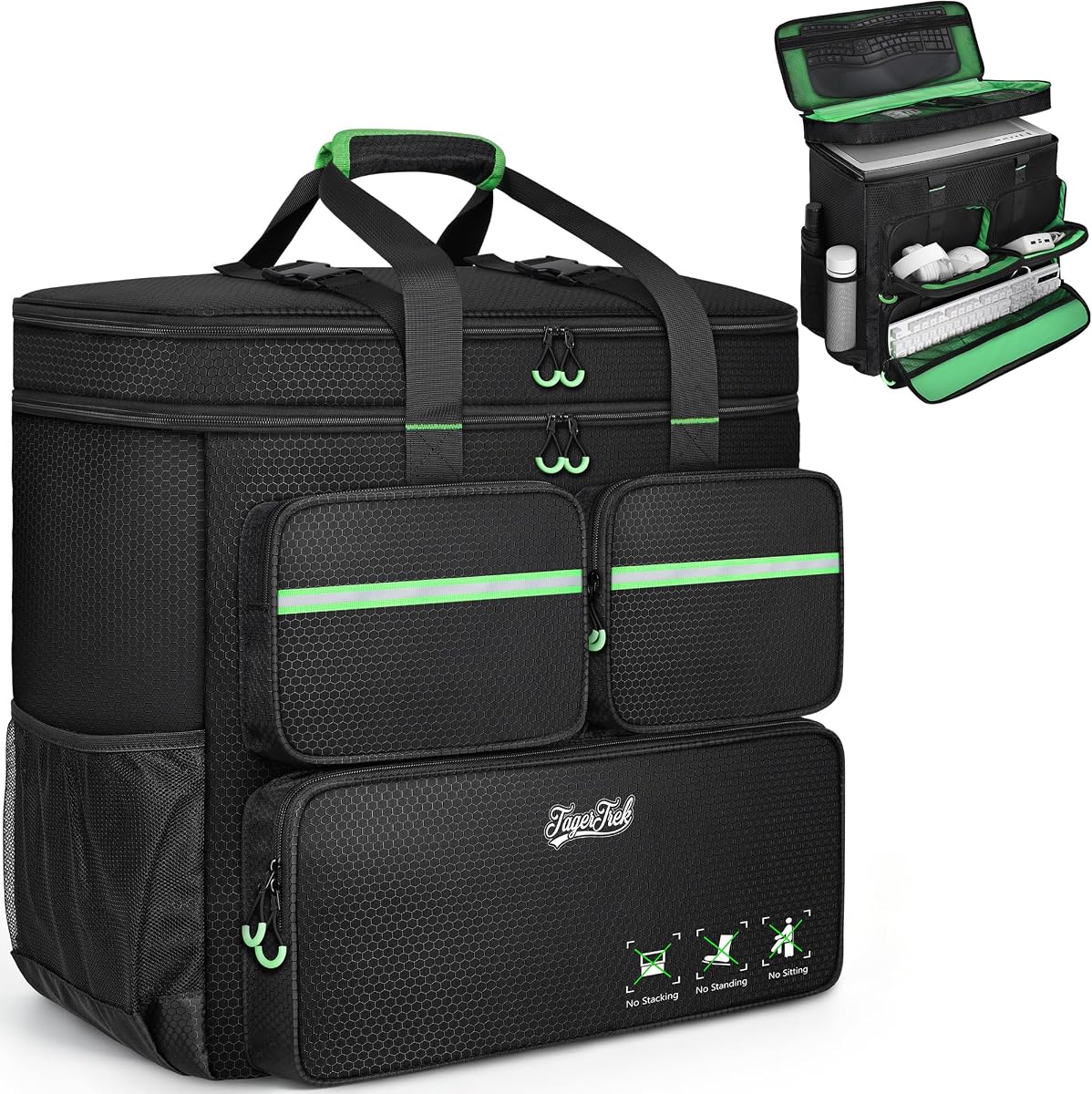
Computer Desktop Tower Large Carrying Case
4.6Editor score
Impact-absorbing EPE lining
20.67-inch tower capacity
Multiple accessory pockets
Hands-free shoulder carrying
Portable PC Case with Handle guide comparing ten carry cases and compact chassis for protection, compatibility, storage, cooling, and easier transport options.
A portable PC case with handle makes transporting a desktop computer far less awkward, whether you are moving rooms, attending a LAN party, or taking a compact workstation on the road. The best options balance protective padding, sturdy carrying hardware, component compatibility, and enough room for essential accessories.
This guide compares ten products across two closely related categories: padded travel bags for existing desktop towers and compact computer cases with built-in or detachable handles. We evaluated the supplied specifications for capacity, motherboard support, cooling, storage, front connectivity, carrying options, and practical organization.
Each pick highlights a different use case, from a feature-rich micro-ATX chassis to a wheeled bag for larger systems. Product ratings and availability can change over time, so readers should confirm current specifications, fit, and prices before making a final purchase decision.
4.6Editor score

4.7Editor score

4.3Editor score
The comparison below covers padded tower bags, rolling cases, compact handled chassis, and a portable monitor case, with each entry assessed using the dimensions, compatibility, cooling, storage, and carrying details in the supplied product information.


The Computer Desktop Tower Large Carrying Case is a padded travel bag for people who want to move an assembled desktop without treating the tower like loose luggage. Its 4.6 rating reflects a generally favorable reception, while the supplied specifications distinguish it through protective materials, generous capacity, and flexible carrying options.
We may earn a commission when you buy through this link, at no additional cost to you.
Protection comes from a high-density 5mm EPE inner lining wrapped in wear-resistant 600D Oxford cloth. The main compartment measures 20.67 x 9.8 x 18.9 inches and is intended for desktop towers, servers, and other electronic equipment. It is also large enough to hold accessories such as a graphics card or radiator, provided the individual dimensions are checked.
Storage is unusually well considered for a transport bag. Three zippered front pockets are assigned practical roles: the lower pocket can hold a keyboard, the upper-left pocket uses elastic straps for cables, and the upper-right fleece-lined pocket accommodates a mouse or power bank. Two side mesh pockets hold water bottles, while a zippered mesh pocket beneath the top cover provides another place for peripherals.
This is the strongest budget-oriented choice when your goal is safe transport for a full-size system. It lacks an integrated handle in the traditional desktop-case sense, but it can be carried by hand or over both shoulders, and a releasable chest buckle helps stabilize the load. Buyers should measure their tower and accessories before ordering to avoid an awkward fit.
The combination of dense EPE padding and a rugged Oxford exterior is designed to absorb impact, vibration, squeezes, and bumps. That makes the bag more appropriate for frequent moves than a basic fabric sleeve with little internal structure.
Dedicated front pockets and a top mesh compartment keep cables, a keyboard, a mouse, and small power accessories separate from the tower. This arrangement makes it easier to pack efficiently and locate individual pieces when setting up at the destination.
We may earn a commission when you buy through this link, at no additional cost to you.
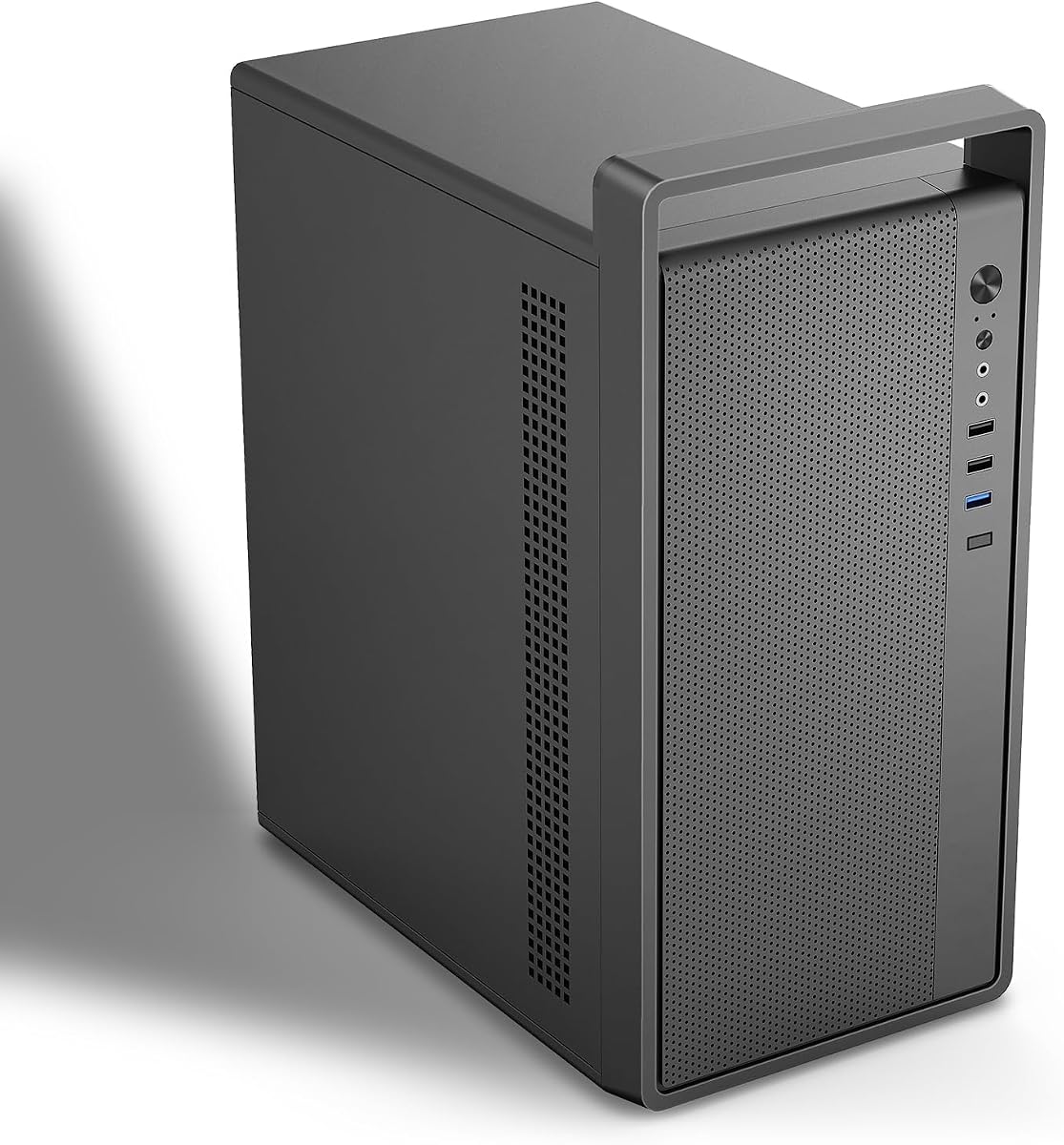
The JONSBO/JONSPLUS Z20 combines a genuine compact computer enclosure with a detachable carrying handle. Its 4.7 rating is the highest among the handled desktop chassis in this guide, and the specification set targets builders who need portability without settling for severely limited hardware support.
We may earn a commission when you buy through this link, at no additional cost to you.
The case provides approximately 20 liters of volume and measures 14.56 x 7.32 x 11.6 inches. It accepts Micro-ATX motherboards, ATX, SFX, and SFX-L power supplies, and supports a 240mm AIO cooler with up to 60mm of radiator thickness. Air coolers can reach 164mm with Intel components or 163mm with AMD components.
The removable PCI-E fixing piece simplifies installation, particularly when working with a longer graphics card. GPU clearance reaches 363mm depending on the remaining hardware configuration, although the manufacturer recommends checking the compatibility image before buying. Fan options are broad, including 120mm and 140mm positions along the top and bottom, plus a rear 120mm position and a smaller 92mm alternative.
This is the most versatile pick for a new portable PC build. It offers modern front connectivity with USB 3.2 Gen 1 Type-A, USB 3.2 Gen 2 Type-C, audio, and microphone connections. The detachable handle adds genuine carrying value, while the compact form makes the finished system more approachable to transport than a conventional full tower.
Unlike the smallest cases in the roundup, the Z20 supports Micro-ATX boards, multiple power-supply formats, long graphics cards, and substantial cooling hardware. That balance makes it useful for a portable system intended to perform like a more permanent desktop.
A magnetic dust filter, numerous fan positions, SFX side mounting, and a removable PCI-E support piece give builders several ways to manage heat and installation order. The supplied GPU guidance remains important because clearance changes with the other installed hardware.
We may earn a commission when you buy through this link, at no additional cost to you.
The darkFlash WD200 is the premium design choice in this roundup, pairing a walnut wood front panel with a compact micro-ATX enclosure. Its integrated heavy-duty handle is intended to make LAN parties, studio setups, and flexible workstation arrangements easier to manage without adding a separate carry case.
We may earn a commission when you buy through this link, at no additional cost to you.
Cooling is supported by a full mesh airflow architecture, a pre-installed ARGB PWM fan, and radiator support up to 240mm. The case accommodates graphics cards up to 335mm, providing room for many modern high-performance GPUs while retaining a more compact footprint than a full tower.
Front connectivity includes USB Type-C, USB 3.0, and audio. The interior is organized for cable management and flexible SSD or HDD placement, while the wood front panel gives the enclosure a more decorative appearance than a typical black or all-metal chassis. The product also carries a one-year brand assurance for computer cases.
The WD200 is best for buyers who care about both portability and presentation. It is particularly appealing when a compact PC will be moved between desks, studios, or events and exposed to view. Confirm the precise storage layout and internal clearance against your chosen components, and verify that the walnut finish matches the intended setup.
Most portable PC cases prioritize function over appearance. The WD200 adds a walnut front panel and integrated handle, making it more suitable for a visible desktop, studio, or shared workspace where presentation matters.
Full mesh construction, a 240mm radiator option, an ARGB PWM fan, and support for graphics cards up to 335mm give the enclosure meaningful performance credentials despite its smaller size.
We may earn a commission when you buy through this link, at no additional cost to you.
The M5 Micro-ATX Case is a portable mini tower that focuses on core compatibility and straightforward transport. It carries a 4.2 rating, and its most notable supplied features include a 0.7mm SPCC steel shell, a built-in handle, and a pre-installed 120mm rear fan.
We may earn a commission when you buy through this link, at no additional cost to you.
The enclosure measures 313 x 185 x 350mm, equivalent to 12.32 x 7.28 x 13.78 inches. It supports Micro-ATX and ITX motherboards, standard ATX power supplies, graphics cards up to 260mm, and CPU coolers up to 160mm. Storage positions include two 3.5-inch hard drives and two 2.5-inch solid-state drives.
Its steel construction is described as heavier and more durable than 0.6mm alternatives, while the installed rear fan provides a useful starting point for airflow. The supplied fan guidance also lists support for 120mm fans in the front and up to four PCI slots, giving some room to expand the cooling arrangement.
The M5 works well for users who want a real handle and a conventional ATX power supply without moving into the smallest possible enclosure. It is less suitable for unusually long graphics cards or very tall coolers, so those dimensions should be checked before assembly. For supported systems, it offers a practical middle ground between portability and flexibility.
The 0.7mm SPCC steel shell gives the case a more substantial feel than lighter mini towers. That structural material is especially relevant for a portable build that will be moved between locations regularly.
Support for Micro-ATX, ITX, standard ATX power supplies, 260mm graphics cards, and 160mm air coolers covers a broad middle range of desktop components without turning the enclosure into a full-size tower.
We may earn a commission when you buy through this link, at no additional cost to you.
The Rolling PC Carrying Case is the most travel-oriented option for a full-size tower, adding a folding cart to a padded carrying bag. Its 4.4 rating reflects a balanced feature set, while the included wheels and adjustable pull handle offer an alternative to carrying a heavy computer entirely by hand or on the shoulders.
We may earn a commission when you buy through this link, at no additional cost to you.
The bag measures 21 x 21 x 11 inches and accommodates tower cases up to 21 x 18.5 x 11 inches. Compatibility examples include the LIAN LI O11D MINI V2 ATX, LIAN LI LANCOOL 207 ATX, Lian Li A3 M-ATX, and MONTECH XR-B ATX. Internal padding is intended to absorb shock and vibration during longer journeys.
A velcro-secured top handle creates a cushioned grip for stairs, and the detachable cart folds flat when it is not needed. Its aluminum pull handle has three height adjustments, while smooth, silent swivel casters make it easier to move through airports, convention halls, and other environments with long walking distances.
This is the pick for a buyer who regularly transports a full tower and wants more mobility than a conventional bag provides. Storage is organized through side mesh pockets, top compartments, and three front pockets for a keyboard, cables, and a mouse or charger. The trade-off is bulk: the case and folded cart take more room than a compact handled chassis.
The folding wheeled cart removes much of the strain associated with transporting a full desktop tower. The adjustable pull handle and swivel casters also make the bag easier to move through stations, lobbies, and event spaces.
A dedicated keyboard pocket, cable storage, mouse area, bottle pockets, and top compartments allow the bag to function as a complete mobile workstation rather than simply a padded enclosure for the computer.
We may earn a commission when you buy through this link, at no additional cost to you.
The Large PC Travel Case is a versatile bag for moving ATX or Micro-ATX towers, with backpack straps, a top handle, and a chest buckle for stability. It shares a 4.4 rating with the rolling option, but serves a different kind of traveler: one who prefers a straightforward carry bag without a wheeled cart.
We may earn a commission when you buy through this link, at no additional cost to you.
The exterior dimensions are 21 x 21 x 11 inches, and the main compartment can hold a tower up to 21 x 18.5 x 11 inches. The listed compatible cases include the LIAN LI O11D MINI V2 ATX, LIAN LI LANCOOL 207 ATX, Lian Li A3 M-ATX, and MONTECH XR-B ATX.
Its polyester exterior is described as water-resistant and wear-resistant, with reinforced stitching for heavier loads. Thick padding helps absorb shock and vibration, while the top buckle is intended to keep the contents from shifting. A chest strap distributes weight more evenly and reduces localized pressure during a carry.
The bag is practical for office relocations, school commutes, business trips, gaming events, and visits to friends. It has a spacious front keyboard pocket, a cable pocket, a mouse or charger pocket, bottle pockets, and a top compartment. Compared with the rolling version, it is simpler and potentially less cumbersome, although a loaded backpack is still easier on the shoulders when a cart is available.
The backpack configuration distributes the load across both shoulders, while the top handle is useful for stairs or shorter distances. Including both options makes the bag adaptable to different travel environments.
Separate areas for a keyboard, mouse, charger, cables, and bottles keep peripherals organized. A keyboard pocket that accommodates models under 19.7 inches also helps buyers check whether their preferred keyboard will fit.
We may earn a commission when you buy through this link, at no additional cost to you.
The S300 is the smallest true computer case in the list, designed around an 8.1-liter Mini-ITX build with a small leather handle. Its 4.4 rating makes it an appealing choice for creators and gamers who prioritize a genuinely handheld system rather than a conventional tower in a padded bag.
We may earn a commission when you buy through this link, at no additional cost to you.
The enclosure measures 12.2 x 5.3 x 7.6 inches and supports 170 x 170mm Mini-ITX motherboards. It accepts SFX or SFX-L power supplies measuring 100 to 130mm, but CPU cooler height is limited to 60mm. Three mesh panels are included to improve hot and cold air exchange.
Graphics card compatibility extends to cards up to 305mm long, 55mm high, and 130mm wide, provided the case is configured with the included PCIe 3.0 16X riser cable. The motherboard BIOS must be set to Gen3 when using that riser with a compatible graphics card, as stated in the product information.
The S300 rewards builders who have already chosen compatible hardware and accept significant size constraints. Its cable management system, front USB 3.0 Type-C connection, and portable form make it effective for mobile gaming, demonstration systems, and space-limited work areas. Measure every major component before ordering, especially the power supply, cooler, and graphics card.
At 8.1 liters, the S20's successor-style compact footprint is dramatically smaller than a micro-ATX tower. The integrated leather handle reinforces the intent to move the completed computer rather than only its components.
The Mini-ITX-only layout, 60mm cooler limit, and defined graphics card dimensions require careful planning. This is best suited to builders who know their parts and can verify every clearance before assembly.
We may earn a commission when you buy through this link, at no additional cost to you.
The Micro ATX Case with Handle is a compact chassis that emphasizes component flexibility, particularly for power supplies, graphics cards, and cooling hardware. Its 4.0 rating is still positive, and the supplied details present it as a capable portable build with a sturdy aluminum handle.
We may earn a commission when you buy through this link, at no additional cost to you.
The case accepts standard ITX and Micro-ATX motherboards within 245 x 245mm dimensions. Graphics cards can measure up to 310 x 135 x 64mm, although a card with a power connector at the end needs approximately 15mm of extra cable space. Both SFX and standard ATX power supplies are supported.
Cooling options include a 135mm CPU cooler, 80mm or 90mm fans, 120mm fans, and a 240mm liquid cooler. However, the product is supplied without fans, and installing a 240mm liquid cooler restricts the power supply choice to SFX. Storage capacity consists of one hard drive and two SSDs, or three SSDs.
The 0.8mm SPCC steel shell adds structural substance, and the handle makes the completed system easier to lift. This case is a good fit for a builder willing to select components around one another, especially when the system needs a larger GPU or radiator than the most compact enclosures allow. Checking PSU and radiator combinations before ordering is essential.
A 310mm graphics card allowance and 240mm radiator option provide more performance headroom than many small cases. The trade-off is a more involved planning process because the chassis must accommodate several large components at once.
Supporting both SFX and ATX power supplies makes the case adaptable to different component inventories. The stated limitation is important: using a 240mm liquid cooler means the larger ATX power supply cannot be installed.
We may earn a commission when you buy through this link, at no additional cost to you.
The Large Desktop Tower Carrying Case focuses on keeping a standard or mid-tower desktop secure during transport. It has a 4.3 rating and uses a rear buckle fastener, internal securing straps, padded walls, and a reinforced base to reduce shifting and tipping.
We may earn a commission when you buy through this link, at no additional cost to you.
Its external dimensions are 20.08 inches long by 9.06 inches wide by 19.69 inches high, while the internal maximum is 19.88 x 8.86 x 19.69 inches. It is intended to fit most standard and mid-tower PCs, but the product information specifically recommends measuring before purchase.
The exterior uses water-repellent Oxford fabric, and the interior includes high-density 5mm EPE padding. Six storage areas consist of two front zippered pockets, one front buckle-flap pocket, two expandable side mesh pockets, and one top inner mesh pocket. A full-height mesh panel provides visibility and convenient access.
This is a strong choice for a buyer who values secure placement over rolling convenience. Adjustable chest straps help distribute weight, while padded handles offer a quick hand-carry option. The six compartments make it possible to bring a keyboard, mouse, headset, and cables with the computer, making it useful for office moves, LAN events, and business travel.
A rear buckle, internal straps, and a stable base work together to restrain the tower. These details are particularly useful when carrying a heavier computer through stairs, airports, or other places where a desktop could otherwise move inside the bag.
Dense EPE cushioning and a water-repellent Oxford shell protect the computer, while the large mesh panel helps the user see the tower and reach external components without opening the entire bag.
We may earn a commission when you buy through this link, at no additional cost to you.
The Portable Monitor Carrying Case is a display-specific companion rather than a case for a desktop tower. It earns a 4.7 rating and offers a protected, organized way to carry a compatible 15.6- or 16.1-inch portable monitor between offices, studios, schools, and travel destinations.
We may earn a commission when you buy through this link, at no additional cost to you.
The internal dimensions are 15.35 x 9.84 x 1.26 inches, so buyers should compare their monitor with those measurements before ordering. The listed compatibility includes MNN, KYY WGK, InnoView, ARZOPA, VILVA, UPERFECT, ForHelp, Anyuse, UFYQL, Yxk, FLYTOCCA, ASUS, cocopar, VisionOwl, and most other 15.6- to 16.1-inch portable monitors.
A large front pocket holds chargers, cables, hubs, power adapters, an iPad, earphones, and cards, while two internal mesh pockets organize smaller items. Reinforced edges and a thickened interior help protect against accidental drops, and a side zipper opening allows the monitor to slide in or out more easily.
This is the right pick for someone building a mobile display setup rather than transporting a tower. The 900D fabric is water-resistant, scratch-resistant, and hard-wearing, while SBS zippers and a padded PU leather handle support regular handling. The handle extends for carrying and tucks away when the case is placed inside luggage.
The narrow, reinforced shape protects a portable monitor far more effectively than a general-purpose bag. Its side opening and internal organization also make repeated packing and unpacking convenient.
The large front pocket can consolidate the accessories needed with a portable display. Because the handle retracts, the case can also fit neatly inside a larger travel bag without leaving a rigid handle protruding.
We may earn a commission when you buy through this link, at no additional cost to you.
The right portable PC case depends on whether you are buying a bag for an existing tower, a new compact chassis, or a dedicated monitor sleeve. Dimensions, hardware limits, cooling, carrying style, and accessory storage should all be considered before choosing.
A carrying case only works if the tower fits without forcing the fabric, zippers, or securing straps. Compare a bag's internal dimensions with the length, width, and height of the computer case, and include space for feet, protruding connectors, cables, and any accessories stored in the same compartment. Some supplied compatibility lists offer example models, but those should be treated as a starting point rather than a guarantee for every dimension.
Briefly: measure the tower and compare internal dimensions before buying.
A travel bag preserves an existing desktop and is often the simplest solution for moving. A compact computer case requires a new build but produces a smaller finished system with an integrated handle. Your choice depends on whether portability means occasional transport, frequent relocation, or a permanent workstation that can travel. The products in this guide include full-size tower bags, micro-ATX and Mini-ITX cases, and one portable monitor sleeve.
Briefly: use a bag for an existing tower and a handled chassis for a new compact build.
Compact cases are not interchangeable with full-size chassis. The JONSBO/JONSPLUS Z20 and darkFlash WD200 support Micro-ATX boards, while the S300 is restricted to 170 x 170mm Mini-ITX motherboards. The M5 and another Micro-ATX option accept both Micro-ATX and ITX. Looking beyond the board size to slot count, PSU format, and internal layout helps prevent compatibility problems later in the build.
Briefly: confirm board format, expansion needs, and internal layout before selecting a chassis.
Graphics card clearance is one of the most important size checks in a compact case. Options in the guide range from a 260mm maximum to as much as 363mm, but larger allowances may depend on other installed components. CPU cooler height and radiator thickness matter just as much; the S300 is limited to a 60mm CPU fan, while other cases accept considerably taller coolers or a 240mm liquid cooler.
Briefly: verify graphics card length, CPU cooler height, and radiator thickness against every planned component.
Moving a compact system requires adequate airflow, particularly when several high-performance components are packed into a small enclosure. Look for mesh panels, dust filtering, supported fan positions, and radiator clearance. Some cases include a rear fan or an ARGB PWM fan, while the Micro ATX Case with Handle is supplied without fans. Remember that a radiator can restrict the power supply choice, as noted for that model.
Briefly: check included fans, ventilation, radiator support, and any PSU restrictions.
A handle, shoulder straps, backpack straps, and spinner wheels serve different travel situations. An integrated or detachable handle is convenient for lifting a compact finished PC, while a padded top handle helps with stairs. Backpack straps distribute weight over both shoulders, and the rolling bag adds a folding cart for long distances. Consider stairs, parking distance, airport terminals, and whether one person will carry the entire load.
Briefly: match handles, straps, and wheels to stairs, walking distance, and carrying strength.
A strong main compartment does not prevent a bag from being inconvenient if small items cannot be found. Look for dedicated cable storage, a keyboard pocket, a mouse or charger area, mesh compartments, and bottle pockets. Padded or fleece-lined areas can also protect smaller accessories. For a compact chassis, storage support for SSDs and HDDs matters just as much as space for loose cables.
Briefly: look for separate pockets for cables, keyboards, mice, and small accessories.
Padding, reinforced stitching, anti-slip feet, securing straps, and buckles all help protect a computer during transit. High-density EPE foam is used in several tower bags, while the handled chassis use steel construction for structural durability. For wheeled transport, internal restraints are especially important because a rolling case may encounter more bumps and abrupt stops than a stationary desktop.
Briefly: prioritize padding, reinforcement, internal restraints, and a stable base.
Before packing a desktop, shut it down properly, disconnect peripherals, and allow the system to cool. Remove or secure loose cables, check that the case handle is rated for the assembled weight, and compare every large component with the bag's internal dimensions. For a compact chassis, install components according to the manufacturer's clearance guidance and use the provided securing straps when they are available.
Place the computer in the center of a padded bag with the weight distributed evenly. Use internal straps or the top buckle to prevent shifting, then place a keyboard, mouse, cables, and other accessories in their designated pockets rather than leaving them loose beside the tower. When using a rolling cart, engage the strap system and keep the pull handle at a comfortable height. On stairs, use the padded top handle and avoid overloading the cart.
To care for a fabric travel bag, remove the computer and inspect for dust or debris before cleaning. Follow the care instructions supplied with the product, use only mild cleaning methods, and allow the bag to dry fully before storing equipment. For a handled computer chassis, dust filters should be cleaned as airflow declines, screws should remain secure, and the handle connection should be checked periodically for looseness or wear.
Buy a travel bag whose internal dimensions comfortably exceed the dimensions of your desktop tower. Measure the case rather than relying only on its screen size, and account for feet, cables, and protruding ports. If you plan to carry peripherals in the main compartment, add space for those items as well.
A padded case is designed to reduce impact and vibration, but no bag can guarantee protection from severe handling. If your airline or destination creates uncertainty, carry the computer in the cabin when possible. Use a durable outer suitcase or flight case for additional protection, and follow the carrier's baggage rules.
Yes, if the chassis supports the components you need and its cooling layout fits your performance hardware. The JONSBO/JONSPLUS Z20, for example, supports long graphics cards, multiple fan positions, and a 240mm AIO. The darkFlash WD200 supports cards up to 335mm and a 240mm radiator. Always verify every clearance before purchasing parts.
A handled PC case is an empty enclosure into which you install a new computer. A PC travel bag is designed to hold an already assembled desktop. The former creates a permanently portable system, while the latter is generally faster and less disruptive for an occasional move.
Use the internal securing straps, top buckle, or other restraint system included with your bag. Place the tower squarely in the padded main compartment and keep loose cables in separate pockets. For a wheeled case, packing tightly enough to limit movement without forcing zippers or compressing the tower beyond its stated dimensions is best.
It can be if you plan the build around the enclosure's limits. Check motherboard format, graphics card length and thickness, power supply type, CPU cooler height, radiator capacity, storage, and expansion slots. Compact cases are most practical when the component list is finalized before the chassis is ordered.
Match the display's exact measurements with the case's internal dimensions, and confirm that the monitor is in the compatible size range. Look for reinforced edges, a padded interior, a convenient opening, and enough room for a charger, hub, cables, and other accessories. A retractable or tuckable handle is useful for fitting the case into a larger bag.
Inspect the handle, fasteners, straps, seams, and zippers before each major move, especially after prolonged heavy use. Check dust filters and ventilation regularly during operation, and remove any debris that could obstruct airflow. Structural wear should be addressed before the next trip rather than waiting for a failure.
The Computer Desktop Tower Large Carrying Case is a strong budget choice for moving an existing full-size system, while the JONSBO/JONSPLUS Z20 stands out for new compact builds with broad component support and a detachable handle. The darkFlash WD200 adds a premium walnut finish, integrated heavy-duty handle, and capable cooling options for buyers who want portability with a distinctive appearance.
Prioritize the right category and the right fit. Choose a padded tower bag for an assembled desktop, a Micro-ATX or Mini-ITX chassis for a dedicated portable build, and a display sleeve for a portable monitor. Before ordering, verify internal dimensions, graphics card clearance, cooler height, power supply format, storage needs, and the way you expect to carry the system.
Ratings, product details, and prices can change, so check the current listing before purchasing. Comparing the live specifications with your planned hardware is the safest way to select a portable PC case with handle that remains comfortable, protected, and compatible over time.