
HDMI Tester Portable High Definition
4.4Editor score
HDMI and RJ45 testing
Up to 19-wire fault scanning
Detachable remote unit
Our HDMI Cable and Port Tester guide compares ten tools for wire faults, signal testing, display diagnostics, portability, connector support, and troubleshootin
An HDMI cable and port tester helps reveal damaged conductors, crossed wires, poor connections, and display problems before a troubleshooting session turns guesswork. The right tool depends on whether you need basic continuity checks, detailed pin-level diagnostics, network-cable support, or a portable display for evaluating live video and audio signals.
This guide compares ten HDMI-focused testers and cable-checking devices using their stated capabilities, connector support, diagnostic features, power options, portability, and practical applications. The list covers compact pin scanners, multi-interface professional tools, signal generators, and display testers designed for installation and repair work.
Each review explains what the product can diagnose, where it fits best, and which trade-offs matter. The top selections emphasize useful functionality and versatility, while the remaining products offer alternatives for different connector combinations and working environments. Product availability and pricing can change, so confirm current details before purchasing.
4.4Editor score
4.6Editor score

4.4Editor score
The comparison below organizes each tester by its most useful diagnostic capabilities, including pin-level fault detection, supported connectors, signal generation, live display analysis, network testing, and power options. These distinctions help separate inexpensive cable scanners from installation-oriented and professional troubleshooting equipment.


The HDMI Tester Portable High Definition Network Cable Tester Checker is a compact dual-purpose cable checker with a 4.4 rating. It offers an unusually useful combination for a portable tool: HDMI continuity testing, RJ45 network-cable testing, and fault identification for shorts, open circuits, and incorrect wire order.
We may earn a commission when you buy through this link, at no additional cost to you.
Its main unit and detachable remote let one person check cables of different lengths without needing a second person at the opposite end. The HDMI side supports standard Type A and Mini Type C connectors and can scan up to 19 wires. For network cables, rotating LEDs indicate proper continuity, while an inactive corresponding light points toward a connection problem.
The principal compromises are its modest connector range and the need to supply an AAA battery separately. It also relies on LED patterns rather than a full color screen or active signal analysis, so it is primarily a wire-condition tester rather than a comprehensive display diagnostic instrument.
This is a strong choice for homeowners, installers, and IT technicians who want one inexpensive device for both HDMI and Ethernet cables. Choose it when simple, rapid fault detection and portability matter more than advanced signal generation or a visual picture test.
Combining HDMI and RJ45 testing removes the need to carry separate continuity tools. That convenience makes this model particularly useful for general troubleshooting, computer installations, and quick checks around an entertainment center or network rack.
The remote stores against the main body for portability, then separates when testing a longer cable. This design supports one-person operation and makes the tester more convenient for permanently routed wiring.
We may earn a commission when you buy through this link, at no additional cost to you.
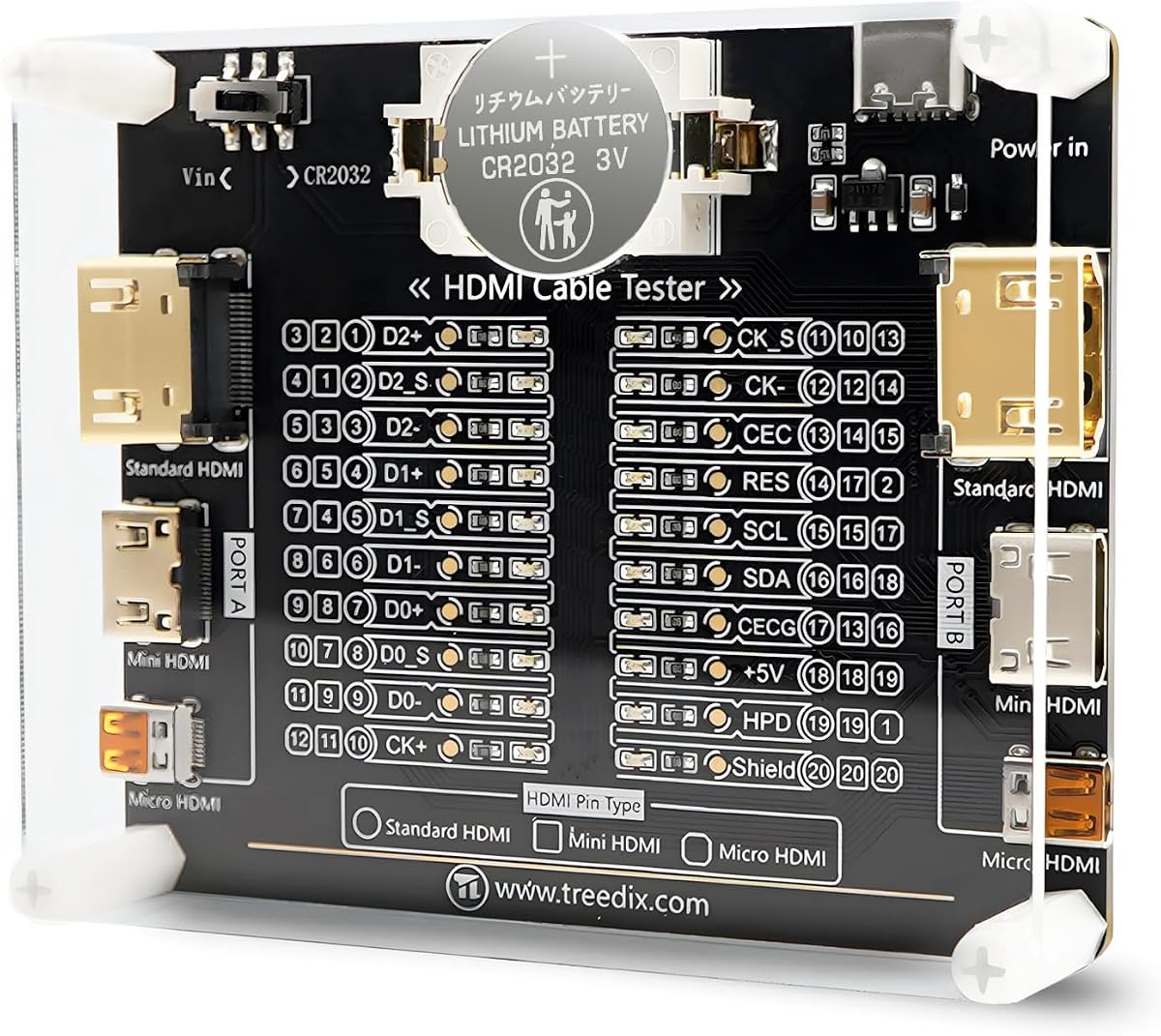
The Treedix Cable Tester Board for HDMI Continuity & Condition Check earns a 4.6 rating and stands out for broad connector compatibility. It supports standard Type A, Mini Type C, and Micro Type D HDMI interfaces across HDMI versions 1.0 through 2.1.
We may earn a commission when you buy through this link, at no additional cost to you.
Twenty LED indicators correspond to the individual pins, providing a more granular view of cable condition than a simple pass-or-fail result. The board can identify internal shorts and open circuits, while its stated multimeter sequence capability supports more detailed maintenance work.
Power can come from a battery or an external 3-to-12-volt Vin supply with reverse-connection protection. One operational detail matters: when using a Type-C power supply, the board's power switch must be moved to the Vin position.
This is the most broadly compatible HDMI cable checker in the list for technicians who encounter multiple physical connector formats. It is less suited to buyers wanting a polished handheld display, but it offers excellent diagnostic detail for repair benches and field kits.
A dedicated indicator for each pin helps narrow a failure to a specific conductor. This is useful when a cable appears intermittent or when several connected devices produce unexpected symptoms.
Support for Type A, Mini Type C, and Micro Type D reduces the need to carry separate adapters. The board also accommodates cables of any length according to its stated specifications.
We may earn a commission when you buy through this link, at no additional cost to you.
The Jonard Tools HDMI-100 is a dedicated HDMI and Mini HDMI cable tester with a 4.4 rating. Its defining advantage is the ability to test cables up to 500 meters, making it unusually practical for building wiring, structured installations, and long fixed cable runs.
We may earn a commission when you buy through this link, at no additional cost to you.
The tester checks each wire pair for shorts, open circuits, and incorrect pairings. A removable remote allows a technician to test installed or lengthy cables without coordinating two people at each endpoint. Scan mode presents connections individually, while full-display mode shows the complete tested set together.
It supports 1.2V, 1.3V, 1.4V, and 2.0V HDMI cables, covering the stated versions relevant to standard and Mini HDMI connections. A 9V battery is required for operation, which should be considered when maintaining a field kit.
The HDMI-100 is best for professional installers and advanced users who regularly work with long or concealed cables. If your needs are limited to short, loose HDMI leads, the feature set may be more than necessary, but for large installations it offers convincing specialization.
Testing capability up to 500 meters sets this tester apart from compact lead checkers. It is better suited to in-wall cable routes, commercial displays, and other installations where a short bench cable is not representative.
Scan mode isolates individual connections as they are checked, which helps during troubleshooting. Full-display mode gives a broader overview when confirming the condition of an entire cable.
We may earn a commission when you buy through this link, at no additional cost to you.
The Monoprice HDMI Signal Generator and Display Analyzer takes a different approach from conventional cable scanners. With a 4.0 rating, it can operate as either an HDMI signal generator or a display emulator, helping evaluate source devices, displays, and signal compatibility.
We may earn a commission when you buy through this link, at no additional cost to you.
A four-position DIP switch controls video resolution and HDCP settings. Supported outputs include 4K at 60Hz in 4:4:4 and 4:2:0, 4K at 30Hz in 4:4:4, and 1080p at 60Hz. HDCP can be disabled or configured for version 1.4 or 2.2.
The tool also provides four test patterns associated with HDCP versions. It therefore addresses active signal behavior and content-protection compatibility rather than continuity, shorts, crossed wires, or individual pin faults.
Choose the Monoprice when diagnosing resolution, HDCP, or source-to-display issues. It is a specialized installation tool rather than a general-purpose cable-condition checker, so most buyers should treat it as a complement to a wire tester rather than a replacement.
Generating a known test signal separates source-device problems from display or cable issues. The selectable resolutions make it easier to reproduce a reported format or refresh-rate problem.
Configurable HDCP off, 1.4, and 2.2 modes help identify protected-content negotiation issues. Four test patterns provide visual references when evaluating the resulting output.
We may earn a commission when you buy through this link, at no additional cost to you.
The Portable High Definition Network Cable Tester Checker is a compact HDMI and RJ45 tester with a 3.9 rating. It supports HDMI 1.1 through 2.0 and can scan up to 19 wires for shorts, open circuits, and incorrect ordering.
We may earn a commission when you buy through this link, at no additional cost to you.
Two operating modes are provided: a fast scan for quick results and a full display for a more comprehensive view. LED indications make the tool straightforward for routine checks, while network-cable support adds useful flexibility for computer and network installation work.
Its automatic shutdown after ten minutes of inactivity is a thoughtful feature for battery-powered tools. The main limitation is connector coverage, as the listed HDMI support is limited to Type A rather than Mini or Micro formats.
This tester is a practical choice for basic household and installation diagnostics involving full-size HDMI and Ethernet cables. Buyers needing miniature connectors or a higher level of user feedback may prefer one of the more specialized models in this guide.
Fast scanning suits routine checks and initial troubleshooting. Full display mode provides a broader picture of the cable's overall condition when a more thorough evaluation is needed.
Automatic shutdown helps preserve battery life when the tester is left unattended or forgotten in a toolbox. That makes it easier to keep the device ready for intermittent troubleshooting work.
We may earn a commission when you buy through this link, at no additional cost to you.
The MFL. Detachable Professional Cable Tester is a multi-interface diagnostic device with a 4.5 rating. It is designed for technicians who work across audio, video, and network cables rather than those focused exclusively on HDMI leads.
We may earn a commission when you buy through this link, at no additional cost to you.
Supported connections include XLR, HDMI, USB, RCA, BNC, 3.5mm and 6.35mm TRS, Type-C, and RJ11. A ten-way switch and LED indicators provide visual feedback for connectivity and pin configuration, allowing a single platform to cover several common service tasks.
The detachable design permits the two test ends to be separated at different locations, which is useful for installed wiring. A metal housing, labeled ports, and dedicated switches support regular professional use, although the expansive feature set may feel more complex than a simple HDMI scanner.
This tester is best for AV repair benches, installers, and maintenance teams that regularly encounter varied cable types. It is overkill for checking one standard HDMI lead but can consolidate several basic cable checkers into one professional toolkit.
The broad port selection lets technicians check HDMI alongside USB, analog audio, coax, and network-style wiring. This breadth can simplify tool preparation and make the device useful across mixed service calls.
The metal body and clearly labeled controls suit repeated bench and field use. The detachable remote also allows testing where both cable ends are not within immediate reach.
We may earn a commission when you buy through this link, at no additional cost to you.
The UT681 HDMI Cable Tester has the highest stated rating in this selection at 4.8. It is a compact cable-condition tool designed to identify shorts, disconnections, mis-sequencing, and cross-connections across 19 wires.
We may earn a commission when you buy through this link, at no additional cost to you.
The device supports standard Type A and Mini Type C interfaces for HDMI 1.2V, 1.3V, 1.4V, and 2.0V cables. Separate LED zones make abnormal points easier to locate, while boot-state scanning and full-display modes provide both quick and comprehensive views.
A low-battery warning appears when voltage falls below 7.2V, and the unit turns itself off after ten minutes without work. Its stated operating-temperature range is minus 10 to 50 degrees Celsius, and the included separate transceiver supports one-person field testing.
This is an excellent option for detailed fault-finding in both full-size and Mini HDMI cables. It is especially compelling for field technicians who value compactness, clear abnormal-point indicators, and straightforward battery management.
Scanning the core conduction state allows a technician to distinguish a complete failure from a short, open line, or incorrect sequence. Divided LED zones help narrow the affected area without relying only on a general pass-or-fail outcome.
The portable body, separate transceiver, low-battery warning, and automatic shutdown support repeated use away from a bench. Its stated temperature tolerance is useful for maintenance work in variable environments.
We may earn a commission when you buy through this link, at no additional cost to you.
The Parts Express HDMI Cable Signal Tester is a compact diagnostic unit with a 4.3 rating. It uses DVI-F and HDMI-F connectors and displays the status of each HDMI signal component, offering a more direct way to investigate missing pictures and visual artifacts.
We may earn a commission when you buy through this link, at no additional cost to you.
The stated applications include diagnosing color shift, sparkle, and absent images. Because the tester can be positioned at either the source or display end, it gives installers flexibility when determining where along a connection the signal becomes unstable.
Its simplicity is both an advantage and a limitation. The device focuses on HDMI signal behavior rather than providing the exhaustive pin mapping offered by modern multi-LED scanners, and its connector selection reflects an older physical design.
Choose this model for basic signal troubleshooting with a full-size HDMI connection. It is useful when a cable appears to work intermittently, but users needing miniature HDMI, network testing, or detailed conductor-level diagnostics should select a more specialized option.
When a screen shows sparkles, color shifts, or no image, this tester offers component-level status information. That can help distinguish a failed signal from a fully disconnected cable.
Locating the tester at the source or the display end allows a more controlled troubleshooting process. The compact enclosure also keeps setup simple for quick service checks.
We may earn a commission when you buy through this link, at no additional cost to you.
The HDMI Cable Tester & RJ45 Network Cable Tester Tool has a 5.0 rating and combines multimedia and network continuity testing in one portable unit. It supports HDMI versions 1.2V through 2.1V along with RJ45 Ethernet cables.
We may earn a commission when you buy through this link, at no additional cost to you.
The HDMI side scans up to 19 wires and identifies shorts, open circuits, and incorrect ordering. On the network side, the product listing specifies support for Cat5, Cat5e, Cat6, and Cat6a UTP Ethernet LAN wire, with rotating LEDs indicating proper connections.
A 9V battery or a phone USB charger can provide power, although neither power source is included. The supported HDMI format is Type A, so smaller Mini and Micro HDMI cables will require a different tester or an appropriate adapter arrangement.
This model is a strong choice for network installers and computer technicians who also maintain ordinary HDMI connections. Its high stated rating and broad Ethernet support make it particularly compelling for desks, offices, and home-network installations.
RJ45 testing covers several common copper Ethernet categories, making the device useful for structured-network work. The rotating LED sequence provides immediate feedback when all conductors connect correctly.
The tester can run from a conventional 9V battery or draw power from a USB phone charger. That gives technicians options when one power method is more convenient than the other.
We may earn a commission when you buy through this link, at no additional cost to you.
The STEREN Handheld HDMI Tester is a comprehensive installation aid with a 4.5 rating. Unlike a simple pin scanner, it includes a full-color LCD that displays audio and video, auto-scales resolutions, and performs 19-pin continuity checks.
We may earn a commission when you buy through this link, at no additional cost to you.
The handheld display allows a technician to verify a set-top box without connecting the installation to a television. It can also display the channel lineup, making it useful for confirming that a source device produces expected output after installation.
Three HDMI ports support two-way cable continuity testing and a separate connection to the source. A ruggedized housing combines silicone rubber and plastic, while the tempered-glass display is described as resistant to scratches, shattering, dirt, water, and shock.
This is the best option for installers who need to show and verify a live picture away from the final display. Its 2300mAh battery is specified for three to four hours of use, and the unit charges through its micro USB port.
The built-in display lets an installer confirm source output and channel presence independently of the customer's television. This can shorten setup checks and make incomplete installations easier to demonstrate.
The 19-pin continuity function and live audiovisual display cover both physical and signal-related checks. That combination makes the device more comprehensive than a conventional LED-only continuity tester.
We may earn a commission when you buy through this link, at no additional cost to you.
The right HDMI tester depends on the cables you use, the faults you need to identify, and whether you also need live signal evaluation. Consider connector formats, diagnostic depth, display features, power requirements, and the environments in which the tool will be used.
A continuity tester checks whether conductors are connected correctly and can identify shorts, open circuits, and mis-sequencing. A signal analyzer goes further by generating or displaying a known audiovisual output. These categories solve different problems, so a cable checker may be sufficient for a damaged lead while a display tester is better for installation and source troubleshooting.
Full-size HDMI Type A remains common, but Mini Type C and Micro Type D cables appear in cameras, portable displays, and compact installations. Confirm that the tester supports the exact connector on your equipment, and check whether adapters are included or even supported by the device design.
A simple pass-or-fail result is enough for quick checks, but per-pin LEDs make it easier to locate a specific broken conductor. Full displays are even clearer for color shift, missing picture, and audio assessment. Consider how clearly each result can be interpreted in bright rooms, cramped racks, or mobile work environments.
A tester that checks continuity may support several HDMI versions without actively generating those formats, so distinguish conductor testing from signal-output specifications. For active analyzers, review supported resolutions, refresh rates, chroma formats, and HDCP versions before buying.
IT and AV technicians often troubleshoot Ethernet, USB, analog audio, coax, and other connectors alongside HDMI. A dual-function HDMI and RJ45 tester may be sufficient, while a multi-interface device can consolidate several continuity tools. Extra interfaces add versatility but may also increase size, cost, and learning time.
A detachable remote is important when testing long or permanently installed cables because it allows one technician to work at both ends. For structured wiring, note any stated maximum cable length and ensure the remote and main unit maintain clear communication across the complete test range.
Consider whether the tester accepts replaceable batteries, external voltage, USB power, or a rechargeable internal battery. Low-battery warnings, automatic shutdown, protective housings, and temperature ratings improve reliability during mobile work. Verify whether required batteries or charging cables are included.
A small tester is easier to carry, but a very thin board may offer less protection or be harder to operate with gloves. Consider the footprint, detachable parts, labeled controls, storage case, and how easily the remote can be secured. A balanced tool should be compact without becoming frustrating to operate.
Before testing, inspect both cable ends and the tester ports for bent pins, debris, moisture, or visible damage. Disconnect power from the equipment being tested, connect the tester according to its guide, and select the proper connector and operating mode. For a continuity check, attach the main and remote units at opposite ends of the cable and wait for a stable LED sequence.
Interpret the result according to the tool's documentation. A complete pass or rotating sequence normally indicates continuity, while missing, fixed, or out-of-order LEDs point toward an open conductor, short, or crossed connection. For a signal tester, connect the source, select the required resolution and HDCP mode, and inspect the generated pattern or live picture for stability, color, and audio.
After use, disconnect cables before changing adapters or ports, and remove batteries from long-term storage if the manufacturer recommends it. Keep the tester dry, protect its display or board from impact, and clean contacts with a dry, nonabrasive material. Recalibrate or confirm operation on a known-good cable if results become inconsistent, and consult the product documentation for unsupported cable types or voltage limits.
It can, provided the intermittent fault occurs during the test and the tester checks the relevant conductor paths. Moving the cable, connectors, or equipment while observing the LEDs may help expose a loose connection. A stable pass does not rule out every shielding, signal-integrity, or intermittent contact problem, so cable substitution may still be necessary for confirmation.
A continuity tester primarily checks whether the cable's internal wires are connected correctly. An HDMI display tester includes a screen that can show live video and audio, allowing an installer to confirm source output without a television. The second type may also include continuity testing, but it is built around signal and installation verification.
Only if your equipment uses those smaller formats. Standard HDMI Type A is sufficient for most televisions, receivers, computers, and game consoles, while cameras and compact displays frequently use Mini or Micro connections. Check the physical connector shape rather than relying only on the product's HDMI version label.
Yes, when the product includes RJ45 testing. Several compact models in this guide support both HDMI continuity checks and network-wire continuity, while broader professional tools may also support USB, RCA, BNC, XLR, and analog audio. Confirm the exact network categories and supported connector types before purchasing.
Most can detect open circuits, short circuits, crossed connections, and incorrect wire order. Some provide a separate LED for each pin, making the faulty conductor easier to locate. Advanced tools may also help diagnose line sequence, but a pin tester does not necessarily evaluate every aspect of signal quality or HDCP negotiation.
That depends on whether the product only checks wire continuity or actively generates a video signal. A continuity scanner may support a modern HDMI version without displaying 4K itself. Active signal generators should list the exact resolution, refresh rate, chroma format, and HDCP version supported.
A handheld unit is usually easier to carry and position at a display, while a board-style tester often exposes more pins and connector options for detailed bench work. The best choice depends on whether the priority is live display verification, extensive connector coverage, or straightforward continuity inspection.
Replaceable batteries are convenient for predictable field use, while USB power can reduce battery waste if a charger is available. Rechargeable models reduce ongoing battery replacement but require charging access. Also check whether batteries or cables are included and whether the tester warns you before power becomes too low.
The HDMI Tester Portable High Definition offers the best budget combination of HDMI and RJ45 testing in a compact form. The Treedix board stands out for its broad HDMI connector support and pin-level indicators, while the Jonard Tools HDMI-100 is the premium choice for long cable runs and professional installation work.
Prioritize the diagnosis you actually need. Buy a continuity scanner for wire faults, a multi-interface checker for varied service work, a signal generator for resolution and HDCP troubleshooting, or a handheld display tester when visual confirmation away from the final screen is essential.
Before ordering, verify connector compatibility, maximum cable length, included accessories, and power requirements. Product specifications and availability can change, and current pricing may differ, so review the latest listing details before making a final purchase decision.