
SABRENT 74-in-1 Card Reader
4.0Editor score
Supports 74 card formats
Fits standard 3.5-inch bay
Includes front USB 2.0 port
Explore 10 internal media card reader options for desktop PCs, comparing card formats, USB speed, bay fit, extra ports, compatibility, and ease of installation.
An internal media card reader adds convenient front-access storage to a desktop computer without requiring a separate external adapter. The most useful models support commonly used camera and mobile-device formats, connect directly to motherboard headers, and fit a standard drive bay. Compatibility, transfer speed, slot layout, and available space matter as much as the advertised number of supported cards.
This guide compares ten internal card readers using the supplied specifications, focusing on supported formats, USB generation, drive-bay requirements, operating-system compatibility, status indicators, and added connectivity. It includes dedicated 3.5-inch readers as well as multifunction 5.25-inch front panels, giving desktop builders, photographers, and content creators several practical options.
Each review explains the strongest feature, relevant limitations, and the type of user most likely to benefit from the product. The leading choices balance broad card support, useful front-panel access, and straightforward motherboard integration. Product availability, specifications, ratings, and prices can change, so readers should verify current details before purchasing.
4.0Editor score

4.5Editor score

5.0Editor score
The comparison highlights the main differences among dedicated card readers and multifunction desktop panels, including supported media, USB speed, physical fit, operating-system coverage, and added front-panel features.


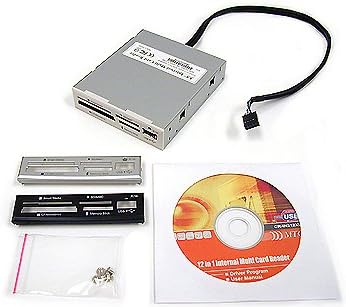
The SABRENT 74 in 1 is a budget-oriented internal reader designed for users who want broad compatibility without paying for a multifunction front panel. Its 4.0 rating reflects a generally useful product, and its standout feature is the advertised support for 74 memory card types across six physical reader slots.
We may earn a commission when you buy through this link, at no additional cost to you.
The six slots cover M2, XD, SD, SDHC, SDXC, MMC, microSD, microSDHC, microSDXC, CompactFlash, MultiMedia cards, and Memory Stick variants. A front-facing USB 2.0 port adds another way to connect removable storage. An internal power connector is intended to ensure that connected USB devices receive sufficient power through the system's USB hub.
The important limitation is the reader's older USB 2.0 interface. Large files from high-resolution cameras or modern SDXC cards may take longer to transfer than they would through a USB 3.0 reader. Some Memory Stick cards also require an adapter, so users should verify the exact physical shape and generation of their media before installation.
This model is a sensible choice for a desktop owner who keeps several generations of memory cards and wants a low-cost internal upgrade. It suits photographers, collectors, and system builders who value compatibility over maximum throughput. For the stated budget position, however, it is best when the computer case has an available 3.5-inch bay and a compatible internal USB header.
The main appeal is access to many legacy and modern formats in one place. Rather than maintaining a collection of external adapters, users can insert supported cards directly into the front panel.
The included front USB port can support flash drives and other USB storage devices, making the unit more useful for everyday transfers than a reader limited strictly to memory cards.
We may earn a commission when you buy through this link, at no additional cost to you.
The StarTech 35FCREADBU3 combines modern USB 3.0 performance with the convenience of a 3.5-inch internal installation. Its 4.5 rating is the highest among the products with an established numeric rating, making it the most balanced recommendation for serious desktop users.
We may earn a commission when you buy through this link, at no additional cost to you.
This reader supports CompactFlash Type I, several SD and microSD standards, numerous MMC variations, Memory Stick formats, and xD Picture cards. Four different card slots can operate at the same time when they use different media types, allowing images from several cameras or phones to be accessed without repeatedly changing cards.
Its UHS-II capability is particularly relevant for compatible high-speed SD cards, while the front USB 3.0 port can handle external storage at the same interface speed. Built-in power and activity LEDs give users immediate confirmation that the reader is operating and that data is moving. The included 20-pin cable, screws, and operating-system-independent design simplify planning and installation.
The reader is especially appropriate for photographers, videographers, podcasters, and desktop professionals who regularly move media between devices. It also suits IT departments because the product is TAA compliant and backed by two years of support plus lifetime technical assistance. Buyers should verify their case has a free 3.5-inch bay and that the motherboard provides the required header.
USB 3.0 and UHS-II support make this reader a stronger option for large image and video libraries. Users can benefit from faster media when the inserted card and computer connection both support the relevant standard.
Accessing four different card types simultaneously reduces friction when importing batches of material from multiple devices. It is particularly useful for active photographers who alternate among camera, phone, and legacy memory cards.
We may earn a commission when you buy through this link, at no additional cost to you.
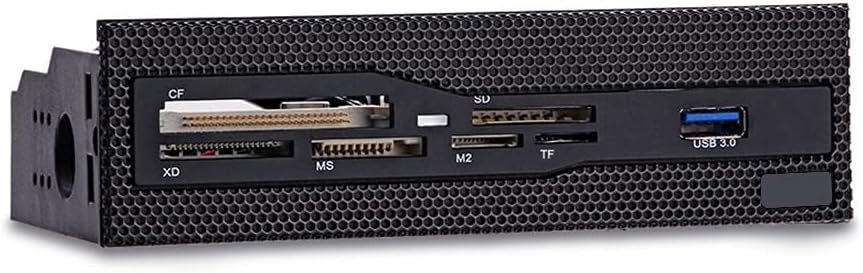
This 5.25-inch multi-function dashboard combines a six-slot card reader with a front USB 3.0 port. Its 4.3 rating reflects a well-rounded option for desktop builders who want prominent card access without installing a large collection of separate front accessories.
We may earn a commission when you buy through this link, at no additional cost to you.
The supported formats include CompactFlash, XD, Memory Stick, M2, and TF cards, covering several common standards used by cameras, older compact cameras, and portable devices. The USB 3.0 interface provides a faster option for flash drives and other USB peripherals, while the card slots themselves are described as copper-plated for stability during transfers.
Its most obvious trade-off is the physical footprint. Unlike a dedicated 3.5-inch reader, this unit requires a full 5.25-inch bay. It also does not list audio connectors, eSATA, or numerous USB ports, making it a simpler dashboard than several competing products in this guide.
Choose this panel when your case has an open 5.25-inch bay and you want a clean, accessible combination of card slots and one USB port. It is a good fit for general-purpose desktop use and compact builds with unused optical-bay space. Media professionals should confirm that their specific card type and capacity are supported before installation.
Installing the reader at the front of the case makes card insertion more convenient than reaching around to an external adapter. The layout also gives the desktop a more finished appearance when it replaces an unused bay.
The format list covers many cards still encountered in photography and device-transfer workflows. Buyers should compare it with the exact media they use rather than relying only on the number of slots.
We may earn a commission when you buy through this link, at no additional cost to you.
This media dashboard is designed as a broad front-I/O upgrade rather than merely a card reader. Its 3.8 rating is respectable, while the combination of USB 3.0, USB 2.0, eSATA, audio jacks, status LEDs, and a multi-format reader makes it appealing to builders consolidating desktop connections.
We may earn a commission when you buy through this link, at no additional cost to you.
The card reader supports M2, TF, SD, MMC, Memory Stick, and CompactFlash cards up to 64GB according to the supplied description. The USB 3.0 hub is listed at 5Gbps, the USB 2.0 connection at 480Mbps, and multiple cards can be accessed simultaneously. Dedicated speaker and microphone connections bring familiar front-panel audio to the desk.
Some caution is warranted because the compatibility text is poorly formatted and appears to contain incomplete wording. Users should also consider the number of motherboard headers and cables required for a panel with this many functions. Although the stated dimensions fit a standard 5.25-inch bay, installation planning remains important.
This dashboard is a strong candidate for a custom desktop where the builder wants one faceplate to replace several separate accessories. It offers less value for a basic office system that only needs SD and microSD access. Confirm the available USB headers, power connections, eSATA requirements, and operating-system support before choosing it over a simpler reader.
Combining removable-media access, USB connections, eSATA, and audio in one panel can reduce clutter around the desk. It is most useful when the case otherwise lacks front I/O options.
The 5.25-inch format and bundled cabling suit builders comfortable matching a front panel to motherboard headers. It is less convenient for users who want a plug-and-play external accessory.
We may earn a commission when you buy through this link, at no additional cost to you.
The Vantec UGT-CR940 is a feature-rich internal reader with a perfect 5.0 supplied rating. Its principal advantage is an exceptionally detailed media-support list that covers CompactFlash, Secure Digital, microSD, MMC, eMMC, numerous Memory Stick generations, and xD-Picture cards.
We may earn a commission when you buy through this link, at no additional cost to you.
For modern camera workflows, SD, SDHC, and SDXC support extends to capacities up to 2TB, while listed UHS modes include SDR12, SDR25, SDR50, DDR50, and SDR104. CompactFlash support includes several established generations, and the reader uses a Multi-LUN design with an internal 20-pin header.
The broad specifications do not eliminate the need for compatibility checks. Some listed capacities and card families are specialized, and the exact performance still depends on the connected computer, internal header, card, and file-transfer software. An internal 20-pin connection also makes this unsuitable for a compact desktop without the appropriate header.
Despite those caveats, the UGT-CR940 is the strongest pick for users with varied and demanding media libraries. It suits a high-end workstation, upgraded enthusiast PC, or professional editing system where one reader should handle numerous standards. Its USB 3.0 connection and extensive format coverage justify considering it as a premium internal solution.
The unusually extensive card list gives the reader a strong appeal for mixed-device studios. It can reduce the need to keep separate readers for camera cards, phone media, and legacy formats.
Listed SDXC support up to 2TB and multiple UHS speed modes make the reader relevant to current high-resolution workflows. Actual card capacity remains subject to operating-system and device recognition.
We may earn a commission when you buy through this link, at no additional cost to you.
The TCC-QL5E is a large multifunction front panel aimed at desktop builders who want to bring storage, USB, and audio connections to the front of a case. It has no supplied numeric rating, so its recommendation rests on the breadth and clarity of its listed functions.
We may earn a commission when you buy through this link, at no additional cost to you.
Its five-in-one reader supports M2, TF, SD, MMC, Memory Stick, and CompactFlash media, with cards up to 64GB indicated in the specifications. USB 3.0 is listed at up to 5Gbps and USB 2.0 at up to 480Mbps. The panel also includes SATA and eSATA connections, front speaker and microphone jacks, and LEDs for power and drive activity.
The extensive cable bundle reflects the number of functions: a 20-pin USB 3.0 cable, four-pin power connector, USB 2.0 cable, two SATA data cables, and an audio cable are listed. That complexity increases installation demands and makes motherboard-header planning essential.
This panel is best for a full tower or custom workstation with an unused 5.25-inch bay and several available internal connectors. Users seeking a simple SD reader should choose a smaller dedicated unit instead. For a builder who wants a single front panel to handle external storage and several connection types, the TCC-QL5E offers substantial functionality.
Front SATA and eSATA connections can make it easier to attach storage without reaching behind the chassis. That convenience is valuable in systems used for regular media or backup workflows.
Bundling card slots, USB connections, storage data paths, and audio avoids assembling separate front accessories. The trade-off is a more involved installation with multiple internal cables.
We may earn a commission when you buy through this link, at no additional cost to you.
The Sony MRW620/U1/181 is an older 17-in-1 internal reader and writer that remains most relevant for legacy systems or users with period-compatible memory cards. It carries a 4.0 rating and includes black and ivory faceplates to help it fit different desktop interiors.
We may earn a commission when you buy through this link, at no additional cost to you.
Its primary convenience is drive-letter recognition software, which is intended to simplify the appearance of supported cards in Windows. The reader and writer design supports everyday card management rather than simply reading media as a one-purpose device.
The central limitation is the supplied compatibility information, which lists Microsoft Windows Vista and Windows XP Home and Professional. It does not state support for modern Windows, macOS, or Linux, and it provides no modern USB generation or transfer-speed details. Installation on a current system may therefore require additional troubleshooting.
This Sony reader is best for restoring or upgrading an older desktop that still uses compatible operating systems and legacy cards. For a current workstation, a reader with explicitly modern operating-system and USB support will usually be more convenient. Choose it only when its older platform support and card formats match the machine in question.
The explicit Windows XP and Vista support makes the model easier to evaluate for older hardware. Current operating-system requirements should be verified before installation.
Black and ivory finishes provide some visual flexibility inside a desktop. The faceplate choice helps the reader blend with cases from different eras and manufacturers.
We may earn a commission when you buy through this link, at no additional cost to you.
The MTG All-In-One internal card reader is a compact option with a perfect 5.0 supplied rating. It is designed for installation in a 2.5-inch position and is marketed as a reliable all-in-one solution for bringing memory-card access inside a desktop.
We may earn a commission when you buy through this link, at no additional cost to you.
A notable benefit is the choice of black, silver, and white bezels, allowing the unit to coordinate with different case finishes. Its smaller internal format may appeal to builders working within tight space constraints or looking for a more discreet card-access solution than a large dashboard.
The supplied information does not list supported card formats, USB generation, transfer speed, operating systems, or connector requirements. That limited detail makes compatibility verification especially important. A high rating is positive, but it cannot substitute for confirming that the reader supports the exact cards and internal connection method used by the computer.
This product is best for users who value a simple, compact internal reader and have confirmed its technical details. It is less suitable for users who need USB 3.0 performance, simultaneous card access, or a clearly documented multi-format guarantee. Check the device listing and computer layout before finalizing a purchase.
The 2.5-inch form offers a smaller alternative to full 3.5-inch and 5.25-inch readers. This can be useful in compact cases or builds where preserving larger bays matters.
Three bezel colors make it easier to coordinate the reader with an existing chassis. Visual integration is especially noticeable when the unit sits prominently near the front of the case.
We may earn a commission when you buy through this link, at no additional cost to you.
The Akasa AK-ICR-07 is a six-port internal reader with a 4.2 rating and a clearly described front-facing design. It fits a standard 3.5-inch PC bay and places popular memory-card access within easy reach of the user.
We may earn a commission when you buy through this link, at no additional cost to you.
The reader supports SDHC and includes dedicated ports for adapters, eliminating the need to use microSD or M2 cards directly. This arrangement can simplify physical compatibility, although an adapter adds a small step when transferring files from phones or compact devices. An additional front USB port provides a route for USB flash drives or USB-enabled mobile phones.
Two front fascia panels are offered in black or classic white, giving users some control over the internal appearance. Two LEDs indicate power, card insertion, and data-transfer activity, helping users confirm that the reader and inserted media are operating.
The AK-ICR-07 is well suited to general desktop users who want a straightforward multi-card reader and one extra USB connection. Its dedicated adapter slots may be less convenient than native microSD support, but the organization can prevent incompatible or easily damaged cards from being inserted incorrectly. Verify the case and internal header requirements before buying.
The dual LED system gives useful feedback about power, insertion, and active transfers. These indicators can help distinguish an unrecognized card from a reader that is not receiving power.
Dedicated slots for smaller cards and their adapters reduce guesswork at installation. Users should keep adapters close at hand and avoid forcing a card into an inappropriate slot.
We may earn a commission when you buy through this link, at no additional cost to you.
The MTG CR-IN212XU-1 is a 22-in-1 internal reader that emphasizes straightforward installation and efficient multi-card access. It uses a metal case, fits a 3.5-inch bay, and can operate from bus power without requiring an external power supply.
We may earn a commission when you buy through this link, at no additional cost to you.
Four slots can be used simultaneously for data exchange, making it practical for users who regularly transfer among several different card families. Supported media includes CompactFlash, IBM Microdrive, SmartMedia, SD and MMC, and the Memory Stick series, while icons help users identify the appropriate slots.
The reader follows the USB 2.0 specification and is listed at up to 4.5MB per second. That speed is adequate for many small documents and images but may feel slow with large RAW photo libraries or high-resolution video files. It also has no supplied numeric rating, which makes direct comparison with rated products more difficult.
The MTG CR-IN212XU-1 makes sense for older or general-purpose desktops that need multiple legacy formats and value plug-and-play, bus-powered operation. Beige, black, and silver bezels offer visual options. For modern high-volume media workflows, a USB 3.0 or UHS-II model would offer a better foundation.
The ability to use four compatible slots together reduces repeated insertion and removal. This is useful when organizing or exchanging files across several types of memory cards.
Because no external power supply is required, installation can be simpler than for panels with numerous powered functions. The computer must still provide the appropriate internal USB connection.
We may earn a commission when you buy through this link, at no additional cost to you.
Choosing an internal media card reader requires balancing card compatibility, transfer technology, physical fit, motherboard connections, and the amount of front-panel functionality the computer actually needs.
Begin by listing every card type and generation used in the household or creative workflow. SD, SDHC, SDXC, microSD variants, CompactFlash, Memory Stick, XD, M2, MMC, and proprietary formats are not interchangeable merely because they fit into the same overall reader. Pay particular attention to the difference between full-size and micro cards, as some readers require an adapter while others provide a dedicated slot. Very high capacities and newer speed generations should also be checked against the product specifications.
USB 2.0 readers can handle many everyday documents but are a noticeable limitation when moving large photo or video collections. USB 3.0 is generally a more appropriate choice for modern systems, while UHS-II support can provide additional benefits with compatible SD cards. The advertised interface speed is a theoretical ceiling rather than a guaranteed real-world result, and performance also depends on the computer, card, file sizes, and software used for transfers.
Internal readers must physically match an available bay in the desktop case. Dedicated readers commonly use a 3.5-inch bay, while multifunction dashboards often require a 5.25-inch bay; the compact MTG option uses a 2.5-inch position. Measure the case and consider whether a bay can be removed without interfering with a hard drive cage, optical drive, ventilation, or the case's front bezel. Compact cases may have no suitable mounting location at all.
An internal card reader still needs to connect to the motherboard through an appropriate USB header or included cable. A device with several USB, audio, SATA, or eSATA functions may require multiple connectors, additional power, and more internal space. Check the case and motherboard manual before ordering, especially when upgrading an existing system. The supplied screw and cable bundle can simplify assembly, but it does not replace the need to confirm that the required ports are available.
Cross-platform support is valuable for systems used with Windows, macOS, or Linux. Older readers may list only legacy Windows releases, making them less predictable on a current computer. Some products include drive-letter recognition software, while modern operating systems may recognize compatible readers without it. Look for a plug-and-play statement, then verify whether separate software or drivers are required before the system starts.
Products with multiple usable slots can save time when cards contain different media types. The stated capability generally applies to different card families rather than multiple cards of the same type, so the wording should be read carefully. For photographers moving between several cameras, simultaneous access can streamline imports. Users who only handle one common card format may value a simpler layout more than extra slots.
A front USB port adds everyday convenience for flash drives, phones, and accessories. Larger dashboards can also provide USB 2.0, USB 3.0, eSATA, SATA, audio jacks, and activity lights. These features can consolidate a cluttered desk, but each adds wiring, installation complexity, and potential points of failure. Choose extras that solve a real problem rather than buying the most elaborate panel available.
The card slots and connector are repeatedly used, so secure alignment and a durable faceplate matter over time. Copper-plated slots, metal housings, and clear status LEDs can indicate attention to durability and user feedback. Finish color and bezel shape should also complement the case. Installation should not force awkward cable bending or interfere with removable drive cages, adjacent components, or front-panel clearance.
Before installation, shut down the computer, disconnect its power source, and consult the case and motherboard manuals. Remove the appropriate bay cover, attach the specified internal USB, power, audio, or storage cables, and secure the reader with the supplied screws. Connect the front panel's switches or activity indicators if they are separate from the reader body, then check that no cables obstruct fans, drives, or expansion cards before closing the case.
After the computer starts, insert one compatible memory card at a time unless the product explicitly supports simultaneous use of different slot types. Allow the operating system to assign a drive letter before opening files, and use the computer's normal eject or safely-remove function before pulling out the card. Transfer copies rather than removing the card during writes, and avoid moving a card while it is being read or written.
Handle cards by their edges, keep ports free of dust and lint, and avoid aggressive cleaners that could damage contacts or plastic. If a card is not recognized, reseat it, try a compatible reader, and check the format and capacity specifications. Do not force cards into the wrong slots, and treat readers with unusually loose contacts, discoloration, or unusual heat as faulty equipment that should be inspected before continued use.
Internal readers are more convenient for frequent desktop use because the cards remain accessible from the front of the case and do not require another USB connection. External readers are easier to share between computers and generally simpler to replace. The best choice depends on whether portability, convenience, speed, or case integration matters more to the user.
Most dedicated readers use an internal USB header and a small power connection, although the exact arrangement varies by model. Multifunction panels may also require audio, SATA, or eSATA cables. Check the product's cable list and the motherboard manual before buying, and confirm that the case has both an available bay and the necessary internal connectors.
Many can, but not every reader supports every capacity, generation, or speed rating. SDXC compatibility requires the reader to explicitly support the relevant standard and capacity, while microSD cards may need a physical adapter. Compare the exact card designation on your media with the reader's published format list before purchasing.
No. The front USB connection may use USB 3.0 while the individual card interfaces remain limited by the card standard, reader controller, cable routing, and computer performance. A USB 3.0 reader helps only when the inserted card and connected system also support faster transfer methods.
Most products listed here are designed for desktop drive bays and cannot be installed directly in a laptop. Laptop users generally need an external USB card reader or a device with a compatible built-in reader. Desktop-only features such as 3.5-inch and 5.25-inch mounting should not be assumed to translate to portable computers.
Some readers allow access to several different card types simultaneously, while others are intended for one card at a time. Simultaneous access generally does not mean multiple cards of the same format can be inserted into a single slot. Check the product description and physical layout for confirmation.
Many modern readers are recognized automatically by the operating system, but compatibility varies. Older products may include drive-letter recognition software or may list support only for legacy Windows versions. Confirm driver requirements and operating-system compatibility before installation, particularly for models whose supplied specifications are dated.
Only if the case has a compatible 5.25-inch bay and enough internal room for the reader and its cables. Some compact cases support 2.5-inch or 3.5-inch devices but not a full 5.25-inch dashboard. Measure the available space and review the case's drive layout before ordering a large front panel.
The SABRENT 74 in 1 stands out as the budget-oriented choice for broad card compatibility, while the StarTech 35FCREADBU3 is the most balanced overall option thanks to USB 3.0, UHS-II, simultaneous card access, and cross-platform support. For users who need an especially broad modern card library and can provide the proper internal header, the Vantec UGT-CR940 represents the premium feature set.
Prioritize the formats you actually use, the available drive bay, and the motherboard headers before considering extra front-panel functions. USB 3.0 is preferable for large modern media, while compact 3.5-inch readers are usually easier to integrate than full 5.25-inch dashboards. For complex custom builds, multifunction panels can be useful, but their additional cables deserve careful planning.
Product details, ratings, availability, and prices can change over time. Review the current listing and manufacturer information before purchasing, especially for older models whose operating-system support may be limited. Checking the fit and connector requirements first will prevent most installation disappointments.