
Secure Phone 4G GPS Tracker
4.2Editor score
Parent-programmed calling only
Real-time GPS location tracking
No internet, games, or apps
Required Secure Phone cellular plan
Choosing a safe phone for a child or teenager means balancing communication, independence, privacy, and meaningful parental oversight. The best models offer restricted app access, contact controls, scheduled availability, and a simple interface without making the device frustrating to use.
We compared the 10 products in this guide across their most important safety and usability features, including parental management, app restrictions, camera access, calling controls, location functions, screen size, storage, connectivity, and intended age range.
Each pick reveals which type of family it best suits, from full-featured phones for older children to camera-free devices and offline learning phones for younger kids. Ratings and availability can change, so confirm current details and prices before buying.
4.2Editor score

4.0Editor score

3.0Editor score
As an Amazon Associate we earn from qualifying purchases.
This side-by-side comparison highlights each phone's strongest safety tools, age suitability, core specifications, and major limitations to help families identify the most appropriate device for a child's needs.

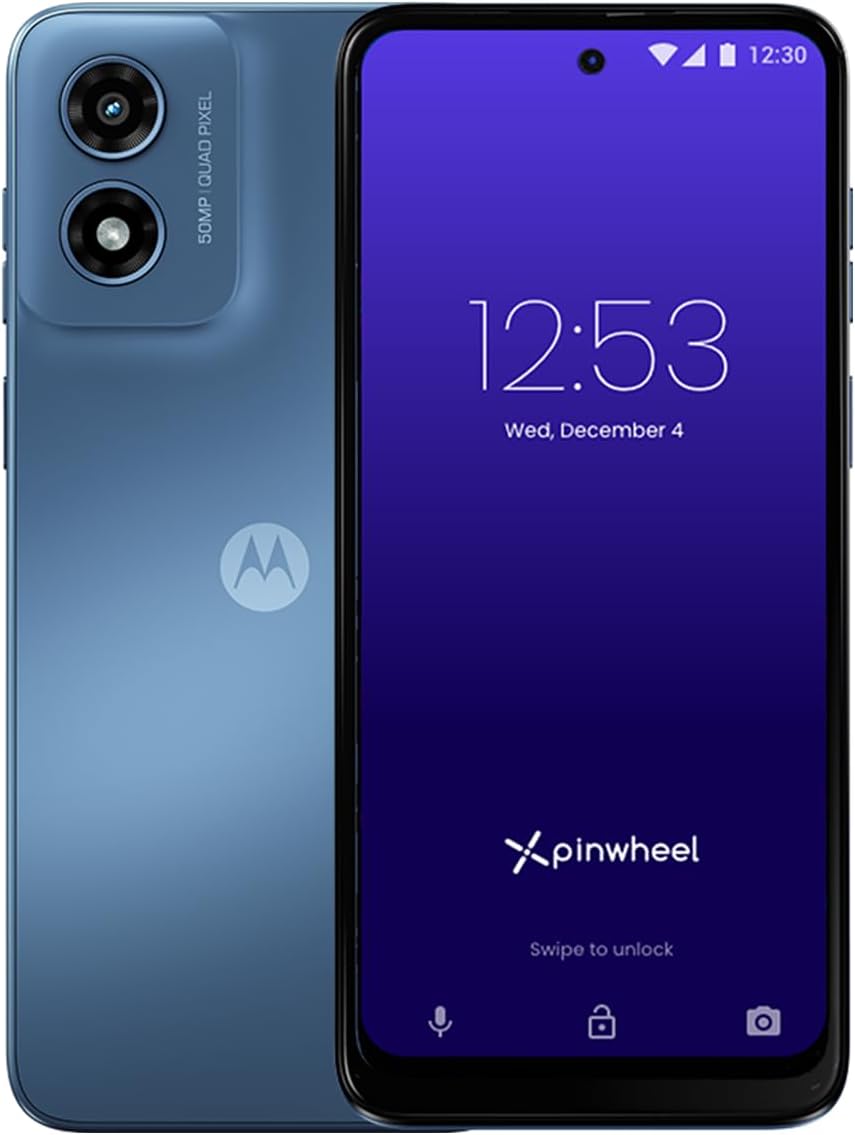


The Pinwheel Plus 6 is a feature-rich smartphone designed for children and teenagers ages 8 to 18. Its 3.0 rating indicates that customer satisfaction is currently mixed, but the supplied specifications show one of the most robust management systems in this guide. The device combines unrestricted talk and text options with controlled app access, scheduled availability, and parent visibility into communication history.
We may earn a commission when you buy through this link, at no additional cost to you.
Its strongest feature is the Caregiver Portal, which lets parents remotely manage the phone, safelist approved contacts, review text messages and call history, and set schedules for when apps and contacts become available. Parents can also draw on more than 1,200 app safety ratings when deciding which applications are appropriate. Social media and adult apps are excluded, while the web browser is optional rather than permanently enabled.
The hardware is more substantial than that of most dedicated kids devices. It includes a 50MP triple-lens camera, 128GB of memory, a 6.7-inch display, and 5G compatibility. It is unlocked and can use Pinwheel Wireless, Verizon, AT&T, or T-Mobile service, giving families more carrier flexibility. The trade-off is that its capabilities make it closer to a controlled conventional smartphone than a stripped-down kids phone.
This is a strong choice for a family that wants meaningful oversight without immediately allowing the full risks of a standard smartphone. It is best suited to parents willing to learn and maintain the caregiver settings. Families seeking a simpler device may prefer the camera-free G-Mee Connect Pro, while the low customer rating means buyers should carefully check recent feedback and current service options.
The Caregiver Portal provides a practical middle ground between an unrestricted Android phone and a basic call-and-text device. Approved contacts, application schedules, communication visibility, and blocked social platforms give parents several ways to adapt the phone as the child becomes more independent.
A large display, 128GB of storage, 5G compatibility, and a triple-camera system make this phone suitable for teenagers who may outgrow basic communication needs quickly. Its app ratings and scheduling tools also help parents introduce approved digital experiences gradually rather than all at once.
We may earn a commission when you buy through this link, at no additional cost to you.
The Genesis 4 is another managed smartphone for children and teenagers, with a stated age range of 8 to 18. It offers a broad safety package through the Caregiver Portal, including contact safelisting, message and call-history access, and schedules for app and contact availability. Its 1.6 rating is the lowest among the listed products and warrants close attention to recent customer feedback.
We may earn a commission when you buy through this link, at no additional cost to you.
The parent-control concept is similar to that of the Pinwheel Plus 6. Parents can allow children to use approved apps while excluding social media and adult applications, with more than 1,200 safety ratings available as guidance. The phone starts with a controlled experience and can gain functionality as a child matures, supporting a gradual transition toward greater independence.
Hardware specifications include a dual-lens 50MP rear camera, an 8MP front camera, 4GB of RAM, 128GB of internal memory, and a 6.7-inch display. Cellular compatibility is narrower than that of the Pinwheel Plus 6: the supplied information says it works with AT&T and T-Mobile but not Verizon or 5G networks. That limitation could be decisive depending on the household's carrier and location.
The Genesis 4 is most appropriate for an AT&T or T-Mobile household seeking extensive parent controls for a child in the 8-to-18 range. Families should weigh the low rating and network limitations against the otherwise useful management tools. It is less convincing for buyers who need broad carrier flexibility or a device expected to receive broad user satisfaction.
Parents can change available contacts and applications according to the child's age, schedule, or level of responsibility. The ability to inspect calls and texts adds visibility, while the contact safelist helps prevent unknown people from reaching the phone unexpectedly.
The combination of 128GB storage, 4GB RAM, and a 6.7-inch display is useful for a child who wants more than a basic calling device. It creates room for approved educational, reading, creative, and other vetted applications as the child's interests develop.
We may earn a commission when you buy through this link, at no additional cost to you.
The Pinwheel Slim 6 offers a managed smartphone for ages 8 through 18 and carries a 3.5 rating. Its defining combination is a large touchscreen, a 50MP camera, 64GB of memory, and a stated four-day battery life. The phone also provides the caregiver tools for which the Pinwheel range is best known.
We may earn a commission when you buy through this link, at no additional cost to you.
Parents can use the Caregiver Portal to safelist contacts, inspect call and text history, and determine when particular apps and contacts should be available. The Google Play Store is accessible for approved applications, but social media and adult apps are excluded. More than 1,200 safety ratings give parents a broader basis for deciding what belongs on the device.
The Slim 6 supports Pinwheel Wireless and SIM cards from major carriers, including Verizon, AT&T, and T-Mobile, according to the supplied information. It also blocks spam and stranger calls and texts, which helps reduce immediate communication risks. Compared with the Pinwheel Plus 6, however, it has less storage and a simpler camera arrangement.
This is a balanced recommendation for families wanting a capable managed smartphone without moving directly to the most hardware-heavy model. It may work especially well for children who need approved applications but do not yet require advanced camera features. Buyers should configure the portal together with the child and revisit the schedule as responsibilities change.
The stated four-day battery life can reduce the anxiety of sending a younger child to school with a device that may need frequent charging. It makes the phone easier to use for calls, approved learning apps, and communication over an ordinary school and activity schedule.
A parent-controlled safelist, restricted communication history, and blocked stranger calls and texts address risks that app filtering alone cannot solve. The device is intended to reduce unwanted contact while still allowing the child to reach approved family and friends.
We may earn a commission when you buy through this link, at no additional cost to you.
The Secure Phone 4G GPS Tracker is a deliberately restricted communication device with a 4.2 rating, the highest numerical rating in this guide. It supports calls, text messages, and real-time tracking without providing the open app and internet environment found on conventional smartphones. That makes it especially relevant for children, teens, seniors, and people with special support needs.
We may earn a commission when you buy through this link, at no additional cost to you.
Parents determine which numbers can call or receive text messages, creating a tightly controlled communication circle. The absence of internet, games, apps, and spam calls removes several familiar sources of distraction and online exposure. Its touchscreen interface and GPS tracking add useful everyday functions without turning the device into a full internet smartphone.
The principal limitation is carrier commitment. A cellular plan must be purchased from Secure Phone, and the product cannot be used with another provider. Some families may see this as a restriction, while others may appreciate that the service is designed around the phone's specialized tracking and calling features.
This is a strong budget-oriented choice for a child who needs dependable family communication and location awareness more than entertainment or app flexibility. It is also a practical second device for a teen who already owns a smartphone. Parents should compare the required service and confirm coverage in the child's regular locations before purchasing.
Real-time GPS tracking gives caregivers a way to check the user's location when needed. That capability is particularly useful for younger children, teens with added supervision needs, and family members responsible for coordinating pickups or monitoring travel.
Removing internet, games, apps, and spam calls eliminates entire categories of risk rather than merely attempting to filter them. The result is a predictable device centered on approved communication and location tracking, although it will feel limited to a child accustomed to unrestricted smartphones.
We may earn a commission when you buy through this link, at no additional cost to you.
The G-Mee Connect Pro is a full Android smartphone designed with safety and simplicity in mind. It has a 4.0 rating and is described as suitable for children ages 10 and above. Its most distinctive feature is the complete absence of cameras, reducing the possibility that the child can photograph other people or participate in image-based interactions with strangers.
We may earn a commission when you buy through this link, at no additional cost to you.
A built-in app locker lets guardians assign a PIN and lock individual applications before handing over the phone. The device still provides a modern smartphone experience through Android 13, a 2.0GHz octa-core processor, 4GB RAM, 64GB of internal storage, and expandable microSD storage. Parents therefore have more flexibility than with a purely call-and-text device.
Connectivity includes T-Mobile service, dual nano-SIM support, NFC, Bluetooth 5.0, and dual-band Wi-Fi. The 5.72-inch HD+ display can run streaming and educational applications, while the 3000mAh battery is rated for up to 117 hours of music or eight hours of HD video. A protective case, screen protector, wired earbuds, and USB-C cable are included, though a power adapter is not.
This is the most balanced full-featured recommendation for an older child who does not need a camera but still wants approved apps and familiar smartphone functions. It is less suitable for a creative child who wants to take photographs or for a family unable to use T-Mobile. Subject to carrier compatibility, its combination of camera removal, app locking, and modern hardware makes it unusually compelling.
Not including front or rear cameras prevents the device from creating or sharing photographs and videos of the child, other people, or strangers. It also avoids accidental video calls and removes camera-based applications that could undermine a family's broader safety rules.
The PIN-protected app locker lets guardians make individual tools unavailable without turning the entire phone into a basic feature phone. Android 13, expandable storage, dual-band Wi-Fi, and current connectivity features preserve useful flexibility for learning, music, and communication.
We may earn a commission when you buy through this link, at no additional cost to you.
The Mini Phone for Kids is a compact Android 10 device built around a 3.7-inch touchscreen. No numerical customer rating was supplied for this product, so its long-term customer feedback cannot be compared directly with the rated options. Its feature set is aimed at a child's first phone, travel backup, or everyday communication need.
We may earn a commission when you buy through this link, at no additional cost to you.
The phone supports voice and video calls, GPS tracking, Wi-Fi, applications, and a quad-core processor. Face recognition provides device unlocking, while a 2MP front camera and 8MP rear camera record 1080p video. The included screen protector and protective case help address the physical damage risks that come with handing a small device to a child.
Storage and connectivity add useful flexibility. Two SIM slots can hold two SIM cards or one SIM and one TF card, and expansion up to 128GB is supported. USB Type-C charging is stated to complete in one hour, with up to 27 hours of standby time. However, the supplied information mentions support for apps including TikTok and Chrome, so this is not a restricted phone by default.
The compact size, location features, and straightforward calling make this a practical option for a child who wants a smaller phone or for an adult seeking a backup device. Parents should strongly consider adding screen-time and application controls, use a protective case, and verify SIM frequency compatibility before purchase. Its lack of a supplied rating warrants extra care when assessing long-term reliability.
A 3.7-inch display is easier for small hands to navigate and less likely to dominate a child's attention than a large smartphone. The device still provides voice and video calling, Wi-Fi, and GPS, covering the core functions of a first mobile phone.
Dual SIM capability and expansion up to 128GB make the phone easier to adapt to different family arrangements. A child can use one SIM and one memory card, while adults can maintain two lines, and the included case and screen protector help protect the compact chassis.
We may earn a commission when you buy through this link, at no additional cost to you.
The Kids Smart Phone Learning Toy is a 3.97-inch touchscreen device intended for children ages 3 to 12. It has a 4.1 rating and is closer to an offline entertainment and learning device than a conventional cellular phone. Its most important safety property is simply that it has neither Wi-Fi nor calling functions.
We may earn a commission when you buy through this link, at no additional cost to you.
More than 200 educational games, 190-plus drawing activities, interactive story adventures, a flashlight, camera tools, and an alarm clock fill the preloaded experience. Front and rear cameras, 45-plus stickers, and creative effects encourage playful photography and video. A 1500mAh rechargeable battery and 8GB of storage support everyday use, while the included shockproof silicone case helps with drops and bumps.
Password protection, app and time management, and support for multiple child accounts form the parental control mode. Because app downloads are not supported, the child cannot use this device to discover new apps or enter an open download environment. This closed approach makes the device safer for younger children than a general-purpose Android handset.
This is an excellent first device for a child who wants a phone-shaped toy for games, stories, drawing, and creativity rather than independence from caregivers. It is not suitable for a child who needs to call parents, coordinate rides, or maintain emergency contact. The included Type-C cable, manual, lanyard, case, and toy phone create a ready-to-use gift package.
The absence of calling, Wi-Fi, and app downloads creates a tightly bounded digital environment. Children can use the preloaded activities without entering chat platforms, browsing websites, or installing unpredictable third-party software.
Alphabet games, number activities, puzzles, stories, drawing pages, and creative challenges provide more variety than a single-purpose toy. Multiple child profiles and parental time management also make it possible to share the device among siblings while keeping individual experiences organized.
We may earn a commission when you buy through this link, at no additional cost to you.
The Kids Smart Phone 3.0 is a small Android device aimed at children age 3 and above. It has a 3.3 rating and operates over Wi-Fi without accepting a SIM card. That makes it more flexible than a fully offline learning toy while remaining distinct from a conventional phone that can communicate over cellular networks.
We may earn a commission when you buy through this link, at no additional cost to you.
The device includes 16GB of built-in memory, front and rear HD cameras, video calling, and support for an expandable 128GB microSD card. Its broader app support includes educational software, reading tools, and popular applications such as TikTok. Parents can add their own location or family messaging applications over Wi-Fi to create a basic awareness and communication layer.
A detachable, washable silicone case surrounds high-impact ABS construction, while the compact format is intended for small hands and Bluetooth headphones. The device is positioned for music, learning, video creation, and family communication. The supported presence of popular social media apps, however, means it is not automatically as restricted as dedicated kids phones in this guide.
This is most appropriate for a young child whose family wants Wi-Fi calling and selected applications without buying cellular service. Parents should install only approved apps, configure any location and messaging tools carefully, and use the device's parental controls as part of a broader family safety policy. The Wi-Fi-only design is a limitation for emergencies outside reliable wireless coverage.
Using household Wi-Fi can allow video calls and selected messaging or location applications without a cellular account. It can be a practical middle ground, although families should remember that connectivity will be unavailable in many outdoor and travel locations.
The palm-sized body, detachable washable case, and high-impact construction address durability and handling concerns. Front and rear cameras, expandable storage, and Bluetooth headphone support give children creative and listening options within a more child-oriented form factor.
We may earn a commission when you buy through this link, at no additional cost to you.
The Unlocked 2G Mini Smartphone is a compact first phone intended for children ages 7 to 12. It carries a 2.7 rating and uses a small 3.0-inch display designed for one-handed use and reading. Its compact dimensions, 2800mAh battery, and basic communication functions make it more appropriate for a younger child than a feature-heavy smartphone.
We may earn a commission when you buy through this link, at no additional cost to you.
The phone includes GPS location tracking, facial recognition, voice and video calls, a 2MP front camera, an 8MP rear camera, and 1080p video. It runs Android 10 with 2GB of RAM and 32GB of storage. Support for apps including TikTok, Chrome, and educational games means the device is flexible, but those capabilities also make parental supervision important.
Two SIM slots can be configured with two SIM cards or one SIM and one TF card, and storage can be expanded by as much as 128GB. USB Type-C charging is stated to take one hour, and standby time is listed at up to 27 hours. The screen includes an eye-protection and reading mode, which may be useful for children who spend time reading or using educational applications.
This is a reasonable option for a child between 7 and 12 who wants calls and familiar applications but may find a large phone cumbersome. The key concern is the 2G designation: families should verify network compatibility, coverage, and service expectations before purchasing. It is less compelling where faster cellular service or broad app performance is important.
The compact body and 3.0-inch screen reduce both visual overwhelm and the likelihood that a younger child will carry a large, expensive device everywhere. A focused set of calling, navigation, camera, and game functions provides a gradual introduction to mobile technology.
GPS, face unlock, dual SIM capability, expandable storage, and a stated one-hour charging time cover several practical needs in a small package. The included screen protector, protective case, instruction manual, SIM ejector tool, and Type-C cable make setup easier for a child and caregiver.
We may earn a commission when you buy through this link, at no additional cost to you.
The MOMILLA Kids Phone is a 5.0-inch offline learning and entertainment device for children ages 3 to 12. It has a 4.0 rating and is designed more like a compact creative tablet than a communications phone. The absence of Wi-Fi and SIM support is its clearest safety advantage because it cannot browse the web or receive cellular calls.
We may earn a commission when you buy through this link, at no additional cost to you.
More than 500 educational contents cover alphabet learning, Montessori-inspired activities, STEM themes, and interactive stories. The library also includes games, mini games, two-player modes, and more than 200 coloring, puzzle, drawing, art-appreciation, and doodling activities. These features allow children to create, learn, and play without encountering unrestricted app-store content.
Front and rear cameras support selfies, photos, video recording, stickers, themed frames, and panorama mode. Forty calming tracks and white-noise audio provide quiet-time options, while a timer, calculator, and voice recorder broaden the practical features. A 2000mAh rechargeable battery, protective pink case, and lanyard support everyday use, and Parent Mode controls apps and play time.
This is a strong gift for a young child who wants a larger screen for drawing, stories, games, and photography without online access. It is not a substitute for a phone when a parent needs to reach the child directly. A standard non-fast-charging USB-C adapter should be used with the included cable for proper charging.
The 5.0-inch display provides more room for drawings, stories, games, and videos than the mini learning devices in this guide. A slim body measuring 3.0 by 5.6 by 0.5 inches preserves portability while giving children a more comfortable creative surface.
With more than 500 educational contents, 50 mini games, and over 200 creative activities, the device offers enough variety for sustained play. Parent Mode and the lack of connectivity help adults keep the experience focused on preapproved learning and entertainment.
We may earn a commission when you buy through this link, at no additional cost to you.
The safest device is the one that matches the child's age, communication needs, maturity, and tolerance for limits. Compare parental controls, connectivity, camera access, carrier requirements, and the difference between a managed phone and an offline learning device.
Age is the first practical filter because a phone intended for an eight-year-old should not provide the same independence or application access as one designed for a teenager. Pinwheel models explicitly target ages 8–18, the G-Mee Connect Pro is described as suitable for ages 10 and above, and the smaller learning devices focus on children between 3 and 12. These ranges are useful starting points, but they should be combined with the child's reading ability, maturity, and ability to follow family rules.
Choose a device that meets the child's actual needs without exposing capabilities they cannot manage safely. A young child may be better served by offline activities or a tightly restricted calling phone, while a teenager may need approved messaging, navigation, educational tools, and more independence.
Useful parental controls include contact safelists, call and text history, scheduled app availability, camera restrictions, and controls over the browser. Pinwheel devices provide a caregiver portal with several of these functions, while G-Mee uses a PIN-protected app locker and omits cameras entirely. The Secure Phone 4G takes a simpler approach by limiting calls and texts to parent-programmed numbers and excluding internet and apps.
Prioritize controls your family will actually understand and maintain. A comprehensive portal is valuable for an older child, but a simple contact whitelist may be more effective for a younger one or a caregiver with limited technical experience.
The safest phone is not always the most connected phone. Some products provide cellular calling, video calls, GPS, and a broad app environment, while others are offline toys that cannot make calls or browse the internet. Secure Phone 4G focuses on communication and location, whereas the MOMILLA device and Kids Smart Phone Learning Toy are built around preloaded educational content.
Write down the features your child truly needs before comparing models. If emergency calls to caregivers are essential, eliminate offline learning devices. If the goal is a manageable introduction to technology, an offline device may be safer and less distracting than a fully connected smartphone.
Cameras can introduce privacy and social risks, particularly for younger children. G-Mee Connect Pro has no cameras at all, making it one of the most privacy-focused full smartphones in the guide. The Secure Phone 4G also lacks a camera, while the learning devices include cameras for creative play. Several mini phones support apps such as TikTok, so their inclusion should not be mistaken for comprehensive safety filtering.
Decide whether the camera is necessary and whether popular social media apps are appropriate. A camera-free device can prevent image sharing and stranger video interaction by design. If cameras are included, pair them with parent supervision, restricted app access, and clear household rules about photos and videos.
Connectivity is more complicated than checking whether a device has Wi-Fi. Pinwheel Plus 6 and Pinwheel Slim 6 support major carriers and, in the case of Plus, 5G networks. Genesis 4 is listed as compatible with AT&T and T-Mobile but not Verizon or 5G. G-Mee Connect Pro is locked to T-Mobile, and the Secure Phone 4G requires a cellular plan purchased through Secure Phone rather than another provider.
Confirm the child's carrier, network type, coverage, and any service contract before ordering. For unlocked 2G and Android 10 mini phones, verify SIM frequency compatibility as well. A device that fails to connect on the child's usual network can be more frustrating than a simpler model with reliable service.
A small screen can reduce distraction and make a phone easier for a young child to carry, but it can also limit reading, video, drawing, and message comprehension. The 3.0-inch and 3.7-inch mini phones suit children who value portability, while the 5.0-inch MOMILLA display offers a larger creative canvas. Pinwheel models and G-Mee fall between these extremes with displays approaching standard smartphone size.
Choose a size the child can comfortably hold and use without constantly dropping it. Also consider the included protective case, screen protector, and overall weight. A phone that is too large may be uncomfortable, while one that is too small may encourage poor posture or make legitimate communication frustrating.
Storage needs depend on whether the phone stores photos, videos, music, and educational applications. Pinwheel Plus 6 and Genesis 4 offer 128GB, while the learning toy has 8GB, the Wi-Fi-only kids phone has 16GB, and G-Mee provides 64GB with microSD expansion. Battery claims also vary widely, from a stated four days for Pinwheel Slim 6 to about 27 hours of standby for the 2G mini phone.
For younger children, prioritize a protective case and simple charging routine. For teens, consider enough storage for approved media and reliable battery performance. Compare the included charging equipment carefully, because some devices include a USB-C cable but not a wall adapter, and one device specifies use with a standard non-fast-charging adapter.
Customer ratings can help flag consistency issues, but they do not replace checking the current product listing and parent reviews. The featured ratings range from 1.6 for Genesis 4 to 4.2 for the Secure Phone 4G, while one mini phone has no supplied numerical rating. A strong safety concept cannot compensate for poor reliability if the child cannot make a call when needed.
Review the present listing, carrier details, included accessories, warranty information, and recent customer feedback before purchasing. Feature claims can also change across product revisions, so verify that the exact safeguards, connectivity restrictions, and parental controls shown in the listing match the model you intend to buy.
Start by configuring the phone together before handing it over. Create the child's profile, set a secure screen lock, add only approved contacts, and review the default application permissions. On managed devices, establish schedules for school, sleep, homework, and recreational use, then explain in age-appropriate language which contacts and activities are available and why.
Teach the child how to accept unknown calls, avoid unfamiliar links, protect personal information, and ask an adult before installing an app or changing a setting. If the device has a camera, agree on rules for taking and sharing photos, participating in video calls, and posting content. Keep the caregiver portal or app-locker PIN in a place adults can access but children cannot easily discover.
Maintain the device over time by installing available security updates, reviewing newly added applications, checking contact lists, and adjusting schedules as the child becomes more responsible. Use the included case and screen protector, keep charging ports clean, and teach the child not to share the unlock pattern. Periodically revisit the balance between safety and independence rather than treating the initial setup as permanent.
The safest choice depends on whether the child needs real communication. A tightly restricted calling phone such as the Secure Phone 4G may be appropriate when a child primarily needs to reach approved family members. Offline learning devices such as the MOMILLA phone or Kids Smart Phone Learning Toy are safer when the goal is entertainment without calls or internet access. A camera-free managed smartphone becomes relevant as a child grows older and needs more digital independence.
They can be, provided the device offers enough approved functionality for the teenager's age and responsibilities. The Pinwheel Plus 6, Genesis 4, and Pinwheel Slim 6 are explicitly aimed at ages 8–18 and provide app, contact, and scheduling controls. Teenagers may eventually need more applications and flexibility, so parents should review restrictions regularly rather than treating a child's eighth birthday as the final stage of the setup.
A camera-free phone can reduce certain privacy risks because the user cannot take photographs, record video, or use camera-based communication features. G-Mee Connect Pro and the Secure Phone 4G take this approach. It does not make a device safe by itself, however; parents must still control applications, contacts, browsing, and communication methods.
A no-internet device can be a strong choice for a young child or for someone who only needs restricted calling and tracking. The Secure Phone 4G excludes internet, games, and apps, while the MOMILLA phone and Kids Smart Phone Learning Toy provide offline activities. Teenagers may find the restriction too limiting, making a managed smartphone with parental controls a better long-term option.
Look for contact safelists, call and text history, app filtering, time schedules, and controls over the browser. The most useful system is one that lets a parent make changes remotely and provides clear visibility into communication. Also consider whether individual apps can be locked, whether cameras are present, and how difficult it is for a child to bypass the settings.
That depends on the model. Pinwheel Plus 6 and Pinwheel Slim 6 list major-carrier compatibility, while Genesis 4 is limited to AT&T and T-Mobile networks. G-Mee Connect Pro is locked to T-Mobile, and Secure Phone 4G requires its own cellular plan. Always check the exact model, SIM type, network generation, coverage map, and activation rules before ordering.
Choose a managed phone when your child needs to call caregivers, use approved educational applications, or begin learning responsible smartphone habits. Choose an offline toy phone when calls are unnecessary and the main goals are games, stories, drawing, and controlled play. The toy option is simpler and generally less distracting, while a managed phone provides more practical independence with greater configuration demands.
Review the settings at least whenever the child's age, school schedule, or responsibilities change, and whenever a new app or contact is added. A quick monthly check can reveal unused applications, excessive screen time, or communication needs that the original setup did not account for. Involve an older child in these reviews so restrictions can be explained as evolving trust rather than arbitrary punishment.
The G-Mee Connect Pro stands out as the most balanced full smartphone because it combines Android 13, useful connectivity, expandable storage, and a PIN-protected app locker with no cameras. The Secure Phone 4G GPS Tracker is the strongest restricted communication option, offering parent-programmed calling and location tracking without internet or apps. For families seeking extensive remote management and a broader range of hardware, the Pinwheel Plus 6 provides the most capable caregiver portal.
Prioritize the child's age, need for communication, and family's technical comfort before comparing small differences in cameras or storage. A simpler restricted device can be safer than a poorly configured smartphone, while a managed Android phone can serve an older child who needs approved learning, navigation, and messaging tools. In every case, parental involvement, clear rules, and periodic reviews remain essential because no product can replace responsible adult guidance.
Ratings, carrier compatibility, included subscriptions, and prices can change over time, so verify the current Amazon listing before purchasing. Check recent customer feedback, confirm network support, read the included-service terms, and make sure every accessory required for charging or activation is present. The right device is the one that provides needed communication with the least unnecessary exposure.