
Headphone Mic Splitter for PC
4.7Editor score
TRRS female to dual male
Color-coded audio and mic
Braided 7.87-inch cable
A mic and speaker splitter connects audio equipment with separate microphone and headphone plugs to a device featuring a combined 3.5mm connection. The right adapter depends mainly on connector direction, TRRS or TRS wiring, CTIA support, device ports, cable construction, and whether you need to share audio or combine a headset with a computer.
We compared all ten products by examining their connector configurations, stated compatibility, audio construction, portability, and intended applications. The list covers PC headset adapters, portable sharing splitters, and a USB audio cable, showing how each model differs for legacy computers, modern systems, gaming equipment, and mobile devices.
Each review identifies the product's strongest use case and important limitations, while the comparison table highlights connector layouts and practical differences. Ratings and availability can change over time, and current prices should be checked at the linked retailer before making a purchase.
4.7Editor score

4.5Editor score

5.0Editor score
As an Amazon Associate we earn from qualifying purchases.
This side-by-side comparison focuses on connector direction, supported devices, audio construction, and intended use, helping readers distinguish PC headset adapters from music-sharing splitters and USB audio solutions.



The UGREEN Headphone Splitter for Computer is a purpose-built adapter for combining a single 4-pole headset connection with a computer's separate 3.5mm headphone and microphone jacks. Its 4.5 rating reflects a well-regarded design that combines polished 24K gold-plated connectors, an aluminum alloy housing, and a nylon-braided cable in a compact 20-centimeter format.
We may earn a commission when you buy through this link, at no additional cost to you.
Its defining strength is clear, practical compatibility. The product description identifies support for common gaming headsets, including models from Turtle Beach, HyperX, and Razer, as well as Sennheiser headphones and several legacy laptops. The oxygen-free copper construction is intended to support signal transmission, while the jacket reportedly withstands more than 10,000 bending tests.
The important qualification is that the microphone function requires a CTIA-compliant 3.5mm TRRS cable. OMTP devices and the stated incompatible Apple earbuds may fail to work, and the adapter is intended for computers with separate audio and microphone jacks rather than a modern single USB-C audio interface.
This is a strong choice for a desktop or older laptop user who wants a compact, clearly labeled adapter for a dual-plug gaming headset. Confirm that the headset uses CTIA wiring and that the computer still has separate 3.5mm ports before buying, but for that common setup it offers a convincing balance of construction and compatibility.
The single TRRS female end receives the combined headset cable, while the two male ends provide dedicated connections for headphones and a microphone. Color-coded or clearly differentiated ends help reduce setup errors at a crowded desktop.
The braided jacket, aluminum alloy housing, and short cable length make the adapter easy to carry between a home computer, office laptop, or gaming setup while avoiding unnecessary cable clutter.
We may earn a commission when you buy through this link, at no additional cost to you.
The Headphone Mic Splitter for PC offers a straightforward way to connect a combined 3.5mm headset to separate microphone and audio ports. It carries a 4.7 rating, and its most useful feature is the color-coded pair of male outputs: black is identified for headphones and red for the microphone.
We may earn a commission when you buy through this link, at no additional cost to you.
The connector layout is particularly helpful for PC users because it removes much of the guesswork from routing a TRRS headset. The product is stated to work with popular gaming headsets from Turtle Beach, HyperX, and Razer, along with Bose and Sennheiser models, speakers, and several legacy computers.
Construction details include 24K gold-plated contacts, aluminum connector heads, braided wire, and a reported 40,000-plus bending-test rating. Its 20-centimeter length keeps it compact, while the plug-and-play design requires no drive, app, or additional configuration.
The adapter is not a universal solution for every 3.5mm headset, since the description specifically says the microphone will not work with original Apple earphones and Beats headphones. It also lacks USB-C or USB support. For a compatible CTIA headset and a PC with separate jacks, however, it is an attractive, easy-to-identify choice.
The black headphone output and red microphone output provide an immediate visual cue when connecting to a PC. This simple detail is particularly helpful for users who do not routinely work with analog audio adapters.
There are no drivers, applications, or configuration steps. The adapter is designed around standard 3.5mm connections, so compatibility with the device and headset matters much more than operating-system support.
We may earn a commission when you buy through this link, at no additional cost to you.
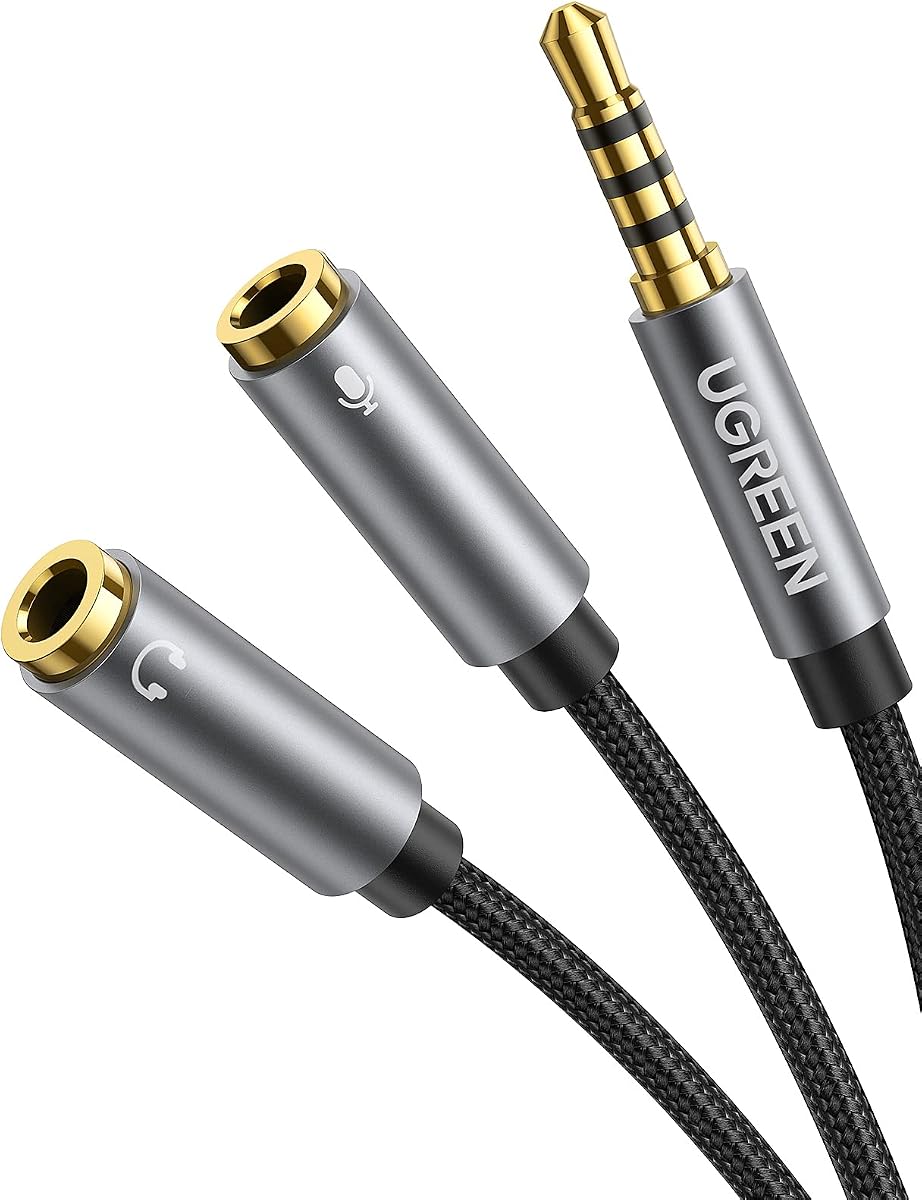
This UGREEN adapter reverses the direction of many PC headset splitters by using one 3.5mm male plug and two female sockets. That makes it appropriate when a computer or game console has a combined port while the headset uses separate headphone and microphone plugs.
We may earn a commission when you buy through this link, at no additional cost to you.
The design includes soft TPE material for flexibility, a nylon-braided exterior, a copper core, and gold-plated connectors. Its short 7.87-inch length is well suited to mobile use, while the two female ends provide an easy way to connect a legacy dual-plug headset without replacing the original cable.
Compatibility is the principal limitation. The headphone side supports CTIA-standard equipment, but the stated information excludes iPhone headsets and OMTP headphones. A notable setup requirement is that the headset and microphone should be connected to the adapter before the adapter is plugged into the computer.
This model is a good option for a laptop, tablet, or console with one combined 3.5mm port and a separate-jack headset. Buyers should verify the physical direction of the plugs and the CTIA standard, but for matching equipment it offers a flexible and neatly constructed solution.
A male-to-dual-female design is useful when the source device uses a single combined jack and the headset terminates in separate microphone and headphone plugs.
The soft TPE section and short braided cable should tolerate routine repositioning while fitting conveniently into a laptop bag, gaming case, or travel kit.
We may earn a commission when you buy through this link, at no additional cost to you.
The SYNCWIRE Headphone Splitter is designed primarily to send one analog audio source to two sets of headphones or speakers. Its male-to-dual-female Y configuration works with many phones, tablets, laptops, media players, and game consoles, making it a simple option for shared listening.
We may earn a commission when you buy through this link, at no additional cost to you.
A polished 24K gold-plated connector, double shielding, and a soft nylon jacket form the core construction. The stated jacket has endured at least 15,000 90-degree bend cycles, and the compact, lightweight design is aimed at travel as well as stationary use. Its slim connector is also said to fit most cases except LifeProof cases.
This is not the same type of adapter as a PC microphone splitter. Its two female ends are intended as audio outputs, so it should not be selected for someone whose headset has separate microphone and headphone plugs and whose computer has matching separate inputs.
The best buyer is someone who wants to share music, a film, or another audio source between two listeners. For a personal gaming headset on a legacy PC, choose a TRRS-to-dual-TRS microphone adapter instead. Within the sharing category, SYNCWIRE offers a well-constructed and broadly compatible cable.
The two female sockets allow two headphones or speaker sets to receive the same source, a useful arrangement for travel, gaming with a friend, or collaborative audio playback.
The double-shielded construction is intended to reduce interference, while the gold-plated connector supports reliable signal transfer over repeated use.
We may earn a commission when you buy through this link, at no additional cost to you.
KINGTOP's Headphone Mic Splitter combines one male 3.5mm connection with separate female microphone and audio sockets. It is tailored to dual-plug gaming headsets and devices with a combined CTIA port, including the PS4, PS5, Xbox One, and Switch controllers.
We may earn a commission when you buy through this link, at no additional cost to you.
The adapter uses standard TRRS splitter wiring and 24K gold-plated connectors. Its compatibility list includes the Logitech G430 and G231, Turtle Beach X12, and dual-plug models from HyperX, Razer, and SteelSeries. The compact format also makes it practical for newer laptops and Android phones with the appropriate connection.
Compatibility caveats are significant. The supplied information explicitly excludes iPhone, iPad, MacBook Pro, iMac, other Mac systems, and Beats or Bose headphones designed for Apple. It is also not a music-sharing splitter: its purpose is to combine one microphone and one headphone connection at a single-port device.
This is a sensible choice for console or Android gaming when the headset has two plugs and the device has one combined socket. Check the headset wiring and device port before ordering, but those who match its CTIA configuration gain a focused adapter without excess cable length.
Separate female microphone and headphone sockets map directly to the two plugs found on many gaming headsets, making the adapter especially useful for console and mobile gaming.
The stated platform list spans current and legacy gaming hardware as well as compatible Android and laptop connections, all through the standard 3.5mm format.
We may earn a commission when you buy through this link, at no additional cost to you.
The Headset Headphone Splitter Adapter Cable for PC is a compact Y adapter intended to connect a 4-pole CTIA gaming headset to separate microphone and headphone ports on a computer. It can also serve compatible single-port consoles and smartphones, according to the supplied product information.
We may earn a commission when you buy through this link, at no additional cost to you.
Its strongest feature is the breadth of stated gaming support. The description names Astro A10 and A40, Turtle Beach, BENGOO, HyperX Cloud, SteelSeries, Razer Kraken, Sennheiser, and Sades headsets. It also supports communication applications, making the adapter relevant to online meetings and voice chat as well as game audio.
The hardware is a 20-centimeter or eight-inch cable with one 3.5mm female connector and two 3.5mm male ends. The supplied details do not make the same detailed material claims as several competing products, so buyers seeking extensive connector specifications should compare the physical design and stated compatibility carefully.
This adapter makes sense for a gamer with a recognized CTIA headset and a PC that retains separate 3.5mm microphone and audio jacks. It offers good brand and platform compatibility in a simple form, but CTIA wiring remains the essential requirement.
A long list of supported headset brands gives the adapter broad practical appeal, especially for users who know their model is configured with the standard CTIA four-pole connection.
Beyond game sound, the microphone path supports voice-chat applications, allowing the same compact adapter to handle both communication and audio.
We may earn a commission when you buy through this link, at no additional cost to you.
The 4FT USB to Dual 3.5mm Male Headphone/Speaker and Mic Splitter Audio Cable is the most technically advanced product in the group. Instead of relying on a computer's analog 3.5mm port, it uses USB audio and a built-in high-resolution DAC to provide separate speaker and microphone connections.
We may earn a commission when you buy through this link, at no additional cost to you.
The stated digital audio support reaches 16-bit/48kHz, and the chip is designed to decode signals and optimize analog amplification while reducing noise. A pure copper core, 24K gold-plated connectors, aluminum shells, and a cotton-jacketed four-foot cable support both signal quality and everyday durability.
Installation is simple because the product operates without drivers or external power. The stated compatibility list covers several Windows versions, macOS, Linux, Chromebook, Windows Surface 3 Pro, Raspberry Pi, PS4, and PS5. It supports CTIA-standard audio and microphone jacks.
This cable is a strong premium choice for a modern computer that lacks a 3.5mm audio jack, or for a user who wants separate desktop microphone and speaker connections through a single USB lead. It does not replace every analog adapter, and CTIA remains the required standard, but its DAC, long reach, and driver-free design distinguish it clearly.
The built-in DAC converts USB audio for analog outputs, allowing a modern computer to use separate 3.5mm microphone and speaker connections without relying on a legacy sound-card jack.
The longer cable can span the gap between a desk and a monitor speaker or microphone arm, reducing the need for additional extension leads in common desktop arrangements.
We may earn a commission when you buy through this link, at no additional cost to you.
This two-pack is designed for sharing a phone, tablet, laptop, computer, game console, or MP3 player with another person. Unlike a basic dual-output audio Y cable, its stated purpose is to support two TRRS headsets with both sound and microphone functions at the same time.
We may earn a commission when you buy through this link, at no additional cost to you.
Each cable uses a 3.5mm TRRS male plug and two 3.5mm female outputs. The 30-centimeter braided nylon cable resists wear and tangling, while the gold-plated plug is intended to limit signal loss. The aluminum housing is described as lightweight, scratch-resistant, and resistant to corrosion.
The split has an important limitation: ordinary TRS headphones or speakers can receive sound, but microphone use requires a headset with a TRRS plug and built-in microphone. The exact behavior of a call may also depend on how the source device manages a shared microphone connection.
This is the most specialized sharing option in the list and a useful alternative to the one-person mic-and-audio adapters. It is well suited to two people sharing media or calls on a device with one analog port, particularly when both listeners need microphones. The two-pack also provides a spare for travel or a second device.
The dual female outputs can each accept a compatible TRRS headset, allowing shared music, films, games, or calls while retaining microphone capability on both sides.
Including two splitters lets one cable remain in a gaming setup while the other travels with a phone or laptop, reducing the need to move a single adapter between devices.
We may earn a commission when you buy through this link, at no additional cost to you.
The Maeline Headphone Splitter Adapter provides the common PC arrangement: one female 3.5mm input for a combined headset and two male outputs for separate microphone and audio connections. It is intended for laptops and computers that still use the traditional dual-jack layout.
We may earn a commission when you buy through this link, at no additional cost to you.
Material construction is a notable part of its appeal. The adapter uses a polished 24K gold-plated connector, aluminum housing, oxygen-free copper wire, shielding, and a nylon-braided cable. Additional strain-relief rings are intended to make the connection more stable and flexible over repeated bending.
The eight-inch length keeps the adapter compact enough for travel while still providing enough separation to reach two neighboring PC ports. The supplied information also notes its use with voice applications, covering online communication, instant messaging, and other headset-based services.
Compatibility requires attention to the stated exclusions: it works with CTIA-standard Android headphones but not CTIA-standard Apple Earbuds. Within the limited pool of products explicitly restricted to 3.5mm Android and PC equipment, Maeline offers polished construction and a practical short-cable format.
Gold plating, an aluminum shell, shielding, and a braided cable work together to support dependable connections in a small adapter that may be moved frequently.
The 20-centimeter cable reaches adjacent microphone and headphone sockets without creating the clutter that a longer adapter cable can create beside a monitor or desktop.
We may earn a commission when you buy through this link, at no additional cost to you.
The D & K Exclusives Headphone Splitter is a compact adapter for connecting a combined 3.5mm headset to a PC or laptop with separate headphone and microphone jacks. It is also described as suitable for two headsets on one source, giving the product a broader potential role than a simple mic-and-audio combiner.
We may earn a commission when you buy through this link, at no additional cost to you.
Its stated construction includes gold-plated 3.5mm contacts and oxygen-free copper, intended to provide conductivity and durability. The compact design is emphasized for portability, while the product description references use with voice applications such as Skype, chat programs, messaging services, and Google Voice.
The principal drawback is the breadth of the universal-compatibility claim. It mentions iPhone, BlackBerry, and Droid earphones, but the specific requirements of modern mobile headsets and different TRRS standards mean buyers should verify the exact wiring arrangement rather than rely on a general platform name.
This adapter is best considered for a simple analog PC setup or as a compact backup adapter. Its rating of 4.3 indicates a generally positive reception, while the compact gold-plated design and dual-headset capability make it versatile. Detailed confirmation of the headset and computer ports remains essential before purchase.
The female input and two male outputs can support a PC headset arrangement, while the stated dual-headset capability offers an additional way to share one audio source.
Its compact profile suits a laptop bag and can serve as an inexpensive backup for older systems that retain separate headphone and microphone ports.
We may earn a commission when you buy through this link, at no additional cost to you.
Choosing the correct mic and speaker splitter starts with identifying the connector direction and TRRS standard, then considering the devices, intended function, and construction that best fit your setup.
A splitter may connect a combined headset to a device with separate ports, or connect a dual-plug headset to a device with one combined port. Inspect both ends before buying. A TRRS female end receiving a headset cable usually leads to two TRS male outputs, while a TRRS male plug may split into two TRS female sockets. The physical direction must match the source device and headset.
Buy the direction that directly matches your equipment rather than assuming all 3.5mm splitters are interchangeable.
TRRS describes a four-pole connector that carries audio and microphone signals, while TRS describes a three-pole connection that normally carries audio alone. CTIA and OMTP are two common TRRS wiring arrangements, and they are not interchangeable for microphone input. Many of the products in this guide specifically require CTIA, while the UGREEN sharing splitter supports two TRRS headsets for both audio and microphone use.
Check the headset manufacturer's wiring requirements and the product description before purchasing to avoid silent or failed microphone operation.
Traditional computers and laptops may have one combined 3.5mm jack, two separate jacks, or no analog audio connection at all. The two-separate-jack arrangement requires a female-to-dual-male headset adapter, while a single combined device port may require the opposite orientation. Modern USB-C laptops may need the featured USB audio cable or another compatible digital audio adapter instead.
Count the available ports and identify their type before ordering. A splitter cannot overcome an incompatible connector format.
A mic-and-audio splitter combines one microphone and one headphone connection, whereas a music-sharing splitter sends one audio source to two headphones or speakers. Some sharing products can also support two TRRS headsets, but microphone behavior remains dependent on the source device. Choosing the wrong functional type can produce duplicated audio, an inactive microphone, or an unexpected connection arrangement.
Write down whether you need mic-plus-headset conversion or two-listener audio sharing, then select the adapter designed for that task.
Gold-plated contacts, oxygen-free copper, shielding, and a built-in digital DAC can all contribute to reliable signal transmission. Gold plating is intended primarily to resist corrosion and maintain consistent contact, while shielding helps limit interference in cable-heavy environments. The USB model differs by decoding a digital source before converting it to analog audio.
Consider these specifications alongside compatibility. Excellent materials cannot compensate for the wrong connector direction or unsupported TRRS standard.
Most PC adapters in this group are approximately eight inches long, which is convenient for reaching adjacent ports without excessive desk clutter. The USB audio cable provides four feet of reach, while the sharing splitter uses a one-foot cable. Braided jackets, aluminum housings, strain relief, and stated bend-test results indicate attention to repeated handling and travel.
Choose a short adapter for a laptop bag and a longer cable when the USB source or audio equipment sits farther from the computer.
The featured products support a range of PCs, laptops, phones, tablets, media players, and gaming consoles, but compatibility should be evaluated at the connector and wiring level. The USB model additionally supports several desktop operating systems and requires no driver. Analog products generally work without operating-system software, yet they may still fail with unsupported headset standards.
Look for your exact device and headset in the stated compatibility information whenever possible, and avoid relying on a broad brand name alone.
Clearly labeled or color-coded microphone and headphone outputs make installation easier, especially on a crowded desk. The Bordsek adapter distinguishes its male ends with black and red housings, while the UGREEN PC splitter is described as clearly labeled. For a permanent setup, these details can prevent incorrect connections and make troubleshooting faster.
Prioritize an adapter whose microphone and audio outputs are easy to identify, especially if you will use it with several different systems.
Begin by identifying the source device's available ports, the headset's plug style, and the required direction of the adapter. For a PC with separate headphone and microphone jacks, connect the headset's combined TRRS plug to the splitter's female end, then attach the headphone and microphone male plugs to their matching ports. If the source has only one combined jack, use the reverse configuration with the male plug entering the device and the headset leads entering the female sockets.
For the USB model, connect the USB end to a free computer port and attach the black speaker output and red microphone output to the corresponding equipment. Allow the operating system to detect the audio device, then select it in the sound settings if it is not already active. The product is designed for plug-and-play use without drivers or external power. For shared-headset models, connect both TRRS headsets before starting a call, as the source device may not recognize a headset added during an active session.
To preserve the connector and cable, avoid sharply bending the plug where it enters the housing, and do not pull the cable to disconnect it. Keep the adapter away from moisture, excessive heat, and strong magnetic fields. When not in use, loop it loosely rather than creating a tight fold, especially around the strain-relief section. Periodically inspect the plug and socket for debris, and gently clean the contacts with a dry, soft cloth if necessary.
A mic splitter normally combines one microphone and one headphone connection so a dual-plug headset can use a device with a single combined port. A headphone sharing cable sends one audio source to two pairs of headphones or speakers. Some TRRS sharing cables can support microphones on both sides, but ordinary TRS headphones will generally receive audio only.
Only if the laptop includes a compatible 3.5mm audio jack or you use an appropriate USB-C audio adapter. A conventional 3.5mm splitter cannot connect directly to USB-C. The USB to dual 3.5mm male cable in this guide provides a different route for supported computers, with separate speaker and microphone outputs and no driver installation.
The most likely causes are an OMTP-versus-CTIA wiring mismatch, an incompatible headset, or incorrect connection order. Many adapters in this guide support CTIA TRRS equipment only, while some also exclude Apple-designed earbuds. Connect the headset to the splitter first, then attach the adapter to the computer, and verify the manufacturer's wiring requirements.
Yes, provided the headset and adapter use matching TRRS standards and the device has the correct port arrangement. Several models specifically list Turtle Beach, HyperX, Razer, SteelSeries, Astro, and other gaming headsets. A PC with separate microphone and headphone jacks needs a female-to-dual-male adapter, while a console with one combined port usually needs the reverse.
A splitter normally preserves the source signal rather than inherently improving it. Good contacts, copper conductors, shielding, and a digital DAC can support clean transmission, but the largest practical benefits are reliable routing and compatibility. Actual audio quality also depends on the source, headset, speakers, microphone, and software settings.
A dedicated male-to-dual-female audio splitter can send sound to two headphone sets. For both users to use microphones, the two-port sharing model with TRRS support is more appropriate, although call behavior depends on the source device. Standard TRS headphones connected to that sharing model can receive sound but not microphone input.
Choose a female TRRS end with two male TRS outputs when your headset has one combined plug and the computer has separate microphone and headphone ports. Choose a male TRRS end with two female TRS outputs when the source has one combined port and the headset has two plugs. Check the physical connectors rather than relying only on the product title.
The conventional 3.5mm splitters are passive analog adapters and do not require installation. The USB model is also described as driver-free and draws no external power, though the computer must recognize it as a USB audio device. If it is not selected automatically, the user may need to choose it through the operating system's sound control panel.
The UGREEN Headphone Splitter for Computer is the most balanced general recommendation for a dual-jack PC and a compatible CTIA gaming headset. The Bordsek Headphone Mic Splitter stands out with its higher rating and color-coded routing, while the USB to dual 3.5mm cable offers the most advanced option for a modern computer that needs digital audio conversion and separate speaker and microphone connections.
Compatibility should outweigh every other consideration. Confirm the connector direction, determine whether the headset uses CTIA or OMTP, and verify that the source device has the required ports. CTIA is the dominant standard across the PC-focused products, and Apple-designed earbuds, Beats models, or other specialty headsets may require a different adapter.
For a simple two-listener audio setup, the SYNCWIRE splitter or the two-pack TRRS sharing option may be more appropriate than a PC headset adapter. After choosing the correct type, compare portability, labeling, and construction against the exact equipment in use. Prices and availability change over time, so check the current listing and included accessories before purchasing.