
8Bitdo M30 Wired Controller
4.2Editor score
Official Xbox-style control layout
USB-C wired connection
Three switchable profiles
Fightpads for PC put six-button control at your fingertips; this expert guide compares switches, inputs, builds, features, and platform support for players.
Fightpads for PC give fighting-game players a more focused alternative to a standard gamepad. A dedicated six-button layout, symmetrical stick placement, and tournament-oriented controls can make training sessions and competitive matches feel more consistent, comfortable, and precise.
The products in this guide were compared using their stated layouts, switches, connection methods, adjustment options, platform compatibility, and intended uses. The list covers official licensed fightpads, an Xbox-focused arcade controller, premium leverless models, a compact stick, and a conventional gamepad.
Each review highlights the features that distinguish the controller and identifies the player most likely to benefit from it. Ratings reflect the supplied customer feedback, while prices and availability change, so readers should verify current listings and condition before purchasing.
4.2Editor score

4.4Editor score

4.2Editor score
This side-by-side comparison organizes every controller by its most important characteristics, including platform support, control layout, wired or wireless operation, and notable customization features.



The HORI Fighting Commander OCTA is a conventional six-button fightpad designed for PlayStation 5, PlayStation 4, and PC. Its supplied rating of 4.1 reflects generally favorable customer feedback, while its strongest qualities are the symmetrical arrangement, short-throw stick, adjustable D-pad, and Sony licensing. It offers a practical middle ground between a basic gamepad and a highly specialized arcade deck.
We may earn a commission when you buy through this link, at no additional cost to you.
The controls are designed around competitive fighting-game needs. Micro Switch buttons provide a distinct action for each face input, while the short-throw analog stick uses an eight-way gate to reduce unwanted diagonal movement. Its adjustable D-pad and six-button layout make the controller more suitable for fighters than a standard console pad, and the onboard audio controls and headset input add convenience without altering the core fightpad layout.
Customization through the companion app is another useful feature, although it means the controller is not entirely configured without additional software. Wired operation avoids wireless interference and removes the need to manage batteries, but the attached cable can occupy desk space. These are modest compromises for a controller whose core controls, platform support, and recognizable HORI design are otherwise well suited to PC fighting games.
This is a strong recommendation for a player who wants a familiar, officially licensed fightpad without moving into a leverless or premium tournament ecosystem. It works particularly well for owners of recent Sony hardware who also play on PC and want one controller across multiple systems. Those who prioritize wireless freedom, on-screen status information, or extensive switch-level personalization may want to look at the other options in this guide.
The eight-way gate and short travel give players a more controlled way to enter directional commands. That design is especially useful when practicing movement, shortcuts, and other actions that demand consistency across a long training session.
Compatibility with PS5, PS4, and PC makes this a versatile household controller. A single wired fightpad can serve both console and PC fighting games without requiring the player to relearn the arrangement of face buttons.
We may earn a commission when you buy through this link, at no additional cost to you.
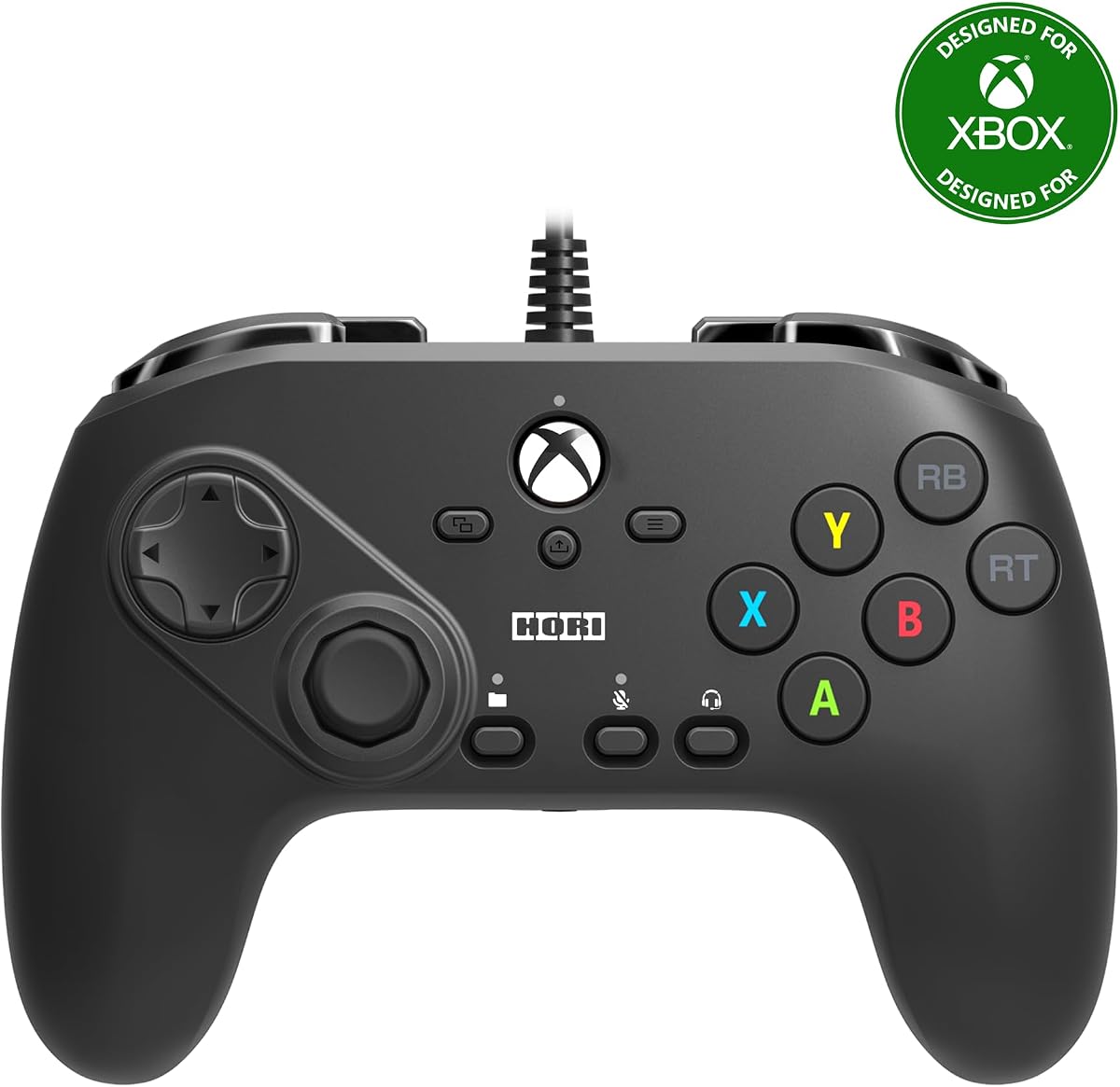
This HORI Fighting Commander Octa is an officially licensed Microsoft controller for Xbox Series X, Xbox Series S, Xbox One, and Windows 10. Its supplied rating of 3.5 is the lowest among the rated products in this list, so buyers should weigh its established feature set carefully. The six-button arrangement and short-throw stick nevertheless target fighting games directly rather than general console play.
We may earn a commission when you buy through this link, at no additional cost to you.
Its six-button face layout, Micro Switch buttons, adjustable D-pad, and short-throw eight-way analog stick mirror the core design priorities of modern competitive fightpads. The companion app can save up to four profiles, allowing different button arrangements or settings to be recalled through the controller's profile button. This is convenient for players who move between characters, games, or training configurations.
The 3.5 rating suggests that some customers may have found aspects of the experience less compelling than those of the higher-rated controllers. Wired operation, the need for companion software, and the lack of a display are possible limitations when compared with newer leverless alternatives. Even so, official Microsoft licensing and support for both current Xbox systems and Windows 10 make it a straightforward choice within the Xbox ecosystem.
Consider this controller if you regularly play fighting games on an Xbox Series console and want to bring the same familiar control scheme to a Windows 10 PC. It is also relevant to competitive players who value multiple saved profiles more than wireless operation or advanced trigger adjustments. Buyers seeking a more extensively rated product may find the 8Bitdo M30 or DOYOKY leverless controller more compelling.
Four saveable profiles provide a practical way to keep separate configurations for different games or training routines. The physical profile button makes switching more direct than repeatedly opening software menus.
The controller works with Xbox Series X, Xbox Series S, Xbox One, and Windows 10. That makes it useful for players who split their fighting-game time between console sessions and PC practice.
We may earn a commission when you buy through this link, at no additional cost to you.
The 8Bitdo M30 is an officially licensed Xbox controller for Xbox Series X, Xbox Series S, Xbox One, and Windows. It carries a supplied rating of 4.2 and combines a traditional gamepad shape with a six-button fighting layout. That combination makes it a practical option for players who want fightpad ergonomics without moving to a large leverless arcade controller.
We may earn a commission when you buy through this link, at no additional cost to you.
Two bumpers, two triggers, and two layout switches provide the familiar controls needed to enter matches and navigate game menus. A USB-C wired connection supports a stable link with virtually lag-free operation, while the dedicated profile button allows three profiles to be changed on the fly. Compatibility with 8BitDo Ultimate Software opens additional configuration options, and the 3.5mm audio jack with volume control is convenient for private practice.
It does not include the rapid trigger, SOCD management, screen-based status display, or tournament lock found in premium leverless models. It also appears less specialized than a full-size arcade stick. Those limitations are understandable at the accessible end of the category, and the simpler feature set can be a benefit for someone learning standard fighting-game inputs rather than optimizing every competitive rule.
The M30 is a strong recommendation for budget-conscious PC and Xbox players who want a six-button layout and a familiar controller design. It suits casual matches, local multiplayer, and focused training where reliable wired input matters more than extensive personalization. Players seeking a more tournament-oriented alternative should compare the DOYOKY model, while those wanting premium electronics can consider the Akko FUNBOX.
The six-button layout provides the action arrangement expected in many fighting games while retaining familiar shoulder controls. It offers a manageable learning curve for new players and quick access to training functions.
A dedicated profile button lets players move among three stored configurations without navigating through PC menus. This is useful when different games or characters benefit from distinct control assignments.
We may earn a commission when you buy through this link, at no additional cost to you.
The DOYOKY Leverless Controller is a multi-platform fighting-game controller for PC, PS4, PS3, Nintendo Switch, and Steam Deck. Its supplied rating of 4.4 is tied for the highest score in this guide. The combination of a leverless 16-button layout, hot-swappable switches, five input modes, and a built-in OLED display makes it unusually flexible for players who move between systems.
We may earn a commission when you buy through this link, at no additional cost to you.
Its reinforced USB-C connection and detachable 1.5-meter braided cable are designed for repeated daily use. The OLED screen shows the active input mode, SOCD setting, and Turbo status, allowing the player to verify important configurations without returning to a computer. The controller supports XInput, DirectInput, PS4, Switch, and Keyboard modes, while three SOCD options—Neutral, Last-Input, and Up-Priority—provide meaningful directional control.
The included switch puller, spare switch, and spare keycaps make mechanical personalization accessible without soldering. Web-based customization also removes the need to install conventional controller software, although learning the browser interface and configuring inputs initially takes more attention than using a standard gamepad. Its 29.6 by 21-centimeter base and non-slip feet occupy more desk or lap space than a conventional pad, which may matter in compact setups.
This controller is a compelling choice for a PC player who wants leverless ergonomics without committing to one platform. It is especially attractive to owners of multiple compatible devices and to players who enjoy experimenting with switch feel, SOCD behavior, and macros. Those who need more elaborate on-screen controls, higher-end magnetic switches, or explicit tournament locking may prefer the Akko FUNBOX.
Support for XInput, DirectInput, PS4, Switch, and Keyboard modes lets the controller adapt to different devices and software environments. The built-in OLED makes the selected mode visible at a glance.
Hot-swappable mechanical switches let players alter feel and sound without a soldering iron. The supplied spare components and puller make the system approachable for first-time customizers.
We may earn a commission when you buy through this link, at no additional cost to you.
The Akko FUNBOX is a premium leverless arcade controller built for competitive fighting games. Its supplied rating of 4.2 reflects a favorable response despite the controller's specialized feature set. Hall Effect magnetic switches, an adjustable rapid trigger, an eight-thousand-hertz polling rate on PC, and tournament locking distinguish it from simpler leverless alternatives.
We may earn a commission when you buy through this link, at no additional cost to you.
Kailh Star Mini 2.8mm low-profile Hall Effect switches use contactless magnetic operation, reducing physical friction and debris buildup while remaining hot-swappable with compatible Kailh low-profile mechanical switches. Rapid Trigger can be adjusted from 0.1 to 2.8 millimeters, allowing players to tune the reset point for different play styles. The 50KHz scan rate and PC polling specification emphasize the controller's focus on fast, repeatable inputs.
The two-inch full-color LCD is more than decorative. It can display input modes, SOCD settings, input tests, and user-selected standby animations, while an aluminum multi-function dial provides tactile menu control. Tournament Lock restricts simultaneous opposing directional inputs and disables functions such as Home, Turbo, Select, and Start. Outside that mode, four SOCD modes and full button remapping are available through a browser driver.
The FUNBOX is the strongest recommendation here for a player building a dedicated competitive setup and willing to invest in advanced electronics. It suits players who care about rapid-trigger control, precise switch behavior, tournament rules, and clear on-screen status. Casual players may find the premium construction and configuration depth unnecessary, but serious competitors can use its controls and safeguards to create a disciplined practice environment.
The 0.1-to-2.8-millimeter range allows players to tune when a pressed input resets. That control is valuable for characters and techniques where the timing of directional releases affects execution.
Tournament Lock limits simultaneous opposing directions and disables several nonessential buttons. It creates a simplified control environment for players who want their setup to reflect formal competition restrictions.
We may earn a commission when you buy through this link, at no additional cost to you.
The HORI Fighting Commander OCTA in the TEKKEN 8 Edition is a wired fightpad made specifically for Windows PC. It carries a supplied rating of 3.8 and is officially licensed by Bandai Namco Entertainment. Its six-button face layout, Micro Switch buttons, accurate D-pad, and short-throw stick provide the fundamentals expected from a dedicated fighting-game controller.
We may earn a commission when you buy through this link, at no additional cost to you.
The short-throw left analog stick uses an eight-way gate to help players enter directional commands with less chance of unwanted diagonal movement. Micro Switch buttons give each face input a mechanical action, while the analog slide pad provides another method of moving through menus and lobbies. Its wired design keeps the PC connection direct and removes battery management from the equation.
This PC-specific edition does not list the same app-based profile features as some other HORI models, and its platform focus is narrower than that of multi-system controllers. The licensed TEKKEN 8 presentation may also matter more to fans of the series than to players seeking a neutral-looking controller. Those are aesthetic and setup differences rather than fundamental issues with the core fightpad layout.
It is a sensible choice for a Windows PC player who appreciates the TEKKEN 8 collaboration and wants a straightforward six-button fightpad. The licensed design gives it a clear identity, while the stick, D-pad, and button construction cover the essential requirements of serious fighting-game practice. Players needing broader platform support or deeper customization should examine the general OCTA, DOYOKY, or Akko options.
This edition is tailored for Windows rather than requiring cross-platform setup. That focus can simplify ownership for players whose primary training platform is a gaming PC.
The analog slide pad offers an additional navigation method beyond the D-pad. It can be useful when moving through character or lobby selections without occupying the primary directional input.
We may earn a commission when you buy through this link, at no additional cost to you.
The HORI Wireless Fighting Commander OCTA Pro is a wireless tournament-grade fightpad for PlayStation 5 and Windows 11 or Windows 10 PCs. Its supplied rating of 3.6 is lower than the ratings of most conventional fightpads in the guide, but its wireless construction, rear controls, and interchangeable D-pads serve clear competitive purposes. It is officially licensed by Sony.
We may earn a commission when you buy through this link, at no additional cost to you.
The six-button Micro Switch layout is joined by an eight-gate analog stick, an analog slider pad for lobby navigation, and tactile shoulder switches. Programmable rear buttons add inputs that can be useful for shortcuts or frequently used commands. Players can also select among three D-pad options, allowing the feel and travel to be adjusted to suit different games or personal preferences.
Wireless operation removes the cable from the competitive equation, which can make seated or couch play less cluttered. It also introduces responsibilities that wired fightpads do not have, including charging and managing the connection. HORI instructs users to download and install the latest firmware from its website before use or when encountering issues, making initial setup more involved.
Choose this model for a Sony-oriented setup that prioritizes wireless freedom and programmable rear controls. It is particularly relevant to PlayStation 5 owners who also use Windows and want a single licensed controller across both. If dependable wired operation, straightforward startup, and a broader set of documented customization features matter more, the standard wired OCTA models may be the more practical choice.
Eliminating the operating cable gives players more freedom to position themselves around a desk or seating area. The trade-off is the need to maintain battery power and establish a stable wireless connection.
Swappable D-pads let players select among different layouts and feels. The choice can make a substantial difference in fighting games where diagonal movement, shortcuts, and directional execution are frequent.
We may earn a commission when you buy through this link, at no additional cost to you.
The renewed HORI PlayStation 5 Fighting Commander OCTA is an officially licensed fightpad for PS5, PS4, and PC. It is supplied without a numeric customer rating, so it cannot be compared through that measure with the other products in the guide. Its eight-button layout, touchpad, and programmable macros nevertheless position it as a capable alternative within the OCTA family.
We may earn a commission when you buy through this link, at no additional cost to you.
The eight-button arrangement provides a broad set of face inputs, while the integrated touchpad follows the familiar PlayStation interface. Programmable macros can automate repeatable actions or assign extra functions, adding a layer of customization for dedicated practice. Wired operation keeps the connection direct and removes the need to charge batteries before a session.
The primary uncertainty is renewed condition. Cosmetic marks, wear, and differing levels of functional refinement are possible when purchasing refurbished electronics, and the supplied data provides less detail about the exact condition of this listing. Buyers should review the condition description, inspect included accessories, and understand the applicable return terms before ordering.
This product makes the most sense for a budget-conscious Sony and PC player who is comfortable with refurbished hardware. It offers a licensed, full-size fighting layout and useful macro functions without moving to an advanced leverless ecosystem. Players who prioritize a new condition, detailed rating history, or tightly specified switch and stick adjustments should examine one of the fully documented new models instead.
The eight-button layout offers more face-input positions than a standard six-button fightpad. That makes it useful for players who like additional commands close to the main action buttons.
Refurbished products can vary in appearance and wear even when their core functions work as intended. Reviewing the listing's condition notes and return policy is essential before making a final decision.
We may earn a commission when you buy through this link, at no additional cost to you.
The Logitech G F310 is a conventional wired gamepad with a 4.4 supplied rating, tying for the highest score among the rated products here. Although it is not a purpose-built six-button fightpad, its familiar control scheme, broad game support, and simple USB connection make it a practical PC option for players who want dependable gamepad input without a large specialized controller.
We may earn a commission when you buy through this link, at no additional cost to you.
The floating D-pad rests on four switches rather than a single pivot, which can make quick direction changes more responsive. Ten programmable buttons and an eight-way programmable D-pad expand its adaptability, while Profiler software can assign keyboard and mouse commands to games that lack gamepad support. The six-foot cord provides enough reach to play comfortably at a distance from a monitor.
Its main limitation is obvious for the category: the standard gamepad arrangement lacks a dedicated six-button face layout, short-throw eight-way stick, and tournament-oriented leverless design. It also requires software installation for the full profiling feature set. As a result, it is more appropriate for general gaming and arcade-leaning experiences than for a player focused exclusively on optimized fighting-game execution.
The F310 is worth considering for PC players who value a familiar, highly rated gamepad, broad compatibility, and programmable controls at an accessible tier. It can also serve as a secondary controller for non-fighting games while a dedicated fightpad handles competitive sessions. Serious fighting-game specialists should prioritize a six-button model, short-throw stick, or leverless deck instead.
Resting the D-pad on four switches can make diagonal inputs and quick reversals feel more consistent than a single-pivot design. The structure remains familiar to anyone accustomed to console controllers.
Profiler software can assign keyboard and mouse commands to controller buttons, expanding support for older or unconventional PC games. This adds flexibility even though it falls outside specialized fightpad design.
We may earn a commission when you buy through this link, at no additional cost to you.
The HORI Fighting Stick Mini is a compact arcade-style controller for PS5, PS4, and PC. Its supplied rating of 4.2 places it among the stronger-rated products in the guide. The classic eight-button arrangement, original HORI joystick with V-cut housing, and portable base distinguish it from both conventional gamepads and leverless fighting controllers.
We may earn a commission when you buy through this link, at no additional cost to you.
Its eight-button layout caters to arcade and fighting games, giving players dedicated access to multiple face inputs without the bulk of a full-size leverless deck. HORI's original joystick and V-cut housing preserve the feel of a traditional stick, while the included eight-foot cable offers ample reach for desk or seated play. Official Sony licensing allows the same controller to cover current and older PlayStation systems along with PC games.
The stick remains bulkier than a standard gamepad and is not the most portable option for travel, even though it is described as compact and lightweight. The supplied details do not highlight programmability, tournament locking, SOCD adjustment, or wireless operation, so players seeking those functions should look toward the DOYOKY, Akko, or Wireless OCTA Pro models.
The Fighting Stick Mini is a sound recommendation for players who prefer the feel and appearance of a traditional arcade stick but need a smaller footprint than conventional full-size controllers. It works well for fighting-game practice on PC and for Sony owners who value an eight-button layout. Those who want maximum portability may prefer a leverless pad, while those wanting greater control depth should examine the more configurable models.
The eight-button layout provides more direct face inputs than a standard gamepad. Paired with HORI's original joystick, it offers a recognizable arcade-style experience for fighting-game fans.
The compact base is easier to store than a full-size arcade cabinet or oversized leverless controller. It balances a traditional stick experience with a more manageable footprint.
We may earn a commission when you buy through this link, at no additional cost to you.
Choosing a fightpad for PC means balancing layout familiarity, control precision, connection reliability, platform support, and the degree of customization you actually need. The most important step is identifying how and where you plan to play.
A six-button fightpad uses a traditional arcade arrangement that many competitive fighting games expect, while an eight-button layout offers additional face inputs for games and styles that use them. Leverless controllers flatten the traditional stick-and-button shape into a grid and may feel more comfortable for some players, though they take up more desk space. Choose the format that matches your current habits; switching layouts while learning a new game can make otherwise simple inputs harder to execute.
Prioritize a layout you can use consistently. Six buttons are the common choice for focused fighting-game play, eight buttons suit players who want broader arcade coverage, and leverless layouts prioritize a uniform surface and modern competitive aesthetics.
The stick determines how cleanly the controller registers cardinal and diagonal directions. An eight-way gate helps prevent accidental diagonals when you intend a single direction, while a short throw reduces the distance required to reach a direction. These characteristics are especially relevant for movement-heavy games, shortcuts, and players training long combinations. Levers and gate tightness also influence the effort needed to maintain a direction.
Look for a short-throw stick with a clearly defined eight-way gate. If you prefer a gamepad, prioritize a floating or similarly responsive D-pad and make sure the directional layout feels natural.
Mechanical switches, magnetic Hall Effect switches, and traditional micro switches create different action, sound, and maintenance profiles. Hot-swappable systems let you alter feel or sound without soldering, which is valuable for experimentation but adds setup considerations. Hall Effect switches use contactless magnetic operation, while mechanical options provide a broad range of tactile and audible options. Consider whether you value customization more than a simple, factory-defined action.
A hot-swappable controller is ideal if you enjoy tuning your setup. If you want a straightforward product, prioritize a well-regarded factory switch configuration and reliable button registration over extensive replaceability.
PC support should be confirmed through the specific operating-system and input-mode information supplied for each product. XInput and DirectInput can affect how a controller behaves in different games and launchers, while multi-platform products may also require a particular mode. Sony and Xbox official licenses matter when you want one controller to work naturally across console and PC sessions. Multi-platform support is convenient, but it can introduce configuration steps.
Verify the exact PC versions and console models listed for your intended setup. If you only play on one system, a platform-specific controller may be simpler. If you move between devices, prioritize broad input-mode support and quick profile switching.
Wired controllers provide a direct connection, eliminate battery management, and avoid wireless interference. Their cables can occupy desk space, however, and a loose connection may affect comfort. Wireless controllers offer freedom of position but require charging, firmware or pairing management, and confidence in the stability of the connection. For tournament play and long PC sessions, wired operation is often the simpler choice; for living-room play, wireless may be more comfortable.
Choose wired if consistent input and minimal upkeep matter most. Choose wireless if flexible positioning outweighs the need to charge regularly and manage connection setup.
Profiles allow separate control assignments to be stored and recalled, which is useful across different games or training styles. SOCD, or simultaneous opposing cardinal direction, settings control how left and right or up and down interact. Neutral mode keeps both directions registered, Last-Input emphasizes the most recent direction, and Up-Priority gives upward movement priority. Macros can automate sequences, while tournament lock can disable specific functions to comply with competition rules.
Look for features you will regularly use rather than assuming more is always better. Profile buttons and clear status displays are especially helpful because they let you confirm a setting without returning to the PC.
Fightpads range from conventional gamepads to broad leverless decks and compact arcade sticks. A larger surface can feel stable and provide more room for leverless hands, but it requires desk or lap space. A small stick may be easier to store and still offer a traditional grip, while a standard pad takes up the least room. Build quality also affects stability, cable durability, button feel, and how comfortably the controller remains positioned during a match.
Measure the available playing area before buying. Choose a compact form for travel or shared desks, and select a broad leverless platform when neutral wrist position and a stable resting surface are your priorities.
Useful extras include headset ports, volume controls, touchpads, analog navigation pads, swappable D-pads, rear buttons, and displays. These features can improve menu navigation, private practice, or control variety, but they should support rather than distract from the main input surface. Check whether audio, navigation, and secondary controls are important enough to justify a more complex device. A simpler controller that executes your preferred game's commands well may be the wiser choice.
Prioritize extras that improve daily use. A clear display or physical profile switch is often more valuable than a feature that adds little to your usual game selection.
Connect the controller with the supplied cable or establish the required wireless connection, then confirm that the PC recognizes it in the game or software you use. For multi-mode controllers, select the correct input method before launching a title. Check the controller's display or indicator, verify the stick and buttons in a test menu, and create a profile before beginning a serious training session.
Set the stick gate, D-pad, triggers, SOCD behavior, and any macros to match your game and preferred rules. For leverless models, check every switch for an even press and use the supplied testing tools to identify loose or inconsistent inputs. Competitive players should save a separate tournament profile, keeping casual features such as Turbo or macros out of the configuration used for official matches.
Clean the controller gently with a soft, dry cloth and avoid spilling liquids around the controls or ports. Keep the surface free of dust, and inspect the cable connector for bending or strain. Wired fightpads should be unplugged rather than dragged by the cord, while wireless models should be charged periodically and kept at a reasonable battery level. Before a major tournament or match, test the controller, update any required firmware, and pack spare switches or keycaps if the model supports them.
A fightpad uses a more fighting-game-focused layout, usually with six or eight face buttons and a short-throw directional stick or a leverless button grid. A standard gamepad keeps the familiar asymmetric design, with the stick on the left and directional pad on the right. Fightpads generally suit players learning or specializing in arcade-style and competitive fighting games.
Neither format is universally better. Six-button fightpads follow a familiar traditional layout and often feel intuitive to arcade and fighting-game players, while leverless controllers provide a broad, uniform input surface and allow extensive switch customization. The better choice depends on your preferred grip, available desk space, competitive rules, and willingness to adjust to a different layout.
A wireless connection is convenient but not essential for competitive play. Wired models offer a direct connection and avoid charging and pairing management, while wireless models provide more freedom in positioning. Consider wireless most strongly when you play at a distance from the PC or want a cleaner setup around a shared desk.
An eight-way gate guides the stick through horizontal, vertical, and diagonal positions while limiting unintended movement between them. This is useful in fighting games because a slight angle during a left or right command can accidentally register a diagonal. A short throw also reduces the distance needed to reach a direction.
SOCD means simultaneous opposing cardinal direction, such as pressing left and right or up and down at the same time. Controllers can handle this with Neutral, Last-Input, or Up-Priority behavior. Tournament rules may require a specific configuration, so players should confirm current competition requirements before using an unrestricted setup in an official event.
Most hot-swappable designs are intended to make switch changes faster than soldering replacement switches directly to the board. A supplied puller is commonly used to remove and install the switch, while keycaps may also need to be lifted. Follow the controller's instructions carefully and confirm that replacement switches are compatible with its housing and plate.
Check the controller's listed PC compatibility and input mode before buying. PC games commonly use XInput, although some titles or utilities use DirectInput or keyboard commands. A controller with selectable input modes and a visible status display makes setup easier, and you can confirm every button in the game's control settings before training.
A renewed fightpad can be a sensible way to obtain licensed hardware at a lower commitment, provided the condition and warranty are clearly described. Review cosmetic details, included accessories, functional guarantees, and return terms. Players who cannot accept uncertainty about wear or component condition may prefer a new controller with a more complete product description.
The DOYOKY Leverless Controller stands out for its broad platform support, hot-swappable switches, OLED status display, and strong supplied rating. The Akko FUNBOX takes the premium lead with Hall Effect switches, adjustable rapid trigger, high polling specifications, a color display, and tournament locking, while the 8Bitdo M30 offers a more accessible way to enter six-button fighting-game play.
Before buying, prioritize the control format and response characteristics you will use every session. A short-throw eight-way stick, reliable button action, compatible input mode, and a connection style that suits your setup matter more than decorative extras. Tournament rules, software support, desk space, and your comfort with maintenance should also influence the decision.
Prices and availability can change over time, and renewed or specialized products may have different listing conditions. Check the current product page, platform details, included accessories, customer feedback, and return policy before ordering. Choosing a controller that feels right in your hands and remains reliable during practice is the surest route to a satisfying PC fighting-game setup.