
ASUS TUF Gaming A2
4.5Editor score
20 Gbps USB-C interface
Dual NVMe and SATA support
MIL-STD-810H tested chassis
Aluminum thermal management
Our rugged NVME enclosure guide compares durability, transfer speed, SSD compatibility, cooling, portability, and ease of use, helping you choose the right
A rugged NVME enclosure turns a spare internal solid-state drive into portable, high-speed storage. A worthwhile model should protect against impacts, dust, moisture, and frequent transport while helping the drive dissipate heat. SSD protocol, connector speed, size support, installation method, and host compatibility matter just as much as the outer shell.
The products in this guide were compared using their stated specifications and listed customer ratings. The list includes military-tested models, metal-and-silicone designs, tool-free enclosures, write-protected options, and cases for gaming systems. It also distinguishes between 10 Gbps and 20 Gbps interfaces and between NVMe-only and dual-protocol support.
Each review highlights the feature that makes its enclosure most useful, along with compatibility limits and practical trade-offs. The top picks demonstrate the strongest balance of protection, performance, and convenience for different needs. Availability and prices can change, so confirm the current drive requirements, interface, and listing details before purchasing.
4.5Editor score
4.6Editor score
4.5Editor score
This side-by-side comparison focuses on the details that affect real-world portability, protection, and performance, including interface speed, protocol support, drive sizes, cooling, and installation convenience.




The ASUS TUF Gaming A1 is our best overall rugged NVME enclosure because it combines unusually clear environmental protection with broad compatibility and straightforward installation. Its listed 4.6 rating reflects a strong reception, while the enclosure’s combination of MIL-STD-810H drop resistance and IP68 water and dust resistance makes it particularly appropriate for mobile work, travel, and exposed field use.
We may earn a commission when you buy through this link, at no additional cost to you.
The USB-C 3.2 Gen 2×1 interface supports transfer rates up to 10 Gbps, giving the enclosure enough bandwidth for most modern NVMe drives without requiring a specialized host. More importantly, it accepts both NVMe PCIe and SATA M.2 drives in the common 2242, 2260, and 2280 form factors. That flexibility lets users reuse compatible SATA drives while taking advantage of faster NVMe storage.
Installation is handled by ASUS’s Q-Latch mechanism rather than a conventional screw. A bundled USB-C cable connects the case to PCs, laptops, mobile devices, and current-generation gaming consoles, including the PS5 and Xbox models identified in the product information. The enclosure does not provide the 20 Gbps ceiling of the TUF Gaming A2, and buyers should not interpret the headline USB rating as guaranteed real-world drive speed; the SSD itself and host connection remain important limits.
This is the most broadly convincing recommendation for someone who wants serious physical protection without sacrificing drive compatibility or easy maintenance. It is a sensible choice for students moving projects, photographers transferring images, and gamers carrying a spare console-compatible drive. For buyers whose host supports the newer 20 Gbps standard, the A2 may be a more performance-oriented alternative, but the A1 offers the most balanced package in this roundup.
MIL-STD-810H drop resistance and IP68 sealing give this enclosure a meaningful advantage over lightweight aluminum cases. It is better suited to bags, work sites, and frequent travel where impacts, dust, and occasional moisture exposure are realistic concerns.
The Q-Latch system makes it easy to install or replace an SSD without reaching for a screwdriver. This convenience is valuable for cloning, troubleshooting, and moving between a desktop and a laptop without repeatedly opening a conventional enclosure.
We may earn a commission when you buy through this link, at no additional cost to you.
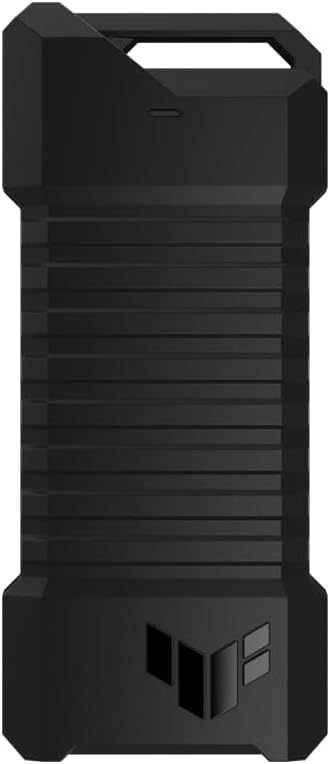
The ASUS TUF Gaming A2 is the best premium option because it raises the interface ceiling to 20 Gbps while retaining the protection and installation conveniences associated with the TUF line. Its 4.5 rating, military-grade testing, and IP68 rating make it a compelling choice for buyers who need more than a simple protective shell.
We may earn a commission when you buy through this link, at no additional cost to you.
The USB-C 3.2 Gen 2×2 connection is the model’s defining advantage. On compatible computers, it can provide a faster theoretical pipeline than the 10 Gbps designs in this guide, which is useful when working with large video files, virtual-machine images, project archives, and other data sets that benefit from quick transfers. The enclosure supports M.2 NVMe PCIe and SATA SSDs in 2242, 2260, and 2280 sizes, so it also accommodates a broader range of existing drives.
Thermal management receives careful attention. An aluminum-alloy chassis helps spread heat, while a thermal pad transfers heat away from the SSD. A protective silicone-rubber exterior adds grip and helps shield the chassis during handling. The enclosure also meets MIL-STD-810H and IP68 testing standards, making it suitably rugged for mobile storage, though actual water exposure should always follow the manufacturer’s guidance.
Choose the A2 when you own a host that supports USB 3.2 Gen 2×2 and want a premium enclosure that is prepared for demanding transfer schedules. It is less compelling if every available computer offers only 10 Gbps USB, because the host will limit the result. Even then, the durable construction, broad protocol support, and Q-Latch system remain excellent features for a frequently used portable drive.
The 20 Gbps Gen 2×2 interface can reduce transfer bottlenecks with compatible hosts and fast SSDs. It is most worthwhile for media libraries and multi-gigabyte transfers rather than routine document movement.
The aluminum chassis and thermal pad provide a stronger cooling strategy than a purely plastic shell. Sustained transfers still depend on drive thermals, ambient conditions, and the speed of the installed SSD.
We may earn a commission when you buy through this link, at no additional cost to you.
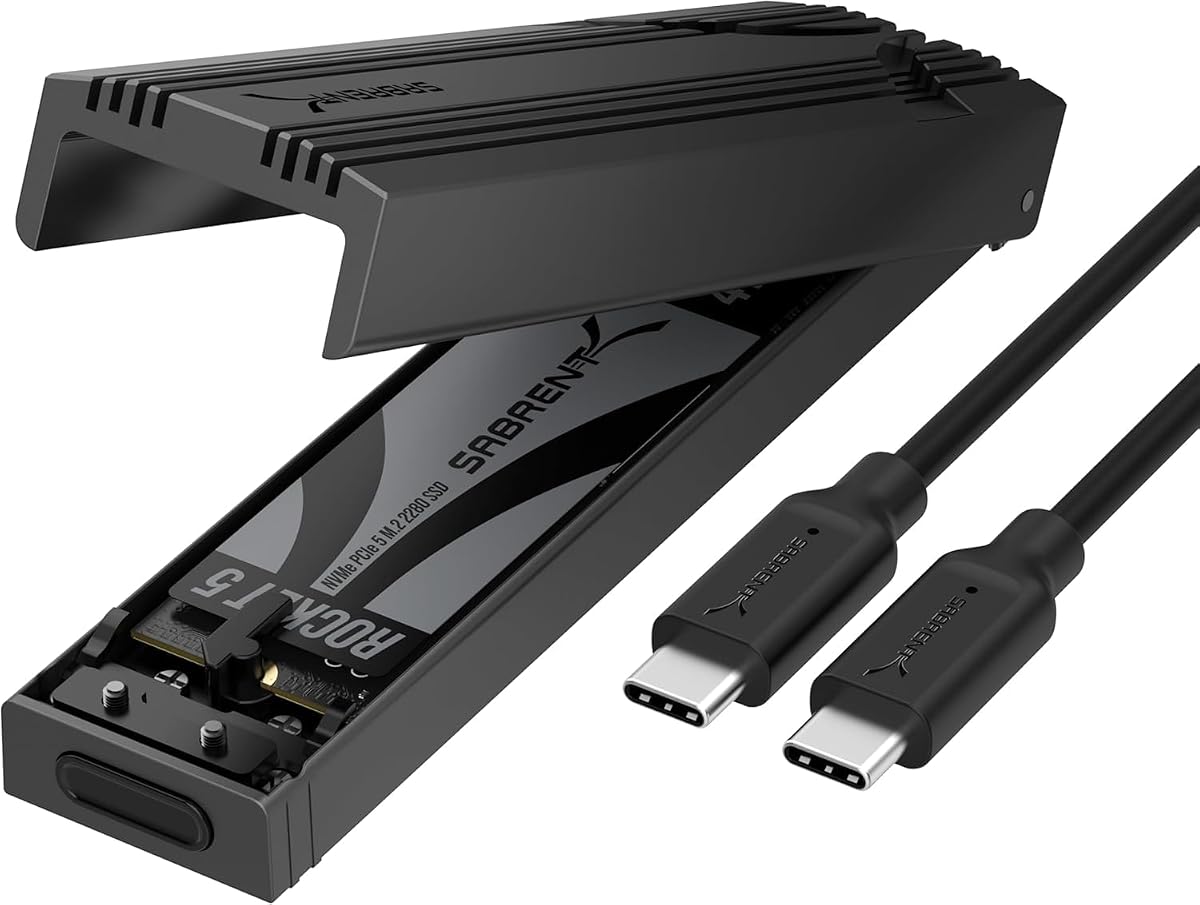
The SABRENT EC-PNVO stands out as the best budget-focused rugged NVME enclosure because it combines a 10 Gbps interface, a genuinely tool-free installation design, and a practical reinforced-aluminum body. Its 4.5 rating indicates strong customer satisfaction, and the enclosure is well suited to users who need portable NVMe storage without paying for premium gaming features.
We may earn a commission when you buy through this link, at no additional cost to you.
The flip-open mechanism allows the cover to be opened, the SSD inserted, and the drive locked into place without screws or separate tools. That makes the EC-PNVO convenient for cloning, troubleshooting, and swapping between several portable SSDs. It supports 2230, 2242, 2260, and 2280 NVMe drives, with stated capacity support of at least 8TB, giving it unusually broad coverage of common M.2 lengths.
Unlike several competitors, this model is limited to M.2 NVMe SSDs and does not support M.2 SATA drives. Its RTL-based 10 Gbps connection uses USB 3.2 Gen 2, and the enclosure works with laptops, desktops, gaming handhelds, and other USB-C devices without drivers or external power. The aluminum structure presses a thermal pad directly against the SSD, an approach intended to improve heat transfer and sustain more stable transfer performance.
This is a strong pick for students, creators, and travelers who already use NVMe drives and want straightforward installation. Its construction is described as portable and durable, although the supplied specifications do not claim a formal IP rating or military drop standard. Buyers seeking verified environmental resistance may prefer the ASUS TUF models; buyers seeking the easiest installation at a practical cost will find the EC-PNVO especially convenient.
The flip-open cover and internal locking mechanism remove the need for screwdrivers during installation. That makes the enclosure especially convenient for users who frequently alternate between work, travel, and troubleshooting setups.
The EC-PNVO is built for M.2 NVMe SSDs only. A buyer with an M.2 SATA drive should choose a dual-protocol case instead of assuming that all similarly shaped M.2 drives will fit electrically.
We may earn a commission when you buy through this link, at no additional cost to you.
The Ineo C2597-NVMe is differentiated by a built-in write-protection switch, making it the most relevant option for inspecting files on a public or shared computer. It retains a rugged, militarized aluminum construction and a 10 Gbps USB interface, while its 4.2 rating reflects a solid but less universally enthusiastic response than the leading products.
We may earn a commission when you buy through this link, at no additional cost to you.
Moving the switch to the lock position places the enclosure and its contents into read-only mode. This is useful when transferring files to a service bench, sharing footage with someone else, or presenting documents on a computer that is not fully trusted. The physical switch is easier to verify than a software setting and provides a visible reminder that protected content is being accessed.
The enclosure supports M.2 NVMe PCIe drives with an M key in 2280, 2260, 2242, and 2230 sizes. It does not support NGFF or SATA SSDs, so users with older M.2 SATA storage must verify the protocol before buying. Its aluminum cover and bundled silicone thermal pad provide physical protection and help manage heat during sustained 10 Gbps transfers.
Buy this model if secure, reversible write protection is a core requirement. It is less suitable for users who want SATA compatibility, a formal IP rating, or a tool-free installation system. For technicians, field investigators, and travelers who routinely connect personal drives to unfamiliar computers, the physical lock is a meaningful advantage that outweighs the limited protocol support.
The write-protection switch prevents changes to files and the connected device while locked. It offers a quick way to reduce accidental modification when using a shared or unfamiliar computer.
The solid metal cover and Picatinny-style design give the enclosure a field-oriented appearance. The rail-like form may also appeal to users who carry equipment in tactical, outdoor, or creative setups.
We may earn a commission when you buy through this link, at no additional cost to you.
The Zinc Alloy Dual-Protocol enclosure is a flexible choice for anyone carrying both NVMe and SATA M.2 drives. It supports 2230, 2242, 2260, and 2280 sizes and uses an RTL9210B controller with support for UASP and Trim. Its 4.4 rating reflects a well-rounded feature set, even if the design is less refined than some tool-free competitors.
We may earn a commission when you buy through this link, at no additional cost to you.
The stated 10 Gbps transfer rate applies to NVMe PCIe SSDs, while M.2 SATA III drives operate at up to 6 Gbps. A bundled USB-C cable connects the enclosure to compatible hosts, and the listed software support includes Windows, macOS, Linux, and Android. The product information also identifies compatibility with smartphones, tablets, Chromebooks, cameras, smart TVs, and gaming consoles.
Protection comes from a zinc-alloy body and silicone-wrapped edges designed to resist impact, scratches, dust, and water. A silicone heat pad is included for thermal transfer. Installation is less convenient than the tool-free models because a screwdriver is supplied and used to secure the drive. Drives with factory-installed heatsinks are not supported, and the enclosure cannot use M.2 SATA AHCI B-key drives.
This enclosure makes the most sense for a user who values protocol flexibility and physical toughness over rapid drive swapping. It is especially useful for technicians or content workers who may encounter older SATA laptops alongside newer NVMe systems. Make sure the chosen drive is bare, uses a supported key, and stays within the stated 4TB maximum capacity before purchase.
Supporting both NVMe and SATA eliminates the need to carry a separate enclosure for each protocol. It is a practical advantage when maintaining several generations of laptops, mini PCs, and portable workflows.
Silicone wrapping adds a forgiving barrier around vulnerable corners, while the zinc-alloy shell provides rigidity. These materials suit travel, though the enclosure lacks a stated formal IP certification.
We may earn a commission when you buy through this link, at no additional cost to you.
The Ineo C2594-NVMe combines a 10 Gbps interface, a compact aluminum enclosure, and integrated RGB styling for gaming-oriented portable storage. Its 4.4 rating is favorable, and the waterproof and shockproof construction gives it a more adventurous visual identity than many sober metal cases.
We may earn a commission when you buy through this link, at no additional cost to you.
The enclosure accepts M.2 NVMe PCIe drives with an M key in 2280, 2260, 2242, and 2230 sizes. It does not support NGFF or M.2 SATA SSDs, an important distinction for buyers with older storage. A bundled silicone thermal pad helps move heat away from the drive during sustained transfers, while the aluminum cover supplies structural protection.
Its compact silicone frame and covers are described as waterproof and shockproof, making the case suitable for travel and mobile gaming setups. The integrated RGB design can coordinate the enclosure with a visually themed computer or peripheral collection. Lighting is a style feature rather than a performance upgrade, but it helps the enclosure feel purpose-built for desktop gaming and portable console accessories.
Choose the C2594-NVMe when a gaming aesthetic, compact format, and 10 Gbps connection are priorities. Users needing SATA compatibility should look to a dual-protocol alternative, while travelers who need a formally certified ingress rating may prefer the ASUS TUF models. For an NVMe user who wants storage that looks integrated with a gaming setup, this enclosure remains a distinctive option.
The RGB-lit housing gives a portable SSD enclosure the appearance of a gaming accessory. Its compact dimensions make it easy to carry alongside a laptop, handheld, or travel kit.
The silicone frame, shockproof design, and aluminum cover work together to protect the drive during transport. Buyers should still follow the manufacturer’s instructions and avoid exposing the enclosure to conditions beyond its stated limits.
We may earn a commission when you buy through this link, at no additional cost to you.
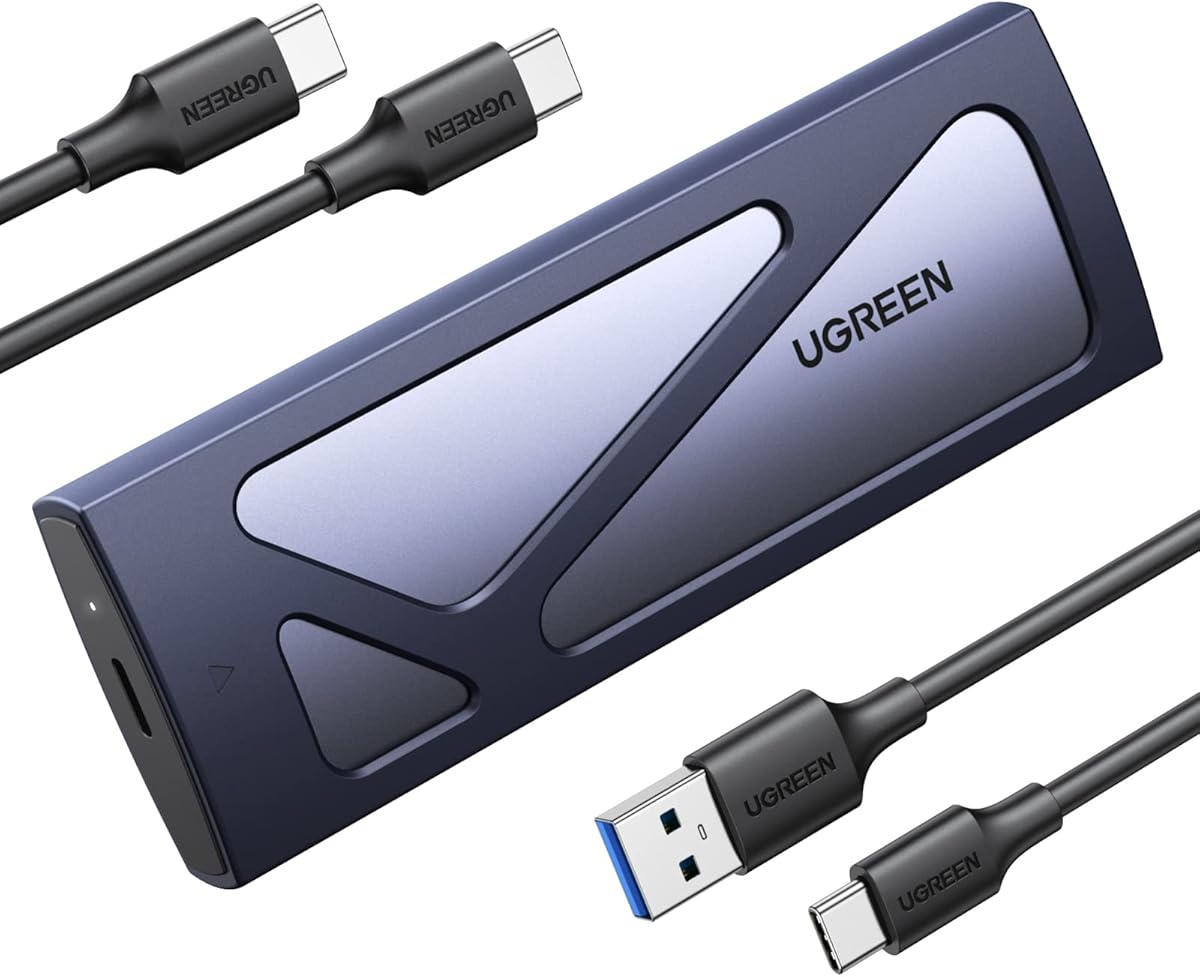
The UGREEN 10Gbps Enclosure is a practical choice for people who want a slim, straightforward way to carry an NVMe drive. Its 4.4 rating and mix of tool-free installation, broad length compatibility, and durable aluminum construction make it one of the most approachable options in the roundup.
We may earn a commission when you buy through this link, at no additional cost to you.
The USB 3.2 Gen 2 interface supports rates up to 10 Gbps and remains backward compatible with USB 3.1 and USB 3.0, although the host and cable must support the faster standard to achieve it. The tool-free buckle design secures the drive without a screwdriver, and the enclosure is plug-and-play with no driver installation required.
It supports NVMe M.2 SSDs in 2230, 2242, 2260, and 2280 sizes, with stated capacity support up to 8TB. The RTL9210 controller provides short-circuit, over-current, and other multi-protection features, while UASP and Trim support helps sustain efficient transfers. As with many slim enclosures, it excludes SATA NGFF and mSATA drives, so protocol verification is essential.
The ultra-slim aluminum shell and extra silicone case make the enclosure easy to carry without adding much bulk to a laptop bag. It is best for everyday mobile storage, quick backups, and routine data exchange. Buyers who need formal water or drop certification should choose a more aggressively protected model, but for portable convenience and a clean installation process, this UGREEN enclosure is an effective pick.
The buckle design holds the drive in place while eliminating the need for screws. This makes installation, removal, and drive sharing faster for everyday workflows.
The aluminum shell and silicone outer layer provide a durable, travel-ready structure. They are well suited to ordinary bagging and handling, although they do not carry a stated formal IP rating.
We may earn a commission when you buy through this link, at no additional cost to you.
The ICY BOX Dual-Protocol enclosure is designed for photographers, videographers, and mobile professionals who need storage that is easy to retrieve in the field. Its 4.3 rating, metal housing, included lanyard, and support for both NVMe and SATA make it a versatile travel-oriented option.
We may earn a commission when you buy through this link, at no additional cost to you.
The enclosure accepts M-Key NVMe and B+M-Key SATA drives in sizes from 2230 through 2280. Its USB 3.2 Gen 2 Type-C interface supports transfer rates up to 10 Gbps and is listed as compatible with Windows, macOS, Linux, and Android. That cross-platform support is useful for moving between editing systems, field laptops, and mobile devices without maintaining separate cases.
A full metal housing resists dust and shock, while a thermal pad helps dissipate heat during large transfers or extended use. The included lanyard allows the enclosure to attach to a camera bag or gear loop, keeping it accessible and reducing the chance that a small case will be left behind. The product is described as compact and lightweight, balancing protection with portability.
Choose this enclosure when you need protocol flexibility and a practical way to keep external storage attached to a bag. Its stated maximum capacity of 4TB is lower than the ceiling advertised by some rivals, so high-capacity users should check their drive before ordering. The lack of a formal IP rating also means it is better understood as a durable travel case than a fully certified waterproof enclosure.
The included lanyard turns the enclosure into an easily reachable field accessory. Attaching it to a camera or gear bag keeps a spare drive close at hand during shoots and travel.
The metal housing and included thermal pad help maintain more stable performance during large transfers. This is useful for media workflows, though cooling still varies with SSD design and ambient temperature.
We may earn a commission when you buy through this link, at no additional cost to you.
The SABRENT EC-SNVE is a balanced, tool-free enclosure for users who want both NVMe and SATA support without a complicated installation process. Its 4.5 rating is among the strongest in the guide, and the stated real-world transfer rate of up to 1000MB/s makes it appealing for fast external storage and large working files.
We may earn a commission when you buy through this link, at no additional cost to you.
The tool-free design allows an SSD to be installed or removed in seconds without a screwdriver. The case accepts bare M.2 PCIe NVMe and M.2 SATA drives in 2242, 2260, and 2280 lengths. It does not fit 2230 drives, 2.5-inch SATA drives, mSATA devices, or SSDs that already have a large factory heatsink, so buyers should inspect their drive before installation.
The USB 3.2 Type-C connection supports up to 10 Gbps and remains backward compatible with USB 3.1 and USB 3.0 at their respective limits. The enclosure is bus-powered, needs no drivers, and is listed for Windows 7 or later, macOS 10.5 or later, and Linux. A thermal pad moves heat away from the drive, while the slim aluminum case and ABS frame keep the overall package light.
This is an excellent general-purpose option for a user who values quick installation and protocol flexibility. The EC-PNVO is more compact and supports the 2230 size, while this model handles both NVMe and SATA. Choose the EC-SNVE when you need one simple enclosure for multiple drive types and want to move between operating systems without driver-related friction.
NVMe and SATA support makes the case useful across both current and older portable systems. It is particularly handy for technicians who regularly encounter different SSD protocols.
Bus power and driver-free operation reduce setup time. The enclosure works with major desktop and laptop operating systems, making it straightforward to use across multiple systems.
We may earn a commission when you buy through this link, at no additional cost to you.
The ASUS ROG Strix Arion combines a highly rated 4.7 customer score with polished aluminum construction and extensive lighting integration. It is the strongest choice in this guide for a desktop gaming system where the enclosure should coordinate visually with other ROG accessories rather than resemble a generic utility case.
We may earn a commission when you buy through this link, at no additional cost to you.
The USB 3.2 Gen 2 Type-C interface supports transfer rates up to 10 Gbps, which is appropriate for a wide range of external NVMe tasks. The enclosure supports PCIe NVMe SSDs in 2230, 2242, 2260, and 2280 sizes. The drive is not included, and buyers need to supply their own compatible M.2 SSD before the enclosure can provide storage.
Aluminum alloy construction and thermal pads help pull heat away from the installed drive, supporting more stable operation during transfers. The signature feature is ASUS Aura Sync RGB lighting, which can synchronize the enclosure’s effects with other compatible hardware. Two cables are included: one USB-C-to-USB-C cable and one USB-C-to-USB-A cable, making connection to newer and legacy ports more convenient.
Choose the Strix Arion when visual coordination, brand integration, and a refined enclosure matter alongside performance. It is less compelling for a field kit requiring formal water or drop certification, and some buyers may prefer the ASUS TUF models for their documented environmental testing. Within the gaming-desktop niche, however, its combination of 10 Gbps performance, thermal considerations, two cables, and synchronized lighting is difficult to overlook.
Aura Sync integration allows the enclosure to participate in a coordinated lighting setup. It adds visual personality and makes the case feel like a deliberate component of a gaming desktop rather than an afterthought.
Including both USB-C-to-USB-C and USB-C-to-USB-A cables simplifies connections to modern laptops, desktops, and systems with legacy Type-A ports. The correct cable also helps preserve the intended 10 Gbps connection.
We may earn a commission when you buy through this link, at no additional cost to you.
Choosing a rugged NVME enclosure requires balancing environmental protection with interface speed, protocol support, thermal design, drive dimensions, and the way you will actually use the enclosure. The following factors help narrow the field before you commit to a model.
Protocol compatibility is the first technical filter because the physical shape of an M.2 drive does not guarantee electrical compatibility. NVMe PCIe drives and SATA M.2 drives can use similar dimensions, but they communicate through different standards. Selecting an NVMe-only enclosure gives you less flexibility, while a dual-protocol model lets you reuse SATA and NVMe storage in the same case.
Most enclosures in this guide use USB 3.2 Gen 2 and advertise up to 10 Gbps, while the ASUS TUF Gaming A2 supports 20 Gbps through USB 3.2 Gen 2×2. A faster enclosure cannot create extra speed if the computer port or cable operates at a lower standard. For large media files, the faster interface is most useful when paired with a high-speed SSD and a host that supports the matching connection.
M.2 SSDs come in several lengths, and an enclosure may support only a subset. The 2230, 2242, 2260, and 2280 formats are common, but some cases begin at 2242. Capacity support also varies: several products list support up to 4TB, while the SABRENT EC-PNVO and UGREEN enclosure are stated to support up to 8TB. Confirm both the physical length and stated capacity of your intended drive.
Rugged can mean several things: a solid metal shell, shock-resistant silicone edges, formal drop testing, or ingress protection. The ASUS TUF models state both MIL-STD-810H drop resistance and IP68 water and dust resistance, while other products emphasize durable materials without a formal rating. If the enclosure will be used on location or carried through harsh conditions, documented standards provide clearer evidence than general claims.
Fast SSDs generate heat, and a sealed enclosure can allow performance to fall during sustained transfers. Aluminum housings, direct-contact thermal pads, and ventilated or well-fitted structures can help move heat away from the drive. The TUF A2, SABRENT EC-PNVO, SABRENT EC-SNVE, ROG Strix Arion, and several metal alternatives all include thermal-management provisions, though actual results depend on the SSD and operating conditions.
Tool-free Q-Latch, flip-open, and buckle systems make frequent drive changes much easier. Screw-secured cases can be equally secure, but they require a screwdriver and a little more care. If you will clone disks, troubleshoot systems, or move between multiple SSDs, tool-free installation offers a clear convenience advantage. Always disconnect power and use the manufacturer’s installation procedure before opening an enclosure.
A USB-C enclosure still depends on the capabilities of the device it connects to. Some computers, phones, tablets, and consoles expose USB-C ports that support data at different rates, and some cables are optimized only for charging. Use a data-capable cable and confirm that the host supports the enclosure’s protocol and maximum interface rate. The included cable can be convenient, but replacing a low-quality cable may be necessary for stable performance.
A smaller enclosure is easier to carry, while a lanyard, bundled cable, or protective frame can improve daily usability. The ICY BOX includes a lanyard for attaching to a gear bag, and the ASUS TUF A1 and ROG Strix Arion include cables. Consider the full travel setup rather than comparing shell dimensions alone, especially if the case will accompany cameras, field tools, or a gaming handheld.
Before installing an SSD, confirm that it uses a supported protocol, key, physical length, and capacity. Connect the enclosure to the computer first when the manufacturer’s instructions permit it, check for correct recognition, and safely eject it before changing hardware. For tool-free designs, open the cover and engage the locking mechanism exactly as directed; for screw-secured models, tighten screws evenly without forcing the enclosure.
When transferring files, use the enclosure’s specified USB-C data cable and a host port capable of the advertised interface rate. Allow large copying operations to finish before ejecting the device. For long media transfers, keep the enclosure uncovered, level, and away from direct heat or sunlight. After use, eject it through the operating system and disconnect it only after the notification appears.
Care for the case by keeping the connectors clean and dry, avoiding conductive objects near exposed contacts, and inspecting seals or silicone edges for damage. Do not use an enclosure with a visibly loose drive, damaged cable, or compromised chassis. Periodic file backups are still essential because a protective shell cannot prevent logical failure, accidental deletion, or device loss.
A rugged enclosure emphasizes physical protection through stronger materials, silicone edges, drop testing, or formal water and dust resistance ratings. A regular enclosure may provide a similar USB interface with a lighter or less protective shell. The best choice depends on whether the drive remains on a desk or travels in bags, field kits, and changing environments.
Some models support both protocols, while others are limited to NVMe. The ASUS TUF A1 and A2, SABRENT EC-SNVE, ICY BOX dual-protocol model, and Zinc Alloy enclosure support both NVMe and SATA within their stated size and key restrictions. Always confirm the protocol because similarly shaped M.2 SATA drives are not electrically compatible with NVMe-only cases.
No. The enclosure rating describes the maximum interface capability, while the host port, cable, SSD, file system, and source device also affect results. A slower computer or storage device will reduce transfer speed, and some individual files may take longer to transfer depending on their size and the overhead involved.
It requires a host and compatible connection that support USB 3.2 Gen 2×2. A USB-C port may provide data at a much lower rate, in which case the enclosure will be limited by that connection. Verify the specifications of the computer or docking setup before expecting the interface’s full potential.
It depends on the enclosure, and several models explicitly exclude SSDs with pre-installed heatsinks. The Zinc Alloy enclosure requires removal of the existing heat sink, while the SABRENT EC-SNVE only accepts bare drives. A large third-party or factory heatsink may also prevent the drive from sitting flat against the enclosure’s thermal pad.
An IP68 rating indicates substantial protection against dust and water under defined test conditions, but it should not be treated as permission for indefinite submersion or exposure to every liquid. Follow the manufacturer’s guidance, keep covers and seals properly seated, and inspect the enclosure for damage before exposing it to moisture.
A physical switch can place an enclosure and its files into read-only mode with a clear physical action. This reduces the chance of accidental changes when using a public or shared computer. The Ineo C2597-NVMe includes this feature, making it especially useful for diagnostics, field review, and controlled file access.
The listed products are generally designed for plug-and-play use with compatible systems, and the SABRENT models explicitly require no drivers. Your operating system should recognize standard USB mass-storage devices automatically. If a problem appears, update the host firmware and system software, try a known data cable, and confirm that the enclosure supports the installed drive.
The ASUS TUF Gaming A1 is the strongest all-around recommendation because it combines MIL-STD-810H drop protection, IP68 resistance, Q-Latch installation, and support for both NVMe and SATA drives. The ASUS TUF Gaming A2 is the premium choice for hosts that support 20 Gbps, while the SABRENT EC-PNVO delivers the best budget balance of tool-free use, 10 Gbps transfer capability, and broad NVMe size support.
For most buyers, prioritize the protocol and size of the SSD you already own, then confirm that the computer and cable support the desired interface. Field users should also look for documented drop or ingress ratings, while frequent drive swappers will benefit from Q-Latch, flip-open, or buckle-style installation. RGB styling and write protection are worthwhile only when they match a specific workflow.
Before ordering, verify the current listing, included accessories, drive restrictions, and host requirements. Prices and availability can change, so compare the complete package rather than relying only on a headline transfer rate. With the right SSD and connection, one of these rugged enclosures can provide fast, portable storage that is better prepared for life outside a stationary desk.